The Sims 4 continues to break all records even considering the fact that the game is more than 4 years old now.
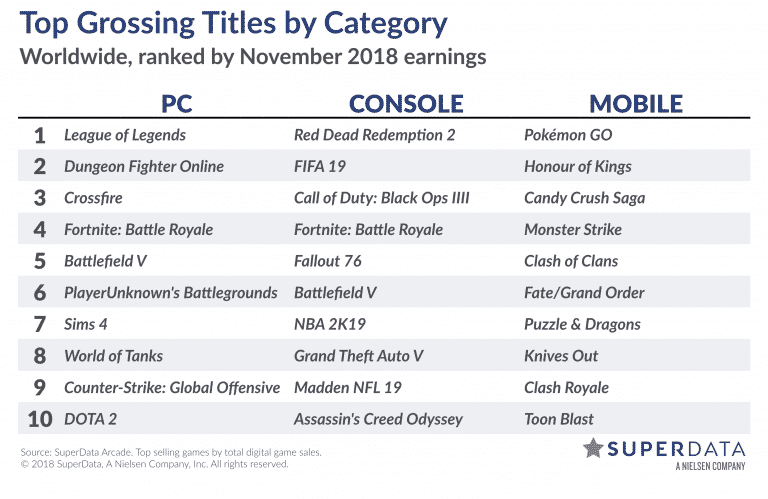
SuperData, a Nielsen branch company who makes detailed research about video game sales and success has posted a Top Grossing Video Games by Category list. Down below you can see the best selling games for PC, Console and Mobile during November 2018.
The Sims 4 has took the 7th spot on the PC list, with the 6th spot taken by a popular Battle Royale game PUBG and 8th spot taken by World of Tanks.
This is the latest report for the best selling video games considering that it takes a lot of research and effort to take count the sales for hundreds of video games that are out there on multiple platforms.
We should be expecting a sales report for December 2018 in the upcoming weeks.
A new year means a new wave of The Sims 4 content – and according to SimGurus 2019 will be super exciting!
A few gurus have expressed excitement and joy over the content that they’re working on and plan to release this year. We know that the tweets they’ve shared are vague and do not reveal anything specific about 2019 content but it’s still exciting to see that they’re still working on the game in full force! After all, we still have at least 3 more years of new content ahead…
Future 2019 looks super fun for The Sims 4! I wish we had a time machine!!!! [I’d play a great Doc (albeit far less intelligent) to your cool Marty]
Happy New Year SimFam! I hope you had a wonderful, fun, and safe New Year’s Eve (I didn’t make it to midnight 😴)! 2018 was quite the year for The Sims and I can’t wait for all that we will be bringing you in 2019. It’s going to be a GREAT year!
There’s so much great stuff coming to The Sims in 2019, it really is going to be a great year. But remember it’s only the 2nd day of the year so we have a long way to go. Slow and steady wins the race. Be patient. Good things come to those who wait. I promise it will be worth it.
Happy 2019! I’m back in the office and ready to burn* this place** down***
* design
** unannounced future content
*** with careful thought and feedback
— Doi (new and improved for 2019) (@GrimSuruDoi) January 2, 2019
Back in the office all refreshed after the holidays, got a chance to play some great and inspiring games. Got me ready to make some great content going into the new year! 🎮💻 pic.twitter.com/E485C4ib7M
The Sims Mobile is launching a brand new quest tomorrow – January 3rd, 2019 at 10AM local time called Slice of Nice! This is a special quest made in collaboration with Millie Bobby Brown, most known for her acting in the Netflix television series Stranger Things.
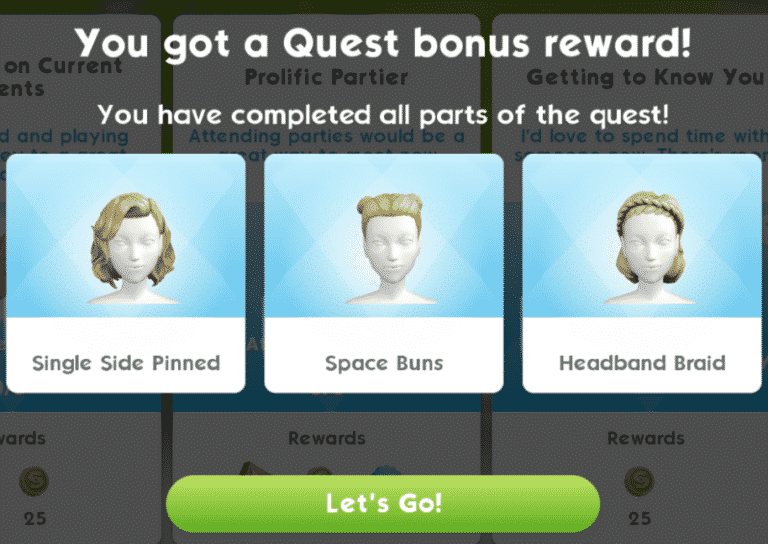
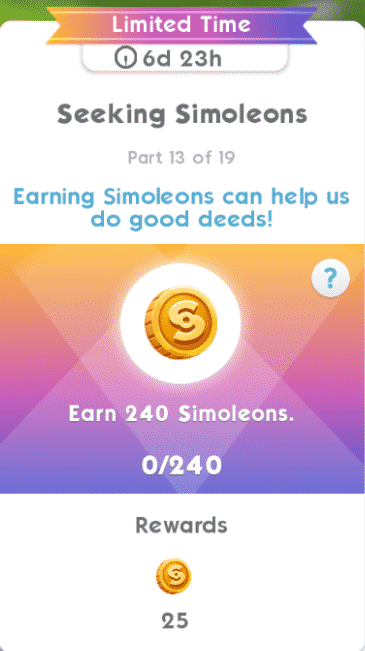
We’ve received a full walkthrough of the upcoming quest that will last for 7 days. Each quest step is going to bring a 25 Simoleons award with certain steps giving you 10XP points. After fully completing the quest you’ll be able to unlock 3 new Millie Bobby Brown-inspired hairstyles that we’ll show down below.
First of all take a look at all of the quest steps that you’ll need to take in order to unlock the new hairstyles:
Part 1: Sit on the couch and write New Year’s resolutions
Part 2: Dream up ways to be kind to others
Part 3: Meet a new Sim
Part 4: Compliment 3 Sims
Part 5: Complete a Friendly Event
Part 6: Complete the Caffeinated Caring event
Part 7: Give stickers to 5 Sims
Part 8: Complete the Spa Day event
Part 9: Offer pie to 5 Sims
Part 10: Complete the Great Food and Great Company event
Part 11: Complete 1 Friendly Chapter
Part 12: Meet 4 new Sims
Part 13: Earn 240 Simoleons
Part 14: Encourage 5 Sims to be kind to each other
Part 15: Complete the Caffeinated Caring event
Part 16: Tend to 3 plants
Part 17: Complete the Spa Day event
Part 18: Encourage 5 Sims to be nice to Emily
Part 19: Complete the Great Food and Great Company event
Here are all the hairstyles that you’ll unlock after completing this quest:
The Sims Team has released a brand new Update for The Sims 4 on PC and Mac!
To download the latest version of The Sims 4, simply open your Origin program and if the game doesn’t update automatically, right click on The Sims 4 and select ”Update”.
In case you have Mods or Custom Content, the game will automatically disable them for you after first launching The Sims 4 after the update. To re-enable all your Mods and Custom Content, select the Settings option in the Menu and select Settings. Under the”Other” section you’ll find the ”Enable Custom Content and Mods” option. Check it and restart your game in order for it to take effect!
Patch Notes
Update: 12/20/18 – PC 1.48.94.1020 / Mac 1.48.94.1220
Hey Simmers,
A quick note for a couple of hot issues.
You should now be able to once again, use speed controls when in cinematic camera (aka tab camera).
You should now be able to once again have your Sim travel without causing them to become corrupted because they did not get to know Lin-Z.
You should now be able to once again dance the Samba, assuming you previously knew the Samba.
Are you sick and tired of Babs L’Amour, June Kaye, Andre DeSilva and more popping up in The Sims 4 every time you decide to start a New Game? Well, you’ll be encountering those Sims much less now…
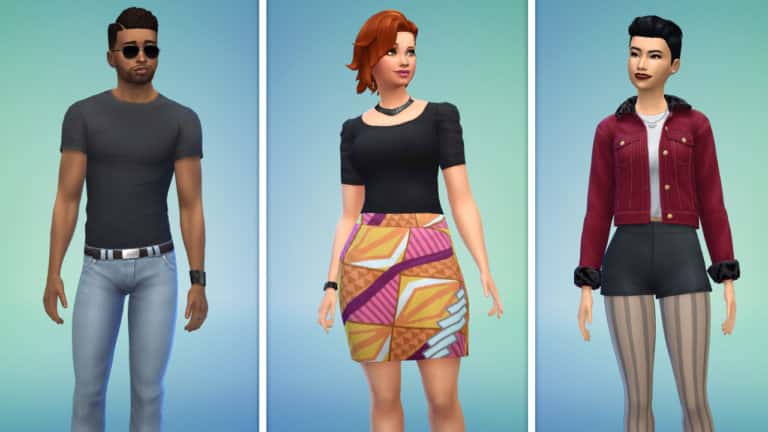
With the latest update The Sims Team has surprised us with new Premade Sims that will show up from time to time when deciding to start a New Game. What’s interesting about these Premade Sims is that they’re rocking new outfits from some of the base game updates that we’ve gotten over the years.
Sims such as Babs, June, Andre and others will still appear from time to time but not as much now that there’s a bigger variety of Premade Sims.
SimGuruMorgan confirmed that there are 8 new Sims in total that have been added when starting a New Game.
Microsoft is currently offering a huge sale on select The Sims 4 Games!
If you’re a proud owner of Xbox One and want to expand your collection you’ll be happy to know that there are plenty of select The Sims 4 Games now available for a much cheaper price, including the Base Game, some Expansion Packs, Game Packs and Bundles. Some newer packs which were recently released on console haven’t gone to sale yet which is why we’ve listed all of the packs on sale down below with their discount offer.
Please note that if you’re an Xbox Gold member you’ll be able to get an additional discount which we’ve also listed.
The Sims 4 Base Game (67% off + 8% off with Gold)
The Sims 4 Get to Work (40% off + 10% off with Gold)
The Sims 4 Cats & Dogs (40% off + 10% off with Gold)
The Sims 4 City Living (40% off + 10% off with Gold)
The Sims 4 Seasons (40% off + 10% off with Gold)
The Sims 4 Vampires (40% off + 10% off with Gold)
The Sims 4 Dine Out (40% off + 10% off with Gold)
The Sims 4 Bundle – Get to Work, Dine Out, Cool Kitchen (40% off + 10% off with Gold)
The Sims 4 Bundle – City Living, Vampires, Vintage Glamour (40% off + 10% off with Gold)
These offers are now available and will last until January 4th, 2018. Make sure you take advantage of these new prices before it’s too late!
Origin is having a HUGE Holiday Sale where you can save up to 75% off on ALL The Sims 4 Games! Yup, even Stuff Packs and Get Famous are included in this offer and you can save a lot on each type of Sims 4 Pack.
Here are all the discounts for all of The Sims 4 Packs and Games:
The Sims 4 Base Game (75% off)
The Sims 4 Expansion Packs (50% off)
The Sims 4 Game Packs (25% off)
The Sims 4 Stuff Packs (40% off)
The Sims 4 Bundle Packs (20% off)
The offer is now LIVE and will be available for a long period of time. More specifically, you’ll be able to enjoy these new prices until January 11th, 10AM PST. Make sure you take advantage of this discount before it’s too late!
Multiple Simmers are reporting that they’ve encountered a strange error in The Sims 4 since the latest update which prevents them from loading up lots and / or travelling to different lots. The message shown below will pop out after loading a certain lot kicking the player out to the World Menu and not allowing the player to load any type of lot:
What’s the cause of this issue? As strange as it might be, the new Lin-Z Smart Speaker and the relationship you form with it is the root of the issue above. As reported by Crinrict, the issue starts showing up when your Sim visits a lot that had Lin-Z on and after you decide to move the Lin-Z Speaker to your Sim’s inventory or delete it altogether.
Unlike with the Talking Toilet Object from The Sims 4 City Living Expansion Pack with which you can form a relationship and get rid of it by deleting the object, you cannot get rid of the relationship with Lin-Z Smart Speaker even after deleting it which will cause big issues.
If you’ve already encountered the issue above then there isn’t a perfect solution. You’ll have to go back to the Main Menu and revert your Save Game to the point where you didn’t purchase the Lin-Z Smart Speaker. If you didn’t encounter the issue it’s highly recommended that you don’t purchase the Smart Speaker until The Sims Team releases a fix.
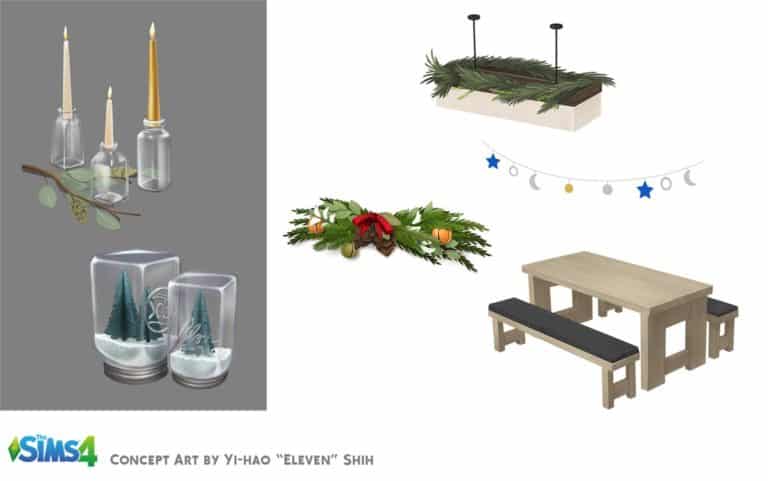
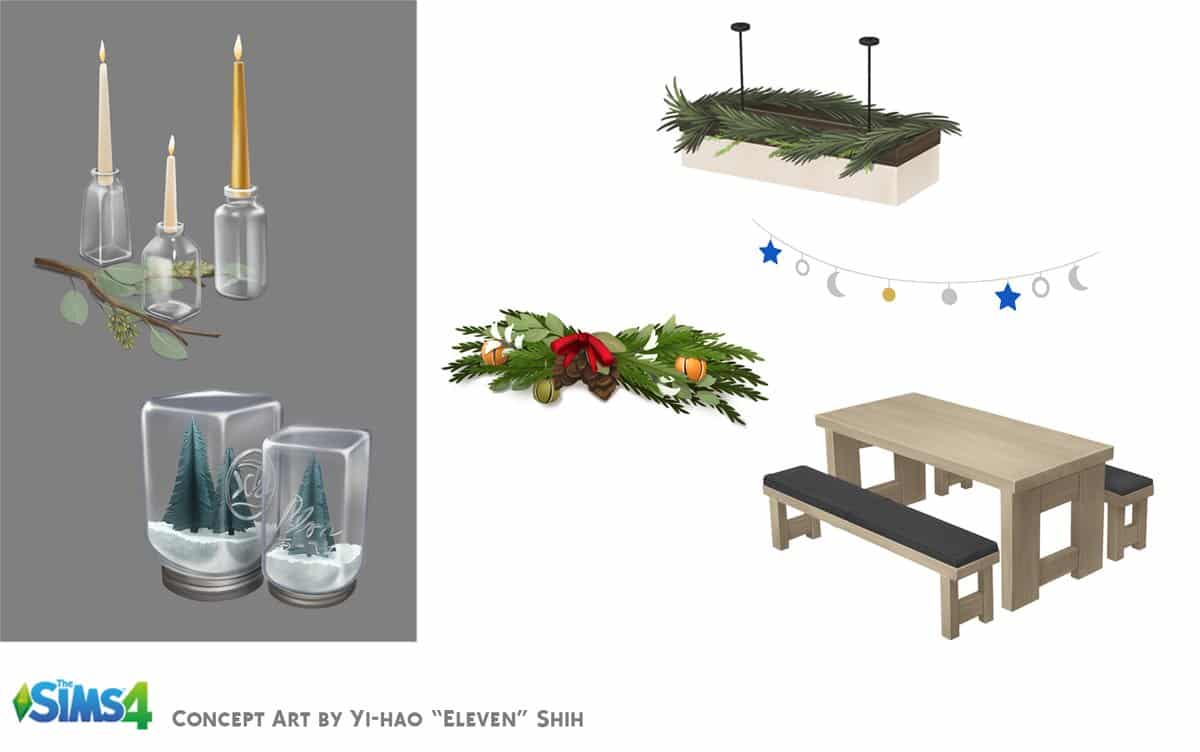
SimGuruSalo has shared some new Concept Art pieces from The Sims 4!
Concept art shown below shows new items and decoration that were released with the latest The Sims 4 Update and are a part of The Sims 4 Holiday Celebration Free Pack.
Playstation Store (United States region) is currently having a huge sale on select The Sims 4 Games where you can save up to 75% off! This includes select Game Packs, Expansion Packs, Bundles and of course, the Base Game.
Select packs and bundles have been slashed for 40% off. If you have the PS Plus Membership you can get access to additional 10% off – making it 50% off. The Sims 4 Base Games have been slashed for 67% off but with the PS Plus Membership you can make it 75% off!
Here are all the packs that are currently on sale and for how much:
The Sims 4 Base Game (67% off + 8% off with PS Plus)
The Sims 4 Base Game Deluxe Party Edition (67% off + 8% off with PS Plus)
The Sims 4 Bundle Pack with City Living, Vampires and Vintage Glamour (40% off + 10% off with PS Plus)
The Sims 4 Bundle Pack with Get to Work, Dine Out and Cool Kitchen (40% off + 10% off with PS Plus)
The Sims 4 City Living (40% off + 10% off with PS Plus)
The Sims 4 Get to Work (40% off + 10% off with PS Plus)
The Sims 4 Cats & Dogs (40% off + 10% off with PS Plus)
The Sims 4 Parenthood (40% off + 10% off with PS Plus)
The Sims 4 Vampires (40% off + 10% off with PS Plus)
The Sims 4 Dine Out (40% off + 10% off with PS Plus)
Are you ready to save big on these games? The sale is currently live on the US Playstation Store and will be available until January 8th, 2019 at 8AM PST.
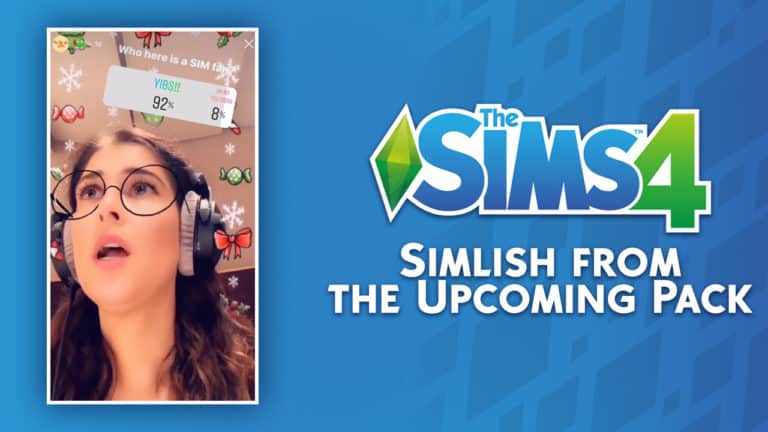
Krizia Bajos, one of the main voice actresses for The Sims 4 has shared an interesting series of Instagram Stories on her Instagram account!
In the compilation video that we’ve made down below you can see Krizia’s journey to Electronic Arts as well, Simlish audio of the pack for The Sims 4 that yet has to be released and some funny outtakes.
According to the video the voiceover sessions have just begun, meaning that there are probably going to be a lot more videos in the near future showcasing simlish from the upcoming pack.
The Sims Team has added plenty of new holiday-themed goodies to The Sims 4 in celebration of the festive season, but that’s not all. Along with bug fixes, they’ve also teamed up with real world celebrity, Baby Ariel, to bring our Sims some new fashionable attire.
Let’s dive right in to everything this new patch has to offer!
Create A Sim
There are plenty of new CAS items that come with this update, both festive and fashionable.
1 feminine hairstyle and 1 masculine hairstyle:
12 18 18 3 35 32 PM
12 18 18 3 34 14 PM
1 feminine full body outfit and 1 unisex full body outfit:
12 18 18 3 19 17 PM
12 18 18 3 18 44 PM
1 masculine top, 1 feminine bottom, and 1 unisex pair of shoes:
12 18 18 3 30 21 PM
12 18 18 3 26 29 PM
1 unisex top for children:
And as part of The Sims Team’s collaboration with real world celebrity, Baby Ariel, we also have 3 new feminine tops with Baby Ariel’s logo on them:
12 18 18 3 20 48 PM
12 18 18 3 20 57 PM
12 18 18 3 21 03 PM
Buy Mode
CAS isn’t the only area of the game to receive new holiday inspired goodies. Buy Mode has received plenty of new additions as well:
1 decorative faux fireplace display, 1 decorative log with candles, 1 decorative wooden wall hanging, and 1 decorative pine cone garland wall hanging:
1 decorative set of mason jar candles and 1 decorative set of mason jar snow globes:
1 decorative ceiling hanging in both star and snowflake variants, 1 garland ceiling light, and 1 picnic table:
12 18 18 3 46 40 PM
12 18 18 3 46 59 PM
If your Sims are looking for some tasty festive treats to celebrate the holiday season, they’re in luck because there are also two new cooking recipes; the Winter Cake and Crown Roast. Look for them in the recipe list when your Sims are cooking.
Captured down below is the Winter Cake and the Crown Roast. The Winter Cake requires Level 2 Cooking Skill while the Crown Roast requires Level 7 Cooking Skill.
12 18 18 11 10 21 PM
12 18 18 11 11 19 PM
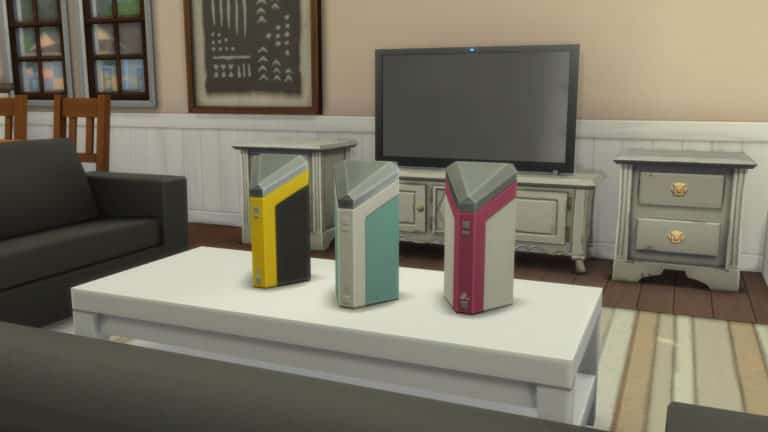
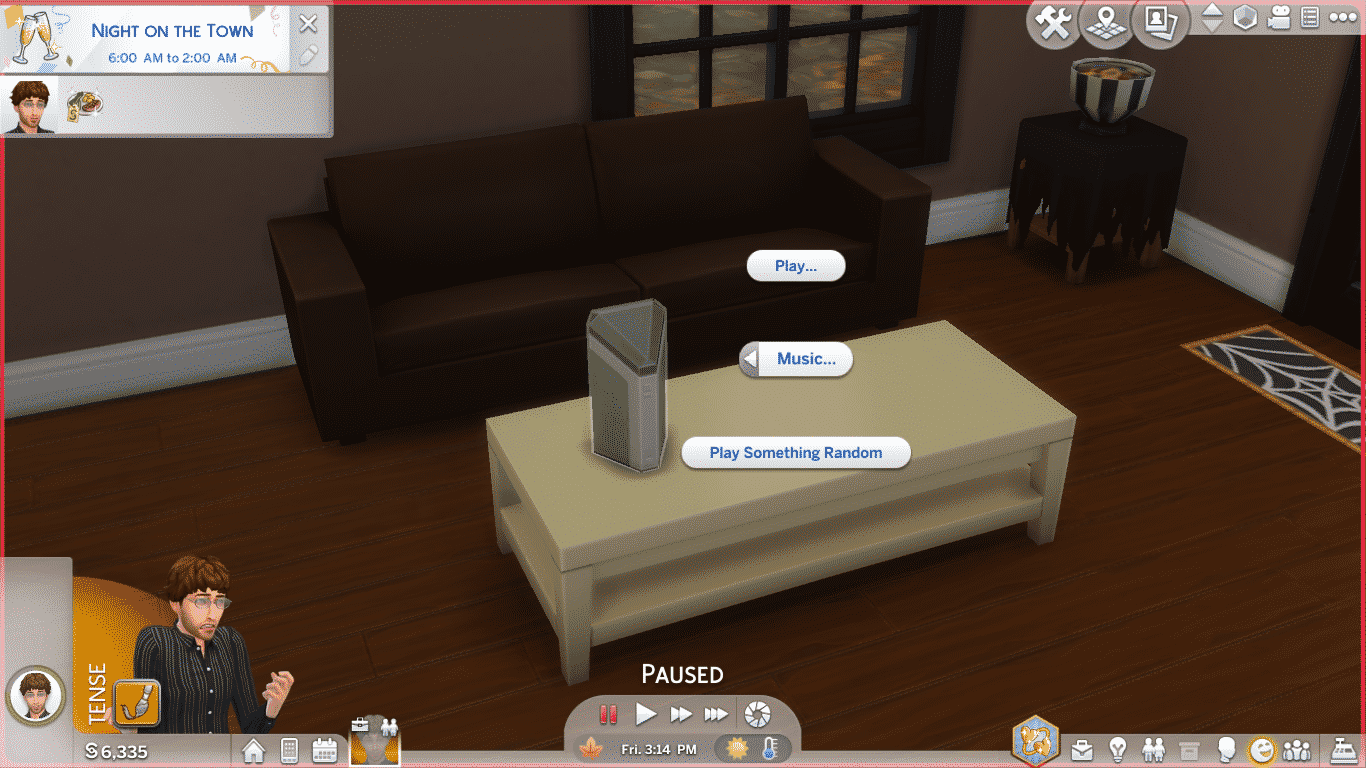
And last but not least, our Sims now have their very own smart speaker! Welcome Lin-Z into your home this holiday season! Lin-Z can socialise with your Sims, play music for them, order home services, and turn all the lights in your Sims’ homes on and off. Thanks, Lin-Z! You’re a real help around the house!
Screenshot 407
Screenshot 406
Screenshot 405
Screenshot 404
What do you think of all the new content? Let us know here in the comments or on social media!
Don’t See Anything New? Update your game!Right-click on The Sims 4 in your Origin library and select Update Game.
Today The Sims Team has released a brand new content update for The Sims 4 adding new Holiday Clothing and Objects, Baby Ariel Clothing, a new Smart Speaker and some new cheats for the First Person Camera Mode along with some bug fixes.
We’ve covered all of that in the video above showcasing everything that has been added with today’s update. Check it out!
The Sims Team has released a brand new Update for The Sims 4 on PC and Mac!
To download the latest version of The Sims 4, simply open your Origin program and if the game doesn’t update automatically, right click on The Sims 4 and select ”Update”.
In case you have Mods or Custom Content, the game will automatically disable them for you after first launching The Sims 4 after the update. To re-enable all your Mods and Custom Content, select the Settings option in the Menu and select Settings. Under the”Other” section you’ll find the ”Enable Custom Content and Mods” option. Check it and restart your game in order for it to take effect!
Patch Notes
Update: 12/18/18 – PC 1.48.90.1020 / Mac 1.48.90.1220
Hey Simmers!
It’s cold out there… wait, that’s a Groundhog Day intro. Also, it’s pretty “northern” stereotypical… my apologies. So, it’s a month out there in which some experience a cold season at this time of the cycle in which we revolve (or not) around the glowing ball in the sky, and in which festivities may or may not be observed, and others experience a warmer season, in which similar, or non-similar observances may be made. And I wish you an emotional response relevant to your desire.
With that said…
What’s New?
We have added MORE to the Holiday Pack!
More home things…
Some new light sources!
2×1 Ceiling light
Mason jar candles
A log display… with candles
Some new decoratives!
Ceiling snowflake décor
Mason jar décor
Bough wall hanging
Wood carving wall hanging
A fireplace façade (for decorative purposes only)
A new Picnic table
And more clothing things…
A sweater top for kids
A female full body outfit
Female pants
A female hair
A male sweater
A male hair
Slippers for male and female
Yeti costume, unless you choose brown, then it’s a Bigfoot costume
Not that I’ve ever seen Bigfoot…
And I apologize if you are a Big Foot who happens to play The Sims. Hopefully you see a resemblance.
All Holiday pack objects can be found easily in the catalog by using the Holiday Pack filter, in the filter sort options.
Remember, if you have not yet downloaded the Holiday Pack, click on the Holiday Pack icon from the Main Menu! And if you have already downloaded the pack previously, you don’t need to do anything, you have the updates now!
…assuming you are reading this after you launched The Sims, and finished downloading the update. If not, then you have them then!
In addition to the Holiday content, there are few other new bits…
A female hoodie, sweater, and crop top are new in Create a Sim
Two new recipes for your Sims to cook
Winter Cake
Crown Roast
And the Lin-Z Smart Speaker!
Play music, order a pizza, play trivia, be yelled at… all with the touch of… with the call of the wild… with just a…
You have to just talk to it. Your Sim talks to It.
Please don’t start talking to your computer.
But if you already do, that’s ok, there’s nothing wrong with that. Just don’t name your computer Shodan.
Make friends with your new AI overlord and learn its secrets! Or don’t. It’ll remember
First person camera smoothing updates. We got some feedback about the mode being a bit sickness-inducing (especially if you watch the announce stream and saw the Sim on the swing… or the rock clim… ahm, ur okay, I’m… let’s move on).
“Roll” has been disabled in First Person Camera mode when you are using the Sims 4 camera settings (you can find your chosen option in the Camera Controls menu in the upper right corner of the screen). Roll is essentially side to side movement along a curve, and the primary motivator of discomfort.
If you are a Sims 3 Camera user, and you want the smoother camera, you can use the cheat “camera.fpc.simple on” to switch to Sims 4 camera while in First Person Camera mode. And of course, to turn it off “camera.fpc.simple off”.
In addition players can use the cheat “camera.fpc.smoothing off/low/medium/high” to fine-tune their experience.
That’s that for the new, on to the old.
General Issues
The tutorial has been updated with some new tips in order to assist our new players with the basics of playing The Sims!
Style Influencer stay at home tasks now register as complete, when completed.
You can now hire a gardener if you have plants on your lot for your gardener to garden, regardless of your garden’s gardening needs.
Previously, if your garden was not in need, you were being incorrectly informed that you didn’t have a garden.
The brick01GEN wall pattern has a new name.
Teen interaction Mess Around should no longer duplicate itself in the interaction menu for each target location for said mess around.
Townie Sims are no longer glaring at each other as they pass by on the streets.
Sims have taken social etiquette classes, and now understand that one does not need to constantly mix drinks when hosting a party.
Does the concept of the entire Sims populace taking classes in social etiquette give you an Orwellian chill?
The tutorial’s chef aspiration no longer starts your Sim with the Snob, Foodie, and Glutton traits, but instead the Slob, Perfectionist, and Foodie traits.
The former due to a text error.
The later due to the two being incompatible.
First Person Camera will no longer show the inside of the Sim’s head when using Intel Integrated Graphics.
I told my mom that, she called my grandma, and said she was worried about me.
Ceilings should no longer look darkened, but instead lighting should be more prevalent in comparison to the location of lights in a room.
The Gardener Career now provides raises when the profession is maxed.
The With Pets, Dogs, or Cats Gallery filter now works, and will no longer break your other filters from functioning.
Z/X and -/+ shortcut keys will now adjust FOV in first person camera mode.
Exiting first person camera will no longer cause a Sims head to become stuck facing one direction.
Many others however are still stuck facing One Direction.
If you have enough traits to fill the Simology panel beyond the window height allowed by your monitors resolution, you will no longer find yourself unable to interact with the Simology panel.
Also, your Sim is amazingly complex.
So, this issue has been addressed (see next bullet). However, the fix is easier to understand than the issue… but here it is as it was communicated to me:
Visiting a household with locks set using another household, resets the locks on returning control to the household with the locks
If that was not clear, just go with the fix:
Doors stay locked.
Non-specific pack issue
Randomly generated neighborhood Sims should no longer shop exclusively within the City Living and Vampires Create-a-Sim catalogs, and are more likely to have expanded their clothing opportunities to all packs you have available for them.
Cats & Dogs
Cats will no longer become stuck on top of surfaces after being lectured about jumping on surfaces.
Cat Whiskers now appear with the proper color relevant to the color chosen in Create-a-Sim.
Seasons
Setting the thermostat to cold when it’s hot out, or hot when it’s cold out, will no longer add a 1.5-5x modifier to your bills.
Get Famous
Take Selfie interaction will now help relieve the Separation Anxiety tense buff that is a result of the Phone Fanatic quirk.
The More Views Video Station can now be cloned with the Eyedropper tool.
In case you wanted more More Views.
Sleeping Pod interaction Less Needy Dreams, has been changed to Social Dreams.
The More Views Video Station memory upgrade tooltip will no longer lie to you.
The Drama King buff received from watching a Sim perform the Perform Dramatic Monologue interaction will now tell you that it is from watching a Sim perform the Perform Dramatic Monologue interaction.
Moving an in use Music Production Station will no longer cause the music to become stuck on.
The Lifestyle Brand interaction now works.
Celebrity Sims set to the normal walk style, should now maintain their walk style setting.
Married celebrity Sims will no longer react in disgust towards one another.
Unless there is reason to.
Like cutting your toenails in bed.
I mean, who does that?!
Spa Day
Sims giving a hand massage, will no longer contort in an excruciatingly painful manner during the massage.
Vampires
The Parts to Copy filter, for vampires in Create-a-Sim, should now actually show what parts you can copy.
Parenthood
REJOICE! Children can once again play on the monkey bars without the compelling need to halt their monkey bar activities to make a mess. Yes, that’s right Mr. and Mrs. John Q. Player, children are free! Free to play! Free to climb, swing, and do whatever it is that children do on the monkey bars. The draw, the compulsion, the absolute need to end their activity to make a mess has finally come to a close. So rejoice! And let your kids climb, until they can climb no more.
Ok, let’s see, it’s been awhile since I’ve done this, so let me just go through my checklist.
Greeting, uh yep, check.
The What’s New section, check.
Various issue commentary, unnecessary expository, overuse of ellipses, random grammar atrocities, run on sentences…, check, check, and… um, check.
References to old and outdated entertainment media, check.
Sign off, and holiday wishes, not yet, but shortly.
The Sims Team has just announced on their website an exclusive collaboration between The Sims FreePlay, The Sims Mobile and The Sims 4 with Baby Ariel – mostly known as a singer, influencer and actor on Nickelodeon.
This collaboration will span throughout the entire Sims Franchise and will cover the following things:
The Sims 4
As part of the PC base game update* (more on that tomorrow), you can dress Sims in Baby Ariel-inspired tees, hoodies, and sweatshirts. Plus, with The Sims 4 Get Famous Expansion Pack*, you can catch Baby Ariel singing songs and strumming a guitar in your Sims’ world!
The Sims Mobile
The casual comfort continues in The Sims Mobile, where a Baby Ariel collection is now available in Create-A-Sim. Let the styling expertise begin!
The Sims FreePlay
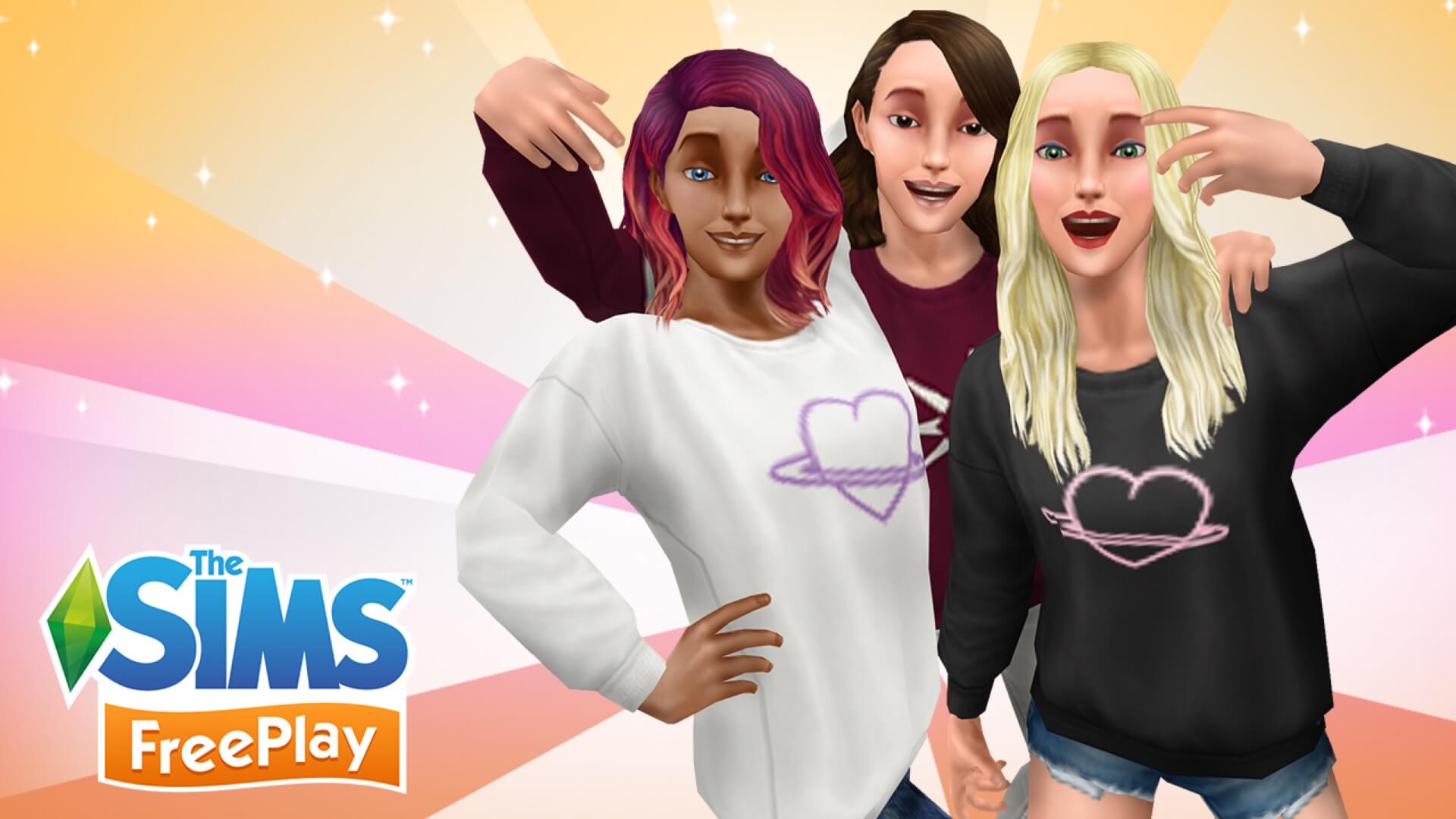
This collab wouldn’t be complete without some FreePlay fun. Style female adult Sims with this special pack – complete with two different sweaters – to keep cool yet cozy. These will be available to collect from December 18, 2018 to January 1, 2019, so grab them now.
Dress your Sims in style today with Baby Ariel gear!
The Sims FreePlay
Limited Edition Baby Ariel Items starting from December 18th, 2018 to January 1st, 2019.
The Sims Mobile
Get a sweatshirt, hoodie, and crop top for your Sims!