Home Blog Page 292

Enhance your Holidays in The Sims 4 Seasons with these Mods

6

Although The Sims 4 Seasons Expansion Pack brings tons of new customization options and traditions that you can choose, there’s still things like lacking holiday icons and no traditions for cats and dogs. Luckily talented modders LittleMsSam and icemunmun have already made a solution for your holiday troubles.

More Icons

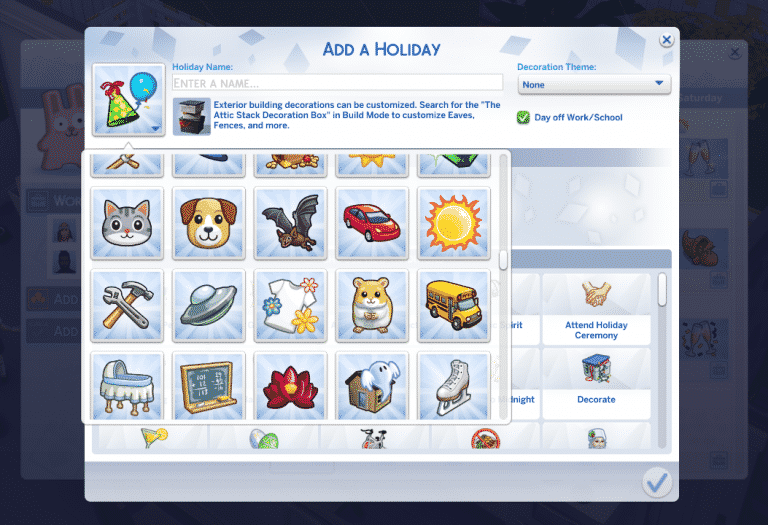
The More Icons Mod by LittleMsSam allows you to choose between 200 icons which are available in the icon chooser when creating or editing an existing holiday. It brings plenty of colorful icons which are already a part of The Sims 4 universe.

Enhance your Holidays in The Sims 4 Seasons with these Mods

Pet Traditions

One thing that everyone was hoping for is holiday integration between the Seasons Expansion Pack and the Cats & Dogs Expansion Pack. Sadly, that didn’t happen and the only tradition from a different pack that we got was “Fireworks” from City Living. Thankfully icemunmun solved that with 9 tradition for your Cats & Dogs! They’re very general and most of them apply to both cats and dogs.

There’s 9 traditions that come with this mod, including:

  • Feel The Love
  • Play With Dog
  • Teach Tricks
  • Play With Laser Pointer
  • Meet or Adopt
  • Cook for Pet
  • Pamper Pets
  • Go for a Walk
  • Age Up Pets

Enhance your Holidays in The Sims 4 Seasons with these Mods


To download these mods simply click on the headings of each mod above. Installing them is pretty easy too – simply extract the .zip files to Electronic Arts > The Sims 4 > Mods folder and make sure you have Mods / CC enabled in your game options. These mods have been tested out with the current version of the game and are proved to be working.
3 reasons why The Sims 4 on Console is currently better than The Sims 4 on PC

Editor’s note: this article isn’t all that serious. However, there is some truth tea.

You’ve probably noticed that The Sims 4 for PC / Mac is going through a rough patch at the moment (no tea no shade). Screenshots which are a crucial part of storytelling have been blurry for a few days now ever since The Gallery update and The Gallery itself, although it looks great, crashes on a daily basis. I actually spent plenty of hours these last few days playing The Sims 4 on Console with all of the packs currently available and I gotta say – I’m enjoying the game a lot more, and here’s why:

1) The screenshots are crisp

Nothing better than taking a screenshot that isn’t blurry. Sure, The Sims 4 Console relies on taking screenshots using your controller but still the result of those screenshots that you take on console are perfectly clear.

3 reasons why The Sims 4 on Console is currently better than The Sims 4 on PC
The Sims 4 PC screenshots make me want to see an eye doctor.

2) No Gallery – No problem!

The Sims 4 Console players are at ease considering they’ve been met with expectations that the game won’t have The Gallery feature (at the launch of TS4 Console). Sure, the developers have said a few times that they’re working on implementing The Gallery on Console but as of right now Console players have no worries or struggles when opening up The Gallery only to find out that The Gallery is down. Seriously though, The Gallery on PC went down at the same time for the last 3 days and it’s starting to get annoying.

Console players are currently at their own mercy of creating their own Sims and Houses which is actually pretty fun. I’ve built a house last night on Console (which isn’t something I usually do) and thanks to The Gallery not currently being a thing for Console I’ve discovered all the wonderful ups (and downs) of building your own house.

3 reasons why The Sims 4 on Console is currently better than The Sims 4 on PC
My work of art (WIP)

3) The ability to appreciate previous packs all over again

You probably know already that The Sims 4 Console doesn’t have all the packs from PC currently available. However, the game is slowly getting there. With 3 Expansion Packs, 3 Game Packs and 8 Stuff Packs I’ve gotten an opportunity to appreciate all the features and gameplay we got with Cats & Dogs, Parenthood and so on without being distracted by features from packs that are currently trending.

Honestly, all I’ve ever done lately on PC ever since The Sims 4 Seasons Expansion Pack came out was create holidays and take screenshots of my neighborhoods covered in snow. It’s nice to go back to the good old days when everything seemed like a hint towards Seasons.

3 reasons why The Sims 4 on Console is currently better than The Sims 4 on PC

The Sims Mobile: Photography Heirloom Quest + Offer is here!

13

The Sims Mobile has finally brought a chance to win the Photography Career Heirloom after its first introduction back in April 2018 with the ASOS Fashion Event.

This opportunity will be triggered in the Quests tab when you open up The Sims Mobile. As soon as you open up the game the counter will start ticking and from that point you have 3 days to complete this limited time quest!

The Sims Mobile: Photography Heirloom Quest + Offer is here!

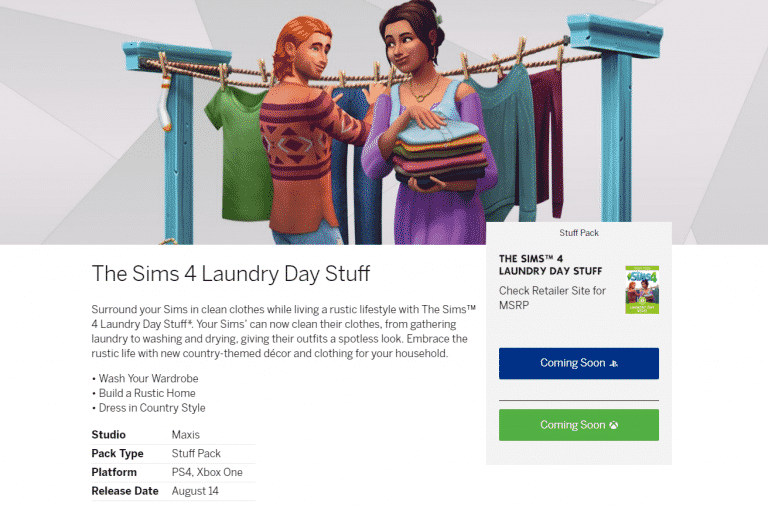
The Sims 4 Laundry Day Stuff coming to Consoles on August 14th

The Sims Team has officially announced that The Sims 4 Laundry Day Stuff Pack will be making its way to Xbox One and PS4 on August 14th!

Considering that Stuff Packs and Game Packs do not offer pre-orders you’ll be able to get this pack directly from the Microsoft and Playstation Stores on August 14th. For all the latest news and updates about The Sims 4 Console stay tuned to our Console News Category!

The Sims 4 Laundry Day Stuff coming to Consoles on August 14th

The Sims Mobile earns $15 Million in its first 4 months

0

SensorTower, a trustworthy website which provides data and insight on all the apps that you can find on Google Play and App Stores has published an article regarding the earnings of The Sims Mobile. Although the game is free to download and doesn’t require you cash to unlock basic gameplay, some premium features are still locked behind SimCash and packs that you can purchase with money.

According to SensorTower and their Store Intelligence tool, The Sims Mobile has grossed over 15 million dollars since the worldwide launch of this app in March 2018. This puts The Sims Mobile as EA’s 8th best-selling app for smartphones.

Launched globally at the beginning of March, The Sims Mobile has taken in more than $15 million in worldwide player spending for publisher Electronic Arts, according to Sensor Tower Store Intelligence estimates. The game, which joined the already available The Sims FreePlay, was EA’s eighth highest earning mobile title across the App Store and Google Play for the month of June.

Approximately 59 percent of The Sims Mobile revenue has come from the United States so far, with Great Britain a distant second at just 8 percent.

Electronic Arts continues to operate The Sims FreePlay concurrently with The Sims Mobile, which still has considerable ground to cover in order to supplant that earlier title. Last month, The Sims FreePlay was EA’s third highest earning mobile game, taking in about double the revenue of The Sims Mobile worldwide.

The Sims Mobile earns  Million in its first 4 months

The Sims 4 Laundry Day for Console has been officially teased

0

The Sims Team has just officially teased the coming of The Sims 4 Laundry Day Stuff Pack to Xbox One and PS4!

We don’t know about the release date just yet but we can expect a full announcement with the date really soon. Make sure you stay tuned to our website for the latest updates about The Sims 4 Console!

The Sims 4: How to fix Gallery UI issues caused by Mods

27

The Sims 4’s latest update has redesigned the way The Gallery looks and functions. Because of it heavily scripted mods (such as the UI Extension Mod) can affect your gameplay experience or even lead to UI errors and game crashes.

One of the things that many have reported is an issue where friends, followers and downloads on your personal profile would go “000000” and sometimes even your screen would go black after browsing through the gallery. It has been confirmed that this issue is caused by Mods (specifically UI Extension Mod) but it can be solved.

Removing the mods from your Mods folder and / or updating them to the latest verseion doesn’t always do the trick though. To fully fix The Gallery UI issues go to Electronic Arts > The Sims 4 save game folder and delete a cache file called “localthumbcache.package”. This is a cache file which regenerates after opening up The Sims 4 again so you don’t have to worry if it’s going to affect your game or not.

The Sims 4: How to fix Gallery UI issues caused by Mods

The Sims 4: Screenshots have become blurry with the latest update

4

The latest update for The Sims 4 seems to have affected the outcome of the screenshots we take in the game. They’re now much more blurred and don’t provide so much details to things like skin details and the overall background.

I’ve taken a screenshot using The Sims 4’s screenshot tool and taken another screen using Windows 10’s Windows Key + Print Screen Key feature to take screenshots. The difference that you can see down below are drastic:

The Sims 4: Screenshots have become blurry with the latest update
The Sims 4 Screenshot
The Sims 4: Screenshots have become blurry with the latest update
Windows 10 Screenshot

It’s unclear what’s causing this issue other than the fact that it surfaced with the latest update for The Sims 4. Multiple folks in the community have complaining about this issue meaning that it’s caused by nothing else but the latest update.

We’re hoping that The Sims Team will resolve the screenshot issue very soon considering that plenty of simmers depend on it.

The Sims 4 Console is handling Multiple Packs Very Well

I was a bit skeptical about The Sims 4 Console ever since the announcement that the game will be porting over all the current (and future) array of packs from The Sims 4 PC / Mac. The reason for that is the fact that Playstation 4 and Xbox One both have dated RAM (8 GB) and GPU (around 1.8 TFLOPS). Considering both consoles have released in 2013 I was really curious to see how The Sims 4 would handle multiple packs.

Now in August 2018 with more than a half amount of packs already ported over to Console (3/5 Expansion Packs, 3/6 Game Packs and 8/14 Stuff Packs) The Sims 4 still runs as smooth after the original Console launch – maybe even better with performance updates that were patched in over the last few months.

The Sims 4 Console is handling Multiple Packs Very Well

Going into Live Mode and actually playing the game is a smooth experience that doesn’t differ much from an experience you would get by playing The Sims 4 on PC. Sure, The Sims 4 Console still doesn’t support CC / Mods or The Gallery (just yet) but the content and gameplay that you’re actually paying for is delievered rather smoothly.

The Sims 4 Console is handling Multiple Packs Very Well

There are a few things I ran into while playing The Sims 4 Console with all current packs that differ from the experience on The Sims 4 PC. For example, loading screens tend to be longer than what I’m used to on my PC. However, that’s to be expected considering that I’m using a Samsung SSD 850 which has abnormal writing / reading speeds compared to the regular SATA disk drive that my PS4 Pro has.

It’s worth mentioning that playing The Sims 4 Console on Xbox One X and PS4 Pro will help you with cutting down the loading time speeds, but that’s basically all there is to playing The Sims 4 Console on these “upgraded” consoles.

The Sims 4 Console is handling Multiple Packs Very Well

I’ve spent quite a few Sim Days playing The Sims 4 on Console and the performance hasn’t changed. The Sims 4 Console had a major issue in the beggining where the game would tremendously lag after playing for a few days. However, that’s no longer the case and with multiple packs installed it’s running like you would expect it to run.

The Sims 4 Console is handling Multiple Packs Very Well

I even tried to “challenge” my console by playing with larger households and larger homes. Still, the game is running surprisingly well with no issues or stutter. After getting the hang of all the controls and hot keys that work quite differently on console I’ve found out that the game is truly playable and a much better experience from what I’ve played back in November 2017 where the game would freeze in the most unreasonable situations.

The Sims 4 Console is handling Multiple Packs Very Well

I’m quite interested to see how well will The Sims 4 Console support the rest of The Sims 4 Packs. The Sims 4 Seasons Expansion Pack has been released on PC last month which means there’s probably still a few months to go until this pack makes its way to the Console. Still, if The Sims 4 Console can run Cats & Dogs which turned up the requirements for The Sims 4 on PC without any problems then I’m hopeful that Seasons wouldn’t be much of a difference.

The Sims 4 Cats & Dogs is Now Available on Console

The Sims 4 Cats & Dogs Expansion Pack is now finally available for purchase on Xbox One and PS4!

You can get the pack by purchasing them from the Playstation or Microsoft Store.

For more information about The Sims 4 Cats & Dogs check out our Cats & Dogs Post Category!

The Sims 4 Cats & Dogs is Now Available on Console

The Sims 4: SimGuruKate on Upcoming Strategy and Twitch Livestreams

0

SimGuruKate has posted a thread on The Sims Forums explaining more the road ahead for The Sims 4 as well as their marketing and communication strategy and The Sims Team’s presence on Twitch:

The Sims 4: SimGuruKate on Upcoming Strategy and Twitch Livestreams

First I want to say thank you to all who tuned in to today’s livestream to check out the update to the Gallery! We hope you all enjoy the new look and feel to the Gallery. The Gurus have been working hard on this for quite some time and as SimGuruGrant said, this is the first of a number of future updates to the Gallery.

Second, if you stayed until the end you may have caught me briefly talking about some upcoming initiatives for The Sims on Twitch. Since we know not everyone could tune in, I wanted to share a little bit more about our plans for Twitch in the coming months. You’re definitely going to be seeing us a lot more!

Beginning in August we plan to launch a new stream series called the Guru Garage. Every two weeks you’ll be able to tune in on a set day/time to hang with the Gurus and chat with them as they play The Sims for two hours. You’ll be able to ask them questions, get to know them a little more, and maybe even have a bit of an impact on what they will be doing on the stream. We will be switching up the SimGurus so one stream you may see SimGuruRomeo and SimGuruNinja, and the next it might be SimGuruGrant and SimGuruKimmi. This stream series is all about having fun and playing The Sims with SimGurus, who also love the game.

Then beginning in September we will be launching a new monthly series called Maxis Monthly. Each month, on a set day/time, you’ll be able to tune in for an hour “talk show” hosted by me! During this hour we will recap what happened in The Sims over the previous month, host interviews with members of the Dev. Team (learn a little more about their job and what they do), showcase cool community creations, and even give a peak at what will be coming in the next month.

We will also continue to do livestreams for updates/patches and releases, though these will likely be bit of a surprise and will be announced 72 hours in advance. Like I said, you’re definitely going to be seeing a lot more of us.

We are working on finalizing the schedule for our first series of Guru Garage and Maxis Monthly livestreams and we will share here once it is complete so that you can get everything on your calendar and tune in for those streams you are interested in.

We are so very excited about the future of The Sims and bringing more consistent and frequent communication with the Community.

The Sims Team talks about The Future of The Sims 4 (Maxis Monthly, Livestreams and more)

5

The Sims Team talks about The Future of The Sims 4 (Maxis Monthly, Livestreams and more)

Today’s livestream about The Sims 4 Gallery brought a bit more information outside the realm of The Gallery. SimGuruGrant has talked a little bit about the future of The Sims 4 as well as what they have in plan for The Gallery in the coming months, while SimGuruKate announced what we can expect in the next few weeks in terms of communication, livestreams and their new “Maxis Monthly” segment which is replacing the quarterly teasers. Check out what they said:

SimGuruGrant

  • We plan to keep supporting The Sims 4 for 3+ years. I know I’m thinking about stuff for 3+ years out. We’re doing some nice investments on what we’re up to.
  • This is the first foundational step out of many Gallery updates coming up this calendar year.
  • As we said at the top of the stream we’re actually planning more updates for The Gallery, some big ones later this year. I can’t talk about them yet; they’re in progress, they’re pretty cool and we have a lot more plans down the road for The Gallery like in years out. Because we have to port these changes to the Console we want to make sure that we have the changes finished on the PC first so that we don’t have to go constantly back and forth.
  • We plan, hoping to support The Gallery on console as well. We want to make sure that we get things settled a little bit on the PC first so that we’re not doing the work 3 or 4 times.
  • We know a lot of you who use the gallery who wish you could upload your own pictures, your own thumbnails. We know this…winky face. That’s all I can say about that.

SimGuruKate

  • We’re gonna be working on some really cool things. We’re gonna be looking at doing bi-weekly streams here on The Sims Twitch with our awesome SimGurus where we’re actually gonna be popping in and playing the game and chilling out with you guys for a couple hours every two weeks. This is just gonna be something fun that we can do where you can get to know our Gurus a bit better and you can watch us and enjoy the game like you guys are enjoying the game.
  • We’re also gonna be starting something called “Maxis Monthly” where we’re gonna be doing a 1-hour show every single month probably around the end of the month where we’re gonna do a recap of all of the awesome things that happened in The Sims over the last month; showcase some awesome player-created content both in The Gallery and in the community as a whole and talk about what might be coming up in the next month. We’re hoping to kick all of this off starting in September. We might start a little bit here in August but definitely look for these things to be coming in September and we’ll be sharing a big schedule with you guys so that you can bookmark your calendar and make sure you can tune in for the streams that you want to watch.

The Sims 4: New Update + Patch Notes! (July 31st, 2018)

The Sims 4: New Update + Patch Notes! (July 31st, 2018)

The Sims Team has released a brand new Update for The Sims 4 on PC and Mac!

To download the latest version of The Sims 4, simply open your Origin program and if the game doesn’t update automatically, right click on The Sims 4 and select ”Update”.

In case you have Mods or Custom Content, the game will automatically disable them for you after first launching The Sims 4 after the update. To re-enable all your Mods and Custom Content, select the Settings option in the Menu and select Settings. Under the”Other” section you’ll find the ”Enable Custom Content and Mods” option. Check it and restart your game in order for it to take effect!

Patch Notes

UPDATE: 07/31/2018 – PC 1.45.62.1020/ Mac 1.45.62.1220

Hello Summers!

Hopefully the weather isn’t too hot in your neck of the woods, because then you’d be…Simmers. *cough*

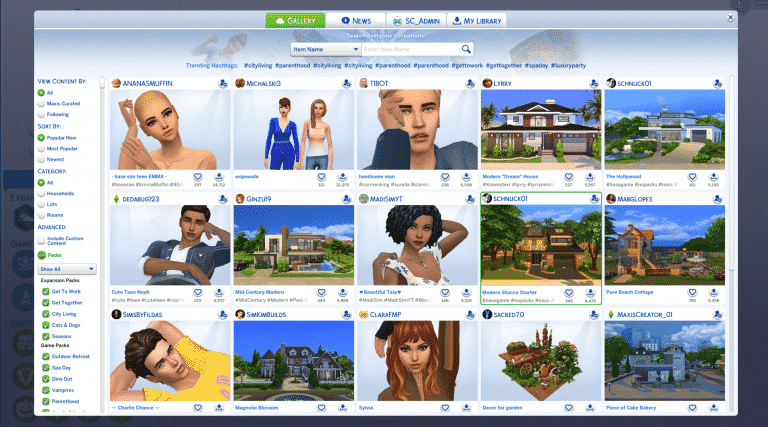
In addition to several fixes and tweaks to improve your game experience, we’ve overhauled the Gallery! This is something we’ve been working on for a while and is the first step to keep enhancing the Gallery to make it an incredible platform for this community to share its creations.

Read below to find out what we changed with the Gallery as well as various improvements throughout the game.

Gallery Update

Our goal with the Gallery is to shift the focus towards the creators making incredible content and make it easier to download the content.

  • We’ve re-arranged the content images so that you can now Follow the creator, Favorite the content, and download the content on the front page.
  • We’ve moved the Search bar and popular hashtags front and center.
  • Popular Now is the default filter, which means you should see more fresh, different content.
  • We’ve renamed and re-arranged the tabs. You now have Gallery, for content, News to find out who is uploading and sharing content, your Profile (with your name), and your Library, to see your downloaded content.
  • We’ve updated the art and visuals throughout the Gallery.
  • You can now download and place Lots and Rooms from the Gallery even if you begin in Live mode. Hurray! At last!

Just a reminder in case you haven’t used the Gallery before: The Gallery will not download custom content or mods to your machine. There is a filter to see items created with custom content, but it will not install the custom content for you. So, you can rest assured that items downloaded from the gallery will not break your game.

The Sims 4

  • You can now move Easels into your inventory and Live Drag them, which means you can paint out and about in the world! Be sure to pick up your easel before you leave!
  • Removed unnecessary “seams” that appeared when wearing some full body toddler outfits.
  • Sims should now use the closest counter to prepare Garden Salads of any portion size.
  • Sims should now use the closest sink to wash dishes.
  • Sims should now only use a single Kitchen space to prepare a meal, even on Lots with multiple kitchens.

Get to Work

  • The “Ask About Suspect” interaction is now available during an APB event in the detective career.

Get Together

  • You can now select Hot and Cold Weather attire via the Closet.
  • Sims who belong to an Infamous Club no longer get the Intimidated by Fame moodlet at a gathering.

Seasons

  • The temperature in the Kiddie Pool is now consistent with other pools. Sims will get the “Uncomfortable Chilled” moodlet, but won’t immediately begin freezing to death.
  • Vampires are now protected from the Sun when using an umbrella, though it probably gives things away, wouldn’t you say, Vlad?
  • Decorations no longer clip through the rooftops when viewing a Lot in Free Camera mode.
  • Electronic objects will now function properly during the rain, assuming they are indoors and beneath a roof.
  • Sims will no longer freeze to death while playing basketball in cold weather. One could say that as a result of their skillful play, they’re on fire.
  • Father Winter has been banned from all Clubs and will no longer appear when adding Sims to a club. Seems Father Winter has been naughty.
  • Pets will no longer stretch bizarrely while Sims are opening presents.
  • The Sing Together… interaction is now available on the Kinara, Menorah, and Holiday Trees when a Holiday Tradition is active.
  • The Flower Bunny no longer appears on random holidays and events, which is good, because Flower Bunnying is a full time job and they were really slacking.
  • Sims with the Responsible Trait now have their Daily Tasks automatically completed for the Gardening Career. R-E-S-P-O-N-S-I-B-L-E doesn’t quite have the same ring to it. Sorry, Aretha.
  • Sims who die while skating now die like you’d expect them to die. There was some weirdness, but now there isn’t. Just good ‘ol standard death.
  • Sims were sometimes slipping indoors while walking TO a mud pile, which is silly. They now slip and fall like you’d expect.
  • Sims disturb their bees less frequently. We told them to buzz off.
  • Plants pollinated by bees will now evolve more quickly, which is how they bee better.
  • Facial hair now appears while the Hot and Cold Weather filters are active.
  • Banana, palm, and fern trees no longer drop leaves.
  • While using the randomize function with a mannequin you can now see Hot and Cold Weather options appear.
  • We fixed various typos in the Scouting Career. Apparently our Scouts didn’t earn the spelling merit badge…
  • Handiness Whims are now completed when Handy Sims work on the Sprinklers and Weather Controller.

Jungle Adventure

  • Vegetarian safe options purchased from local vendors are now actually vegetarian safe.
  • Purchasing items from a vendor now contributes to the Jungle Explorer Aspiration progress.

Perfect Patio Stuff

  • Broken Sparks visual effects now go away once you repair a Hot Tub.

Backyard Stuff

  • Birds will once again appear when a bird feeder is placed.

Vintage Glamour Stuff

  • The vanity table should now apply makeup appropriately once more.

Laundry Stuff

  • Clothing should no longer disappear after hung on the Model T Clothesline.

The Sims 4 Update Livestream (REPLAY)

9

UPDATE: The stream has ended! You can catch the replay down below.

The Sims Team is doing a special livestream on Twitch on July 31st at 8PM CET / 7PM BST / 11AM PDT to discuss the latest update for The Sims 4 Base Game on PC that will go live an hour before the stream.

SimGuruKate also confirmed that she will talk about the new communications plan and strategy about sharing information at the end of this livestream so make sure you stay tuned!


The Sims 4 Console: EU PlayStation Store Sale

The Playstation Store in Europe currently has most of The Sims 4 on a sale that is running until the 22nd August 2018. The only packs that are not included in this sale will be the new Cats & Dogs expansion, the Parenthood Game Pack and the Kids Room Stuff Pack. With savings ranging from 10% to nearly 60% off some packs this is a sale not to miss out on!

Click on the images below to visit the PlayStation store!

The Sims 4 Console: EU PlayStation Store Sale