Home Blog Page 332

The Sims 4 Console Interview with Producer Michael Duke

A few weeks ago we had a chance to interview Michael Duke, one of the producers working on The Sims 4 Console. Take a look at what he has to say about the game, its development and the future of Sims 4 Console.

The Sims 4 for Consoles is finally happening! What pushed you to start development for Xbox One and PS4?

Since we launched members of Maxis have talked about bringing the game to console.  It is something we have done in the past and we know we have Sims fans who don’t play on modern PCs.  We felt this was our chance to bring the amazing Sims 4 experience to more players.

Did you consider building an entirely new Sims 4 experience completely different from the PC version and what was the decision to make it the same experience?

Entirely new was never really on the radar.  It was more a question of straight port vs what we have done in previous generations where we tweak the PC game by adding and removing elements.  This time we were driven by the idea that we could unite our community of players be it on console or on PC, and bring them together to enjoy the same game no matter their system of choice.  Once we agreed on that goal, it unlocked cool potential like bringing all of the free updates from PC to Console, and being able to support PC DLC on the Console.  That really makes Sims 4 unlike any console product we have done before, and I think our players will love all of the choices.

Were there any obstacles that you ran into while porting the game to consoles?

Of course.  Controls is always your biggest challenge when moving a PC game to Console.  Especially a game like Sims which has so many hotkeys and contextual menus.  There is a lot of UI in the game.  We also had some challenges bringing our custom engine over to the console hardware but our engineering team did a great job.

Are there any differences between the PC and Console version in terms of User Interface and control?

Yes.  We have mostly kept the User Interface the same.  We have removed UI for things like screen capture and record video since the consoles have system level support for those features.  In terms of control, we created a hybrid control scheme that uses virtual cursor mixed with Button selection browsing the HUD.  This felt like a nice hybrid that let you take advantage of cool features Sims 4 created, but still avoid using a mouse pointer to navigate all of the game UI.

How do cheats function?

Players can hold down L2, L1, R2, R1 (LT, LB, RT, RB) all at once to open the cheat window.  Almost every PC cheat is also on console.  A few of them have been moved behind testingcheats to avoid players cheating to earn trophies/achievements.  Things like motherlode.  Once you enable testingcheats, trophies/achievements will be disabled for that save game.

Will the game be able to reach 60fps on both platforms?

No, the game does not run at 60FPS.  We felt great visuals and all of the gameplay was far more important than 60FPS for a simulation game.

What’s the highest screen resolution that the console version can support?

1080p

We know that you’re currently working on integrating various packs into the console experience. How do you decide which pack is going to get ported to console version first?

We have a cool opportunity to revisit the order of DLC release.  So we are looking at what our players are most requesting and also what packs they are playing the most.  Using that info we have tried to bring forward the most “popular” packs and release them first for console players.  Also, we have tried to make a launch bundle where the 3 packs really work together and complement each other nicely.  So for launch we did Glamourous Vampires living in the City (City Living EP, Vampires GP, Vintage Glamour SP)

Speaking of packs, have you tested the console version running several packs installed at a time and is the performance still smooth?

When we test performance, we turn on all of the packs.  Much like PC, the more you have the more load that can cause.  So we watch it, and we constantly do optimization work to ensure the game quality stays high no matter what packs you install.

Will people be able to choose lower or higher graphic settings or is that something that already comes preset in this version?

It is preset on the console version.  We know what your hardware is capable of since everyone has the same machine.  So those felt like good options to remove.

When it comes to updates, how often do you plan to release updates and bug fixes for this version?

We just launched so we have not settled into a steady cadence quite yet.  We do want to bring players new DLC at a regular cadence though, and obviously we want to respond to player feedback as the game launches and make sure we put our time into the features our players most want.

Let’s say that The Sims 4 for PC releases a new content update with new features. Will The Sims 4 Console get the same update on the same day or..?

I don’t think we will get to be same day.  The fact is PC does not have to go through a 3rd party to post the update.  EA owns everything end to end.  So, we have to work with Sony and Microsoft which means we have some delay.  Also, when the PC team builds something, we need to bring it over to console and make any needed changes to have it work on the console hardware.  Once it is in, we still need to test and work with Sony or Microsoft to get the update out.  So, expect a bit of lag between PC and console updates.  We do plan to bring updates to console though.

Will the game support Xbox One X and PS4 Pro?

The game runs on both systems.  You will get improved loading times and a faster speed 3 from the better hardware.

Can you give us an example of the new soundtrack coming to console and will that soundtrack eventually make its way to The Sims 4 PC?

There are 5 new songs available on console.  All of that music will make its way over to PC as well.

Any final words?

For those of you who prefer to play on a console, I’m excited to share the full potential of a Sims game with you.  I hope you will jump in and try it, and be sure to let me know what you think over on Twitter, @SimGuruDuke
Being The Architect in The Sims 4: Frank Lloyd Wright

Hi, I’m Jason Sterling. Everyone who designs a structure within the Sims game is an architect. Whether you consider your work good or bad, simple or elegant, experienced or novice you are still an architect. This series of articles will highlight individual architects from the past. A person that was responsible for establishing and defining a revolution of the discipline. Each article will also demonstrate how you can be that architect and execute their style within the game. In this article will we focus on the work of Usonian Architect Frank Lloyd Wright.

Usonia was a word used by American architect Frank Lloyd Wright to refer to his vision for the landscape of the United States, including the planning of cities and the architecture of buildings. Wright proposed the use of the adjective Usonian in place of American to describe the particular New World character of the American landscape as distinct and free of previous architectural conventions.

Frank Lloyd Wright (born Frank Lincoln Wright, June 8, 1867 – April 9, 1959) was an American architect, interior designer, writer and educator, who designed more than 1,000 structures, 532 of which were completed. Wright believed in designing structures that were in harmony with humanity and its environment, a philosophy he called Organic Architecture. This philosophy was best exemplified by Fallingwater (1935), which has been called “the best all-time work of American architecture”.[1] His creative period spanned more than 70 years.

Wright was the pioneer of what came to be called the Prairie School movement of architecture and he also developed the concept of the Usonian home in Broadacre City, his unique vision for urban planning in the United States. In addition to his houses, Wright designed original and innovative offices, churches, schools, skyscrapers, hotels, museums and other structures. He often designed interior elements for these buildings as well, including furniture and stained glass. Wright was recognized in 1991 by the American Institute of Architects as “the greatest American architect of all time”.  (The above information was quoted from the entry on Wright at Wikipedia: Frank Lloyd Wright)

If you have any interest in architecture at all then you have undoubtedly heard of Frank Lloyd Wright. If not, then this is your chance to learn about the seminal American architect. The entry above from Wikipedia sums up the person well. His work redefined the American art of architecture and his influence can still be felt across the country today. His work favors straight lines, blending with the environment and a modern openness to his floor plans. Below are some example of his designs.

  1. Falling Water- Residence in rural Pennsylvania
  2. Guggenheim Art Museum in New York City
  3. Church of the Holy Cross in Sedona, Arizona
  4. Price Tower in Bartlesville, Oklahoma

Being The Architect in The Sims 4: Frank Lloyd Wright

Being the Architect: Frank Lloyd Wright

You will need to utilize the cheat BB.MoveObjectsOn (MOO). Press the “CTRL” “SHIFT” “C” keys together to open up the dialog box at the top of the screen and enter the cheat in bold into the space, then press enter.

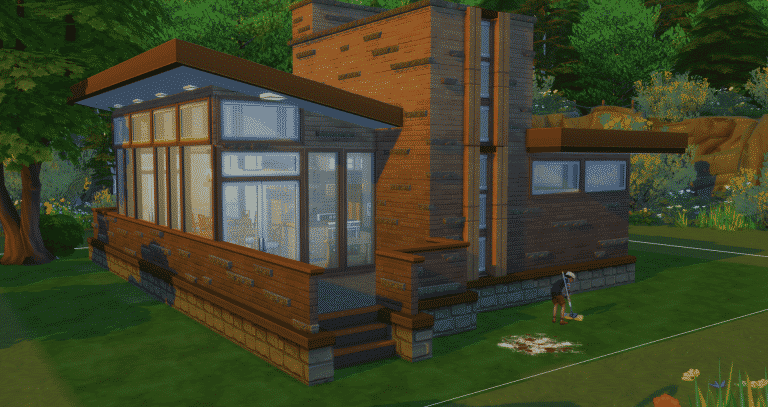
The Seth Peterson Cottage: Like my other articles in this series, this is not so much about building this specific example in the exact form. It’s rare to be able replicate a real world build exactly within this or any video game as a player. Instead, I hope you’ll be able to use, and expand upon, some of the build techniques shown here for your own creations. In this case we are going to create the look of “stacked stone” in building a structure. As well, we will create a built-in sectional style arrangement of  furniture. One interesting note about this cottage, and in fact many of Wright’s homes, is that the bedroom is quite small, almost tiny. Essentially, a room for a bed and designed for sleeping only.

Being The Architect in The Sims 4: Frank Lloyd Wright

Stacked Stone

It’s used to create the walls of the structure. It’s also used to create the fireplace overhang.  The recent addition of the ability to decrease the size of objects makes this look far more attainable. It’s also easy. Take the “Rockin Coffee Table” from Outdoor Retreat and decrease it to it’s smallest size by pressing the “[” key on the keyboard. Then while holding the “ALT” key, press the “9” key to raise the table to the desired height. Then line the tables up to the length you want. (Picture #1) In the case of this build I have also slid them into the wall to create a narrower look.

In picture #2 I have used the coffee table in different shrunken heights and colors to create a “fireplace” overhang. Here I also shrunk the “Billowing Bonfire” from Get Together to fireplace size for a more roaring fire.

In picture #3 I replicated the exterior look inside. The stones double as a faux shelves for pictures. You can place the pictures freehand by holding the object and pressing the “ALT” key while moving the picture on the wall with your mouse. The pictures have also been reduced in size to better fit the space.

In picture #4 I have lined up the tables, again shrunken to their smallest size, to create an edge for the flat roof that matches the rest of the build.

Being The Architect in The Sims 4: Frank Lloyd Wright

Sectional Seating

Building the sectional that is visible in picture #3 above is not much more difficult. In this case I have used the “No Time for Love Seat” from Parenthood, the “Unfulfilled Wall Sign” from Dine Out, the “Plump Pillow Pad” from Toddlers and the lowest height “half wall” from the Base Game.

Begin by outlining the space you want to use for your built-in with the half-wall. (Picture #1) Next position the Love Seats so that they intersect in the corner. If you need to redraw the half-wall do so. Lift the “Love Seat using the “ALT” “9” combination so that the cushion appears to be sitting on a base created by the half-wall.  Continue holding the “ALT” key and slide the seat forward until it suits your eye. (Picture #2) Place the “Plump Pillows” at the intersection in the corner and raise them using the “ALT” “9” combination to cover the stutter on the cushions created by using MOO. (Picture #3) Lastly, place the “Unfulfilled Wall Sign” on the wall so that it appears to be providing the back of the sectional. (Picture #4)

Being The Architect in The Sims 4: Frank Lloyd Wright

Other Simmers Being the Architect – Frank Lloyd Wright:

Do you want to see some other takes on the Frank Lloyd Wright Style? Please check out these and many other builders on the Sims 4 Gallery. I used the hashtag FrankLloydWright. Easy, huh?

Picture #1 Bay Forest House by belledaisies- Gallery Link: Bay Forest House

Picture#2 Robie House V2 by Orange Bram- Gallery Link: Robie House V2

Picture#3 Samara by SimsDesignFest- Gallery Link: Samara

Picture#4 Fallingwater House 1935 by Ritpit01- Gallery link:  Fallingwater House 1935

Being The Architect in The Sims 4: Frank Lloyd Wright

Thank-you for reading and I hope you have enjoyed this article. If you’re inspired to build something and would like to share it with the rest of us please do so in the comments below. As well, if you have any questions regarding this article you may ask them in comments. You can always feel free to contact me on Twitter @JasonSterling70 or on the Sims Forum JasonAnthonySterling. I broadcast building and storytelling on Twitch: Channel JasonAnthonySterling

Save 30% on ALL Origin Games! (The Sims 4 Cats & Dogs Included)

0

Origin is having an awesome deal right now where you can save 30% on ANY EA game. Yup, this means that The Sims 4 Cats & Dogs Expansion Pack is also included in this offer.

All you have to do is enter the following code at the checkout: FILLYOURSTOCKING

Offer ends on December 14th at 10AM PDT.

Save 30% on ALL Origin Games! (The Sims 4 Cats & Dogs Included)

The Sims FreePlay: Upcoming Events for December 2017 / January 2018

7

The Sims FreePlay brought more than just one quest with the latest Holiday 2017 Update. The game will have 4 events (the last one being a rerun) including a new quest and 2 new hobby events! Take a look:

  • Snow Problem Seasonal Quest: December 12 – December 24 (AEDT)
  • Hair Salon Live Event: December 26 – January 8 (AEDT)
  • Streetwear Hobby Event: January 13 – January 21 (AEDT)
  • Teen Idol Hobby Event: January 23 – January 29 (AEDT)

We’ll be covering all the important information about each event so make sure you stay tuned on our Sims FreePlay News Category!

The Sims FreePlay: Upcoming Events for December 2017 / January 2018

The Sims FreePlay: Holiday 2017 Update Now Available!

0

The Sims FreePlay has just launched their latest Holiday 2017 Update which promises plenty of awesome events and quests throughout the next few weeks! Here’s what’s coming (and what’s currently available):

Experience pure luxury for the holidays when you reunite with your favorite characters, join them on a whirlwind tour of fantastical locations, and arrive at the ultimate snow destination!

In a commemorative update, we’re celebrating the spirit of the holidays while you play the Snow Problem Seasonal Quest. While preparing for another lovely Christmas, a snowy wonderment of fun and excitement turns to despair as something – or rather, someone – literally rains on their parade! Gather your Sims, revisit old friends, and make new ones as you try to return SimTown to its snowy glory! Do so and be rewarded with the ultimate prize – an extravagant Snow Chalet, plus unlock beautiful build-mode content like sculptures, chandeliers, and our biggest couch yet!

Hair, glorious hair! It’s time to sharpen your scissors and design your very own SimTown Hair Salon with the Hair Salon Live Event. Create new on-trend hairstyles for your Sims in your salon with hairdressing stations and barber chairs, while adding some extra flair through basins, swivel chairs, reception desks, and more!

Lit, fire, on fleek – however you want to name it, the Streetwear Hobby Event is your chance to get your hands on lots of new outfits! Stretch up, because your Sims will be participating in the Aerobics Hobby for this!

Look out for a rerun of the Teen Idol Hobby Event rounding out the update! Still dreaming of the teen rock star life? Now is your chance!

More Highlights:

  • From the start of the update, we’ll be handing out a holiday gifts to Simmers. These are all Christmas-themed, ranging from doors and windows, to sofas.
  • To celebrate The Sims FreePlay’s sixth birthday, we’ll be gifting Simmers with a Mystery Box redeemable between December 14 – 18 (AEDT).
  • We’ve added three new skin tones for all Sim genders and age groups!

Sims 1 Support Added to The Sims Website

14

EA has added support for The Sims 1 on their main website. Clicking on The Sims 1 icon takes you to a new page with more detailed information about the game, along with an empty space next to the label Standard Edition. This is normally where the Buy Now link appears on other pages for games that are currently available to purchase.

We can’t say for sure that this means The Sims 1 is coming to Origin, but it certainly does look like a hopeful sign!

Would you like to see The Sims 1 make a return on Origin? Let us know in the comments!


Thank you to TheSimsStyle on Twitter for first posting this information.

The Sims 4: Grant Rodiek talks about plans for Future Content

11

Grant Rodiek, one of the producers on The Sims 4 has spoken to PC Games Insider about the past, present and the future of The Sims 4. He revealed that The Sims Team has some interesting things in store for us, that they’re planning on creating more fun and crazy content and that some of the content will be revisiting stuff from previous Sims games but with a fun twist. Check out what he said:

So, The Sims 4 launched back in 2014. How have the last three years been for the game?

It’s been very successful actually. We started a smidge rough and since then we have done so much. One of our big focuses was releasing tonnes of free content for our players. So pools, toddlers, the ability to have genderless outfits…. we gave all that away. We have our expansions packs, game packs, we’ve done everything from vampires to spa days to camping trips to work. We’re at the point now where it’s fun, where we have all the scary features out of the way, all the big requests out of the way, finally released toddlers for our fans and so now we can sort of focus on making fun stuff. It’s not that it’s easier – it’s more ‘wouldn’t it be cool if?’ content. It frees us a bit.

Now that the Pets expansion is out, what’s the plan moving forwards?

Historically, after pets people are like: ‘Okay, we did the big pack, now we’re going to think about something else. I want players to still be around because we are still making killer content. We’re not going away. Pets is the biggest one but we’re not going to dial it back. Some of the stuff we are thinking about is pretty ambitious, it’s also fresh twists on old things and so I am hoping that people see Pets as the start of the second wave, not the end of the cycle. I want to do more content, keep upping the bar, more free content. Those are things that are super important to us and we have been talking about stuff for next year for ages already because we want it to be super good. There’s crazy long cycles. Next year I want people to be like: ‘Wow, I can’t believe you’re doing all this stuff’. Next year we’ll be four years old and still here.

Read More

The Sims 4: Grant Rodiek talks about plans for Future Content

The Sims 4 Cats & Dogs for Xbox One and PS4 has been rated in Brazil

More leaks of The Sims 4 Cats & Dogs Expansion Pack coming to the consoles are popping out. Several weeks after a Polish website Empik listed the pack for Xbox One and PS4 and just a few days ago after EA France accidentally posted a scheduled tweet saying that Cats & Dogs is out on Consoles, a trusted Brazilian website which is responsible for video game ratings in Brazil has listed The Sims 4 Cats & Dogs for Xbox One and PS4.

According to them, the game has been tested / classified on November 30th. Considering all the leaks so far I wouldn’t be surprised if Cats & Dogs is the next Expansion Pack coming to the consoles.

The official release date is still unknown.

Official document

The Sims 4 Cats & Dogs for Xbox One and PS4 has been rated in Brazil

Tip: @TiagoGrey

The Sims 4 Cats & Dogs: Building a Custom Pet House

Today’s Sims 4 building tutorial we’re going to get a creative to give your dogs or cats an upgrade to their sleeping arrangements.

In this tutorial, we’ll be using various objects that will be combined to make a functional and adorable pet house with a tiny garden.

Let’s get started!

Once you’re in build mode, press CTRL + SHIFT + C to open cheat box in the top left of your screen. There are two cheats that you’ll to enter:

  • bb.moveobjects
  • bb.showhiddenobjects
  • [ – Left Bracket to size down
  • ] – Right Bracket to size up

Adding The Base

First, let’s get started by on a blank lot or either a backyard whichever you prefer. I’m going to be using the Medium- Tall Half Wall and the Tall Half Wall for the back. Use these tools to make a 2×2 square to get the base.

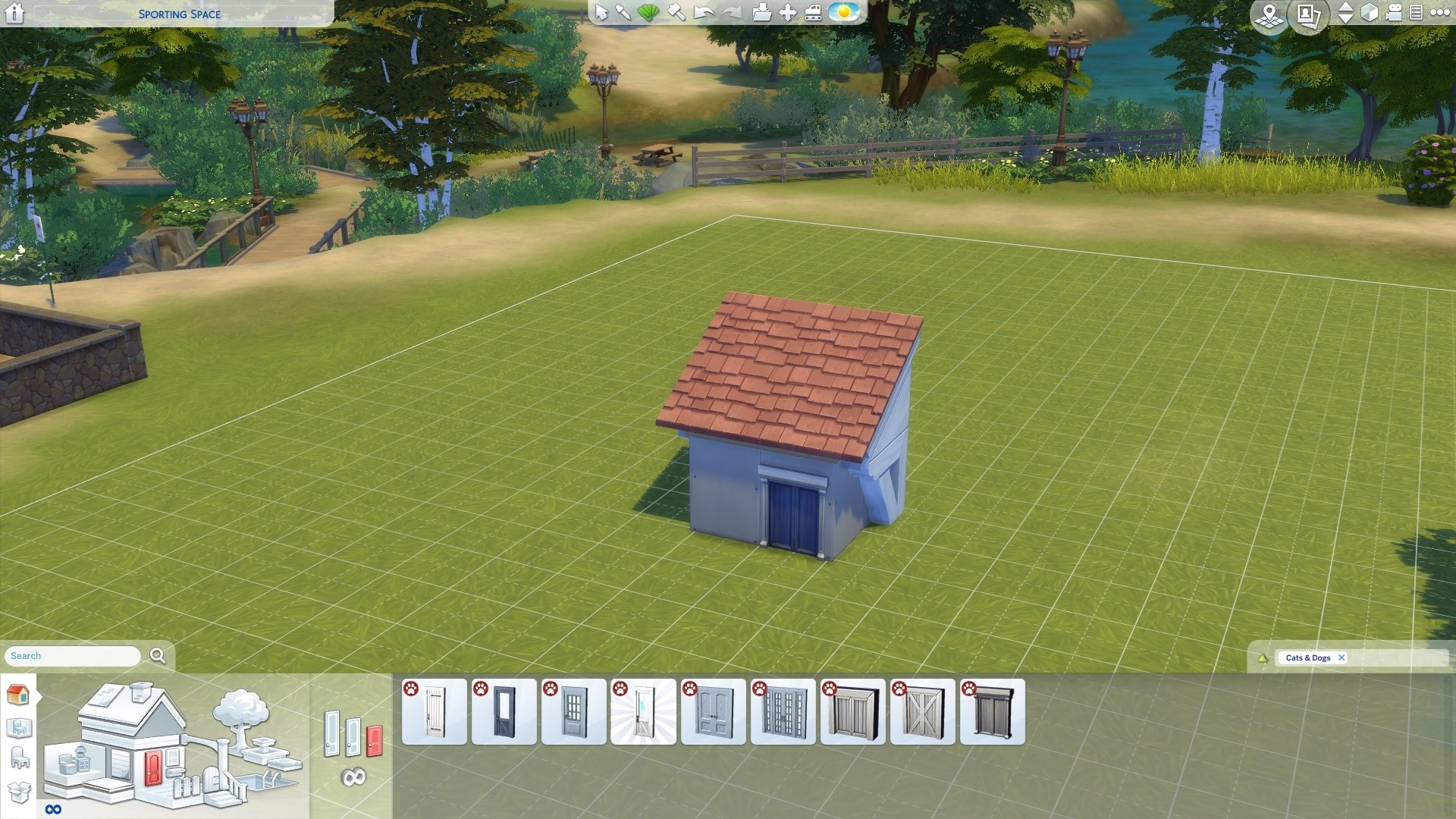
Once you have your 2×2 base, go over to the wall sculptures and filter it to show only Cats and Dogs objects. I’ve chose the Substantially Shingled Awning Small. You’ll use this as your roof for your pet house.

The Sims 4 Cats & Dogs: Building a Custom Pet House

Using the awing to place it on the back of the tall half wall. Scale it one size using the right bracket ( ] ) and using the CTRL +9 to move up the awing. Make sure that it covers the back of the half wall to make it look like a roof. Then add your pet door from the door section filtering with Cats And Dogs.

The Sims 4 Cats & Dogs: Building a Custom Pet House

Once you’re done placing your walls and roof, you can start adding your wallpaper and floor of your choosing.

Decorating the Garden w/fence

Now that your have your wallpaper and flooring, it’s time to the fun part of this creation. You’ll be able to get creative with decorating your garden with a little fence.  I sized down the Sun Spot Awing from Get Together with some pot planter.

Personalizing Your Pet House

Using the Cats and Dogs pack and other various of packs, you’ll get to personalize the way your pet will look like with using the pet beds and sizing down objects. To get everything inside the pet you’ll need to move the awing roof to place your objects. I wouldn’t suggest place a lot of objects inside just so you can keep the inside functional for your pets to use.

The Sims 4 Cats & Dogs: Building a Custom Pet House

Now you’ve done it! You made your very own custom pet house!

You can follow my socials:

The Sims 4 Genesis Challenge

Story

Due to economic decline and poor government funding of social programs, the population of many Sim-inhabited towns and cities have all but disappeared. Everyone has moved away to find greener pastures elsewhere, leaving their old homes nothing but a ghost town. Out of desperation to boost the population and get these towns thriving again, the United Nations has hand-picked two Sims who are willing to participate in a re-population program, tasking them with bringing the population back up through natural procreation while living the best, most fulfilling lives they possibly can. The project’s name? Operation BFAM (Be Fruitful And Multiply). The subjects? Adam and Eve.

Objective

Start with two Sims, one that can become pregnant and one that can impregnate other Sims and use them to fill a completely empty world. The challenge ends when every household in the world is occupied by at least one direct descendant of your two original Sims.

Setting Up The Challenge

  • Start a new save file and begin by creating two young adult Sims in CAS. They can have any gender customizations you want as long as one of them can become pregnant and the other one can impregnate other Sims. These Sims can have any appearance you want and any traits, aspiration, walk style, and voice that you want. Feel free to use as much CC as you want. Custom traits are also fine to use. Your two starting Sims must start out as roommates. For the purpose of this challenge, we’ll call them Adam and Eve but you don’t actually have to name them Adam and Eve. You can name them whatever you want.
  • Adam and Eve can be aliens or vampires! CAUTION: Having children between an alien and a vampire has been known to cause serious damage to your save file. If you choose an occult-themed challenge, it is recommended that you make both Adam and Eve the same occult type or make one human. Do not make one an alien and the other a vampire.
  • Move Adam and Eve into any lot they can afford in any of the home worlds. You can download a house from the Gallery, build one of your own or use one of the default starters, it doesn’t matter. They must be able to afford the house with their starting funds, though.
  • Next, go into your options and make sure Lifespans are set to Normal and that Fill Empty Homes is unchecked. If you plan to play households on rotation eventually once Adam and Eve’s children start leaving the nest, set Auto-Age (Played Sims) to Only Active Household. If you’re a single household type of player, leave it set to On. Do not set Auto-Aging Off for any group.
  • Once this is done, you need to go about emptying your town of all the Sims living in it. Evict all the premade families in all of the home worlds. You can delete them or leave them as townies to become part of the mating pool later on, it’s up to you.
  • Now that your worlds are empty and Adam and Eve are settled in, it’s time to begin Operation Be Fruitful and Multiply.

The Challenge Rules

  • Adam and Eve’s primary purpose is to have children to populate the world with. How many children they have is up to you but keep in mind that the more children Adam and Eve (and their descendants) have, the faster you’ll complete the challenge.
  • Adam and Eve don’t need to be married to have children together, nor do any of their descendants need to be married to have children with their partners but you can have them get married if you’d like.
  • All Sims in your challenge are free to live their lives however you want when they aren’t busy populating the world. They can all have whatever jobs you want and spend their free time doing anything you want, their lives are completely in your hands to do as you see fit with.
  • I’m not going to ban all mods but mods that give you an unfair advantage in the challenge are not allowed (for example, a mod that adds snow or fall colours to the world would be fine because it doesn’t affect the challenge at all but a mod that extends lifespans would not be allowed because it gives you more time than other players to have more children on a Normal lifespan).
  • No cheating is an obvious rule. No money cheats, no cheats that change relationships or alter emotions. If you have the plumbob mood lamps, those are fine but no cheats to put your Sims into a specific emotion.
  • If all the members of a household die off, leaving the house empty again, you need to repopulate it with at least one direct descendant of Adam and Eve but if you have at least two generations living in each house and make sure they bring in new generations when they’re old enough, you shouldn’t encounter this problem very often (if at all).
  • It’s easier to play on rotation for this challenge to ensure everyone is continuing Adam and Eve’s bloodline but if you’re playing a single household, you’ll need to add and remove people from the household to get them pregnant and keep Adam and Eve’s line going.
  • There are no rules against descendants having same-sex relationships and adopting children but only direct blood descendants of Adam and Eve count for occupying the town so make sure your households with same-sex couples also have a direct blood descendant living with them (if one Sim out of the couple is a direct descendant of Adam and Eve, they still count, no need to move in another descendant).
  • This isn’t a hard and fast rule but I recommend you play one week in each household if you’re doing rotation so everyone ages at the same pace.
  • All residential lots in the worlds you choose to repopulate must be occupied by at least one direct descendant of Adam and Eve in order to complete the challenge, even empty lots. You don’t need to save up a lot of money to move a Sim into one of the prebuilt homes, you can bulldoze and build/download a cheaper one in its place.

Optional Noah’s Ark Mode (Cats & Dogs Required)

  • If you have Cats & Dogs installed, you can challenge yourself further by playing Noah’s Ark mode alongside the regular challenge.
  • When making Adam and Eve, make either a pair of cats or a pair of dogs to go with them. They can be any breed you wish and have any visual appearance you’d like. They can also have any traits you’d like, but they must both be the same species (either two cats or two dogs, not one of each), they must be opposite genders, and they must both be unspayed/unneutered. For the purpose of this challenge, we’ll call them Noah and Naamah, but you can name your pets anything you want.
  • Move Noah and Naamah in with Adam and Eve. Just like Adam and Eve’s purpose, your goal with Noah and Naamah is to have at least one direct descendant of these pets living in each household in your world(s).
  • Descendants of Noah and Naamah cannot be sold or given up for adoption. They must be moved into other households with the descendants of Adam and Eve to help populate the world.
  • Just like Adam and Eve, Noah and Naamah’s lives are in your hands to do as you see fit with. They can learn tricks, be trained, use the obstacle course, go to the vet, go for walks, go hunting/prowling, explore the world and do anything their little hearts desire. The only restriction is they can’t consume age up or age down treats. You must allow them to age naturally just like your Sims.
  • Pets don’t have family trees, so I highly recommend using the Plum Tree App to keep track of Noah and Naamah’s descendants.

Difficulty Level

Baby Steps: Populate Willow Creek
Easy: Populate both Willow Creek and Oasis Springs
Normal: Populate Willow Creek, Oasis Springs and Newcrest
Advanced: Populate Willow Creek, Oasis Springs, Newcrest and Windenburg
Hard: Populate Willow Creek, Oasis Springs, Newcrest, Windenburg, and San Myshuno
Very Hard: Populate Willow Creek, Oasis Springs, Newcrest, Windenburg, San Myshuno, and Forgotten Hollow
Insane: Populate Willow Creek, Oasis Springs, Newcrest, Windenburg, San Myshuno, Forgotten Hollow, and Brindleton Bay
 
There is no advantage to doing more difficult modes that require add-on packs except bragging rights, so if you only have the base game, doing Normal mode is perfectly fine. The harder versions are just for fun if you have extra content and want to challenge yourself further.

How to create Wild Animals in The Sims 4 Cats & Dogs

The Sims 4 Cats and Dogs Expansion Pack adds the long-awaited option to finally have a cat or a dog in your Sims household. But what if you want a totally different kind of animal as your personal fluffy companion?

In this tutorial I’ll show you my approach on how to create totally different kinds of animals out of the cats or dogs using the customization tools available in the new Create A Pet mode.

My first step is always to decide which kind of animal I’m going to create and which kind of anatomy it has. Is it even possible to achieve the animal within the Create A Pet mode? If you´re not sure, why not just give it a shot? I once tried building a pig, which turned out hilariously horrible. Still a good laugh though.

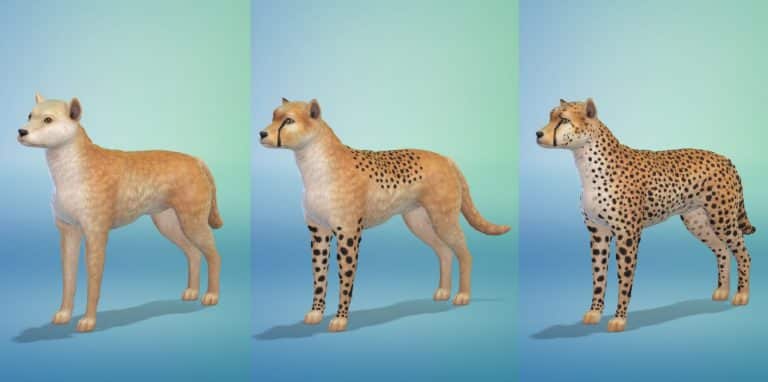
For this example I’ve decided on creating a cheetah. It might sound counter-intuitive but since I wanted to get the size right I went for using the big dog as the base model.

How to create Wild Animals in The Sims 4 Cats & Dogs

When trying to get as realistic as possible, it’s always paramount to gather a lot of references. So I do some Google image searches to have a good collection of images showing the animal in a lot of different poses from a lot of different angles.

How to create Wild Animals in The Sims 4 Cats & Dogs

When creating in The Sims 4 I keep the game in window mode, so I can always have my browser window with the reference images right next to it. This way I can constantly check, what parts already look fine and what areas still need tweaking.

So when I start shaping the animal, the first thing to adjust is always the head. I work on the eyes, ears, nose (size, form, offset and proportion) and general proportions of the face. Once I’m happy with the head, I switch to shaping the general body volumes. How big is the belly, the head, the neck or the legs and how large are they in relation to the rest of the body? Only when those general sizes match, I try finding a nice fur for the animal. In the case of the cheetah, I decided on a very short kind of fur, which is also not too bushy on the tail, face or neck areas.

How to create Wild Animals in The Sims 4 Cats & Dogs

Next up and a very important step is painting the fur. I begin with trying to get the primary colour as close as possible to the reference. Then I work my way up from rough colour patterns (like gradients) to increasingly finer details. I always save a lot, especially when transitioning to a finer pattern size. So I can always go back if I mess up.

How to create Wild Animals in The Sims 4 Cats & Dogs

It’s very important to achieve smooth transitions between the colours. So I never paint with the transparency slider way up to the top, but rather a much lower value, like 50% or even lower. With very bright colours, I even use 1 to 10% most of the times. I also try to vary the shades and nuances of the main colours a little.

How to create Wild Animals in The Sims 4 Cats & Dogs

I pay close attention to size of dots or stripes in the fur pattern. I always compare back and forth between my animal and the reference images.

When working on the face, I try introducing some asymmetry into it. It makes the animal much more natural and believable.

How to create Wild Animals in The Sims 4 Cats & Dogs

Back and belly should also have slight differences left and right. Even if it’s just in tiny details.

How to create Wild Animals in The Sims 4 Cats & Dogs

During this whole process I constantly make tiny adjustments to the shape of the animal. No way to get everything right in the first shot. It takes patience to get everything good looking.

I hope you find this little guide on my creation process helpful. Feel free to visit my Gallery ID TheKalinotr0n for more awesome animals. Can’t wait to see your creations on the gallery!

The Sims 4 Cats & Dogs: EA holds a special Fitness Class for Dogs in London

0

To celebrate the launch of The Sims 4 Cats & Dogs Expansion Pack, Electronic Arts UK held a very special Fitness Class in Ministry Does Fitness – a fitness studio in London. However, this wasn’t just any ordinary fitness class that you might’ve witnessed or attended – it’s a fitness class for dogs!

The fitness class was held specially for London’s famous dogs and dog owners. You can check out some of the cute pictures from this event down below!

Thank you guys @thesims for my workout & my yummy treats! I made alot of new friends. #thesims #thesims4

A post shared by Hugo the Bear (@hugo_the_chowchow) on Nov 30, 2017 at 12:15pm PST

The Sims 4 Console: Luxury Party & Cool Kitchen Stuff Livestream Replay

The Sims Team held a livestream of The Sims 4 Luxury Party & Cool Kitchen Stuff Packs – which are coming to Xbox One and PS4 on December 5th. Check out the livestream replay above!

Did You Know About These “Secret” Clubs in The Sims 4 Get Together?

Find out how to unlock these hidden clubs!

Sims 4 Secret Clubs

Obviously, if you have The Sims 4 Get Together, you’re probably well-acquainted with the clubs from the expansion. Of course, the good ol’ Spin Masters, Upper Crusts, and League of Adventurers (among others) have become familiar sights around your worlds. It’s almost impossible to think of a world in The Sims 4 in which none of these iconic clubs exists, but what happens when you’ve played through two or more generations and all of these clubs have died out? However, did you know there are secret clubs in The Sims 4?

Indeed, many Simmers might be surprised to discover that there are other “secret” clubs in The Sims 4 Get Together tucked away in the game code. When Sims start dying off, disbanding the original clubs, the game generates these new clubs to replace them. Of course, these extra clubs have their own descriptions, club activities, and membership requirements. When a new club is generated, the game will randomly add inactive Sims from around your worlds who fit the club requirements. Your Sim can also join these new clubs, provided they meet the requirements.

The Sims 4 Secret Clubs

So, here are all of the secret clubs in The Sims 4! Additionally, there are some pretty interesting ones and even some cross-pack ones! These clubs will start to pop up when the total number of clubs in your world drops too low but if you don’t want to wait that long, there is a cheat that will spawn them, provided there are eligible Sims in the world to populate them.

We’ll provide the cheat code to spawn each club below, but first, you must enable testingcheats. Of course, to do this, open the cheat console with CTRL+SHIFT+C. Also, if you’re playing on a console, press all four back triggers. Then, type in testingcheats true and confirm. Also please be aware you will need to confirm that you want to permanently disable trophies/achievements on your save if you play on console.

Bearly Associated

Sims 4 Secret Clubs
  • Club Hangout: Any Park
  • Secret Club Cheat: clubs.create_club_from_seed BearClub
  • Club Description: Looking for a fancy shmancy club? This club’s not for you. This is a bear-bones club for those who really like to strip down to their bear essentials and revel in the unbearable lightness of being bearly there. And roar at people. Also honey. Definitely honey.

Check Mates

Sims 4 Secret Clubs
  • Club Hangout: Any Park
  • Secret Club Cheat: clubs.create_club_from_seed ChessClub
  • Club Description: Minutes to learn; a lifetime to master. No, it’s not Foosball. It’s the age-old game of Chess!

Club Cosplay

Cosplay
  • Club Hangout: Any Park
  • Secret Club Cheat: clubs.create_club_from_seed Cosplay
  • Club Description: Love dressing up like your favorite fictional character? Not afraid of hanging around other people dressed in costumes? Club Cosplay is for YOU!

Complementary Colors

Sims 4 Secret Clubs
  • Club Hangout: Any Museum
  • Secret Club Cheat: clubs.create_club_from_seed ArtClub
  • Club Description: If you’re a blue, we’ve got your yellow. If you’re a red, we’ve got your cyan. We don’t all get along – in fact, we often clash – but together we create the strongest contrast possible.

Covalent Bonds

rocket
  • Club Hangout: Club Member Residence
  • Secret Club Cheat: clubs.create_club_from_seed LogicClub
  • Club Description: Not intimidated by rocket science? Think you could solve the Unsolvable Hetu Hypothesis if only you had enough moral support? Want to share electron pairs to create a stable balance of attractive and repulsive forces? Join the Covalent Bonds!

Dive Club (Requires Island Living)

Sims 4 Secret Clubs
  • Club Hangout: Any Beach
  • Secret Club Cheat: clubs.create_club_from_seed DivingClub
  • Club Description: Fascinated by the expanse of the ocean? Want to explore the mysteries of the deep? Dive into action with us!

Guild of Gamers

Gaming
  • Club Hangout: Club Member Residence
  • Secret Club Cheat: clubs.create_club_from_seed GamingClub
  • Club Description: Whether you’re a Sims Forever fan or a Blicblock enthusiast, you’re in! Gamers of all stripes, colors, or pixel resolutions welcome.

Major Chords

Sims 4 Secret Clubs
  • Club Hangout: Club Member Residence
  • Secret Club Cheat: clubs.create_club_from_seed MusicClub
  • Club Description: Major ‘cause we’re important. Chords ‘cause we sound together. Don’t you want to sound together with us?

Just for the Halibut

fishing
  • Club Hangout: Any Park
  • Secret Club Cheat: clubs.create_club_from_seed FishingClub
  • Club Description: Don’t play koi! You cod never find a betta crew! So drag your bass on over, grab yourself a perch, and get to fishin’!

Mixing Crew

Sims 4 Secret Clubs
  • Club Hangout: Club Member Residence
  • Secret Club Cheat: clubs.create_club_from_seed MixologyClub
  • Club Description: If you love talking about the proper angle at which to shake a Simsmapolitan, or the right proportion of juices to use in a Sunset Valley, then the Mixing Crew is for you!

Page Turners

reading
  • Club Hangout: Any Library
  • Secret Club Cheat: clubs.create_club_from_seed BookClub
  • Club Description: Read any good books lately? We have! And we’re more than happy to tell you all about the characters (and characterization!), plot twists, story structure, themes, and symbols that we’ve analyzed.

Punch Lines

Sims 4 Secret Clubs
  • Club Hangout: Any Lounge
  • Secret Club Cheat: clubs.create_club_from_seed ComedyClub
  • Club Description: Comedy’s not all fun and jokes – well, it is, but it’s hard work, too. If you need a friendly audience to try out your one-liners and ad-libbing, the Punch Lines are happy to laugh with you, not at you.

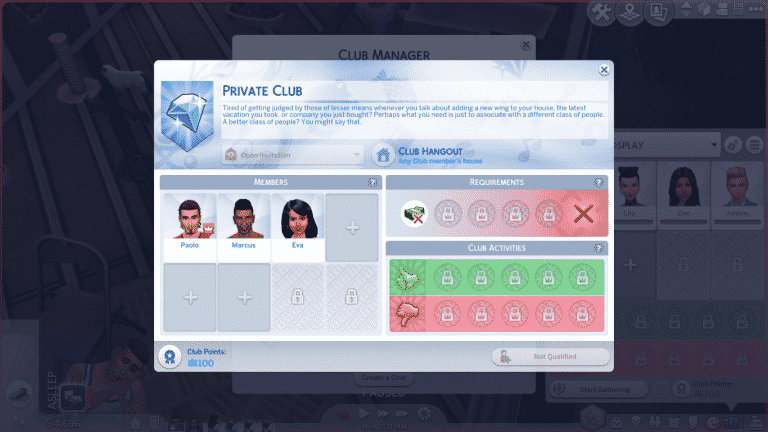
Private Club

house
  • Club Hangout: Club Member Residence
  • Secret Club Cheat: clubs.create_club_from_seed RichClub
  • Club Description: Tired of getting judged by those of lesser means whenever you talk about adding a new wing to your house, the latest vacation you took, or company you just bought? Perhaps what you need is just to associate with a different class of people. A better class of people? You might say that.

Society of Sixam (Requires Get To Work)

Sims 4 Secret Clubs
  • Club Hangout: Club Member Residence
  • Secret Club Cheat: clubs.create_club_from_seed AlienClub
  • Club Description: Whether you were born on the homeworld or you’re more of the newfangled hybrid type, this club is for you. Come share your experiences of trying to maintain a secret disguise in a world where not everyone enjoys having their memory erased.

Additionally, some of these secret clubs in The Sims 4 are quite interesting. Some might argue they’re even better than the original clubs! For example, there is a Private Club for rich Sims only. So, your Sim must have §30,000 in household funds to be eligible to join this elite club. There’s also a book club, a music club, an art club, a mixology club, and even a club for cosplay! Of course, Simmers who have The Sims 4 City Living installed will find Club Cosplay goes great with the Geek Con festival! Indeed, what better opportunity to break out those Star Wars outfits and Spooky Stuff costumes?

The Sims 4 High School Years Cheats Guide

Looking for more Clubs in The Sims 4 Get Together?