

Via SimGuruMeatball!


From all The Sims games so far, The Sims 4 probably has delivered the biggest amount of visual effects, and it did an amazing job. But, some visual effects are really hard to get and only occur ever so often. That’s why Andrew’s Studio come up with a great Mod!
The Studio Effect Player Mod lets you pick any effect from a list of over 6000 visual effects and play them via a simple object.
To get started, Download the Mod here, extract the .zip content and start up your game. Don’t forget to also download the list of Visual Effects that can be found on the bottom of the site.
You start off by searching for the Studio Effect Player in Build Mode. You can place as many Effect Players as you want!

Then in Live Mode, click on the Effect Player and select ”Select Effect”.
You paste the effect code in this section!
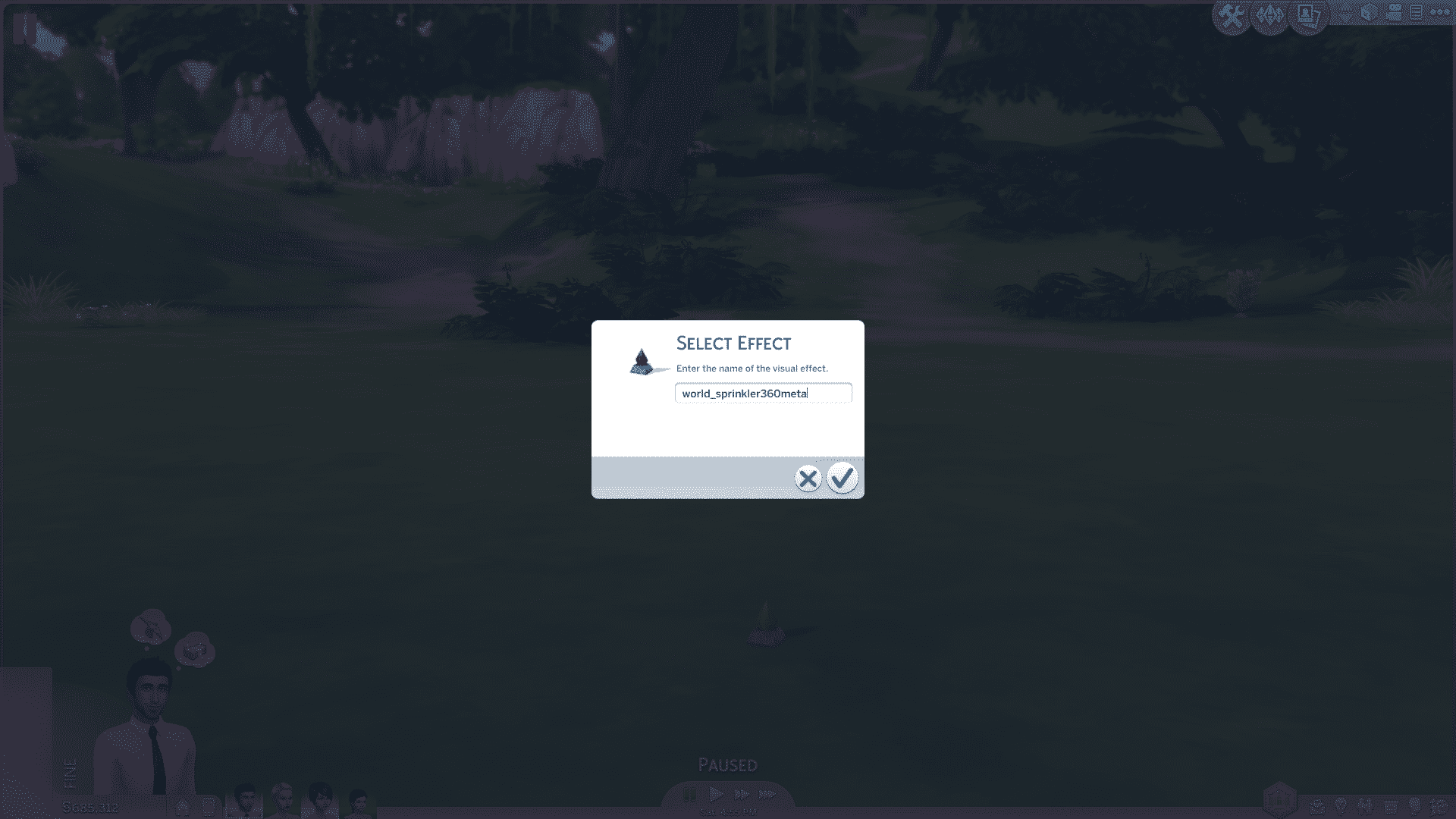
After you’ve pasted your code, press the check button and the effect you pasted will start emitting!
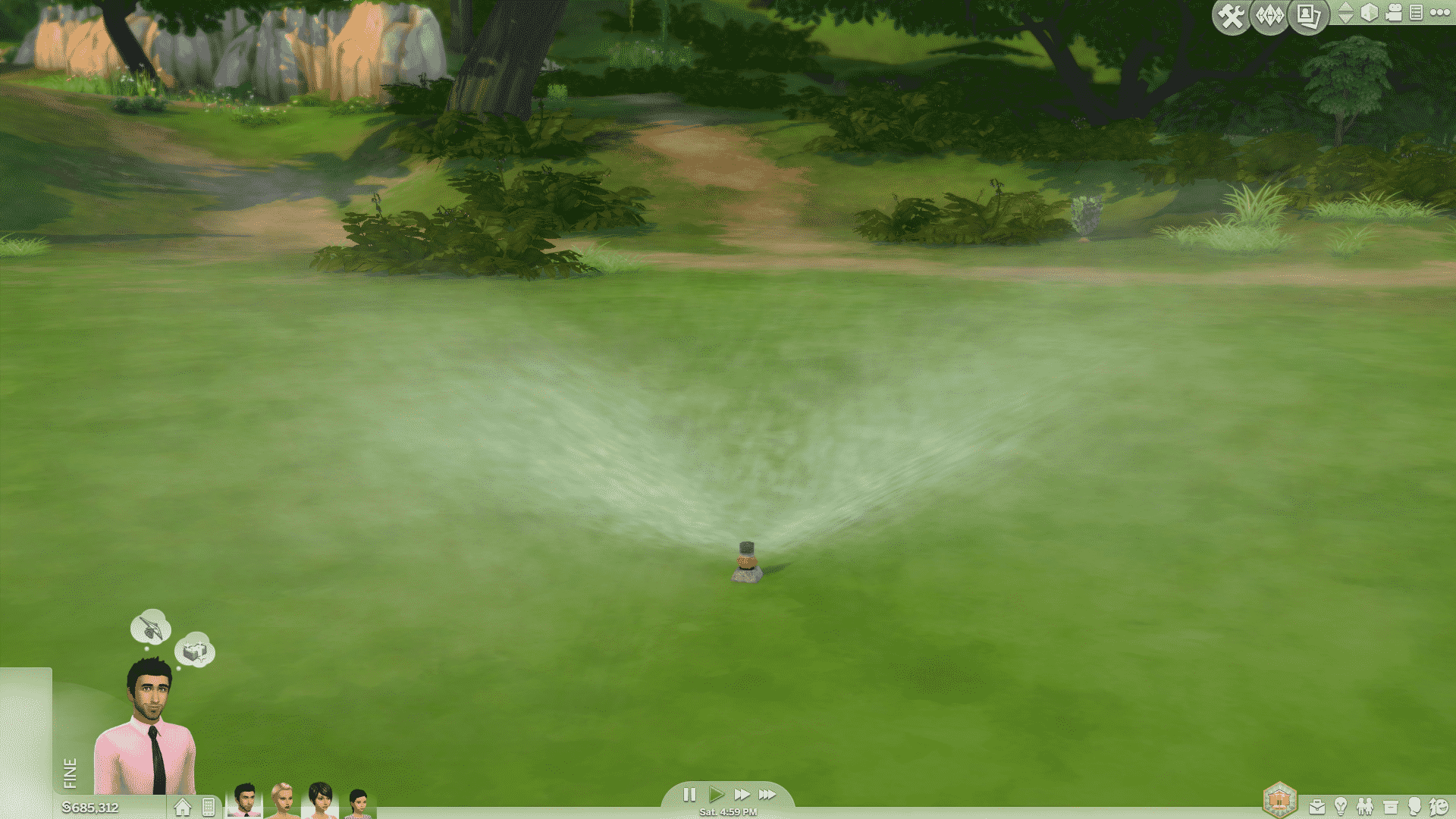
But, there are a few cases where the Effect Player object just doesn’t go along with the actual effect. That’s when you should consider placing another Effect Player object on the lot. While the first Effect Player emits the effect, click on the second Effect Player and select ”Hide Others” which will hide all other Effect Player objects except the one you used to hide them.


This Mod really lets Storytellers and Machinima makers create richer and better content!
Some of my examples.

For a better explanation on how to implement the code and hide the Effect Players, check out our video below!
[vc_video link=’https://www.youtube.com/watch?v=TvP5TKr8oFM&feature=youtu.be’]
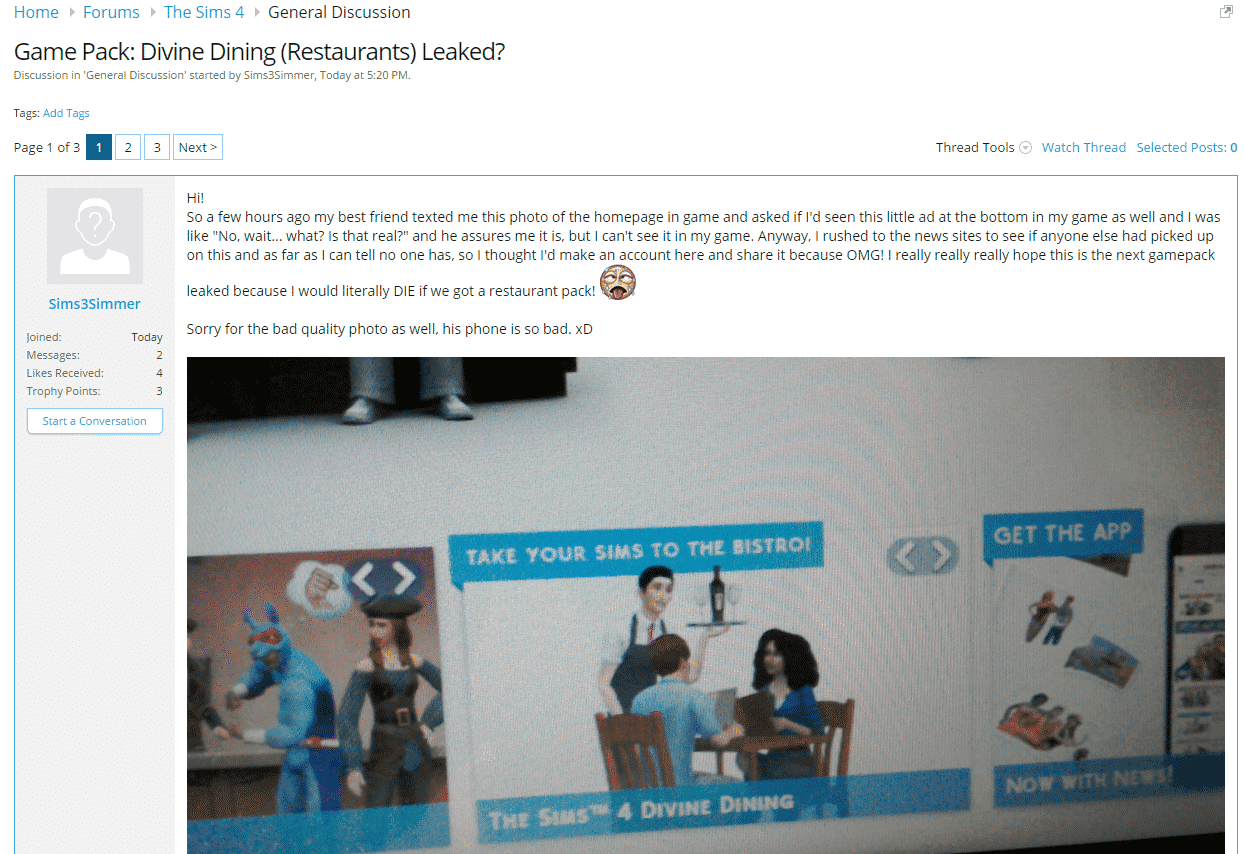
You probably read on Sims Community Social about a possible Game Pack called Divine Dining (if not, you can check out the post here).
Obviously, the Game Pack was confirmed as fake by EA, but rumors like these always bring false hope to Simmers who are looking forward to content like this.
I’d just like to let everyone know who got upset by this fake rumor that someone had clear intention to create this kind of rumor. The person created his account and just a few minutes after, the rumor was posted. After doing some research, it turned out that the IP of the Divine Dining poster is the same person who wanted to start the Star Wars Stuff Pack rumor.
I don’t want to shoot the messenger for doing this (I honestly don’t know who the person behind these accounts is), but I would like to let everyone know to take extra caution when reading rumor posts like these. Until we confirm the validity of the rumor that was either posted on our site or sent to us, don’t raise your hopes.
I know that The Sims news drought is affecting a lot of simmers, but please stay patient just a little bit more, November is just a few days away, and that’s when real news should start flowing (Get Together news). Until then, make sure you join the latest Halloween Challenge created by The Sims Team! There are 3 new objects to earn!
Happy simming!
– Jovan, SC founder

The Sims Blog has just announced a brand new challenge and its just in time for halloween! Here are all the details you need to know about below:
Remember, Remember, the 23 of October
Pirates or ninjas? Half-full or half-empty? That sparkly vampire guy or that shirtless werewolf guy? For eons, these arguments have echoed in the halls of academia and internet forums, with millions choosing a position and arguing it vehemently. But there’s one debate so polarising it eclipses all others… trick or treat?
And soon, you’ll be asked to choose a side in this timeless debate. The #TeamTrick vs. #TeamTreat Challenge kicks off in The Sims 4 on October 23 and runs through October 31! It’s not all fun and games, though – there are items on the line! You’ll be working on unlocking new decorated doors, fantastic fish, and awesome storage chests! If you choose to participate, you’ll play a role in which items get unlocked – will it be the creepy #TeamTrick items, or the playful #TeamTreat versions? That’s up to The Sims 4 community.
Two new interactions (Trick and Treat) are temporarily available in The Sims 4 for all players, and you’ll need to choose between them to help unlock different items in the game. If you’re on #TeamTrick, you’re going to want to task your Sim with tricking everyone in sight, while Sims on #TeamTreat will be handing out sweet treats to the Sims they meet.
Here’s how it’ll work:
• There are #TeamTrick and #TeamTreat versions of each item: #TeamTrick has a demonic door, a skeletal fish in a spooky bowl, and an interactive chest; and #TeamTreat has a lion door, a candy fish in a delicious bowl, and a usable chest of its own.
• Every three days, the two sides are trying to make their team’s version of the item the winning one. In the end, only one of each version will make it into the game!
• Whichever side wins (that is to say, if there are more Trick interactions or Treat interactions) will end up getting their version added to the game in early November.
• Everyone gets the items – your actions are choosing which items are actually added!
Want the sweet Candy Fish? You’d better hope #TeamTreat wins during that period, otherwise everyone will be hanging out with the Skeleton Fish instead. The cool Demonic Door? That’s a #TeamTrick item, so you’ll need to trick for that one. The chests are assigned to the different sides, too.
Which side will you choose? Head onto Twitter, Instagram, Facebook, and Tumblr using #TeamTrick and #TeamTreat to show your allegiance, and spread the word if you want to unlock the items associated with your side.
The full details are below, and we’ll keep this article updated as the results come out.
CHALLENGE 1: OCTOBER 23 – OCTOBER 25 – The Stoar the Bearded or Edgar the Generous Door
CHALLENGE 2: OCTOBER 26 – OCTOBER 28 – The Bones or Gummie Fish Bowl
CHALLENGE 3: OCTOBER 29 – OCTOBER 31 – The Buyers Beware or Ornate Beauty Storage Chest
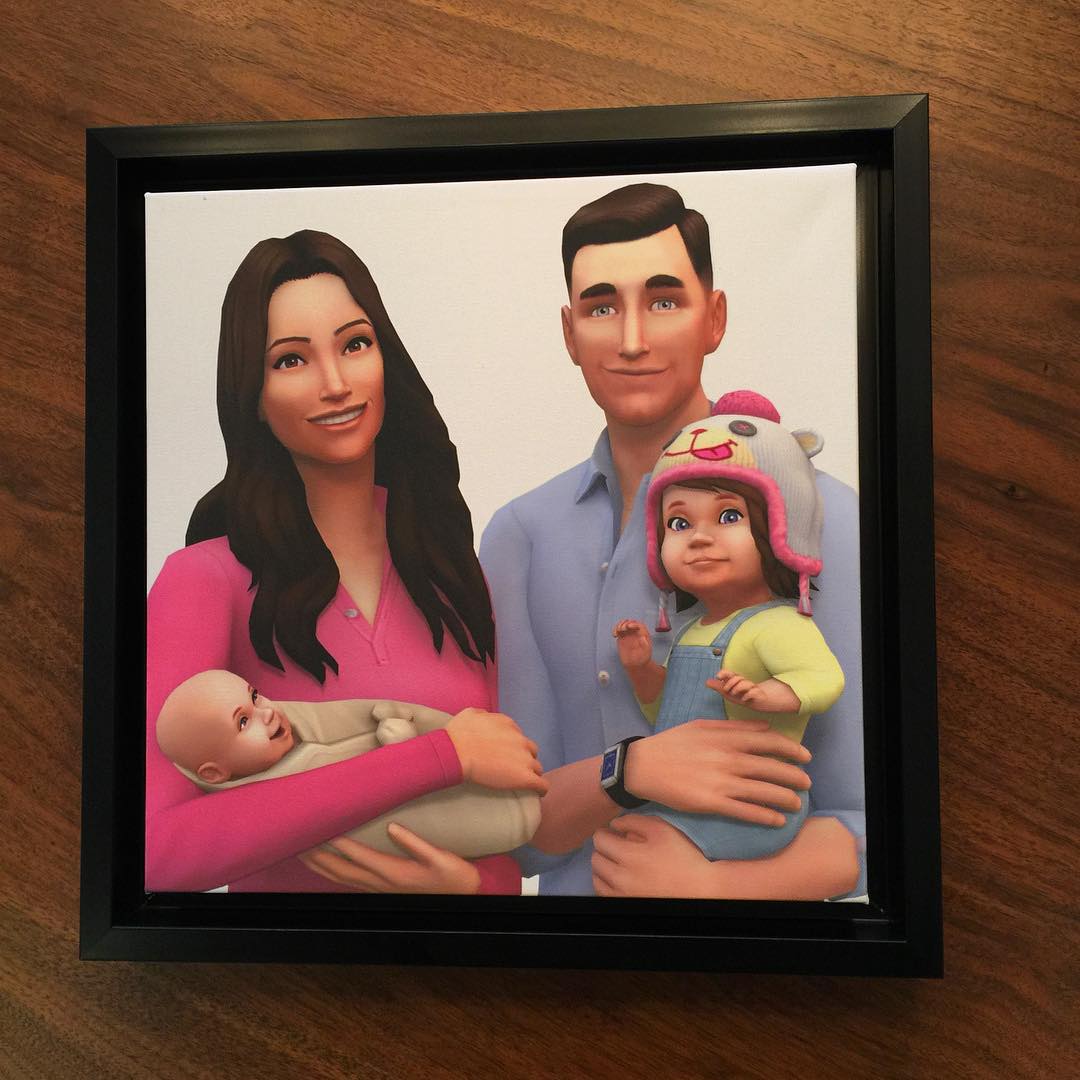
UPDATE: SimGuruLyndsay gave a statement about this unique render:
The unique piece of art of our CEO & his family as Sims was crafted by our team to celebrate the birth of his new baby.
Angelique Wilson, wife of Andrew Wilson, Electronic Arts’ CEO, shared this The Sims 4 Render on her instagram account. We went to check the liability of this information with Sims Domination and it turns out this post is still live on her Facebook profile, from where we got this instagram link!
Please note that this could only be a render dedicated to Andrew Wilson and his family, but for the first time ever, we have an actual idea of what Toddlers could look like in The Sims 4!


Tip: SimsDomination

People play The Sims 4 for many different reasons. Some enjoy to create and participate in community challenges, such as the 100 Baby Challenge, where others play it for interior design and fashion purposes. Personally, one of the main reasons that I play The Sims 4 is for the purpose of character creation and storyboarding.
When the game was released it opened up a whole new world of sliders, making the customisation of your Sims more unique than previous generations did, and so this was perfect for simmers who wished to add a little extra flair to their Sims. And so after the initial stage of playing for the sake of playing, I realised that this new software could be used for so much more.
For the past two years, a friend and I have spent our time drafting a book together, and drew pictures of our characters by hand in order to get a better feel of who we were writing about. But with the Sims 4, we could create them in a way that really showcased their personalities. We could suddenly choose what hairstyles and outfits would go with different scenes in the story, and then later, act out those scenes and see how the characters would react.
The Sims 4 has become so much more than just a game for me, and has turned into one of my most trusted sources of inspiration when it comes to creative writing. I would highly recommend this method to other writers, especially ones who struggle to find inspiration for their characters. Create your own inspiration!
The Sims 4 can be used to create concept art for storyboarding and character creation as well as just pure fun!

By popular demand, here are the adorable tiny FX sheep in the Windenburg countryside.


SimGurus shared new info about The Sims 4 Get Together after releasing the ”How Windenburg was built” blog.
*UPDATED 19/10*
@Cinderellimouse no interactive pigeons. I actually wrote a design for them though!
— Lyndsay Pearson (@SimGuruLyndsay) October 18, 2015
@catloverplayer @ZerbuTabek @AhmedKallala @SimGuruHouts there are special lots, harder to get to but not hidden like the glade or cave. — Lyndsay Pearson (@SimGuruLyndsay) October 18, 2015
@AhmedKallala @catloverplayer @ZerbuTabek @SimGuruHouts there are new objects in Get Together 😉
— Lyndsay Pearson (@SimGuruLyndsay) October 18, 2015
@Cinderellimouse there are some environmental fx ducks and sheep. 🙂 — Lyndsay Pearson (@SimGuruLyndsay) October 18, 2015
@aussiesimmer97 @SimGuruDaniel It’s pretty similar to the map in the blog post.
— Aaron Houts (@SimGuruHouts) October 15, 2015
@LuckyLunayre @SimGuruDaniel There is a 2×1 and a 2×2 version. — Lyndsay Pearson (@SimGuruLyndsay) October 13, 2015
@AhmedKallala @SimGuruHouts @SimGuruDaniel yes, the blog spoiled the surprise
— Lyndsay Pearson (@SimGuruLyndsay) October 17, 2015
@AhmedKallala @SimGuruHouts no windmills. no houseboats. there are special lots but they’re not hidden. — Lyndsay Pearson (@SimGuruLyndsay) October 17, 2015
@Cinderellimouse @SimGuruDaniel @SimGuruJill We didn’t make market stands. It was one of our many early ideas.
— Lyndsay Pearson (@SimGuruLyndsay) October 17, 2015
@TheSimScraper close! Concept art is always used for inspiration! — Lyndsay Pearson (@SimGuruLyndsay) October 17, 2015
@Iron_Cgull @SimsWorld_IT Concept art explores many different ideas. It helps visualize the different things we could consider building.
— Lyndsay Pearson (@SimGuruLyndsay) October 17, 2015
@TheSimScraper Karaoke is super fun. I’m pretty good at it even! It’s not in Windenburg though. — Lyndsay Pearson (@SimGuruLyndsay) October 17, 2015
@RacodyZ If only…
— Daniel Hiatt (@SimGuruDaniel) October 14, 2015
@TurkkiToni @SamWitts2 @TheSimCommunity I mean, why we would we do concept art if we never used any of it? 😛 — Daniel Hiatt (@SimGuruDaniel) October 14, 2015
@ladyteruki Any cool ideas we have that don’t fit into a particular pack could always come back in the future. 🙂
— Aaron Houts (@SimGuruHouts) October 15, 2015

Lay Them Down to Sleep
If you’ve opened up the Gallery, you’ve likely seen some amazing creations, from absurd mansions to mind-bending homes. And we often see the same question: how do they do that?! That’s what inspired us to invite members of the community to teach you how they build the amazing things you can find on the Gallery.
Today, we asked popular builder Zita1966 to write up some tips on creating an amazing modern bedroom in The Sims 4. Below is her guide*!
Thanks! I enjoy creating my bedrooms in the same way I enjoy building bathrooms: realistic in size, easy accessible and playable. Black and white is the go-to combination for a modern bedroom.
I created this bedroom in five easy steps:
Step one: Start with a medium size room. Bedrooms don’t have to be very big – in fact, making them a more realistic size can have a better effect than having a large room with open spaces staring at you. We are building a room with slots for a build-in closet, dressing table (dresser) and, of course, a bed. After building the frame for the bedroom, color the walls and floor. Insert doors and windows. This will help you to coordinate the color scheme for your bedroom.
Step two: Make use of barriers and walls. After you’ve build the shape itself, you’re going to start dividing it up into different sections for your closet space. You already created a spot for the dresser, so we will focus only on the closet space for now. Place two tall BlandCo Contemporary Cabinets in each corner of the wall, as shown on the illustration below. (These cabinets can be found under the kitchen cabinet tab) Draw a 2×2 wall between them, separating them and cover the front wall with 1 or 2 glass doors.
Step three: Put the finishing touches on the closet and dresser. We want to create the illusion that there is a real life build-in closet in the room, so now we have to use the Move Objects Cheat (if necessary) and clutter to “dress” the closet. Go to decorations and select wall decorations – there, you will find the storage units with hanging clothes for him and her. Hang them in the glass door closet against the inside wall. You may also choose to place a shoe rack there. I opted to place the smallest BlandCo Contemporary Cabinet inside my closet, instead of shoes. This creates the illusion of more space for storage inside the “closet,” but you can really just decorate at free will.
For the dresser, I opted to again go for something small. The BlandCo Contemporary Cabinet did the trick, but this time I put it on top, so that it frames the dresser for when I’m going to place the mirrors.
Handy tip: When using the Straight-up Wall Mirror like I have done here, you can overlap them when placing on a wall. This way you create a smooth bigger mirror without the gap that normally shows between them.
Step four: Choose and place the rest of the bedroom furnishings. Here’s where you need to fill in the rest of the room. Place the bed and side tables, and your modern bedroom will start to look complete. At this point, you’re almost done, and your room should now look something like this:
Step Five: Personalize your bedroom. Now the real fun starts. Decorating and placing little trinkets all over your room to make it beautiful and lived in. Paintings, rugs, plants – these will help make your bedroom look more realistic.
If you’re comfortable using the Move Object Cheat, you can do cool things like the plant in the picture below. I used the “Glaze and Grace” Glazed Vase with a house plant MOO’d into it.
Place items and objects on your dresser to make it look like a dressing table. Perfumes, plants and ornaments can be used to create that special effects. Cover the windows with modern blinds and your room is all set.
And there you have it, a perfect sensible and realistic, yet modern bedroom! You can find this bedroom along with all my creations in The Gallery under ID: Zita1966. Happy Simming!
Via TheSims.com!

It takes a lot of time and simoleons to decorate your rooms to fit the right emotion. Emotional Auras do have an effect on Sims, but they’re usually not that powerful, especially if your Sim already has some buffs.
That’s why Zerbu has come up with the perfect solution! His latest Environment Emitters Mod lets you place invisible Emitters in any room that will affect your Sim’s emotion by adding certain buff points.
After downloading the Mod, extract the .zip in Documents > Electronic Arts > The Sims 4 > Mods. Each emitter is treat as one .package file, so don’t worry over the count of emitter files.
After loading up your game, open Build Mode and enter the bb.showhiddenobjects cheat in the cheat console (CTRL + Shift + C). The easiest way to find these emitters is by going to Lighting > Misc section.


Each Emitter has 3 levels of Emotion Buff Strenght that go from 1 Point to 3 Points. After selecting an Emitter of your choice, place them in any room you want. They’ll only be visible in build mode with a square of a certain color, depending on the Emitter you’ve chosen.


You can also give a boost to positive Buffs with General Emitters that function as Happy Emotional Auras.


These Emitters even work when you place them outdoors!
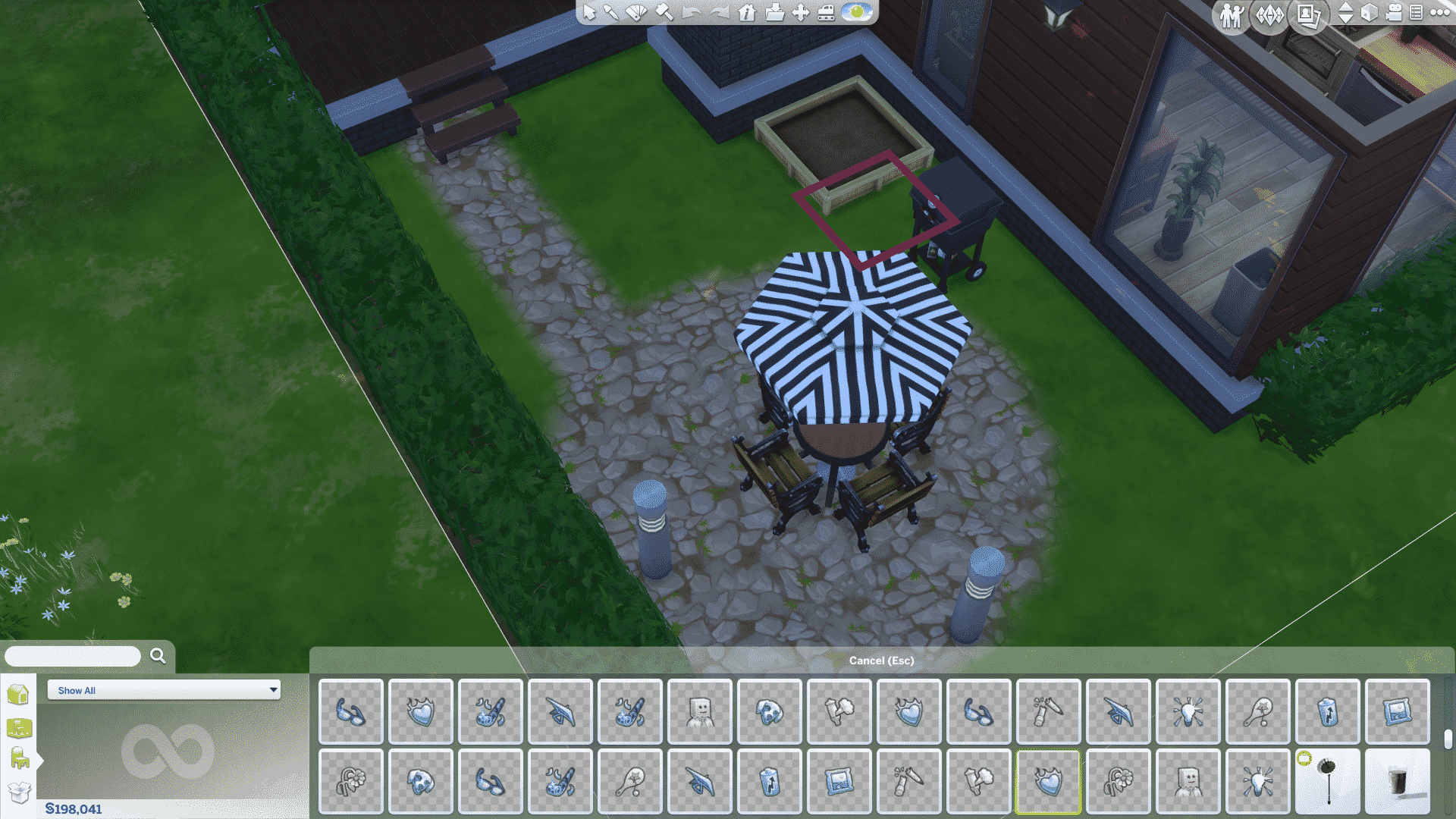

You can create themed rooms that will each affect your Sims differently. For example: you send your Sim to the bathroom and the Sim will get bored. Then you send your Sim to the Study room and the Sim will get focused and so on. There are a lot of Storytelling possibilities with this Mod!

Note: as these Emitters functional similarly to Emotional Auras, they’ll only have an affect on your Sim in a radious of few blocks. You can cover the entire room or outdoors by placing multiple Emitters that are the same.

If you still have The Sims 4 CAS Demo installed, you probably wonder why Origin updated it. SimGuruDrake confirmed that it’s a minor update with Gallery updates and fixes.

You can get your free copy of The Sims 4 CAS Demo HERE!

UPDATE: SimGuruDaniel confirmed this rumor as FAKE!

One of our readers Lucas has found a listing for The Sims 4 Star Wars Stuff Pack which is allegedly releasing on December 15th, 2015. According to Lucas, the listing has had been up and removed just a few minutes ago. Luckily, he saved a screenshot for us!
Last night I stumbled across a listing for “The Sims 4 Star Wars Stuff” on Amazon. It was getting late, so I had to go to bed. But I resolved to link you guys the listing as soon as I got home from work. To my surprise (or maybe not, considering how fast EA takes down leaks :P), the listing was removed as of five minutes ago.
Here’s where the listing would have been: http://www.amazon.com/gp/product/B01713KNML/
As I don’t have enough evidence about this story to prove it’s veracity, I’m putting it as a simple rumor until proven otherwise.

Hello there! Firstly a warm welcome to The Sims Community Simmers Q&A, we love getting to know another member of our community, now we always kick things off by asking, what started your Sims journey and how long have you been playing?
I first played Sims: Bustin’ Out with my older sister on the Playstation 2 and it really loved that! But I started to become a Sims addict ever since Pointless Blog and Zoella started their Sims 3 Let’s Play, and then now I’m here!
Sounds great! Now we have been taking a look at your YouTube channel which hosts some fantastic content for sims lovers out there, tell me what inspired you to begin recording your gameplay?
I started YouTube as I realized it was really easy to make videos! I really didn’t care about subscribers, but I wanted to have a blast and show my gameplay and myself to the interwebs! I think it was because I was really getting into watching YouTube, so I thought “Heck, why not!” And I started my YouTube channel, I’m improving everyday and I’m having fun!
I love the stuff pack! It was really just heaven! You can tell the Sims team put a lot of effort into this one. I feel like the Sims team have been getting a considerable amount of hate, so I think they made this stuff pack to really impress the fans! It is definitely one of my top three add-ons we have got for the Sims 4! Also, I’m yet to play around with the new Spooky Party type, but I’m going to do that in a upcoming part of my Girl Meets World Let’s Play!
We like the sound of that! Now The Sims 4 has brought us some fantastic content so far, Is there anything you would personally like to see in The Sims 4 and why?
Probably, University! I’m loving playing that in my Sims 2 University Let’s Play, so I think it would be really cool in the Sims 4! I think it would be really interesting as well how they improve the University gameplay, and to compare it to Sims 2: University and Sims 3: University Life!


Finally we have to ask if you are excited about the brand new expansion pack Get Together? Is it something you will be getting and if so what are you most looking forward to?
Galaxy Simmers Quick Fire Questions
Night or Day – Day
Tea or Coffee – Tea
City Break or Beach Holiday – City Break!
DVD or Cinema – DVD
Pink or Blue – Blue


Welcome back to another week of The Sims Video Spotlight! I hope you enjoy the videos featured, we have a few builds, Create A Sim videos and a Let’s Play.
First up is a beautiful modern condo created for the world of Newcrest. This house is gorgeous, inside and out. Simified such a talented creator and keeps his builds very play-friendly, which great thing in my eyes – this is definitely worth watching!
[vc_video link=’https://www.youtube.com/watch?v=72oB27kj6yA’]
This series, Around the World, is possibly my favourite build series’ yet. It’s so creative and each house is different, this Japanese style house is wonderful and gives me so much hope for a pack in the future similar to World Adventures. DutchSims4Master is just that – a master, at building beautiful houses for our sims to enjoy. It’s very inspiring to watch and makes me want to build outside the box!
[vc_video link=’https://www.youtube.com/watch?v=UBV5oOahSnY’]
For the final build themed video we have a renovation collaboration. In this part, MaiSims redecorates the living/entry room of an existing house. I love the idea of this, and it’s interesting to watch rooms transform and how much difference it can make to a house without changing its shape.
[vc_video link=’https://www.youtube.com/watch?v=bs_tGS_dJrU’]
Now as it is, after all getting closer to Halloween, I spotted this spooky looking sim and just had to watch her being made. There is a lot of custom content used in the creation of this beautifully creepy ghost, so much that I wish she had listed the links but it is still a great video and fun for the month of October.
[vc_video link=’https://www.youtube.com/watch?v=z3kg8I0riEM’]
I have seen this tag floating around for a while now and I really adore it. It’s fun and different, with a little nostalgia thrown in. Here are the details she lists in her description box:
In this series, I will be generating the offspring of two Disney Characters in The Sims 4 Create A Sim, to see what they would look like. The results are quite interesting!
I generate two males and two females. Every fifth sim generated using genetics in Create A Sim, will be chosen as the Disney couple’s offspring.
In this episode, I am generating the children of Tarzan and Jane – who I downloaded off The Sims 4 Gallery from user ‘paunda96’.
[vc_video link=’https://www.youtube.com/watch?v=-zNxD-Bx1Ss’]
Finally we finish this weeks spotlight with a Sims 3 Let’s Play, based around Generations and Pets. These two expansions are many peoples favourites, especially Generations, so I think this is a great series to watch if you’re missing these features. I think StellaSims101 did a great job with this Let’s Play so far, and I’m definitely going to keep up with it!
[vc_video link=’https://www.youtube.com/watch?v=itT1JZqb6iI’]
That is all for this week, as always I hope you found something you enjoy watching and feel free to mention any that you have been liking too!

The Sims 4 Get Together’s latest blog post got us all pumped up for it’s December release. With some other concept art pieces we got, there’s also this concept art image that appears to be showing Windenburg’s entire map!
What once used to be an assumption is now a confirmed fact! Thanks to SimGuruHouts, we now know that the Map of Windenburg will pretty much look similar to the concept piece above.


