

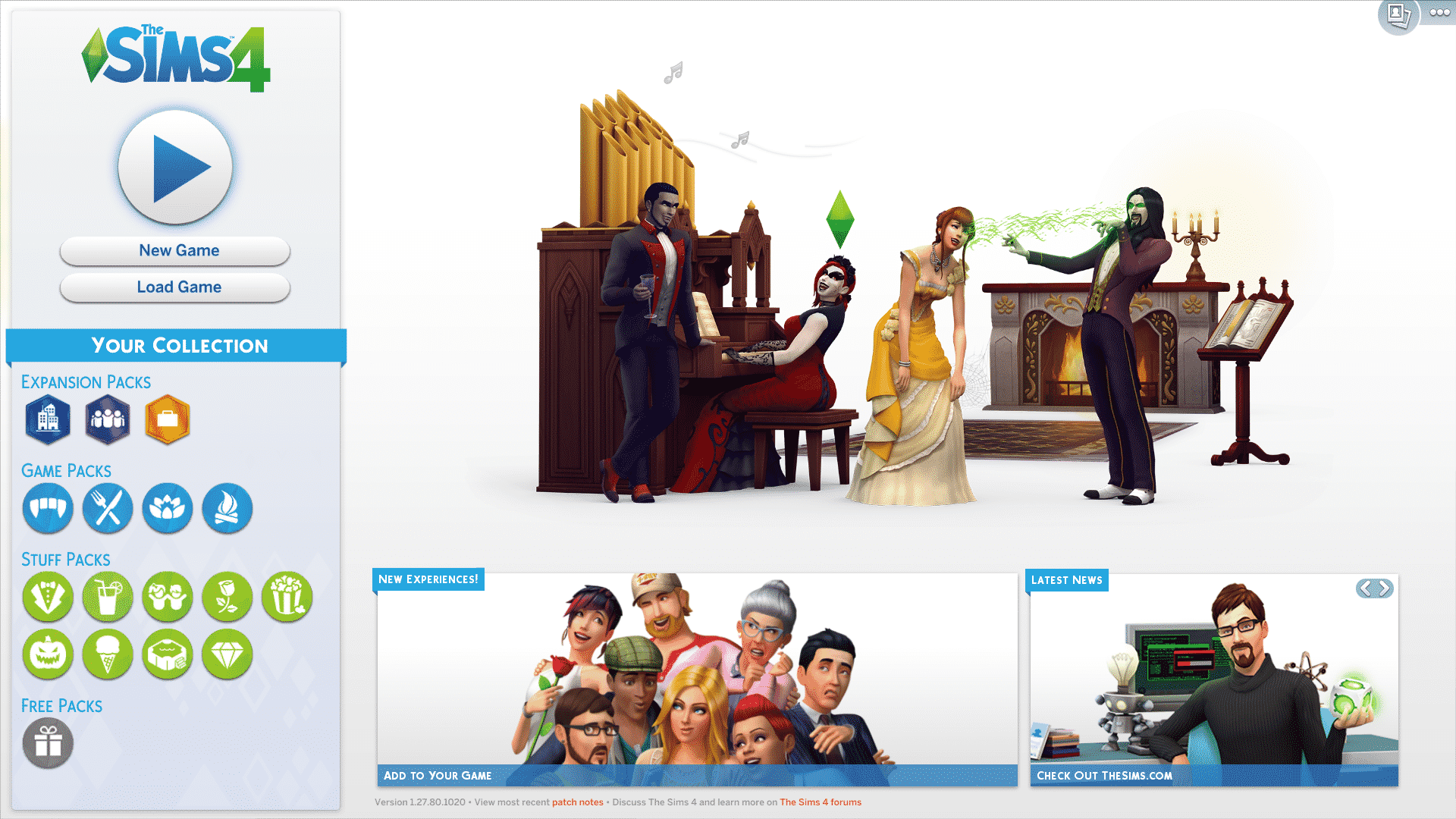
The Sims Team made quite a few changes to The Sims 4’s Main Menu in the latest update.
From now on you have a full overview of your installed The Sims 4 packs. That includes Expansion Packs, Game Packs, Stuff Packs and Free Packs.
Instead of the + button that had a ”new game” function on the top right corner that was present in previous main menus, now you have a full ”new game” button on the left side right below the play button.

Clicking on each Pack icon will give you more information about that pack (internet connection is required). What’s new is that now you can slide left and right between all the packs you’ve installed:
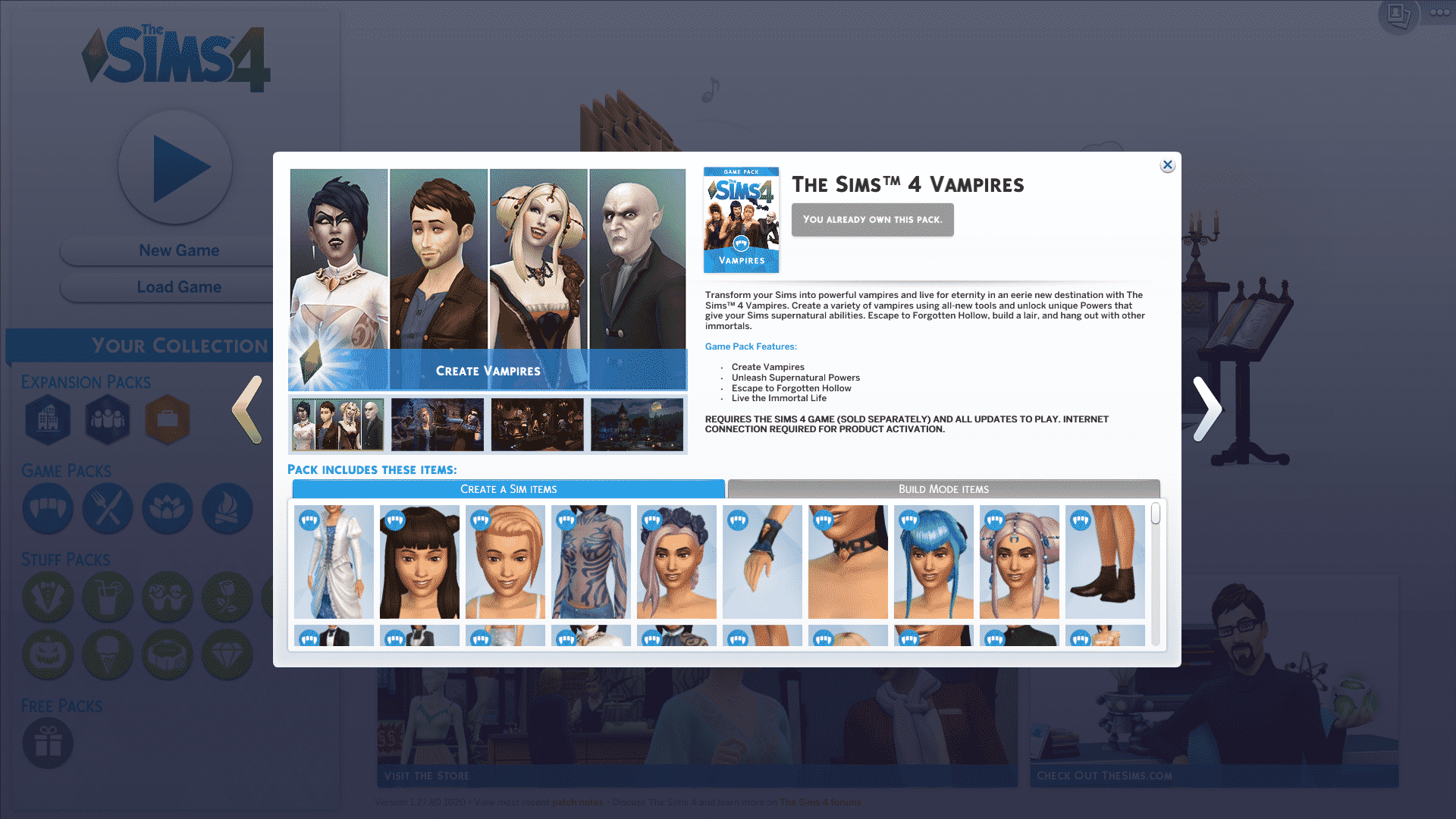
This means that you can only check out information about installed packs throughout your Main Menu. The ”My Packs” button has been removed from live / build mode:

What are your thoughts on the new main menu?


20 Comments
I like it <3
I love that it now shows your DLC on the side. Been wanting that for a while.
I like the new design and especially the new pop up when you click on a pack icon.
The only thing I don’t like about it is that it shows the DLCs you don’t have too. I wish there was an option to hide unpurchased content, the grey icons trigger my OCD :T
Reply to SoulEater
Ha! You know they wanna constantly remind you of the packs you don’t have so you are “encouraged” to buy the rest. I feel you; I’m super OCD about those things too.
Where is the CAS button from the main menu. Sometimes I don’t want to play a world, I want to play in CAS.
It’s nice that they made the New Game icon so noticeable, easier to find for people who want to start over or play a challenge.
It looks good
Ugh…The new menu SUCKS!
how can i now make a new world without deleting my other people… like i wanna start completely new without losing anything of my other world.. everytime i click on new game it just lets me create new sims in the same world as my others.. please help…
I like the new design and especially the new pop up when you click on a pack icon.
It’s nice that they made the New Game icon so noticeable, easier to find for people who want to start over or play a challenge.
how can i now make a new world without deleting my other people… like i wanna start completely new without losing anything of my other world.. everytime i click on new game it just lets me create new sims in the same world as my others.. please help…
Ugh…The new menu SUCKS!
It looks good
I like it <3
Where is the CAS button from the main menu. Sometimes I don’t want to play a world, I want to play in CAS.
The only thing I don’t like about it is that it shows the DLCs you don’t have too. I wish there was an option to hide unpurchased content, the grey icons trigger my OCD :T
Reply to SoulEater
Ha! You know they wanna constantly remind you of the packs you don’t have so you are “encouraged” to buy the rest. I feel you; I’m super OCD about those things too.
I love that it now shows your DLC on the side. Been wanting that for a while.
Welcome to Sims Community!
Our community is about connecting people through open and thoughtful conversations. We want our readers to share their views and exchange ideas in a safe space.
In order to do so, we've created a simple set of rules that will improve your experience. Simply put, keep it civil.
Your post will/might be rejected if it contains:
User accounts will/might be blocked if we notice:
So, how can you be a power user?
Thanks for reading our community guidelines. Please note that we're aware of certain issues with Sign In / Log In and Create Account / Email Confirmation issues. We're working behind-the-scenes on a new Account Creation process. Thank you for your patience and remember - freedom of speech is not freedom of reach