Home Blog Page 103

Decoding the “It’s All Relative” Roadmap for The Sims 4

0

Okay… what’s with the bear?

After yet another long news drought, we finally have a new roadmap for The Sims 4! As usual, it was full of vague hints and silly puns, leaving Simmers to guess what on earth is in store for them. The fandom can come up with some pretty crazy theories sometimes but hey, sometimes those theories actually turn out to be correct! We just never know what The Sims Team has in store for us!

Sims Community has been staring at this roadmap all day, trying to piece together the puzzle for you. We want to make it clear that this post is pure speculation. Nothing suggested in this article has been confirmed by any official sources. We’re just having fun joining in on the speculation with the rest of the Simming community, so let’s start speculating!

The Sims 4 Roadmap Speculation

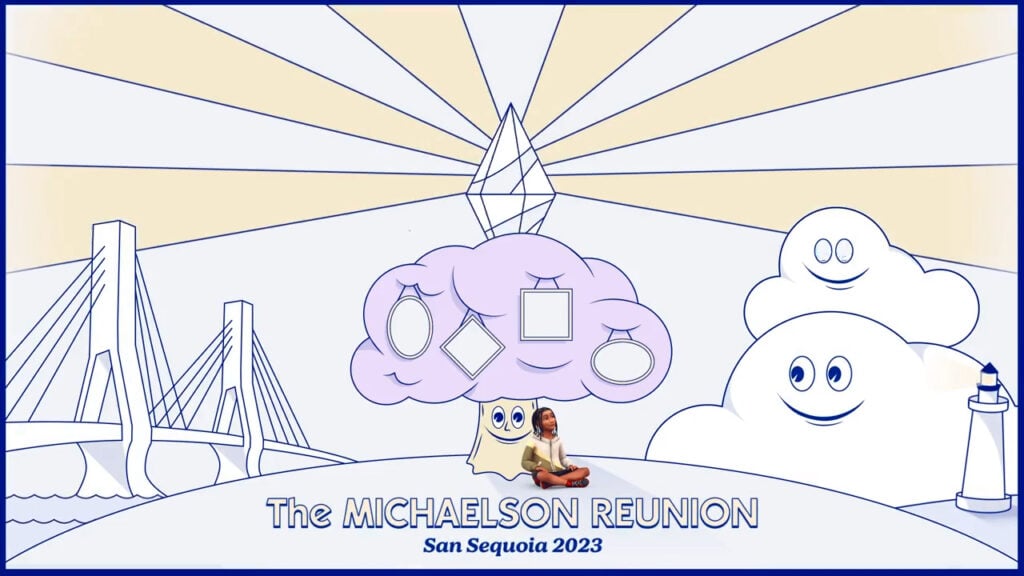
The Sims 4 roadmap comes in the form of a short video posted to The Sims social media channels. It depicts a child Sim sitting under a drawn tree that has framed portraits on it. Inside the portraits is a visual hint about upcoming updates and packs for The Sims 4.

The overall theme of a family tree and family-related content is obvious to us but let’s unpack the details a little further, shall we?

One Big Update

Sims 4 Roadmap

This one has actually been confirmed already. We’ve known since last year that a new life stage called infants will be coming to The Sims 4 in early 2023. It is now early 2023 so this update is nearly due (pun intended). The diaper shown alongside this just confirms that we’re getting infants very soon. Hooray!

Two Unique Kits

Two New Kits

Kits should be no surprise to anyone anymore. Kits are routinely pushed out at a much more frequent pace than game packs and expansions. For better or worse, kits have essentially killed stuff packs. An image of some underwear and a tube of toothpaste is seen in The Sims 4 roadmap. We’re willing to bet that we’re getting a CAS kit for sleepwear and a Build/Buy kit for bathrooms.

One Expansion Pack

Sims 4 Roadmap

Okay. You got us. We have NO idea what this one means. We know we’re getting a new expansion pack but we don’t have a clue what it’s going to be about. The staff here have been brainstorming hard for this one. Lots of things have been suggested, including a royalty pack, an elder pack, something related to dental hygiene, and even the tooth fairy but if we’re being honest, they’re all kind of a reach. What does the bear wearing a crown mean? Your guess is as good as ours.

Community Stream Jan. 31st!

Community Stream

No cryptic clues here in the Sims 4 roadmap! There will be a community stream on January 31st so make sure you tune in to The Sims’ YouTube and/or Twitch channels on that date. No details yet on what time the stream is taking place or what it’s going to be about but as always, we’ll keep you updated on all of that information as it’s made available.

The Michaelson Family Reunion

Sims 4 Roadmap

This obviously has something to do with generations and/or family in some capacity. Our best guess is that since family reunions are a gathering of extended relatives, The Sims 4 may be getting more support for extended family members. Currently, Sims do have aunts, uncles, and cousins, but it’s not specified in very many places in the game. Aunts, uncles, and step-relatives are not treated like family at all. 2nd and 3rd cousins are also not seen as family. This can lead to a lot of awkward situations in generational saves. Maybe The Sims Team is planning to clean this up. We could also be getting a family reunion social event, which would be very cool!

As for the name Michaelson, perhaps it’s the name of a premade family being added to the game? The little boy in the roadmap may be part of the Michaelson family and in case you didn’t spot this already, he is sporting a new hairstyle not yet in the game!

San Sequoia 2023
Michaelson Family Reunion

We see a bridge and a lighthouse in the Sims 4 roadmap along with a place called San Sequoia. We wouldn’t be surprised at all if San Sequoia was the name of a new world coming with the expansion pack. The bridge and lighthouse may be landmarks in the new world. This still doesn’t provide any insight into what the bear wearing a crown means, though.

It’s All Relative!

Sims 4 Roadmap

Every Sims 4 roadmap has its own slogan to tie together a common theme. This roadmap’s slogan is “It’s All Relative!” We can’t see how this isn’t a pun on family relatives so clearly, the overall theme is family. With comfy sleepwear and bathroom stuff as kits, and all the references to family trees and family reunions seen in the video, it’s obvious everything is going to tie into family home life in some way. So whatever this mysterious expansion pack is about, it’s a pretty safe bet that it’s going to fit into this theme.


Those are our best guesses as to what we might see in the near future! What do you think of our predictions? Have anything else to add? Discuss your thoughts with other Simmers in the comments, but remember to be respectful!
The Sims 4 Curseforge CC Festival: Final Round!

0

Curseforge is wrapping up their Community Event for Sims Creators with a bang! Learn how you can participate.

Curseforge, the official modding platform for The Sims 4 is wrapping up its CC Festival with huge prizes!

Sims 4 x Curseforge

In case you don’t know, Curseforge is the new Custom Content and Mods platform in partnership with EA / Maxis. The celebrations for this ongoing partnership began shortly after the release of The Sims 4 Mod Manager with a CC Festival.

This festival has been a celebration for both CC Creators / Modders and players of such content. With several Phases throughout, Custom Content Creators were able to submit various entries; from Sims Homes and Households to Custom Poses – many had the opportunity to showcase their talents and be rewarded for such!

The festival ran across 3 different phases, including:

  • Phase 1 – CC & Sims
  • Phase 2 – Lots & Rooms
  • Phase 3 – Grand Finals (happening now)

This major festival is among the first events for CC Creators and Modders at this scale. Considering several categories (and even judges!) were included in this process. Today, you can be the judge as well!

The SIms 4 CC Festival - Phase 3

Sims 4 CC Festival – Phase 3 (Final Round)

The final round includes 3 different categories with 12 final Sims Creators from the previous phases. Their finalist creations have been shared on Twitter, with images showcasing the finalists creations.

In the page linked down below you’ll be able to access the full list. There are prizes for 60 random voters included, so if you have a Twitter account make sure you like your favorite!


Stay tuned for more updates on The Sims 4 Mods Hub! The newest Mod Manager is out now on Mac as well.

Upcoming Kit for The Sims 4 has Leaked!

0

The Sims 4 Simtimates Collection Kit is the next CAS Kit!

It wouldn’t be a new Sims Season without a leak!

EA’s new rebranded program EA App has accidentally revealed images of the upcoming Kit for The Sims 4. Revealing the title and cover art of the Kit.

The leak was first spotted by Reddit user u/nekokitty200 who found out that images on EA App have been misplaced. Instead of proper assets for The Sims 4’s already existing Modern Menswear Kit, EA accidentally misplaced the assets with the future Kit.

Simtimates Collection Kit Leak for The Sims 4 in EA App
Right there in the center! Image by nekokitty200

The leak was later additionally confirmed by @LuddySimmer, who spotted the new Kit assets in their own EA App.

The Sims 4 Simtimates Collection Kit has been already teased yesterday with The Sims 4’s new roadmap. The left caricature on the right image strongly suggests that one of the new Kits is a CAS Underwear Kit. Now, we have an official confirmation from the EA App itself!

One of the assets featured in the leaked image also showcase a new Underwear outfit that was shared during The Sims Summit.

You can check out the Concept Art in the middle that showcases a glimpse of The Sims 4 Simtimates Collection Kit:

Sims 4 Kit Concept Art

The Sims 4 Simtimates Collection CAS Kit is expected to release this Season, by the end of March. We’ll keep you posted on all things Sims 4 Kits right here on Sims Community!

SPECULATION: The Sims 4 Infants Update coming Next Week!

0

Rumors on The Sims Streets suggest that The Sims 4 Infants Update is releasing very soon!

ARTICLE UPDATE: There’s a new update for The Sims 4. Unfortunately, the Infants remain to be a rumor as they’re not included in the update. The next release suggests at January 31st during the Community Livestream.

POLICE SIREN

Before I begin with this post, please note to take anything mentioned here with a grain of salt and to keep your expectations set. Nothing is officially confirmed as of yet. This post contains information based on previous patterns and hints.

Remember – It’s All Relative! 😉

An interesting Season is ahead for the players of The Sims 4! A new “It’s All Relative” Season teases many new releases, with a strong focus on the upcoming Expansion Pack and Free Game Update. Many players have eagerly been waiting for the Infants Life Stage Update since Behind The Sims Summit in October. Today, it seems we’re closer to the patch and the proposed “Early 2023” teaser.

Let’s take a fun speculative ride and see if all the clues are lining up to the update being released next week.

The Sims 4’s Season 1 Roadmap for 2023

Yesterday Maxis released the first roadmap of Sims 4 releases for 2023. Covering new Kits, a Livestream and of course the community’s favorites – new EP and Update!

The Roadmap released started off strong, with the first thing being The Sims 4 Infants Life Stage Update.

Whether or not the new roadmap is in chronological order or not, other rumors confirm that the Infants Update is indeed the first one to arrive.

The Sims 4’s latest Laundry List

The Sims Team released a new Laundry List for The Sims 4 on January 10th. Covering Bugs and Issues that should be fixed with a new game update this month.

Following the patterns of previous Laundry List releases, it’s almost tradition now to expect a Sims 4 Update seven days after the release of a Laundry List if all goes right. Previous Laundry Lists have fallen in this line almost always 7 days before the Update release.

This one doesn’t look to be much different.

Tweet from TurboDriver

Popular modder behind big Mod Packs such as WonderfulWhims and WickedWhims (18+) has released a tweet comment in regards to the new roadmap. Strongly suggesting that this One Big Update is coming next week!

https://twitter.com/WickedWhims/status/1612855235814330394

Laying the groundwork for upcoming Sims 4 Expansion Pack

The Roadmap itself gave away clues that the community has been gathering about the upcoming Expansion Pack since the first Summit! Considering that the Family-themed Expansion Pack will be released by the end of this March, it’s highly likely that the team will put out the Infants Update first before releasing the EP.

San Sequoia Concept Art from The Sims 4's Upcoming Expansion Pack
San Sequoia Concept Art from The Sims 4’s Upcoming Expansion Pack

Once again, it’s all relative. We’ll find out soon enough if the speculation turns out to be true and if the update will come out January 17th. Please keep your expectations set just in case the Infants Update doesn’t come out next week.

If it does, we’ll keep you updated every step of the way on News & Guides for this brand new Life Stage. Stay tuned!

The Sims 4 Mod Manager is Now Available on Mac!

0

The official Curseforge Mods Hub for The Sims 4 is out now on Mac!

Curseforge has made a big announcement yesterday!

The timeline of the Mods Hub development begins with an announcement of the official partnership between Curseforge and Maxis back in October. The Mods Hub was supposed to come out for both PC and Mac on December 7th, but unfortunately the team had to push the Mac release for a later date. Luckily, that later date is January 9th!

Sims 4 Mods Hub releases on Mac

The team announced that The Sims 4 Mods and Custom Content are now available on the Curseforge platform for Mac. Making it available for you to download a huge gallery of Mods and CC right away into your game!

LETTER 2 PATTERN e1673387654567

Mac users, we know you’ve been waiting for this one: Mac support on the CurseForge client is officially available for The Sims 4™. Let the CC shopping begin!

– Curseforge on Twitter

FmCB96UWIAAcsPF

You’re now available to get instant downloads straight to your Save Game on your Mac device. The application allows you to search for specific mods or browse through a catalogue of recommended Mods & CC!

Sims 4 Mods Hub on Mac
The holiday decorations can go through January, right?

You can downloat the Curseforge client here. After installing the application the program should automatically detect your installed Sims 4 game. If not, there’s a feature that allows you to do so manually!

The Mod Manager is especially useful for upcoming Sims 4 Updates. It allows creators to release updated versions of their Mods after each update, and have the users of Mods / CC automatically get the new updated content. All through the Curseforge program!

We now also have a dedicated section for all the updates on The Sims 4 Mods Hub. Check it out!

The Sims 4 Laundry List: January 10th, 2023

0

Bugs & Glitches you should expect to be fixed for The Sims 4 this month!

EA has released a new Laundry List for The Sims 4. The Laundry List includes hot bugs and glitches reported by the community that should be fixed in the upcoming Game Update for The Sims 4.

Take a look at this month’s Laundry List:

Wrench Icon

Hi Simmers!

Welcome to this month’s Laundry List, where we’re sharing our list of the top community concerns that we’re currently investigating and hoping to resolve in the next patch. This is only a list of upcoming fixes; there are more topics that have been reported by players that are not listed and are still being worked on.This list is reported by players on Answers HQ and helps us continue our work of improving the user experience on a regular basis. 

Please note that some topics can be tricky and require an extended investigation on our end, so even though we are actively reviewing, it’s not a guarantee that we’ll have an immediate fix in the upcoming patch.

Here’s the list of the community concerns we’re investigating and aiming to resolve in the game update this month:

Bugs & Issues

Thank you for all your patience and valuable help in reporting! Please continue sharing with us any issues you’re experiencing on Answers HQ.

Stay tuned on Sims Community and be the first to know when the new update drops!

New Roadmap for The Sims 4 is here!

0

There’s a new Sims 4 Roadmap for the upcoming quarter. Here’s what to expect!

Say goodbye to the news drought with the Sims 4 Roadmap!

The Sims Team has just announced a brand new roadmap for The Sims 4. Covering releases and events from January this year till the end of March. The new roadmap has several new Paid (and free) content releases.

Sims 4 Teaser

From the Infants Update to a brand new Expansion Pack, here’s what you can expect:

Big Update – Infants

The teaser confirmed the obvious. Infants Life Stage are coming to The Sims 4 through an update this season!

We also have a list of expectations with the Infants Life Stage update if you want to take a peek!

Two Kits

According to the roadmap, The Sims 4 is getting two Kit releases this quarter. With the teaser it’s apparent that one Kit is going to focus on Underwear (CAS Kit) and the other on Bathroom (Build Kit).

New Sims 4 Expansion Pack

Finally, after months of waiting the moment for a new Sims 4 Expansion Pack is finally here! Although we haven’t gotten much from The Sims 4 Team, with the roadmap it’s speculated that the new EP will be Generations themed. The roadmap aesthetics and “It’s all relative” slogan further confirms the community’s suspicions!

We don’t know what the bear means as of yet.

Coincidentally the teaser also contains a tease for a potential new Sims 4 world. “San Sequoia” could be the name of the future Expansion Pack’s world.

San Sequoia also had its debut during Behind The Sims Summit livestream, where a similar world was teased through Concept Art. Take a look:

The Sims 4 is getting TWO Expansion Packs next year!

Sims 4 Community Livestream

As we know through the roadmap, there’s going to be a new official livestream for The Sims 4 on January 31st, 2023! Stay tuned on Sims Community to know more about the stream.

Sims 4 Community Stream

What are your thoughts on the new roadmap? As always we’ll keep you posted on all the latest information about upcoming Sims releases right here on Sims Community!

COMMUNITY POLL: Sims 4 Wishlist for 2023

Vote for your most-wanted addition to The Sims 4 in our latest poll!

It’s the start of a new year and it doesn’t look like The Sims 4 is slowing down anytime soon. With an infants update scheduled for early this year (no, we still don’t have a specific date) and the promise of more SDX drops, it’s likely that The Sims 4 will see some big changes in 2023. We want to take some time to ask Sims 4 players about what they most want to see added to The Sims 4 in 2023.

From open world to cars to hotels and resorts to simply having more things for neglected life stages to do (*cough* elders *cough*), there’s no shortage of things Simmers want in The Sims 4 for 2023. While open world may be an impossible order to fulfill based on The Sims 4’s core engine not supporting it, other things could very well be a possibility on the horizon. With infants confirmed to be on the way, it seems like The Sims Team is looking to start off strong in 2023. Let’s hope that momentum continues throughout the rest of the year!

The Sims 4 Seasons: 127 Screens from the Announce Trailer / Sims 4 2023 poll
Happy New Year! Here’s to 2023!

Before we get into the poll, we want to remind our readers that Sims Community is a fansite. We’re dedicated and passionate Simmers just like you! We have absolutely no affiliation with EA or Maxis. The features listed in our poll have no bearing on whether they will be added to The Sims 4 in 2023 or later. The results of this poll do not reflect the future of The Sims 4 in any way. Our community polls are purely for fun and entertainment purposes only.

The Sims 4 2023 Community Poll

We know there’s a lot of options to choose from so you’ll be able to select up to two choices! Ready to share your opinion with the world? Let us know what you want to see in The Sims 4 in 2023!

[totalpoll id=”134516″]

Did we forget anything? Tell us what you want in The Sims 4 in 2023 in the comments! Strike up meaningful discussions with your fellow Simmers!

The Sims 4: CC Clutter to Personalize Your Sim’s Home

A base game CC collection inspired by the Everyday Clutter Kit to fill up your Sims’ homes!

Clutter has always been at the forefront of decorating in The Sims. It’s easy to fall down the rabbithole of clutter CC and end up with thousands upon thousands of little trinkets to fill your Sim homes with stuff that tells a story about who they are. Luckily, we’re not going to test the limits of your computer’s processor today. We’re going to show off a single set of 45 clutter CC items for The Sims 4.

Simkoos Preview
Image Credit: simkoos

This clutter CC set for The Sims 4 is called Clutter Dump and it’s made by simkoos. As the title suggests, the collection is a smattering of completely different, unrelated objects intended to fill up your Sims’ home with personalized items tailored to their lifestyles and interests. There are a wide variety of items to clutter up a home; many of the objects are edits of items from the Everyday Clutter Kit among other DLC packs. There are also a few conversions from The Sims 3, such as the strollers.

Sims 4 Clutter CC Previews

Sims 4 Clutter CC Previews
Image Credit: simkoos

Everything in the CC Clutter Dump collection is base game compatible. Most of the objects are purely decorative but the televisions and mini speaker are functional.

Here’s an in-game screenshot of how everything in the CC Clutter Dump set looks in our game:

Sims 4 Clutter CC Screenshot

All similar-looking items are actually separate pieces so you can mix and match with other objects. Our personal favourite items in the collection are the baby strollers and baby bottles. Even as deco, they can make a house with young children feel more lived-in. For those who use or make custom poses, the strollers will be great props for family poses.

The Sims 4 CC Clutter Dump collection is available for free on simkoos’ Patreon! Click the download button below to go straight to the Patreon download page.

Thinking of purchasing the Everyday Clutter Kit? Check out our overview and read our full review!

The Sims 4 Money Cheats: Every Way to Get Rich Instantly!

Get rich instantly with these Sims 4 money cheats!

The great thing about The Sims is it allows us to live out our wildest fantasies… even if that wild fantasy is just being able to purchase a house and raise a family on a single income. Yeah. I went there. Sorry. But for those of us who want a little more fantasy and a little less realism, there are numerous ways to make a lot of money fast in The Sims 4. Not all of them involve cheats but we know cheats are what you’re here for, right? This article is all about The Sims 4 money cheats! How to use them, how to make the most of them, and how to buy that big mansion on the hill without working for it at all. We won’t judge!

How to Use Sims 4 Money Cheats

Making Money in Sims 4 Cheat

Before we get into all the cheats, you should first know how to use them! We’ll tell you everything you need to know about how to use The Sims 4 money cheats on any platform!

PC/Mac

For Windows and Mac users, bring up the cheat console by pressing CTRL+SHIFT+C at the same time while the game is running. Then click on the text bar that pops up and type in your cheat. Double check that you have it spelled correctly. When you are sure you typed in the cheat correctly, hit ENTER to activate the cheat. Press CTRL+SHIFT+C again to remove the cheat console when you’re finished putting in all your cheats one at a time.

Some cheats will notify you that the cheat is now active. Others won’t. If you get no notification after putting in your cheat, check to see if the desired effect has happened in your game. If no change to your game has happened, you probably typed in your cheat incorrectly or are using the wrong cheat for what you want to do.

Console

On PlayStation and Xbox consoles, bring up the cheat bar by hitting all four back triggers at the same time on your controller. Move the curser to the cheat bar with the right analog stick and hit X (PS) or A (Xbox). When the on-screen keyboard appears, type out your cheat. Double check that you have it spelled correctly. When you are sure you typed in the cheat correctly, hit X (PS) or A (Xbox) to activate the cheat.

Be aware that using money cheats on consoles will permanently disable trophies and achievements on that save! Make sure you really want to do this before using any money cheats! You can also use the Save As function to save a copy of your save file so you can use cheats on one save and keep the other for trophy and achievement collecting.

Some cheats will notify you that the cheat is now active. Others won’t. If you get no notification after putting in your cheat, check to see if the desired effect has happened in your game. If no change to your game has happened, you probably typed in your cheat incorrectly or are using the wrong cheat for what you want to do.

Basic Sims 4 Money Cheats

Best Money Cheats

There are several different money cheats you can use to get rich quick in The Sims 4! Some are basic cheats that don’t require any other cheats to be active. Others require you to enable debug cheats to use them. We’ll start with the simple money cheats.

Please note that console players must confirm to activate debug cheats for all money cheats. PC/Mac players can use the following cheats without enabling debug cheats first.

  • kaching – adds $1,000 to your household funds
  • rosebud – adds $1,000 to your household funds (this cheat is more of a Sims 1 easter egg but it does actually work!)
  • motherlode – adds $50,000 to your household funds

Make sure you are in Live Mode when you use these cheats! They will only work while you have a household active.

Advanced Sims 4 Money Cheats

Get Rich Quick in Sims 4

The following money cheat is an advanced cheat. This means that it will only work with debug cheats activated. Use the following cheat to activate debug cheats

  • testingcheats true – activates the debug cheats, opening up more advanced cheat options for you.
  • testingcheats on – an alternate version of this cheat. If the above cheat does not work for you, try this variation, instead.

You should get a notification under the cheat bar telling you that testing cheats are now enabled. If you did not, try entering the cheat again and double check the spelling.

Money X

If you want to add a specific amount to your household funds, you can use the following Sims 4 money cheat to do so.

  • money X – replace X with the desired amount of simoleons you want your Sims to have. This will set your household funds to the exact amount you typed in. For example, if you want your Sims to have $57,674, type in money 57674

You can also reduce your household funds using this Sims 4 money cheat. If you want to set your funds to $0 for extreme rags to riches challenges, just type in money 0! Or type in any amount you wish your Sims to have that is lower than their current household funds.

Make sure you are in Live Mode when you use this cheat! It will only work while you have a household active.

Free Real Estate

The Sims 4 Get Famous: Over 130 Screens from the Celebrity Life Trailer / Free Real Estate
Go ahead… buy that house with the golden toilet. It’s free!

The following cheat is not necessarily a money cheat; it won’t add or subtract simoleons to/from your household funds, but it can save you a lot of money when moving into a new home!

  • freerealestate on – this makes all homes cost $0, essentially allowing your Sims to move to a nicer home without spending a single simoleon!
  • freerealestate off – disables the freerealestate cheat if it’s currently active.

Make sure to use these cheat in Manage Worlds! They only work and stay active while you are in Manage Worlds.

Looking for more Sims 4 cheats? Check out our ultimate list of all the most essential cheats!

Our Top 12 CC Picks for the Cool Kids!

Jazz up your kiddos’ wardrobes with these amazing hairstyles and clothes for children!

Even though we’ve gotten some great kid-centric packs and kits, children in The Sims 4 still have some pretty slim pickings in the CAS department compared to adults. Luckily for PC and Mac players, there is no shortage of custom hairstyles and clothes to choose from thanks to talented custom content creators! With the power of custom content, the possibilities are almost endless! We’ve compiled a list of our top 12 favourite Sims 4 child CC to help you dress your young Sims for success!

Sims 4 Child CC: Our Top 12 Picks!

Midge & Amanda Hair

Midge & Amanda Hair
Image Credit: NaevysSims

Creator: NaevysSims

These adorable long pigtails and swept back updo for girls are beautiful additions to your CAS collection! They are Maxis Match and base game compatible. They are also compatible with hats and come in all EA swatches. Custom thumbnails allow you to find them easily in the catalogue.

Koni Shoes

Sims 4 Child CC
Image Credit: Madlen

Creator: Madlen

Kids are always in desperate need of more shoes to choose from and these ruffled wedge sandals are the perfect addition to any warm weather or formal outfit! They come in a variety of cute colours and will really take your Sims 4 child CC wardrobe to new heights.

Sims 4 Child CC Hair Conversion

Hair Conversion 1
Image Credit: loomella

Creator: loomella

This hair conversion for kids is super pretty! We love the shoulder length smooth waves and the side hair clip is just the perfect touch to make this hairstyle a little more fancy without going overboard. This hairstyle is suitable for both casual and formal occasions. We love versatility!

Girls Hair Dump

Sims 4 Child CC
Image Credit: an0nymousghost

Creator: an0nymousghost

This set of three Maxis Match hairstyles for girls is superb. We could see our child Sims rocking these hairstyles as everyday casual looks and for special occasions! Make sure you remember to download the mesh for the scrunchie on the curly hair on the right! It’s always important to double check that when it comes to Sims 4 child CC.

Vevesims Hair Conversions

Vevesims Hair Conversions
Image Credit: dbasiasimblr

Creator: dbasiasimbr

Let’s hear it for the boys! We couldn’t forget about them so we found this fantastic set of hair conversions for boys; however, they can also be used on girls if you wish. They are base game compatible and hat compatible and come with toddler versions as well! What a two-for-one deal!

Get Famous Boys Hair Conversions

Sims 4 Child CC
Image Credit: NaevysSims

Creator: NaevysSims

We’re not done showing some love to our boy Sims, yet! These Get Famous hair conversions for male children are base game compatible and look great on our kiddos! This Sims 4 child CC is compatible with hats, too!

Shearling Boots

Shearling Boots
Image Credit: Fabienne

Creator: Fabienne

Shearling boots are always in fashion and now your child Sims can rock this popular shoe style during the colder seasons! They’re the perfect shoe to complete any autumn or winter look and come in plenty of different colours to match any outfit.

Sims 4 Child CC: Liv Dress

Sims 4 Child CC
Image Credit: Madlen

Creator: Madlen

This adorable dress for both children and toddlers is just too cute for words! We love the semi-sheer hem and plaid-patterned top with a bow at the waist! This Sims 4 child CC is so elegant and yet still casual enough to run around and play in.

Café Sweat Suit

Cafe Sweatsuit
Image Credit: nucrests

Creator: nucrests

This two piece sweat suit for kids comes in both solid and pattern variants so you can really mix and match your little Sims’ style. Look cute or punk depending on what swatches you pick out. It looks so warm and comfy, too. Can we get one for ourselves in real life, please?

Sims 4 Child CC: 10k Pack

Sims 4 Child CC
Image Credit: casteru

Creator: casteru

This full set of Sims 4 child CC comes with three new hairstyles and three clothing items for girls so you get a lot of new content to work with all in one download! Everything comes in 20-25 swatches to give you lots of freedom to mix and match different colours and styles!

Edwardian Child Clothes

Edwardian Clothes for Kids
Image Credit: chere-indolente

Creator: chere-indolente

This one’s for you History Challenge players! These Edwardian dresses for children will give your historical playthroughs a more authentic feel. The dresses also come with a brooch and smock overlay to further customize your child Sims’ historical look.

Korinna Jacket

Sims 4 Child CC
Image Credit: Madlen

Creator: Madlen

And finally, we have a gorgeous unisex puffer jacket for both children and toddlers! The jacket is layered over a warm knitted turtleneck sweater and is the perfect winter look for your little Sims!

Looking for more Sims 4 child CC? Check out this amazing recreation of The Sims 2 Family Fun Stuff pack!

The Sims 4 Toddler CC: 13 Clothing Sets for Tiny Tots!

Add some cuteness and style to your toddlers with these adorable outfits!

If there’s one thing family players complain the most about, it’s lack of content for younger Sims. Especially toddlers. They have a good point! Almost all of The Sims 4’s content caters exclusively to young adults. More specifically, party animal young adults. The selection of “homely” attire for Sims is sparse. Toddlers are the most neglected life stage of them all but it’s time to fix that! We’ve compiled a list of 13 cute and stylish toddler CC for The Sims 4!

13 Charming Toddler CC Outfits for The Sims 4

Toddler Leggings

Sims 4 Toddler CC Patterned Leggings
Image Credit: Colorful Plumbobs

Creator: Colorful Plumbobs

These base game legging recolours for toddlers are the perfect accessory for your tiny tots! Use them with almost any outfit combination and for any occasion. We always love to see Sims 4 toddler CC that is versatile like these leggings!

Toddler CC Shoe Pack

Shoe Set
Image Credit: casteru

Creator: casteru

I don’t know about you but I am always frustrated by the lack of shoe options when dressing my toddlers. The right shoe can really pull together a whole outfit, after all. These super cute sneakers are the perfect Sims 4 toddler CC to complete your kiddo’s outfit. They’re perfect for running around the playground!

Sims 4 Toddler Sweater

Sims 4 Toddler CC Baggy Sweater
Image Credit: KK’s Creation

Creator: KKs Creation

You can never have too many sweaters! They work for so many different casual occasions. We love all the different swatches on this Sims 4 toddler CC sweater, from popular brand logos to camo sleeves to a festive Winterfest option!

Winter Kiss Sweaters for Toddlers

Winter Kiss Sweaters
Image Credit: Margeh-75

Creator: Margeh-75

With Winterfest right around the corner, these winter themed sweaters are the perfect way to dress up your littlest Sims for the holidays. The patterns are too cute for words and will look amazing in your Sims’ holiday family photos!

Kaden Overcoat and Boots

Sims 4 Toddler CC Kaden Coat and Boots
Image Credit: OnyxSims

Creator: OnyxSims

This dapper overcoat and matching pair of boots will instantly elevate your toddlers from cute to sophisticated! This ensemble is great for any outdoor occasion where your little ones need to look a bit more formal. The perfect autumn or winter outfit to add to your Sims 4 toddler CC collection!

Hooded Dress Sims 4 Toddler CC

Jordyn Hooded Dress
Image Credit: OnyxSims

Creator: OnyxSims

This hooded dress looks so warm and comfy, I want one for myself! It comes in plenty of solid and patterned swatches and can be paired with leggings for the ultimate cozy vibe! Your little ones will be both comfy and adorable in this dress!

Gloria Layered Dress

Sims 4 Toddler CC Gloria Dress
Image Credit: PowLuna

Creator: PowLuna

This adorable dress for toddler girls comes in a variety of solid and plaid patterned swatches. It’s the perfect outfit for a chilly autumn day with its warm turtleneck sweater layered underneath. Pop a stylish hat and some warm leggings on your toddler and you have a super cute autumn-inspired look!

Kimi One Piece Outfit

Kimi One Piece Outfit
Image Credit: casteru

Creator: casteru

This super cute pleated skirt with a sweater layered over a collared blouse is a full body outfit and comes in 12 swatches. It’s the perfect balance between casual and formal for your toddlers! This Sims 4 toddler CC is sure to fit in at many different functions.

Happy Fall Toddler CC Set

Sims 4 Toddler CC Happy Fall Collection
Image Credit: PowLuna

Creator: PowLuna

This full set f 13 different CAS pieces for toddlers is a must-have for your Sims 4 toddler CC collection! We’re totally in love with the thigh-high socks and all the plaid patterns on numerous pieces. This versatile set includes skirts, pants, tops, shoes, socks, and leggings so you won’t be short on options!

Cutie Pie Sims 4 Toddler CC Outfit

Cutie Pie Outfit
Image Credit: Pluto Sims

Creator: Pluto Sims

This outfit comes in two separate pieces; leggings and top so you can mix and match your favourite swatches. We love how colourful this toddler outfit is and the cute little embroidery on the collar is such a sweet touch.

Toddler Cardigan Outfit

Sims 4 Toddler CC Cardigan Outfit
Image Credit: georgiaglm

Creator: georgiaglm

This cardigan outfit was converted from Kids Room Stuff for toddlers and made base game compatible! Your little Sims will look fashionable in this casual cool Sims 4 toddler CC. The ripped jeans add just the right touch of roughness to an otherwise polished outfit.

Toddler Pea Coat

Pea Coats
Image Credit: OnyxSims

Creator: OnyxSims

I just love pea coats! They’re so classy and sophisticated. This Seasons pea coat has been converted for toddlers and made base game compatible so your littlest Sims can look just as classy and sophisticated as their older family members!

Edwardian Nightgown Sims 4 Toddler CC

Sims 4 Toddler CC Nightgowns
Image Credit: HistoricalSimsLife

Creator: HistoricalSimsLife

This one’s for you Decades and History Challenge lovers! As hard as it is to find Sims 4 toddler CC, it’s even harder to find historical toddler CC, so we found some delightful Edwardian-period nightclothes for toddlers for your historical saves.


Looking for more content like this? Check out these mods for family gameplay!

The Sims 4 CAS Backgrounds: Give CAS a Makeover!

These custom CAS backgrounds will give CAS itself a makeover!

While the minimalist default CAS background of The Sims 4 is a nice neutral background that allows you to focus on the Sim, some players find it boring. Many Simmers miss the dressing room background with a handy floor mirror behind their Sim from The Sims 2 and The Sims 3. Others just want a more interesting background in CAS to take modeling photos with.

Whatever your reasons for wanting to upgrade your CAS background, we have a varied list of 13 background downloads for you to choose from! Remember that CAS backgrounds are default replacements, so you can only have one background installed at a time!

Sims 4 CAS Backgrounds

White Rooms

Sims 4 CAS Background
Image Credit: Annett

Creator: Annett

These white room backgrounds are great for adding a little variety to your CAS photoshoots without taking attention away from your model. Select from seven different backgrounds to find the one that best fits your tastes.

Realm of Magic Sims CAS Backgrounds

Realm of Magic Theme
Image Credit: KatVerse

Creator: KatVerse

These backgrounds inspired by Realm of Magic are the perfect Sims 4 CAS background to show off your spellcaster and occult Sim looks! Choose between the portal during the night and the day, the cobblestone paths, open sky, or the floating islands.

Old School CAS Room for The Sims 4

Sims 4 CAS Background
Image Credit: littledica

Creator: littledica

This dressing room goes back to The Sims’ roots and looks very similar to The Sims 3 but in The Sims 4’s signature art style. We love that this CAS background brings us back to the days of old school Sims but still fits in with The Sims 4’s aesthetic.

Britechester University

Britechester Theme
Image Credit: Annett

Creator: Annett

These Britechester Sims 4 CAS backgrounds are perfect for showing off those trendy college looks. Choose from 10 different scenic backgrounds around the beautiful city of Britechester to achieve the perfect backdrop to compliment your Sims’ wardrobe.

Evergreen Harbour

Sims 4 CAS Background
Image Credit: Annett

Creator: Annett

Is industrial grunge more your style? Then you’ll love these Evergreen Harbour backgrounds! There are ten different backgrounds from this rundown old industrial town to show off your Sims’ best grunge looks.

Mt. Komorebi

Mt. Komorebi Theme
Image Credit: KatVerse

Creator: KatVerse

These stunning wintery Sims 4 CAS backgrounds taken from Mt. Komorebi are absolutely gorgeous and really capture the beauty of the more mountainous regions of Asia. These backgrounds are fantastic for showing off your Sims’ winter wardrobe.

Sims 4 CAS Background Set

Sims 4 CAS Background
Image Credit: NekoChan-Simmer

Creator: NekoChan-Simmer

Fans of anime will love these whimsical backgrounds inspired by anime. Place your Sims in various stunning settings in a beautiful art style without ever leaving CAS.

Christmas Eve CAS Background Set

Christmas Eve Theme
Image Credit: Annett

Creator: Annett

With the holidays this month many Simmers are sure to love this set of Christmas Eve CAS backgrounds. Ten different backgrounds showing off different festive rooms in a home are available for you to select from to take those festive holiday pictures without ever leaving CAS.

Watercolour Sims 4 CAS Background

Sims 4 CAS Background
Image Credit: KatVerse

Creator: KatVerse

If you like something a little less busy but still a treat for the eyes, this lovely watercolour Sims 4 CAS background is sure to be a delight. It’s bright and colourful without being overstated and overshadowing your Sim.

Summer Backgrounds

Summer Theme
Image Credit: KatVerse

Creator: KatVerse

For those Simmers who spend all winter dreaming of warm summer days, this set of backgrounds are the perfect way to get away during the colder months. Show off your Sims’ new swimsuit or breezy beachy summer look with these four sandy options.

Christmas CAS Backgrounds

Sims 4 CAS Background
Image Credit: mosaica

Creator: mosaica

Want to make your Sims 4 CAS backgrounds a little more festive but still want to keep it simple? This set is perfect for you! These solid colour backgrounds with snow gently falling is a beautiful subtle way to celebrate the holiday season with your Sims’ wardrobe.

Pink Sims 4 CAS Background Set

Pink Theme
Image Credit: NekoChan-Simmer

Creator: NekoChan-Simmer

If you can’t get enough of the colour pink, you’ll want to add one of these soft pink CAS backgrounds to your game. From bricks to trees to clouds and even patterns and solids, there’s no shortage of options to complement your Sim’s pink outfits.

TS2 Inspired CAS Background

Sims 4 CAS Background
Image Credit: thorben-maerz

Creator: thorben-maerz

This creator has taken the time to lovingly recreate the CAS background from The Sims 2 in The Sims 4. It looks so close to the CAS background from our childhoods and we absolutely love it!

Like the holiday backgrounds featured in this post? Check out more of our holiday content!

Set Your Cows and Llamas Free with Free Range by Lot51

Thanks to Lot51, The Sims 4 Cottage Living’s Cows and Llamas have been freed from their enclosures!

Cottage Living cover
From Lot51’s Website

One of the best parts about The Sims 4 Cottage Living was the ability to have a farm with cows and llamas. Unfortunately, many Simmers were disappointed that each cow or llama was attached to it’s little barn in addition to only one cow or llama could be bought per barn. All things considered, it was a good pack but we knew it could be better. Thanks to Lot51, the cows and llamas can roam free with his Sims 4 Free-Range Mod!

The Free-Range Mod allows Simmers to create their own farm with cows and llamas not attached to a small barn. Finally, the freedom to create barns and choose where the animals graze. On the positive side, the system is highly customizable and easy for Simmers to use.

Using Free-Range

Sims 4 Cottage Living Mod
From Lot51’s Website

Firstly, in buy mode, there are two areas for your animals to frequent around: the Livestock Shelter Marker and the Grazing Marker. These markers disappear when the game returns to Live Mode so they won’t interfere with any farm designs. Lastly, the Markers are located in the Outdoor Activities Category. To put it another way, if you have trouble finding them, searching for Marker will show them.

To adopt either a llama or cow, click on the ground near the Livestock Shelter Marker. In this menu, the Appaloosa Plains Ranch & Stables Market can be opened and purchased from. This Market is open daily from 6 am to 8 pm so make sure you pay attention to the time. With a variety of llamas and cows, Appaloosa Plains Ranch & Stables Market sells each animal depending on its age and also has an assortment of animal treats. The treat selection changes daily.

Taking Care of the Animals

Llamas and Cows require the same care as they do using on Cottage Living. The difference between Free-Range and Cottage Living care are the messes that the animals create. Each animal creates cow pies, trash piles, and mud puddles (Seasons required) daily and dirty animals will create an increased amount. Sims can clean up after their animals by clicking on the ground and choosing Clean Livestock Shelter. No constant clicking needed! Sims will cleanup all messes that they are able to find.

Eco Lifestyle

With Eco Lifestyle installed, Cows will become gassy. Like in real life, this extra amount of methane will affect the local eco footprint and push it towards the industrial footprint.

With Additional DLC for Sims 4 Free-Range Mod

Seasons

Sims 4 cottage living mod by Lot51
From Lot51’s Website

With seasons installed, there is a special surprise when it rains! Keep an eye on the Grazing Marker when it is raining or during a full moon to see wild mushrooms grow. Sims can harvest and use these mushrooms for ingredients. Sometimes, Sims will encounter a fairy ring growing.

Get to Work

“There have been stories of strange phenomena occuring near dairy farms in the Appaloosa Plains for decades, even theories of genetic testing to gain control of the Sim’s mind! Is it just a myth, or is the Ministry of Central Intelligence hiding something?”

– From Lot51

Sims 4 Free-Range Mod Cheats

purchase_picker.refresh 10510752052178073266

Changes the current stock of Appaloosa Ranch and Stables Market. To summarize, these normally rotate every 24 hours.

Sims 4 Free-Range Mod’s Important Information

Required DLC: Sims 4 Cottage Living
DLC Used But Not Required: Get to Work, Seasons, and Eco Lifestyle

Mods Required to Work: Lot 51 Core Library (v. 1.4)

Overall, this mod is the perfect touch for any farming save! It makes cows and llamas feel more like real animals and less like an animal bound to it’s enclosure. The additional parts such as the fairy ring and the “strange phenomenon” add depth to the mod. Without a doubt, if you haven’t already tried Free-Range, definitely consider downloading it!

download icon

Without delay, create more realistic farms with Lot51’s Free-Range Mod! Download for FREE on Lot51’s Website.

Problems with the Free-Range Mod?
Visit Lot51’s Discord Server for Support.

More Mods by Lot51:
The Sims 4 Fashion Authority Mod lets you design Various Uniforms
Blockbuster, but for The Sims 4

How to Use the “Scoot Over” Interaction to Maximize Space in The Sims 4!

0

This simple interaction can help you make the most of a small living space in The Sims 4!

When designing a small bedroom for two Sims, it can be hard to figure out how to fit a double bed in the room without causing routing problems. Most Simmers might assume that the double bed needs at least half a tile of space on either side in order to be usable by two Sims. It’s not unreasonable to think that; after all, that’s how it’s worked in every Sims game before. But The Sims 4 has a little known trick up its sleeve. Did you know that Sims can “scoot over” in bed to make room for their partner in The Sims 4? If you didn’t, don’t feel bad! It’s a somewhat hidden interaction, but we’re going to show you how to make the most of this little secret to make the most of your Sims’ small living space!

Small Living Space Hacks
A very tiny bedroom for two Sims. We’ll show you how two Sims can use the bed like this.

Using the Scoot Over in Bed Interaction in The Sims 4

If you’re wondering why you’ve never seen a “Scoot Over” interaction on your Sims in bed, it’s because there isn’t one. It’s more of an autonomous thing but you can influence Sims to do it all the same.

Small Living Space Hacks
Tell the Sim to relax, nap, or sleep on the other side of the bed.

To have a Sim “scoot over” in bed, first have them relax in a double bed. The Sim must be relaxing above the covers; they cannot scoot over if they are asleep underneath the covers. When the Sim is relaxing, click on the empty side of the bed and tell them to relax, nap, or sleep. The Sim will choose to scoot over to the other side of the bed instead of getting out of bed and walking around to the other side!

Sims 4 Scoot Over in Bed
Watch as they scoot over to the other side!

How is this useful? It means that you can place a double bed up against a wall and still have the bed be usable by two Sims! It might seem like a small space saver but in a tiny home, every half-tile matters. That space you saved could allow you to fit a dresser or a mirror or something else your Sims need in their bedroom.

With the double bed against a wall, just make sure the first Sim who goes to sleep scoots over to the wall to sleep. Then their partner will be able to get into bed on the open side and sleep next to them. Pretty convenient, right?

Limitations of the Scoot Over Interaction

Of course, living in a small space comes with its own challenges. This little space saving manoeuvre is no different. There are some things you need to be aware of that aren’t possible with a doubled bed against the wall.

Sims 4 Scoot Over in Bed
Her partner can now sleep in the bed, too

The first is your Sims cannot WooHoo in a double bed if it’s up against a wall on one side. This requires both Sims to get in bed at the same time, so both sides of the bed need to remain open for WooHoo. If you have other spots in the home to WooHoo, this isn’t much of a problem. A shower, bush, or hot tub will satisfy that need depending on what DLC packs you own.

The second limitation is you need to make sure the Sim sleeping on the open side of the bed wakes up first. If they don’t, the Sim sleeping near the wall will be trapped in bed when they wake up. They can’t climb over their partner to get out of bed.

Looking for more quick build tips? Check out our mini guide!