Your favorite The Sims 2 families are back, but now in The Sims 4!
Photo Credit: Needlework Reverie
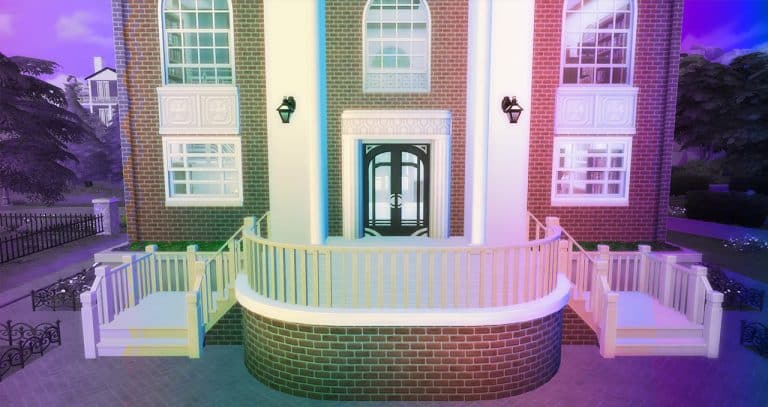
Needlework Reverie has recreated some of our favorite The Sims 2 characters—this time with a Sims 4 Save File! Not only did she create The Sims 2 characters, but she also created both houses and community venues for them to use. She made approximately 148 sims for the Save File. We love this nod to The Sims 2 and can’t wait to play with it even more!
Photo Credit: Needlework Reverie
Sims 4 Save File Walkthrough
Description
“What if all of the sims we know and love from TS2 were remade for TS4? Well you don’t need to wonder that anymore. Answer questions like, “How did Cassandra and MarySue know each other?” and “What was Brandi like as a teen?” “Did Don have game?” Ever wondered how things would be different for Romeo and Mercutio if their mom was still alive? Would things be different for Juliet if her grandmother was? Or Maybe you just want a save file that feels different and lively. I got you, boo.”
Photo Credit: Needlework Reverie
Backstory
“It is 8 years before Bella disappeared from Pleasantview, and all the sims that are meant to be contemporaries of Cassandra Goth’s are teens too and are living at home with their families. What were they like as teens? Set Pleasantview up so the events of the beginning happen, or go down alternate routes. It’s all up to you.
Strange Town and Veronaville are also alternative timelines for you to discover in this Sims 4 Save File. All the sims have jobs and relationships in their home world. You can choose how much or how little to mingle them. There are even sims in Britechester enrolled in the colleges.”
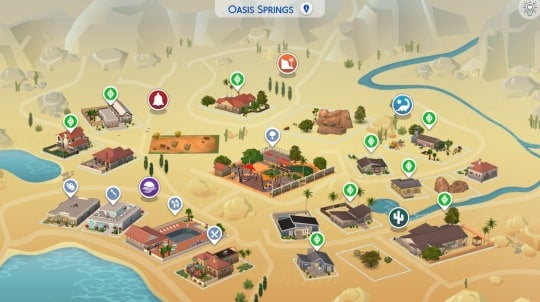
World Maps
Photo Credit: Needlework Reverie
Builds
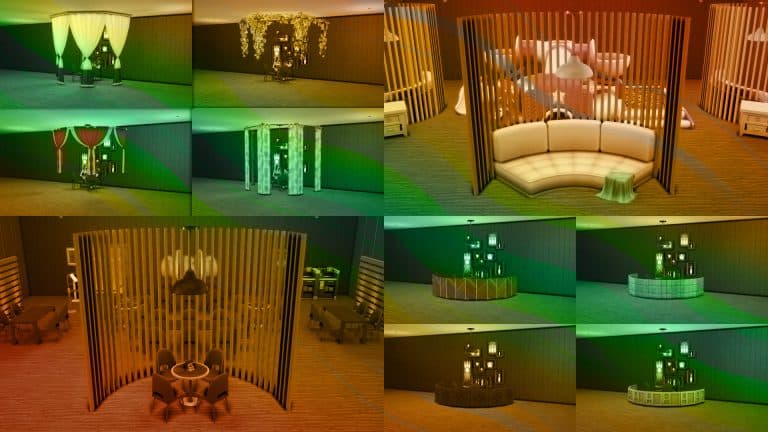
Photo Credit: Needlework Reverie
More Information
In addition to the information we have shared, Needlework Reverie has included more information in the following posts:
This is what Needlework Reverie had installed when creating this save file:
EP: all EPs installed but High School Years GP: all GPs installed but Journey to Batuu SP: all SPs installed but My First Pet Stuff Kits: all kits installed
If you are missing any of the packs used, you will end up with some sims missing clothes, hair, etc. You can always use testingcheats on and cas.fulleditmode on to edit the sims. A warning will appear when opening the save, but it just means that saving the file without those packs installed will delete that information. The save is not corrupted.
Note: You will have sims from the packs that Needlework Reverie did not own. You’ll just need to go into manage worlds and delete them if you do not want them walking around.
How to Install
Open your The Sims 4 folder and then your Saves folder. Extract the Needlework Reverie folder somewhere outside the folder. Check to see if you have a save with the same name. If you do not, just copy and paste the files to the Saves folder. DO NOT put this in your mods folder. If you do have a save with that number, CHANGE the number to a number not already in your folder. Make sure the files all have the same number. The save should show up in your game in Load Game. It should be named Needleworkreve TS2 in TS4.
You can download the Save File for FREE on her Tumblr! You can also find Needlework Reverie’s work on her Patreon!
At first, only a few people were getting the 532 error. But, more and more people have been reporting this error. What was causing it? It took a lot of detective work, but LeRoiDeTout might have solved the case!
The bug we’re referring to will cause a last exception. It will have an error called, “ValueError”. You will also get a pop-up in-game that says “The Game Failed to Save. Error Code: 532” (with other numbers/letters after 532) and you will be unable to save your game.
NOTE: There is likely more than one cause for the groundhog bug.
From a mc_lastexception; Courtesy of CoffeeConfessor
What is CAUSING this error?
When creating the Thrift Store/Trendi system, EA used 32-bit IDs and only 32-bit IDs for the Thrift Store/Trendi CAS items. Custom Content CAS items use 64-bit IDs. If Custom Content has the new rarity tags, due to having the 64-bit IDs, it is broken.
At 6 a.m., the clothing selection refreshes. At this time, it also picks random trends and rarity, in addition to clothes. If a broken piece of custom content is chosen that day and you or the game tries to save, you will receive Error Code: 532.
Special thanks to Carl for providing information on the 532 error
There is a “Band-Aid”
Saving Your Game
You might be able to at least save your game. Try waiting until the next day after 6 am and save. This would change the current trends and your cc might not be available to buy.
Without Mods
Unfortunately, without mods, you will need to find the broken Custom Content with methods like the 50/50 method. Depending on your organization method, it will be an item you downloaded or was made after July 26, 2022.
After finding the item, you will need to removethe rarity tags from the item. (Instructions Below) You can also remove the Custom Content from your game permanently.
With Mods
LeRoiDeTout has created a “band-aid” mod that lets you know what Custom Content is broken when placed in your Mods Folder. The mod creates a file named invalid_CAS_part_IDs.txt listing all the CAS part IDs. In order to find out what CC that is, you’ll need to use the resource.find console command.
Take each ID from the invalid_CAS_part_IDs.txt, click tools and open Hash Generator. Put them in the Hexadecimal line.
Copy the Decimal conversion
3. Use Ctrl + Shift + C (Windows) to open the command console. 4. Type resource.find then paste the decimal number. Hit Ok.
5. You will receive a pop-up that tells you exactly what item this number belongs to. 6. Repeat for all affected items and either remove them or remove the tags from each item and their swatches.
Special Thanks to Ravasheen for showing me how to use resource.find command.
Removing Tags
You will need to download and install Sims 4 Studio.
1. Click on My Projects and select the Custom Content that you need to alter
2. Click on the Warehouse tab on the top tabs. 3. Click on the first CAS Part and go to the right-hand section in the Data tab. Scroll to Tags and click Edit Items.
4. Find any of the following tags and highlight them: Fashion_Rarity_Exclusive_Common Fashion_Rarity_Exclusive Fashion_Rarity_Exclusive_Depop Fashion_Rarity_Rare Fashion_Rarity_VeryRare 5. Click Remove to remove the tag. 6. Make sure to hit save after editing the tag.
7. Repeat and do this for every CAS Part in the Custom Content. 8. Do not forget to hit save in the bottom right corner!
Update
Sims 4 Studio has released a batch fix to fix affected clothing and to prevent future clothing from causing the error. Make sure to batch fix any CAS cc that you downloaded after July 26, 2022 and remember to remove any defaults before running the batch fix.
You can download Sims 4 Studio 3.1.6.3 on their website for free!
Build your Elementary School before Go to School V5 is Released!
Zerbu just released The Sims 4 Go to School V5 Builder Tools in anticipation of the release of The Sims 4 High School Years update for The Sims 4 Go to School Mod Pack. Go to School is the popular mod by Zerbu that allows Simmers to go to school with their Sims.
Go to School has faculty (Principal, Caterer, and Janitor) and specific subjects. Also, each school day, there are activity-based goals for students to complete. (Note from Zerbu: If you’ve used V4, you might notice there’s no object for the counsellor. I have plans to bring back the counsellor at some point, but the NPC stickers will be optional, so custom schools won’t require any CC.)
For a full list of everything that The Sims 4 Go to School Mod Pack V4 does currently, see Zerbu’s blog.
The Sims 4 Go to School V5
Zerbu outlined the plan for Go to School V5 on Twitter.
Instead of having a morning class and an afternoon class, like how high school works in High School Years, there will be a morning class, and in the afternoon, the player will be given goals to perform activities like in the current version of Go to School.
The current version has five subjects, with one occuring each day: Personal Development, Problem Solving, Creative Arts, Health and Fitness and Science and Technology. The new version is based on the old, but with some big differences.
Science and Technology will be merged with Problem Solving, while music goals will be split from Creative Arts and moved to a new Performing Arts class. This new class is also planned to have acting related goals if you have Get Famous, assuming nothing goes wrong.
That’s not all. There will be a complete new Agriculture class! With the base game, this will focus on Gardening. If you have Cottage Living, and the appropriate objects are placed in the school, there will be goals related to animals!
To make room, Personal Development will be removed, as there isn’t much content to fill it with.
The school schedule will be as follows: 8-10: Morning free time (minor social goals) 10-11: Morning class (attend class, works similar to high school) 11-12:30 – Lunch (more social goals) 12:30-3 – Activity goals
Builder Tools
These Builder Tools include the Elementary School custom venue ahead of the release. This allows builders to start building schools before the mod is released!
The lot requires:
Toilet: 2
Sinks: 2
Whiteboard: 1
High School Cafeteria Station: 1
Principal’s Desk: 1
Loud Speaker: 1
Dining Table: 2
All subjects: Bookshelf: 1
All subjects: Computer: 1
Creative Arts: Activity Table: 1
Environment and Culture: Stereo: 1
Environment and Culture: Planter Box: 1
Performing Arts: Stereo: 1
Performing Arts: Piano: 1
Performing Arts: Violin: 1
Problem Solving: Chess Table: 1
Problem Solving: Science Table: 1
Problem Solving: Telescope: 1
Optional items include:
Environment and Culture: Animal Shed: 1
Environment and Culture: Chicken Coop: 1
Environment and Culture: Puppet Theatre: 1
Health and Fitness: Basketball Hoop:
Health and Fitness: Meditation Stool: 1
Health and Fitness: Soccer Ball: 1
Health and Fitness: Yoga Mat: 1
Performing Arts: Karaoke Machine: 1
Performing Arts: Pipe Organ: 1
Performing Arts: Puppet Theatre: 1
Building Tips
Zerbu included some tips so players have the best experience:
Place the cafeteria somewhere that is easily accessible from the main classroom, so Sims won’t take too long to route there after class.
Every day is a different subject. These are (in order from Monday to Friday): Problem Solving, Health and Fitness, Creative Arts, Environment and Culture and Performing Arts. After lunch, Sims will receive goals to perform activities. It is recommended you place objects required for the same subject close to each other, so Sims won’t take too long to route between them.
All classes have a “Read” goal and optional “Study Online” goals, and some have other goals that require a computer. It is recommended you place computers and bookshelves close to other activity objects.
Since this only unlocks the lot type, it should be safe to have both this and V4 installed at the same time.
In a Tweet, Zerbu stated, “I recommend putting objects from the same subject in the same room, but you can have separate rooms for each subject”.
We tried building an Elementary School and liked the integration between the Builder Tools and The Sims 4 High School Years. Although, due to the limitations of The Sims 4 High School Years Expansion Pack, there are limited options for several of the requirements. Hopefully, more creators release cc that fills the requirements of The Sims 4 High School Years pack since they will also be used for Go To School.
This tool is a great idea to help ensure that there are numerous Elementary Schools available when the Mod Pack launches! We are excited to try out The Sims 4 Go to School V5 and can’t wait to see all the Elementary Schools that people build while we wait!
Go to School V4
“Follow your Sims to school and help them achieve their education. Attend a different subject every day with the teacher NPC, and demonstrate your knowledge through activity goals. Bored? See the Counsellor for a boost of spirit. Want more to do? Elementary students can apply for special opportunities (unlockable aspirations) from the Principal for a chance to earn Emblems and redeem them for reward traits that will help them later in life.
That’s not all! Older Sims (or unusually gifted Child Sims who have succeeded in boosting their adult skills) can pass their knowledge onto other Sims and teach entire classes with the podium.“
Want to try out The Sims 4 Go to School Mod Pack V4 while waiting for The Sims 4 Go to School V5 to be released? You can download it for free from Zerbu’s Blog. Make sure to download ALL the required files.
“This mod unlocks the “Elementary School” lot type, so you can get started on building your own elementary school now! This version includes a built-in checklist of all the objects, both required and optional.”
Download The Sims 4 Go to School V5 Builder Tools here for free! Make sure to download ALL the required files.
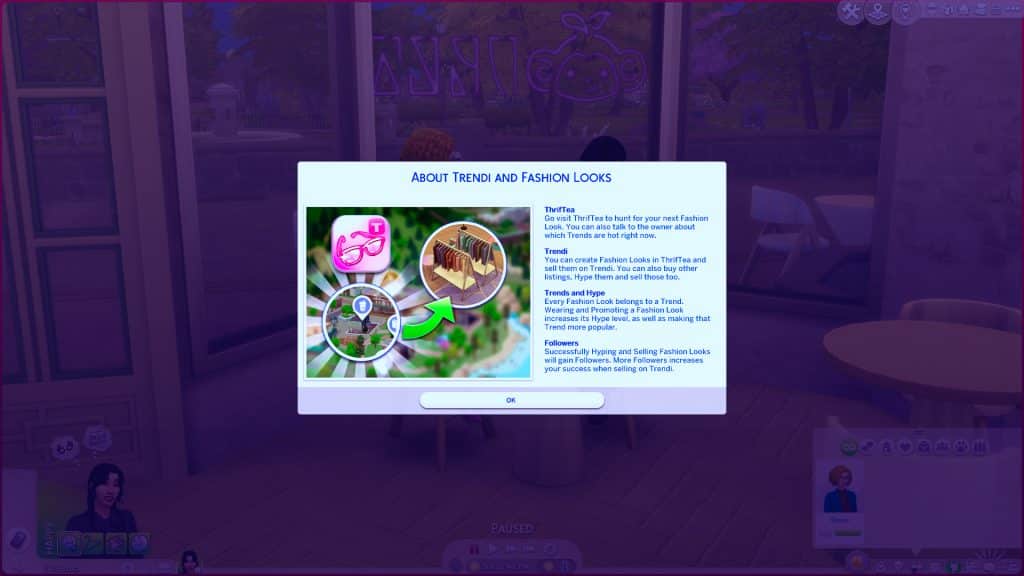
Creating Trendi looks can be a lot of fun… and profitable!
Welcome to ThrifTea! Let us help you create a new look!
Here at ThrifTea, Eloise Hiddlestix sells some of the trendiest clothes! Put together an outfit and you can even sell it for a profit. Just don’t tell Eloise how much profit you’re making!
Every day at 6 am, the stock of ThrifTea (or any other thrift store in your save) will refresh. This is based on the randomized trend and rarity that also changes at 6 a.m.
Creating THE Look!
Creating THE Look is simple! Click on one of the clothing racks and choose Create a Fashion Look. From the clothing that is available, choose an outfit that fits your style and fits the current trend. You can create up to 5 outfits at one time.
Wondering how much an outfit costs from ThrifTea?
You can calculate the cost of your outfit using the Base Cost + Rarity + Style formula. If you are not sure what something costs, play around with the tags until it appears or disappears.
Example: Base Cost (§5) + Rare (§20) + Hipster (§20) = Total Cost of §45 Note: A few items are tagged with more than one style. If that is the case, they seem to use the larger amount.
Street: §10 General Contemporary Basic: §10 Bohemian: §20 Country: §20 Hipster: §20 General Outdoor Explorer: §20 General Preppy: §30 Goth Rock Punk: §30 General Polished: §50
Who’s Who with Trendi
The more hype, the bigger chance you have to sell your outfit! But, how do you get Hype for your outfit?
Some Sims are so influential that they automatically add Hype to their outfits. Low-level actors to high-level actors add increasing amounts of hype according to their actor level. Follower count on Trendi affects the Hype level of an outfit. And if you’re a stylist influencer, you boost the amount of Hype for outfits. You can even take pictures in your outfit to increase follower count and Hype on your outfit.
Don’t forget to talk to Eloise Hiddlestix and other people about the current trends!
Hype Levels
There are four Hype levels; Tepid, Neutral, Hot, and Fire.
Mooncasters? Bloodlines? Map Replacements? Here’s 18 Werewolf Mods to Change Up Your The Sims 4 Werewolves Gameplay!
You thought we were done with The Sims 4 Werewolves? We’ve collected a list of werewolves mods that the community has created since the launch of The Sims 4 Werewolves! Make sure to read any pack or other requirements before installing. Now drink up some Moonpetal Punch and eat some raw meat while reading this list of werewolf mods.
Better Werewolf Cheats Mod by Carl
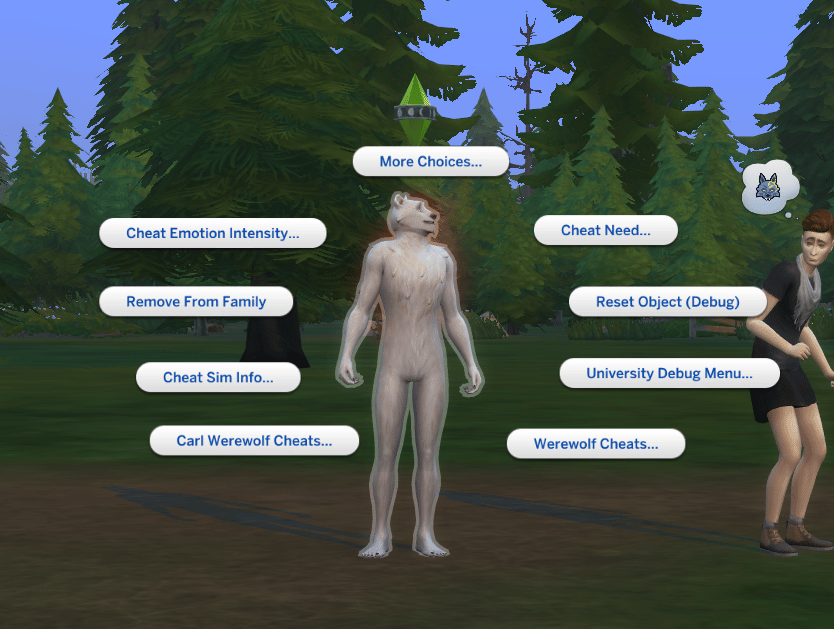
“This is a simple mod. Shift-click a Werewolf with testingcheats on, and you’ll find Carl Werewolf Cheats. From there, you can add and remove the Werewolf Perks and Temperaments.
For Temperaments, you can actually add several if you want, even though the game only shows you four of them. It’s plausible you can add them all if you want your Werewolf to be some kind of psycho that’s triggered by everything!”
“This lil mod adds a Run Here interaction for Werewolves in their beast form, allowing them to run on all fours even when they’re not rampaging with fury!”
No Relationship Loss from Reacting to Werewolf Activities by nasakura
“Here’s a little mod for your puppies, when they howl transform next to none werewolves, they have any relationship loss while reacting to your wolfy activities.”
“As with other bloodline traits of mine, it follows the theme and inheritance rules of the in-game Spellcaster bloodlines, minus the exclusion of Aliens from the rules, starting at no bloodline then Weak -> Strong -> Ancient.
The perks you will find at each level of the bloodline are:
Weak Werewolf Bloodline:
Hunger decays 10% slower
Energy decays 10% slower
Lycanthropy skill gained 10% faster
Wildness decays 10% slower
Strong Werewolf Bloodline:
Hunger decays 20% slower
Energy decays 20% slower
Lycanthropy skill gained 20% faster
Wildness decays 20% slower
Ancient Werewolf Bloodline:
Hunger decays 30% slower
Energy decays 30% slower
Lycanthropy skill gained 30% faster
Wildness decays 50% slower
Version 2 targets Werewolf Lore instead of Lycanthropy, and Feral Control instead of Wildness.”
“Personally, I prefer to be able to see some difference between male and female werewolves, so I did this for visible werewolf sexual dimorphism. This mod gives female werewolves a more feminine shape.
– The bust is fairly subtle in the nude werewolf, and tends to disappear in female clothing. I haven’t been able to find a way around this. In my days of experimenting, making the breasts bigger doesn’t make much difference and makes the flatness and distortion in clothing more noticeable. Ironically, they look better in male clothing.
– There’s some distortion in clothing, especially female clothing, but IMO no worse than the EA version.”
“The amount of experience a Werewolf gains through interacting with objects and Sims was very little to earn new ranks as a Werewolf progresses through the Werewolf ability system. This system is identical to the Vampire ability system in which ranks are gained, points are earned and new abilities are unlocked.
The only difference? The Werewolf Experience Mod will be released in one flavor unlike my other thread, “Vampire XP Gain Mods”, that offer several flavors. In the unmodified game, the EA values will make Werewolves howl sadly because no matter how many times they dig up stuff, fight each other or do other things, they will not be able to earn much experience.
What is the deal with the EA values and the Greater Wolf Blood trait? Wolves with this trait should be powerful and should be able to become pack leaders (Apexes). The Werewolves with this trait should earn a bit MORE experience than those Werewolves who do not have this trait.
The Greater Wolf Blood trait is similar to the Spellcaster trait in which the Spellcasters would earn more experience if they inherit the trait from one or both parents with the Spellcaster trait.”
Werewolf Fury Enhancer and Reducer Spells by Rolwen
“This pack contains 2 new spells that are related to the werewolf pack and in particular werewolf’s fury. I wanted a way for my spellcaster to maxify or reduce the fury of a werewolf. (Although it doesn’t work when they are on rampage, they are just too lost at that point)
Those spells are UNTAMED Spells and requires the Master rank to be learned.
Quote:
How to unlock : To learn the spells, there are 2 new custom tomes that your sim can buy with the debug cheat or can be purchasable at Caster’s Alley, from the magic market stalls.
Fury Reducio: The spell will make the fury meter of the targeted werewolf go down to 0. I tried to remove as much fury as I could in case some of you have mods that increases the size of the fury meter. Like this one – If the spell backfires, the targeted werewolf will get a sad buff that will last 2 hours. – If the spell works, the targeted werewolf will get a confident buff that will last 2 hours.
Fury Maxifier: The spell will automatically lead the werewolf to go on rampage. – If the spell backfires, the spell caster will get a new buff that will make them angry instead of making the wolf angry. The targeted werewolf will also get a buff that will make them Dazed. The buff lasts 3 hours. – If the spell works, the werewolf will get an angry buff and will go on rampage.
You can’t throw both spells when the targeted werewolf has a buff from either spell or if the spellcaster has a buff from this mod as well. (To prevent excess usage of the spell of course)”
“The name of the mod speaks for itself. As in other occultations, werewolves will not be able to use their abilities in Batuu. Thanks to this mod you can fully play as a werewolf in Batuu and bite Kylo Ren or Rey.”
“Some tweaks to improve the werewolf gameplay and add new features!
Venomous Bite Gives your werewolves the ability to give vampires a venomous bite.
Vicious Wolves Werewolves will be allowed to do more interactions autonomously while on a rampage – there are three packages that you can pick & choose from. 1. For the cursed bite to turn other Sims into werewolves autonomously 2. Cross compatibility with the venomous bite module – only install this package if you have the module installed! 3. Autonomous fights with Sims, Werewolves and Vampires (non deadly)
Wolf Protection Adds a new ability to add wolfsbane to your food and drinks to keep your Sims safe from werewolves.
Wolfy Walkstyle Enables the wolf walk and run walkstyles that are normally only available while rampaging in the werewolf form.”
“This mod adds a new “Werewolrify” spell that allows Master Spellcasters to turn human Sims into Werewolves. This spell belongs to the School of Untamed Magic. Unlike other spells, sages won’t be able to teach you this spell and you won’t be able to learn it randomly through duels or practicing on your own. Instead, your Sim has to use the new “Reveal Hidden Werewolf Secret” interaction on the computer, Web-Research category.”
“Spa Day Allows werewolves to reduce their Fury by doing various Wellness activities.
-Baths with Soaks/Mud Baths Note that if your werewolf sim gets grossed out by the mud bath, it will increase their Fury! –Massages Be careful though! Depending on the massage therapist’s competence, they may accidentally enrage the beast inside instead if they do a poor job! –Yoga Some yoga activities may also have a chance to reduce Fury.
Snowy Escape Allows werewolves to reduce their Fury by relaxing in the Onsen.”
Moonwood Mill Map Replacement by 20th Century Plumbob
“Give your map a howling makeover with this Moonwood Mill Map Replacement! The world was giving Twilight-esque vibes, so the map should also reflect that vibe! *wolf noises* Awooooooooooo!
As usual, this map comes with two versions: the original, eye-popping one, and also a low saturation one. DOWNLOAD BELOW!“
“Embrace the moonlight and bring chaos (or blessings) among sims with The Sims 4 Mooncasters!
Assuming you already explored the lore, Mooncasters were a group of Spellcasters who fought the Century conflict against Vampires. They were powerful emissaries of the moon, who were binded to the night and their wolf familiars, whose magic was eventually absorbed, allowing them to turn into what we now know to be Werewolves. Modern Werewolves still have magic inside of them, and that’s what basically makes them able to turn into beast mode. However, unlike Mooncasters, their magical prowess is locked and aren’t able to cast any spell.
Between the founding Mooncasters there were Greggorius and Avelina Lunvik, Yina Kia, Maria and John Volkov.”
“Immortal Wolf is a perk that werewolves can buy that allows them to live forever, literally. They cannot die under any circumstances, you cannot burn them, drown them, or even starve them. I personally don’t enjoy that, so I’ve nerfed it a bit so that the perk only prevents werewolves from aging, similar to Vampires.
This is for players who enjoy a harder gameplay experience, or for those who like to kill sims, no judging here! Now your immortal Werewolves can continue to drown or choke on that pufferfish, be wary!”
“Don’t care for werewolves but want the world and aesthetic? This mod goes beyond the game option to restrict werewolves’ beast form to their home world. Instead, this toggle allows you to completely remove any occult characteristics when a would-be werewolf spawns in.
Enter “tm.togglewerewolves” into the cheat console and werewolves will be toggled on or off, globally. Any would-be werewolf will be forced into a normal sim when they spawn, including pre-made sims. Settings will be saved even if you close and re-open your game.
To go back to werewolf gameplay, use the command to toggle them on and any werewolves loaded from that point forward will keep their werewolf status.”
In the normal game you have some interactions (going to the toilet, dancing, showering, jogging, eating). When your Sim becomes a werewolf, these interactions will be replaced by beastly ones. With this mod, “beastly” interactions will only appear with a certain level of rage.
Here is a table showing how the text will change with a certain amount of fury.
I originally planned to do this for the eating animation as well, but it didn’t work out for me.
By the way, I only did this for one interaction, and it was replaced in the others. I don’t know how it works, but it works!
All high school students can graduate no matter what lifespan you play on. A Sim graduates high school upon aging up to a young adult. When they age up, you’ll be notified that your Sim has graduated and whether they graduated normally, with honours, or as valedictorian. Sims will need to maintain high grades to graduate with honours and have a good chance at being selected valedictorian.
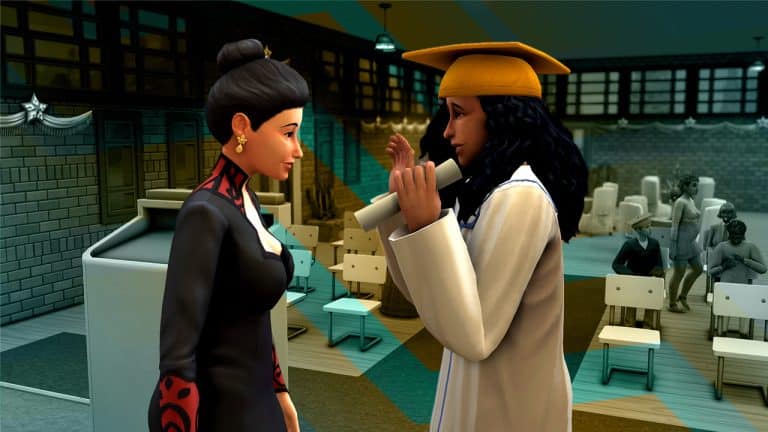
The graduation ceremony takes place the following Sunday. It runs from 6pm to 11:30pm at the high school auditorium. When you arrive, all the teens you went to high school with will be young adults now. Use the High School Graduation social category to see all the graduation related options. The other graduates were in graduation robes but our Sim would not change into them even when we tried to force her.
After socializing, the valedictorian will make their speech. If that is you, your Sim will go up to deliver the speech. Hopefully you practiced in a mirror beforehand. If not, you might flub the speech. Immediately after the speech, the principal will hand out diplomas. Go up to receive your diploma.
Afterwards, you’ll have a grad portrait in your inventory. Check the mail when you get home, then go into the household inventory to find your diploma. Our Sim was in her everyday outfit in her portrait which was disappointing.
If you want a good portrait, we recommend making a grad outfit beforehand and using the photo backdrop at the grad event to take a nice photo of your own.
Easily create a base save with TS4 Premade Household Tool!
For many of us, we have created a Base Save that we use every time we start a new game. It has all our Sim and lot makeovers already in place and problems fixed. Any other changes we want in-game are already done in our Base Save. It’s an effective alternative to setting up a new save each time we want to start a new game. And now there is a new way to ensure our Sim makeovers show up every time we hit New Game!
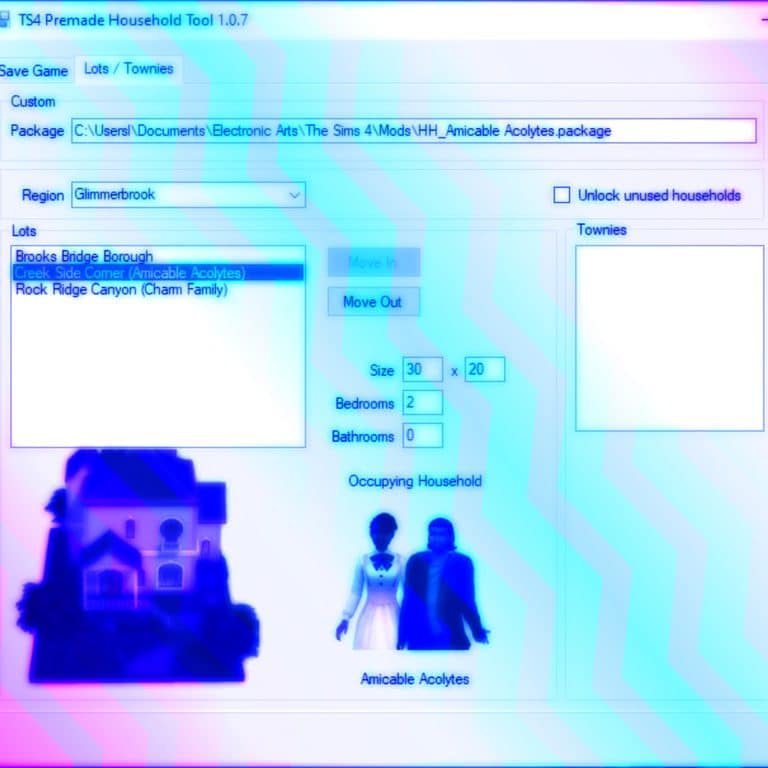
The creator denton47 released the TS4 Premade Household Tool, which is a game-changer in setting up games. First, you will need to makeover the premade sims of your choice. Then, you will need to use the tool to choose the Sim you made over. Make sure to save them to a package file. You can save the whole family to one package file. Put the package file into your mods folder and delete your cache. Then, the next time you start a game, your sims will replace the original premades!
Some notes from the creator:
The tool will transfer age, gender, aspiration, voice, skin tone, traits, morphs, outfits, peltlayers, and genetic data. This includes all CC! (Must be installed to work)
Make sure not to change the first name of the Sims.
The household portrait is the default from the game files. It does not represent how the Sims look in the game.
How to Use the Mod:
How to create a new premade Bjergsen household (makeover) 1. Double-Click on TS4HouseholdTool.exe to start the tool. 2. Select the save game file you want to use as a base for creating a new household template. 3. In the Households list box select Bjergsen, the household members should display in the Sims list box along with the default portrait image. 4. Click Save to Package to save the new template. 5. Copy the package to your mods folder and start a new game.
How to create an empty Willow Creek 1. Start the tool and select the second tab page. 2. In Region select Willow Creek and all residential lots will appear in the Lots list box. 3. Select lot Cypress Terrace (Spencer-Kim-Lewis) and click Move Out. 4. Repeat step 3 for the other three lots/households. 5. If you don’t want the households completely removed from your game you should add them as Townies by clicking Add next to the Townies list box. 6. Click Save and copy the package to your mods folder and start a new game.
How to replace EA households in Willow Creek with custom households 1. First you need one or more Save Games containing the four custom households you want to use. 2. Start the tool and open the first Save Game file. 3. Find the first household and click Save to Package. 4. Find the next three households and click Add to Package.
5. Navigate to the second tab page and select Region Willow Creek. 6. Click Open and select the package created in steps 3 & 4, this will import them into the world. 7. Select lot Cypress Terrace (Spencer-Kim-Lewis) and click Move Out. 8. While Cypress Terrace is still selected click Move In and select the first custom household you want to use. 9. Repeat steps 7 & 8 for the remaining three lots/households. 10. Again you will need to decide whether to keep the EA households as Townies or not. 11. Click Save and copy the package to your mods folder and start a new game.
(Instructions From ModTheSims)
The Tool is available for free. Make sure to read the full instructions on the ModTheSims download page!
Get matching wood tones in The Sims 4 with this Custom Content from MadameRia!
Ever since the re-introduction of swatches into The Sims 4, Simmers have had trouble matching wood tones and patterns, etc. This has caused many Simmers to either use the same few choices or turn to Custom Content to make their game match.
Thanks to MadameRia, we now have a set of matching Stairs, Railing, and Fence to match their Limber Lumber Floor Recolor. She was inspired by Peacemaker’s Wood Tones 02 Palette which is pictured below.
The mod is divided into four packages or you can download it as a zip file:
MadameRiaMatchingSwatchesMegaFenceBasic: This is a recolor of the Mega Fence (Basic) with fence posts that repeat every tile.
MadameRiaMatchingSwatchesMegaRailing: This is a recolor of the original Mega Railing.
MadameRiaMatchingSwatchesMegaFenceBasicNoRepetition: This has fence posts that only show up at the end of the fence lines. MadameRia notes that you can combine with the repeating version for variation of post placements.
MadameRiaMatchingSwatchesUnremarkableStairs: This is a recolor of the Unremarkable Stairs.
Some notes to include from MadameRia: “I used TSRW to make all of these recolors, so I ran into a lot of problems. Because of that, there are a few important notes about this set:“
There are no custom thumbnails.
“The Mega Fence (Basic) has a different price (§25) so it will show up earlier in the BB catalog!”
“The Unremarkable Stairs use the Martian Soil wallpaper as their default wall.”
We love using this set already and we can’t wait to see what other people use the set for in their builds. Don’t forget to get the matching Limber Lumber RC: A BGC Wood Floor Recolor Set to complete your matching set. Both sets are linked below!
Unlocking more Principal’s Office Desks in High School Years
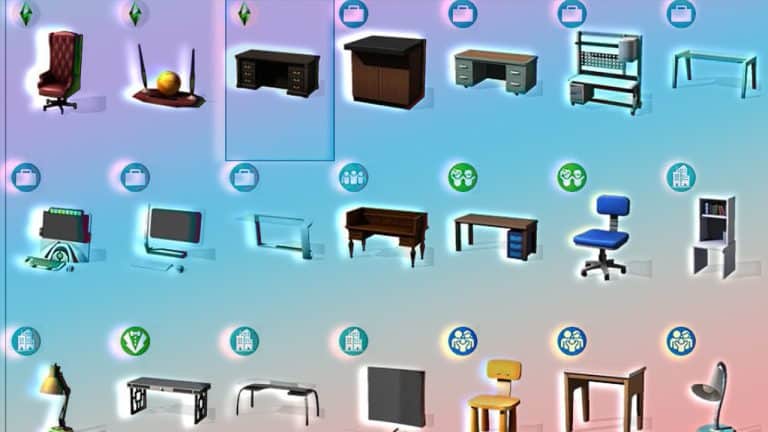
We were shocked when we realized that The Sims 4 High School Years only came with one Principal’s Desk. There are so many desks that would look great in a Principal’s Office, but they were overlooked. Luckily, we have the solution to add more Principal’s Office Desks to your game, including Custom Content Desks!
5 CC desks were added as options for Principal’s Desks
Step #1: Choose Your Desk
Option #1: Custom Content Desk
To use a Custom Content desk as a Principal’s Desk, click on My Projects and select the file on your computer.
Option #2 EA Desk
If you’d like to use an EA Desk other than the one in The Sims 4 High School Years, you will want to choose either Override or Standalone Recolor. Override will make it so the new desk you create replaces the original desk in the catalog. Standalone Recolor will create a separate desk so there will be two of the same desk in the catalog.
Step #2: Warehouse Tab
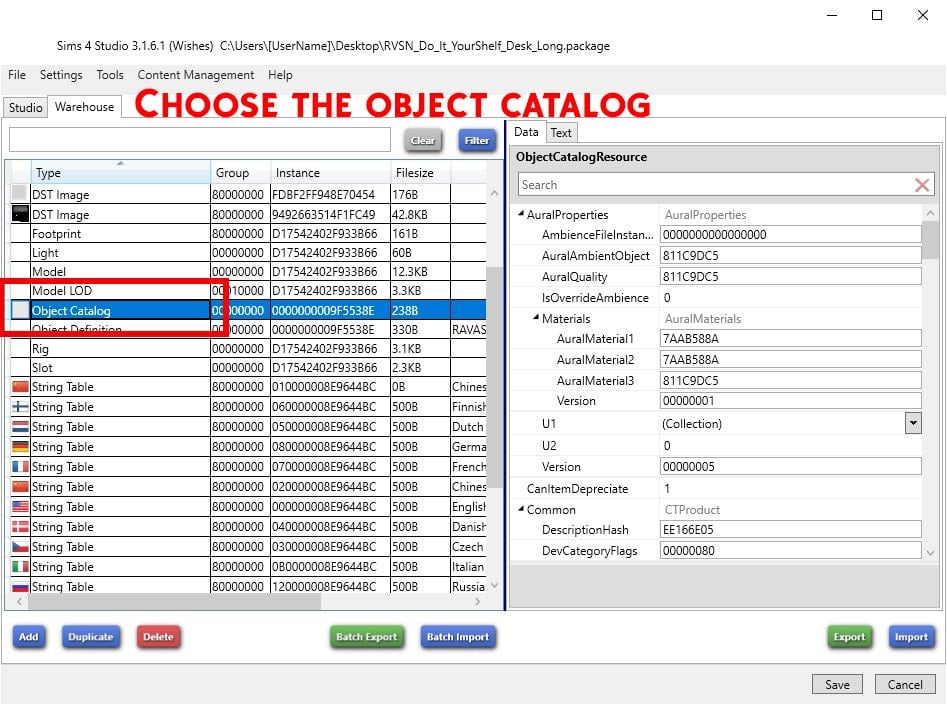
Inside the package file, on the left side, there are two tabs. Click on the Warehouse tab.
For ease, click on the Type Column Header to sort everything.
Look for Object Catalog. If there are more than one of them, you’ll need to do the following steps to all of them.
Step #3: Tags
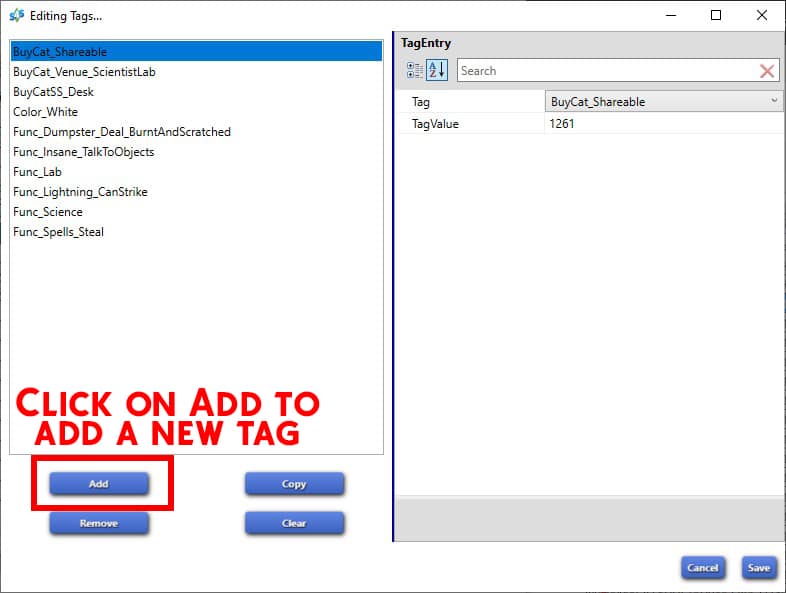
On the right-hand side, in the Data tab, scroll down to Tags. Click Edit Items to the right of it.
In the window that opens, click on Add in the bottom left corner.
In the left column, click the drop-down box next to Tag that says None. Scroll or type to find the Func_HighSchool_Active_PrincipalDesk tag.
Once you choose it, it will automatically fill in the correct Tag Value.
Click save and then make sure to click save again in the package file. Put the package file into your mods folder. You can put this in folders up to 5 deep.
Now, any desks you add this tag to will show up with the Principal’s Desks in Build/Buy, will satisfy the lot requirement of a High School, and will function as a Principal’s Desk!
What desk have you been waiting to use for the High School Principal’s Desk?
The Sims 4 High School Years come with two new festivals for your Sims to take part in after the school day is done!
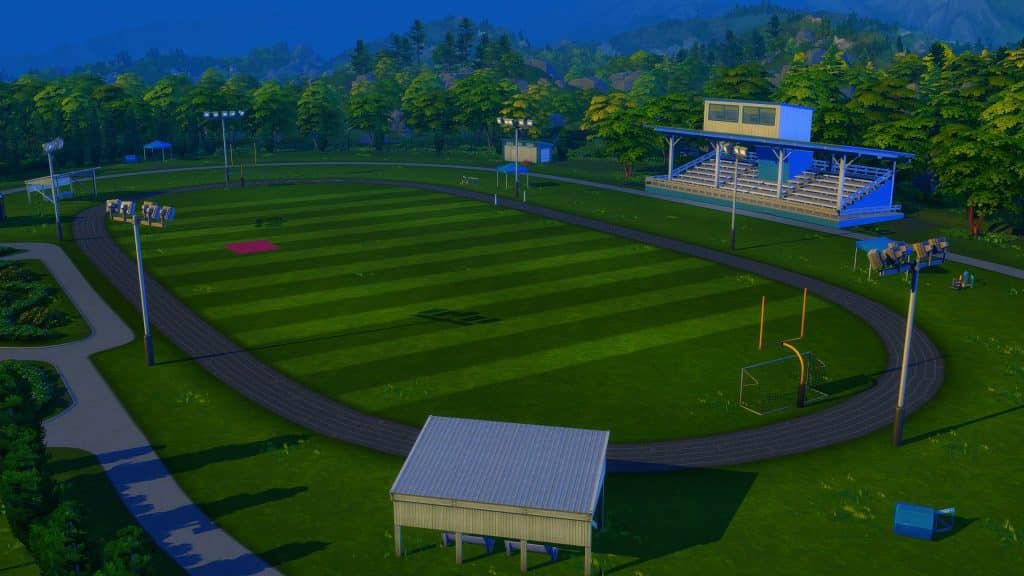
Located on the Sports Field behind the school campus, you will have the opportunity to attend and take part in the Cheerleading Team and Football Team Sports Day!
Attending A Festival
Attending a Festival is easy. You will get a pop-up on the notification wall letting you know that the Festival is due to start. Simply click on the Show Festival Info button to find out more. It will also give you the option to travel straight to the Festival location.
You can also find both festivals listed on your Household Calendar. From there, you’ll be able to read more about the event as well as keep track of when both festivals are happening.
Let’s take a closer look at each of the Festivals!
Football Team Sports Day
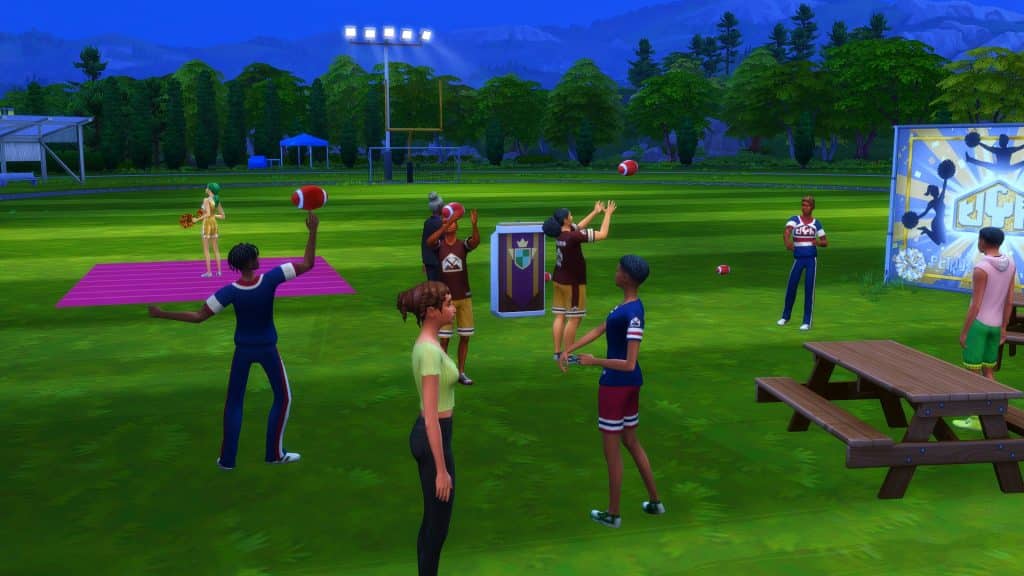
Build up skillful Football throws and be the winner! Sims with higher fitness and positive moods fumble less and score more highly.
Location: Copperdale High School Sports Field When: Thursday, 5pm – 10pm
Festival Activities
Football Throw Competition
Cheerleading Team Sports Day
Show off your squad’s dance skills and win the day! Sims with higher Fitness perform more daring moves and will get higher scores. Be sure to arrive to the Sports Day with other Sims that you want to cheer with.
Location: Copperdale High School Sports Field
When: Friday, 5pm – 10pm
Festival Activities
Group Cheerleading Competition
Make sure you submit your scores for both the Football and Cheerleading events to the Judge NPC during the festival!
Festival Merchandise
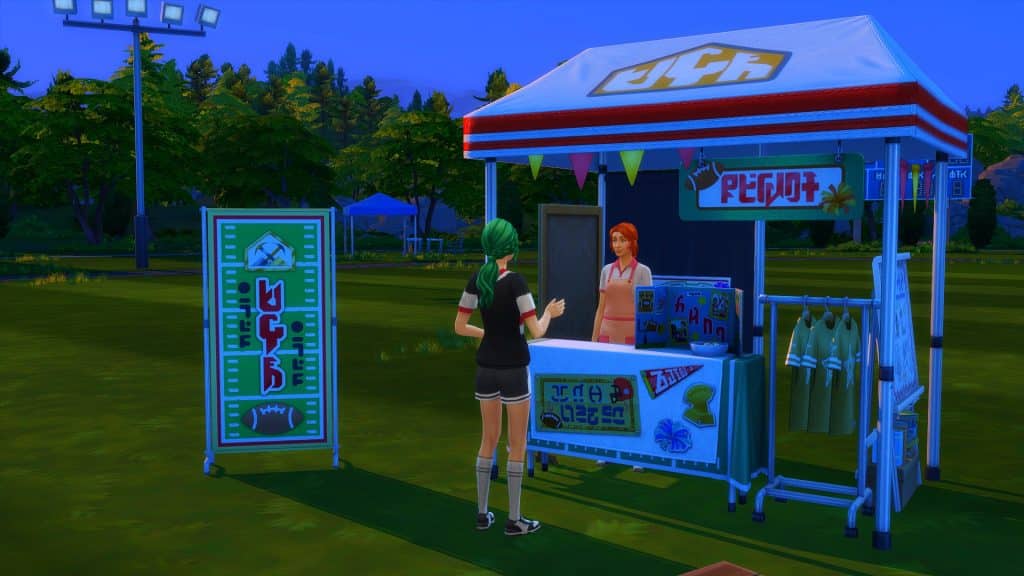
In addition to the events, you will also be able to buy Festival Exclusive Merchandise, including a Golden Cheerleading outfit and Quarterback shirt!
These can be purchased from the kiosk located at the event itself. Once you have purchased the new Create a Sim items, they can be found, unlocked, in Create a Sim for you to use.
Here’s a quick look at the Festival Outfits!
These can be found by filtering Create a Sim to show clothing options from the High School Years expansion, and then by selecting unlocked under the content filter category.
Will your Sims take part in the new Festivals? If so, which one do you think you’ll attend first?
We all know round walls in the Sims 4 are…problematic. Especially when they’re used indoors: invalid round rooms, mismatched floor tiles, etc.
So delete them! This simple decorating trick replaces round walls with so many wall decor options that we have in-game.
Just keep bb.moveobjects on before starting!
Add a round room to your build. It doesn’t matter what size it is, it should work anyway.
Add your desired wall decor, preferably a one-tiled item. You can size it up or down by pressing ‘[’ or ‘]’ respectively.
This Eco Lifestyle panel is perfect for a classy modern design. Let’s use it and size it down once so it looks more realistic.
Place it around the perimeter of your round room. You can toggle more precise placement on a quarter tile by pressing Shift+F5. But if the spaces between your wall decor are awkward, simply hold down Alt and adjust accordingly.
Once you’ve filled up the whole perimeter of the room, delete the round wall with the sledgehammer tool.
If you’re having trouble deleting the remaining walls of a round room, draw a normal room bigger than the round room. Then delete the walls of the room you just created. Add back the wallpaper and floor tiles. Now, the flooring is even without any weird outline.
And you’re done! Decorate it into a cafe space, a feature wall, or a restaurant booth.
Weird backside?
If the wall decor you used has an unsightly backside that’s bothering you, you can cover it up by repeating the same process on the inside.
After you delete the round wall, use the Alt key to scooch the items closer to the ones outside. Just make sure to align them right.
So many options, and so many styles to create!
It also works with curtains for a softer effect.
You can even create faux round half-walls with it!
It may be not useful if you wanna enclose a round room, but it definitely adds pizzazz to any space. Like they say, fake it ’til you make it!
You can also watch this short video tutorial to guide you:
Will you try out this trick? Let us know in the comments below!
Sims can now manage an interactive social media account!
In The Sims 4 High School Years, teens and older Sims can now create and manage their own social media account that’s actually interactive for the player. The new Social Bunny app has its own interface and allows you to add contacts, send DMs, make posts, and react to other Sims’ DMs and posts. The more you use Social Bunny, the more followers you’ll gain which in turn will help you with hyping up Trendi outfits if you also happen to be a Trendi user. The app can help you build (or ruin) relationships without having to interact face-to-face.
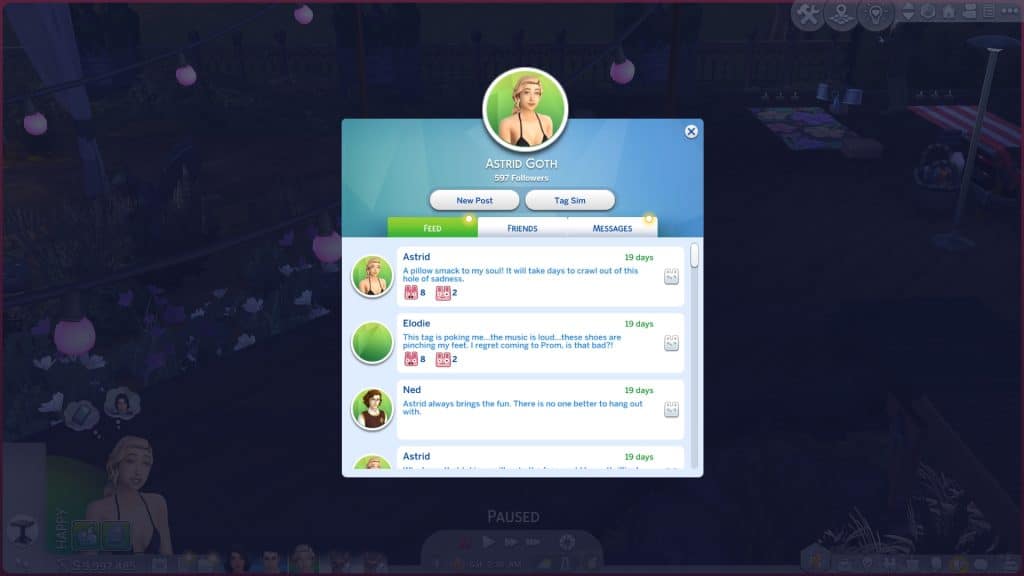
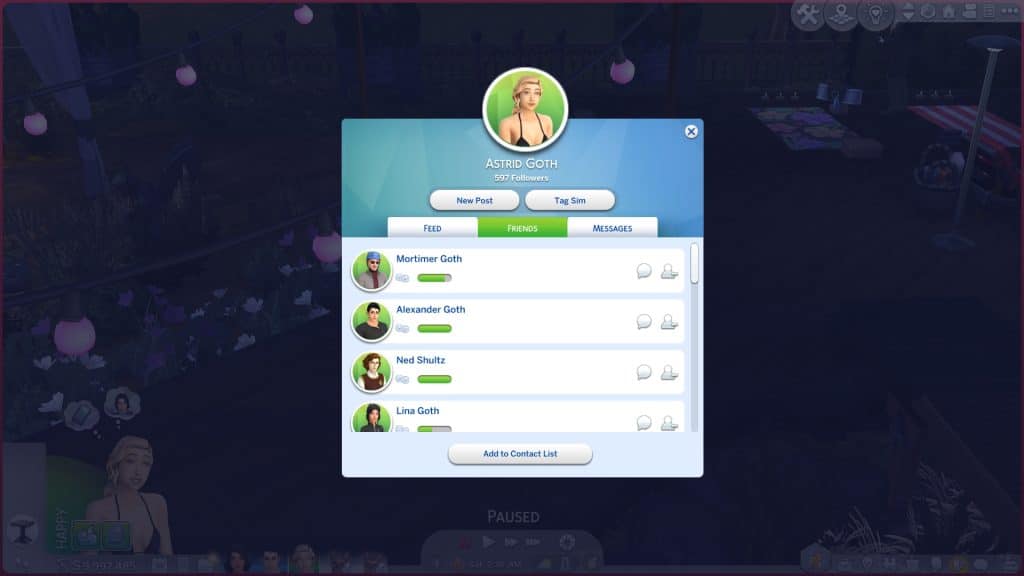
To get started, click the Social Bunny app icon on your cell phone and create a profile. Once you’ve opened the app for the first time, start by adding contacts. Your Sim will need to already know Sims in order to add them as contacts on Social Bunny. Once you’ve added contacts, you’ll start seeing their posts show up in the feed tab.
To make a post, you’ll have to wait for “Social Bunny worthy” things to happen to your Sim. Certain daily tasks like homework and getting a new outfit will give you the opportunity to post about those things. Milestones like prom, graduation, and getting married will also give you the opportunity to share those experiences on Social Bunny. Select the New Post button when it’s available and choose which life experience you want to make a post about. Then select a narrative. Was it a happy, tense, stressful, or sad experience?
Once you make a post, other Sims will begin reacting to it. You can also react to their posts. Scroll down your feed and choose reactions to what Sims are saying. It’s like selecting a Facebook reaction in the real world. Reacting to posts and DMs is a good way to build your following even when you have nothing to post about.
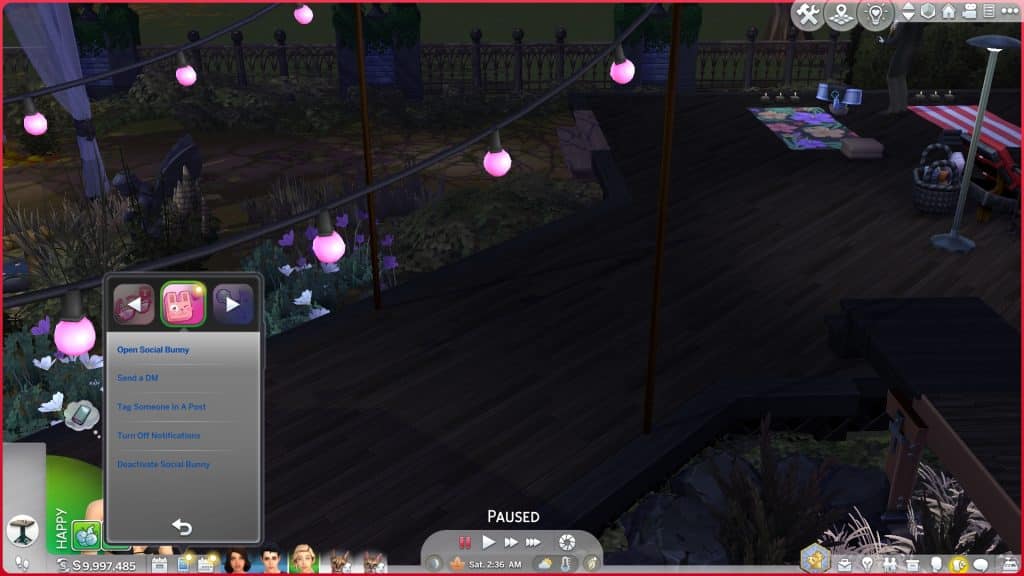
You can also send DMs to Sims when you don’t have anything to post or tag people in a public post. You can build friendships, romances, and rivalries all online through Social Bunny. You can DM a Sim through the Contacts tab in Social Bunny or right from your cell phone’s Social Bunny app menu. Tag a Sim in a post by clicking the Tag Sim button in the Social Bunny app. Then select what kind of message you want to send. You can send Friendly, Flirty, and Mean messages. These messages will affect your relationship with those Sims. This is why you’ll see social plus and minus signs above your Sim’s head periodically even when they aren’t talking to anyone; they’re gaining and losing relationship with other Sims based on what’s happening on Social Bunny.
Your cell phone and the Social Bunny app will glow with a little yellow notification ball when there’s new messages to see on Social Bunny but if the notifications are annoying, you can disable them through your cell phone’s Social Bunny app menu. You can also deactivate your account if you’re tired of Social Bunny altogether but it is handy for maintaining long distance relationships and hyping up your Trendi looks.
One thing we’d like to see changed with Social Bunny is which messages certain age groups can post. We want elders to be tech-illiterate and accidentally post google searches. We want adults to post about adult things and not prom or pillow fights or school lunches. If there were better age filters for the messages and more messages, we think Social Bunny would be a lot more fun.
Everything you need to know about getting ready for prom night!
In The Sims 4 High School Years, teen Sims have a chance to attend prom. Depending on what lifespan you play on, they may have the opportunity to attend multiple proms. Teen Sims can make many lasting memories at prom with dates, friends, or on their own, and a lot of prep work goes into getting ready for prom.
We’re going to walk you through attending prom, from the preparation to the afterparties!
Preparing for Prom
Prom is hosted at the auditorium lot every Saturday from 7pm-11pm. If you don’t like the idea of having to attend prom every weekend, you can always just skip it or pretend your teens are attending a general formal school dance rather than prom.
The weirdest promposal ever but ok
Starting Wednesday, you’ll begin to get notifications about prom while your teens are at school. You’ll be reminded to start thinking about who to take as your prom date and what outfit you want to wear to the event. Sometimes, you may be asked to prom either as friends or as a romantic interest by another student at school. Other times, you might need to take matters into your own hands and scout out your own prom date.
Of course, you could just walk up and ask them to go to prom with you. In fact, that’s the best way to do it if you just want to go together as friends but it’s much more fun to do something clever or grand, isn’t it? Apart from just asking your potential date, there are two additional ways to ask another student to prom. You can leave a note in their locker or make a flashy promposal sign and present it to them.
To leave a note in their locker, click on any locker in the school and select Leave Promposal Note. The locker doesn’t have to actually be the other student’s locker so don’t worry about remembering which locker they open between classes. You’ll be able to choose which student you want to leave the promposal note for. Then it’s just a matter of waiting and hoping. When the student does open the locker and sees the note, you’ll get a notification from them either accepting or rejecting your promposal.
To make a grander gesture with a promposal sign, just click on your Sim and select Make Promposal Sign under the Prom category. When the sign is finished, present it to the Sim of your choice! If all goes well, they’ll accept and you’ll have a date to the prom! If not, well, there’s no shame in attending prom alone!
As for picking out what to wear, you can always just go into CAS and put together your dream prom look using any installed content or custom content you have. You can also check out ThrifTea to put together a look using the shop’s inventory that day. Finding a prom outfit from ThrifTea’s limited selection might be more challenging but also more fun since you can go with your friends and make a day of it.
If your teen Sim has many friends in school, they might get invited to another student’s house to get ready before prom. This is kind of like a pre-prom party. If you accept, you and a bunch of other teens will travel to the home of the Sim who invited you several hours before prom starts. This is not a goaled event. In fact, it’s not really an event at all. You and your friends are free to do whatever you want together until prom starts.
Prom Night
When prom starts, you’ll be prompted to travel to the auditorium. You’ll arrive in your formalwear along with your date and other students from school. Prom is a goaled event so make sure you pay attention to the different goals in the top-left corner and complete them to get a good score and have a great prom night.
There will be buffet tables and drink fountains at prom with tables to eat at, an area for dancing, a photo booth, a voting box for prom royalty and prom jester, and a stage for announcing the prom royalty and prom jester. There will also be a photo backdrop to take selfies and pose for photos.
The Sims 4 High School Years doesn’t come with a dance floor object so to dance with friends or a date, click the stereo that’s there and select Dance or Sweetheart Dance. The Sweetheart Dance is a slow, more romantic-looking dance.
While you’re there, don’t forget to vote for Prom Royalty and Prom Jester! The voting box is in the auditorium and you can cast your vote for who you want to see win in each category. Unfortunately, you cannot vote for yourself but thanks to our writer, ThatSimsLady, looking at the tuning files for us, we found out that you can increase your odds of winning with high Comedy, Mischief, or Charisma skills. To be in the running for Prom Royalty, you need to have at least level 3 Charisma skill. Higher Charisma skill increases the odds further. To be in the running for Prom Jester, you need at least level 3 Comedy or Mischief skill. Higher Comedy or Mischief skill increases those odds.
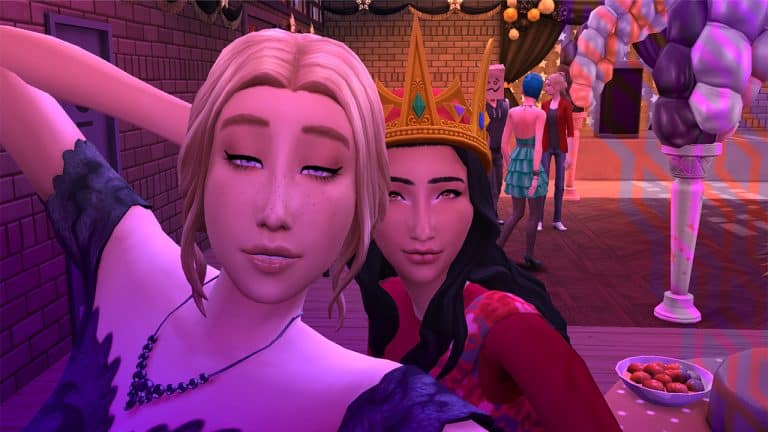
After you eat, dance, vote for Prom Royalty and Prom Jester, and take plenty of pictures, Prom Royalty and Prom Jester will be announced near the end of prom. If you win Prom Royalty, it will unlock the crown hat in CAS. Winning Prom Jester unlocks the court jester hat.
If prom seems too short, you might be interested in attending an afterparty. That is, if you get invited to one. When prom ends, there’s a chance you might get a popup from another student, inviting you to attend an afterparty. The afterparty is pretty much the same thing as the preparty; an opportunity to travel somewhere else with friends and do whatever you want after prom ends. When we accepted an invite to an afterparty, everyone traveled to the carnival at the pier together.
Now that you know all about what to expect when it comes to prom, what are you waiting for? Go find yourself a date and an outfit and party it up all night long next Saturday!
Not sure what career path is right for you? Career Day can help!
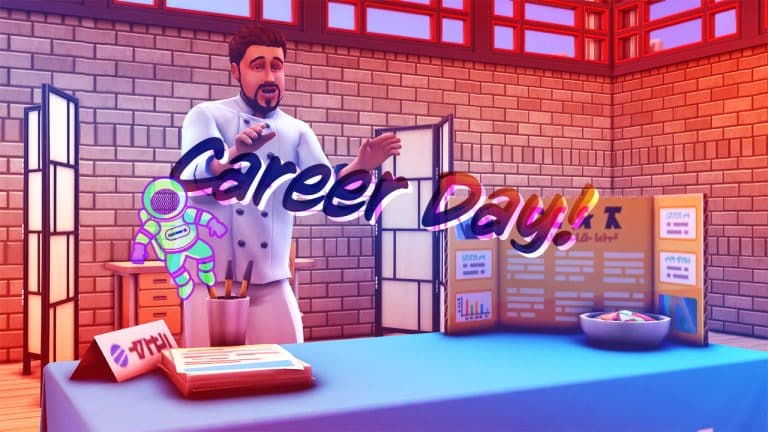
Career Day is one of the events that happens at the Copperdale High auditorium lot and can only be attended by high school students. Unlike prom, which also happens at this location, Career Day doesn’t happen every week. The schedule appears to be somewhat random but for us, we saw it pop up every other week on Tuesday.
Career Day is always on a weekday during class hours from 12pm-3pm. On Career Days, students will be excused from afternoon classes and travel to the auditorium for the event.
There will be three career day tables set up in the auditorium with guest speakers giving presentations at each table. Career Day is a goaled event so make sure you pay attention to the list of goals in the top left corner of the screen to do well in it. It’s not difficult to get a perfect score on Career Day. All you need to do is ask the guest speakers for information about their careers, watch the presentations, and ask your teacher about your future.
It’s not super obvious which careers the guest speakers are talking about but you can hazard a good guess by what they’re wearing. The guest speakers will be wearing career outfits for different careers. We had a chef, an athlete, and a criminal (which we thought was hilarious) at our Career Day.
Your teen Sim will get different moodlets related to the presentations. Our teen hated the thought of cooking for a living and when she asked her teacher about the future, she only became more scared and uncertain. Your teen’s reactions to the different career presentations can help inform your choices about their future.
The Sims 4 High School Years comes with two new part-time careers; Video Game Streamer and Simfluencer. The working hours for these jobs do not conflict with school or after-school activities, teens can be a part of one of these part-time careers and still attend class and after school activities with no issues.
The Video Game Streamer career is linked into the new Entrepreneur skill. As you progress through this career, you will find yourself also working on your Entrepreneur skills through creating content and promoting your creations online.
Let’s take a closer look at what the Video Game Streamer career!
To become a Video Game Streamer, simply head to your nearest computer or phone and select Find A Job.
As this career is classed as a part-time career, Sims can choose to work either 5.30am-7.30am or 9pm-11pm.
As your shift approaches, you’ll receive a notification asking what your Sim wants to do. You can choose to send your Sim to work, work from home, or have a vacation day.
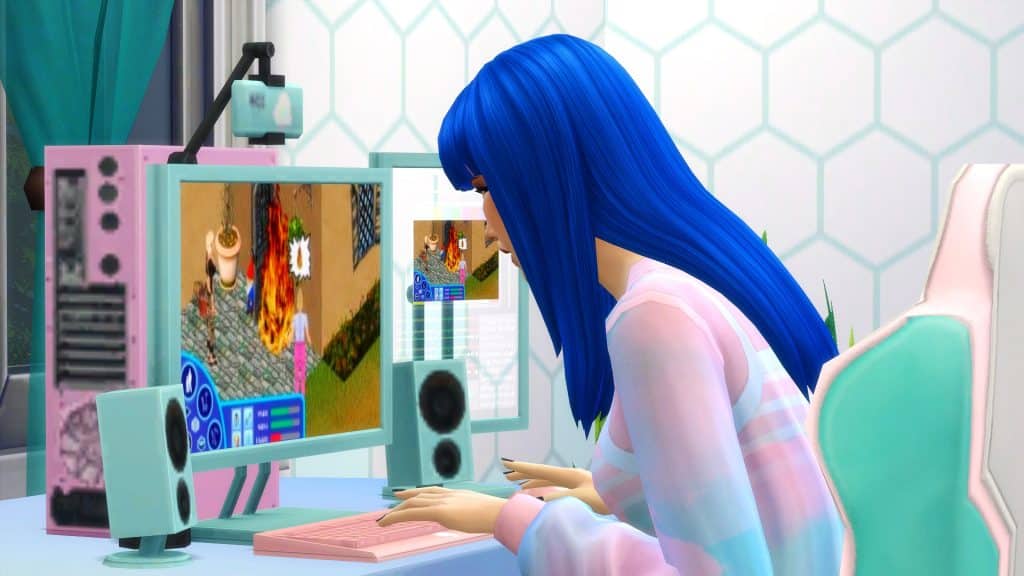
If you choose to work from home, you will be able to jump in and livestream once your shift starts. Simply head over to the computer and find the Career option on the computer. Here, you can choose to stream either Crypt Creeper or The Sims Infinite! The choice is yours!
Don’t forget to complete your Work from Home assignments each day, too!
1. Casual Streamer
Pay: $20/hour
Days Off: Sunday & Saturday
Promotion Requirements:
Reach Level 2 Entrepreneur Skill
Reach Level 2 Video Game Skill
2. Speedrunner
Pay: $43/hour
Days Off: Sunday & Saturday
Promotion Requirements:
Reach Level 4 Entrepreneur Skill
Reach Level 4 Video Game Skill
Promotion Rewards:
Stream Unreleased Game
$400 Bonus
3. Pro-Gamer
Pay: $61/hour
Days Off: Sunday & Saturday
Promotion Rewards:
$750
Daily Tasks
As with other work from home careers, your Sim will have daily work related tasks to work through. These change daily, but here are some of the tasks you are likely to encounter as a Video Game Streamer!
Update Online Bio with a Business Headshot
Hold a Livestream
Livestream an Unreleased Game
Make a Business Plan
Cross Promote at Venue
Rewards & Other Perks
While there are no rewards as such when you gain a promotion in the Video Game Career, from time to time you may receive rewards in the form of performance gain or monetary.
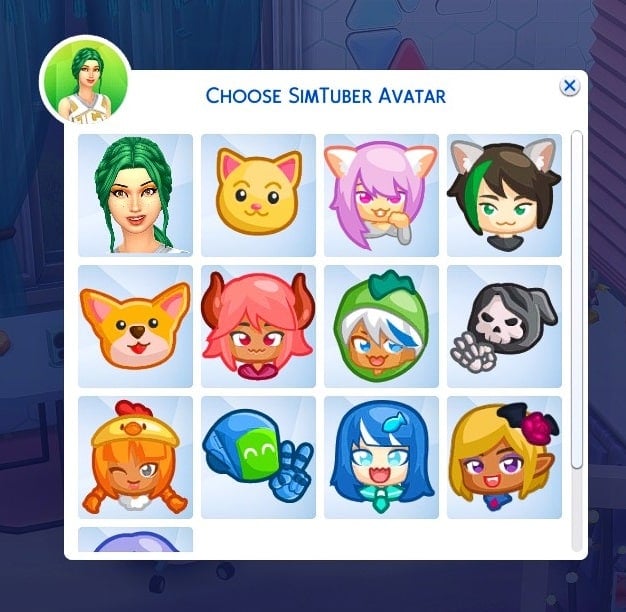
When you select the Career menu on the computer, you will also be able to check your Side Hustle Followers, Advertise your Video Game Stream Online, Choose a Simtuber Avatar and Research a Business Plan.
Can we take a moment to appreciate how cute the Simtuber Avatars are as well!
Business Plans
When your Sim researches a business plan, the completed one will appear as a USB stick in your Sim’s inventory. From their inventory, you can submit the business plan to an Angel Investor or appear on Llama’s Lair. This will give you a chance of obtaining extra funding for being a Video Game Streamer!
Tips
Are you wondering how to become a better Streamer? Here are a few tips to help you along the way!
Livestream when you can, even if you are not due to be working.
Get your friends involved and livestream Farming with Friends with them!
Talk to other Sims about video games.
Play video games for fun.
Struggling with your Entrepreneur skill? Pick up an Odd Job or two to help build the skill, or become a Simfluencer as well?
The new Video Game Streamer career offers your Teen Sims (well, all Sims really) an opportunity to be the content creator that they have always dreamed of!
Will your Sim make it big in the world of streaming? Let us know in the comments below!