Home Blog Page 158

Iconic Objects through The Sims Series

3

With the 22nd birthday of The Sims series coming up this February 4th, we’re taking a look back at some of the most iconic objects in the game that have made The Sims, well… The Sims! Objects that both young and old players alike will no doubt have fond memories of and that shaped the way they played The Sims… or were just super weird and funny. That’s cool, too.

With thousands upon thousands of objects across all four main titles alone, it would have been impossible to narrow things down without some criteria. We decided to focus on objects that have made an appearance in at least 3 out of the 4 main titles. The object could not be a basic generalization, like any old chair or any old shower. It had to be a specific object with some kind of unique function or significance. And finally, it had to be a tangible object, not a concept or a character.

So here are 10 of The Sims series’ most iconic objects throughout the years!

Hot Tub

Iconic Objects through The Sims Series

The hot tub! It’s been around since the dawn of Sims! Many a Sims baby has been conceived underneath its steamy waters. It’s where friendships are made and new romances begin. Throughout the years, the hot tub has been a focal point of socialization and relationships for Sims. I remember back in The Sims 1 days, if I wanted to make sure I threw an awesome party all my guests would rave about, all I had to do was make sure there was a hot tub to enjoy. Instant roof raiser, oh yeah!

Gnomes

Iconic Objects through The Sims Series
What would The Sims series be without these utterly pointless yet delightful little lawn ornaments? Back in the early days when Sims had an Environment motive you had to look after, plopping a few of these friendly little fellas in your front yard was a convenient and low cost way of making sure your Sim left for work in a good mood. These days, they’re more of a long-running joke. And a lot more vengeful in The Sims 4. But there’s a whopping 16 of them now. No, seriously. We ranked them.

Flamingo

Iconic Objects through The Sims Series
Ah yes. The ever present and even more pointless lawn flamingo! This staple of The Sims series has been in every single main title and some spinoffs as well. You probably forgot about their existence and yet, if you ever found out this flamingo had disappeared from the series, you would be outraged on a deep emotional level. You would. Don’t lie.

Cowplant

Iconic Objects through The Sims Series
The famous Cowplant, or more technically named, the Laganaphyllis Simnivorii, did not join us until The Sims 2 but it has been a beloved icon for Simmers ever since. This weirdly cute but very dangerous carnivorous plant first appeared as a career reward object in The Sims 2, then as Store content in The Sims 3. It made another return in the base game of The Sims 4 as part of the gardening collection. Simmers became so attached to their Cowplants that a movement started to allow us to name our Cowplants like we can name other minor pets such as fish. The devs granted our wish and now our Cowplants can have individual names. I named mine Moonshine.

Heart Bed

Iconic Objects through The Sims Series

Sadly, the latest installment of the series lacks this iconic object but it was present in The Sims 1, 2, and 3. For the Don Lotharios of the Sims world, owning one of these bad boys told every suitor who came to call that you were serious about romance. Just maybe don’t let them in on how many other suitors have enjoyed the romance of this bed…

Wishing Well

Iconic Objects through The Sims Series

The wishing well was first introduced in The Sims 2 Seasons and returned as Store content for The Sims 3. It was brought back again in The Sims 4 with the release of the Romantic Garden Stuff pack. I’ve lost count of just how many disasters have befallen my Sims over the years because of this malevolent monster but I still can’t really picture a complete Sims game without it and its merciless treachery.

Espresso Machine

Iconic Objects through The Sims Series
Maybe I’m alone in this but somehow, the espresso machine just feels like one of those things every Sims game has to have even if my Sims hardly ever use it. It might be because I have a lot of fond memories of my Sims drinking a shot of espresso in The Sims 2 and then becoming jittery for the next several hours. Did anyone else think their game was glitching out? Because I did. Turns out, it’s just the espresso! I’ll have another cup, please!

Birthday Cake

Iconic Objects through The Sims Series

How could we leave out this timeless gem? In spite of the fact that Sims did not age in The Sims 1, the game did have a birthday cake that Sims could celebrate with! This means that this iconic object has been present in all four installments of the main PC series. I dn’t think we really need to explain why this object is iconic, do we? Generations upon generations of celebrations and important life milestones have been celebrated around this cake.

Tragic Clown Painting

Iconic Objects through The Sims Series
I know, I know. The Tragic Clown is a character, not an object and therefore, he does not qualify for this list. That’s true, but his painting is an object and even though it doesn’t have a unique function in 3 out of 4 titles, it is present in 3 of the main Sims titles. So the Tragic Clown Painting just barely makes this list. In The Sims 1 and 4, viewing a Tragic Clown painting will cause the Tragic Clown to appear on the lot and make everyone miserable with his terrible magic tricks and awkward conversation. He’s not present as a living Sim in The Sims 3 but his painting still comes with one of the free Store sets.

Agnes Crumplebottom’s Purse
Iconic Objects through The Sims Series
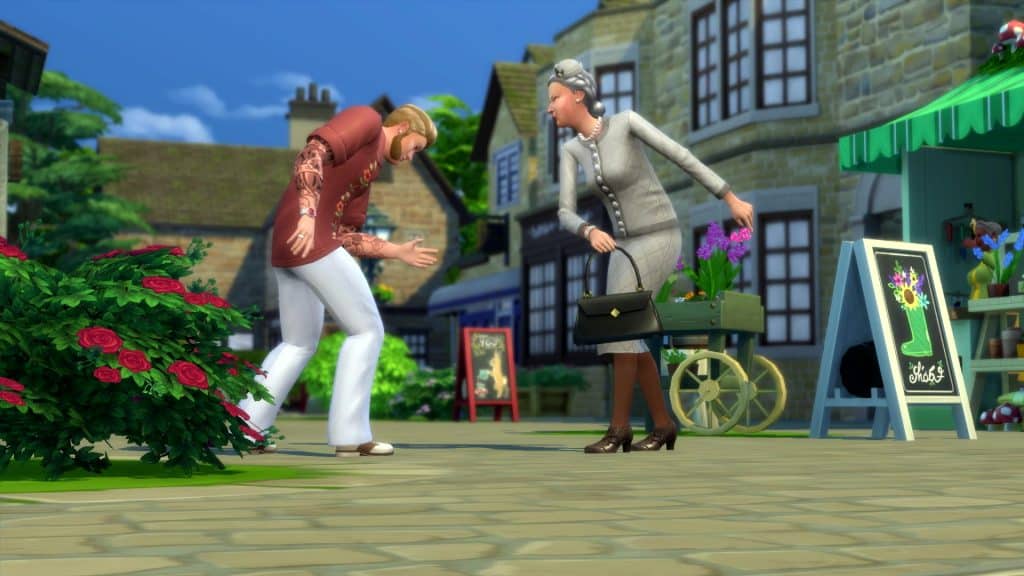
Okay, this might not be an object you can grab out of the regular Build/Buy catalogue but it is, technically, an object. And it has a very unique function. Wanton violence. If you haven’t been mercilessly beaten over the head by Agnes Crumplebottom’s purse at least once in a Sims game, have you really played The Sims? It’s a sacred rite of passage every Simmer must go through. Have your strength tested against the rage of an angry old lady and emerge stronger and wiser than before. That is the way.


What other objects would you consider iconic to The Sims series? Tell us in the comments below or let us know on social media!

The Sims 4 Carnaval Streetwear Kit: CAS Overview

Everything included with The Sims 4 Carnaval Streetwear!

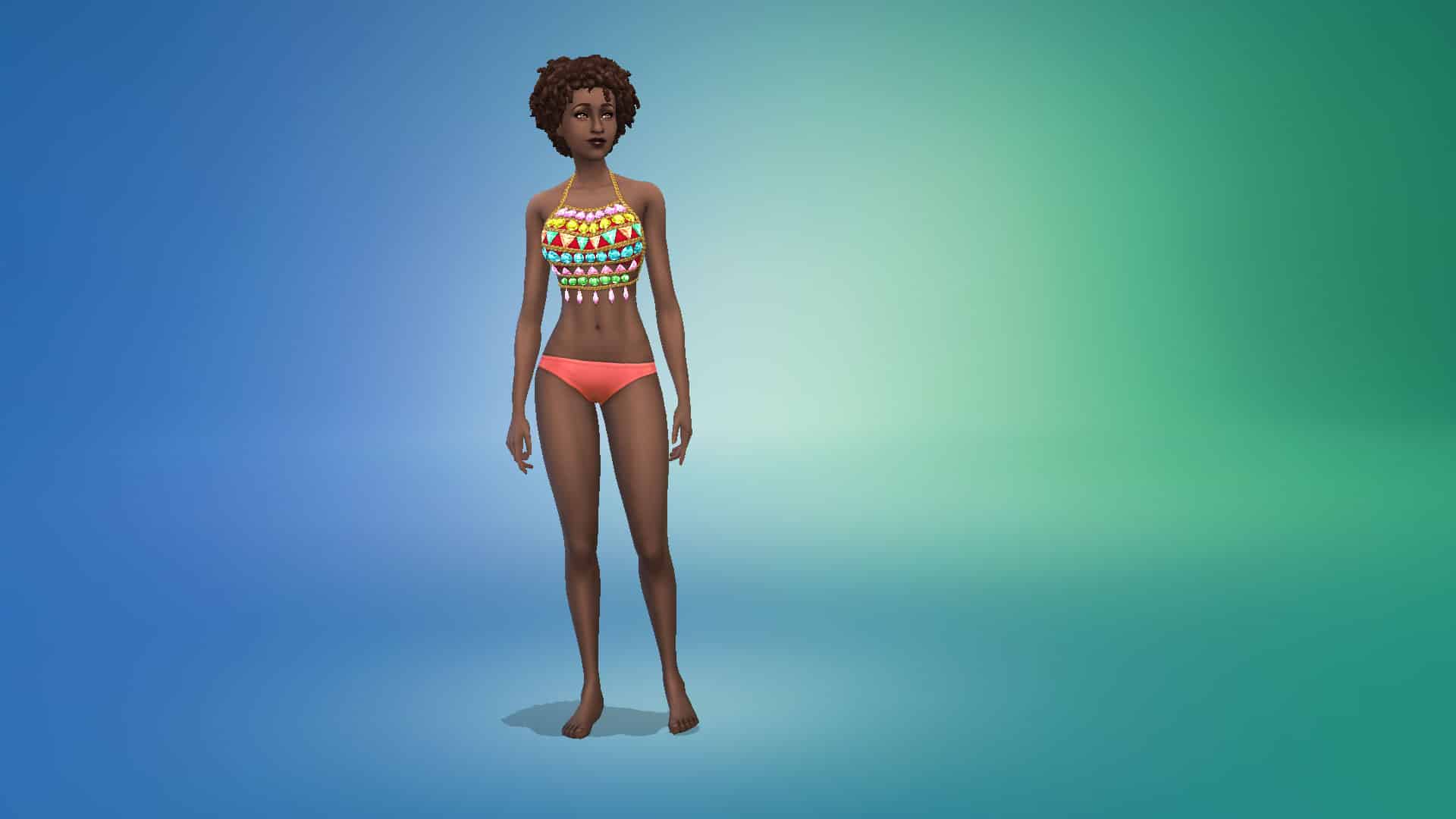
The Sims 4 Carnaval Streetwear Kit comes with 26 clothing items and accessories for both masculine and feminine adult Sims. The kit does not contain any content for children or toddlers.

Check out every new CAS item below. To zoom in, just click on a picture to get a larger view.

Adult Feminine

Tops (3)

Bottoms (4)

Full-Body Outfits (5)

Accessories (1)

The Sims 4 Carnaval Streetwear Kit: CAS Overview

Styled Looks (1)

The Sims 4 Carnaval Streetwear Kit: CAS Overview

Adult Masculine

Tops (4)

Bottoms (1)

The Sims 4 Carnaval Streetwear Kit: CAS Overview

Full-Body Outfits (2)

Styled Looks (1)

The Sims 4 Carnaval Streetwear Kit: CAS Overview

Adult Unisex

Accessories (4)

Makeup (2)

Author’s Swatch Picks

Just for fun, I’ve picked out my personal favourite swatch for every item and styled look that comes with this kit. Check them out below!
SPECULATION: The Sims 4 “My Wedding Stories” Releasing February 17th

The next Game Pack for The Sims 4 is allegedly called “My Wedding Stories”

@Alumia_Italia, the same user who provided us with leaks for some of the last few Kits for The Sims 4 (including Blooming Rooms and Carnaval Streetwear) is back with another report from the Microsoft database!

Apparently there is now first information regarding The Sims 4’s upcoming Game Pack which was already rumored to be themed around weddings.

According to the user, the Game Pack is titled “My Wedding Stories” and is set to release on February 17th, 2022. That’s this month!

Unlike with some of the previous leaks done by this user they haven’t provided any official assets / screenshots from the Game Pack…yet. The insider was asked about any proof including screenshots / cover, but it seems they don’t plan to share it just now.

We’ve seen from the official roadmap from The Sims Team that the next Game Pack is definitely related to Weddings – you can find it in both the teaser and the confetti icons around the teaser below:

SPECULATION: The Sims 4 “My Wedding Stories” Releasing February 17th

We’ll keep you posted on all the information about the upcoming Game Pack right here on Sims Community!

New Look into The Sims 4’s Next Sims Delivery

2

Durags and Bonnets coming to CAS!

Recently The Sims Team has confirmed that the upcoming Sims Delivery Express coming to The Sims 4 is set for February 9th, 2022.

Beside the 6 new recipes inspired by East Asian cuisine, there’s also a collaboration with a Custom Content creator – ComplexSims!

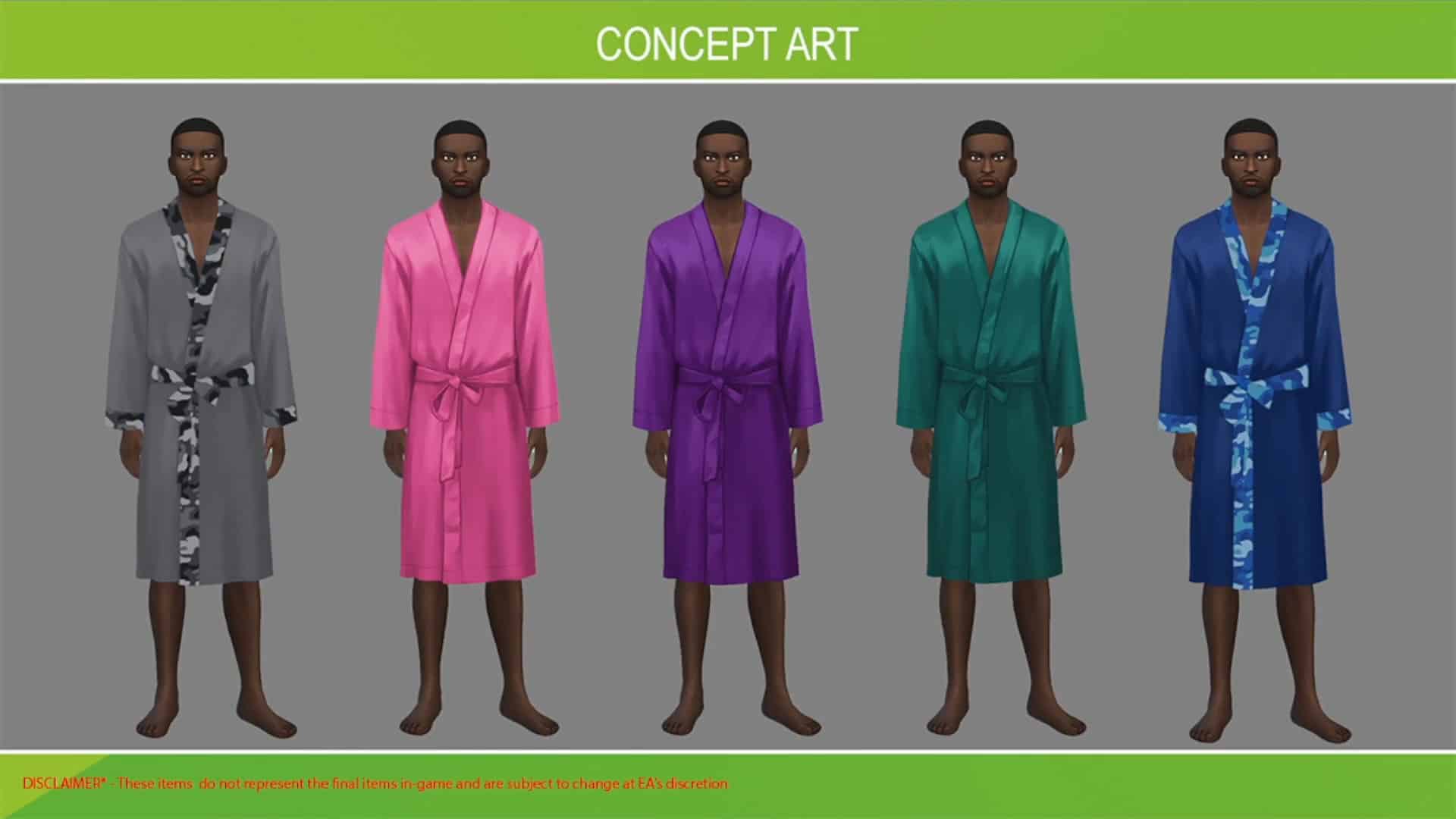
The new Sims Delivery will bring 3 unique pieces into Create A Sim including new robes. We only saw a glimpse of what the robes will look like from the Concept Art below:

New Look into The Sims 4’s Next Sims Delivery

In today’s latest Blog Post interview with ComplexSims, the team revealed a new screenshot of the upcoming CAS assets, including the robes, durags and bonnets all coming to CAS next week!

Check out the preview below:

Why are a bonnet, a durag and a unisex robe important items for your collaboration?  

These items are very useful to my community and are incorporated into our daily routine. They offer multiple advantages in terms of comfort and preservation. I’ve used every one of these items in my everyday life at some point. These items being integrated into the base game will allow a lot of the core fans to feel seen and represented. If you have these items when you need them, they’re pretty much an insurance policy against looking a mess when you wake up! You’ve seen them everywhere, from the corner store, to the airport, even the runway. These items will keep you on lock and in tact wherever you go.

I think they’re important to expand the possibilities for players who like to accommodate Sims of diverse backgrounds. It will also allow some players more representation because they fit into their everyday lives.

Why did you select these colors and prints?

I selected the specific patterns that I did because I wear and have worn some of these items myself. I have quite a few and chose them based on what I currently have. I would say that my favorite pattern was the kente inspired one. All the colors really represented the cultural pattern very well.

New Look into The Sims 4’s Next Sims Delivery

The Sims 4 Carnaval Streetwear Kit is Now Available!

0

The Sims Team has just started rolling out the release of their latest Kit for The Sims 4 – the Carnaval Streetwear Kit!

Just like previous Kits for the game, this one is retailed at $4.99USD – or a price that’s equivalent to your local currency.

We are currently working on a detailed overview of this Create A Sim Kit so expect a full rundown very soon!

The Kit is available in the official online stores listed below, including:

Screenshot 2022 02 03 at 18.58.43

Creating Functional Home Plants with Grafting in The Sims 4

1

We never cease to be amazed at the creativity and resourcefulness of Simmers. Sometimes, we’re so impressed with these clever tricks that we just have to write an article about it! Mushilda on Twitter recently tweeted about how they created functional indoor potted fruit trees with no mods or CC just by using the grafting mechanics in the game!

They took a cutting from a lemon tree and grafted it onto a potted black bean plant, then sized down the planter once with the bb.moveobjects on cheat and the [ key. The result was a fully functional potted lemon tree that could easily sit in your living room window! Mushilda says they were inspired by the Blooming Rooms Kit; they wished the plants that came with the kit were interactive and decided to create their own imitation.

We wanted to showcase Mushilda’s functional lemon tree as well as experiment with some of these grafting combinations ourselves. You can see Mushilda’s setup below.

https://twitter.com/Mushilda/status/1488217999429488641

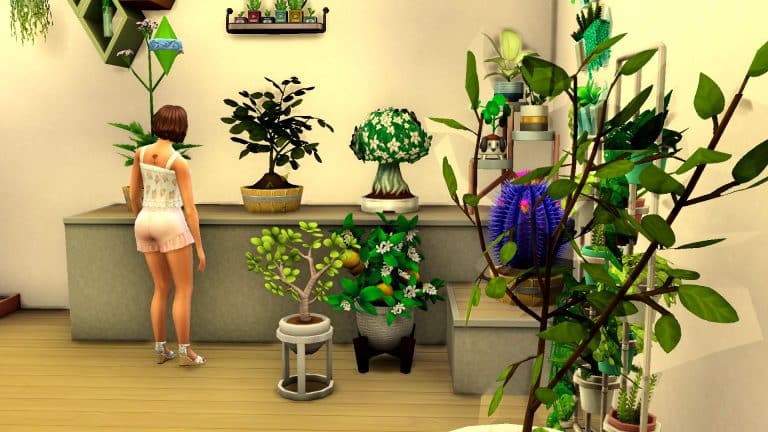
We wanted to experiment with this a little bit ourselves. The basic idea is to take a cutting from a fruit tree and graft it onto a smaller plant to grow a smaller version of that fruit tree which can be kept indoors. To add visual appeal to the setup, decorative plants from the Blooming Rooms kit are displayed alongside it. The decorative plants help the functional grafted plants to blend in and look and feel like a functional part of the kit.

We loved the idea of having more unique-looking plants that bore fruit so we used valerian root and quill fruit for two of our small plants. The valerian plant is a tall flowering stalk that we thought would look very appealing inside the home and the quill fruit resembles some kind of succulent which are super popular, low-maintenance houseplants. For the fruit trees, we used pomegranate, pear, and plantain.

Creating Functional Home Plants with Grafting in The Sims 4
Our Sim took the cuttings from the fruit trees and grafted them onto the smaller plants. We paired pomegranate with the quill fruit, plantain with the valerian root, and pear with a more typical looking kava root plant. Then we sized down the planters they were in and tried a few different setups to display them. All three plants were completely functional and could be harvested from and tended as long as there was nothing obstructing the Sim’s path to the plant. However, they looked visually hilarious. We had pears and plantain growing out of the dirt which gave us a good chuckle.

Creating Functional Home Plants with Grafting in The Sims 4
After our little mishap, we realised that this technique for making functional indoor fruit trees looked best when a fruit was paired with a small plant that blossoms on the leaves. So flowers for example were good candidates for this; the grafted fruit would display on the leaves just like the flowers do. But grafting fruit onto small root plants resulted in fruit growing out of the soil.

Creating Functional Home Plants with Grafting in The Sims 4
So if you’re thinking of experimenting with this yourself, try grafting fruit onto plants that produce their harvestables on the leaves of the plant. Your indoor fruit trees will look best that way. Or, if you don’t care to bother with grafting, Mushilda has her lemon tree setup available in the Gallery.

Community Thoughts: The Future of The Sims 4 Stuff Packs

Since early last year, we have seen a variety of new content released for The Sims 4. While the release schedule did not follow a similar pattern compared to previous years, we did get content in the form of one Stuff Pack, Game Pack and Expansion pack as well as nine new Kit-style Packs.  Of course, this is not including content via Patches or the recently introduced Sims Delivery Express Feature.

However, you may be thinking, but this seems like a lot of content? It is definitely a lot of content, however, one thing that stands out is that we only saw one Stuff Pack last year. There are probably a number of reasons for this. Some of these could include the fact we saw the introduction of the new Kit pack types, many people were still working from home due to the current global situation and many more reasons.

The last Stuff Pack that was released was The Sims 4 Paranormal Stuff back in January 2021!

While speculating if and why we haven’t had a new Stuff Pack in over a year isn’t the main aim of this article, I wanted to focus more on what not only myself but also what the community would love to see in future Stuff Packs while The Sims 4 is still in active development.

I decided to reach out to the community on Discord, Twitter and in our Facebook Group to see what kind of ideas they had for potential new Stuff Packs.

After going through the replies, it was clear to see that many players echoed similar ideas for what they would love to see as a future Stuff Pack. With so many different ideas, it’s clear to see that Stuff Packs are still something that the community would love to see return.

There were a variety of different ideas shared and a number that if they weren’t viable for a Stuff Pack could also work as a Game Pack and maybe even an Expansion Pack.

For the purpose of this post, I’ve grouped together ideas that fit into similar categories.

Life Stages

  • Teen Stuff
  • Elder Stuff
  • Baby/Toddler Stuff
  • Kids Stuff
  • Generations

Occults

  • Werewolves
  • Fairies
  • Plant Sims
  • Elves

Activities

  • Hobbies
  • Crafting
  • Arts
  • Music/Bands
  • Night Life
  • Arcade
  • After School/School Activities
  • Voidcritters
  • Tiny Pets (Rabbits, Hamsters, Birds)

Other

  • Historical
  • Goth/Rock
  • Space
  • Fantasy
  • Medieval
  • Retro Stuff
  • Burglars
  • Clutter
  • Everyday items
  • Household items
  • Kitchen Appliances
  • Cars
  • Horses
  • Ikea

You can see the original Tweet and all the replies here.

Another idea that popped up several times was a Wedding themed Stuff Pack. However, based upon the most recent Road Map released by The Sims Team, there has been a lot of speculation amongst the community that the next Game Pack could possibly be based around Weddings. While there is no official confirmation about this currently, however, it will be interesting to see what the next Game Pack is about when it is revealed.

Community Thoughts: The Future of The Sims 4 Stuff Packs

A number of players also referred to some of the concept ideas that we saw from the previous Community Voted Stuff Packs and that it would be nice to see some of those features make their way into the game in some form as well.

There’s no denying that the more recent Stuff Packs have been more in-depth than earlier Stuff Packs, with many offering a good mixture of gameplay, Build Buy and Create A Sim options. Maybe we will see some of the earlier Stuff Packs receive a Pack Refresh, like we did with The Sims 4 Spa Day Game Pack.

Personally, I would love to see more Stuff Packs released in the future. Many of the ideas that the community have shared are ones that I would be interested to see, including more random household items, kitchen appliances and clutter in general, as well as more content for Teen and Elder Sims. I’d also love to see a Stuff Pack which would be more of a throwback to either The Sims or The Sims 2 where it would feature some classic items from that game, be it Create A Sim or Build Buy items, remade for The Sims 4.

With so many possibilities, it will be interesting to see when the next Stuff Pack is revealed and what it will be based upon.

What kind of Stuff Pack would you like to see next? Let us know in the comments below!

The Sims 4 LUX Lights Mod Kit Reveal

Arnie is a popular modder within The Sims 4 community and is always pushing the boundaries of the game with his mods. Now you may recognize his name from the likes of his Farmland, Create Your Style, Plumfruit 2 + Simstagram and World Edit mods. Now, Arnie is back with a brand new mod kit.

The LUX Lights Mod Kit takes your lighting options in The Sims 4 to the next level!

Featuring a number of new ways to explore lighting, including LED lighting strips, modular lights, neon lights and vintage lightbulbs, there is an option for every type of room. However, that’s not all!

The Sims 4 LUX Lights Mod Kit RevealYou will be able to customize the new lighting options in more depth than before. With a specially created pie menu, customize each individual lights colour and intensity or even a full group of lights in one go.

Take a look at the LUX Lights Mod Kit Trailer below!

The LUX Lights Mod Kit is out now for early access download and will be publicly available soon! Check out the link below to find out more and download the Mod Kit!

[mks_button size=”large” title=”LUX Lights Mod Kit Download” style=”squared” url=”https://www.patreon.com/posts/61671637″ target=”_blank” bg_color=”#4e62ac” txt_color=”#FFFFFF” icon=”” icon_type=”” nofollow=”0″]

Don’t forget to follow Arnie for all the latest updates on his current and upcoming mods!

The Sims 4 Laundry List: February 1st, 2022

9

The Sims Team has published their first The Sims 4 Laundry List for 2022!

In case you don’t know what a Laundry List is – it’s a list of all the highly reported bugs and issues that are notable in The Sims 4. The Laundry List covers bugs and glitches that are being investigated for The Sims 4’s upcoming Game Patch. If all goes well, The Sims 4 should have these reported bugs and issues resolved this month!

Check out the Laundry List below:

Hi Simmers!

Welcome to the Laundry List where we’ll share a list of the top community concerns that we’re currently investigating and hope to have resolved in the upcoming patch. This is just a top list, there are more topics that we saw reported by players that are not listed and being worked on. 

These concerns were reported by players who help us continue our work of improving the user experience on a regular basis.

Please note that some topics can be tricky and require an extended investigation on our end, so even though we are actively reviewing, it’s not a guarantee that we’ll have an immediate fix for it in the upcoming patch.

Here’s the list of the top community concerns we’re investigating for the game update this month:

Thanks for all your patience and valuable help! Please continue sharing with us about any issues you’re experiencing on Answers HQ. We’ll continue to check in, and together we can make this game the best that it can be. Happy Simming!

The Sims 2: Mods to Enhance the Look of Your Game!

4

Upgrade your graphics, textures and lighting with these The Sims 2 Mods!

If you’ve just started playing The Sims 2 again on new hardware, you might have noticed that the game doesn’t look quite as good as how you remember it from nearly 20 years ago. That’s because The Sims 2 has trouble recognizing newer hardware. The good news is that it’s actually pretty easy to fix all these problems. I’ll be linking you to some resources to help optimize the look of your game! Not only that but I’ll also be showing you a few mods to upgrade the graphics. Enjoy crystal clear, reflective water, custom skies, greener grass and more!

The Sims 2: Mods to Enhance the Look of Your Game!

Graphics Rules Maker

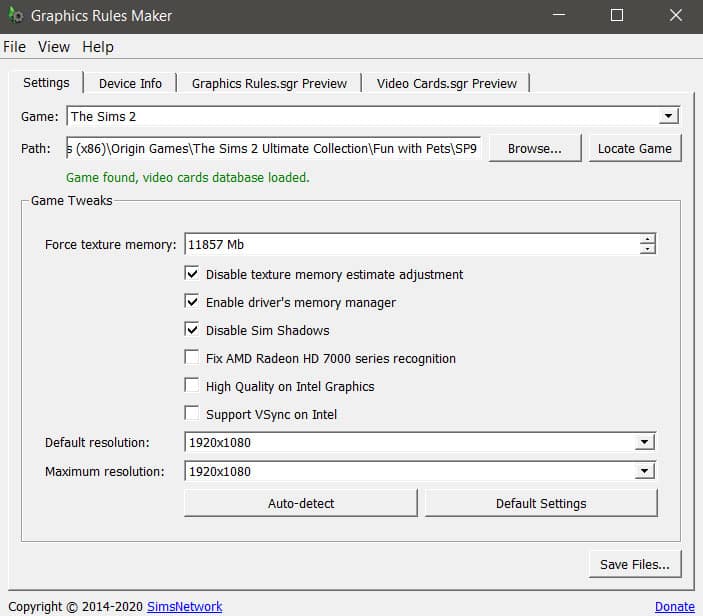
Before you do anything else, you should download and install the Graphics Rules Maker program. This program does all the hard work of optimizing The Sims 2 for you. It will force the game to recognize your graphics card and optimize the screen resolution to match your monitor’s native resolution.

The Sims 2: Mods to Enhance the Look of Your Game!
Just open the program, select The Sims 2 from the dropdown list and hit Auto Detect. Make sure Disable Sim Shadows is checkmarked if it isn’t already. Once it’s detected your settings, hit Save Files. If you get a popup about your graphics card, just hit OK. That just means The Sims 2 doesn’t recognize your graphics card so the program is asking you if you want it to fix that for you.

And you’re done! The Sims 2 should already look loads better but if you want to take things a step further and make the game look even nicer, here are some of the mods I’m currently using in my own game that you might enjoy as well.

Realistic Ocean and Pond Water

The Sims 2: Mods to Enhance the Look of Your Game!
We really can’t fault The Sims 2 for having ugly water; after all, the game is almost 20 years old and at the time, the water looked great! Still, it’s 20 years later and we can do a bit better with the water visuals. If you feel like the look of your water could use an upgrade, I really recommend this mod over on Mod The Sims. It will make your ocean and pond water look more realistic, closer to how the water in The Sims 3 and The Sims 4 looks.

Custom Skyboxes

The Sims 2: Mods to Enhance the Look of Your Game!
Have you ever noticed that the sky in The Sims 2 looks very… flat? It’s the same tone of blue with no variation or clouds at all. There is a mod to add clouds to the sky but I actually prefer to use custom skyboxes. Why? Custom skyboxes are a lot more detailed and add much more variation to the sky than just clouds. My personal favourite is the animated skies collection. It comes with a nice variety of different skyboxes you can use that are animated; the clouds, stars and other details slowly move through the sky. And if you’re using the realistic water mod listed earlier, it makes for some truly beautiful reflections.

To use custom skyboxes, place the spawner object in the corner of your neighbourhood map or lot, depending on whether the skybox you downloaded is for the neighbourhood or your lot.

Detailed Sun and Moon

The Sims 2: Mods to Enhance the Look of Your Game!
Another default replacement I love are these more detailed sun and moon. Only install one of each; you can’t have all three in your game. I use the real moon version and the regular sun. I also use the optional corona effect around the sun because I think it looks much prettier with those rays of light beaming out from around the sun.

Neighbourhood Lighting Fix

The Sims 2: Mods to Enhance the Look of Your Game!
This might not be something you’ve noticed before, but once you see the difference, you won’t be able to unsee it. There’s a problem with the lighting on the neighbourhood screen causing buildings and other world décor objects to appear dark in places where they shouldn’t be. This mod fixes that for you and creates a nice, even lighting that will make your neighbourhood look brighter and clearer.

Tree Replacements

The Sims 2: Mods to Enhance the Look of Your Game!
These tree texture replacements are awesome and really make your neighbourhoods look more vibrant. I never realised how flat the trees in the neighbourhood looked until I downloaded these replacements and now I don’t think I could ever go back. There are replacements for both the pine and oak trees available.

Terrain Replacements

The Sims 2: Mods to Enhance the Look of Your Game!
These neighbourhood terrain replacements make your grasses look more full and lush and your cliffs look more detailed. I use the lush grass replacement and the grey cliffs replacement in my own game. I just love how rich and vibrant it makes everything look. That faded, bedraggled grass was not the vibe for me.

Crisper Speech Bubbles

The Sims 2: Mods to Enhance the Look of Your Game!
I’m not sure why the speech bubbles in The Sims 2 are so blurry but this mod will clean them right up for you, giving the bubbles a nice crisp outline. It’s a small detail but a detail that I’m quite fond of all the same.

Clean UI

The Sims 2: Mods to Enhance the Look of Your Game!
The old Sims 2 UI is rather dark and cluttered. I never really liked it even back when The Sims 2 was the newest Sims game. The Clean UI mod is one of my favourite visual mods ever for The Sims 2! It cleans up the UI a great deal and changes that dark blue/purple colour to pale whites and blues. When I first installed it, I honestly felt like I was playing a completely new Sims game. It really changes the entire feel of the game that much.

The only reason it’s last on this list is because it’s a lot more complicated to install than the other mods I’ve listed here. Make sure you pay very close attention to all the install instructions and read all the folder labels carefully so you don’t mess up your game trying to install this.

Taking Things a Step Further

If you’re pretty mod and tech-savvy and want to really take things a step further with improving the look of your Sims 2 game, you should check out this tutorial by Boring Bones on YouTube! With the exception of the Clean UI mod, I’ve only listed visual enhancements that are fairly easy to install; they just require you to drag and drop a few files into your Sims 2 Downloads folder.

Boring Bones really takes things a step further with improving the look of his game and he shares his process over on YouTube. It’s definitely a longer, more complex process that requires editing some of the installation files but in the end, his game looks absolutely stunning! It really looks even better than The Sims 4 so I definitely recommend checking out some of his advanced tips. In fact, a lot of the visual mods I recommend here, I learned about from Boring Bones! Definitely go subscribe to his channel on YouTube!

Cozy up your Living Room with The Sims 4 Winter Garden CC Set!

Cozy, Maxis Match objects for your Living Room!

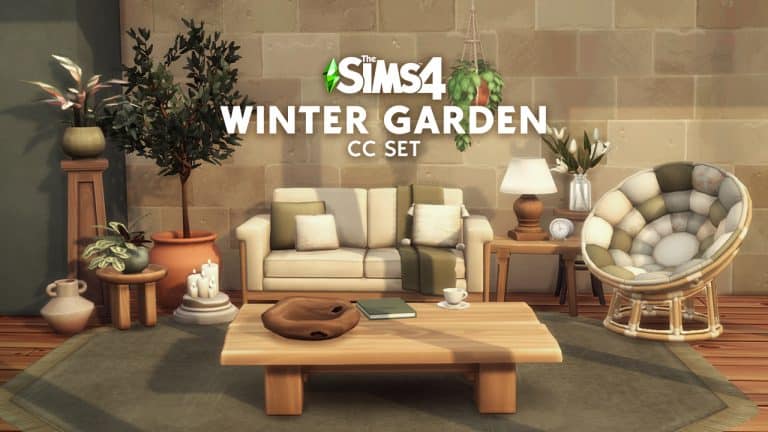
PieriSims has released his first part of the Winter Garden Custom Content Set for The Sims 4 to the public!

This set consists of 22 items completely Maxis Match that you can use primarily for your Living Room. The set is packed with new sofas, a gorgeous circular loveseat, wooden stools and surfaces, plants of all variations, throw pillows and more!

Check out the breakdown below:

Cozy up your Living Room with The Sims 4 Winter Garden CC Set!

Oh, but what about the swatches? I was pleasantly surprised with the amount of color variations and patterns that come with each object. Just check out the amount of swatches for this loveseat:

Cozy up your Living Room with The Sims 4 Winter Garden CC Set!

The set can be yours to download and add to your game right now! Simply click the download button below and you’ll find the .package that contains this set at the bottom of the creator’s Patreon post.

The set can be installed by pasting the .package file to Electronic Arts > The Sims 4 > Mods folder.

[mks_button size=”large” title=”DOWNLOAD!” style=”squared” url=”https://www.patreon.com/posts/winter-garden-60953790″ target=”_blank” bg_color=”#1e73be” txt_color=”#FFFFFF” icon=”fa-arrow-down” icon_type=”fa” nofollow=”0″]

Keep in mind that this is only the first part of the Winter Garden Set!

The creator shared some work-in-progress photos for their second part of the set, including new windows and doors, columns, doors and spandrels. The second set will primarily focus on the exterior part of houses, as well as patios and lofty designs.

Cozy up your Living Room with The Sims 4 Winter Garden CC Set!

You can stay up to date on PieriSims’ creations by finding them on these socials:

Two Sims Deliveries coming to The Sims 4 Next Week!

0

A few days ago we reported on the information about the upcoming Sims Delivery Express deliveries coming to The Sims 4 Base Game.

Originally The Sims Team had intended to release the collaboration with Custom Content first on February 2nd. The CC Collaboration with Complex Sims will bring three new Create A Sim pieces to the Base Game, and we also had a preview of one of the new pieces coming:

Two Sims Deliveries coming to The Sims 4 Next Week!

Another Sims Delivery is a set of 6 new recipes inspired by East Asian cuisine, including Sticky Rice Cake, Steamed Fish, Cold Noodles, Nian Gao and more. The date for this Sims Delivery wasn’t set yet, but it was expected to be released sometime during the Simthing to Celebrate Season:

Two Sims Deliveries coming to The Sims 4 Next Week!

Both of the deliveries have now merged into one – The Sims Team has shared – and are set to release on February 9th, which is next week!

Two Sims Deliveries coming to The Sims 4 Next Week!

Countdown to the release of The Sims 4 Carnaval Streetwear Kit

0

The Carnaval Streetwear Fashion is coming to Create A Sim in just a few more days!

The Sims 4 Carnaval Streetwear Kit is the latest upcoming Kit for the game which is set to release on February 3rd, 2022 at 10AM Pacific Time. Just like with the previous Kits this one is set to release on PC, Mac, Xbox and Playstation consoles.

The Kit is retailed at $4.99USD or a price that’s equivalent to your local currency.

Since there are many time zones to be covered we’ve included a handy countdown below. When the countdown timer below goes zero you’ll be able to purchase the Kit from official stores including Origin, Steam, Microsoft and Playstation Store.

Stay tuned on our The Sims 4 Kits Article Category for the latest coverage and overviews on this Kit!

[janky target_time=”1643911200″ color=”#d21b73″]

Countdown to the release of The Sims 4 Carnaval Streetwear Kit

Walkthrough of the Into The Void: Voidcritter Tablet Mod for The Sims 4

Have you heard of Voidcritters? If not, you’re about to become well-acquainted with them! Voidcritters are the Sims equivalent of Pokémon; cute fictional creatures featured on television and on collectible trading cards that kids can collect, train, trade, and battle with. They come with the Kids Room Stuff pack but references to Voidcritters are littered throughout the entire game across many different packs.

If you own Kids Room Stuff and have played with Voidcritters, you’ll know that Voidcritters are extremely detailed and fun but they have some frustrating limitations. For one thing, only children can play with Voidcritter cards. Since it takes so long to complete the collection and fully train every Voidcritter, kids often didn’t have enough time to fully enjoy the Voidcritters they worked so hard to collect before they age up. Also, kids had to use the Voidcritter battle station to train and battle with their Voidcritters. The battle station does have a lot of fun animations but it’s a big bulky stationary object. This limited kids to only being able to play on lots that had a battle station on them.

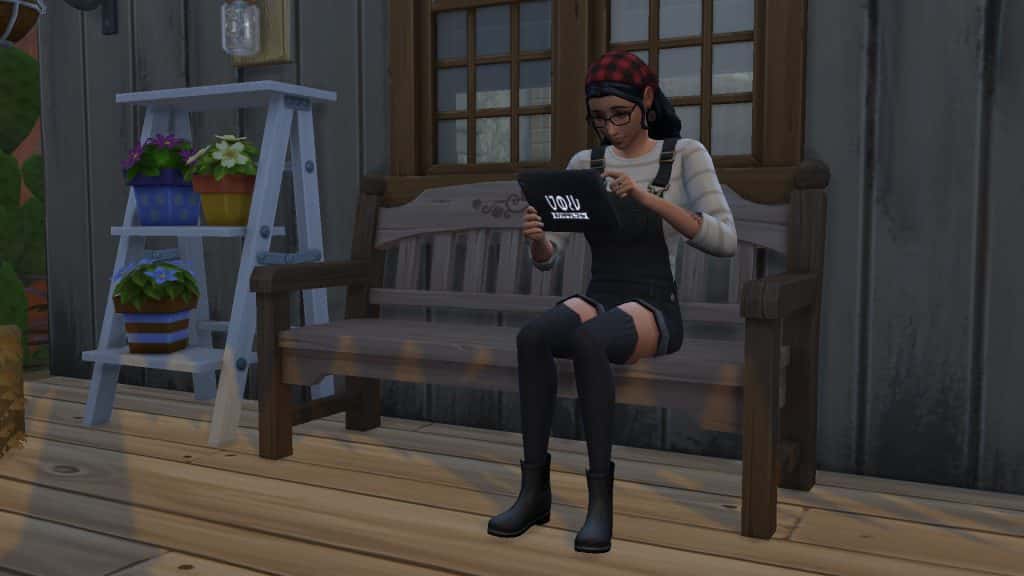
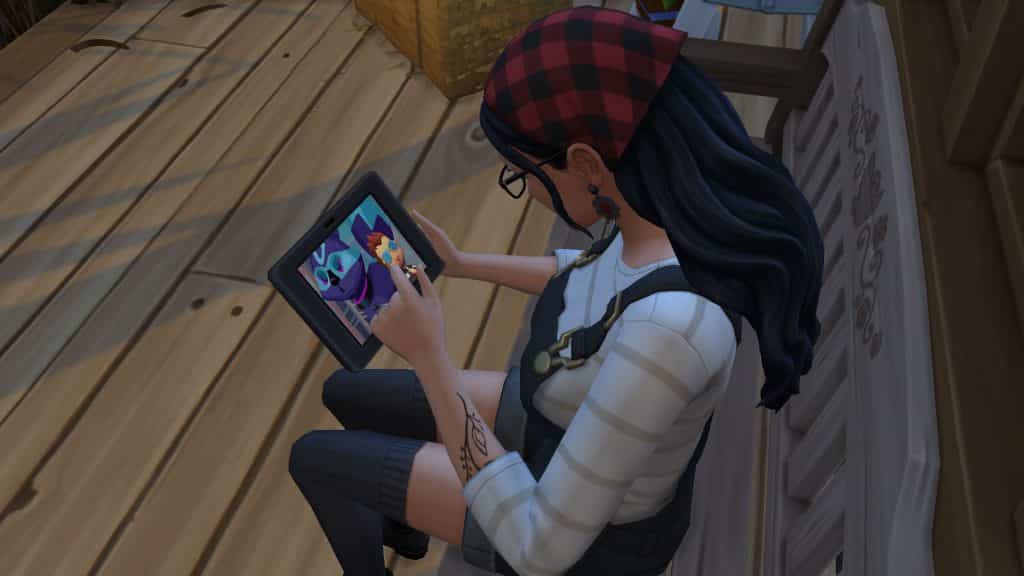
Ravasheen and LittleDica have put their heads together to create a new, functional object that eliminates all of these limitations! The Into The Void: Voidcritter Gaming Tablet is usable by children, teens, young adults, adults, and elders! It allows your Sims to take Voidcritters with them on the go and comes with both Base Game and Kids Room Stuff functionality! Players who own Kids Room Stuff will have access to the tablet’s full range of features but the tablet does have gameplay for base game players, too!

The tablet eliminates the need for the battle station entirely but it is not an override; you can still have children play with the battle station as well as the tablet if you like. Playing with the tablet builds Video Gaming skill for teens-elders and Motor skill for children. Children will also build Social skill while battling online with other Sims.

Getting Started

Of course, you will have to install the mod, first. You can get it from Ravasheen’s website. The current version is in early access for patrons only but will be released to the public on February 15th, 2022. If you need help with installing mods, check out our article Getting Started With Mods and CC.

Walkthrough of the Into The Void: Voidcritter Tablet Mod for The Sims 4

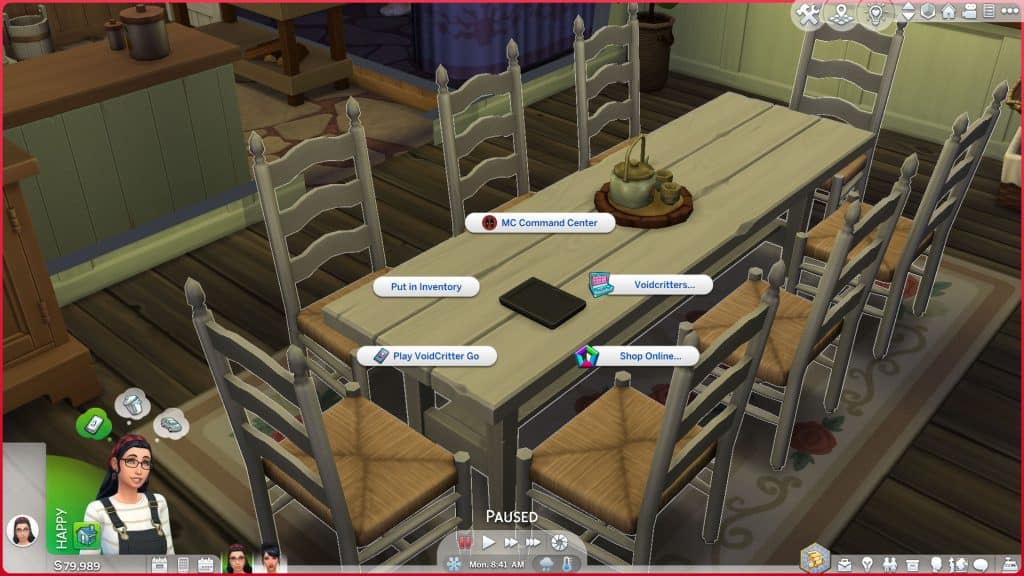
Once the mod is installed correctly, all you have to do is load up the game and go into Build/Buy. The Voidcritter gaming tablet will be located under the Kids’ Activities category. You can also search “rvsn” in the search bar to bring up all of Ravasheen’s content you have installed in your game.

Voidcritter GO (BGC)

Walkthrough of the Into The Void: Voidcritter Tablet Mod for The Sims 4
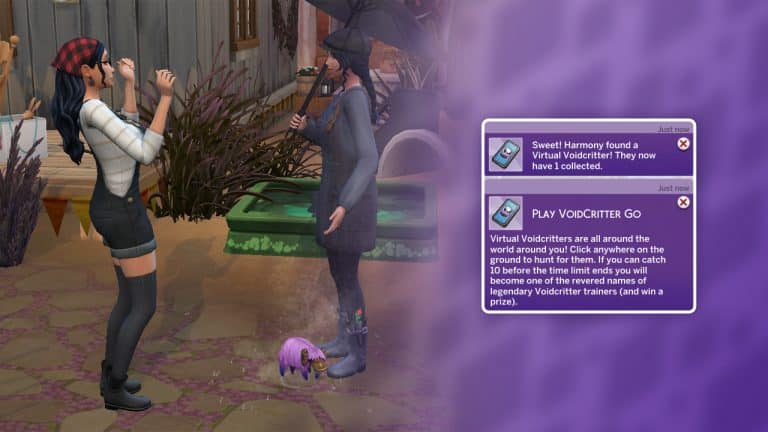
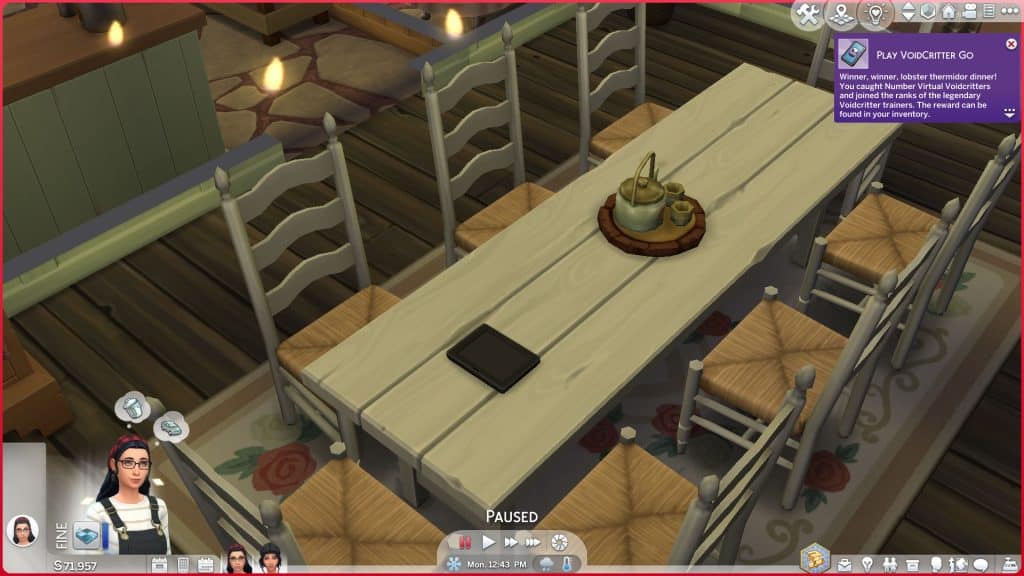
The Voidcritter Gaming Tablet comes with a brand new way to play with Voidcritters on the go! The Voidcritter GO app will let your Sims collect virtual Voidcritters out in the world. Even though Voidcritter GO is based on the Voidcritter challenge at the Festival of Youth from the Snowy Escape expansion, this feature is base game compatible. You do not need Snowy Escape to use this feature; Ravasheen has rebuilt the code from the ground up to be base game.

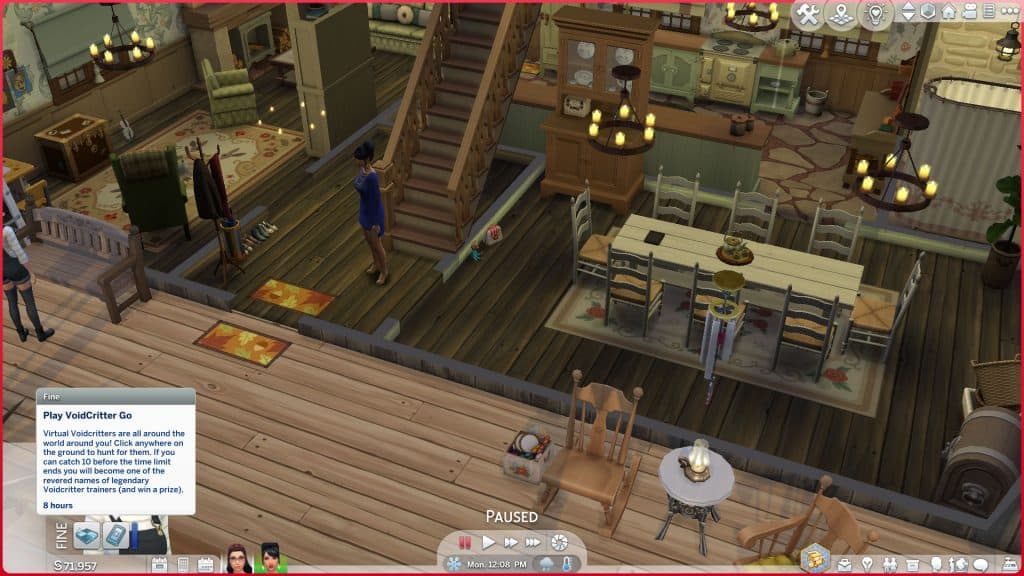
To start playing Voidcritter GO, click on the gaming tablet either in the world or in a Sim’s inventory and select Voidcritter GO. This will start a timer that lasts for 8 in-game hours. Your Sim will get a Fine moodlet for the duration of the timer so you can see how long you have left by looking at the moodlet.

Walkthrough of the Into The Void: Voidcritter Tablet Mod for The Sims 4

While the timer is active, click anywhere on the ground to have your Sim look for a Voidcritter. They will pull out their phone to play Voidcritter GO and attempt to catch a Voidcritter. Your Sim won’t find a Voidcritter every time and their chances decrease the more times they try to look for a Voidcritter in a row. If your Sim isn’t having any luck finding Voidcritters, try waiting a little while before looking again.


Sims can continue playing Voidcritter GO even if they travel to another lot. They can play throughout the day while traveling to different places and going about their normal lives, much how people in the real world play Pokémon GO. Although the tablet is needed to start playing Voidcritter GO, it’s not needed to find the virtual Voidcritters after that point so if your Sims accidentally leave their tablet at home when they travel somewhere, it won’t break the timer. They can continue to play Voidcritter GO with their cell phone.

Walkthrough of the Into The Void: Voidcritter Tablet Mod for The Sims 4

If your Sim manages to find 10 Voidcritters before the 8 hour timer expires, they will win a prize! The prize will be either a Voidcritter card or some Voidcritter merchandise. Players with more packs will have a wider prize pool but there are some base game Voidcritter prizes available to win as well. If you do not see your prize in your Sim’s inventory, check the household inventory. Not every item can go in the Sim inventory, in which case it will be sent to the household inventory, instead.

Buy Voidcritter Swag (BGC)

Walkthrough of the Into The Void: Voidcritter Tablet Mod for The Sims 4

Speaking of Voidcritter merchandise, Sims can also purchase Voidcritter swag from the tablet. Players with Kids Room Stuff can also purchase specific Voidcritter cards or random booster packs from the tablet. Since being able to buy whatever Voidcritter card you want is a rather cheaty way to complete the collection, Ravasheen’s implemented a price hike on these items. You’ll be paying up to 4x the base price for some of those rare foil editions. The random booster packs remain the same price.

There are a variety of Voidcritter themed items scattered throughout both the base game and various packs that Ravasheen’s compiled for purchase as swag through the tablet. Players with more packs will see more items available for purchase but base game players will also have access to some Voidcritter-themed goodies.

Pictured below are all the Voidcritter-themed items you can purchase from the tablet across all packs:

Walkthrough of the Into The Void: Voidcritter Tablet Mod for The Sims 4

Players who own Kids Room Stuff can also purchase the wall decals of all the Voidcritters that come with this stuff pack, pictured below:

Walkthrough of the Into The Void: Voidcritter Tablet Mod for The Sims 4

Training Voidcritters (KRS)

Training Voidcritters is only available to players who own the Kids Room Stuff pack. Sims will need to own at least one Voidcritter card to train them on the tablet but unlike the battle station, the cards don’t need to be in your Sim’s inventory. Any card displayed on the lot can still be trained! This is great for players who like to display their Voidcritter card collection. They don’t need to constantly be dragging them in and out of the Sim inventory to train and battle with them.

Walkthrough of the Into The Void: Voidcritter Tablet Mod for The Sims 4
Once you’ve chosen a Voidcritter to train, your Sims will sit down with the tablet and begin a training session. The tablet does not display the same dynamic display for each Voidcritter like the battle station but it does play the Voidcritter television show from the BeTween TV channel and has all the same audio from the show which is still fun to watch.

Walkthrough of the Into The Void: Voidcritter Tablet Mod for The Sims 4
Once a Voidcritter has been trained to its maximum power level of 10, it will no longer show up in the menu when selecting Voidcritters to train, since it cannot be trained any further.

Online Battles (KRS)

Currently, the gaming tablet can only be used for online battles with other players who are not on the lot but Ravasheen does plan to implement PVP battles between Sims on the same lot in the future.

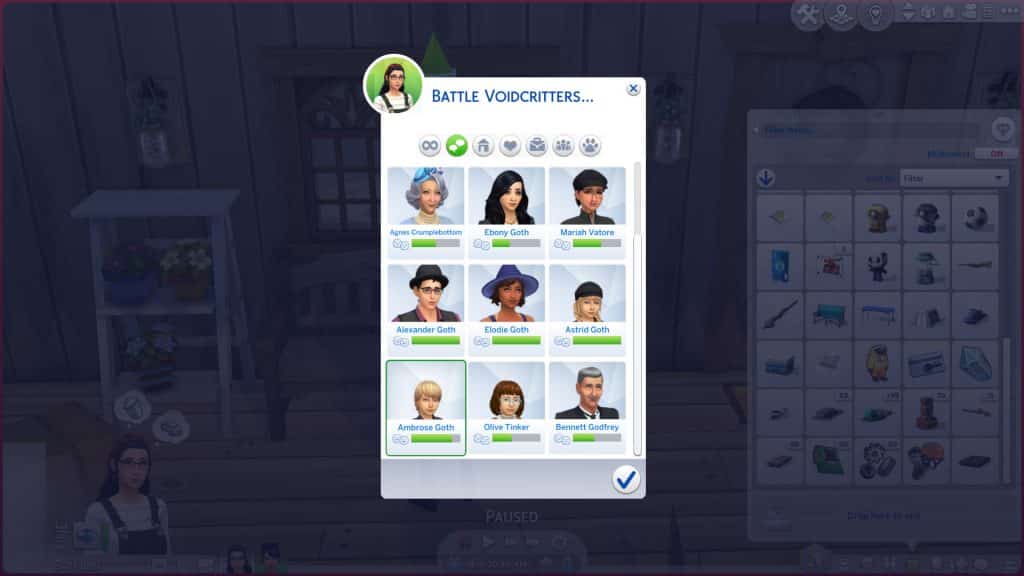
Like training Voidcritters, Sims do need to own a Voidcritter card to battle them on the tablet but the card does not need to be in their inventory; it can be displayed anywhere on the lot. Select Voidcritters > Battle Voidcritters on the tablet and select the Voidcritter you’d like to battle with. Then choose your opponent from a large selection of Sims in the world. Children all the way through to Elders will be available to battle against.

Walkthrough of the Into The Void: Voidcritter Tablet Mod for The Sims 4
Once your Sim sits down to battle against their opponent, the battle results are calculated by comparing different stats. The game will compare your Sim’s Video Gaming skill (or Motor skill for children), the type, rarity and power level of their Voidcritter against their opponent’s. Therefore, you have much higher chances of winning a battle if your Sim is using a rare Voidcritter with a high power level and your Sim has high Video Gaming/Motor skill. However, a win is never guaranteed. There is an element of randomness added to the mix, too.


Winning a battle will give your Sim a happy moodlet while losing a battle will give them a sad moodlet. Sims will also build (or lose) relationship with the Sim they are battling against. This is largely based on traits; Sims with traits like evil or mean will be sore losers and take a loss personally.

Cheats

For those of you who are cheaters at heart, Ravasheen’s thought of you, too! If you shift-click on the gaming tablet, you’ll see an option to instantly acquire all the Voidcritter cards. If your Sim is currently playing Voidcritter GO, you’ll also see an option to find all 10 Voidcritters which will instantly complete the game and award you with your prize. This option will only be available if your Sim has started a Voidcritter GO session.

Walkthrough of the Into The Void: Voidcritter Tablet Mod for The Sims 4
Our Thoughts

Every time I think Ravasheen can’t impress me any more than she already has, she does something like this that sets the bar even higher. And LittleDica’s contribution to making the tablet object can’t be overlooked, either; his textures are beautiful and the tablet is a perfect Maxis Match addition to the game.

I have been in love with Voidcritters ever since Kids Room Stuff released and it remains one of my favourite stuff packs to this day because of the Voidcritters. I think it’s one of the coolest yet one of the most underrated features ever added to the game. That’s mostly due to the fact that all of the gameplay surrounding Voidcritters is locked to everyone except children. Even if you are a family player, you probably figured Voidcritters weren’t worth bothering with because your kids wouldn’t have the time to invest in them before aging up, anyway.

I really think the Into the Void: Voidcritter Gaming Tablet is going to change the way players see and interact with Voidcritters. Making them accessible to older Sims is going to introduce many more players to the rich lore and detail of Voidcritters. I also love that base game players will also get the opportunity to get a taste of Voidcritters even if they can’t battle or train with the physical cards. Voidcritter GO was such a smart way to bring Voidcritters to everyone.

So if you’ve ever wondered what the big deal is about Voidcritters, definitely add the Into the Void: Voidcritter Gaming Tablet to your mod collection and let your Sims of all ages see what they’re about!

Guide to Flooding Your Home in The Sims 4

I don’t normally write guides and tutorials on how to wreck your home in The Sims 4 but I was absolutely amazed with @LuddySimmer’s discovery and had to try this out myself!

The July 2021 Update for The Sims 4 which adds Water Tools to the game also lets you completely flood the first floor of your home. I had to try it for myself and was surprised to see how well this works!

Before moving on with this guide I’d like to point out that the new Water Tools probably weren’t made to flood homes and rooms in the game, so some visual glitches and errors might occur during this experience.

Flooding your Home

For this tutorial I’ll be using a Pre-Made Home from Maxis. First, I’ll place down the home like and make sure there’s enough room around to dig out a hole around the house using the Terrain Tools.

Then I used a Water Tool to fill in the Pond around the terrain and leveled the Terrain so that the entrance area of the home is accessible.

Guide to Flooding Your Home in The Sims 4

Now’s the time to dunk your home in the surrounding water! Simply select any floor from the ground floor and and drag it just enough so that the home is just accessible enough for your Sims to approach and enter.

Guide to Flooding Your Home in The Sims 4

You might notice that as soon as doors touch the water they’ll be removed. You’ll have to open up your home and remove at least one wall from the entrance area in order to flood the first room. You’ll notice that any objects that your Sims won’t be able to interact with while the room is flooded will be removed. In this case it’s the door to another room and the fireplace.

flood5

Congratulations – just like that you’ve completely flooded the first room!

Guide to Flooding Your Home in The Sims 4

Do you feel like flooding your Kitchen and Dining Room as well? Simply remove a single piece of wall that protects the water from entering a room that hasn’t been flooded yet.

Guide to Flooding Your Home in The Sims 4

Sims will be able to do almost every interaction in their flooded home. If the water is deep enough then younger Sims, such as Children, will only have the option to wade through the house instead of the “Go Here” interaction and animation.

Sims will also be able to play in the water inside of their home!

Guide to Flooding Your Home in The Sims 4

You can see that I added some visual effects such as fireflies, bugs, fountains and a different water type. You can apply all of that to your flooded home!

The only visual error that occured to me was with visual effects such as Ducks and Swans, which were also dunked in the water along with my house objects.


That is your guide to completely destroying and flooding your home in The Sims 4. Let me know if you plan to try this out in your game in the comments below!