Home Blog Page 297

The Sims 4 Seasons Gallery Spotlight: Houses

The Sims 4 Seasons Gallery Spotlight: Houses

In this Spotlight, we’re featuring all sorts of homes built with The Sims 4 Seasons Expansion Pack, as well as some other packs.

Hover over the pulsing plumbobs to see screenshots of marked areas. Pulsing plumbob that’s on the left bottom corner contains all the info (and download link) of the lot.

To see more of our previous Gallery Spotlights, CLICK HERE!

[ult_hotspot main_img=”id^76289|url^https://simscommunity.info/wp-content/uploads/2018/07/07-02-18_9-25-23-PM.jpg|caption^null|alt^null|title^07-02-18_9-25-23 PM|description^null”][ult_hotspot_items icon_type=”custom” icon_img=”id^39525|url^https://simscommunity.info/wp-content/uploads/2015/09/plumbob2.png|caption^null|alt^null|title^plumbob2|description^null” img_width=”38″ tooltip_custom_color=”” tooltip_custom_bg_color=”rgba(255,255,255,0.01)” tooltip_width=”400″ tooltip_position=”right” enable_bubble_arrow=”off” tooltip_continuous_animation=”on” hotspot_position=”53.99153930131004,61.22699386503068″]

The Sims 4 Seasons Gallery Spotlight: Houses

[/ult_hotspot_items][ult_hotspot_items icon_type=”custom” icon_img=”id^39525|url^https://simscommunity.info/wp-content/uploads/2015/09/plumbob2.png|caption^null|alt^null|title^plumbob2|description^null” img_width=”38″ tooltip_custom_color=”” tooltip_custom_bg_color=”rgba(255,255,255,0.01)” tooltip_width=”400″ tooltip_position=”right” enable_bubble_arrow=”off” tooltip_continuous_animation=”on” hotspot_position=”33.97925764192139,61.963190184049076″]

The Sims 4 Seasons Gallery Spotlight: Houses

[/ult_hotspot_items][ult_hotspot_items icon_type=”custom” icon_img=”id^39525|url^https://simscommunity.info/wp-content/uploads/2015/09/plumbob2.png|caption^null|alt^null|title^plumbob2|description^null” img_width=”52″ tooltip_custom_color=”#1e73be” tooltip_custom_bg_color=”#ffffff” tooltip_width=”450″ tooltip_position=”right” tooltip_continuous_animation=”on” hotspot_position=”89.61858624454149,3.190184049079755″ tooltip_custom_border_size=”border-style:solid;|border-width:2px;border-radius:5px;|border-color:#81d742;”]

Seasons Family Home (Download Here)

by SarahAmina

Value: §96,417
Size: 30×20
Lot Type: Residental Lot[/ult_hotspot_items][/ult_hotspot][ult_hotspot main_img=”id^76292|url^https://simscommunity.info/wp-content/uploads/2018/07/07-02-18_9-36-34-PM.jpg|caption^null|alt^null|title^07-02-18_9-36-34 PM|description^null”][ult_hotspot_items icon_type=”custom” icon_img=”id^39525|url^https://simscommunity.info/wp-content/uploads/2015/09/plumbob2.png|caption^null|alt^null|title^plumbob2|description^null” img_width=”38″ tooltip_custom_color=”” tooltip_custom_bg_color=”rgba(255,255,255,0.01)” tooltip_width=”400″ tooltip_position=”right” enable_bubble_arrow=”off” tooltip_continuous_animation=”on” hotspot_position=”60.91703056768559,61.717791411042946″]

The Sims 4 Seasons Gallery Spotlight: Houses

[/ult_hotspot_items][ult_hotspot_items icon_type=”custom” icon_img=”id^39525|url^https://simscommunity.info/wp-content/uploads/2015/09/plumbob2.png|caption^null|alt^null|title^plumbob2|description^null” img_width=”38″ tooltip_custom_color=”” tooltip_custom_bg_color=”rgba(255,255,255,0.01)” tooltip_width=”400″ tooltip_position=”right” enable_bubble_arrow=”off” tooltip_continuous_animation=”on” hotspot_position=”83.86326419213974,61.59509202453988″]

The Sims 4 Seasons Gallery Spotlight: Houses

[/ult_hotspot_items][ult_hotspot_items icon_type=”custom” icon_img=”id^39525|url^https://simscommunity.info/wp-content/uploads/2015/09/plumbob2.png|caption^null|alt^null|title^plumbob2|description^null” img_width=”38″ tooltip_custom_color=”” tooltip_custom_bg_color=”rgba(255,255,255,0.01)” tooltip_width=”400″ tooltip_position=”right” enable_bubble_arrow=”off” tooltip_continuous_animation=”on” hotspot_position=”32.710152838427945,61.59509202453988″]

The Sims 4 Seasons Gallery Spotlight: Houses

[/ult_hotspot_items][ult_hotspot_items icon_type=”custom” icon_img=”id^39525|url^https://simscommunity.info/wp-content/uploads/2015/09/plumbob2.png|caption^null|alt^null|title^plumbob2|description^null” img_width=”52″ tooltip_custom_color=”#1e73be” tooltip_custom_bg_color=”#ffffff” tooltip_width=”450″ tooltip_position=”right” tooltip_continuous_animation=”on” hotspot_position=”89.61858624454149,3.190184049079755″ tooltip_custom_border_size=”border-style:solid;|border-width:2px;border-radius:5px;|border-color:#81d742;”]

Pleasant Seasons House (Download Here)

by SimplyNando

Value: §101,117
Size: 30×20
Lot Type: Residental Lot[/ult_hotspot_items][/ult_hotspot][ult_hotspot main_img=”id^76296|url^https://simscommunity.info/wp-content/uploads/2018/07/07-02-18_9-44-30-PM.jpg|caption^null|alt^null|title^07-02-18_9-44-30 PM|description^null”][ult_hotspot_items icon_type=”custom” icon_img=”id^39525|url^https://simscommunity.info/wp-content/uploads/2015/09/plumbob2.png|caption^null|alt^null|title^plumbob2|description^null” img_width=”38″ tooltip_custom_color=”” tooltip_custom_bg_color=”rgba(255,255,255,0.01)” tooltip_width=”400″ tooltip_position=”right” enable_bubble_arrow=”off” tooltip_continuous_animation=”on” hotspot_position=”56.66962336244541,67.11656441717791″]

The Sims 4 Seasons Gallery Spotlight: Houses

[/ult_hotspot_items][ult_hotspot_items icon_type=”custom” icon_img=”id^39525|url^https://simscommunity.info/wp-content/uploads/2015/09/plumbob2.png|caption^null|alt^null|title^plumbob2|description^null” img_width=”38″ tooltip_custom_color=”” tooltip_custom_bg_color=”rgba(255,255,255,0.01)” tooltip_width=”400″ tooltip_position=”right” enable_bubble_arrow=”off” tooltip_continuous_animation=”on” hotspot_position=”35.876091703056765,68.46625766871166″]

The Sims 4 Seasons Gallery Spotlight: Houses

[/ult_hotspot_items][ult_hotspot_items icon_type=”custom” icon_img=”id^39525|url^https://simscommunity.info/wp-content/uploads/2015/09/plumbob2.png|caption^null|alt^null|title^plumbob2|description^null” img_width=”52″ tooltip_custom_color=”#1e73be” tooltip_custom_bg_color=”#ffffff” tooltip_width=”450″ tooltip_position=”right” tooltip_continuous_animation=”on” hotspot_position=”89.61858624454149,3.190184049079755″ tooltip_custom_border_size=”border-style:solid;|border-width:2px;border-radius:5px;|border-color:#81d742;”]

Winter Family Home (Download Here)

by Kait411

Value: §94,733
Size: 30×20
Lot Type: Residental Lot[/ult_hotspot_items][/ult_hotspot][ult_hotspot main_img=”id^76299|url^https://simscommunity.info/wp-content/uploads/2018/07/07-02-18_9-47-27-PM.jpg|caption^null|alt^null|title^07-02-18_9-47-27 PM|description^null”][ult_hotspot_items icon_type=”custom” icon_img=”id^39525|url^https://simscommunity.info/wp-content/uploads/2015/09/plumbob2.png|caption^null|alt^null|title^plumbob2|description^null” img_width=”38″ tooltip_custom_color=”” tooltip_custom_bg_color=”rgba(255,255,255,0.01)” tooltip_width=”400″ tooltip_position=”right” enable_bubble_arrow=”off” tooltip_continuous_animation=”on” hotspot_position=”49.17781113537118,57.668711656441715″]

The Sims 4 Seasons Gallery Spotlight: Houses

[/ult_hotspot_items][ult_hotspot_items icon_type=”custom” icon_img=”id^39525|url^https://simscommunity.info/wp-content/uploads/2015/09/plumbob2.png|caption^null|alt^null|title^plumbob2|description^null” img_width=”38″ tooltip_custom_color=”” tooltip_custom_bg_color=”rgba(255,255,255,0.01)” tooltip_width=”400″ tooltip_position=”right” enable_bubble_arrow=”off” tooltip_continuous_animation=”on” hotspot_position=”29.462336244541486,58.03680981595092″]

The Sims 4 Seasons Gallery Spotlight: Houses

[/ult_hotspot_items][ult_hotspot_items icon_type=”custom” icon_img=”id^39525|url^https://simscommunity.info/wp-content/uploads/2015/09/plumbob2.png|caption^null|alt^null|title^plumbob2|description^null” img_width=”52″ tooltip_custom_color=”#1e73be” tooltip_custom_bg_color=”#ffffff” tooltip_width=”450″ tooltip_position=”right” tooltip_continuous_animation=”on” hotspot_position=”89.61858624454149,3.190184049079755″ tooltip_custom_border_size=”border-style:solid;|border-width:2px;border-radius:5px;|border-color:#81d742;”]

SEASONS (Download Here)

by theholybackpack

Value: §124,880
Size: 40×30
Lot Type: Residental Lot[/ult_hotspot_items][/ult_hotspot]
No More Quarterly Teasers for The Sims 4 + Update on Future Plans

2

SimGuruKate has shared a post on The Sims Forums talking about Quarterly Teasers for The Sims 4. More precisely, she explained that there will be no more quarterly teasers for the game and that The Sims Team is taking a different approach to announce and release packs from this point on.

You can check out the full elaboration below:

Hello Simmers!

With July now here we know many of you have been anticipating the next quarterly teaser video. Getting straight to the point, I’m here to let you know that we will no longer be releasing quarterly teasers. As much as we enjoyed sharing a sneak peek into the future, there’s a good reason why they don’t make sense moving forward.

Since the beginning of The Sims 4, we’ve been forthright in saying that pack releases won’t fall into predictable patterns, and to expect for things to change as we try new approaches to creating fun experiences. As you may be guessing, we’re mixing things up. Starting with the recent surprise announcement and release of The Sims 4 Seasons, we’re shifting our approach regarding the types of packs we create, and when they’ll be released. This change means that there will be quarters where we don’t release new paid content, so quarterly teasers won’t be the right format for sharing information.

That said, we’re also reaffirming that a bright future lies ahead for The Sims 4. The full Sims 4 Development Team is working hard on multiple packs that are in various stages of development. We also remain committed to improving the game via updates and more free content, which will continue to release on a frequent cadence. Ultimately this is a signal that we’ve heard your feedback, and we’re tweaking our plans to deliver the content you’ve been asking for.

Thank You!
SimGuruKate


We’re looking forward to what upcoming quarters have in store for The Sims 4. Until then, please enjoy our super cheesy compilation of all the quarterly teasers that we had:

The Sims 4 Seasons: Holiday Friend’s Home Build Challenge

Simarchy has created a new build challenge all based around our new Holiday friends from The Sims 4 Seasons. Appropriately named Holiday Friend’s Home Build Challenge the aim of the challenge is to build a home or homes for your favourite holiday friend. Choose either Patchy, Father Winter, Flower Bunny or the Holiday Gnome and create a home based around each friend’s specification. Simarchy will also be touring some of the builds over on her Twitch channel during July too!

You can find all the information about each build and the rules for the challenge in the image below.

The Sims 4 Seasons: Holiday Friend’s Home Build Challenge
You can find Simarchy on Twitch here or follow her on Twitter as well! Also have you seen these four holiday friend’s are on Twitter too! Click the links below to check them out.
Patchy The Scarecrow – TalesofPatchy
Flower Bunny – TheFlowerBunny
Father Winter – WinterFather
Holiday Gnome – GnomeHoliday

Let us know what you think of the challenge and let us know which of the friends you are going to make a build for first!

Using The Sims 4 Seasons to Create Immersive Storytelling

With the Seasons expansion, storytelling has never been this easy in the Sims 4! With a handful of new features, and a few pre-existing ones, you can make your game come to life for your gameplay and your sims stories. Utilizing new decorating options, multiple outfits, and tweaking the seasons settings to suit your experience, gives your game a whole new depth and telling a more dynamic story than ever before – just think of the screenshots!

Decorating the house exterior

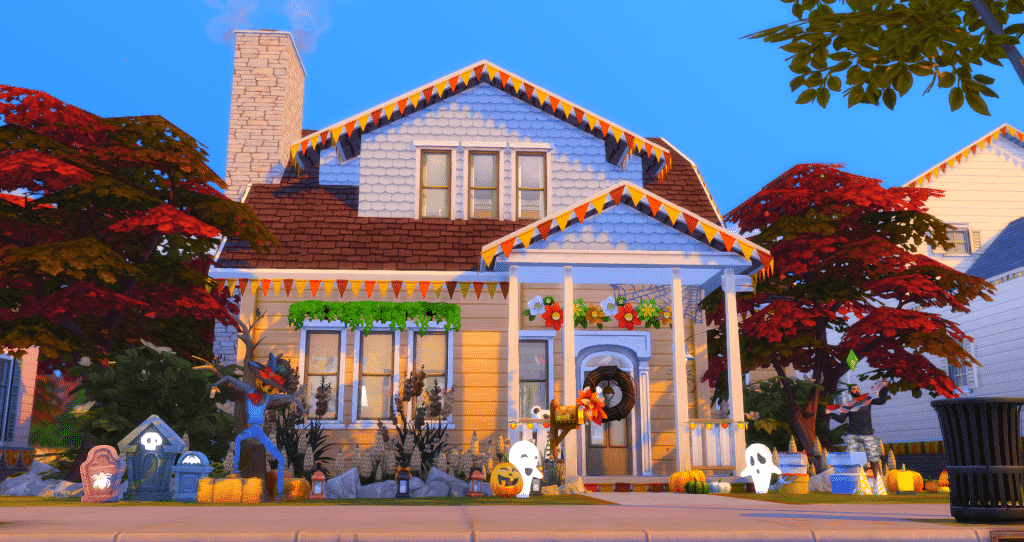
Use the new decorations box to quickly and easily get your house ready for the festivities of the season! You have plenty of options from bunting to lights to streamers, and plenty of colour options to cycle through to perfect the atmosphere. You can even use these decorations for everyday, and they can all be taken down with one click on the box. The perfect way to immerse yourself into seasonal gameplay and take wonderful screenshots with none of the fuss!

Search The Attic Stack Decoration Box in build/buy mode.

Using The Sims 4 Seasons to Create Immersive Storytelling

Using multiple outfits for all your categories

Utilising the multiple outfit system from the base game makes it easy to have your sims dressed for every occasion! Having some alternate outfits set up means you can switch super easily from your snow coat to your festive winter sweater, or from your shorts and flip flops to a dress, hat and sunglasses. Making use of multiple outfit options with the new weather and holiday functions adds realism to your gameplay, and makes your screenshot stories so much more dynamic. There’s some gorgeous new Winterfest sweaters that are sure to get your sims in the holiday mood!

Using The Sims 4 Seasons to Create Immersive Storytelling

More decorating

If you want to spend more time decorating, Seasons has added a load more festive decorations for you to manually place in your sims abode to up the realism in game. Not sure what to choose? By using the decorations box, you can be provided with some seasonal decorations in the matching colour scheme for that time of year. That way, you don’t have to search through the catalogue to get a homey seasonal feel. If that’s not enough, don’t forget to download the free Holiday Stuff through Origin for even more Winterfest decorations, or use The Sims 4 Spooky Stuff for any Halloween shenanigans!

Using The Sims 4 Seasons to Create Immersive Storytelling

Fine tune your seasons

Trying to take the perfect screenshot, but the extreme weather in some of the neighbourhoods keeps getting in the way? Use the seasons menu to fine tune your neighbourhoods weather effects, so you can choose how much your sims are affected by the daily forecast. Playing in Oasis Springs, but your sims can’t go outside without getting heat stroke midsummer? Turn that off, and you can have all the fun you want outdoors! It’s all about fine tuning your experience to you, to give you the most immersive experience possible.

Using The Sims 4 Seasons to Create Immersive Storytelling

Using events for storytelling

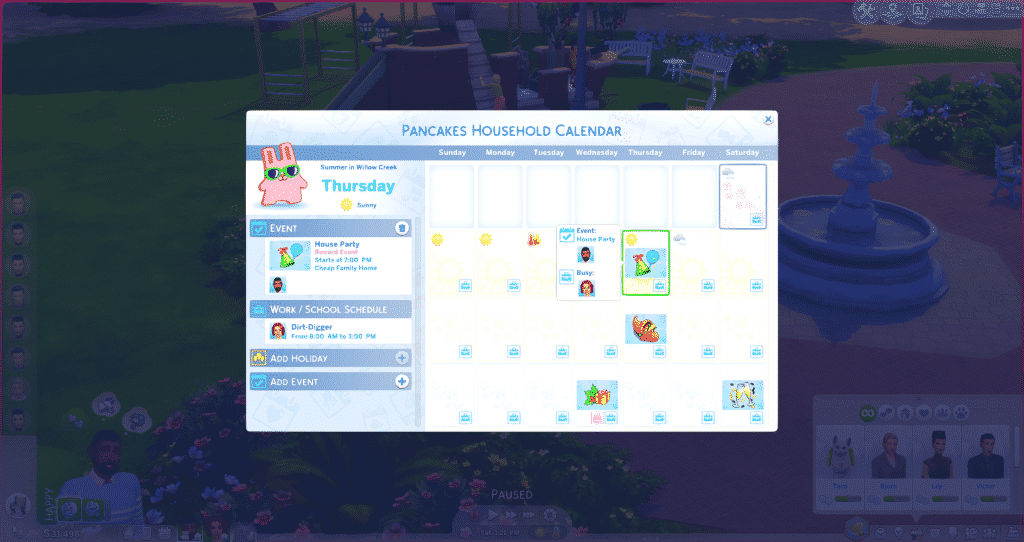
Got a sim who throws big raging parties every week? Or a family that gathers for a movie night every second Sunday? Use the new calendar functions to add events like these into your sims lives! This way, you can organise when some gameplay highlights will happen, and you can coordinate sims around work or other activities to make sure you can tell the story you want to tell. The calendar will also tell you other important dates such as sim birthdays, making it even easier to know when sims will be aging up and to plan the perfect party to celebrate. For an expanded explanation of the new calendar system, click here.

Using The Sims 4 Seasons to Create Immersive Storytelling

What are your tips for incorporating storytelling with The Sims 4 Seasons? Let us know in the comments!

SimGuruGrant’s Final Poll about Life States in The Sims 4

3

SimGuruGrant, a senior producer on The Sims 4 has shared his final poll about which Life States would you like to see in The Sims 4. After sharing your thoughts in the first and second poll, you can now vote in the final life stages poll, letting you choose between Witches, Mermaids, Fairies and Imaginary Friends.

Unlike with previous polls you have 3 days to vote in this one. Do note that you need a twitter account in order to share your vote on a poll linked below!

SimGuruGrant’s 2nd Poll on which Life State do you want in The Sims 4

5

SimGuruGrant has shared a second poll asking simmers about which life state do you want to see in The Sims 4.

He also shared an important piece of information about what these polls are being used for:

We’re using the polls to gather information, confirm or refute our assumptions, and guide what/how we make…sometimes. It’s useful information.


Down below you can choose between Zombies, Robots, Mermaids and Imaginary Friends! Once again, please note that you’ll need a twitter account in order to vote in this poll!

SimGuruGrant’s 2nd Poll on which Life State do you want in The Sims 4

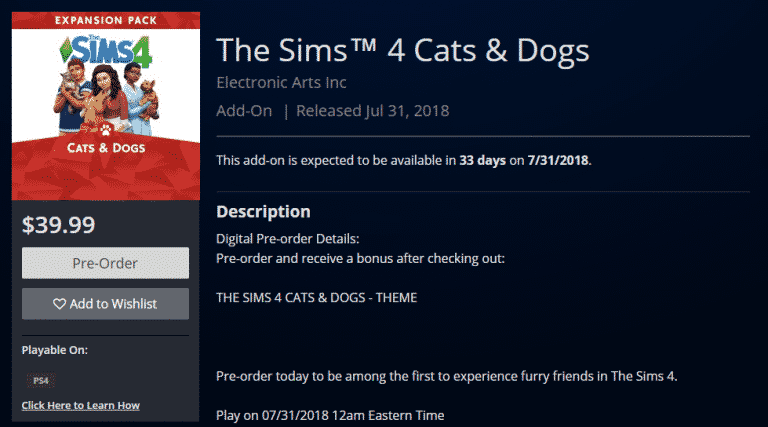
Pre-Order The Sims 4 Cats & Dogs on Microsoft and Playstation Store

The Sims 4 Cats & Dogs Expansion Pack is now available for pre-order for Xbox One and PS4 on the Microsoft and Playstation Stores!

There’s also a special bonus for PS4 users – by pre-ordering The Sims 4 Cats & Dogs now you get to enjoy the Cats & Dogs PS4 Theme!

Down below we’ve linked the pages where you can officially pre-order the game:

Pre-Order The Sims 4 Cats & Dogs on Microsoft and Playstation Store

The Sims 4 Cats & Dogs is coming to Xbox One & PS4 on July 31st

The Sims Team has finally announced that The Sims 4 Cats & Dogs Expansion Pack will be arriving to Xbox One and PS4 on July 31st, 2018.

Down below you can check out the console trailer that’s been just released!

The Sims Team also published an official blog spot talking more about the features that Cats & Dogs will bring to the console!

The Sims 4 Cats & Dogs Console Announcement is being teased for Tomorrow

The Sims Team has just released a new teaser on their twitter, teasing that they could be revealing The Sims 4 Cats & Dogs Expansion Pack for Xbox One and PS4 tomorrow.

The tweet includes 3 emojis including a Dog, Cat and a Console controller, as well as the fact that they’ll be dropping a new trailer tomorrow.

Stay tuned to Sims Community to find out what tomorrow’s announcement is!

The Sims 4: Dev Cheats Removal and How To Bring Them Back

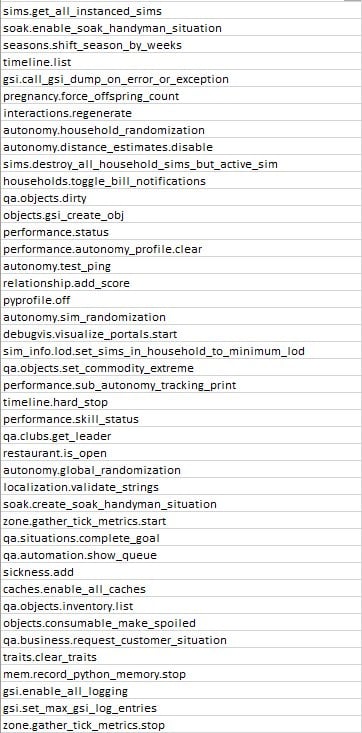
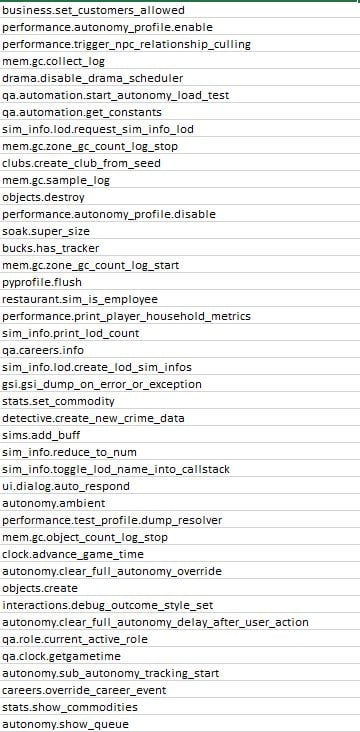
The Sims Team removed plenty of developer cheats with their recent update that were present in The Sims 4 since its launch. Some of them included the ability to spawn collectibles, reset certain objects and more which you can find on this list.

However, modder TwistedMexi was able to bring these back with his latest mod, allowing you to use all the cheats that we had since the beginning.

The mod can be installed just like any other. Simply paste the .ts4script file to Electronic Arts > The Sims 4 > Mods folder and make sure you have BOTH Mods / CC and Script Mods enabled in your game options. Enabling the Script Mods option is crucial for this mod to work.

Click below to be directed to the Cheat Fix Mod’s download page!

[mks_button size=”large” title=”DOWNLOAD!” style=”rounded” url=”https://www.patreon.com/posts/cheats-fix-get-19645059″ target=”_blank” bg_color=”#1e73be” txt_color=”#FFFFFF” icon=”fa-arrow-down” icon_type=”fa” nofollow=”0″]

Please note that the dev cheats that we have on The Sims 4 Cheats Page are now accessible only with this mod!

The Sims 4: Dev Cheats Removal and How To Bring Them Back

The Sims 4: List of Removed Cheats

SimGuruGrant has confirmed that with the recent update for The Sims 4 they’ve removed some cheats from the game for technical reasons.

The developer confirmed that Sims 4 Removed Cheats that have been excluded from the game will be making a comeback. All in a more “official” way as The Sims Team plans to add more cheats over time with better presentation and availability.


Sims 4 Removed Cheats statement from Developer

There is a specific bullet in the patch notes I want to talk about. You might be mad. But, let’s discuss. (This may take a few Tweets). This is in regards to Cheats. We create cheats in every pack to help us test and develop features.

— Grant Rodiek (@SimGuruGrant) June 26, 2018

We also discuss which cheats we can expose to the community. We know many of you use them to tell stories, get to the part of the game you like, all of that. Unfortunately, we exposed a handful of cheats that we really, really shouldn’t have. It was a mistake on our part.

— Grant Rodiek (@SimGuruGrant) June 26, 2018

Why shouldn’t we expose some cheats? Well, some cheats can REALLY mess up your game. In ways we cannot fix or reverse. It’s also very difficult for us to know what you did and what cheats you used when you come to us with glitches to fix.

— Grant Rodiek (@SimGuruGrant) June 26, 2018

While this will frustrate you, and that’s fair, we needed to remove some cheats to basically make sure you don’t get into a case where your game just doesn’t work. Long term, though, something we’d like to do is make many of our cheats more official. What does this mean?

— Grant Rodiek (@SimGuruGrant) June 26, 2018

The idea is that we would develop cheats and put them in the option menu, or in official game interactions. They would be fully developed so that the ones we release cannot break or ruin your game. Whether it’s “cheating” money, skills, and so forth, we’d make it “real.”

— Grant Rodiek (@SimGuruGrant) June 26, 2018

So, stay tuned. It’s “on the roadmap” so to speak. I’m sorry for the bad news. pic.twitter.com/bFairu9tW1

— Grant Rodiek (@SimGuruGrant) June 26, 2018

Grant also provided a useful list of all The Sims 4 Removed Cheats that have been removed from the game for the time being. Here’s the list:

The Sims 4: List of Removed Cheats

The Sims 4: New Update + Patch Notes! (June 27th, 2018)

The Sims 4: New Update + Patch Notes! (June 27th, 2018)

The Sims Team has released a brand new Update for The Sims 4 on PC and Mac!

To download the latest version of The Sims 4, simply open your Origin program and if the game doesn’t update automatically, right click on The Sims 4 and select ”Update”.

In case you have Mods or Custom Content, the game will automatically disable them for you after first launching The Sims 4 after the update. To re-enable all your Mods and Custom Content, select the Settings option in the Menu and select Settings. Under the”Other” section you’ll find the ”Enable Custom Content and Mods” option. Check it and restart your game in order for it to take effect!

Patch Notes

Update: 06/26/2018 – PC 1.44.83.1020 / Mac 1.44.83.1220

Hi Simmers!

With the launch of Seasons we encountered a few issues we weren’t expecting and wanted to quickly address as many issues as possible. We’re still following up on several community reports, so if you know of an issue that isn’t listed here, be sure to engage with us on the Forums or social media to continue the conversations.

Base Game

  • We addressed an issue where fireplaces wouldn’t remain lit. Now, they should remain lit, and if they could talk, they would probably tell their friends “come thru, it’s lit.” Because it’ll literally be lit.
  • We addressed some cases where players were experiencing severe lag when placing wallpapers in build mode.
  • They always say the grass is greener on the other side, but here at Maxis we try to innovate, and unfortunately we made the grass really brown in some cases, even if you don’t have Seasons installed. We’ve now returned to our regularly scheduled green grass.
  • Spliced plants now have a proper description so you know what comprises their genetic makeup.
  • The underside of roof eaves no longer have texture.
  • Plants were growing a bit too wildly out and about in the world. We’ve scaled them back with some digital, organic, completely sustainable pesticide.
  • In the past, we accidentally made available several cheats that are meant for debugging and developing the game only. To be frank, the cheats are VERY dangerous and can have very unpredictable effects on your games. We took these cheats away to be safe. However, we took a few TOO many away. We have added the following cheats back:

    stats.set_skill_level
    stats.set_stat
    sims.fill_all_commodities
    stats.fill_commodities_household

  • Plants inside a planter box can now receive water again.

Get to Work

  • As expected, any objects placed in the Modern Metallic Illuminated Display Case can now be moved, removed, and so forth.

Seasons

  • Calendar events will now occur on the day for which you planned them, thus ending centuries of debate on the purpose of a calendar.
  • Player created events will now appear on the calendar as expected.
  • NOTE: As a result of some calendar improvements, the dates for some of your currently scheduled events MAY change, but this will only happen once.
  • In an unexpectedly diabolical twist, Sims were hosting pool parties in the winter and their guests were freezing to death. Yikes! Sims invited to the pool party are now immune to the effects of the cold during the party.
  • We fixed an audio issue when Teen Sims plead for Forgiveness on gnomes.

The Sims 4 Seasons: Holiday Lookbook

Seasons Lookbook

With the amazing CAS items from Seasons, I knew I had to make a lookbook! The looks are inspired by Holidays and times of the year we got with Seasons. I have included some CAS items in shoes and makeup and I will link those. If there’s stuff from other packs I will also note it below. Otherwise, take a look at the 5 Looks below!!

Pretty In Pink

The Sims 4 Seasons: Holiday Lookbook

Pretty In Pink was inspired by Love Day! I went to town on the hearts and the Love Day dress was the perfect fit for the theme! The new Ombre hair has a subtle pink tinge to the ends of it which blends into the dress. I then went with these Heart White Tights from Get to Work, a cute accessory to the dress. Then these Custom Content shoes from Madlen which have a little bow on the toes.

Included:

Hair: Ombre Long Wavy in Dirty Blonde (Seasons)

Accessories: Pearl Bracelet (Get to Work)

Top: Love Day Dress in Pink (Seasons)

Bottom: Heart Tights (Get to Work)

Shoes: Madlen Carinet Shoes (CC)


Wicked Witch

The Sims 4 Seasons: Holiday Lookbook

Wicked Witch is my personal favorite! Though it only uses a few Items from Seasons I also used an Item from Spooky Day because this look is themed on Halloween! The dress is the Figure Skating Dress we get with Seasons using the purple swatch, I thought it fit so well with the spooky theme but used in a party way. The I brought in the Witch hat from Spooky Day stuff paired with the Maple Leaf Earrings from Seasons in a Black Swatch.

Included:

Hair: Medium Curls (Base Game)

Accessories: Witch Hat (Spooky Day Stuff) | Maple Earrings (Seasons) 

Top: Skate Outfit (Seasons)

Bottom: –

Shoes: Madlen Sylvie Shoes (CC)


Mrs Claus

The Sims 4 Seasons: Holiday Lookbook

When I saw this sexy Santa dress I just KNEW I had to make a look with it! I found this Pin Curl hair from Bowling Night and paired it with the new Snowman Earrings from Seasons. I then got some CC Tights from Blush Cat and some shoes from PTS Which have a nice bow on the toes.

Included:

Hair: Short Pin Curls (Bowling Night Stuff)

Accessories: Snowman Earrings (Seasons)

Top: Santa Dress (Seasons)

Bottom: Blush Cat Cold Weather Tights (CC)

Shoes: Sarah Bow Strap Heels (CC)


Reminiscing

The Sims 4 Seasons: Holiday Lookbook

Reminiscing was inspired by the New Years event. This is an Elderly couple looking back on their life and having fun in the colder weather. I used the new Sweater Dress from Seasons and paired the browns with the Tights from Get to Work and the Slouchy Boots from Seasons. For the Male, I used the new Santa Beard and paired it with Jungle Adventure Hair then for the jacket went with the Multi-Layer Trench Coat.

Included:

Hair: Swept Back Wavy (Jungle Adventure) | Santa Beard (Seasons) | Wavy Bob (Seasons)

Accessories: Zig Zag Bangles (Seasons)

Top: Scarf Trench Coat (Seasons) | Sweater Dress (Seasons)

Bottom: Tribal Brown Tights (Get to Work) | Linen Pants (Seasons) 

Shoes: Patch Boots (Seasons) | Slouchy Boots (Seasons)


Summer Holiday

The Sims 4 Seasons: Holiday Lookbook

Summer Holiday is inspired by the new Swim Items we got for Toddlers and Children. Here we have a brother and sister enjoying the sunshine together! Both hairs are from Seasons and I adore the baby Afro! The toddler Swimsuit comes in a variety of swatches but I chose orange and blue as it matched her little flower band. For the brother I chose this blue and yellow Swim Outfit to match the new toddler pool and because it also matched the Base Game Flip Flops.

Included:

Hair: Under Cut (Seasons) | Afro Flower (Seasons)

Accessories: –

Top: Ruffle Chevron Swim Suit (Seasons) | Rashguard Swim Outfit (Seasons)

Bottom: –

Shoes: Flippy Floppies (Base Game)

The entire Sims Franchise could be banned in these 7 countries

The Sims Franchise could be severely impacted by regional standards in some of the countries which are trying to get The Sims banned.

EA_Mai, the Community Manager at EA Answers HQ has posted a notice saying that The Sims FreePlay will no longe be available starting July 5th, 2018. Players will be able continue to play the game, however, the game will disappear from the iOS and Google Play stores, meaning that it will no longer receive new updates and support in these 7 countries.

Simmers,

We’ve always been proud that our in-game experiences embrace values as broad and diverse as our incredible Sims community. This has been important to us, as we know it is to you.

In light of regional standards, starting 5th July, 2018, The Sims FreePlay will no longer be made available in the following storefronts:

  • China
  • Saudi Arabia
  • UAE
  • Oman
  • Kuwait
  • Qatar
  • Egypt

You can keep playing after this date if you already have The Sims FreePlay installed on your mobile device, but further updates or purchases will not be available. Since we won’t be updating, the game could stop working at a later date. If you delete the game or switch to a new device, the game won’t be available to download.

We appreciate your support. Please be sure to download the latest update today to keep creating your story.

Thanks for playing!

The Sims FreePlay Team


The reason why The Sims FreePlay (and possibly other Sims games as well) are getting banned in these countries is because The Sims FreePlay and other Sims Games allow you to form and have same-sex relationships in the game. Countries listed above all share the same rule and that’s that they don’t allow “gay propaganda” in the public. For example, even though it’s not “illegal” to be gay in China, all LGBT content is banned from the Internet and TV.

How is this affecting the entire Sims Franchise? Well, considering that it’s the easiest to pull the plug on a mobile game, we could be expecting The Sims Mobile to be banned in these 7 countries as well, following the PC games such as The Sims 4 and previous entries. Still, there isn’t an official announcement talking about pulling the plug on The Sims Mobile and The Sims 4 for PC…yet.

We’ve already seen examples of The Sims Team showing support towards the LGBT community through their promotional material. One of the biggest things they’ve done to allow more inclusion and diversity in the game was the CAS Gender Update, letting your Sims wear masculine or feminine clothing, change their physical frames between masculine and feminine, change their voice types and even allow them to get pregnant regardless of their gender.

The entire Sims Franchise could be banned in these 7 countries

Considering the fact that EA and The Sims Team would rather show support and provide diverse gameplay to millions of players worldwide than to comply to homophobic regional standards, it’s only a matter of time before The Sims 4 and other Sims PC games also get banned in China, Saudi Arabia, United Arab Emirates, Oman, Kuwait, Qatar and Egypt.

The entire Sims Franchise could be banned in these 7 countries

The Sims Mobile, a game which was released worldwide in March 2018 is still not available to Russian App Stores – @TheSimsRU reports. The Sims 4 on PC currently has a 18+ rating in Russia due to diverse gameplay and freedom that players have to create LGBT characters, which Russia thinks is inappropriate for minors. This could be one of the reasons why, 3 months after, the mobile hit which has over 10 million downloads on Google Play still hasn’t been released in this country.

All The Ways you can earn Simoleons in The Sims Mobile

Simoleon is the unit of currency in The Sims games series.

We need Simoleons to purchase home items, clothing, unlock locations, land expansion, buy more rooms, switch jobs or hobbies, and repair furniture.

Simoleon is easy to earn. However, everything in the game gets more expensive the more you level up.

So how to earn Simoleons faster?

There are many ways to make Simoleons with a minimum to zero spend of real money.

Complete Daily To Do List

All The Ways you can earn Simoleons in The Sims Mobile                   Note: green tick indicates completed task.
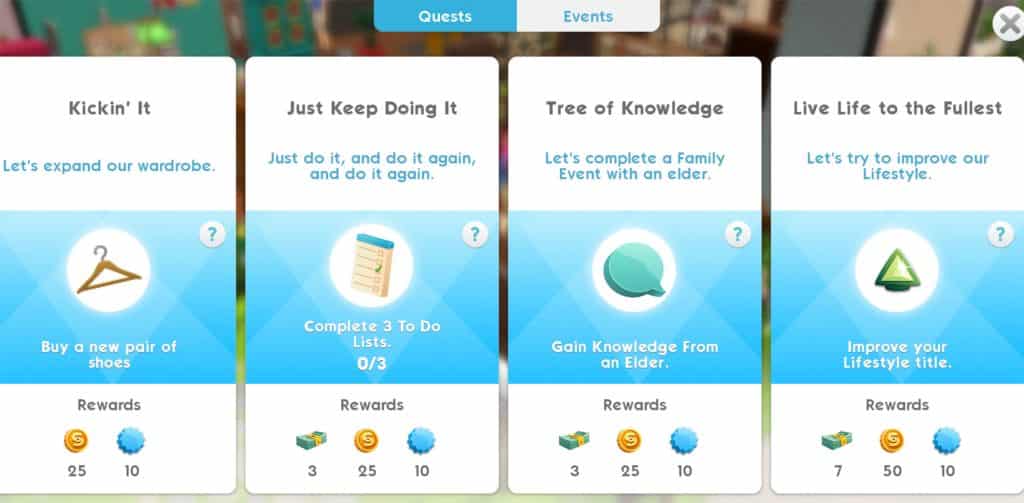
You will get 180 Simoleons everyday by completing a few tasks in the Daily To Do List:

Remember to socialise

”Complete 2 Relationship or Family Events”

Family events

  • If you have a baby (note: Babies unlock at level 11), you can complete the family event by clicking on the Stork’s Visit Bassinet (with the baby) at home. The family event icon will pop up daily until you click on it. You can still complete the family events when the baby grows to a toddle, then child, until he/she becomes an adult.

And then you make more babies!

  • Retired sims (note: Retirement unlock at level 16), same as babies, you can complete family events with a retired sim. When a new day starts, the family event icon will pop up on your retired sim, click on it and they will prompt you to finish the event.

Relationship story

The simplest one!

You don’t need to have babies, you don’t need to retire your favourite sims, just simply click on any other sims* passing by (around your house or in town) and begin a friendship or complete a quick catch-up event if you are already friends.

*Tips: Other sims can be

  • Other players: sims with the blue Plumbobs;
  • In-game sims (created by the game with NO blue Plumbobs);
  • or Sims within your household: not recommended as you want your other sims to work in the meantime.

Improve your Lifestyle

There are 3 ways to complete this task:

  • Buy items from Build-Buy collection*
  • Buy new clothing, or purchase new items from Izzy’s Fashion Shop (using Fashion Gems)
  • Buy Heirlooms (Heirloom unlock at level 16)

*Tips: If you have limited Simoleons this is the most efficient way to do: complete the task Improve your home, which you only need to spend 75 Simoleons on home items. This will automatically green-ticked the Improve your Lifestyle task, meaning that you will complete 2 tasks by only one action.

Kill two birds with one stone!

Change Sims Appearance

This is pretty much a free and easiest step to get Simoleons. Go to Change Appearance and change your clothing. If you like what your sim is currently wearing then you just need to add earrings, glasses or shoes. You can always change back once the task is done.

NOTE that special events only appear in Daily To Do List when you are at level 12 (you won’t see Complete a Special Events task until you reach level 12).

Complete Quests

All The Ways you can earn Simoleons in The Sims Mobile

Quests are sometimes quite hard to complete, some requires your sims to finish their entire career, hobby or relationship story to get a few pennies. The easiest quest would be Just Keep Doing it, which you can complete daily, or 3 days when your level is higher.

Complete Events

CAREER and HOBBY events (Hobbies unlock at level 8) are the main source of income in the Sims game. Though you make very few Simoleons when you first started, like any careers (or hobbies), you need to level up by keep doing it until you reach the max level. There are 10 levels for each career/hobby story in The Sims Mobile.

All The Ways you can earn Simoleons in The Sims Mobile

Note: this example is level 10 of the INTERNET ICON hobby practice session.

There are 3 options:

  • Quick Shift/Practice Session: up to 1 hour* →  BEST choice

If you have the time to do it, Quick shift is the best way to make more Simoleons compare to Standard or Long shift. For example: a Long shift gives you 450 Simoleons afer 8 hours, while Quick shift gives you: 112 x 8 = 896 Simoleons after 8 hours. All you need to do is to make your sims work, leave it there, do your things for roughly an hour then come back and collect Simoleons then…repeat.

  • Standard Shift/Practice Session: up to 4 hours*

Do Standard shift when you know that you won’t be checking your phone for a few hours (e.g. at work, say you can check your sims in lunch break).

  • Long Shift/Practice Session: up to 8 hours*

Do Long shift at night when your sleeping (or at school when you cannot check your phone for a long time), so when you wake up, all those moolas will come at you!

Unless you don’t sleep!

*Tips: the session/shift is quicker or longer depends on

  • Bonuses from items around the house (e.g. 3-star item will give better bonus than 1-star item, or bonus from career of hobby items, etc.)
  • Traits (e.g. Sims that have Ambitious trait are better at all Careers → bonus Event Points → quicker shifts)

You gotta work it to make it!

Traits that give Bonuses

All The Ways you can earn Simoleons in The Sims Mobile

Pickpocket: These Sims sneak a few Simoleons when interacting with others, every now and then.

All The Ways you can earn Simoleons in The Sims Mobile

Generous: give you better Daily Rewards including Simoleons: when log in daily, at the beginning of the in-game day.

Tips: traits that have more stars will give better rewards.

Complete Special Events

(Special Events unlock at level 12)

All The Ways you can earn Simoleons in The Sims Mobile

Special Event is available every day. Its duration is up to 6 hours.

Tips: Same as long shift, do this event at night or before you go sleep so when you log in the next day, you will collect a bunch of Simoleons and most of all you also Complete a Special Events task in the Daily To Do List (when you are level 12 or up).

One stone kills…two birds!

Make the Most at Any Parties

Attending parties

Tips for finding parties: look for the parties that has the Ideal Attendees row right below the rewards. That means if your sims attend those parties, there are more items that associated with their hobbies or careers for them to interact with, and giving a change to earn max Simoleons when the party bar is filled.

All The Ways you can earn Simoleons in The Sims Mobile

First off, complete 3 star for yourself: interact with items in the party to fill your bar up to 3 stars, you will then receive 20 Simoleons.

All The Ways you can earn Simoleons in The Sims Mobile

Group Progress Rewardsthis is where it counts!

If you have extra Party cakes (that you get from the action above) to use, use it and try to earn more Party Points. More Simoleons earned when parties level up. You will make 70 Simoleons at level 10 any parties.

Tips: keep in mind that the Group Progress Rewards is for all other players that attend the party. The Ideal Attendees hints that there are more items to interact for all other players. More ideal players attend, more Party Points earned, more rewards.

All The Ways you can earn Simoleons in The Sims Mobile

So, in total you will have 90 Simoleons for each party, and you can attend 2 parties daily, meaning that:

90 x 2 = 081…?!

Host Weekly Parties

In the Party panel, at the top, there is an option for you to Host weekly party.
All The Ways you can earn Simoleons in The Sims Mobile

Though we can only host a party only once a week with a small amount of Simoleon, don’t neglect it because Every Dollar Counts!