It’s confirmed. The big mystery Sims 4 Patch is releasing February 25th.
There’s no more rumors about the release date for the upcoming Sims 4 Mystery Update release. Reliable modder and everyone’s favorite TurboDriver has confirmed that The Sims 4’s big patch release is slated for February 25th!
The February 25th game patch (1.113.277) is about to come out and this could mean trouble for mods! The expansion pack release on March 6th might require some mods to update again too. Play in offline mode or without mods enabled and stay tuned for mods updates!
With the latest confirmation from EA that tomorrow’s update will feature Burglars, we’re pretty excited for what’s to come in tomorrow’s patch release. Here’s when exactly we should expect the update to drop, and what the rumored features are:
The Sims 4 Burglars Update Release: Date & Time Info
Article Update: Expect Sims 4 Burglars!
EA and Maxis have dropped a brand new video teaser trailer for tomorrow’s update. Confirming our suspicion that the next patch will feature Burglars in The Sims 4! Check out the video teaser here.
So if you’ve been wondering when is the Sims 4 Burglars Update releasing on your preferred platform, look no further. Check out our full countdown below:
The Sims 4 Mystery Update Release Details
The next big Sims 4 Update is set to release across PC, Mac, Playstation and Xbox supported platforms on February 25th, 2025. The assumed release time for this patch is set around 8AM PT / 5PM CET / 4PM GMT. I’ve made this assumption considering that Maxis has to unlock the last week of Blast From The Past Live event just an hour after The Sims 4 Mystery Update Release.
We’ll keep you posted here in case the update turns out to get released at 10AM Pacific Time. Until then, this is when you should expect the next update to drop:
Countdown to The Sims 4 Burglars Update Release
We checked for the new Sims 4 Update at 9AM PT – nothing new in the launcher yet. Which is why we updated the countdown for one hour longer.
Releasing on EA App, Steam, Epic, Playstation and Microsoft Stores.
Countdown for 10AM PT / 7PM CET / 6PM GMT
[janky target_time=”1740506400″ color=”#235c82″]
Expected Features in the next Sims 4 Update
There are several features that The Sims Team has teased for the upcoming Sims 4 Mystery update release. Including Tattoo Feature Improvements, Build Mode UI enhancements and more.
There are also big rumors about Burglars making a return to The Sims 4 with this big feature content update. Still, the full surprise of the patch contents is probably awaiting to be fully revealed tomorrow!
The upcoming game patch will also help prepare the Base Game for the upcoming launch of The Sims 4 Businesses & Hobbies Expansion Pack. Set to release on March 6th, 2025 across all supported platforms.
We’ll get to hear a lot more about the big new Sims 4 Update next week!
The next Sims 4 Base Game Update is so big that it has its own segment during the next official livestream! Last time this happened was for Growing Together and Infants in 2023 when these two major features shared the Livestream spotlight.
Electronic Arts has published an official livestream page for their upcoming Expansion release. The Sims 4 Businesses & Hobbies Livestream is set for February 28th at 10AM PT / 7PM CET / 6PM BT.
There’s been a lot of teasers so far about what the next Sims 4 Base Game Update could entail, so we included all the findings about the next patch so far.
Sims 4 Base Game Update Info
Build Mode UI Update
The Sims 4 Base Game Update seems to cover minor tweaks and improvements to the user interface. Sims player @GrabciiooSims on X tagged us on the change they’ve spotted in the latest Sims 4 Businesses & Hobbies Gameplay Trailer. Pointing out that the icons for Dining Room and Study have been revamped.
For reference, this is what the current Sims 4 Build Mode Menu UI looks like for Objects By Room category. It seems The Sims Team has done a good job clearing any possible confusion between these two!
Tattoo Updates
The next Sims 4 Base Game Update is also going to include new Tattoo options free of charge! Sure, the extra features that come with Businesses & Hobbies like Custom Paint Mode, Stencils and new Tattoo designs sure look nice. Still, there are going to be extra new designs for Sims 4 Base Game players too. For example, the chin face tattoo that you can see down below:
As shown in the reveal trailer for The Sims 4 Businesses & Hobbies, there are a couple of new Tattoo designs shown in the User Interface that appear to be Base Game.
The gameplay reveal trailer for the upcoming Sims 4 Expansion Pack has shown the new Tattoo sliders in action. Like transparency, contrast and others you’ve seen for makeup and skin tones in Create A Sim.
The Sims Team hasn’t confirmed this yet, but I’m confident this feature is going to be free of charge for The Sims 4 Base Game players.
If we look at all the evidence gathered so far, the next Sims 4 Base Game Update could be released either on Tuesday (Feb 25th) or Friday (Feb 28th). Maxis set the date for their next livestream on Friday featuring coverage on the next Sims 4 Base Game Update and Expansion. Although we don’t know yet if the Patch will be released before the stream, during or after. At least not yet!
There is a higher chance for EA to release the update earlier in the week than later considering some additional hotfixes and bug reporting might need to be done. We know that there’s going to be Bug Improvements and Fixes thanks to the latest Sims 4 Laundry List. Now the question remains is when!
This is a good reminder to backup all your Sims 4 save game files. Expect a lot of potential changes behind the scenes in Create A Sim, for which Sims 4 CAS Mods might be most affected. Just in case, make sure all your Mods & CC are disabled when ensuring a healthy Sims 4 Base Game Update process, and stay in loop with your favorite Modders and CC creators for mod updates.
What are you hoping to see in the next Sims 4 Patch? Join the conversation below!
The new Patch has just hit the Windows PC platforms!
Electronic Arts has just released a new Sims 1 and Sims 2 Rerelease Update for Windows PC! You can get the latest version of Sims 1 and Sims 2 Rereleases by downloading the Patch from official launchers like EA App, Steam and Epic Games.
Make sure you refresh your game collection and / or restart your game launcher to ensure the update shows up for you.
Fourth Rerelease Patch
Table of Contents
Read the official patch notes down below:
Sul Sul, Simmers!
We’ve loved seeing all the creative builds and memorable moments you’re enjoying in these legacy titles! We’re continuing to address the major issues you’ve been reporting via the official EA Forums.
– The Sims Team
February 20, 2025 Patch Notes:
The Sims 1 Update Notes
Fixed Issues:
General stability improvements
Addressed video player issues
Performance improvement with AMD GPUs
On some systems, walls, floors and other items might not appear on screen
The game could crash when zooming in/out of Calamity Forest
Child Sims would sometimes show a “Missing Animation” error when interacting with mail
On some computers set to 2k resolution, visual artifacts or tearing could be present on various game screens
The blue panel on the bottom of the screen did not properly fill the horizontal space
Tiles near pool edges sometimes displayed as empty and grey
The Burglar appearing could crash the game
The Sims General Notes:
The game by default adopts the aspect ratio of the monitor it is run on. The aspect ratio can now be specified with the launch option “-maxaspect::” (note that underbars ‘_’ can be used instead of colons). Examples: -maxaspect:16:9, -maxaspect_4_3 or bespoke ones like -maxaspect:16:10
Note that the option will only set the aspect of height to width. It will only restrict the maximum width – it can not increase it
In windowed mode, the window will run at the aspect ratio; at fullscreen black bars will fill the unused space of the monitor
This will mostly be useful in situations where your monitor (virtual or real) is very wide, but you want the game to be a more traditional aspect ratio
Note that there are limitations on how extreme a ratio this will accept
There are some hardware configurations that we are seeing a disproportionate number of errors on and are actively investigating.
Some players who have experienced problems with getting an error indicating a lack of Vulkan compatible devices have reported that in some cases removing “OpenCL™, OpenGL®, and Vulkan® Compatibility Pack” can resolve the issue
We have received reports of “random flies” appearing. This is working as designed
The Sims 2 Update Notes
Fixed Issues:
General Stability improvements
In some situations, the game would show an error indicating “too many iterations”
Modular staircases could not be deleted and could be a source of infinite money
The dog Sim is missing from the household after moving to a lot
The Design Tool palette chooser pop-up could go off screen and not be able to be dismissed or interacted with
Music tracks by Depeche Mode and Natasha Bedingfield have been restored
The mouse pointer, Sim names, and Info Panel tooltips in build/buy were sometimes not properly aligned
Beach lots could sometimes have incorrect terrain paint
The Sims 2 General notes:
In some cases, issues that have now been addressed might have corrupted game saves from before they were addressed (e.g. when Sims could disappear, Sims can’t eat cooked food, etc). In these cases, please try starting a fresh save as the game won’t be able to correct the corruption, and working with corrupted saves may lead to unexpected behavior.
While the Alien Abduction scene now works, the scene is still missing the alien baby. We’ll continue working on that. In the meantime, you will have the alien baby in the game once the scene is done.
Some players have tried using Windows shortcut keys to move the full-screen game to another monitor. When in full-screen mode, the game should not be moved to another monitor or this may cause issues.
There may be issues not listed here that are in the process of being addressed as certain issues require an extended investigation on our end. Even though these fixes may be in active review, it’s not a guarantee that we’ll have an immediate fix for it in an upcoming patch.
Dag Dag,
The Sims Team
Did you download the latest Sims 1 and Sims 2 Rerelease update yet? Let us know your progress in the comments below!
An official EA Survey about the next Sims 4 Expansion Pack themes surfaces the web!
A brand new The Sims 4 Expansion Packs Survey has surfaced the internet, revealing seven intriguing themes that EA and Maxis are considering for development. To our surprise, there are THREE Sims 4 Expansion Pack themes which revolve around Cars and Mobile Vehicles.
The images for the newest survey surfaced on X before they got quickly taken down. You won’t be able to parttake in the survey generally as this latest Sims 4 Expansion Packs Survey is close circle only! We’ll make sure to keep you posted if any public surveys surface in the meantime.
The Sims 4 Expansion Packs Survey (2025): Suggested Themes
The Sims 4 Ocean Exploration
“Live at the sea shore and breathe in the cool, misty air each morning in your fully-equipped houseboat. Take a long stroll on the beach, seeking small, metallic valuables with your new metal detector. Make crafts with driftwood, sea glass, and other trinkets. Embark on your vessel as a sea captain, hunting for crabs and lobsters, or chartering your boat for sightseeing, whale watching, fishing, and scuba diving trips.
Delve deep as a master diver in vibrant marine ecosystems, brimming with life, while making new discoveries, like hidden treasures and ancient secrets. Catch lovely fish and other creatures to populate a new aquarium venue. Bring your finds to the surface and exhibit your skills in art and artifact restoration. Display the rare items to your museum, sell them at auction to the highest bidder, or even negotiate trades with shady antiquities dealers.”
The Sims 4 Community Careers
“Welcome to a charming world built around community and neighborhood antics where Sims embrace exciting new active careers!
Tour the local fire station and learn preparedness skills, or become a Firefighter / EMT, tackling neighborhood emergencies like fighting fires, rescuing stranded pets from trees, or freeing a toddler whose head is stuck in a stair railing. Enjoy the comforts of the station with fellow firefighters until a call comes in, then gear up, ride out in a shiny firetruck, and be ready for anything because whether your Sim is braving the career or the one calling for help, there’s never a dull moment when the alarm bells ring!
When the kids come home with gum in their hair, get out the shears to practice home haircuts before opening a professional salon. Expand offerings with luxury shaves, advanced braids, and custom wigs as the shop goes from a gossip-fueled salon to the cornerstone of sage advice and transformational style.
Open a dentist office for teeth cleanings, x-rays, and extractions. Level up to specialize in creating perfect smiles from braces to new teeth to a shiny grill. From replacing lost dentures or fixing a cracked tooth from a schoolyard brawl, the dentist always saves the day! Patients leave with a smile and a lollipop to ensure return visits.
With each career, Sims can choose to give back to the neighborhood, build up community skills, and discover the day-to-day lives of the locals, whether on the job or unwinding at the neighborhood barbeque.”
The Sims 4 Car Life
“Enter the ultimate pack that weaves cars into the day-to-day stories of your Sims! Start by sparking kids’ love for cars with playful collectible toys and a mini mechanics toolbox. Express imaginations while racing RC cars and playing with epic toy car tracks. Join an afterschool gearhead club, or climb into the racing arcade simulator and go head-to-head against friends.
Send your teens to driving school so they can get their license and gain independence with their first car, with every choice reflecting your Sim’s personality and aspirations. Enjoy a movie at the drive-in theater with friends and family or share intimate moments at a scenic overlook under the stars with your sweetheart.
Send your Sims off to work as gig worker, car salesperson or professional race driver, or take on an active profession as a mechanic working at the local garage. As your Sims grow their income, elevate their status with celebrity limos & luxury cars.
Whether they’re pretending to drive the couch or fixing up a broken down jalopy, every Sim can find their dream ride. Get ready to fuel your Sims’ passions with their dreams to drive and explore the world of cars in The Sims like never before!”
The Sims 4 Work on Wheels
“Celebrate the spirit of community and innovation, and make every neighborhood come to life with mobile businesses, where your Sims can explore dynamic careers on wheels. Transform an old truck into a thriving mobile business—be it a food truck, mobile salon, or even a party bus!
Customize and upgrade your vehicle inside and out with your unique flair to stand. Host or participate in lively festivals, collaborating with local events to boost your brand. Navigate real-world challenges like vehicle maintenance, the needs of demanding clientele, and fierce competition. What will you do to gain the edge: Boost your skills, undercut prices, or sabotage your rivals?
Inspire the little ones, with a Kids Mobile Truck Playset, spark creativity and fun. Recruit your teen to work the register or spin a sign for some free marketing. Whether you’re crafting gourmet menus, styling hair on the fly, or bringing the fun to town with party bus, every day offers new adventures and storytelling opportunities.”
The Sims 4 Reality TV
“Enter the world of reality TV as a contestant! Sims must survive the social dynamics of being in competition with others strong personalities to win a large Simoleon prize and notoriety.
While on the show, Sims complete challenges, stoke drama, and can form alliances. Each challenge is a chance for Sims to discover something about themselves, whether a new perspective on life to an unexpected allergy. Keep Sims on their toes and put their skills to the test through baking challenges, physical trials, and social experiments. Each week your Sim earns points based on challenge outcomes and audience approval rating. Will your Sim come out with lifetime friendships, arch nemeses, or a new sense of self? Find out!”
The Sims 4 Suburban Living
“In the heart of suburban life, every day is an adventure in work, play, and a greener lawn than your neighbor! Unleash your potential at a trade school, learning to be a cosmetologist, auto mechanic, truck driver or become the ultimate house-spouse with top-notch homemaking expertise. Imagine owning a gas station and mechanics shop where you fix up cars, trucks, and motorcycles with your skills and unique flair. After a bustling day, grab a quick bite from the fast food drive-thru. When the weekend arrives, will you kick your feet up in your plush recliner or tackle that ever-growing to-do list? Teach your teen auto repair in the driveway or share laughs and drinks with neighbors. Maybe you’ll finally mow that wild lawn (or hire the kid next door), much to the delight of the nosy neighbor! Send your teens to work as a fry cook, babysitter, tutor, car washer, or a lifeguard at the community swimming pool.
But how well do you really know the neighbors? What’s hiding behind the seemingly idyllic façade of suburbia? Societal pressures may lead to dark secrets, hidden relationships, and even criminal activities. Will you shake the foundation or help maintain appearances in this dynamic suburban playground?”
The Sims 4 Van Life
“Embark on a thrilling journey of self discovery and freedom! Jump into your fully-customized dream travel van and explore breathtaking destinations. Experience whimsical adventures as you meet fascinating people, swap stories, jam on new musical instruments, and share crafts and delicious recipes. Whether you’re at truck stops or campgrounds in vibrant national parks, you’ll encounter intriguing folks everywhere—even on the roadside when you pick up a friendly-looking hitchhiker.
Embrace the minimalist lifestyle on the road: tackle challenges like refueling, fixing a flat tire, or testing your mechanic skills with a roadside repair. Imagine waking up to a new, stunning location every day, like quiet beaches, perfect for serene paddle boarding and surfing. Whether you’re traveling with your partner, family, friends, or going solo, hitting the road will weave rich, generational tales as you live freely and celebrate your wanderlust.”
February 20th Update – New Survey Features
We have a new look from the latest private Sims 4 Expansion Packs survey. With a question that asks which features are the most essential to make the new suggested Pack ideas worthwhile. Thanks to @lunar_britney for posting the image!
Of the following potential pack features, which feel the most essential to make this pack worthwhile?
Lawn Mowing & Care
Cosmetologist Career
Auto Mechanic Career
Truck Driver
Gas Station Venue
Mechanics Shop Venue
Home Garage
Fast Food Venue (with Drive Through)
Auto Repair Skill
Teen Careers
Neighborhood Drama & Secrets
Criminal Activities
Which Expansion Pack Survey Theme Is Your Favorite?
The latest rounds of The Sims 4 Expansion Packs Survey is private – meaning that you won’t be able to directly vote to The Sims Team about your preferred Themes. At least not in the current Expansion Pack Survey making the private circles.
We want to know which Sims 4 Expansion Pack brought your interest in the most! Which is why we created a short and fun unofficial community poll consisting of 7 pack themes listed above.
You can only vote for two Expansion Pack themes.
[totalpoll id=”159046″]
Please note that Expansion Pack Themes mentioned in this official Sims 4 Survey are purely contextual and do not represent any information or confirmation about the work-in-progress developments and features.
New The Sims 4 Patch set for February 25th is speculated to be a Burglars Content Update!
Multiple clues about The Sims 4 Burglars Update have accumulated over the last few weeks ever since our first report on the rumors. From in-game teases in the current Sims 4 Live Event to creator reports on the big release next week – here’s everything we know about the current speculation about Burglars coming back to The Sims 4:
The Sims 4 Burglars Update Theories
Live Event Teaser in The Sims 4
Alright, I know I can’t let go of the Milk Carton Theory but it seems that everything’s aligning perfectly in the third week of the Blast From The Past Event. Giving some new contextual clues about the possible Sims 4 Burglars Update.
EA published a brand new The Sims 4 Laundry List yesterday, detailing a list of bug fixes and issues players should expect to be resolved in the next Sims 4 Update. If we were to look at the pattern of releases between previous Laundry List and Updates, new Sims 4 Updatesusually happen a week after the list is published.
The Roadmap Teaser
Something’s definitely happening exclusively for The Sims 4 on February 25th, 2025, according to the first official Sims 4 Roadmap for 2025. And many believe this date is specifically hinting at the Sims 4 Burglars Update release.
There are also valid theories about the Restoration Workshop Kit being about Sims 4 Cars. And that February 25th is instead a Cars update. Still, we also thought that there would be multiple hobbies in the upcoming Pack rather than just two. That’s why it’s important to take any speculation – or official pack title – with a grain of salt!
The Sims Insider also replied to a tweet asking if the new character is Human or Burglar, to which SimMatically confirmed it would be a new Human Character. Aligning with the reassurment about The Sims 4 Burglars Update we’ve gotten in Week 3 of Blast From The Past.
Do you think that The Sims 4 Burglars Update is coming next week or not? Let us know in this quick community poll below:
[totalpoll id=”159016″]
We’ll make sure to keep this article updated with any possible new or current theories. Stay tuned on Sims Community for the latest Sims 4 release news!
Cheat your way to the top… or the bottom of any relationship type!
Balancing Sims’ personal relationships can be difficult. Thankfully, there are a handful of Sims 4 Relationship cheats that can help you, the player, cheat your way to the top of any relationship.
The Sims 4 Relationship Cheats Walkthrough
How To Enable Cheats in The Sims 4
PC/Mac
Before you enter any cheats, you need to enable cheats first.
To enable cheats on PC and Mac systems:
Press CTRL+SHIFT+C simultaneously to bring up the cheat box.
Type testingcheats true in the cheat box.
Close the cheat box by pressing CTRL+SHIFT+C simultaneously again.
If you entered the cheat correctly, a message will appear under the cheat box informing you that cheats have been enabled.
PlayStation
A reminder that enabling advanced cheats on PlayStation 4 and 5 consoles will permanently disable trophies on that save file!
To enable cheats on PlayStation 4 and 5 systems:
Press L1+L2+R1+R2 simultaneously to bring up the cheat box.
Type testingcheats true in the cheat box.
Press X to activate advanced cheats. The game will warn you that doing so will disable your trophies and ask if you’re sure. Press X again to confirm that you want to enable cheats.
To close the cheat box, press L1+L2+R1+R2 simultaneously again.
If you entered the cheat correctly, a message will appear under the cheat box informing you that cheats have been enabled.
Xbox One & Xbox Series X
A reminder that enabling cheats on Xbox One and Xbox Series X consoles will permanently disable achievements on that save file!
To enable cheats on Xbox One and Xbox Series X systems:
Press all four back triggers simultaneously to bring up the cheat box.
Type testingcheats true in the cheat box.
Type testingcheats true in the cheat box
Press A to activate advanced cheats. The game will warn you that doing so will disable your achievements and ask if you’re sure. Press A again to confirm that you want to enable cheats.
To close the cheat box, press all four back triggers simultaneously again.
If you entered the cheat correctly, a message will appear under the cheat box informing you that cheats have been enabled.
Relationship Cheats
There are a variety of cheats in The Sims 4 that can be used to manage both the friendship and romance bars to the players’ desired level. These can be useful when setting up scenarios, stories, and screenshots, or for those who just want to take the fast track. Here is a list of all Base Game-compatible cheat codes to get those relationship bars up high.. or down low!
There are two types of relationships in the Sims 4; Friendship and Romance. To modify these statistics there are two versions of the following cheats that will allow you to change both. LTR_Friendship_main and LTR_Romance_main both do what they say on the tin. Within these cheats, you will need to enter your Sims’ first and last name. In this example, I will be using Bob and Betty Newbie, and their Cat: Bernie. You can change a Sims relationship to their pet by adding ‘SimtoPet‘ after LTR. Simply add a number after the name that can either be positive or negative depending on what you want the outcome to be.
CHEAT
Effect
modifyrelationships Betty Newbie Bob Newbie 100 LTR_Friendship_main
Bob and Betty will now be Best Friends.
modifyrelationships Betty Newbie Bob Newbie -100 LTR_Friendship_main
Bob and Betty will now be enemies.
modifyrelationships Betty Newbie Bob Newbie 100 LTR_Romance_main
Bob and Betty will now be soulmates.
modifyrelationships Betty Newbie Bob Newbie -100 LTR_Romance_main
Bob and Betty’s romance bar will now be at the lowest point.
Betty’s relationship with her cat will now be at its lowest.
Relationship Types
While playing The Sims 4, you may notice that a Sims friendship type or romance type will change depending on the level of the relationship bar. You can find each relationship type below!
FRIENDSHIP
Level
Despised
-100% to -70%
Disliked
-70% to -20%
Acquaintances
-20% to 39%
Friend
40% to 59%
Good Friend
60% to 80%
Best Friend
80% +
Note: The Best Friend option will only be available once your Sim has asked the other if they want to become best friends.
Romance is a little bit more complicated. Their romantic title will depend on their friendship level as well. If you want to set your Sims relationship to a specific level use the handy table below. The Friendship level is listed on the Y axis, and the Romantic level is listed on the X axis.
-100 to -50
-50 to -10
-10 – 25
10 to 25
25 to 50
50 to 75
75 to 100
60 to 100
It’s Very complicated
It’s Complicated
Just Good Friends
Romantic Interest
Lovebirds
Lovers
Soulmates
35 to 60
Bad Romance
Awkward Friends
Just Friends
Romantic Interest
Lovebirds
Sweethearts
Sweethearts
0 to -20
It’s Very Awkward
It’s Awkward
Acquaintances
Romantic Interest
Lovebirds
Lovebirds
Lovers
-20 to -70
Terrible Match
Bad Match
Disliked
Hot and Cold
Hot and Cold
Hot and Cold
Hot and Cold
-70 to -100
Total Opposites
Terrible Match
Despised
Hot and Cold
Hot and Cold
Enemies With Benefits
Enemies With Benefits
Growing Together – Family Dynamics
The Sims 4 Growing Together introduced ‘Family Dynamics’. These can change over time depending on what the player has pre-defined in Create-A-Sims, or they can change naturally through gameplay. Check out some of the cheats below.
First off, you will require both ‘Sim IDs’ which can be obtained through a separate cheat. To get a Sim’s ID, you can use this cheat:
get_sim_id_by_name (First Name) (Last Name)
Then to add a family dynamic you will want to type:
relationship.add_bitSIMID1SIMID2 familyTrope_TYPE
‘TYPE‘above will need to be replaced with a separate word to change their dynamic. Use the table below:
DESCRIPTION
FAMILY DYNAMIC
Difficult
familyTrope_difficult
Distant
familyTrope_distant
Jokesters
familyTrope_Jokesters
Loving Authority
familyTrope_loving_authority
Loving Subordinate
familyTrope_loving_subordinate
Not Close
familyTrope_NotClose
Not Compliant
familyTrope_NotCompliant
Not Difficult
familyTrope_NotDifficult
Not Distant
familyTrope_NotDistant
Not Jokesters
familyTrope_NotJokesters
Not Loving
familyTrope_NotLoving
Not Permissive
familyTrope_NotPermissive
Permissive Authority
familyTrope_permissive_authority
Permissive Subordinate
familyTrope_permissive_subordinate
Close
familyTrope_close
Compliant Authority
familyTrope_compliant_authority
Compliant Subordinate
familyTrope_compliant_subordinate
Lovestruck – Romance Skill
The Romance Skill was introduced to players with The Sims 4 Lovestruck Expansion Pack. This is a skill that can be learnt either naturally through romantic interactions, or by reading a Romance Skill book that can be purchased on bookshelves. You can check out our guide for building the Romance Skill here!
To raise or lower your Sims’ Romance Skill level you can enter the following cheat. (Make sure to replace X with the desired skill level:
Many skills in The Sims 4 will unlock new interactions for your Sim. The romance skill above will grant your Sims access to more romantic interactions such as ‘Back-to-Back Woohoo’ and ‘Tender Neck Kiss’. The Base Game mischief skill will allow your Sims to spy via a telescope, or unlock more interactions with the voodoo doll. With High School Years, teen Sims can perform the ‘Summon Urban Myth’ interaction and the prank whiteboard interaction when the mischief skill is at the required level.
The most important skill for making meaningful connections with other Sims is the charisma skill! Once levelled up you can perform interactions such as ‘Flatter’ which will offer Sims a relationship boost, and the ‘Sweet Talk’ interaction will provide a notable boost to the romance level. The following cheat can be used to raise the Charisma skill (Replace X with the desired level):
Stats.Set_Skill_Level Major_Charisma X
Other skills such as the Comedy skill, Logic skill, and Selvadoradian culture skill can all be used to unlock new interactions with various Sims. The parenting skill from The Sims 4 Parenthood can be used to unlock new interactions between parents and children such as influencing them to do chores, having more sway over a child’s good and bad behaviour, and the ability to find out what is wrong with newborns and infants to help fix their motives. Here are some examples below of cheats to raise social skills:
stats.set_skill_level Major_Mischief X (Max level 10)
stats.set_skill_level Major_Comedy X (Max level 10)
stats.set_skill_level Minor_LocalCulture X (Max level 5)
stats.set_skill_level Major_Parenting X (Max level 10)
Loved this guide for The Sims 4 Relationship Cheats? If we have missed out on any cheats that you like to use, or have any other tips for unlocking new interactions then leave a comment below! Find our guide for all Sims 4 cheats here!
A whole new Aspiration, Reward Trait, CAS item piece and more!
The Sims 4 Blast From The Past Week 3 has just begun across Desktop and Console platforms. With two new quests that feel shorter than the ones from Week 1 and Week 2, and six exclusive Event Rewards. Featuring a new Aspiration and Reward Trait, new CAS Full Body dress and Inflatable Couch, as well as two Simlish songs from previous game releases.
Each part of the plan is falling into place. Although something still feels off, confidence is in the air.
Activate the Time Travel Component (+25 Event Points) – The time travel component has been successfully completed. Now it’s time to find a computer, and turn it into a time machine! Select Activate Time Travel Component on a Computer.
Completing the initial quest step will trigger a set of three new Event Quest steps. Requiring you to take some time off by grabbing to eat, burning off steam and finally repairing the computer. Not necessarily in that order!
Repair or Replace the Computer (+25 Event Points) – What a setback! Going to have to fix up the computer if there is any chance of moving forward. Select Repair or Replace on a broken computer. Or from the Phone, select Home and then Hire a Service to hire a repair service.
Burn Off Steam by Exercising for an Hour (+25 Event Points) – After having nearly destroyed everything, maybe it’s time to burn off some steam. Find an exercise to do, such as Workout on a treadmill or Practice Punching on the punching bag, and exercise for at least an hour. Or visit a Gym Venue and use the equipment there.
Editor’s Note: For some reason I couldn’t get my home workout equipment such as the Treadmill and Punching Bag to trigger finishing this quest step. Instead, I had to perform an exercise at the Gym Venue.
Get Something to Eat (+25 Event Points) – No plan can be executed well on an empty stomach. Find something to eat!
Ask Emit about the Malfunction (+25 Event Points) – Emit has built time machines before, and he might know where things went wrong. Select Ask about Malfunction on Emit.
Emit can be found at Magnolia Blossom Park, or select the Social category on the Phone to Invite Emit Over.
Overclock a Computer (+25 Event Points) – Emit said it wasn’t too much power that fried the power, but rather not enough power! Find a Computer, and select Overclock.
On The Hunt Quest
Determined as ever, it’s time for the final plan to be put into action. All systems are in place. The time travel component based on Nikolai Volt’s theoretical electronics work is installed and activated, and the computer is sufficiently overclocked.
It’s time to catch a thief!
Give Yourself a Pep Talk (+25 Event Points) – With everything in place, it might be the right time to pep oneself up before taking a time travelling experience.
Find a mirror, and select Give Yourself a Pep Talk.
Look for the Thief by Playing in the Archives (+35 Event Points) – Time travel is on the table! Play in the echoes of the past of the archives once more to find the thief in time!
Use a Computer, and select Play Game… and then Play The Sims Archives, vol. 4.
While playing through the archives, your Sim had that same uneasy feeling as when simulating the various events and was able to catch the thief in the act! In doing so, your Sim was able to discover the thief’s email address!
The Sims 4 Blast From The Past Event: Week 3 Rewards
The third week of The Sims 4 Blast From The Past Event includes 7 total Rewards. Including six exclusive Event Rewards and one in-game item. Here’s what you’ll be able to unlock in Week 3:
Sticky Fingers Aspiration
Video Gaming Vol 1: Trolling For N00bs Skill Book
Missing Sim Milk Carton (Emit Relevart)
New Retro Station Songs
Dina Caliente’s LBD Full Body Outfit
Missing Sim Milk Carton (Burglar)
The Fun-Fun Inflatable Set, Part Two Couch
Reward Overviews
Two New Milk Cartons (With A Possible Hint)
There are two new Milk Cartons included in Week 3 of the latest event: Some Sneaky Sim, Not a Raccoon and Emit Relevart, Bow-Tied and Blue-Haired.
What’s interesting about the naming of the first Milk Carton is that it aligns with the recent rumors we’ve had. Both about the Burglars and the Shady Raccoon NPC we’ve been reporting on.
Are Burglars coming soon to The Sims 4? It seems EA doesn’t want us to mistake the Shady Raccoon for a Sneaky Sim. But we could also be very delusional!
The Fun-Fun Inflatable Set, Part Two Couch
The couch comes in 12 matching variants including:
Dina Caliente’s LBD Full Body Outfit
Sticky Fingers Aspiration
The new Sims 4 Aspiration can be found in the Deviance Main Aspiration category. And to complete it, you’ll only need to complete one task: and that’s to steal items worth 250,000 Simoleons in total!
Completing the Aspiration task will grant you the Enhanced Kleptomaniac Reward Trait. Giving you higher chances of not getting caught when stealing objects!
New Retro Station Songs
Week 3 of The Sims 4 Blast From The Past Event introduces two exclusive Simlish tracks to the Retro Radio Station. Including a brand new Simlish Song from American actress and singer Keke Palmer! This is the first time that EA released new soundtrack through a limited time event, and it’s probably not their last one.
New Songs include:
The Game Song – Keke Palmer (from The Sims 2 H&M Stuff Pack)
Podie Tie – Eric Pressley (from The Sims 3 Console)
The fourth and final week of The Sims 4 Blast From The Past Event is set to begin on February 25th at 9AM PT / 6PM CET / 5PM BT. To make things easier we’ve included a countdown timer until the final week unlocks!
Countdown to Week 4 of The Sims 4 Blast From The Past Live Event
Catch all the new Game Features and Item Presets in High Quality!
Electronic Arts has dropped a brand new The Sims 4 Businesses & Hobbies Gameplay Trailer today. With a deep in-depth look into features like Classes, Skill Improvements, Business Management and more. Including a surprising look into the new Business & Hobbies Create A Sim Items and Build Mode swatch variants.
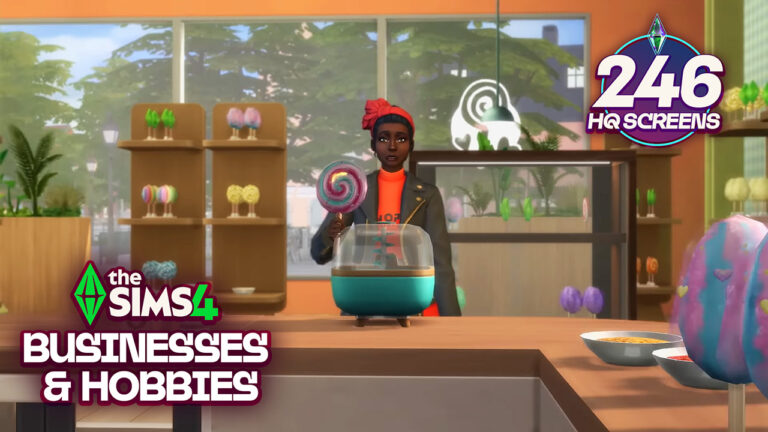
We took the liberty to extract over 240 high quality screen captures from the latest Sims 4 Businesses & Hobbies Trailer. Letting you truly inspect everything new with a magnifying glass!
See all the features and screens down below:
Gameplay Screens Gallery
Welcome to Nordhaven
Welcome to Nordhaven
Pick Up Pottery – A New Skill
Turn Passions Into Small Businesses
New Build / Buy in Sims 4 Businesses & Hobbies
How to Build Your Small Business
Hire, Manage & Fire Employees
Run Your Retail or Service-Oriented Business
Explore New Business Perks
Learn More & Teach Others With New Lectures
Teach Skills & Earn Simoleons Through The New Classes
Become A Master Mentor with New Skill Mastery Perks
Try Your Hand with Tattoos – A New Skill
The New Tattoo Paint Mode in Create A Sim
New Traits, Aspirations & Styles in The Sims 4 Businesses & Hobbies
Outro
Have you managed to spot anything new in the Gameplay Screens from the upcoming Sims 4 Businesses and Hobbies Expansion? Let us know in the comments below and stay tuned for more updates soon!
We’re just over two weeks away from the launch of The Sims 4 Businesses & Hobbies Expansion Pack, and with the release drawing ever closer we were treated to a 7-minute-long gameplay trailer today! It can be a lot to take in, but I’ve got you covered with all the new information. Let’s dive into the trailer!
The Sims 4 Businesses & Hobbies: 10 Features Shown In Gameplay Trailer
Nordhaven – A Whole New World
A new fantastic point of view? Potentially. In recent years The Sims team have treated us to a number of European-inspired worlds, and this time we’re heading North to the Scandinavian-inspired world, somewhere The Sims team haven’t touched on since Aurora Skies on The Sims 3 Store.
The trailer opened with a beautiful shot of Gammelvik, the world’s “old town”. This is home to new market stalls including Gramma Hattie’s Bakery Stall. Gramma Hattie is a returning character from The Urbz for GBA and DS! The world takes inspiration from cities such as Copenhagen, Helsinki, and Oslo. Speaking of Copenhagen, there seems to be a new mermaid-type statue reminiscent of The Little Mermaid statue that has sat on Copenhagen’s waterfront since 1913 in memory of Danish author Hans Christian Andersen! You can learn more about the available lot sizes in our recent article, discovered in a developer build of the game from August 2024.
Two new lot types were shown to us in the Businesses & Hobbies gameplay trailer. First up we have the Residential (Small Business) lot, a new lot type that functions as a residential and commercial lot in one. This means your Sims don’t have to travel far in order to open their business for the day or keep an eye on their employees. This also allows Sims on a tight budget to not have to go through the hassle of securing funds for a separate lot.
The second new lot type is the Small Business Venue. This lot can be purchased in addition to your Sims’ home lot, similar to how restaurants function in The Sims 4 Dine Out and Vet Clinics in The Sims 4 Cats & Dogs do. In build mode, you can choose which rooms are accessible by the public, which are designated as employee only, and which can just be entered by your household (or those you invite in).
Business Options – Setting Up Shop
Players who own The Sims 4 Get Together may be familiar with some of these features from the club system – but in The Sims 4 Businesses & Hobbies, it has been retooled to allow you full control over your businesses. You can choose from a list of presets to allow the game to select a list of customer activities for you such as gyms, nightclubs, and libraries. There has been talk about Businesses & Hobbies featuring a lot of cross-pack gameplay, so expect venues such as Spas to also be available to those who own The Sims 4 Spa Day Game Pack. It has been confirmed however that Residential Rentals and Restaurants cannot be run on Small Business lots thanks to some code discovered by LunarBritney. In addition to choosing presets you can also choose your own activities including playing instruments, fixing objects, buying and selling, and much more.
What would a business be without branding? Players can choose from various logos to represent their business and also give it a name and description. Players can also choose their target customers. This could include sims who have the evil trait if you wanted to run a cafe for criminals. Or maybe you want to target children to shop at your candy store. There is also an occult option that allows you to pick which occults show up. This is perfect for players who want to recreate Vladius’ Organ school for vampires and werewolves seen in the trailer!
Employees – A Helping Hand
Returning from The Sims 4 Get To Work and The Sims 4 Dine Out is the ability to hire (and fire) up to three employees for your business. Unlike the previous business-related packs this system seems to have more depth. You can choose exactly which activities an employee does during their work day and how much you pay them to do that. Want to hire Nancy Landgraab to play the guitar for 10 hours a day on minimum wage? Well, you can do exactly that! We don’t know as of the release of this trailer for Businesses & Hobbies if managers will be able to send Sims to training when they are not at work to improve their employee skill levels. Alongside the list of hireable townies, you also have the choice to hire family members. This can have negative effects if they perform poorly and you end up firing them!
Perk Points – The Perks of Being a Business-Sim
Also returning in Businesses & Hobbies is the ability to gain and spend perk points. These can be spent in three different categories: Schemer, Neutral, and Dreamer! Players who prefer chaos may enjoy investing in the Schemer branch and unlocking the ability to start fires on their lot to claim the insurance money. Be warned that family members and friends who witness this may not be too happy with your newfound enjoyment of arson! Another perk is being able to invest in Simocoin, a new in-game cryptocurrency that can be mined from your Sims PC and both bought and sold as it goes up and down in value. As most financial regulators would say: Never invest more (simoleons) than you are willing to lose!
Classes – Back to School!
Skill classes were announced back in the reveal trailer and we have since had more info on exactly what classes our sims can both host and attend. These classes can be held on any community lot it seems, as well as on residential and commercial business lots. Hosting a lesson will attract Sims who want to improve their skills from Sims who already have attained a high level in said skill. There are a tonne of new skills classes – and that list grows bigger the more packs you own. The trailer used The Sims 4 Knifty Knitting Stuff Pack as an example. Sims attending the class may also use a related skill-building object as they listen to the class.
If you are hosting the class you will have a number of goals to complete until the class is over. Attendees who enjoy the class, and if your host Sim has fulfilled enough goals, then the attendees will pay. If you are at a low skill level or didn’t complete enough goals then they will not pay.
Mentors – A Masterclass in Simming
Mentors are Sims who have mastered different skills and have the ability to pass their knowledge on to others. This can be done at a cost or can be offered for free. This will give the target Sim a boost in that skill – more so than if they were to read a skill book or use a skill-related object on their own. Skill Mastery Perks are a new system that allows Sims to unlock new abilities. Mastery Skill Perks are earned through the persistent use of skill-related interactions and Elder Sims can pass these on to other Sims using the new “Bestow” interaction.
Ticket Kiosk – Pay To Enter
The Ticket kiosk is a returning item, last seen in The Sims 2 Open For Business Expansion Pack. These can be placed on your residential or commercial business lots and will charge Sims a fee when they visit. This can be set as a one-time purchase, or Sims can pay by the hour. This allows venues such as Cinemas, Daycares, and Gyms to be player-owned, or can be placed on other community lots for realism. The price, however, may affect customer satisfaction and can have an effect on the reviews they may leave if your business isn’t worth the entry fee!
Pottery – Give it a Spin
We already knew pottery was included in the pack, however, the gameplay trailer for Businesses & Hobbies has given us more insight into what is possible. Your Sim can choose from a number of different objects to create on the pottery wheel (depending on their level of course). Once they have completed their design they can take it over to the glazing station and choose which design to paint their item with. The Japanese art of Kintsugi is also available. This is the practice of repairing broken pottery with gold or silver to make the repair a part of its history, as opposed to disguising it. Once your glaze is chosen you can pop your item in the kiln and once it is ready you can display, gift, or even sell your product. Items such as gnomes, cake stands, planters, and oil burners can be made, with many of the crafted pottery items being functional rather than purely decorative.
Tattooing – Getting Inked
Alongside Pottery comes tattooing. While tattoos have been available since the release of The Sims 4, our Sims have only been able to acquire these in Create A Sim. The new tattoo parlour business can be run by your artistically inclined Sims or be visited by others to get inked. We have known about the customisable tattoos since the reveal, however, today’s trailer gave us insight into the new Gallery category where players will be able to upload and download designs to use in Create A Sim. Sims who are requesting a new tattoo can dedicate a tattoo to someone such as their partner or friend. This may be regrettable if the relationship doesn’t last! Don’t worry as cover-ups and removals are available for those who regret their hastily made decision.
As a tattoo artist, levelling up your skill will unlock new stamps and stencils to play with when designing a new tattoo before testing them out on paying clients. Be careful though as Sims with a low level in tattooing may leave your clients disappointed and a bad review left for the world to see. Touch-ups can also be done on Sims who request it!
Release Information
The Sims 4 Businesses & Hobbies is set to release on March 6th on PC, Mac, PlayStation, and Xbox consoles. Those who purchase through April 18th 2025 will unlock the Set Up Shop Digital Content.
What are your thoughts on The Sims 4 Businesses & Hobbies Expansion so far? Is there anything we missed? Let us know in the comments! For all Sims 4 updates and future info on EP18 stay tuned!
The latest Expansion Pack will let you run your own Daycare center!
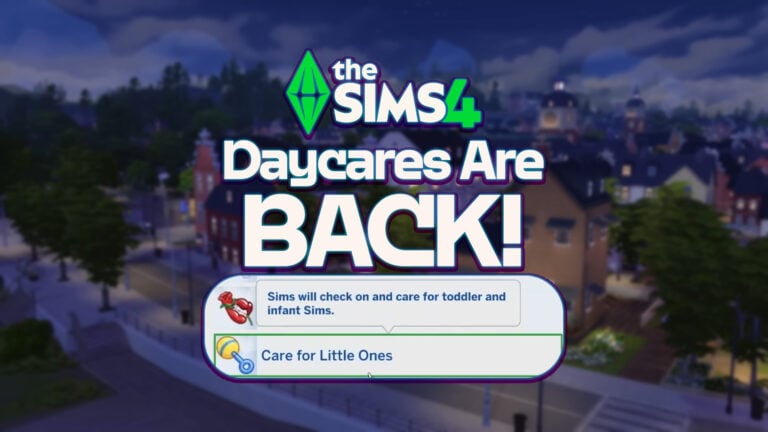
The Sims Team’s reveal of the Businesses & Hobbies Gameplay Trailer confirmed the long awaited feature to the game – The Sims 4 Daycares! With a click of a button you’ll be able to assign your management team to pick up the slacks and take care of Household Sims!
The micromanagement of Small Businesses in the upcoming Expansion Pack goes so in-depth that you’ll be able to assign specific business activities from all The Sims 4 Content. Including pulling Pranks, Opening up a Shower, or even doing Knitting.
The Sims 4 Daycare Preview
The previews from the gameplay trailer included a look into managing your Staff, which revealed that employees of Small Businesses can take care of little Sims. Letting you open up a full blown Daycare Center for profit!
The Employee Task for Sims 4 Daycares says that “Sims will check on and care for toddler and infant Sims”. Meaning that you’ll be able to hire Sims employees to run your own daycare Center and take care of the little ones’ needs!
Sims can also choose specific type of interactions they can perform to other Sims including mannerisms and tone (being mean vs being kind).
In addition, there’s also a new “Stay Near Household Sims” Business Activity. Suggesting that taking care of Sims can be a full on activity for your own custom Daycare center! Or, if you’re more into taking care of Elder Sims, you can also open up a custom Nursing Home!
Are you looking forward to opening up your own Sims 4 Daycare center with the upcoming Expansion Pack? Let us know your thoughts in the comments below!
Maxis drops an official bug fixes list coming to The Sims 4!
The latest Sims 4 Laundry List is finally here! EA and Maxis have released an official list of bugs and issues you should be expecting to get fixed with the next Sims 4 Base Game Update. Including fixes for Base Game and DLC content!
It appears that the issue with Sims 4 Residental Rentals is not getting fixed yet though. However, players should still expect a bigger Sims 4 Update release in the coming days thanks to the release of Businesses & Hobbies.
Take a look at what’s coming below:
The Sims 4 Laundry List
Hi Simmers!
Welcome to the Laundry List where we’ll share a list of the top community concerns that we’re currently investigating and hope to have resolved in the upcoming patch.
While some issues may not be listed here, they may still be in the process of being addressed. Some topics can require an extended investigation on our end, so even though these fixes may be in active review, it’s not a guarantee that we’ll have an immediate fix for it in the upcoming patch.
Here’s the list of community concerns we’re investigating for the upcoming game update:
Base Game:
[EA Forums] Sims will no longer walk through the walls and flip from one place to another place.
[EA Forums] Walls are no longer missing for the bathroom at Movers & Shakers, the Gym in Willow Creek.
[EA Forums] Fixed spine distortion for male Sims with feminine physical frames.
[EA Forums] Sims with the ‘Renaissance’ aspiration will no longer complete the aspirational task of ‘reach level 3 of any career’ without joining a career and reaching said level.
[EA Forums] Fixed basements disappearing when a bigger lot is imported to a smaller lot from the library.
[EA Forums] Jagged edges will no longer stick out of ears with gauges.
[EA Forums] Adjusted objects that previously could not be placed next to raised platforms.
Affecting Multiple Packs
[EA Forums] Thriftea bubble tea counter in the Thriftea shop will have an NPC vendor properly tend to it.
[EA Forums] Household funds should not differ depending on how households are being placed from the gallery. No more households importing with negative Simoleons.
[EA Forums] Specific full body outfits will no longer result in body shape changes.
Cottage Living
[EA Forums] ‘Grim Reaper arrival for the Chickens‘ Notification is no longer triggered when ‘Animal Aging’ is disabled.
[EA Forums] ‘Pumpkin Conserve’ option in the canning menu is now available for any color of pumpkins.
Discover University
[EA Forums] Early graduated teen Sims who enrolled in University can now tutor.
Get Famous
[EA Forums] New Sims will no longer start with negative fame and their celebrity reputation is displayed correctly in the Simology panel.
[EA Forums] Hair and Makeup Chair will not cause any facial distortions for Sims when changing hair styles.
High School Years
[EA Forums] Teen Sims who are followed to school by the player and returned back home will be able to post about all recent events to the Social Bunny app.
Home Chef Hustle
[EA Forums] ‘Convince to buy’ interaction will no longer serve as an invitation for an NPC Sim to enter your Sim’s house.
Nifty Knitting
[EA Forums] Fixed action queue issue for ‘Resume knitting’.
[EA Forums] Sims moving from one rocking chair to another can now ‘Resume knitting’ without a routing error.
[EA Forums] Route fail is no longer triggered when Sim stands and performs ‘Resume knitting project’ for beanies, socks and hanging plant holders.
[EA Forums] Sims will stop performing the knitting animation after canceling the interaction.
Parenthood
[EA Forums] Child Sims should not perform the ‘make a mess’ interaction continuously.
Snowy Escape
[EA Forums] Active lifestyles no longer appear grayed out in the lifestyles UI screen.
Upcoming Sims 4 Update Release
The latest Sims 4 Laundry List is helping prepare the game for the upcoming The Sims 4 Businesses & Hobbies Release, set for March 6th. If we were to look at previous patterns of releases, the next Sims 4 Update is expected for either next week (Around February 25th?!) or after.
What are your thoughts on the latest Sims 4 Laundry List? Let us know in the comments down below!
The full reveal trailer is set for February 18th at 8AM PT / 5PM CET / 4PM BT. You can find when the trailer drops in your area by pressing the play button below.
Hopefully the new info and gameplay previews include a better look into Small Business ownership and more information onto who’s the Shady NPC coming to The Sims 4!
For all the latest on The Sims 4 Businesses & Hobbies, stay tuned on Sims Community!
Manipulate your Simology or turn your Sims into occults instantly. It’s up to you!
There are a wide variety of cheats that players can use in The Sims 2. However, you might be finding yourself wondering if there are any The Sims 2 UI cheats and if so, what exactly do they do, and how do they work?
Now, you could say in a way that these cheats are similar to the hugely popular and essential The Sims 4 UI Cheats Extension Mod from Weerbesu. However, back in the days of The Sims 2, we didn’t really have such a mod, so players relied on the use of cheats to manipulate different aspects that they needed to change.
These The Sims 2 UI Cheats as well as the shift clickable ones, were perfect back in the day and even now, in the Legacy re-releases, are perfect to use.
Table of Contents
How to activate cheats in TS2
Activating cheats in The Sims 2 is easy! In fact, it’s the same as how you do in The Sims 4, players just have a different starting cheat to allow the function to work.
Hold down Ctrl + Shift +C.
To activate cheats, type boolprop testingcheatsenabled true into the cheat bar and select Enter.
Type in the cheat code you want to use and select Enter.
You may also hear players call the above as the TestingCheats cheat, as this is what it is commonly known as across The Sims franchise. For each iteration of the games, the cheat has similar debugging possibilities within each game.
The Sims 2 UI Cheats (Interaction)
Before we get into the shift-clickable The Sims 2 UI Cheats, let’s take a look at a few quick and easy UI cheats that you’ll also find useful in game.
These cheats can remove various aspects of the game, such as the iconic The Sims Plumbob and even the Sim’s thought bubbles!
[table id=125 /]
Shift Click UI Interaction Cheats
Now, onto the good ones!
These Sims 2 UI Cheats were where you could easily change a Sim’s aspiration, birthday, spawn NPC’s and random objects (including the Magic Lamp and Voodoo Doll), give your Sim a handheld games console, spawn a Cat or Dog and more!
[table id=124 /]
How Do The Interaction Cheats Look In Game
If you’ve activated any of the standard The Sims 2 UI Cheats, you’ll notice the changes as soon as you have pressed enter. The same goes for the shift click Sims 2 UI Cheats, and you’ll see the results instantly.
Additionally, there are two pages of shift-click cheats when you start to explore them.
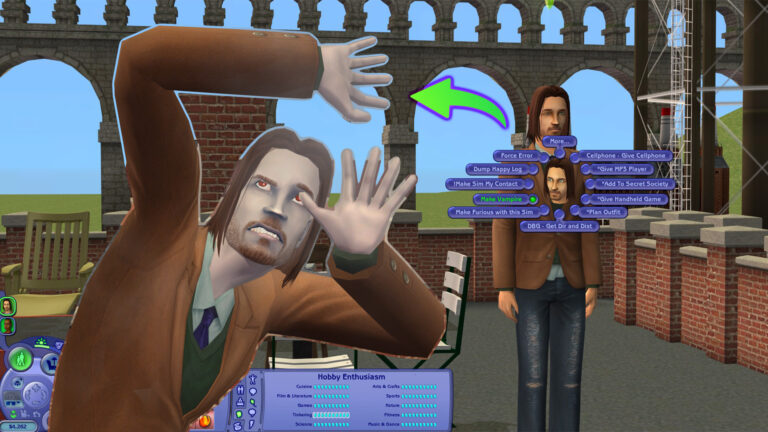
This image showcase the first page of the shift click debug cheats. Upon clicking on your chosen cheat, there are additionally options that allow players to choose more specific options that they are looking for. This goes into different NPC outfits, choosing aspirations, social debug and more.
The Spawn shift click cheat is incredibly interesting to explore as it can add a lot of different NPC’s, objects, different objects and more. With two pages to explore, there is certainly a lot to discover just in Spawn alone.
Likewise, the above image shows the second page of the shift click debug cheats that are available. This includes giving your Sim a cellphone, MP3 player or handheld game as well as making them a Vampire, planning an outfit and more. Yes, you can also join the Secret Society!
How about the Sims 2 UI cheats, you can activate by shift clicking on the mailbox?
Again, much like the Sim based shift click cheats, you have plenty of sub-menus you can explore to truly make use of the debug UI cheats.
The Advance UI Cheat for The Sims 2
Do you truly want to manipulate all the Skills, Careers, Relationships and more with just a click on the user interface? There’s an integrated Sims 2 UI Cheat that lets you manipulate all the elements and features within the game’s UI.
To activate advance UI Cheats for The Sims 2, you simply need to activate the following cheat while in Neighborhood Mode: boolprop testingcheatsenabled true.
Remember, this cheat activation needs to be done in Neighborhood view mode before loading up a Sims household.
How to Use
After loading up any Household, you can use your left click okn the user interface elements to manipulate them. For example, dragging the Needs bar to any point you want!
For Relationships, you can manipulate both meters by dragging the relationship bar left or right. Remember that this relationship manipulation will only work one-way!
Skill Sims 2 UI Cheats let you drag all the Skills and Max them out immediately.
In the Simology Panel, you’ll be able to manipulate Personality, Politics and Hobby Enthusiasm. Simply by dragging the bar left and right!
With that being said, this is everything you need to know about The Sims 2 UI Cheats, how to activate them and what they look like. They are good fun to explore as well as handy for storytelling in The Sims 2 as well.
Are you looking for more cheats? We’ve got you covered with the essential cheats you need for The Sims 2 right here!
Discover all the romantic interactions you can unlock in The Sims 4 Lovestruck!
The Sims 4 Romance Skill is one of the main features included with the 16th Expansion – Lovestruck. An alluring skill available for teens and older Sims. As Sims progress in the skill, they unlock social interactions and more.
If you’re interested in the new Romantic Consultant career or aspirations like the newly added Romantic Explorer and Paragon Partner, this is the skill for you. Keep reading to learn about each skill level!
The Sims 4 Romance Skill Tree
Building the Romance Skill
Simply unlock the Romance Skill by flirting! Performing romantic interactions like Flirt, Embrace, Compliment Appearance, etc. will increase your Sims’ Romance Skill and let them progress through the skill levels. Be sure to use the new romantic interactions your Sim unlocks along the way, too.
Like other skills, your Sim can read the related skill books to increase their Romance Skill. Bored of reading? Use the Research Romance Tips interaction on the computer or Sit in on a Skills Class via the phone to increase your skill, instead.
Personality traits like Lovebug and Romantic will help romantic interactions succeed, which will help your Sim progress through the Romance Skill. Watch out for personality traits like Romantically Reserved, Unflirty, and Jealous. These traits make it harder for your Sim to succeed in romance, which could make it challenging to learn the Romance Skill.
Level 1
Romantic Introduction & Research Romance Tips
As a romantic newby, your Sim unlocks the Romantic Introduction interaction, letting them shower their romantic interests in rose petals. Your Sim also unlocks the Research Romance Tips interaction on the computer, so they can learn all they need to learn about the romantic lifestyle.
Level 2
Share Sweetheart Box
Once your Sim starts to get a little more romantically savvy, they unlock the Share Sweetheart Box romantic interaction. Cuddle up and share treats with your sweetheart!
Level 3
Whisper About Desires
After learning more about romance, your Sim will unlock the Whisper About Desires interaction, letting them get even flirtier with other Sims.
Level 4
Perform Seductive Dance & Tender Neck Kiss
Ready to turn up the heat? At this level, your Sim unlocks the Perform Seductive Dance interaction, letting them show off their moves anywhere, anytime- no music needed! This level also adds the Tender Neck Kiss interaction, giving your Sim a new way to show their affection.
Level 5
Suggest Back-to-Back Woohoo & Recap Woohoo
Want to do what bunnies do? At this skill level, your Sim unlocks the Suggest Back-to-Back Woohoo interaction. This Sims 4 Romance Skill level also adds the Recap Woohoo interaction, keeping your Sims in a flirty mood.
Level 6
Scan the Room
At this level, your Sim unlocks the Scan the Room interaction to find nearby possible romantic interests. Keep an eye out for the floating hearts above other Sims’ heads. That’s how you’ll find your romantic matches!
Level 7
Steamy Make Out & Build Up Partner
As a true casanova, your Sim will unlock the Steamy Make Out interaction at this level. Sims in committed relationships will also unlock the Build Up Partner interaction.
Level 8
Emotionally Connect
Unlocking this skill level helps your Sim strengthen their Romantic Satisfaction with the Emotionally Connect interaction. Deepen your Sim’s relationship by sharing their heart with the Sim they love.
Level 9
Lovingly Dip Kiss
Blow your partner’s mind with the Lovingly Dip Kiss interaction, giving them a kiss that is one for the storybooks.
Level 10
Aura of Flirtiness
Now that they’ve learned the ins and outs of love, your Sim unlocks the Aura of Flirtiness interaction, keeping your Sim flirty for hours to help them find success in love.
Unlock the Hidden Romantic Sage Trait
Once your Sim starts researching romance, they start earning a hidden trait. After performing the Research Romance Tips interaction on the computer a few times, your Sim begins to understand healthy romantic relationships, and a notification will appear letting you know your Sim is on the way to earning the Romantic Sage trait.
Your Sim can continue learning about positive relationship dynamics through researching romance on the computer and talking to Sims in healthy relationships. Once they gain a true understanding of the inner workings of a strong relationship, your Sim will earn the Romantic Sage trait. With this trait, Sims earn Romantic Satisfaction quickly, can influence other Sims to earn the Romantic Sage trait, and unlock the Remember Positive Romantic Experiences interaction to boost their mood.
What will your Sim use their Romance Skill and other features from The Sims 4 Lovestruck Expansion Pack this Valentine’s season?
A PSA to everyone playing The Sims 4 For Rent Expansion!
Players are losing years of game progress due to a recent Sims 4 Save Game corruption issue. Which seems to be getting amplified with the Residental Rentals Feature from The Sims 4 For Rent Expansion Pack.
The corruption issue essentially acts like a virus. You won’t know that your Save Game is corrupted until it’s too late to make any changes or backups. The issue keeps persisting with the latest January 28th Sims 4 Patch, across PC, Mac and Console platforms.
Table of Contents
February 20th Update – Official Sims Direct Statement
The Sims Direct Team issued an official statement regarding the Sims 4 Residental Rentals issue in the For Rent Expansion Pack. Clarifying that they’re actively working on the solution.
We’re aware of issues impacting For Rent and save files, and are investigating this further. Please continue to share details through the EA Forums thread, and upload any impacted save files to assist our investigation.
The Sims 4 Save Game Corruption and Lots Disappearing
Creator @cyberthreed brought to attention an issue they’ve stumbled upon. The latest trend of Sims 4 Save Game corruption glitches caused them to lose over 6 months of saved game progress. They also brought up an EA Forum Thread that was posted two months ago, where several Sims 4 Players started reporting weird glitches they’ve encountered.
I lost my 2 year, 48 gen save when residential rentals were introduced. Yes, I have backups but had already progressed several gens and thought starting over was ok. Didn’t know it could happen again!
Forum expert crinrict brought together a useful list of all the Bug Symptoms that lead up to the recent Sims 4 Save Game corruption, including these official Bug threads:
The full thread in EA Forums contains multiple reports from players who lost their progress due to the latest corruption issue.
Player Experiences
This is such a devastating bug. I lost a seven-year save and rebuilt it only for it to happen again immediately in a new save. I really hope EA takes it seriously and fixes it quickly.
In my case, I’m not getting infinite loading screens. The lots do load. But just the lot I loaded. Everything else is just EA builds or in the case of Newcrest, completely empty. Like the previous comment said this is a MASSIVE bug that I don’t feel like EA is taking seriously. The game is unplayable but they’re releasing more DLC. Player experience is always a second thought. EA claims to be keeping the Sims 4 alive so players don’t have to start over again, but this is literally a save breaking bug where the only solution that’s being given is to start over or not use content that we paid for.
This is also happening to me in Willow Creek. Lots in the same neighborhood as a rental lot vanish when you go in live mode. They appear fine in Map view, but empty lots in live and build mode. When I try to go edit the rental lot to remove it it gives me Error 800 or endless loading screen.
100% I lost my oldest neighborhood. I am really excited about the new pack but I really don’t want to get it if it is going to keep destroying my game. the update they did a week ago complete destroyed my legacy lots, and I know no one is going to fix this. It is fully on the gamer to figure out how to code the game and find work around for a game they paid for. I want to play but I am too afraid I will spread it to another world. It is like a nuke went off in Willow Creek so I am trying to move my families to other worlds but what do I do when it moves to another. So frustrating I just want to play the game I paid for.
This is getting worse for me and is happening on pretty fresh saves of only 68 mBs. It’s gotten to the point where in some of my saves, the played household lot is bulldozed every single time I boot in, with no items in the household inventory (all items in the fridge and bookcase are also gone when replacing the lot). All of my save files are impacted to some degree, making the majority of them completely unplayable, or close to it. This is a massive bug and I won’t be spending money on a single S4 product until it’s fixed.
At the moment, the entire forum thread has been marked as “Under Investigation”. Meaning that EA and Maxis are currently collecting Bug Reports and Game Files. You can contribute your experience to the bug reports listed above!
However, if you want to avoid The Sims 4 Save Game corruption issue altogether and save your long progress, it’s best to avoid playing For Rent. Until at least we get a statement on when to expect a Hotfix Update.
Crinrict put together a Troubleshooting list, explaining some of the causes behind this issue.
Troubleshooting
The issue is really hard to pinpoint but there are a few things that can accelerated the issue.
This issue is not mod caused but it can be influenced by mods and cheats, especially if you create lots of Residential Rental units in your save game.
Save Game Size. The issue usually typically happens on larger save games. There are a few factors that contribute to save game size that you can keep an eye on
Lots of huge houses with lots of objects: Try to keep those down. Consider using empty houses for set decoration if you don’t play certain lots but want houses to make it look nicer
Photos Sims take ingame. Try to only keep the photos you really like and that contribute to your gameplay. Delete everything else. Photos take up a lot of space in the save.
Lots of Sims. The game creates Sims at abundance. Delete the ones you don’t use from time to time.
Usually there’s nothing you can do once it starts happening.
The Sims Direct Communications haven’t made any official statements as of yet regarding this issue. Considering that The Sims 4 Save Game corruption thread on EA Forums is “Under Investigation”, we’re hopeful to get an official announcement soon from Maxis.
Stay tuned on Sims Community for the latest Sims 4 Updates and Reports on this issue.