


To best protect yourself, it’s suggested you don’t download any Mods or CC from any account on the ModTheSims website currently, not just the ones mentioned below. These malicious virus uploads have been found attached to several The Sims 4 and The Sims 2 files, so this issue is not only affecting The Sims 4 players.
Everyone should be on the lookout for these malicious files. Read on below for more information about the matter along with ways to protect yourself.
Table of Contents
ModTheSims Virus Uploads
Sims After Dark first brought the issue to our attention with the below announcement on their Discord.

The issue was first discovered on March 1, 2026. If you have downloaded any Mods or CC from the site since then you should delete the files, run a system virus scan, and change your password.
What was first thought to be a matter of a single compromised account has turned out to be a possible site wide attack. Known accounts that have been found to contain virus files attached to their uploads include NateTheL0ser, PurrSimity, and jellyheadDimbulb.
As previously mentioned, these are the accounts so far discovered to contain these virus files, but any account is at risk. Everyone is cautioned against downloading any Mods or CC from the site at this time.
Tips to Protect Yourself
The Sims Official Forums has an entire page dedicated to safely downloading and installing Mods and CC for The Sims 4.
Their tips include how to find Mods and CC, what to avoid, things to be on the lookout for, and how to detect outdated Mods. It’s highly suggested you read their information before jumping into the massive, chaotic world of Mods and CC gaming.
TwistedMexi has a Mod for The Sims 4 called ModGuard which handles all of the dirty work for you. This Mod will alert you to any attempts to download a virus file from Mods or CC, blocks the attempt, displays the name of the problematic Mod or CC, and even alerts the team so they can notify the modder as soon as possible to rectify the issue.
Below is an example of the alert you will be given in game from ModGuard if a malicious file is detected.
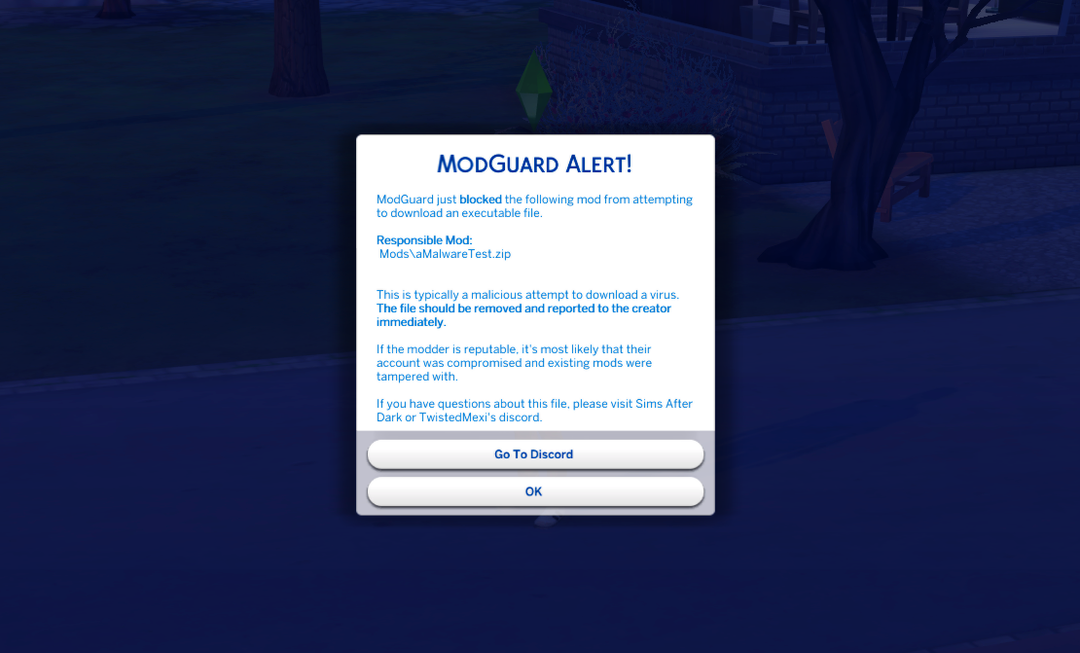
If you download any Mods or CC to your game, it’s highly suggested you also install ModGuard to protect yourself and others. You will be helping to keep not just yourself safe, but the entire Modding and CC community.
Wait Before Downloading
It has been suggested that players wait at least a week before downloading any Mods or CC to ensure this matter is taken care of properly.
We will keep this article updated with news and information as it comes out as this is a developing situation.
Updates
Update 1 – March 2: It turns out this issue is not isolated to just the ModTheSims website. Another mod (Virginity System) from user o_pedrão at the website Lovers Lab contains an active virus as well. It turns out this situation is worse than originally thought.
If you’re concerned you may have been hit by this virus, you can search for “out.exe” or just “out” in your Sims 4 installation location. If you find this executable:
- Delete the executable
- Delete any recent Mods/CC you downloaded
- Empty your recycling bin
- Run a virus scan
- Reset your site password
Keep an eye out for any unknown script files when downloading CC.
Update 2 – March 4:
ModTheSims has added new security measures to their site to prevent unauthorized access to user accounts, especially accounts that have gone long periods of time without logins.
The accounts previously mentioned as being compromised have been handled and their uploads have been reverted to previous versions without the attached virus files. This doesn’t mean these are the only accounts that have had issues, however, so keep an eye out for strange files that comes attached to CC and Mod files.
In the meantime, we have plenty of news about not just The Sims 4, but life simulation games as a whole for you to read.












Here we go again
It’s really sad to see this becoming a common issue.
Agreed so many evil people out there sigh
Oh jeez that sucks.
Seeing this right after I downloaded a bunch of mods and played for a few hours and just put my laptop away for the night.. gotta do some scans tomorrow apparently
Oof wishing you luck!
why do they gotta target the good sims mods websites 🙁
i know that all of The Sims Resource itself is a malware, but can’t THEY have a malicious CC incident for once?
Lol just shut the site down at this point. It was created by a PDF afterall.
https://m.youtube.com/watch?v=ZU38K5Cfg-8
Life is tough as is. Now we can’t enjoy virtual lives either. Come off it, bruh!!
Also: How do you delete your recycling bin?!
You don’t delete the recycling bin itself, you empty it thereby permanently deleting everything that was in it.