Home Blog Page 278

The Sims 4: Positivity Ambassador Trait and how to Claim it

A month ago The Sims Team introduced a brand new Trait to The Sims 4 that took a series of steps to be unlocked through a limited time challenge. Basically, the Positivity Challenge which featured the Sims Ambassador Millie Bobby Brown would unlock a new Challenge Aspiration that you would need to complete through series of interactions in order to unlock the Positivity Ambassador Trait. We have the entire article about the challenge written HERE!

However, now that the Positivity Challenge has ended there’s no way to officially obtain the trait in the game…at least not through gameplay or user interface options.

With a simple cheat you are able to fully obtain the official Positivity Ambassador Trait. Even though the Positivity Challenge is over this trait will remain in the game forever, meaning that you’re able to use this cheat anytime you want to make your Sim a Positivity Ambassador.

Simply open up the cheat console using CTRL + Shift + C and enter the traits.equip_trait Kindness_Ambassador cheat and press Enter. You’ll immediately find this cheat in your Sim’s Simology panel.

The Sims 4: Positivity Ambassador Trait and how to Claim it

So, which benefits do you gain with the Kindness Ambassador Trait? First of all, you get to worry less about the negative emotions which may impact your Sims from time to time as your Sims will strive to focus on brighter things in life.

Second, your Sims will build friendships and remain friends with other Sims for a longer period of time.

The Sims 4: Positivity Ambassador Trait and how to Claim it

The new trait also offers you to “Challenge Sims to Be Kind” by clicking on a Sim of your choice. This interaction might affect the autonomy of the Sim you’ve chosen to perform this interaction on and make them much kinder towards others.

Huge thanks to @EuphorialQueen for helping us uncover this cheat!

This year The Sims 4 has proven that less is more

I’ve been writing about The Sims 4’s content ever since the beginning and I just had to write this article considering that there seems to be an interesting switch in the way that The Sims Team is doing this.

Now, you’re all probably aware of the article we wrote a few months ago where SimGuruKate publicly issued that The Sims Team is shaking up the way that they’re releasing new content. In case you don’t remember – here’s a tweet she shared:

She mentioned the fact that one of the main reasons why Quarterly Teasers stopped being a thing is because The Sims Team is switching the way they are delivering new content to the public. Now, that didn’t make much sense until the last few weeks when I realized all of the content we received this year. Let’s take a look at the pack release pattern that we had in 2015, 2016 and 2017 and the pack release pattern that we had this year:

2015:

  • 2 Expansion Packs (Get to Work, Get Together)
  • 2 Game Packs (Outdoor Retreat, Spa Day)
  • 4 Stuff Packs (Luxury Party, Perfect Patio, Cool Kitchen, Spooky Stuff)

2016:

  • 1 Expansion Pack (City Living)
  • 1 Game Pack (Dine Out)
  • 5 Stuff Packs (Movie Hangout, Romantic Garden, Kids Room, Backyard Stuff, Vintage Glamour)

2017:

  • 1 Expansion Pack (Cats & Dogs)
  • 2 Game Packs (Vampires, Parenthood)
  • 3 Stuff Packs (Bowling Night, Fitness Stuff, Toddler Stuff) + Stuff Pack that was developed together between The Sims Team and the community released in January 2018

2018:

  • 2 Expansion Packs (Seasons, Get Famous)
  • 1 Game Pack (Jungle Adventure)
  • 2 Stuff Packs (Laundry Day, My First Pet)

In 2018 The Sims Team had the lowest amount of packs released. Now, that doesn’t really mean anything considering that the amount of new content they’ve given us this year is the same (or even more) than they’ve released in previous years. 2015 brought big packs such as Get to Work (which was probably in development since the finishing stages of the base game) and Get Together (which relied on some of the older assets that were planned for the base game – Windenburg).

However, there seems to be a big turn this year. 2018 brought the smallest amount of Stuff Packs to the table and the latest pack release was in March 2018 when The Sims 4 My First Pet Stuff Pack came out. The Laundry Day Stuff Pack was somewhere between 2017 and 2018 considering it was released very early this year (January 2018). Plus, it was a community project that took more time than usual considering that The Sims Team had to count and consider all the votes from multiple polls that they’ve published.

So, what is truly different in 2018?

Expansion Packs. The Sims 4 had to go through two years where the team would only release one Expansion Pack per year. Sure, they also offered multiple Game Packs and Stuff Packs throughout that period but The Sims 4 was definitely still missing on more in-depth gameplay that only Expansion Packs could provide.

The biggest change that’s also been made aware for the public is the fact that Graham Nardone, who worked as a Lead Producer on Stuff Packs for The Sims 4 switched positions and is currently working as a producer for The Sims 4 Expansion Packs. Ever since the big switch it’s noticeable that the production of Stuff Packs has slowed down. We are wrapping up this year with only 2 Stuff Packs that were released in the first quarter of this year and the rest of the 3 quarters had no Stuff Pack releases at all. This is a first for The Sims 4 and definitely a noticeable change in the dynamic of the upcoming content production.

The announcement of “Quarterly Teasers no longer making sense” for The Sims 4 tells a lot about the dynamic that The Sims Team plans to put out for The Sims 4. One of the main reasons why Quarterly Teasers were a thing is because they had Stuff Packs and Game Packs to reveal. There were absolutely no Expansion Pack revelations whatsoever in a Quarterly Teaser because The Sims Team always had plans to do a seperate teaser and announcement for them.

In 2018 we had two Expansion Pack announcements and releases. The Sims 4 Seasons and The Sims 4 Get Famous both brought a lot of content and gameplay that still to this day carry on and bring meaning to the general experience of The Sims 4. With these huge releases almost no one in the community was left wondering “What happened to Stuff Packs” considering that both of these packs brought more than enough content to satisfy the need for new items and gameplay. Seasons brought an interesting twist to holiday items and decor with both modern and rustic items that can be found in the build catalog while Get Famous focused more on two set of themes: Mid-Century and High-Rise Modern. With a huge catalog of items that these packs offered absolutely no one had the need to ask The Sims Team “Hey, what about those Stuff Packs?!”.

With the knowledge that Graham Nardone has switched things up and is now working on bigger packs for The Sims 4 and the fact that “Quarterly Teasers make no more sense” could we expect less packs and more bigger packs in the future?

We have no idea what the future holds for The Sims 4 but one thing is certain – we like the content twist that The Sims Team has done in 2018 and we hope that they keep it up for the next 3 years of content that they plan to release.

Modder liberates all the new Vehicles and World Objects from The Sims 4 Get Famous

4

Ever since the release of The Sims 4 Get Famous Expansion Pack many were left wondering why some of the world objects featured in Del Sol Valley were left out of Build Mode – specifically the Debug section that can be enabled using the bb.showhiddenobjects cheats. Some of those objects include vehicles, billboards, boats and many more that are featured in Del Sol Valley.

Luckily a talented modder brazenlotus managed to uncover all of the objects featured in this world. With only 2 download links that we’ve featured down below you’ll be able to unlock all of the world objects that are originally featured in Del Sol Valley.

Both downloads are only around 500KB which means you’ll have no worries about the filesize considering that there are a lot of objects. This mod only unlocks and uncovers the objects.

Now, the vehicles that are featured in the image down below have been added to The Sims 4 Base Game, meaning that you don’t need Get Famous in order to use this mod. To install the Liberated Vehicles mod simply extract the .zip file that’s linked in the download button below and extract it to Electronic Arts > The Sims 4 > Mods folder. You’ll also need to enable Mods / CC in your game options in order to make this mod fully functional.

[mks_button size=”large” title=”DOWNLOAD!” style=”squared” url=”http://brazenlotus.tumblr.com/post/180654230917/liberated-vehicles-download” target=”_blank” bg_color=”#1e73be” txt_color=”#FFFFFF” icon=”fa-arrow-down” icon_type=”fa” nofollow=”0″]

Modder liberates all the new Vehicles and World Objects from The Sims 4 Get Famous

There’s another Liberated Objects pack which features random objects and items featured in the world of Del Sol Valley. Now, unlike the mod above, this one requires The Sims 4 Get Famous Expansion Pack to have all of the liberated objects appear in your game considering that they strictly rely on the textures and files featured in the EP06 installation folder. The installation process for the Liberated Del Sol Valley Objects is the same as the process of installing the Liberated Vehicles mod.

[mks_button size=”large” title=”DOWNLOAD!” style=”squared” url=”http://brazenlotus.tumblr.com/post/180655405057/liberated-get-famous-world-objects-download” target=”_blank” bg_color=”#1e73be” txt_color=”#FFFFFF” icon=”fa-arrow-down” icon_type=”fa” nofollow=”0″]

Modder liberates all the new Vehicles and World Objects from The Sims 4 Get Famous

These items will appear in your game only after you use testingcheats true cheat + bb.showhiddenobjects cheat. Considering that all of the objects unlocked from these mods rely on the mod files to be fully unlocked they are going to be treated and tagged as a mod in the game as well even though they use all of the resources from the game files. If you plan to create a build and share it on The Gallery using these mods make sure you mention the mod and where people can find these mods to ensure that all of the items show up in the game of people who download the builds.

The Sims Mobile: Welcoming Winterfest Quest Video Walkthrough

0

The Sims Mobile’s Welcoming Winterfest Quest – a head start quest helping you prepare for the upcoming 12-day Winterfest Event has just started!

The head start quest is going to be available for the next 6 days. In the video above you can find out everything about what it takes to complete all 28 parts of this quest!

The Sims Mobile: Welcoming Winterfest Head Start Quest Walkthrough

The Sims Mobile Team provided us with a complete walkthrough of the Welcoming Winterfest Head Start Quest! This 28-part Quest is going to help you prepare for the big Winterfest Event which is going to be available later on.

The Sims Mobile: Welcoming Winterfest Head Start Quest Walkthrough

We’ve made a video of this quest so you can check out all the quests available and their specific interactions. You can check out the video down below and check all the steps you need to take to complete this quest below the video!

This limited-time quest is now live and will be available for the next 7 days. Here are all the steps you need to take in order to fully complete it:

  • Part 1 – Earn 25 Simoleons.
  • Part 2 – Ask 5 Sims about getting into the Winterfest Spirit.
  • Part 3 – Watch “A Winterfest Prince”.
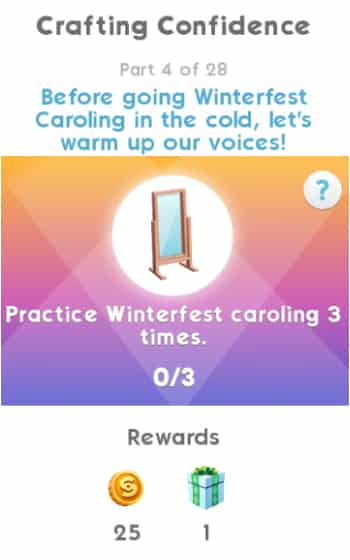
  • Part 4 – Practice Winterfest caroling 3 times.
  • Part 5 – Complete 3 Events.
  • Part 6 – Plan out Winterfest home decorations.
  • Part 7 – Earn 650 Simoleons.
  • Part 8 – Complete the “Cafe Caroling” event.
  • Part 9 – Earn 3 stars at a party.
  • Part 10 – Complete the “Winterfest Fashion” event.
  • Part 11 – Give stickers to 4 Sims.
  • Part 12 – Complete LlamaZoom tasks.
  • Part 13 – Give 5 Sims homemade pie.
  • Part 14 – Complete the “Cafe Caroling” event.
  • Part 15 – Plan to one-up the neighbors’ decorations.
  • Part 16 – Complete LlamaZoom tasks.
  • Part 17 – Share love of Winterfest log channel with 3 Sims.
  • Part 18 – Complete the “Winterfest Fashion” event.
  • Part 19 – Winterfest Dance with 3 Sims.
  • Part 20 – Complete LlamaZoom tasks.
  • Part 21 – Give a Winterfest spirit hug to 5 Sims.
  • Part 22 – Complete the “Cafe Caroling” event.
  • Part 23 – Chug eggnog at the fridge.
  • Part 24 – Complete LlamaZoom tasks.
  • Part 25 – Earn 650 Simoleons.
  • Part 26 – Complete the “Winterfest Fashion” event.
  • Part 27 – Give 3 Sims a Winterfest present.
  • Part 28 – Complete LlamaZoom tasks.

The Sims Mobile: Welcoming Winterfest Head Start Quest WalkthroughThe Sims Mobile: Welcoming Winterfest Head Start Quest WalkthroughThe Sims Mobile: Welcoming Winterfest Head Start Quest WalkthroughThe Sims Mobile: Welcoming Winterfest Head Start Quest WalkthroughThe Sims Mobile: Welcoming Winterfest Head Start Quest WalkthroughThe Sims Mobile: Welcoming Winterfest Head Start Quest WalkthroughThe Sims Mobile: Welcoming Winterfest Head Start Quest WalkthroughThe Sims Mobile: Welcoming Winterfest Head Start Quest WalkthroughThe Sims Mobile: Welcoming Winterfest Head Start Quest WalkthroughThe Sims Mobile: Welcoming Winterfest Head Start Quest WalkthroughThe Sims Mobile: Welcoming Winterfest Head Start Quest WalkthroughThe Sims Mobile: Welcoming Winterfest Head Start Quest WalkthroughThe Sims Mobile: Welcoming Winterfest Head Start Quest WalkthroughThe Sims Mobile: Welcoming Winterfest Head Start Quest WalkthroughThe Sims Mobile: Welcoming Winterfest Head Start Quest WalkthroughThe Sims Mobile: Welcoming Winterfest Head Start Quest WalkthroughThe Sims Mobile: Welcoming Winterfest Head Start Quest WalkthroughThe Sims Mobile: Welcoming Winterfest Head Start Quest WalkthroughThe Sims Mobile: Welcoming Winterfest Head Start Quest WalkthroughThe Sims Mobile: Welcoming Winterfest Head Start Quest WalkthroughThe Sims Mobile: Welcoming Winterfest Head Start Quest WalkthroughThe Sims Mobile: Welcoming Winterfest Head Start Quest WalkthroughThe Sims Mobile: Welcoming Winterfest Head Start Quest WalkthroughThe Sims Mobile: Welcoming Winterfest Head Start Quest WalkthroughThe Sims Mobile: Welcoming Winterfest Head Start Quest WalkthroughThe Sims Mobile: Welcoming Winterfest Head Start Quest WalkthroughThe Sims Mobile: Welcoming Winterfest Head Start Quest WalkthroughThe Sims Mobile: Welcoming Winterfest Head Start Quest Walkthrough

The latest quest also comes with a brand new Chest – Holiday Decorations! For 25 SimCash you are able to purchase the Holiday Decorations Chest and get one of the 4 items including:

  • Freezer Bunny Bells
  • Landgraab Strands
  • Landgraab String Lights
  • Simoleons

IMG 7411

The Sims 4 Get Famous Gallery Spotlight

The Sims 4 Get Famous Gallery Spotlight

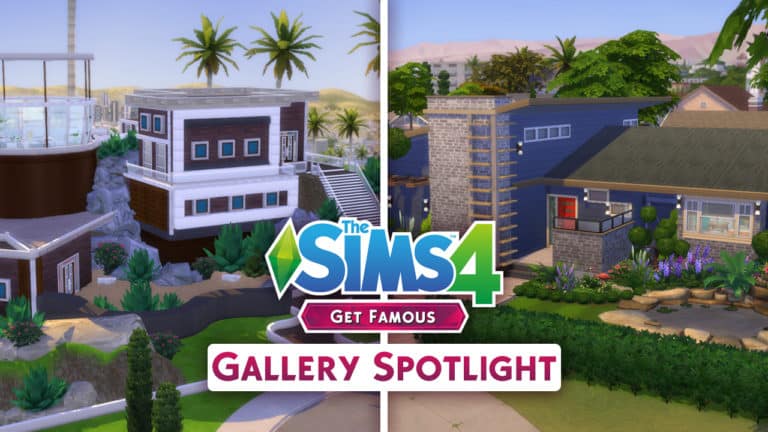
It’s finally time for our The Sims 4 Get Famous Gallery Spotlight!

In the first Gallery Spotlight for this Expansion Pack we’re featuring some of the most exclusive, expensive and creative villas, mansions, manors and mid-century houses! Although this spotlight is primarily focused on content from The Sims 4 Get Together you’ll also be seeing content from other packs as well.

Pulsing plumbob that’s on the bottom left corner contains all the info (and download link) of the desired lot.

To see more of our previous Gallery Spotlights, CLICK HERE!

[ult_hotspot main_img=”id^80815|url^https://simscommunity.info/wp-content/uploads/2018/12/12-03-18_10-12-00-PM.jpg|caption^null|alt^null|title^12-03-18_10-12-00 PM|description^null”][ult_hotspot_items icon_type=”custom” icon_img=”id^39525|url^https://simscommunity.info/wp-content/uploads/2015/09/plumbob2.png|caption^null|alt^null|title^plumbob2|description^null” img_width=”52″ tooltip_custom_color=”#1e73be” tooltip_custom_bg_color=”#ffffff” tooltip_width=”450″ tooltip_position=”right” tooltip_continuous_animation=”on” hotspot_position=”89.61858624454149,3.190184049079755″ tooltip_custom_border_size=”border-style:solid;|border-width:2px;border-radius:5px;|border-color:#81d742;”]

Castle on the Hill (Download Here)

by LindsayHSims

Value: §1,198,039
Size: 64×64
Lot Type: Residental Lot[/ult_hotspot_items][/ult_hotspot][ult_hotspot main_img=”id^80816|url^https://simscommunity.info/wp-content/uploads/2018/12/12-03-18_10-21-57-PM.jpg|caption^null|alt^null|title^12-03-18_10-21-57 PM|description^null”][ult_hotspot_items icon_type=”custom” icon_img=”id^39525|url^https://simscommunity.info/wp-content/uploads/2015/09/plumbob2.png|caption^null|alt^null|title^plumbob2|description^null” img_width=”52″ tooltip_custom_color=”#1e73be” tooltip_custom_bg_color=”#ffffff” tooltip_width=”450″ tooltip_position=”right” tooltip_continuous_animation=”on” hotspot_position=”89.61858624454149,3.190184049079755″ tooltip_custom_border_size=”border-style:solid;|border-width:2px;border-radius:5px;|border-color:#81d742;”]

Cube Mania (Download Here)

by ArchiSim7

Value: §70,376
Size: 30×20
Lot Type: Residental Lot[/ult_hotspot_items][/ult_hotspot][ult_hotspot main_img=”id^80817|url^https://simscommunity.info/wp-content/uploads/2018/12/12-03-18_10-26-20-PM.jpg|caption^null|alt^null|title^12-03-18_10-26-20 PM|description^null”][ult_hotspot_items icon_type=”custom” icon_img=”id^39525|url^https://simscommunity.info/wp-content/uploads/2015/09/plumbob2.png|caption^null|alt^null|title^plumbob2|description^null” img_width=”52″ tooltip_custom_color=”#1e73be” tooltip_custom_bg_color=”#ffffff” tooltip_width=”450″ tooltip_position=”right” tooltip_continuous_animation=”on” hotspot_position=”89.61858624454149,3.190184049079755″ tooltip_custom_border_size=”border-style:solid;|border-width:2px;border-radius:5px;|border-color:#81d742;”]

Modern Display Home (Download Here)

by IllogicalSims

Value: §107,883
Size: 40×30
Lot Type: Residental Lot[/ult_hotspot_items][/ult_hotspot][ult_hotspot main_img=”id^80818|url^https://simscommunity.info/wp-content/uploads/2018/12/12-03-18_10-33-12-PM.jpg|caption^null|alt^null|title^12-03-18_10-33-12 PM|description^null”][ult_hotspot_items icon_type=”custom” icon_img=”id^39525|url^https://simscommunity.info/wp-content/uploads/2015/09/plumbob2.png|caption^null|alt^null|title^plumbob2|description^null” img_width=”52″ tooltip_custom_color=”#1e73be” tooltip_custom_bg_color=”#ffffff” tooltip_width=”450″ tooltip_position=”right” tooltip_continuous_animation=”on” hotspot_position=”89.61858624454149,3.190184049079755″ tooltip_custom_border_size=”border-style:solid;|border-width:2px;border-radius:5px;|border-color:#81d742;”]

Modern Celebrity Mansion (Download Here)

by SofiaMM80

Value: §463,482
Size: 64×64
Lot Type: Residental Lot[/ult_hotspot_items][/ult_hotspot][ult_hotspot main_img=”id^80830|url^https://simscommunity.info/wp-content/uploads/2018/12/12-05-18_12-00-14-AM.jpg|caption^null|alt^null|title^12-05-18_12-00-14 AM|description^null”][ult_hotspot_items icon_type=”custom” icon_img=”id^39525|url^https://simscommunity.info/wp-content/uploads/2015/09/plumbob2.png|caption^null|alt^null|title^plumbob2|description^null” img_width=”52″ tooltip_custom_color=”#1e73be” tooltip_custom_bg_color=”#ffffff” tooltip_width=”450″ tooltip_position=”right” tooltip_continuous_animation=”on” hotspot_position=”89.61858624454149,3.190184049079755″ tooltip_custom_border_size=”border-style:solid;|border-width:2px;border-radius:5px;|border-color:#81d742;”]

Chateau Peak (Download Here)

by PepperMintsWorld

Value: §900,598
Size: 64×64
Lot Type: Residental Lot[/ult_hotspot_items][/ult_hotspot][ult_hotspot main_img=”id^80819|url^https://simscommunity.info/wp-content/uploads/2018/12/12-03-18_10-50-48-PM.jpg|caption^null|alt^null|title^12-03-18_10-50-48 PM|description^null”][ult_hotspot_items icon_type=”custom” icon_img=”id^39525|url^https://simscommunity.info/wp-content/uploads/2015/09/plumbob2.png|caption^null|alt^null|title^plumbob2|description^null” img_width=”52″ tooltip_custom_color=”#1e73be” tooltip_custom_bg_color=”#ffffff” tooltip_width=”450″ tooltip_position=”right” tooltip_continuous_animation=”on” hotspot_position=”89.61858624454149,3.190184049079755″ tooltip_custom_border_size=”border-style:solid;|border-width:2px;border-radius:5px;|border-color:#81d742;”]

Celebrity Penthouse Fixed (Download Here)

by simlicy

Value: §405,519
Size: 40×30
Lot Type: Residental Lot[/ult_hotspot_items][/ult_hotspot]

The Sims 4: New Items Coming Soon to Holiday Celebration Pack!

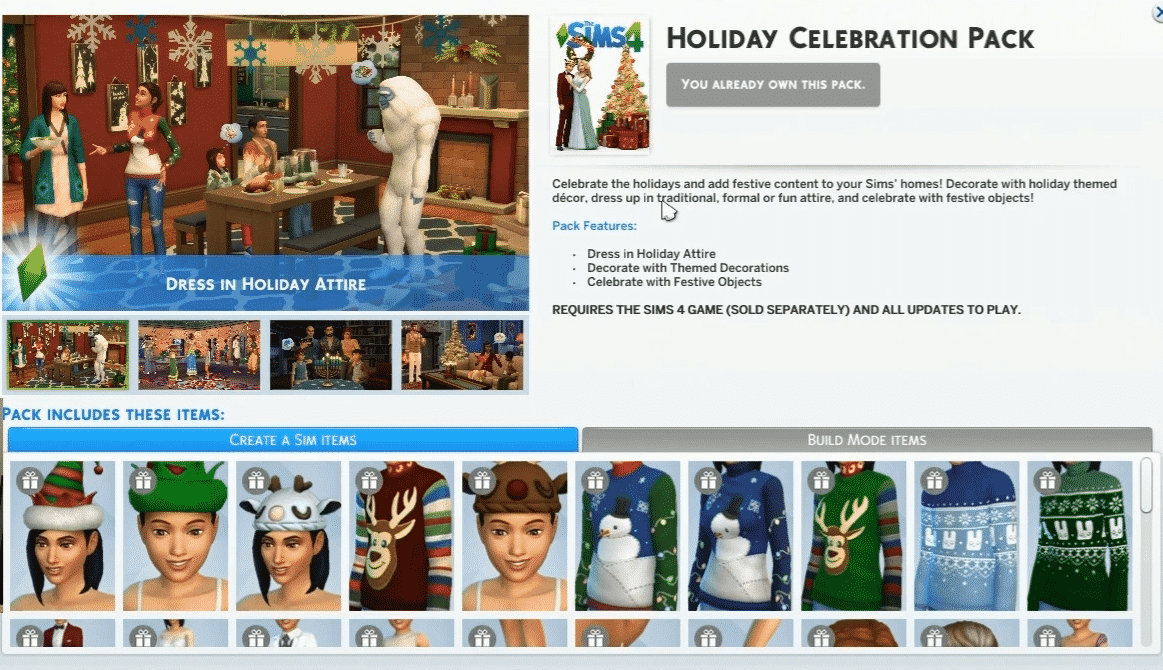
The Sims Team has revealed during their third Maxis Monthly Livestream that they’ll be adding new Create A Sim and Build / Buy Items to the Holiday Celebration Pack – a Free Pack that you can obtain on Origin.

Kate revealed a lot of interesting details about the new items, starting with the new screen that features the Holiday Celebration Pack:

The Sims 4: New Items Coming Soon to Holiday Celebration Pack!

We later got to see the new objects in action! You can see some of the new objects straight from Live Mode:

The Sims 4: New Items Coming Soon to Holiday Celebration Pack!

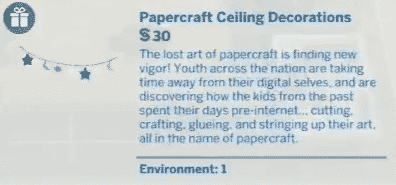
There are 8 new items that are going to be added with the upcoming Holiday Celebration Pack for The Sims 4, including:

  • Papercraft Ceiling Decor
  • Mason Jar Holiday Decor
  • Glass, Wax and Wood
  • Log Display LV-426
  • Festive Ceiling Light
  • Faux Fireplace Facades
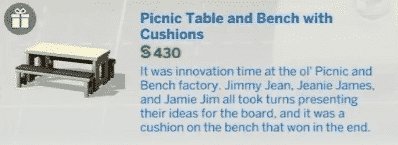
  • Picnic Table and Bench with Cushions
  • Handcrafted Holiday Etchings


The Pack also comes with 2 new recipes including the “Winter Cake” and “Crown Roast”. You can check them out down below:

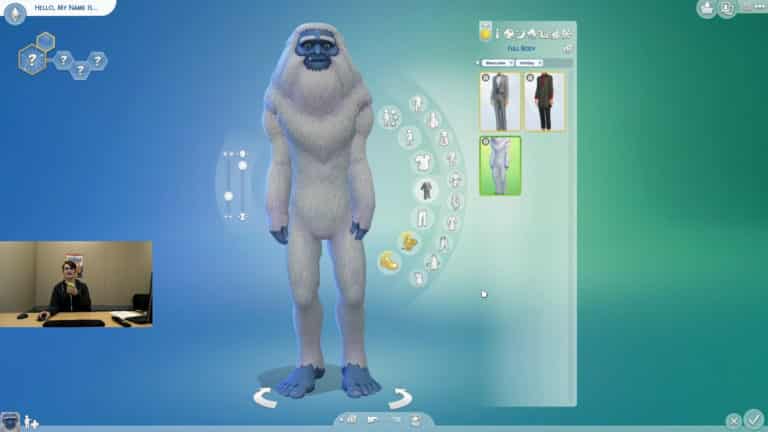
However, the new additions to Holiday Celebration Free Pack don’t stop there! Kate also showcased the new items that are going to be added in Create A Sim as well, including:

  • 1 Feminine Hairstyle
  • 1 Feminine Bottoms
  • 1 Feminine Outfit
  • 1 Feminine Shoes
  • 1 Masculine Hairstyle
  • 1 Masculine Top
  • 1 Unisex Adult Costume
  • 1 Child Top

You can check out the new items and what they look like in Create A Sim down below. Some of these items come with plenty of different swatches and patterns!

This is all the new content that The Sims Team has showcased during this month’s Maxis Monthly. Although SimGuruKate didn’t say exactly when the new update for Holiday Celebration is going to arrive, she did mention that we can expect it to come soon ™.

She also shared information that majority of the bugs that have been introduced with the big Get Famous Patch should be fixed with the upcoming base game update for The Sims 4 that should be arriving soon.

You can check out all of these new items in action in the livestream replay below:

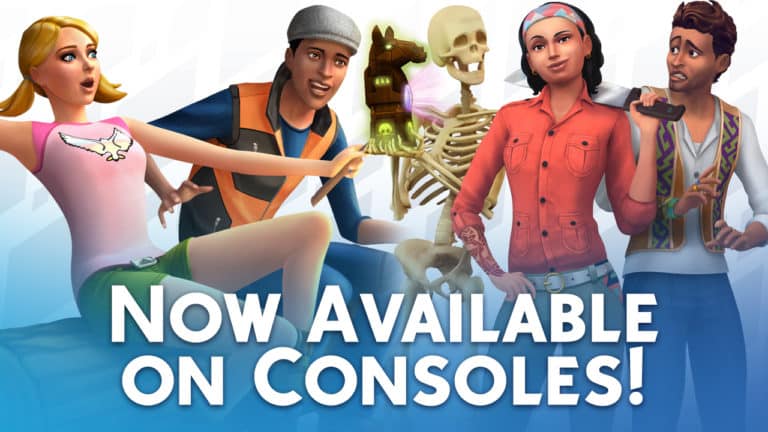
The Sims 4 Outdoor Retreat and Jungle Adventure are Now Available on Consoles!

The Sims Team has just released 2 Game Packs for The Sims 4 for Xbox One and PS4.

Console players are now able to enjoy in The Sims 4 Outdoor Retreat and The Sims 4 Jungle Adventure Game Packs – with the price being 20 USD each.

Down below you can find the official Microsoft and Playstation stores where you can purchase these packs for your console:

The Sims 4 Outdoor Retreat

The Sims 4 Jungle Adventure

The Sims 4 Outdoor Retreat and Jungle Adventure are Now Available on Consoles!

REPLAY: The Sims Team’s Third Maxis Monthly (December 4th, 2018)

UPDATE #2: You can now also catch the replay of Maxis Monthly on YouTube!

UPDATE: The livestream has ended. You can catch the official stream replay down below!


The Sims Team is doing their 3rd Maxis Monthly Livestream (and the last one for 2018) today – December 4th, 2018 at 8PM CET / 7PM BT / 11AM PST.

During this livestream The Sims Team will be talking all about Maxis games including The Sims FreePlay, The Sims Mobile and of course – The Sims 4. SimGuruKate even teased that during this livestream they’ll be showing some “Upcoming Goodies” for TS4.

We know that it’s hard to catch up with all of the time zones and find out exactly when the livestream begins which is why we’ve included the countdown above the livestream window.

We’ll be writing up all the important information that may be shared during the livestream and also update this post with the replay once it becomes available so make sure you stay tuned to our website!


Tumblr’s new Community Guidelines are hurting Simblrs

8

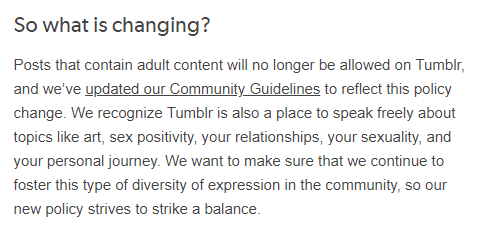
Tumblr has issued a public statement announcing that it will no longer allow adult content on its platform and simblrs are not happy about it.

According to the announcement, the proposed changes are scheduled to take place on December 17th of this year, but Simmers are already receiving notifications that posts on their simblrs have been flagged for adult content.

Tumblr’s new Community Guidelines are hurting Simblrs

An excerpt from Tumblr’s announcement. Full statement linked below.

The Simming Community has always had a large presence on Tumblr. Simmers who frequent the site refer to their Sims blogs as “simblrs.” Storytellers in particular have been hit hard by the announcement. The new Community Guidelines will heavily restrict the freedom of storytellers to explore and address sensitive plots and social issues; something that has long been celebrated in the community.

However, NSFW simblrs are not the only ones affected. Many family-friendly simblrs are being mistakenly targeted by this change as well.

What do you think about Tumblr’s new content policy? Let us know in the comments or contact us on social media.


You can read Tumblr’s full statement here.

LIVE: Let’s explore The Sims 4 Get to Work…in First Person View

0

We are going LIVE with The Sims 4 Get to Work Expansion Pack in less than an hour to explore the game once again…however this time we’re doing things differently.

The First Person Camera allows us to re-explore every single pack through a new pair of eyes. This is why we’re doing a series of livestreams where I’ll be exploring the neighborhoods, the content and the unique gameplay of each pack exclusively through this camera.

This livestream is going live on December 2nd at 9PM CET / 8PM BT / 12PM PT. If you miss the livestream we’ll be having a replay available as soon as the stream ends!

The Sims Mobile: New Update Drastically Lowers Swatch Prices + Grants 150 SimCash for FREE

3

The Sims Mobile has just recently issued a new update for the game which dramatically changes and fixes things that occured after a recent controversial client update that happened only a few days ago.

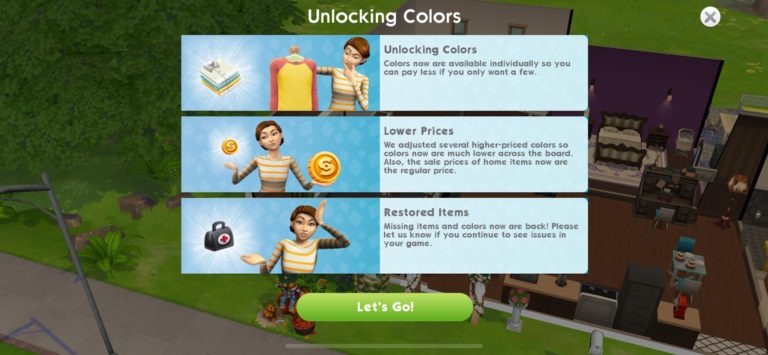
The update finally fully addressed the addition of unlocking for colors and swatches individually so you can, according to the screen below, pay less for the object in total if you only want a few colors.

The Sims Mobile: New Update Drastically Lowers Swatch Prices + Grants 150 SimCash for FREE

The team also addressed the situation where most color swatches would cost a huge amount of Simoleons and SimCash, meaning that plenty of swatches that you can now see in the game have been cut down drastically.

For example take a look at the couch down below. The same swatch price has been cut down from 50 Simoleons to only 6 Simoleons.

The same case goes for swatches that required SimCash. Previously the black color swatch of the couch you can see below costed a whooping 197 SimCash. After the update it has been dramatically reduced to 17 SimCash.

That’s not all – the “Home Sale” offer that they’ve promised to last for only the next few days is now completely permanent – meaning that all of the home items have a permanently decreased price.

The issue where some Simmers would report swatches that they’ve earned before the latest client update has also been fixed, meaning that you should be seeing all of the swatches that you’ve purchased before now.

With the latest update The Sims Mobile Team has also issued a SimCash Gift of 150 SimCash that you can redeem for the next 9 days. This gift has been offered due to the issues that many Simmers have gone through with the recent changes and events.

The Sims Mobile: New Update Drastically Lowers Swatch Prices + Grants 150 SimCash for FREE

Are you satisfied with the way The Sims Mobile has handled this very controversial update or do you think that the team should go back to charging more for individual objects in exchange of having all the presets? Let us know in the comments!

The Sims 4: “Upcoming Goodies” to be shown off in Next Week’s Maxis Monthly

3

SimGuruKate has posted a tweet sharing more details about next week’s Maxis Monthly Livestream. In case you don’t know what the Maxis Monthly Livestream is all about – it’s a monthly segment livestream which lasts for about 30 minutes covering all the latest community creations and news for all the Maxis games including The Sims FreePlay, The Sims Mobile and The Sims 4.

Well, SimGuruKate has just teased that this Maxis Monthly livestream will be revealing new information about the upcoming content for The Sims 4. Although we have no idea what the reveal is all about just yet we’ll be keeping you posted both on our website and our YouTube channel with all the latest info.

The Maxis Monthly Livestream will take place next week, on December 4th at 11AM PST / 8PM CET / 7PM BT. We’ll also be including a countdown on our seperate livestream post so you’ll know exactly when the livestream will go live in your area.

Official The Sims 4 Themes and Avatars Now Available for Playstation 4

0

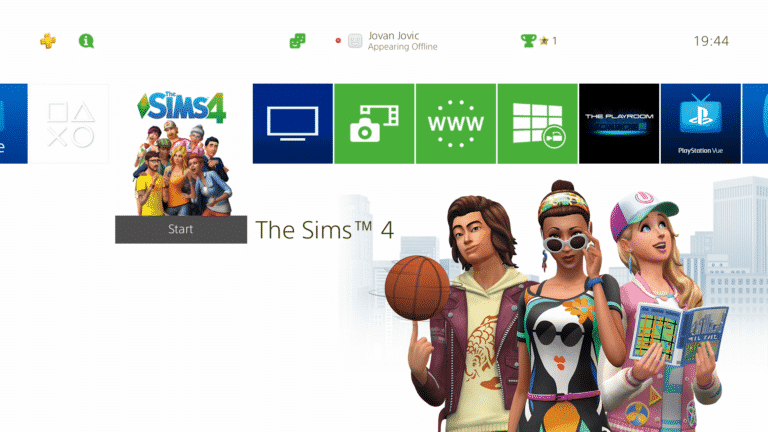
The Sims Team has just released official Themes and Avatars for the Playstation 4 console in the spirit of The Sims 4!

These include Themes from some of the select Expansion Packs and Avatars including Plumbobs and the Freezer Bunny.

You can click on the links down below to be directed to pages for each Theme / Avatar. All of these can be obtained completely for free.

Themes

Avatars

Official The Sims 4 Themes and Avatars Now Available for Playstation 4

The Sims 4 Outdoor Retreat Officially Announced for Next Week On Consoles

The Sims team has revealed that The Sims 4 Outdoor Retreat game pack will be launching on Xbox One and PlayStation 4 on Tuesday 4th December. We reported a few days ago that UK retailer GAME had listed both Outdoor Retreat and Jungle Adventure for release next week on their website but currently the team has only announced Outdoor Retreat at this moment.

Take a look at the trailer for The Sims 4 Outdoor Retreat game pack below and let us know what you think!