UPDATE: The Sims Mobile Team has issued a statement saying that they’ve “mistakenly” pushed out the swatch prices that are much more expensive than expected. We should expect the team to push out an update with lower prices soon.
In case you missed it, The Sims Mobile recently received its Winterfest update. Snuck in with the lights and snow, however, was a big change to the way players purchase items inside the game. In short, each swatch of an item must be purchased individually. The community is, understandably, in an uproar. But player outrage got me thinking – is The Sims Mobile more expensive to play than its computer based counterpart, The Sims 4? Dusting off my math skills, I decided to jump in and find out.
As a current player of The Sims Mobile, I’ve collected a few Sims Cash items of my own prior to this update. For the purposes of this article, I’ll only be looking at what I haven’t purchased yet. Additionally, all prices are based off of my level and lifestyle rank – 27 and Passionately Posh, respectively.
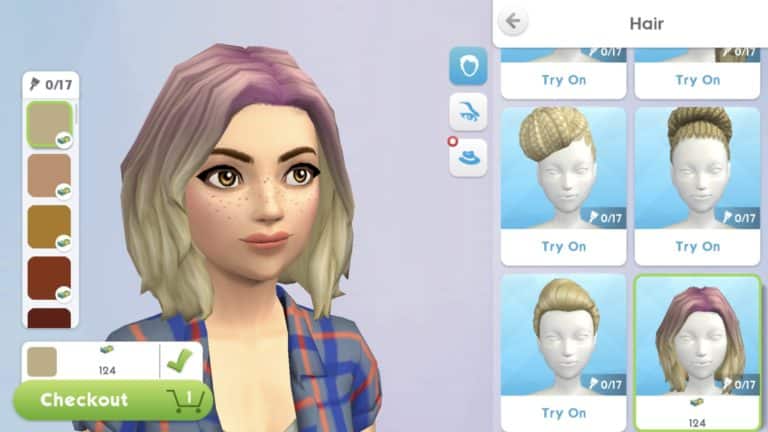
I started with my favorite portion of the game – Create A Sim. Since I seriously lack any and all building skills no matter the platform, this is where I spend the most of my time.
Since the store tells us that 7,500 Sims Cash can be purchased for $99.99 USD, that gives us an exact measurement between Sims Cash and real life currency.
Out of all the female hairs available to me, I was only missing 4 that were purchasable with Sims Cash. 4 hairs with 68 swatches in total came out to an absolutely staggering $205.79 USD. Unfortunately, it doesn’t get better as we go on.
13 female tops, 96 swatches – $1,218.44
5 female bottoms, 55 swatches – $ 176.72
10 female outfits, 85 swatches – $1,988.80
8 female pairs of shoes, 70 swatches – $336.90
8 makeup options, 69 swatches – $344.05
1 pair of glasses, 9 swatches – $0.36
5 pairs of earrings, 45 swatches – $70.19
6 necklaces, 50 swatches – $206.65
2 bracelets, 12 swatches – $25.92
1 pair of gloves, 9 swatches – $2.15
1 pair of socks, 9 swatches – $0.60
3 hats, 27 swatches – $70.19
That brings the total of only female Create-A-Sim items to $4,646.76.
There are a lot of theories circulating the community about why exactly the team behind Sims Mobile would make such a poor business decision, but from our end it just looks like a money grab. For reference, the current asking price for all available The Sims 4 content is, by comparison, a measly $539.73 USD.
I am beyond saddened and disappointed by the direction The Sims Mobile is taking. I can say with absolute certainty that this is not a game I would ever spend time or money on in its current state. Hopefully, the appropriate people at EA hear the communities concerns and make the changes this game deserves.
The Sims Mobile Team has just issued an official statement about the latest update for The Sims Mobile. In case you don’t know, this highly controversial update has locked every single swatch behind a paywall. However, some players were experiencing an issue where even the content they’ve owned before the update required to purchase swatches all over again.
Although they didn’t mention much about the negative feedback from the community they addressed the issues that came with the update and said they’re working on fixing them as soon as possible. They also mentioned an important issue where the prices of color swatches are much higher than they intended them to be – which is going to be fixed soon.
Simmers, our latest update has caused some problems with purchased content. Our intent was to offer you better value, with single color items at a lower price, and options to add on later.
Something is not right with the update and clearly has not worked as designed and we’ve heard from many of you that you’re seeing pricing levels much higher than we intended. We’re sorry for this! As well, any item you owned before the update should include ALL color options.
These are both being fixed ASAP. Thank you for letting us know about this important issue, and again we apologize for the inconvenience.
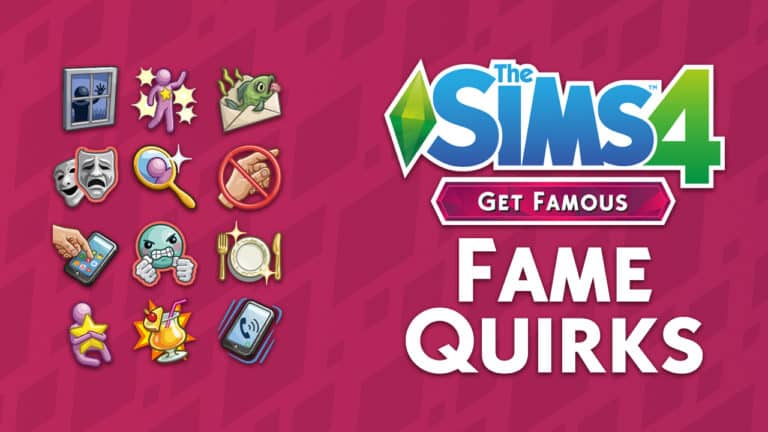
The Sims 4 Get Famous Expansion Pack comes with an interesting twist that proves that having a Celebrity Lifestyle isn’t all easy.
With Celebrity Perks come Celebrity Quirks. Unlike with a similar system that’s introduced with The Sims 4 Vampires Game Pack where choosing a Perk would sometime result in having to choose a Side Effect, this time around Quirks are assigned to Celebrity Sims often randomly through a series of different interactions. These quirks often don’t give your Sim a truly bad side effect, although some of them can be an annoyance for both you and your Sim.
Down below we’ll be listing all of the Quirks, how your Sims can obtain them and what they mean for your Sims.
No Touching!
Trigger: Being touched by strangers with less Fame than your Sim.
Behavior: Celebrities are forced to live their lives with little privacy, but invasions of their personal space still crosses a line. When they find themselves touched by non-famous Sims who aren’t in their family, or who they aren’t in a commited relationship with, they may grow to dread physical contact. They put on a smile for a fan who wants a friendly hug, but inside they feel tense, unhappy about the lack of respect for their boundaries. However, should they manage to avoid direct contact for awhile, they gain renewed sense of confidence to take on the world.
Each time your Sim touches another Sim with a lower Celebrity level they’ll get the +1 Tense Moodlet which lasts for 4 hours. There are plenty of interactions with other Sims which are considered touching including Hugging, “Trick With Hand Buzzer” and a lot more…
The upside of this quirk is that Sims will get a confidence boost after successfully avoiding any physical contact with a lower level Celebrity for a certain period.
Refined Palate
Trigger: Eating “Excellent” Quality Meals.
Behavior: With fame comes fortune, and with fortune comes an expectation for the finer things in life. Such is the burden that some celebrities must endure. For these Sims, once they’ve gained a taste for the finest foods, there’s simply no going back to just any old meal. These celebrities will find eating food that’s of “Excellent” quality most delightful, but they’ll turn their nose up in discomfort when forced to swallow food that’s “Normal”, or–dare I say–“Poor”.
With this quirk Sims who eat an excellent meal will get a +3 Happy boost. However, eating anything less than that will give them a +1 Uncomfortable moodlet.
Vain Street
Trigger: Frequent use of mirrors.
Behavior: Maintaining a gorgeous appearance is of peak importance to celebrities…you never know when a paparazzi is going to pop out and snap a shot after all. This can lead to an inflated ego, and mirrors become a necessary crutch to constantly reaffirm that, yes… they’re still gorgeous. Admiring their own reflection can instill a celebrity with confidence, but they also become anxious if they’re seperated from a mirror for too long.
Staying away from the mirror will make your Sims tense. However, they can quickly fix that by interacting with the mirror and selecting “Admire Fine Self” interaction which will then give them a confidence boost.
A Stan
Trigger: Signing autographs for fans.
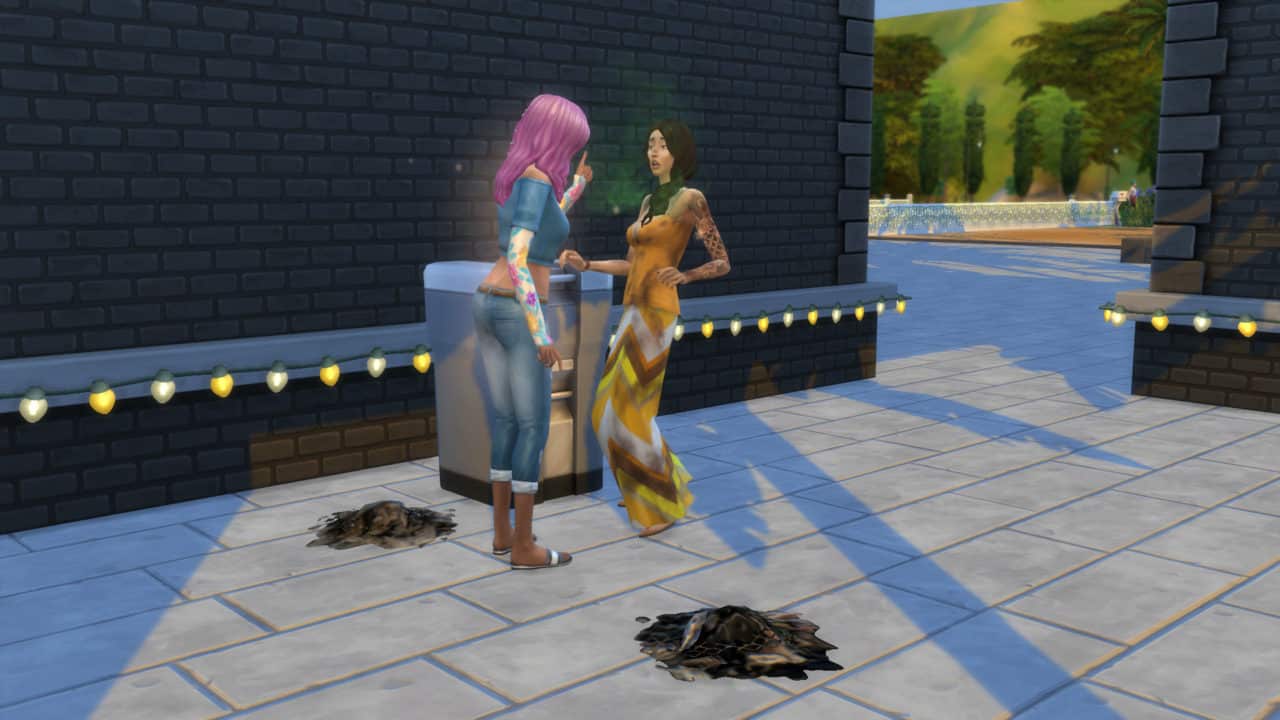
Behavior: Some fans take fandom a bit too seriously. These misguided Sims are known amongst celebrities as “stans”. Thankfully stans don’t mean you any harm, they just have a burning desire for you to know that you’re the center of their universe. Their behavior manifest itself in a variety of ways, from attempting to chat with you while out in public, to showing up at your residence and digging through your trash cans. Should you choose to invite one into your home, keep a close eye on them… They’ll always look for a chance to swipe a souvenir from their favorite superstar.
This quirk will make sure that your Sim gets assigned with a Stan – an NPC that will often follow your Sim wherever they go – including their own residental home. One of the usual occurances is a Stan rummaging through your trash can.
You can definitely chase these stans away, but it may take more than attempt for that to be successful…
11 21 18 10 26 21 PM e1542866872803
11 21 18 10 27 25 PM e1542866863666
Juice Enthusiast
Trigger: Frequently drinking juice.
Behavior: Celebrities that are Juice Enthusiasts find themselves always wanting a drink of juice. If they don’t regularly drink juice, they’ll slip into foul moods, and will have a difficult time raising their Fun.
Sims with this quirk will often get very tense and uncomfortable moodlets if they don’t visit the bar way too often. However after ordering and drinking any drink from the bar your Sims will be satisfied for a certain period.
Emotion Bomb
Trigger: Becoming Very Sad or Very Angry
Behavior: When the world rotates around you, it’s easy to become the emotional center of your own universe. For these celebrities, anything angering will cause them to fly off the handle and become enraged. Anything that saddens them requires the world to stop as they struggle to process their feelings. These intense outbursts don’t last long…After working through an emotional meltdown, they’re back to acting as if nothing was ever wrong at all.
The description of this quirk is pretty self-explanatory. However, it’s worth noting that this quirk will easily lead up to death by anger if you don’t take care of your Sims properly. For example if your Sim gets into a Very Angry state they’ll be getting the +8 Angry Moodlet that won’t last for long but could still be enough to trigger the death.
Paparazzi Darling
Trigger: Being friendly to paparazzi.
Behavior: Some celebrities simply adore being in front of the camera, and the paparazzi are happy to oblige. Celebrities that are Paparazzi Darlings will attract bigger crowds of paparazzi, they’ll love having their photo taken, and they may earn positive reputation when their picture is taken.
Although not a completely negative quirk, your Sim will have a lot more paparazzis following them around which means more disturbances in their everyday activities.
“Fan” Mail
Trigger: Celebrity socialization with fans.
Behavior: Celebrities who open themselves up to the adoring public are occasionally in for a rude awakening, when they discover that not every Sim is a true fan. In reality, there are some Sims who actively dislike celebrities, and will make it a priority to ensure the target of their ire receives frequent “gifts” in the mail. Try not to take it personally.
Your Celebrity Sim is going to go through a rollercoaster of different items being put in their mailbox…daily. From spoiled cupcakes to rotten fish there’s a lot of unpleasant surprises that await your Sim!
A Serious Actor
Trigger: Completing Dramatic Gigs in the Acting Career
Behavior: The acting studio is not the place for pranks or jokes, especially for an actor trying to evoke the right emotion during a dramatic scene. Such behavior frays on the concentration of actors, and eventually they snap. Anytime anyone attempts something funny or mischievous with a serious actor, they’ll show their anger instead of cracking a smile. They’ll hold everyone accountable for their professionalism on set, and anyone that steps out of line can expect to be the subject of a furious rant.
It’s simple – Actor Sims with this quirk will definitely not enjoy any jokes or funny interactions and will usually put them in an Angry mood.
Public Number
Trigger: Using Social Interactions on the phone.
Behavior: Celebrities with the Public Number quirk have had their phone number leak, and must endure receiving text messages from various Sims each day. Some Sims are just thrilled to have the chance to contact someone famous. Other Sims are quick to express their dislike of the rich and famous. Regardless, everyone has an opinion…and they’re eager to share it.
Having your number out in the public is both a blessing and a curse. Sims with this quirk will get all sorts of messages on their phone – both positive and negative that will accordingly influence their mood.
Phone Fanatic
Trigger: Using a cell phone for entertainment.
Behavior: Celebrities who are Phone Fanatics are addicted to checking their phones. Whenever they have spare time, you’ll likely find them tapping away at their phone’s screen. Occasionally, they’ll become Tense if they haven’t been entertained by their phone recently.
Sims with the Phone Fanatic Quirk will become Tense if they don’t play around with their phone for a certain amount of time. You can quickly fix that by interacting with the phone (browsing the net, playing mobile video games, interacting on social media and more).
Brushes With Fame
Trigger: Touching Celebrities with more Fame than your Sim.
Behavior: For some celebrities, hobnobbing with the rich and famous become a way of life. They get sad if they spend too long amongst the general public, seperated from other celebrities that they can actually relate to. They find themselves drawn to increasingly famous Sims, always seeking out the companionship and personal touch of those who are–at minimum–equally as famous as themselves.
With this quirk Sims will feel an extremely high need to get in touch and socialize with celebrities that are on their Celebrity Level or above. Spending too much time with the “regulars” or Sims below their Celebrity Level will give them a sad moodlet.
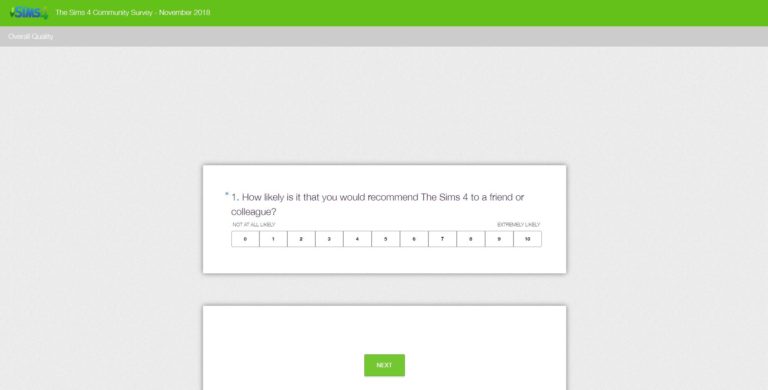
The Sims Team has just published a new Community Survey and they want your input!
In this Survey you get to vote and give your input about communication, livestreams and more!
The questions include:
How likely is it that you would recommend The Sims 4 to a friend or colleague?
What is your primary community channel of choice?
On a scale of 1 to 10 (where 1 is very poor and 10 is excellent) how would you rate the communication and engagement you receive from your Community Team?
On a scale of 1 to 10 (where 1 is very poor and 10 is excellent) how would you rate the Maxis Monthly program?
How can we improve the Maxis Monthly program?
What does the Community Team do really well?
Want to give your input? Click on the image below!
Player @nightzel has noticed a very sly change to The Sims Mobile – forced advertisements. He sent us a YouTube video where, after travelling between Neighborhoods for a couple of times he was forced to watch an advertisement before entering the neighborhood of his choice.
You can check out this addition in the video below – we’ve timed the video to begin at 6:25 where the ad popped out:
However, that’s not all that The Sims Mobile Team has done with ads in the game. Remember the ability to earn additional currency points by watching ads after completing a particular event? Well, the game now forces you to watch an ad and get the bonus currency without having the ability to not watch an ad and get the standard rewards.
Considering that The Sims Mobile only works with Wi-Fi / Data turned on there’s no way for you to skip these forced ads.
the disbelief that I witnessed after opening up The Sims Mobile after today’s client Update. I am still shocked and have no idea where to begin with this article considering that I’ve been enjoying the game since it’s soft-launch release. Sure there were some ups and downs such as replacing Needs with Energy, switching the To-Do List with LlamaZoom and replacing the tickets with LlamaZoom Tokens. Some changes were greeted pleasantly, some were not, but none of that can be compared to what has been done to The Sims Mobile today…
The Requirement to Pay for Individual Swatches
I know – it’s crazy for me to even write that headline without thinking Are they serious?!
But yes, The Sims Mobile now requires you to pay for individual swatches in the game. Those include both the swatches in Build / Buy and the swatches in Create A Sim.
Now, before I dig deeper into what exactly has been changed I want to point out the fact that I’ve reached the maximum Lifestyle Rank in the game – meaning that all of the prices you’ll see down below are really expensive because of it. Lower Lifestyle Ranks can expect lower prices, but still the same requirements such as purchasing Swatches in exchange for Simoleons / SimCash.
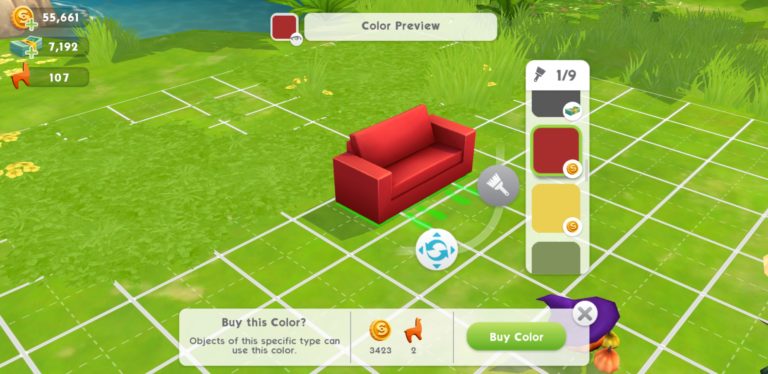
Placing items from Build / Buy will now only give you one basic recommended swatch for free. If you want to switch things up with, let’s say, a sofa and change its colors you’d have to click the Swatch button, choose the swatch of your choice and purchase it…individually.
SimCash that you see down below in my game funds have been provided by the EA Game Changers program
That’s right – each individual color has its own price that you’d have to purchase in order to change your desired object’s color. Cheap items will have a lower swatch price tag attached to them while pricier items will require more Simoleons / SimCash.
Some swatches in the game only require Simoleons in order to purchase the desired swatch…
…while some swatches exclusively require SimCash. Want to turn a basic Modern Blue Sofa and only change its color to Black? Well, you’ll need to pay a lot of SimCash for it…
In my case, I had to spend 197 SimCash to only get this one swatch in the game and let me tell you – this is not a cheap price, even for the maximum Lifestyle Rank that I’ve achieved.
This same sofa also has specific swatches which require Simoleons. However, it’s still an extremely expensive price to pay this much Simoleons (and LlamaZoom Tokens) for a simple red color variant…
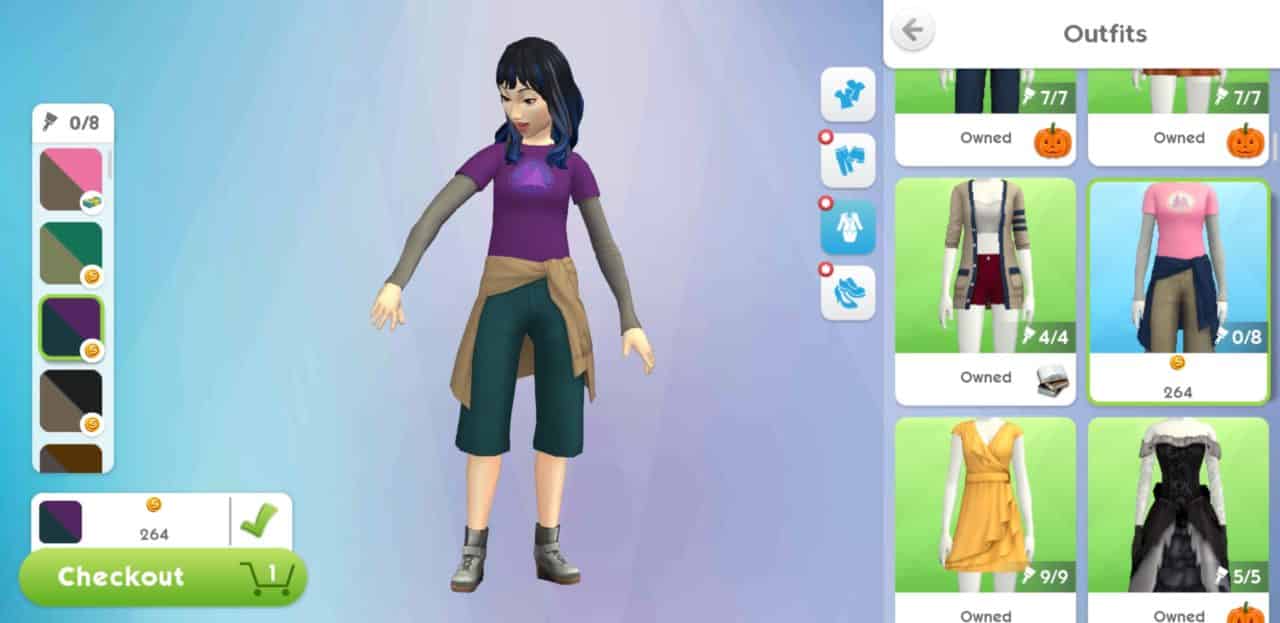
But don’t worry – Create A Sim items haven’t been left out. There’s a slight advantage with Create A Sim items though and that’s the ability to choose any swatch of your choice without having to purchase the item first.
For example when choosing an outfit you have the ability to first try it on and then select any swatch of your choice before adding it to the Checkout section. The same case goes for all categories in CAS.
There’s a really minor upside to all of this and that’s the fact that all of the items (both CAS and Build / Buy) are now much less expensive than they were before. Also all of the items you’ve purchased before have all of the swatches and do not require you to purchase additional swatches.
I’ve played a lot of Free-To-Play Smartphone Games in my life that had a few money hungry features that I wasn’t really bothered about – but as someone who played The Sims Mobile since soft launch and had strong beliefs that the game won’t go to the extremes with spending currencies and microtransactions I have to say that this change feels like a huge slap to my face.
The Sims Mobile has just launched a brand new update for The Sims Mobile! The new update includes plenty of bug fixes, some feature modifications and preparations for the upcoming Winterfest event coming soon to the game.
The update is now available and can be downloaded on the App Store / Google Play Store.
Hey Simmers,
We are kicking off this holiday season by transforming parts of town into a winter wonderland! Check out the snowy additions now! You can look forward to a holly jolly Winterfest event soon, including:
A limited-time quest where you can earn items that give you a head start in Winterfest
So many holiday-themed rewards. So, so many. You will be pleased.
Seriously though, everything from ugly sweaters to fanciful dress; lawn ornaments to the grandest of holiday trees!
ICE SKATING
Additionally, we’ve made some improvements to the Event screen so you can see the rewards more clearly and also see whether clothing items are for men or women.
Also, for one week only, we are holding a Home Catalog sale! All prices are slashed until December 4, 2018 at 10 AM PST. This comes with a change to the catalog where you can buy colors/patterns individually rather than bundled with the item purchase.
Key Bug Fixes
Fixed an issue with some event shifts not always appearing
Balsa Counters have been added to the Kitchen Basics Collection so that lower-level players can purchase them
Fixed a variety of issues that could result in a crash
Thanks for reading and all your continued support of The Sims Mobile!
-SimGuruPaul
P.S. If the update is not showing up in the iOS App Store for you, please try going to your Updates tab and pull down to refresh the page.
Best Buy is celebrating Cyber Monday in the best way possible!
They have just published a new sale including The Sims 4 Get Famous Expansion Pack which is now 50% off! Yup, you can get the pack for only 20USD which is a one of a kind opportunity considering that the game released just a few days ago.
This offer is available to the residents of the United States considering that you need a Best Buy account in order to claim your Digital Code. The code will be delievered to you after the purchase in your inbox with instructions on how to redeem it on Origin.
Other Expansion Packs for The Sims 4 are also 50% off so make sure you take advantage of this crazy Cyber Monday sale!
It was only a matter of time until the modding community came through with some useful improvements to the gameplay of The Sims 4 Get Famous Expansion Pack. Even though the pack has been out for about 6 days now (and we had 2 updates during these 2 weeks) the modding community was still able to come up with some useful mods and solutions. Here are the 3 mods for The Sims 4 Get Famous which have already been released for the game:
No Celebrity Walk Style
A much needed mod which almost everyone’s been dying to get their hands on – the ability to globally turn off the Celebrity Walkstyle. Many have also reported the fact that after manually turning off the walkstyle their Sims would still do the same walkstyle. However, with this mod all Celebrity Sims are guaranteed to perform a normal walkstyle OR the walkstyle that’s been assigned to them in CAS.
Let’s be honest – earning Celebrity Levels is a challenge itself – there’s no need for additional troubles with planning out which perk you’d like to purchase and which one you’d like to skip. With the Free Fame Perks Mod you are able to claim any Fame Perk of your liking without having to spend a single Fame Point. However, the Celebrity Level requirements and Reputation requirements still stand for specific perks.
One of the biggest challenges in The Sims 4 Get Famous is keeping your Fame status in balance and not losing any Celebrity Levels. It might get easier in the last few Celebrity Levels to reach to the top but it definitely won’t be easy to stay in the same position.
Thankfully, this mod allows you to completely freeze the fame decay in the game. You also have 2 different variants which allow you to make the decay process slower or maybe even make it faster if you prefer additional challenge in the game.
Celebrities in The Sims 4 Get Famous Expansion Pack definitely have a…unique behavior in the game. Sure, their Celebrity Shine might be a bit too much but it’s nothing that would affect your gameplay. However, the Celebrity Walkstyle that’s introduced is for sure to annoy a lot of players considering that Sims who use it are about 50% slower than usual, which means getting to a desired location may take twice as much. This feature is only forced upon Sims who are Celebrity Level 4 and 5 so thankfully not every celebrity is going to get to enjoy this special treatment.
Luckily The Sims Team added additional options including the ability to disable both of these features if you wish to do so.
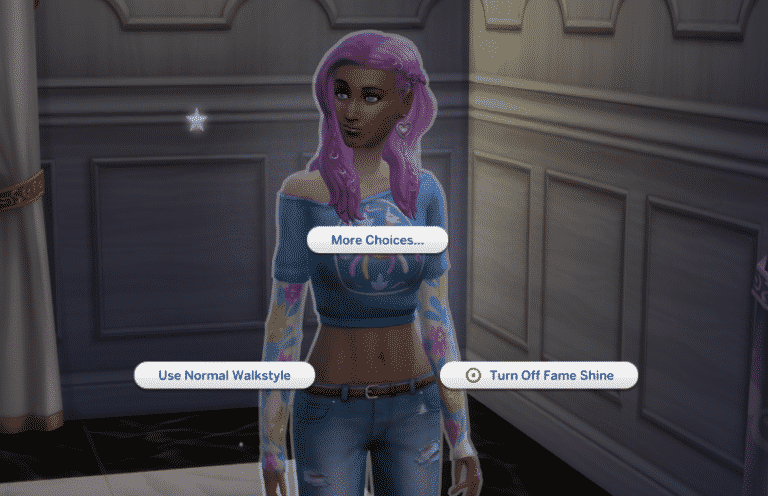
If you wish to disable the Celebrity Walk Style simply select on a Sim of your choice and select “Use Normal Walkstyle”. The same thing can be accomplished for disabling the Fame Shine by selecting “Turn Off Fame Shine”.
At the moment there isn’t an option in the game that allows you to turn off these features globally. However, you have full control of enabling/disabling these features on Sims who are not even a part of your household. Is there a celebrity townie who’s slow celebrity walkstyle is simply annoying you? You can just select that Sim and disable the walkstyle if you wish to do so.
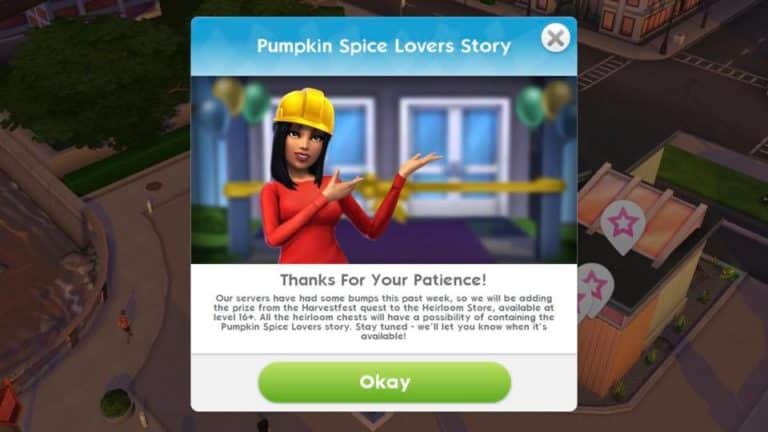
Following the smashing success of the Halloween Haunt event, hopes were high for The Sims Mobile’s Harvestfest event but things did not go according to plan. Right from the start, players began reporting a variety of game-breaking glitches that prevented them from moving on in the quest. As a result, most players were unable to collect the event’s grand prize; the Pumpkin Spice Lovers romance story heirloom.
As an apology for the disastrous bugs so many players experienced, The Sims Mobile will be adding the Pumpkin Spice Lovers heirloom to the Heirloom Store for players level 16 and up. All Heirloom Chests will now have a chance of giving players the Pumpkin Spice Lovers heirloom.
No word yet on when the heirloom will be hitting the Heirloom Store and the chests, but keep tabs on your game for any more news about the upcoming addition.
Were you affected by the Harvestfest glitches? Let us know what you think about this latest development here in the comments or on social media!
We are going LIVE with The Sims 4 Get Famous Expansion Pack at 9PM CET / 8PM BT / 12PM PST!
During this livestream we’ll be exploring some major features that Get Famous has to offer so we can finalize our final impressions about the game. Join us during this livestream as we’ll also be featuring your Sims and guide them through the wonderful path of fame…with some help of cheats as the road to fame is really long in this game.
The Sims Team has released a brand new Update for The Sims 4 on PC and Mac!
To download the latest version of The Sims 4, simply open your Origin program and if the game doesn’t update automatically, right click on The Sims 4 and select ”Update”.
In case you have Mods or Custom Content, the game will automatically disable them for you after first launching The Sims 4 after the update. To re-enable all your Mods and Custom Content, select the Settings option in the Menu and select Settings. Under the”Other” section you’ll find the ”Enable Custom Content and Mods” option. Check it and restart your game in order for it to take effect!
Father Winter’s Babies:
With a snap of his frozen fingers they were gone. Not some. Not half. But all of his children. Gone. While that is certainly one way to abdicate parental responsibilities, it’s admittedly not the best look for the Sim with a supposedly pristine reputation. Father Winter’s PR team and media handlers have assuredly taken note of the social backlash, and a subsequent press release has stated that he will no longer banish his children.
CAS Aging:
One day you’re just a teen trying on clothes in CAS and the next thing you know: BAM – you’re an elder! While it’s true that the icy embrace of mortality inevitably comes to claim us all, it probably should not happen in CAS. So shake free from the shackles of mortal coils and live eternally once more! *Begins to sing* Here we belong, fighting to survive in a world with the darkest power. Here we are…
Terrain Paints & Laptops:
While in laptop mode the terrain paints will now display. They were just being a little shy and hiding from sight. We’ve worked with them on their confidence and offered them a cookie. It was enough to get them out from under the table and back into your game. Finicky little things. But they’re good paints.
Custom Content Hair Color Swatches:
This can now be changed again. Sims were going through their “natural look” phase and were rejecting CC hair. But all the Dev team Dads commented on how hip it looks so, needless to say, Sims want their CC back. A little reverse psychology works wonders.
Del Sol Valley National Park is now editable:
Deforestation is an important issue. But not in downtown Del Sol Valley so go ahead and change that National Park into whatever you want. (I think a nice restaurant would be fantastic provided you have that Gamepack. If not, it’s a great deal right now. Consider picking it up. #ShamelessPlug)
Jasmine? What are you doing here?
Sometimes Jasmine was showing up to conduct the Positivity Challenge instead of Millie Bobby Brown. That is no longer the case. Go home, Jasmine! You’re… confused. This isn’t your job, silly. I get it though. You’re feeling a little insecure. Some cool, new Sim appeared and you think they’re trying to show you up. Trying to take your job; your purpose even. It’s reasonable to feel upset. What isn’t reasonable, Jasmine, is pushing other Sims down so you can get to the front door first. NOT COOL! Go sit down and think about what you did. Maybe the next challenge you can come back.
SimGuruKate has just announced that The Sims Team will be pushing out a hot fix update for The Sims 4 on PC and Mac to address some of the bugs and issues that were added from the major November update.
Some of the issues that you can expect to be fixed are the CAS aging issue, disappearing Father Winter babies and more that should be addressed in a few. Stay tuned for the latest information when the update goes live!
SimFam, I have some good news! We have a small patch coming today that will fix a number of key bugs introduced in last week’s patch, including the CAS aging issue, and the disappearing Father Winter babies. Keep an eye out and be sure to patch your game when it arrives.
SimGuruNick also responded saying that Mods / CC won’t automatically be disabled with this update. However, it’s still advised to remove the mods before applying the upcoming update.
Actually this is a minor patch so your mods/CC will NOT be automatically disabled. That being said, I'd still try removing mods/CC as your first troubleshooting step if you encounter any issues, thanks 🙂
The Sims 4 Get Together Expansion Pack that we’ve gotten back in 2015 still makes adjustments and additional features for new releases and Get Famous is no exception!
With the latest Expansion Pack you are able to mix and match the best from both worlds – the Celebrity System from The Sims 4 Get Famous and the Clubs System from The Sims 4 Get Together.
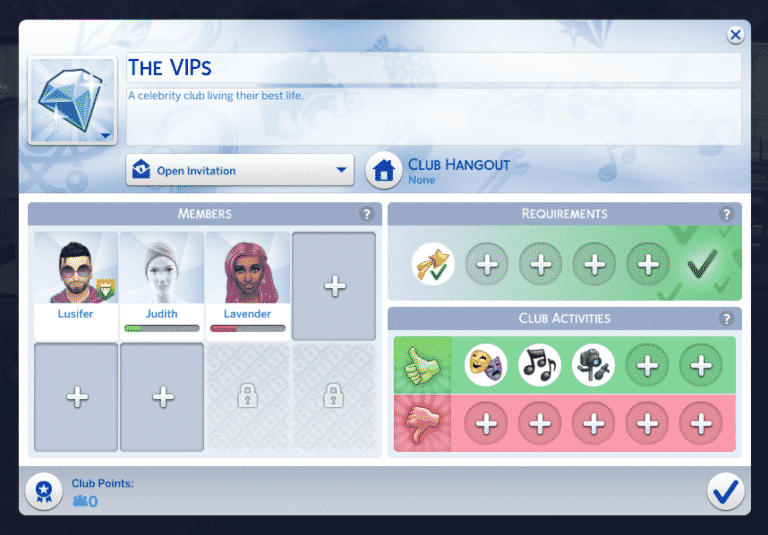
When creating a new club (or moderating an existing one) you now have an additional Club Requirement which is the Celebrity Level requirement.
With this Club Requirement Category you are able to detail which Sims you want to be invited into your Club – specifically which Sims are allowed to join / ask to join and which Sims are not.
The Club Requirement allows you to create different Celebrity Club tiers. You can have a club that consists of all celebrities by ticking all 5 tiers down below, or you can choose to create a truly exclusive Celebrity Club by only choosing the Five Star Celebrities requirement.
This feature really goes in-depth when it comes to different layers of clubs that you can create. If your Sim(s) are just starting out with their Celebrity life you may want to create a club which only consists of lower-level celebrities that together will rise to the maximum Celebrity Level.
There’s also 3 new Get Famous interactions that are now integrated with Clubs, including:
Acting Routines
Produce New Track
Record Video
With these club interactions you’re able to create Clubs that together can level up their Acting and Media Production Skills while also benefitting as a group and earning Club Points.
There are new Club Skill Perks that you get with The Sims 4 Get Famous Expansion Pack. The 2 new Skill Perks include the Media Production Skill Boost and the Acting Skill Boost. With these boosts your Sims are gonna get an additional boost when performing skill interactions while having a gathering.