Home Blog Page 299

12 Features We Love in The Sims 4 Seasons

GameChangers Watermark png 1

With every pack we see a wide range of new content added and The Sims 4 Seasons is no exception. Here are just twelve features that we love that come with the new expansion pack and trust us there is plenty more to explore and discover in this expansion too!

Flower Arranging

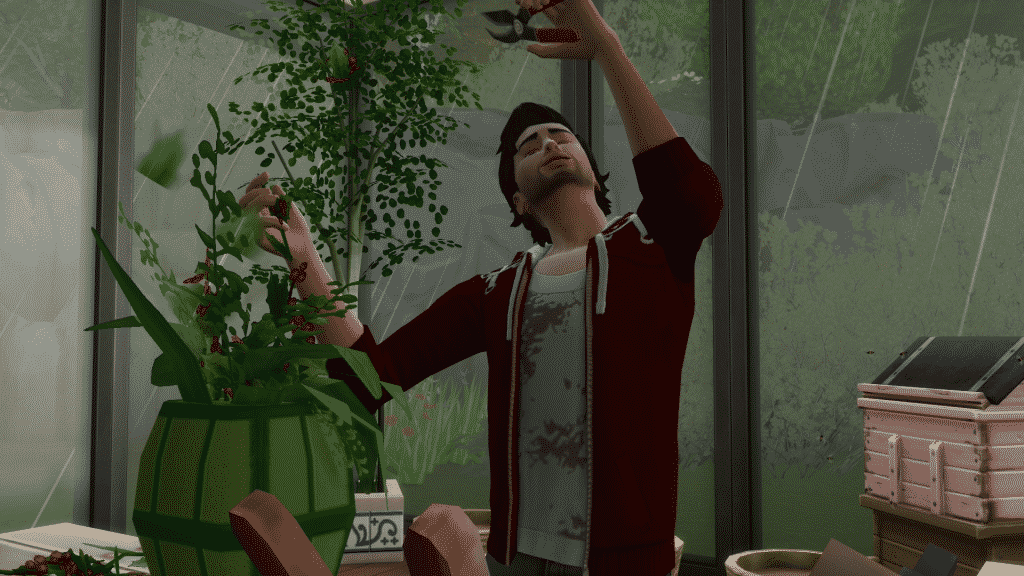
The Sims 4 Seasons comes with a brand new skill which is called Flower Arranging. Make and sell various arrangements ranging from simple displays to more extravagant as your Sims skill develops.
12 Features We Love in The Sims 4 Seasons

New Years Eve

Get your Sims celebrating as you celebrate seeing the new year in, in style. Put up your decorations, celebrate by raising a toast and holding a party, make a resolution and watch the countdown to midnight on TV!

12 Features We Love in The Sims 4 Seasons

Resolutions

As part of New Year’s Eve, celebrations make sure your Sim makes a resolution for the year ahead. Pick from any on the list which is available to them! Those that are not highlighted are not available due to conflicting traits.
12 Features We Love in The Sims 4 Seasons

Traditions

Every holiday has traditions that your Sims can complete to help make that holiday a success and also earn points towards reward traits. One of the traditions in The Sims 4 Seasons revolves around Gnomes. Just whatever you do don’t annoy them as they could turn on you and cause your Sims many issues unless you are quick enough to kick them all!

12 Features We Love in The Sims 4 Seasons

Calendar

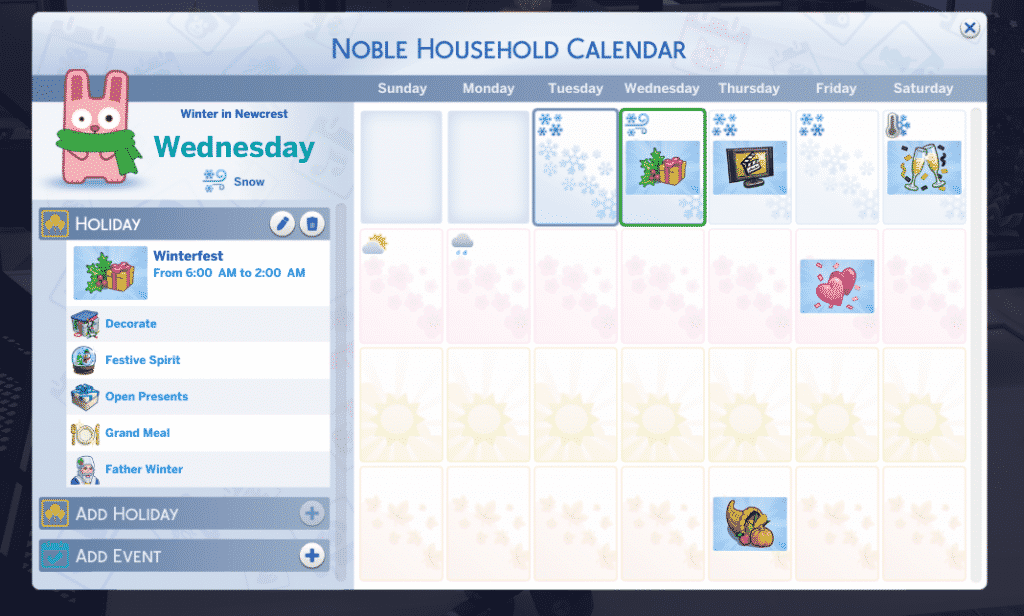
See what events are coming up and plan your own holidays & events! The calendar is the handy place to keep track of what is happening in your Sims live and add in those holidays you’ve been wanting to see in game. Set the date, time and traditions and you are ready to go! Also, it’s handy to keep track of the weather with the cute Freezer Bunny placed on the page.
12 Features We Love in The Sims 4 Seasons

Hot and Cold Outfits In Create A Sim

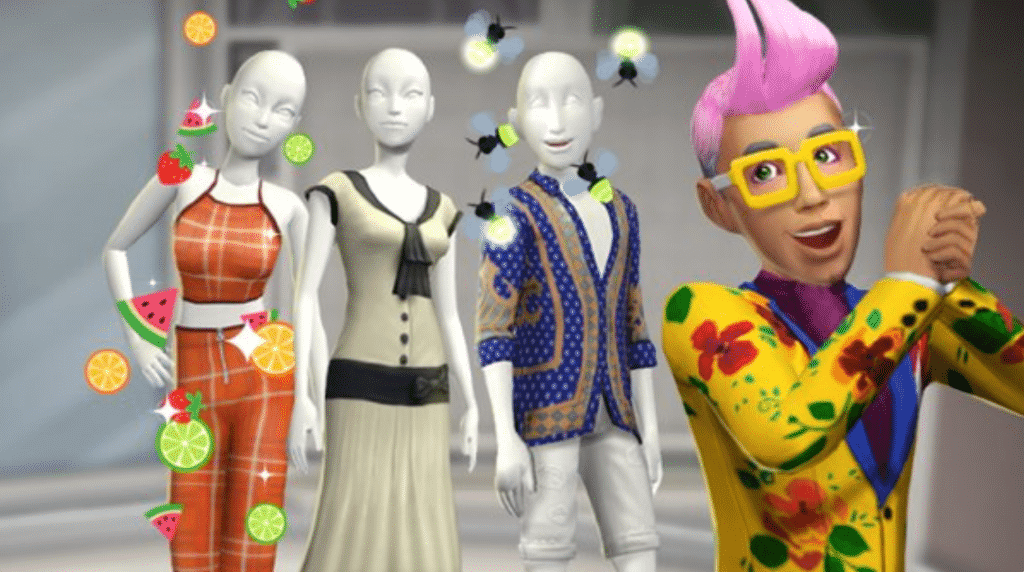
Although the new Create A Sim categories came with the latest patch they allow you to fully style your Sims for the Seasons. Now your Sims can have the hottest styles for Summer and the coolest for Winter!

12 Features We Love in The Sims 4 Seasons

Weather Machine

Although the weather machine has been in previous Seasons expansion packs they have been locked away as Aspiration and Lifetime Rewards. The Sims 4 Seasons allows you to hop into Buy Mode. Drop down the contraption and then it’s time to play with the Seasons! You might just want to level up your handiness skill a little first so your Sims don’t have an electrifying experience with the machine.

12 Features We Love in The Sims 4 Seasons

Thermostat

Your Sims can now no longer suffer from the temperature inside their homes being too hot or too cold. The new Thermostat will help regulate the temperature perfectly.

12 Features We Love in The Sims 4 Seasons

After School Activities

Teen and Child Sims can join a new after-school activity and become a Llamacorn Scout. Complete tasks and collect badges to become the ultimate Master Llamacorn Scout.

12 Features We Love in The Sims 4 Seasons

Bees

Previously Sims have just been able to harvest honey from bees but in the Seasons expansion not only can you still harvest the honey but you can also bond with your bees. Yes, that’s right. Bond with them. You’ll be able to woo Sims with the bees or even send them to pester another Sim.

12 Features We Love in The Sims 4 Seasons

Become a Gnome or a Spring Bunny

Like with most of the recent The Sims 4 content there are many new full-body outfits for your Sims. The Sims 4 Seasons includes Not only Father Winter as an option but you can also dress up as a Garden Gnome and Spring Bunny! I’m sure both outfits will provide for some great screenshots for many Simmers.

A Trusty Friend

Last and certainly not least, our trusty friend Patchy the Scarecrow is back in this Seasons expansion pack. Make sure you strike a conversation with him as you never know he could have a few surprises in store for your Sims.


12 Features We Love in The Sims 4 Seasons


Let us know what you are looking forward to in The Sims 4 Seasons in the comment below, on Twitter or over on Sims Community Social.

The Sims 4 Seasons: Launch Party Livestream

0

We’ll be getting our hands on The Sims 4 Seasons Expansion Pack, showcase some of the features along with other previously released packs and countdown until the release of Seasons in Europe and North & South America!

The stream begins today at 10PM CET (there’s also a countdown on the livestream). If you have any questions or would like to see certain things during the livestream make sure you join the chat on the livestream!

Five Things To Build In The Sims 4 Seasons

GameChangers Watermark png 1

With the launch of the highly anticipated Seasons expansion pack, I’m sure many of you are filled with ideas for new Sims, story ideas, challenges and so much more. But what about builds? The Sims 4 Seasons opens up the possibilities to so much more especially with the recent patch that has overhauled gardening and also added glass roofs. (You can check out the patch notes here).

So here are five build ideas which will help you explore what Seasons has to offer!

Pumpkin Farm

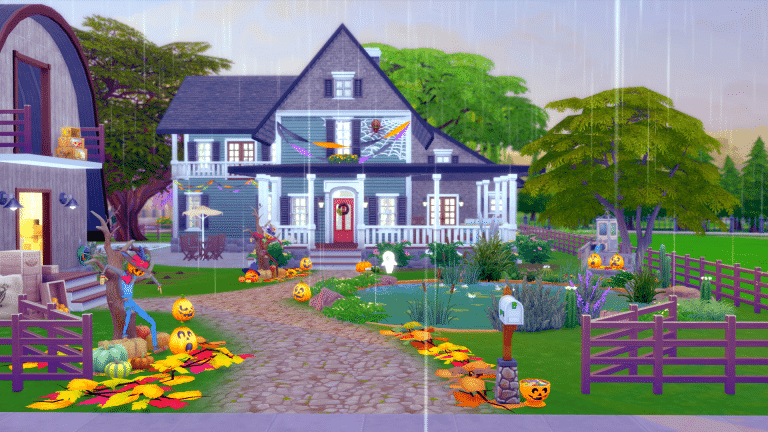
Although pumpkins are not harvestable in the game there are still plenty of pumpkins to give your farm that Fall feel. Not only is it a perfect build to help improve your Sims gardening skill and the new flower arranging skill but it also gets you ready for that Spooky Day Holiday!

Five Things To Build In The Sims 4 Seasons

An Apple A Day Farm by Wrathofcath can be found on The Sims 4 Gallery

Father Winter’s Grotto

What better way to get ready for Winter Fest than visiting Father Winter. It might not be the real deal rather just a Sim dressed up as Father Winter but what better way to get in the festive Spirit though?

Five Things To Build In The Sims 4 Seasons

Scout Camp

With your Child and Teen Sims striving to collect all their Scout Badges why not take them away for a few days to a Scout Camp in Granite Falls? It looks amazing during Winter but just make sure your Sims wrap up warm! You don’t want your Sims freezing to death now?

Five Things To Build In The Sims 4 Seasons

Recreate one of the City Living collectable Snow Globe

This is more of a fun idea but you don’t just have to stop at recreating a Snow Globe. You can make an interconnecting biodome like one of our staff members Lady Hope has done. You can make a home in a dome for your Sim family.  There are many things you can create with the new glass roofs from the recent patch and when you add Seasons into the mix the possibilities are truly endless!

You can check out the tutorial we posted about how to live in a glass dome here. The tutorial also goes into detail about how you go about connecting domes together too!

Five Things To Build In The Sims 4 Seasons

Recreate Central Park from Sunset Valley in The Sims 3

I’m sure Sunset Valley holds a lot of memories for many people but if you are looking for a bigger build to do, then Central Park may just be the thing for you. In fact, you can recreate any of the Festival locations. Being a place for your Sims to have fun, take photos and get involved in various activities this was the place for your Sims to be!

Five Things To Build In The Sims 4 Seasons

These are just five ideas for builds you can do using The Sims 4 Seasons expansion pack and not only that each existing expansion pack, game pack and stuff pack opens up even more possibilities.

Let us know what you are planning on building using The Sims 4 Seasons in the comments below, on Twitter and don’t forget you can share your creations over on Sims Community Social.

The Sims Mobile: New Update! (June 20th, 2018)

The Sims Mobile has released a new update for the game. You can either get the direct update through Google Play/App Store or alternatively the update will be downloaded automatically in game once you are already in it.

The Sims Mobile: New Update! (June 20th, 2018)

Bug fixes

The update came with some minor fixes: issue with Surprising Choices and game crash in Parties.

New Items

A brand new Build-Buy collection to purchase: Farmhouse Decorations (note: unlock this collection at level 18).

The Sims Mobile: New Update! (June 20th, 2018)The Sims Mobile: New Update! (June 20th, 2018)

New outfits and effects is now available in Izzy’s Fashion Shop.

Get all those gems to get it all!

The Sims Mobile: New Update! (June 20th, 2018)


Here is further information for this update:

Hey Simmers,

We’ve just released a new version of The Sims Mobile (11.0.3) that should bring some more stability to your game. This update includes the following fixes:

  • Fixed an issue where players were getting a freeze after engaging with Surprising Choices
  • Fixed an issue where players were crashing after performing certain actions within a Party

We apologize for the inconvenience, and appreciate all your continued support of The Sims Mobile!

-SimGuruPaul

The Sims 4: Amazingly Creative Uses for Glass Roofs

The pre-Seasons patch for The Sims 4 is finally out, and the Sims community has been quick to show off their creative builds using one of the latest new features; glass roofs!

Fabulously Chic Greenhouses

The Sims 4: Amazingly Creative Uses for Glass Roofs

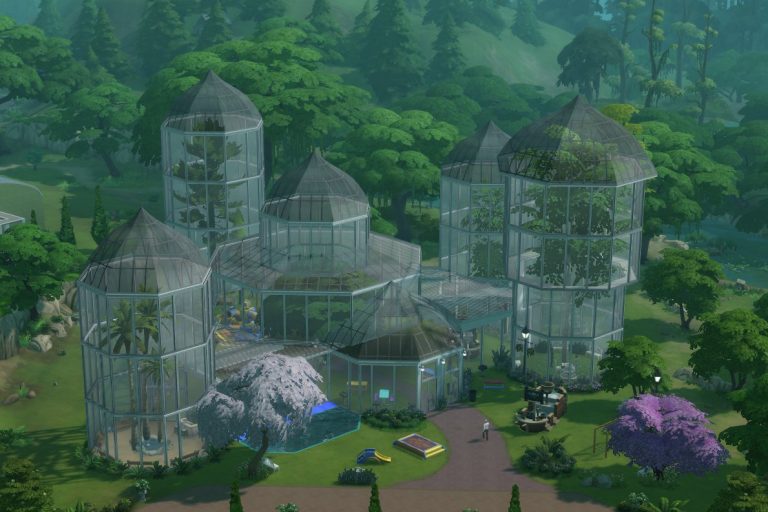
Ansett4Sims has created a stunningly modern greenhouse, complete with dining table to enjoy the meals cooked with the freshly grown produce.

Glorious Gazebos

The Sims 4: Amazingly Creative Uses for Glass Roofs

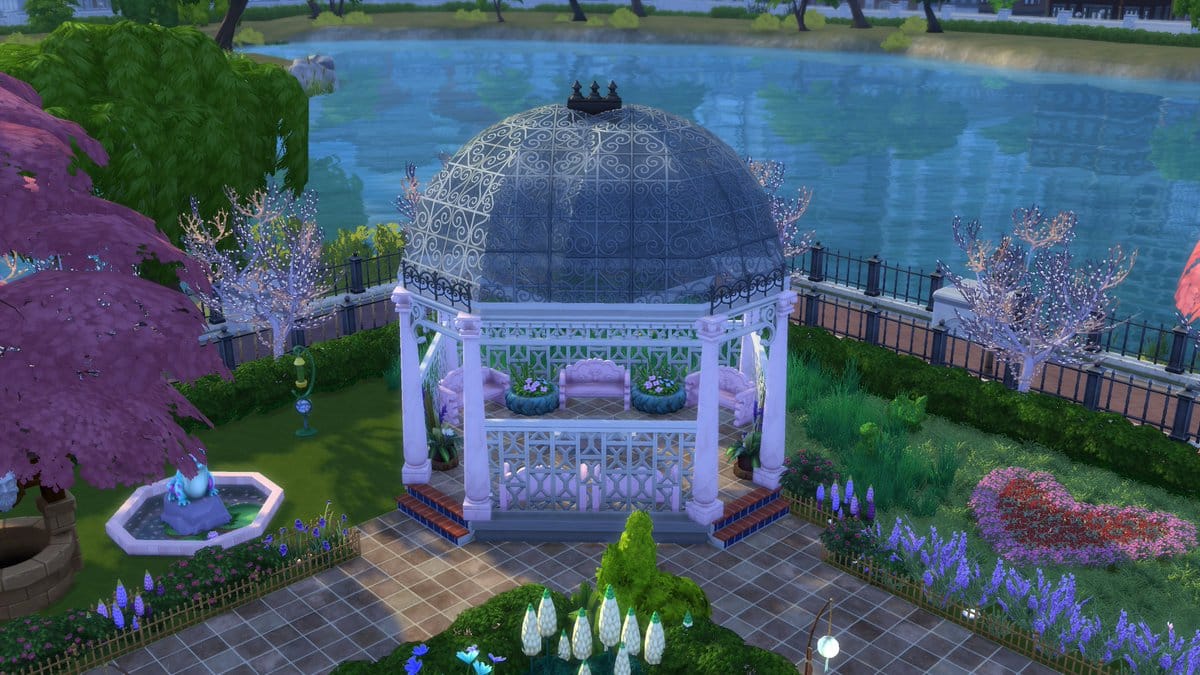
MidnightPearl has built a lovely gazebo overlooking the water. This gorgeous spot will be perfect for catching those warm summer rays once Seasons arrives!

Marvellous Modern Homes

The Sims 4: Amazingly Creative Uses for Glass Roofs

XFreezerBunnyX has an amazing industrial theme to their build, while Misstory has gone for a more crisp and clean look.

The Sims 4: Amazingly Creative Uses for Glass Roofs

Classy Cottages

The Sims 4: Amazingly Creative Uses for Glass Roofs

CK213 has added a sunroom to their beautiful Victorian-esque home. The ornate glass roof pattern fits perfectly here.

Awesome All-Seasons Park

The Sims 4: Amazingly Creative Uses for Glass Roofs

GamerGrannyTana has put together an astonishingly beautiful all-seasons park. This beautiful structure will provide a green haven during a cold winter.

Louvre-inspired Pyramid

Looking right at home amongst San Myshuno’s cultural-melting-pot theme, SimplyJodie has created a dazzling glass pyramid reminiscent of the famous Parisian cultural landmark at The Louvre.

The Sims 4: Amazingly Creative Uses for Glass Roofs

Titanic’s Grand Staircase

The Sims 4: Amazingly Creative Uses for Glass Roofs

Both Guisims_18 and Pekesims have recreated Titanic’s magnificent Grand Staircase in stunning detail. Guisims_18 showcases skill with staircase placement, while Pekesims cleverly places a glowing plumbob in the fairy statue’s hands, which is a lovely detail.

The Sims 4: Amazingly Creative Uses for Glass Roofs

Glass Dome Homes

The Sims 4: Amazingly Creative Uses for Glass Roofs

Want to recreate your Surviving Mars colony in The Sims 4? Now you can! User nikolai2960 over on Reddit was quick to discover this inventive use for glass roofs. You can follow our tutorial to make a Dome Home for yourself. This technique will be perfect for builds on Sixam.

How will you use this amazing new feature? Let us know in the comments below!

The Sims 4: New Content in plan for next 3 Years

58

The Sims 4: New Content in plan for next 3 Years

Variety published an article about their hands-on time with The Sims 4 Seasons Expansion Pack. Beside their thoughts and opinions about the pack, they’ve also had an opportunity to discuss the pack and also the future of The Sims 4 with Grant Rodiek, lead producer on the game.

Previously, we’ve only known that The Sims 4 will offer new content “for years out”. Now we know for how many years.

Though EA hasn’t announced any further expansion for the four-year-old game, it appears as if “The Sims 4” will continue to have a long tale. Though he wouldn’t go into specifics, Rodiek said he was already in meetings discussing the next three years of content for the current title.

“‘Seasons’ is just the tip of the iceberg,” he said.


It’s not known if the production of new content for The Sims 4 will end after these 3 years but at least it’s guaranteed that the next 3 years are going to bring plenty of new content.

The Sims 4 Seasons + All Packs: Early Access Livestream

0

We’ll be getting our hands on The Sims 4 Seasons Expansion Pack and showcase new features and gameplay LIVE, including all the previous packs that have been released for The Sims 4.

The stream begins today at 9PM CET (there’s also a countdown on the livestream). If you have any questions or would like to see certain things during the livestream make sure you join the chat on the livestream!

The Sims 4: List of Common Issues & Bugs with the Latest Update

96

The Sims Team has already acknowledged a few issues and bugs that came with the latest patch for The Sims 4. If you’re experiencing any of the issues listed below then don’t worry – we should be expecting a new update for the game soon to fix these issues.

If there are any more issues that you’re experiencing then feel free to let SimGuruNick know as The Sims Team hunts down all the bugs. Please make sure that any of the issues that you may be experiencing are NOT caused by Mods / CC that you might have installed.

The Sims 4 Update: New Stuff Pack Features & Improvements

The Sims 4’s latest update didn’t just bring new improvements to the base game. Several Stuff Packs for The Sims 4 have been upgraded with a few tweaks and additions, all of them which are focused solely on gameplay objects. Here’s what’s new in some of the Stuff Packs for The Sims 4:

The Sims 4 Fitness Stuff

Sims listening to music from their earbuds are now finally able to raise their fun need for doing so!

The Sims 4 Update: New Stuff Pack Features & Improvements

The Sims 4 Bowling Night Stuff

There are several great improvements in this Stuff Pack. First of all, your Sims are now able to multitask while bowling. This means they’ll be able to socialize with their group comfortably while bowling together.

The Sims 4 Update: New Stuff Pack Features & Improvements

Next, you’ll be able to choose between 3 different frames to play with when starting a bowling round:

  • 3 Frame Game
  • 5 Frame Game
  • 10 Frame Game

The Sims 4 Update: New Stuff Pack Features & Improvements

And last but not least, your Sims will now level up in their Bowling Skill much faster now!

The Sims 4 Vintage Glamour Stuff

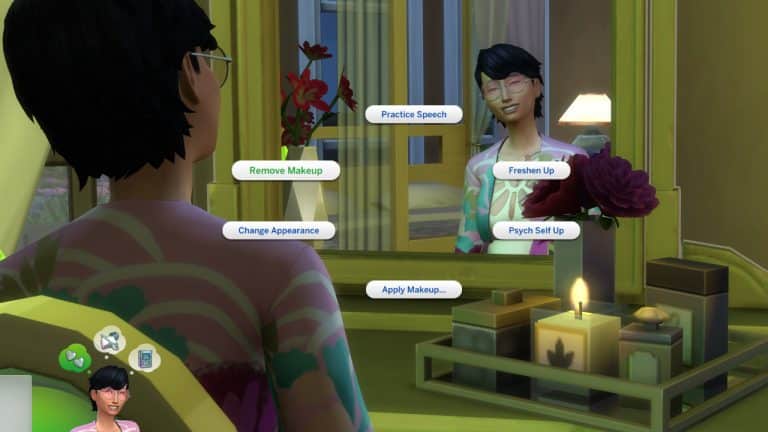
Makeup that you apply using the vanity table can now also be removed directly from the vanity table without having to go take a shower or change outfits in order to remove it.

The Sims 4 Update: New Stuff Pack Features & Improvements

You’re now able to order your Butler to go to sleep. This is really helpful if your entire household is sleeping and you want to enable ultra speed mode by sending the butler go to sleep as well.

The Sims 4 Update: New Stuff Pack Features & Improvements

The Sims 4 My First Pet Stuff

The death of your rodent pet will now have an impact on your household, giving them a sad moodlet.

I tried to trigger the death of my rodent however there seems to be an issue where the food seems refilling automatically even when I isolate the rodent cage.

The Sims 4 Update: New Stuff Pack Features & Improvements

The Sims 4: How to live in a Glass Dome!

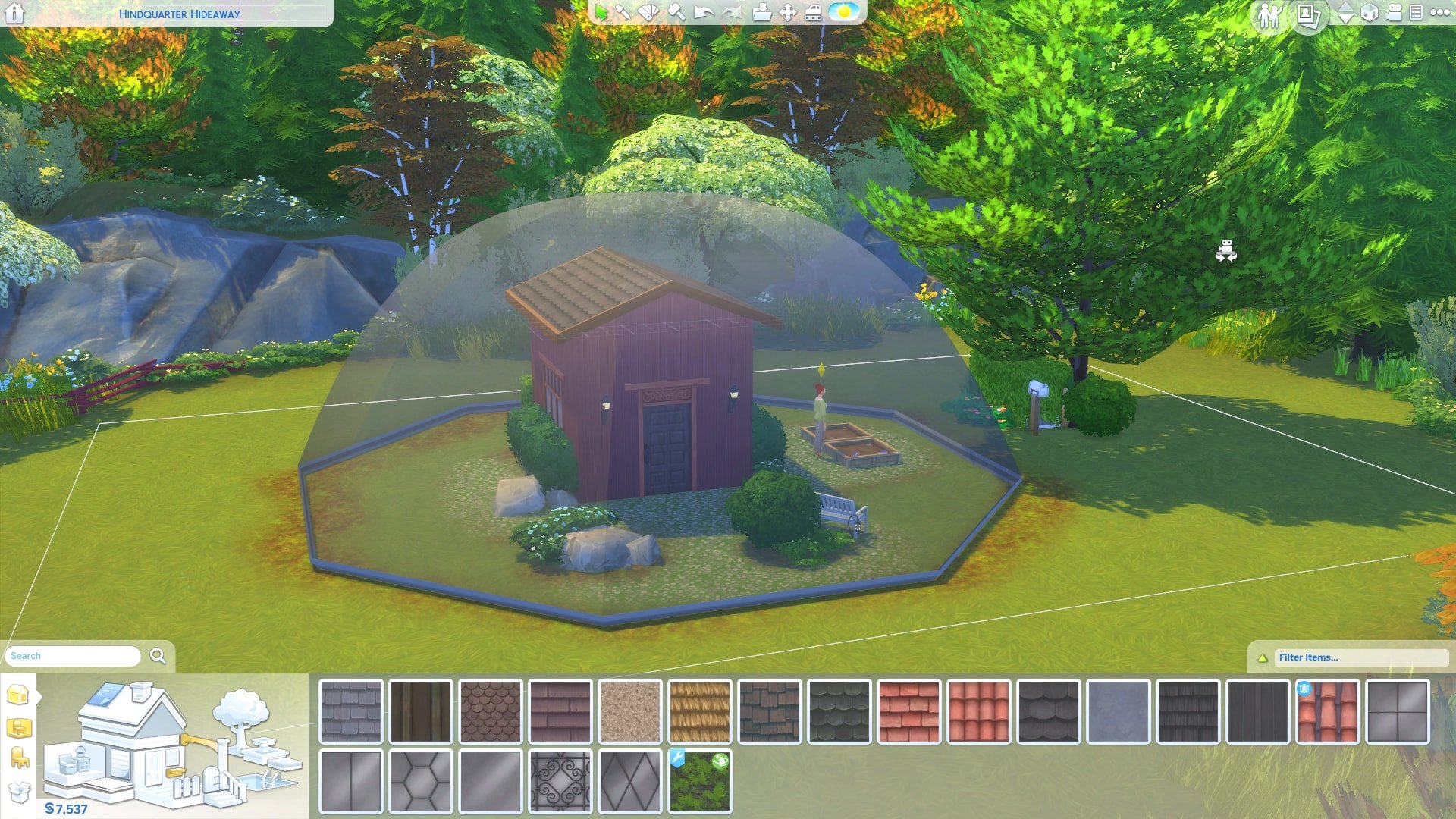
Reddit User Nikolai2960 discovered you can use the new Glass Roof update to live inside a dome!

Heres how to do it!

Step 1

Build a house! I chose to make a small hut because the lot is quite snug, however, this can work on larger builds too as long as the lot is also big.

The Sims 4: How to live in a Glass Dome!

Step 2

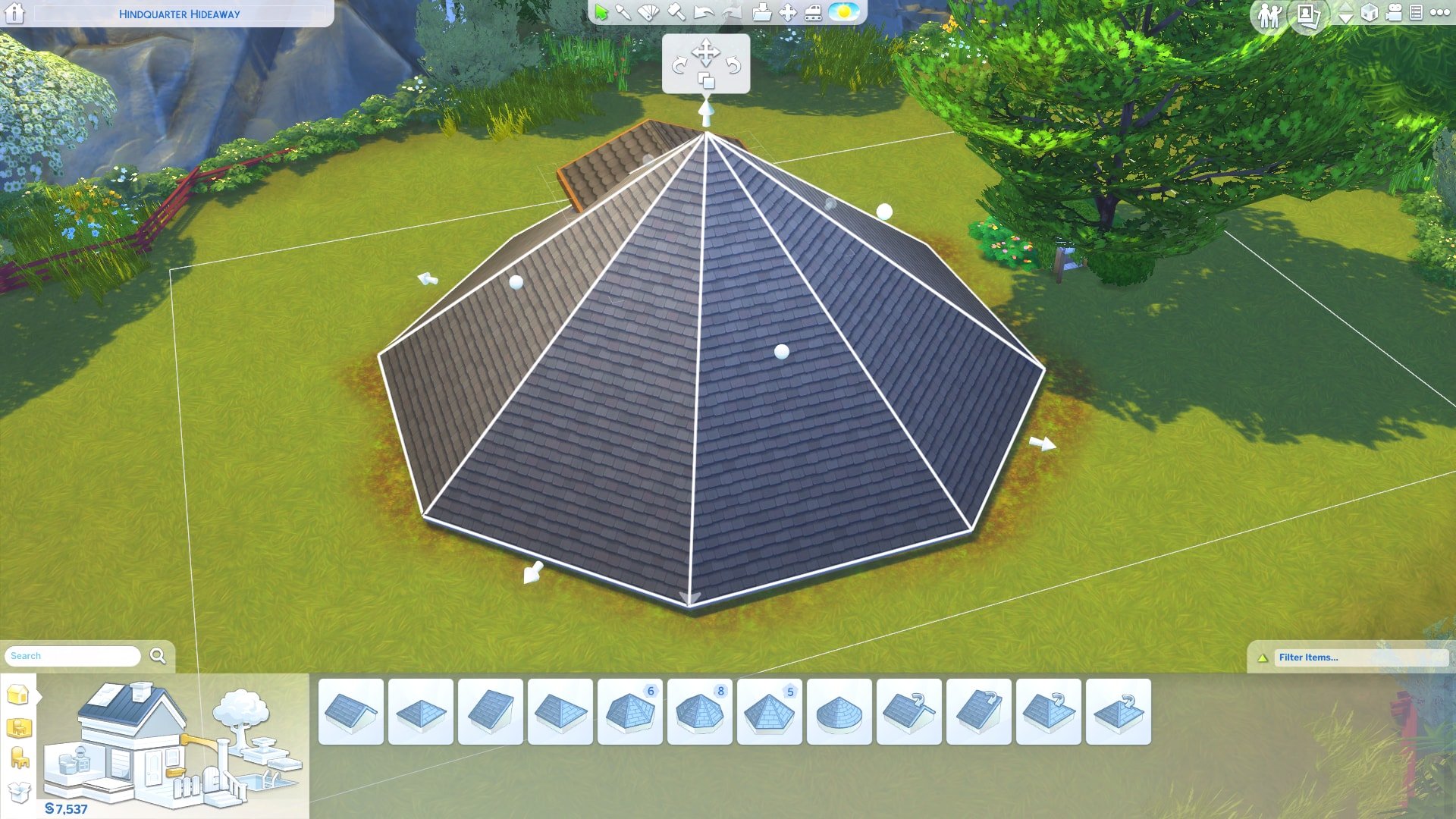
Choose a Round or Octagonal Roof and place it in the center of your house! Don’t worry if the house clips through, the next step will fix that. You should have something like this:

The Sims 4: How to live in a Glass Dome!

Step 3

Next, you want to drag the white dots upwards so the roof is a dome, the roof will look like the 2nd picture when you have it correct:


The Sims 4: How to live in a Glass Dome!

The Sims 4: How to live in a Glass Dome!

Step 4

Now you have your dome shape it’s time to choose some glass! Head over to the roof section and choose a glass design, I chose the clear design so it looks like a snowglobe!

The Sims 4: How to live in a Glass Dome!

The Sims 4: How to live in a Glass Dome!

Step 5

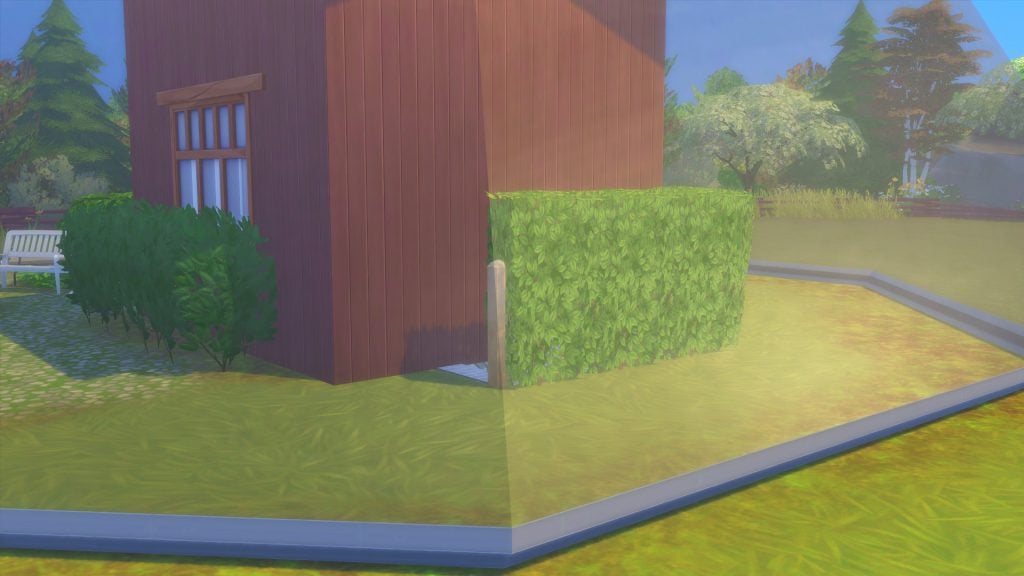
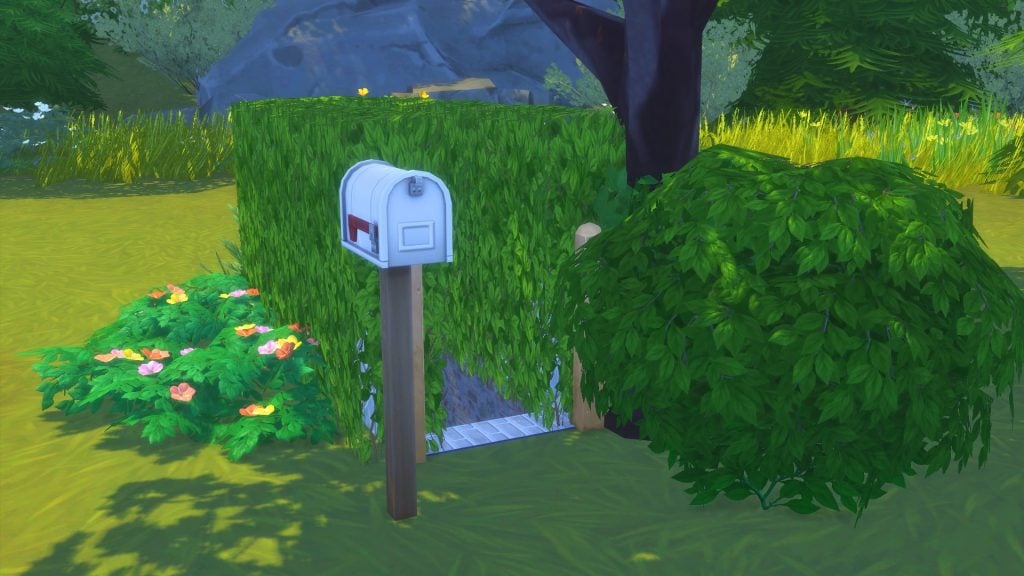
The final step is so your Sim can access their home! You need to use the basement tool to make an underground corridor. I hid the entrances to the domes with Hedge Fences. Like this:

The Sims 4: How to live in a Glass Dome!

The Sims 4: How to live in a Glass Dome!

The Sims 4: How to live in a Glass Dome!

And you’re done!

The dome is fully functional! Your Sim should have no issues going about their daily lives inside the dome. The dome cannot be walked through so if you feel like adding a little flair to your Sims life take away that basement access! You can see below a picture of my Sim happily gardening in her dome:

The Sims 4: How to live in a Glass Dome!

The Sims 4: How to live in a Glass Dome!

If you want a little extra…

Here’s a guide on how to connect Domes! You can also use this to have a ground level entrance to the dome if you don’t want a basement entrance!

First, you want to build a section between the two domes like below:

The Sims 4: How to live in a Glass Dome!

The Sims 4: How to live in a Glass Dome!

Step 2

Choose a roof shape to fit on top, I chose gabled roof but you can do others. Then you want to place it on top of the built section. Once you’ve done that use the smaller arrows to pull the edge of the roof up to get rid of the overhang.

The Sims 4: How to live in a Glass Dome!

The Sims 4: How to live in a Glass Dome!

Step 3

Next, I added windows to the room and doors to each of the domes and corridor. I then got rid of the floor so the whole thing is grass. You also then change all the roofs to glass and boom! You’ve got connected Domes!

The Sims 4: How to live in a Glass Dome!

The Sims 4: How to live in a Glass Dome!

The Sims 4: New Content & Features (June 19th Update Overview)

In preparation for Season’s worldwide launch on June 22nd, the Sims Team has released a brand new  1.25 GB patch for The Sims 4 today!

Here’s what’s new:

New Clothing Categories in Create-A-Sim

The Sims 4: New Content & Features (June 19th Update Overview)

You can now specify hot and cold weather outfits for sims of all ages, as well as have your toddlers enjoy in the new swimwear category! This will not impact gameplay without The Sims 4 Seasons installed.

Glass Roofing Is Now Available!

The Sims 4: New Content & Features (June 19th Update Overview)

The Sims 4: New Content & Features (June 19th Update Overview)

Found with the other roofing choices, glass roofs are now available for everyone to use! As seen above, they come in 6 new options:

  • Hexagon Glass Roof
  • Solid-Sheet Glass Roof
  • Ornamental-Scrollwork Glass Roof
  • Diamond-Paneled Glass Roof
  • Square-Paneled Glass Roof
  • Rectangular Paneled Glass Roof

The Sims 4: New Content & Features (June 19th Update Overview)

Similar to windows, the new glass roofs will cast shadows on the interior of your sim’s homes! Shown above is the hexagon roof.

The Gardening Update

Perhaps the most anticipated feature of today’s update, the Sims Team has overhauled the existing gardening system!

The Sims 4: New Content & Features (June 19th Update Overview)

The following seed packets are now purchasable in buy mode:

  • Catnip Herb Packet – §25 (requires Cats & Dogs)
  • Starter Flowers, Fruits, Herbs, and Vegetables – §35
  • Farmer Flowers and Fruit – §100 (requires level 7 of the gardening skill)
  • Farmer Veggies and Herbs – §100 (requires level 7 of the gardening skill)
  • Uncommon Plants – §250 (requires level 7 of the gardening skill)
  • Rare Plants – §1,000 (requires level 10 of the gardening skill)

The Sims 4: New Content & Features (June 19th Update Overview)* avocado tree requires The Sims 4 Jungle Adventure

Plants now have a brand new UI! Replacing the existing ten category system is a new quality bar with five different stages of evolution.

The Sims 4: New Content & Features (June 19th Update Overview)

The Sims 4: New Content & Features (June 19th Update Overview)

Along with the UI improvements, plants now have new interactions! Sims are now able to research their plants by taking a few picture and jotting down some notes! Once the interaction is complete, the plant’s details will appear in the sim’s personal notebook.

Also included with the update is improved selling options! Sims can now specify what they’re selling from the interaction menu. In order to use the new Super Sell feature, your sim must first reach level 8 in the gardening skill!

The Sims 4: New Content & Features (June 19th Update Overview)

Re-Traiting Potion

The Re-Traiting Potion allows your Sim to change their personality traits for 5,000 Satisfaction Points!

s The Sims 4: New Content & Features (June 19th Update Overview) The Sims 4: New Content & Features (June 19th Update Overview)

Some Small Tweaks to the Existing UI

And finally, eagled-eyed fans may notice a few visual changes to the UI!

The Sims 4: New Content & Features (June 19th Update Overview)

The Sims 4: New Update + Patch Notes! (June 19th, 2018)

The Sims 4: New Update + Patch Notes! (June 19th, 2018)

The Sims Team has released a brand new Update for The Sims 4 on PC and Mac!

To download the latest version of The Sims 4, simply open your Origin program and if the game doesn’t update automatically, right click on The Sims 4 and select ”Update”.

In case you have Mods or Custom Content, the game will automatically disable them for you after first launching The Sims 4 after the update. To re-enable all your Mods and Custom Content, select the Settings option in the Menu and select Settings. Under the”Other” section you’ll find the ”Enable Custom Content and Mods” option. Check it and restart your game in order for it to take effect!

Patch Notes

UPDATE: 06/19/2018 – PC 1.44.77.1020 / Mac 1.44.77.1220

Hello Simmers! SimGuruGrant here! This month’s update is a really big one with hundreds of tweaks, improvements, and fixes to a bunch of content in The Sims 4. Read below to catch up on some of the specific ones! SimGuruGnome is still off on assignment, so once again you’re stuck with boring old me. My apologies!

The Sims 4

  • Fixed numerous pieces of clothing that were not properly compatible or had graphical issues.
  • Fixed numerous issues related to having and interacting with a large number of objects in a Sim’s inventory.
  • Players used to be able to grab a Sim from the gallery randomly then immediately upload it BACK to the gallery, gaining sole credit. That is no longer the case.
  • We’ve been working with air traffic controllers, and as a result, birds are no longer flying through houses throughout the various worlds. It seems we were bird brains on this one.
  • The Welcome Wagon will no longer hide their fruitcake for themselves. When they come say hi, they totally will give you that fruit cake. Which your Sims may or may not hate.
  • Children no longer wake up in a panic every time they wake up. Now, only when there are monsters around.
  • You can now successfully complete the wedding event by having the newlyweds enjoy the first slice of cake!
  • Sims at a social event with failing needs will now properly return to their active lot when you tell them to do so as expected.
  • If a Sim dies while their roommate is off lot, when the roommate returns, they’ll be very sad.
  • If you try to add birthday candles to a cake, the tooltip tells you how to do so if it is currently on the wrong part of the table.
  • Active Sims won’t try to drink so dang much during a party. Once they have a refreshing beverage, they should be good.
  • The “Sims walking on their knees” issue has been fixed for toddlers who age up.
  • The Book of Life can now be read if it is bound to the same lot as the Sim trying to read it. You can now truly get a life, or at least read about it.
  • Custom Music should now work appropriately on all stereos.

Get to Work

  • Aliens and Vampires no longer adjust the colors of their beards and eyebrows when going to work. The office uniform policy has been updated.
  • Some of our fake, not approved doctors were assigning patients to beds that already had a patient in them. This is poor healthcare and we’ve fixed it.
  • You can now sell gardening produce and flowers at retail again.
  • The police chief can no longer be the suspect in a crime. OR CAN THEY? No, they can’t. We fixed it. Or…no seriously. Case closed.
  • Sims can now purchase items stored in the LICE Cold Retail Freezer on NPC owned retail stores.
  • Employee Sims will now clock in more reliably, and automatically be assigned a job task when they show up for work.
  • Doctors and Detectives will no longer receive the Go on Vacation whim so frequently.

Get Together

  • A Sim’s club progress no longer resets when transferring the Sim to a new household.

City Living

  • Sims who are resurrected after dying from eating poisonous Pufferfish Nigiri will no longer die when they eat anything else. Sorry, seems it took us longer to get all the poison out than we would have liked.
  • Sims listening to music via Earbuds (Fitness Stuff) will no longer cause a noise complaint from neighbors in the apartment.
  • Food Critics will no longer have conflicting experiences when reviewing food.
  • Squeamish Sims (Outdoor Retreat) are now properly affected by mice and natural dangers (Jungle Adventure).
  • Sims will now fall asleep after receiving the Zonked moodlet from the Bubble Blower.
  • Teenagers will no longer send inappropriate text messages regarding the Romance Festival.
  • The Scattered Panes windows now cast appropriate shadows.

Dine Out

  • New recipes from Cats & Dogs now function as expected in restaurants.

Perfect Patio Stuff

  • Uhntz uhntz uhntz uhntz ALL RADIOS CAN NOW PLAY THE ELECTRONICA STATION uhntz uhntz uhntz uhntz

Cats & Dogs

  • Male stall vendors who work in Brindleton Bay and San Myshuno no longer wear high heels. Nobody appreciates our fashion choices!
  • Vet clinic staff will now work AS EXPECTED even if a TV or computer are on the lot. We had to update our staff policy.
  • We unfloated the objects that were floating at the Pupperstone Park location.
  • Cats will no longer receive a Flirty Moodlet from Flirty Paintings. They’ll have to look elsewhere to find love. Mee-yow.
  • Spayed cats will no longer become pregnant after an adventure from the Free Spirit trait. Now they’re super fixed.
  • Pet toys will no longer stick to cats when they’re finished playing with them. They’ll stay on the floor, as they should!
  • Fixed situations where Sims were unable to adopt cats or dogs.
  • Sims who belong to played households can no longer be employed by the Vet Clinic.
  • Sims now face the right direction when fishing in Brindleton Bay. The water is thataway!

Romantic Garden Stuff

  • When a new child is successfully summoned using the Wishing Well, the child is now actually added to the household. The magic had to be tweaked, and we apologize for any inconvenience.

Vintage Glamour Stuff

  • We’ve added an interaction to send the Butler to sleep so that time will speed up when everyone in the household is now sleeping.
  • You can now remove Vanity Makeup with a new interaction on the vanity table.

Laundry Day Stuff

  • The maid will no longer put folded clothes back into the washer and dryer. They were just trying to help…badly.

Fitness Stuff

  • Earbuds now raise a Sim’s fun need while music is streaming directly into their ears.

Bowling Night Stuff

  • Sims can now socialize with each other while bowling, because it’s not like they’re breaking a sweat with rigorous athleticism.
  • Sims will level up their bowling skill more quickly now.
  • Sims can now choose between 3, 5, or 10 frame games of bowling, with the winning Sim’s score shown at the end of the game.

My First Pet Stuff

  • Sims, and especially pets, will now be a bit less obsessed with their rodents.
  • Sims who owned a rodent will become sad for a period of time when their rodent dies.

-SimGuruGrant

The Sims 4: Seasons Themed Custom Content Lookbook

Inspired by Seasons, I decided to create some Themed Look Books! The Items used are CC and all linked below!

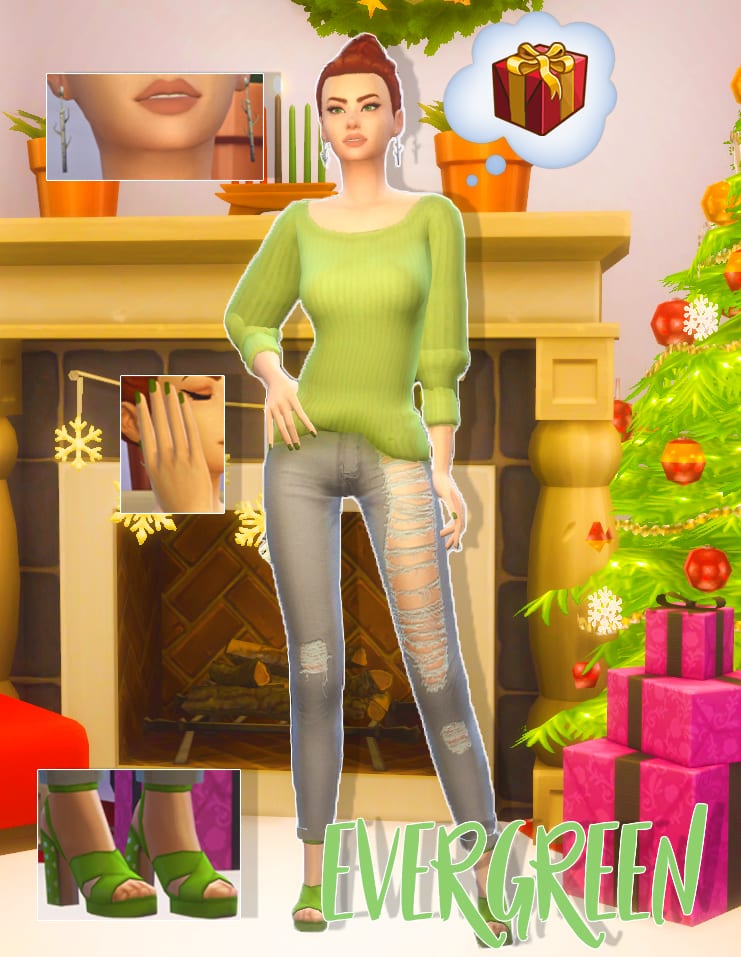
Evergreen

The Sims 4: Seasons Themed Custom Content Lookbook

This look I decided to draw from the green of the Christmas Tree, it’s a tree that never wilts and its evergreen. So I went with a loose baggy jumper by Invadersim and pared it with some pumps by Madlen. The little white dots on the heels reminded me of snowfall. Then we have silver birch earings from Simple Simmer and I think the white of the birch brings a bright tone to the look.

CC Included:

Hair: WMS Aria Hair

Accessories: SimpleSimmer Birch Tree Earrings  || MsBlue’s Velvet Nails

Top: Invadersim RC Anessasims Rainy Day Sweater

Bottom: TajsiweL Lauran AFJeans

Shoes: Madlen Regina Shoes

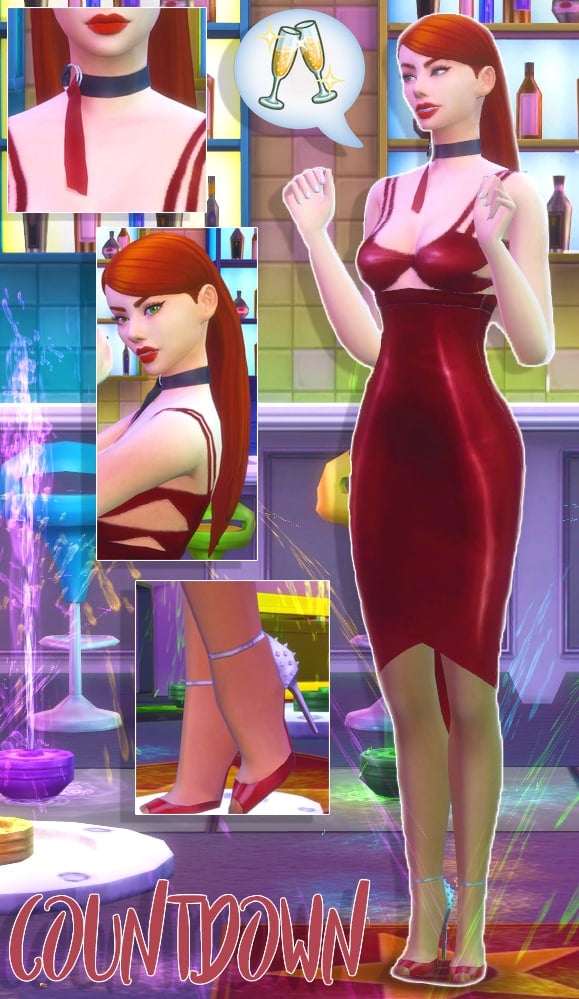
Countdown

The Sims 4: Seasons Themed Custom Content Lookbook

Countdown is a New Years Party themed look! I decided to go with a sultry dark red dress by Dulisla. I have wanted to use these shoes by Madlen for ages and I think the little spikes on the heel give the look a little fun dangerous feel. I adore this sleek hair by Grimcookies and thought it brought the right amount of sleekness and party.  The thing that really ties this outfit together is the choker by SLYD, again adding to the sultry theme but also bringing in a simple accessory that doesn’t take away from the attention the dress gives.

CC Included:

Hair: Grimcookies Chanel Hair

Accessories: SLYD Silk Choker || MsBlue’s Velvet Nails

Top: Dulisla Dress

Bottom: Blushchat Cold Weather Tights

Shoes: Madlen Daniel Shoes

Resolutions

The Sims 4: Seasons Themed Custom Content Lookbook

The next look is based on those New Year Resolutions, the main one people take up is getting fit! I loved this little-cropped jacket by Mortimergth, still keeping you warm while out for a jog but enough skin showing to allow you to cool down when you’re working out, a perfect balance. Next were these thick leggings by PurrsephoneSims, a beautiful lavender and slightly cropped at the bottom. For the shoes, I went with these dip-dyed trainers by Madlen, The blue and purple fit into the outfit well but also providing your Sim with comfort while working out.

CC Included:

Hair: Enrique Braid Hair

Accessories: MsBlue’s Velvet Nails

Top: Nina Jacket Croptop MG

Bottom: Hayden Leggings PurrsephoneSims

Shoes: Madlen Kelly Shoes

In Bloom

The Sims 4: Seasons Themed Custom Content Lookbook

In bloom is probably my favorite outfit even though it’s so simple. Of course, I went with florals in spring, I know groundbreaking, but I died when I saw this yellow and I knew I had to make a look. The outfit is a separate top and shorts by Ilkup and you can mix and match with other items which are nice, but I decided to use them together here for maximum effect. Next, I got these cute rose earrings by PTS and matched the white color to the flowers on the outfit. And lastly these heels by of course Madlen, a little gold buckle to bring in the yellow.

CC Included:

Hair: Kotcat Arianna Hair

Accessories: PTS Rose Earrings || MsBlue’s Velvet Nails

Top: Ilkup Magnolia Shirt

Bottom: Ilkup Magnolia Shorts

Shoes: Madlen Paloma Shoes

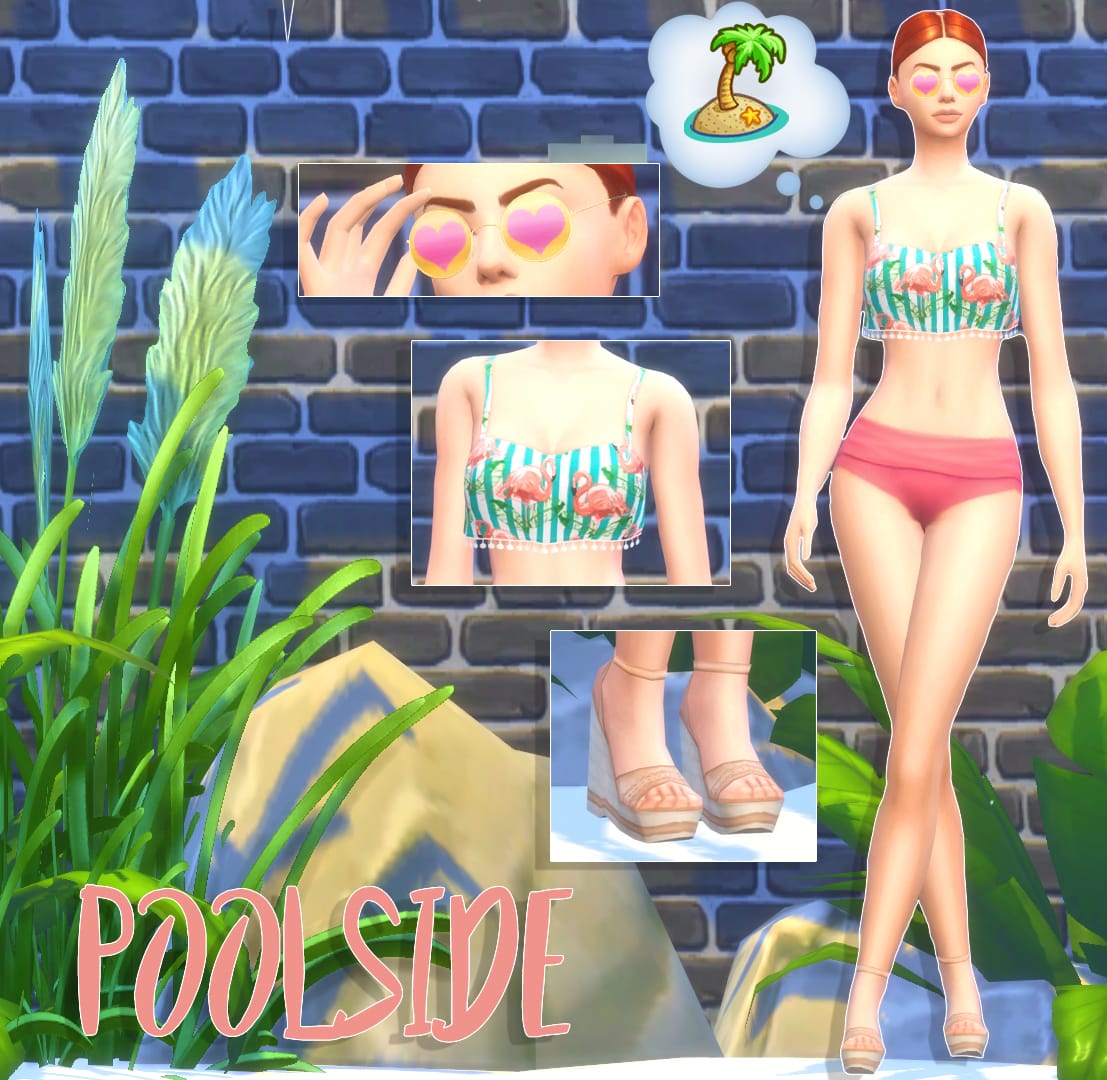
Poolside

The Sims 4: Seasons Themed Custom Content Lookbook

Last but not least I chose to go with a swim look. I was listening to Dua Lupa and I knew when I saw this flamingo top it needed to be in a swim outfit, so I paired it with some Spa Day Bottoms which I know aren’t CC but they went so well! And then some Madeln sandal heels which I love the skin color swatch because again it doesn’t take away from the bold top but still has that beach vibe. Then I found these sunglasses by Pralinesims and I thought the yellow and pink heart screamed cute summer so I just had to add them!

CC Included:

Hair: Kotcat Arianna Hair

Accessories: PS Ekseo Glasses

Top: Trillyke Horololo Top

Bottom: Spa Day Game Pack

Shoes: Madlen Felicia Shoes

Would you like to see more Look Books? Will you be downloading any of the CC here? Let us know in the comments!

The Sims 4 Seasons: Traditions and their Features

The Sims 4 Seasons: Traditions and their Features

The Sims 4 Seasons Expansion Pack brings the ability to create your own holidays. Each holiday can be customized and depend on up to 5 traditions that you can choose in the Edit Holiday Menu.

With each tradition there’s at least 1 activity that will encourage your household and the world around you to perform them. There are also traditions which bring multiple activities and interactions!

Down below you’ll see a list of all traditions that you get with The Sims 4 Seasons. There are also certain traditions that you unlock after installing certain packs for The Sims 4 that we’ll cover during this week!

The Sims 4 Seasons: Traditions and their Features

  • Air Grievances – Direct honest feedback is harsh and it feels oh so good to get off your chest. To participate, select other Sims and choose Mean socials such as Yell At.
  • Appreciate an Object – What is special and worthy of appreciation to you? Reflect around objects and the larger meaning behind them. To participate, click on an Object and select Appreciate.
  • Art & Music Spirit – Make music and make art. Sing until your voice gives out or the neighbors complain. To participate, create art by doing things like Painting, Taking Photos or Dancing, or do musical things by Singing, Listening to Music, or Playing an Instrument.
  • Attend Holiday Ceremony – Attend a Ceremony b using the phone to travel there to complete this tradition.
  • Baking – The smell of fresh baked treats is worth celebrating. Why not make a holiday around it? To participate, Click on a Stove and Select Bake or Cook, then choose a baked good.
  • Bar-B-Que – There is nothing quite like fire grilled food. Debates on the best fuel source and sauce recipe get very heated. To participate, Click on any Outdoor Grill and select Grill.
  • Cleaning – A clean home is a happy home! To participate, Clean around the home, Empty the Trash, Mop Up Puddles, and Clean Up dishes.
  • Countdown to Midnight – Stay up past bedtime and shout at the TV in celebration! To participate, Watch the Countdown to Midnight on TV. The countdown will be available on TVs after 11:00PM.
  • Decorate – The perfect bit of color and decor can really set the stage for any holiday. To participate, place holiday decorations from Build Mode. Decorate the house exterior by placing and using The Attic Stack Decoration Box.
  • Drinking – Celebrate with the perfect summer lemonade, warm apple spiced nog, or any of a Mixologists wonderful creations. To participate, drink something from a Bar, Drink Stand or Fridge.
  •  Egg Hunt – Colorfully painted eggs are hidden throughout your yard. Gotta collect ’em all. To participate, click on objects in the world and select Hunt for Egg.
  • Exercise – Celebrate by taking care of yourself. Push yourself to do just a few more reps or go just a little further on your run. To participate, do any exercise activity like Jogging, Push-ups, or Lifting Weights.
  • Fasting – Appreciate all the good food you have by going without for a short time. To participate, do not Eat any food for 6 hours.
  • Father Winter – On special nights of celebration, Father Winter will visit the household of festive Sims. If you are quick you can catch him bringing gifts for all good children. To participate, place a Fireplace and a Pile of Presents in your home. Then wait for midnight.
  • Festive Lighting – Traditional lighting of candles is a great way to save on the electrical bill while gathering friends and family. To participate, Click on a Holiday Tree, Menorah, or Kinara and select Light Candle.
  • Festive Spirit – Be festive and jolly with friends and family. To participate, use festive socials such as Lighting the Holiday Tree, Ask if Good or Bad or Belly Laugh.
  • Fighting – Time to practice that right hook! Today is all about starting Fights with other Sims.
  • Fire – The crackling flames inspire primal celebration. To participate, Light a Bonfire, Campfire, Fireplace or Burn a Leaf Pile. Then interact with any of these sources of fire.
  • Flower Bunny – The Flower Bunny has come to visit and spread flowery delight! To participate, do Friendly interactions with the Flower Bunny.
  • Games – Strategy, learning, entertainment, and accomplishment all in the same activity. Great alone or with friends. To participate, play with video games, toys, the arcade or the chess table.
  • Gardening – A tradition dedicated to those with a green thumb, and those working on one. To participate, Harvest, Plant, Water, Weed, or Spray in the garden.
  • Give Flowers – To participate, use the Purchase Gift interaction on the phone or computer to buy flowers. Then select a Sim and choose Give Gift.
  • Give Gifts – Exchanging a gift is a great way to conver appreciation, humor, and romance. It even works to trick adversaries. To participate, Buy Gifts from the Phone, Computer or Build Mode. Click on other SIms and Give Gifts. Make sure to check the mail for gifts sent to you.
  • Go on a Date – Take out that special someone, or invite out a new soon to be special someone. It’s tradition! To participate, Click on the Phone and select Ask on Date, Choose another Sim and select a location for the date.
  • Go on a Vacation or Travel – There is no place like home…which you won’t know until you travel! To participate, Click on the Phone and select Take a Vacation, or Travel to a Commercial Venue.
  • Grand Meal – A most delectable feast awaits stomachs growling in anticipation. Just make sure someone else volunteers to do the dishes. Cook a Grand Meal by clicking on the Stove or Fridge. To start the feast, select Call to Grand Meal on the completed dish.
  • Holiday Gnomes – Give respect and gifts to the friendly gnomes in the hopes of festive rewards. To participate, find Gnomes around your lot, Click on the Gnomes and select Appease the Gnome.
  • Invite Guests – Celebrate with friends, family, and random Sims you met on the street. To participate, Click on the Phone and select Invite to Hangout at Current Lot. Then socialize with at least two of your guests once they arrive.
  • Light Kinara – Light the candles on the Kinara to reflect the seven principles. To participate, Click on the Kinara and select Light Candle.
  • Light Menorah – Celebrate by lighting the candles of the Menorah. To participate, Click on the Menorah and select Light Candle.
  • Make Resolutions – Don’t put off until tomorrow what you can do today. To participate, Click on your Sim and select Make Resolution.
  • Mischief Spirit – A holiday is the perfect excuse for mischievious hijinks that are in good fun. Time to work on some pranks. To participate, Click on another Sim and select Mischief. Then select any of the Mischief options.
  • Open Presents – It’s better to receive than to give. Wait, reverse that! To participate, Open a Present from any Gift Pile.
  • Party Spirit – Drink, Dance, and Play Music. The party spirit lives in us all. To participat,e use any of the various party activities. Drink, Dance, Play an Instrument, Tell Jokes, Flirt, or Sing.
  • Polar Bear Plunge – It is freezing out but the water hasn’t completely iced over. Perfect time for a swim. To participate, Swim in any outside pool while it is cold outside.
  • Remembrance – Spend time remembering those who have passed but are never truly gone. To participate, Click on an Urn or Gravestone and choose any of the available options. You can also meet and interact with a Ghost.
  • Romantic Spirit – Spend a little extra time with the one you love or the one you are falling in love with. To participate, do romantic socials such as Kissing, Hugging, Flirting, or if the mood strikes, WooHoo!
  • Spooky Spirit – The midnight hours is close at hand. Ghosts, vampires and aliens are in the plan. Celebrate all that sends a shiver up the spine. To participate, do spooky actions such as interacting with ghosts, vampires, or aliens. You can also carve pumpkins, or play spooky music on the Pipe Organ.
  • Sports TV – Yes, cheering louder does help your team win on TV. To participate, Click on a TV and select Watch Sports.
  • Streaking – Nothing is as freeing as running down the street with the wind in your, um, face. To participate, select the Sim and then select Go Streaking.
  • Tell Stories – Gather around and tell your favorite stories. It is much more interactive than reading a book. To participate, tell a story to another Sim. Try reading a toddler a book or telling stories around a campfire if you have one.
  • Thankful Spirit – Spend time to reflect and be thankful – who knows what tomorrow will bring. To participate, discuss what you can Be Thankful for with another Sim.
  • Trick or Treat – Random masked neighborhood kids come to your door asking for food? Sounds like a great tradition. To participate, Click on Children who have knocked on your door and select Trick or Treat!
  • Watch Romantic TV – A proper romantic flick can really set the mood for a romantic holiday. To participate, Click on the TV and select Watch Romance.
  • Water Fun – When the weather heats up, celebrate with a little H20. It is the only Tradition that requires a swimsuit!
  • To participate, go Swimming or interact with various water toys like the Kiddie Pool, Sprinkle-O-Matic, or Water Balloons.
  • Wear Costumes – A chance to dress up as a Llama or a Fairy and have everyone act like that is normal. To participate, Click on your Sims and select Wear Costume. Then choose your costume.

The Sims 4 Seasons: The Seasons Chooser Menu

The Sims 4 Seasons: The Seasons Chooser Menu

In The Sims 4 Seasons Expansion Pack there are 2 ways to pick a season that you want to dive in: the first way is through live mode and the second way is through the seasons chooser menu. However, the seasons chooser menu is presented to you only when starting up a new game or loading up your old save game that you’ve played before installing The Sims 4 Seasons.

The Sims 4 Seasons: The Seasons Chooser Menu

The Seasons Chooser Menu features 4 plumbobs with different color variations representing each season. There are special animations that you get after clicking each season! Check them out below: