Home Blog Page 366

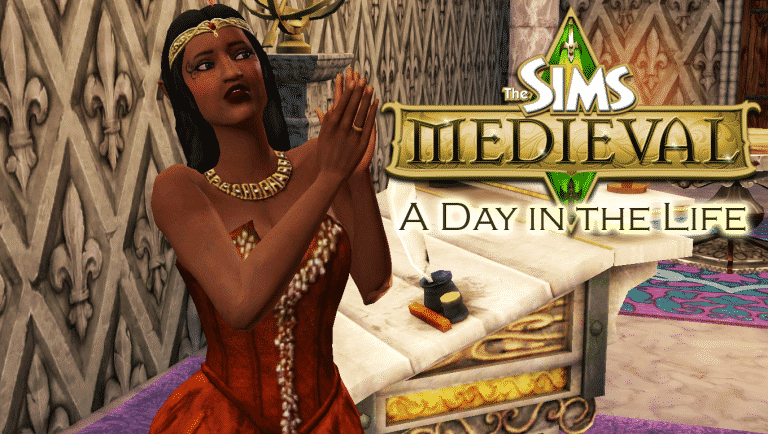
The Sims Medieval: A Day in the Life

4

The Sims Medieval is easily my favourite spinoff of The Sims series. How could putting my Sims in a medieval kingdom full of magic and adventure where they are the destined heroes of the land be anything but amazing? Unfortunately, The Sims Medieval did not have a long life, but I picked up the Deluxe Edition of this game a few days ago and have fallen in love with it all over again. In fact, I was so excited about it, I decided to share the experience with all of you in this walkthrough-style Day in the Life segment! Are you ready for some medieval adventure? Let’s go!

[vc_message 0=””]Helpful Hint! You can click or tap on any image in this article to view the full size version. Don’t hesitate to get a closer look at every detail described in this medieval adventure. There’s lots to see![/vc_message]
[vc_message]PSST! Did you notice the Achievements on the Kingdom Ambitions screen? Just like your Hero Sims, you as the player (or The Watcher as your Sims prefer to call you) can level up as well. There are hundreds of Achievements for you to earn as you play, covering every aspect of the game, from collecting herbs to making Simoles. As you earn Achievements, your Watcher Level increases. Become the mighty, all-knowing Watcher you’ve always dreamed you could be![/vc_message]

The first thing you’re greeted with after the intro and title screen when you fire up The Sims Medieval is the Kingdom Ambitions screen. If that confuses you, you can just call it the game’s main menu, because that’s essentially what it is. This is where you can start a new game or load a previously saved game. Before starting a new game, you’ll have to choose an Ambition for your game. Think of Ambitions as the overall goal for your entire kingdom.

Since this is my first time playing this copy of The Sims Medieval, I can only select one Ambition. It’s called New Beginnings. If I click on that Ambition, I can see that my kingdom’s goal will be to erect buildings in my kingdom. The more buildings that go up during my playthrough of this kingdom, the better my Ambition score will be. Completing Kingdom Ambitions unlocks new Kingdom Ambitions to play, which encourages me to explore all the different ways to build and run a kingdom. I don’t need to stick with one strategy; in fact, completing many Kingdom Ambitions will ensure that I never play the game the same way twice!

Once I’ve selected a new game to play with the New Beginnings Ambition, I’m prompted to select a throne room and give my kingdom a name. I’m a big fan of Doctor Who, so I chose the name Gallifrey but you can name your kingdom anything you like. For the throne room, you get your pick of a couple different styles or you can choose an unfurnished throne room. Choosing an unfurnished throne room lets you start with more Simoles to decorate but I think I’m just going to select the Princess throne room that came with the Deluxe Edition of this game and jump right into the meat of the game.

After starting a new game, I get to take my first look at my kingdom. It’s a big place but wow is it ever empty! It looks like just the throne room has been built. Speaking of which, my throne room needs a Monarch. A kingdom can’t function without a King or Queen! Monarchs are just one type of Hero Sim you can play in The Sims Medieval. There are ten in total. In addition to the Monarch, you can also play as a Knight, Spymaster, Jacoban Priest, Peteran Priest, Blacksmith, Merchant, Bard, Wizard, and Physician. More Heroes will be added to the kingdom as we construct the buildings they need to operate. For now, let’s just worry about our Monarch.

I can choose from two premade Sims to run my kingdom or I can go into Create a Sim and make my own Monarch. Picking one of the premade Sims is a good way to just jump right into all the action if you’re eager to get questing, but I love customizing the perfect Hero Sims for my kingdom so I’m going to make my own Monarch.

Create a Sim works the same way as it did in The Sims 3, so if you’ve played The Sims 3, you’ll be familiar with this. I decide to make an elven queen named Eolwyn. Most of the items I’ve used on her are from the Pirates & Nobles Adventure Pack, which also comes with the Deluxe Edition of The Sims Medieval on Origin.

Sims still have traits in The Sims Medieval, but they work a little differently. You can only pick three traits for a Hero Sim, and one of these traits must be negative. This negative trait is called a Fatal Flaw. Think of the Fatal Flaw as a weakness in character that your Hero Sims will have to find ways to overcome during their quests. I’ve chosen the Eloquent and Entitled traits for Eolwyn. Being Eloquent will help her in situations where a diplomatic approach is needed. Being the Queen of Gallifrey, this is a useful trait for her to have. Royalty have a tendency to be a bit spoiled, however, so I’ve also selected Entitled. This means Eolwyn will be happier in lavish surroundings and become unhappy in dingy or plain surroundings. She’ll also get new socials related to this trait to use with other Sims.

For her Fatal Flaw, I’ve selected Hubris. This means our queen thinks a little too highly of herself and has a tendency to become overconfident. This overconfidence can be her undoing because it will saddle her with a negative buff that will lower her Focus quite frequently during quests. Unfocused Heroes have a harder time succeeding in their quests.
[vc_message]Use Your Imagination! There are no fantasy races in The Sims Medieval like the kind in The Sims 3 Supernatural, but you can create Hero Sims with elf-like appearances by adjusting the point and size of their ears and playing around with some of the skin tones. Some quests even feature elven Sims from other lands! Queen Eolwyn has no special powers due to her elven lineage, but it’s fun to play with backstories.[/vc_message]

The Sims 4 Mod Spotlight: New Lot Traits, Event Unlockers and more!

Before you continue, please note the following:

  • EA does not pre-screen Custom Content /Mods and players should always exercise caution when adding Custom Content to their game files.
  • Make sure your mods are up to date. For a full list of broken and fixed mods CLICK HERE!
  • After each The Sims 4 Update your game will automatically disable Mods and Custom Content. You can re-enable them by going to Game Options > Other > Enable Custom Content and Mods.

You can find more of our Mod Spotlights HERE!

[ultimate_carousel slide_to_scroll=”single” title_text_typography=”” slides_on_desk=”1″ slides_on_tabs=”1″ slides_on_mob=”1″ autoplay=”off” arrow_style=”circle-bg” arrow_color=”#1e73be” arrow_size=”48″ dots_color=”#1e73be” adaptive_height=”on” item_space=”0″]

Entrance Fee Lot Trait

Makes your Sim pay a certain amount of Simoleons in order to enter the lot.

The Sims 4 Mod Spotlight: New Lot Traits, Event Unlockers and more!

Listening to Earbuds is Fun

Raises the Fun need bar when listening to earbuds from TS4 Fitness.

The Sims 4 Mod Spotlight: New Lot Traits, Event Unlockers and more!

Force to Leave

Lets you force Sims to leave your lot.

The Sims 4 Mod Spotlight: New Lot Traits, Event Unlockers and more!

More Expensive Club Perks

Makes Club Perks from Get Together more expensive.

The Sims 4 Mod Spotlight: New Lot Traits, Event Unlockers and more!

More Visitors Lot Trait

Lets you invite up to 50 Sims on a single lot.

The Sims 4 Mod Spotlight: New Lot Traits, Event Unlockers and more!

Reduce Decay of Vampire Thirst

Vampires’ thirst need will decay slower.

The Sims 4 Mod Spotlight: New Lot Traits, Event Unlockers and more!

Preferences Lot Traits

Lets you set preferences to what Sims are prone to doing on a certain lot.

The Sims 4 Mod Spotlight: New Lot Traits, Event Unlockers and more!

Potty Gloat Interaction

Adds a new interaction on the potty for toddlers.

The Sims 4 Mod Spotlight: New Lot Traits, Event Unlockers and more!

More Fridge Quick Meals

Adds some of the existing recipes to the quick meal option.

The Sims 4 Mod Spotlight: New Lot Traits, Event Unlockers and more!

Event Unlockers

Unlocks objects from gameplay events that you didn’t manage to complete.

The Sims 4 Mod Spotlight: New Lot Traits, Event Unlockers and more!

[/ultimate_carousel]

Have a Mod suggestion? Post it here!

This The Sims 3 World lets you go on a cruise!

I don’t often write about The Sims 3 (I should really do something about that) but when I do it’s usually when I’m blown away by a community creation, and this time is no exception.

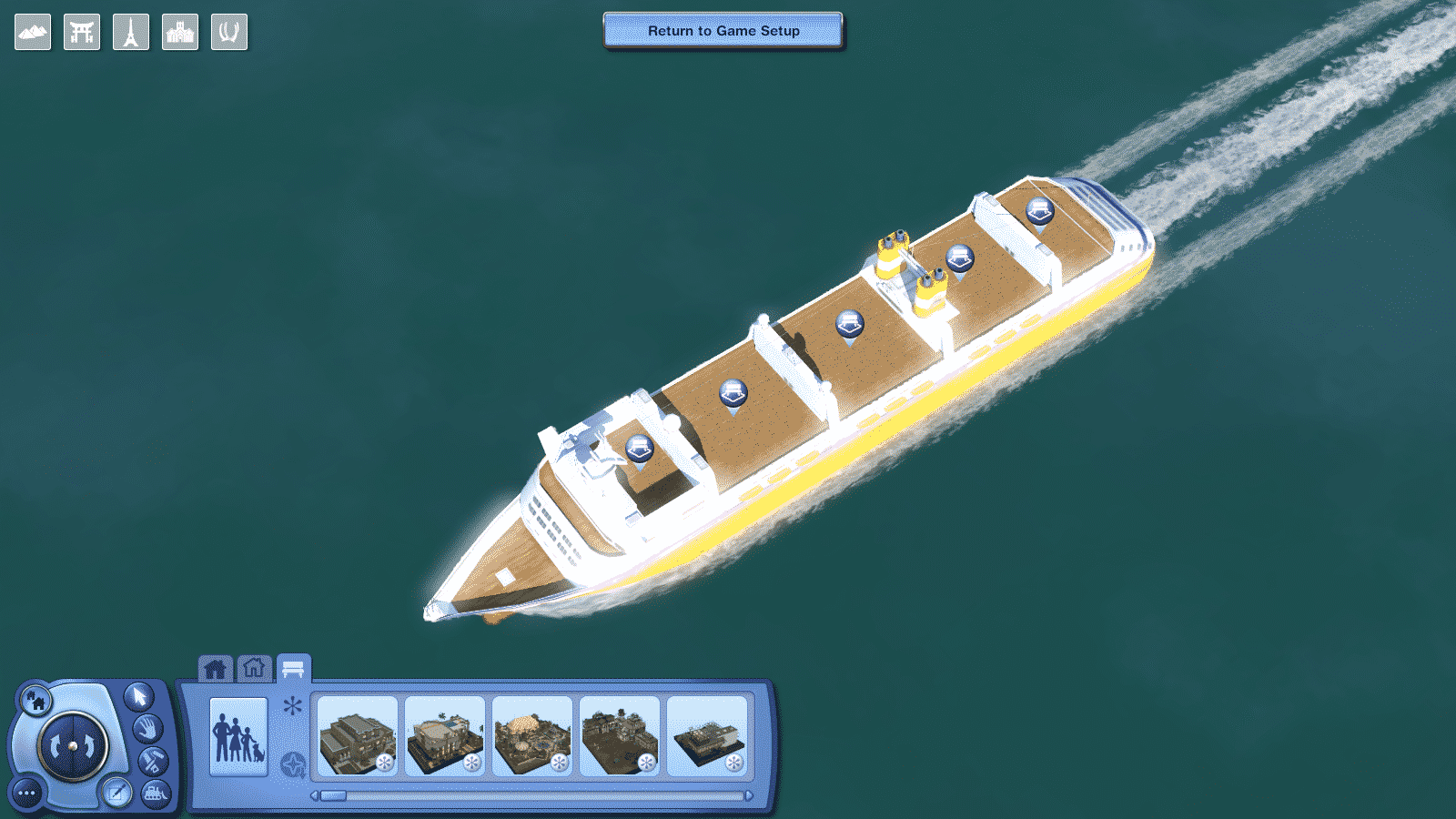
Creator potato-ballad-sims published a custom world for The Sims 3 which gives you that perfect sense of going on a cruise with your Sims!

To install this Mod, extract the zipped content to Electronic Arts > The Sims 3 > Downloads and install the custom world through The Sims 3 Launcher (don’t worry, it’s only 14MB).

You can start off your cruise by selecting the MS Plumbob Dream world in the main menu.

This The Sims 3 World lets you go on a cruise!

It’s also a good idea to use this world as a turning point when travelling from one world to another. Why not just stop by to a cruise and give your Sims a feeling like they’re travelling across the sea to their destination?

It only takes a few seconds to load this world. This cruise ship comes with 5 empty lots (two 30×50 lots, three 60×50 lots) that you can build and populate:

This The Sims 3 World lets you go on a cruise!

The movements of the surroundings will go on indefinitely, meaning that you cannot get off the ship until you decide to travel to a different world.

Ready to go on a cruise? Press the download button below!

[mks_button size=”large” title=”DOWNLOAD!” style=”squared” url=”http://potato-ballad-sims.tumblr.com/post/161964278040/the-ms-plumbob-dream-is-a-plumbob-class-cruise” target=”_blank” bg_color=”#1e73be” txt_color=”#FFFFFF” icon=”fa-arrow-down” icon_type=”fa” nofollow=”0″]

This The Sims 3 World lets you go on a cruise!

The Sims 4 Base Game is coming to Origin Access on July 11th!

0

Origin has announced on their website that The Sims 4 base game will be added for members of the Origin Access on July 11th! Previously you could only access The Sims 3 Starter Pack which includes The Sims 3 base game, Late Night expansion and the High End Loft Stuff pack.

The Sims 4 Base Game is coming to Origin Access on July 11th!

If you don’t know what Origin Access is simply a PC gaming subscription and with that grants you access to a growing collection of EA games which you can download and play as little or as much as you want. Membership can be paid either monthly at £3.99/$4.99. There is also a yearly membership option too. Not only that as an Origin Access member you also get 10% off purchases in the Origin store.

Let us know what you think about The Sims 4 addition to the Vault on Twitter or in the comments below.

Gardening in The Sims 2

Well, hello, everyone!

Yes, I know it has been a while. I really am sorry about that. I have been playing The Sims 2 alot lately (even though I was HYPED about The Sims 4: Parenthood coming out.) But I am the Sims Community “The Sims 2” writer, and because of that, I have a new article for all of you today.

GARDENING

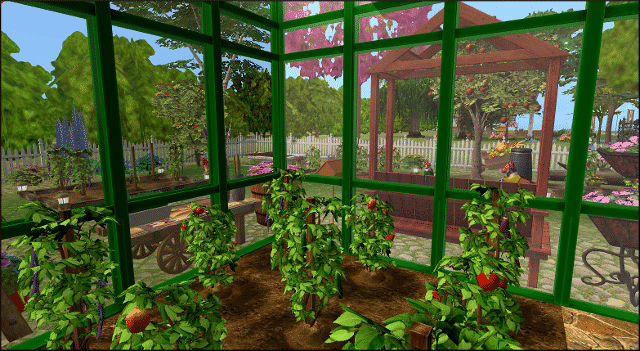
Yes. Gardening. This is one of my favorite hobbies that came with the Sims 2. So much so, that I try to make every sim in the game have a garden. Gardening to me was the best in the Sims 2. You actually had to buy your plot of soil. Build mode actually had a “garden center” which is something I love. The best part about having gardens in The Sims 2 is that you can have greenhouses. Greenhouses were something that I really enjoyed using, and I can always have my plants grow, regardless of the season.

Gardening in The Sims 2

Another thing that I really enjoy about gardening in the Sims 2 is that you can actually juice your fruits and veggies. I love this, because your sims can achieve so much, just by what juice they drink. Your sim kids can drink apple juice and they have a small boost in doing homework. Another perk in drinking juice is if your sim is sick, drinking a glass of orange juice will help out with fighting their cold.

Gardening requires one main purchase from build mode: A gardening plot.

This can be bought and laid out just like how you would lay floors, just buy click and dragging. The price is 10 simoleans per tile. Once these are bought, you can then start your foray into gardening.

As with many other hobbies within The Sims 2, talent badges can be earned by the more time you spend gardening. If one reaches the coveted gold badge, you are able to talk to plants and even satisfy the social need.

Gardening in The Sims 2

Greenhouses are something I truly miss when it comes to later sims games. These keep my plants alive at all times of the year. sad thing is however, is that they are expensive as all could be.  But, once you have the money, the investment in greenhouses is totally worth it.

One of the cool things about gardening is that you can make pretty good money off of it. When an elder retires, they can really make some great cash off of the gardening skills, especially if they have a lot of plants and part of the garden club. The garden club is a small but really cool club that your sim can join. But, your sim’s garden better be in tip top shape before the club arrives for their inspection!

Overall, the Sims 2 gardening skill is probably the best in the series. No matter what sim I create, I always make he or she have a garden of some kins. I even want to garden one day when I get my own place.  But for now, The Sims 2 can really make me feel like I have a realistic garden unit then.


The Sims 4: SimGuruGraham Talks Toddler Stuff + Stuff Packs

In the light of recent news regarding the latest quarterly teaser, SimGuruGraham wanted to clarify some things regarding the upcoming Toddlers Stuff Pack for The Sims 4. This isn’t the regular Q&A that you get after a full Stuff Pack announcement but it still has valuable info.

The Sims 4: Toddler Stuff Pack Icon (HQ)

2

@Herr_Sims has recreated an icon of the upcoming The Sims 4 Toddler Stuff Pack that’s coming later this Summer.  If you’re a creator this icon is perfect for video thumbnails and featured images!

To download it, simply click on the icon and select the ”Download” button on the bottom left corner.

The Sims 4: Toddler Stuff Pack Icon (HQ)

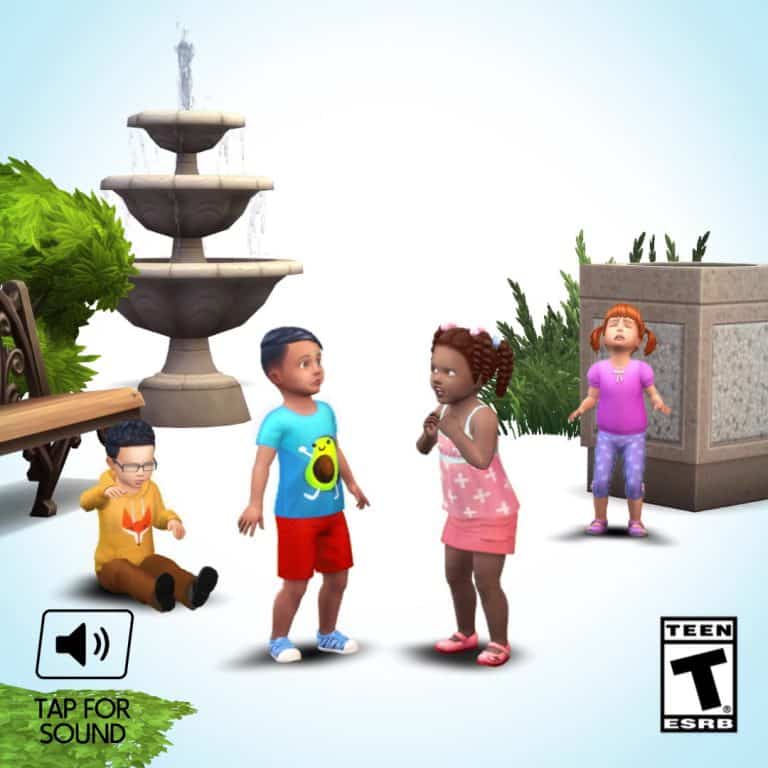
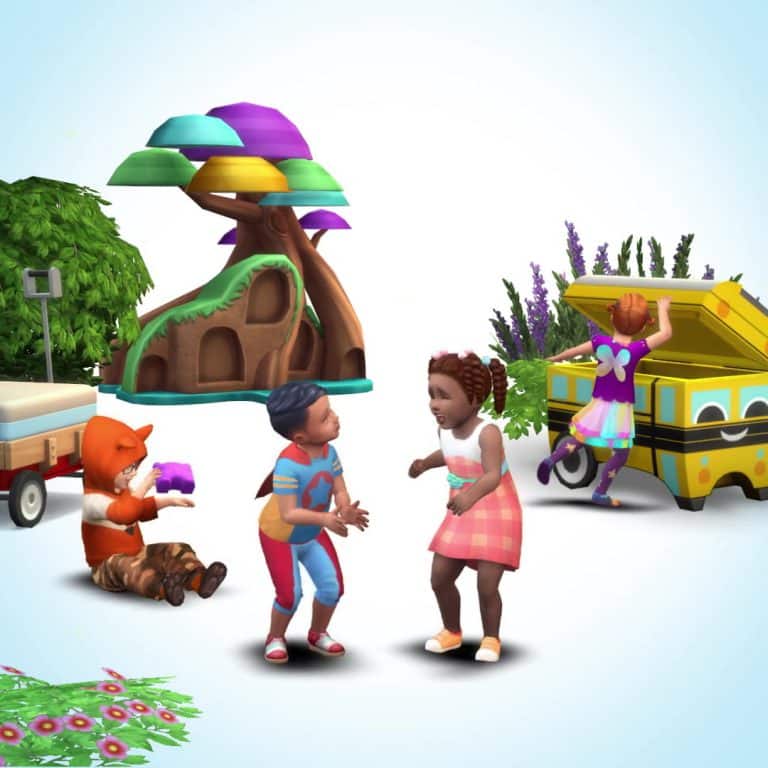
The Sims 4: Toddler-Themed Stuff Pack Coming Later this Summer!

4

The Sims Team has just confirmed in their latest quarterly teaser that the 12th Stuff Pack for The Sims 4 will be toddler-themed!

We don’t have a specific name of this pack but we can speculate about what the pack can bring.

This Stuff Pack is expected to release later this summer and we can expect more information as we get closer to the release date.

Down below you can find some of the screencaps from the latest teaser:

The Sims 4: NEW QUARTERLY TEASER!

36

UPDATE: The Sims twitter has now released the English version of the quarterly teaser. As you can see there only seems to be a single stuff pack centred around toddlers in the pipeline for the Summer, but it looks fantastic.

The Sims Russia has leaked the latest quarterly teaser for the content being released for July, August and September, hopefully an English version will release soon.

The Sims 4’s Third Quarter of 2017 has begun!

76

The Sims 4’s Third Quarter of 2017 has begun!

It’s July, which means that the second quarter of 2017 is behind us. Before we dig deeper into what we can expect in the next quarter, here’s a look of all the content that was released in the last 3 months:

  • The Sims 4 Parenthood Game Pack
  • The Sims 4 Fitness Stuff Pack

There was also an announcement of The Sims Mobile in May which yet has to be released worldwide.

It was a decent quarter that brought a family-themed game pack that we’ve been expecting for so long. However, still not even a sight to an announcement of The Sims 4 Pets whose information started leaking since January. We do have a few leaks saying that this Expansion Pack is listed for a November release so it’s very much possible that we won’t be seeing a teaser for Pets in the upcoming quarterly teaser.

The Sims 4’s third quarterly teaser of 2017 could be released any day now. Just like with previous quarterly teasers, there isn’t exactly a specific day when The Sims Team releases them just like they do with general pack announcements (tuesday) or game updates (thursday). Here’s a timeline of previous quarterly teaser releases:

You can expect a new quarterly teaser for The Sims 4 starting today, which should showcase content that’s releasing between July and September of 2017. Let’s hope The Sims Team still plans to continue their plans for an amazing year.

What do you expect from this quarterly teaser? Let us know in the comments!

A Look Back At The Sims Bustin’ Out

0

Nearly fourteen years ago back in December 2003 EA Games and Maxis released The Sims Bustin’ Out for PlayStation 2, Nintendo GameCube, Xbox, Game Boy Advance and the Nokia N-Gage. Recently I picked up a copy of The Sims Bustin’ Out on Game Boy Advance (as well as The Urbz Sims in the City) from eBay and decided to do another playthrough of the game.

Today we are going to take a look back at the GameBoy Advance version of The Sims Bustin’ Out so let’s start off by taking a quick look at one of the trailers for the game!

Fun Fact – The music in this trailer is a variation of the music found in The Sims Superstar trailer!

A Brief Overview of the Games

The console and handheld versions of the game had two different storylines.

For the console versions of the game your aim was to buy back as many of your fellow Sim’s possessions back from Malcom Landgrabb who had stolen them due to unpaid rent. Of course it was not that simple. You had to complete each career track to help buy back the posessions, become rich and then overthrow Malcom Landgrabb.

On the other hand the handheld versions of the game were very different. You arrive in SimValley for what you beleive is a summer holiday on Hayseed Farm. Your Uncle Hayseed puts you up in the barn and gives you some objects to get you started and also a job mowing lawns.

Of course there were still a few differences between the hand held version compared to The Sims 1 some of which are listed below.

  • No Death –  Instead Sims pass out and a genie will take them to the hospital instead. A Sim can pass out through drowning, hunger dropping too low, running into the Velocirooster and getting knocked out by Mad Willie Hurtzya
  • The room motivie is replaced by the Home Sick motive
  • The jobs system is based around mini games
  • No time controls other than when a Sim sleeps
  • No repo-man
  • Build/Buy mode does not exsist, instead you make all purchases at the store
  • Weather exsists in The Sims Bustin’ Out but not in The Sims 1

To be able to progress through the game you need to complete a variety of task based missions. They are pretty straight forward and if you get a bit stuck there are prompts in the menu screen will help you. This isn’t the only way you can earn money though. You can also earn money through the mini-games.

Once you have completed all relevant tasks the player will be able to advance to the next part of the game.

How It Felt To Play The Game Again?

When I got the package in the post with my game I was excited. Not only did I manage to get a copy of The Sims Bustin’ Out but also a copy in a good condition box. Loading up the game for the first time in a good few years I was anxious as I didn’t know if that game cartridge was going to work or not which luckily it did. With knowing the cartridge worked perfectly I was ready to jump back into the game.

All the memories I had from playing the game originally came back to me and especially the ones from when I spent most of the Christmas school holidays playing The Sims Bustin’ Out as much as I could. Also that I wanted to complete the game before going back to school so none of my friends could potentially ruin the ending of the game for me.

Of course the graphics of the game are very different to games now but I think that all adds to the experience and it doesn’t bother me at all. It’s just great fun to sit down, relax and play The Sims Bustin’ Out again. The only real difference this time was I was playing using a Nintendo DS Lite and not a GameBoy Advance.

Would You Reccomend The Sims Bustin’ Out?

The simple answer is yes!

If you are a long time fan of The Sims franchise who hasn’t dived into the console/handheld side of the franchise yet. A new fan who is exploring and finding out more about the franchise or even if you have played The Sims Bustin’ Out before and just fancy revisiting the game.

The good thing is you can pick up The Sims Bustin’ Out on eBay at pretty reasonable prices. I paid £5 for my boxed version of the game although bids start from 0.01p!

Overall Thoughts

The Sims Bustin’ Out for GameBoy Advance is a good game especially if you like gaming on the go. Despite the limitations the GameBoy Advance had I feel that the game works well for the console and even today it still runs well on a Nintendo DS Lite. I am planning on exploring the PlayStation 2/GameCube version of the game as well as other games from The Sims for console/handheld.

Let us know what you think of The Sims Bustin’ Out on Twitter or in the comments below and what your favourite memories of the game are.

Simmer Q&A: Five Minutes with Vihisha Tak’Nai

2

Welcome to another Simmer Q&A where we take five minutes to get to know another member of our community and share some of their aweSIM content with you. This week we are joined by the fabulous Vihisha! We have been so excited to chat with her and absolutely love her Drifter Challenge! We asked her all about her simming journey and what started it all.

Q1.) First things first we want to know what got you started on your sims journey and how long have you been simming?

Gaming, in general, has been a part of my life for quite some time and I remember talking about some new games that were coming out with my then boyfriend (now husband of 16 years).  The Sims was something that he had read about in a magazine and thought it might be something I’d be interested in trying out.  Little did I know that these little pixel people would become a regular part of my everyday life, and I most certainly did not expect that 17 years later I’d still be just as excited!  But here I am, still in love with one of the best-selling video games of all time!

Q2.) Now most simmers will know you as the creator of the awesome Drifter Challenge, how did it all start?

I was still making the transition from The Sims3 to playing the “vanilla” Sims4 which had only been out for a few months, at the time.  I was used to having TONS of content to play around with and after the novelty of having a new game wore off a bit, I started looking for ways to really get myself hooked on the newest version of The Sims.  I needed a challenge, something to make me try new things and experience as much of the game as I possible.  I gave myself a basic set of rules/guidelines and thought I’d make a go of it!  My husband casually asked me one evening what I was up to (as the piles of sticky notes got bigger and bigger), and after explaining what I was doing, it inspired him to buy his own version of The Sims4 and try this challenge of sorts I had given myself!

A few days later when talking to my best friend, a fellow Simmer, LessThanZero1013 I told him what I was doing and how much fun I was having playing with this set of rules I came up with!  The play testing started soon after when LessThanZero1013 said he really thought I had “something” and I should think about making it an official challenge with a set of written rules and share it with the Simming Community!  I figured “why not?!”  If I could get a ‘Non-Simmer’ and a ‘Builder’ excited about game play, maybe it WAS worth working on and sharing!  I launched The Drifter Challenge House 001 in March of 2015, with the next two years chalk full of play testing, rule writing forum thread managing and video making!  I’m still adjusting to NOT launching a new House Mini-Challenge each month, as it was a regular thing for so long!  Creating and launching the Drifter Challenge feels like one of the biggest accomplishments in my gaming life thus far!  There’s a whole Drifter Family that’s been built around this challenge!  Many friendships have been made, new challenges have been crafted, new creators have been born, video makers, screenshot takers and storytellers have been sharing their journeys!  The Drifter Challenge isn’t just a set of rules on how to play your game, it’s much more than that!

Q3.) We see so many awesome Drifter stories, how do you feel when you see other simmers taking on your challenge and having so much fun?

Obviously there’s a sense of pride about what I’ve created, but mostly, it’s an overwhelming sense of joy and excitedness knowing how much they are enjoying their game!  I’ve heard from many Simmers who hadn’t found the appeal of The Sims4 yet or who had lost the “Simming bug,” but then they tried The Drifter Challenge and now they can’t stop playing!  It’s fun knowing I had a hand in bringing them such enjoyment!

Simmer Q&A: Five Minutes with Vihisha Tak’Nai

Q4.) So as well as creating the Drifter Challenge you also host your own YouTube channel, which sims videos/stories have you enjoyed creating the most any why?

I have all kinds of Simming content on my channel and I think that the Tutorials and Patch Notes videos are my favorites!  I’ve never been one who could ever come up with stories and the like, but playing teacher and explaining how to do something or keeping people posted on the newest happenings with my favorite game…now THAT I can do!

Q5.) You also host an awesome Twitch gaming channel which we know many people love to tune into, do you have any goals or future plans for Twitch?

I’m fairly new to streaming as I’ve only been on Twitch a couple of months now, but I’m pretty proud with what I’ve accomplished there so far!  Of course there’s the usual goals of making Twitch Partner and having umteem thousand Followers and/or Subscribers…  I actually have a set of goals listed on my Twitch channel as a visual reminder of milestones I’d like to achieve!  But honestly, I stream because I enjoy playing games and sharing that joy with others!

Q6.) We have seen lots of new content within The Sims 4, we want to know what has been your favourite pack so far and why?

Hmmm…this is probably the hardest question you’ve thrown at me so far!  There are so many wonderful things that have been added since day one, and now that I think about it, Base Game was pretty awesome in and of itself!  *A FEW HOURS LATER*  I’ve decided that there are just so many facets to The Sims4 that pinpointing one specific pack as a favorite, at least for me, is impossible!

Q7.) Is there anything you would personally like to see included in The Sims 4 in future packs and if you have played TS2 or TS3 did you have a favourite pack from them?

Oh yes!  Now THIS I can answer!  I would love to see the return of scuba diving and mermaids like we had in The Sims3!  I had so much fun exploring underwater and discovering new collectables, and let’s be honest, those mermaids were pretty awesome!  I can only imagine how these elements would be implemented in The Sims4! Where as The Sims3 Island Paradise was pretty awesome, my favorite pack from The Sims3 was Into The Future!  It was the very last pack that The Sims3 released, but there was so much about it that I just loved!  From the quirky outfits to the jet packs (which were deadly by the way) there was just so much fun to be had!  Seeing your descendants in the future…yeah that was awesome!

Q8.) Finally, we sometimes get to see vlogs of your beautiful family, has anybody else caught the simming bug?

My husband has been known to create a house or a Sim on occasion (though he claims he’s NOT a Simmer), and my oldest daughter has played in Create A Sim a few times!  Overall, they leave the Simming to me, and that’s just fine!  Instead of Simmers, I think I have a household full of future Vloggers, YouTubers and Twitch streamers!

Vihisha’s Quick Fire Questions
Early Bird or Night Owl – I USED to be a Night Owl, but the older I get, the less that’s true!  So Early Bird it is!
Spring or Fall – DEFINITELY Fall!
Singing or Dancing – Singing!
Hugs or Kisses – Hugs!  Or as many know me to say…”Hugs Times A Million!”

The Sims 2 or The Sims 3 – Yes!!

We really enjoyed getting to know Vihisha and look forward to more great content on her channels! If you want to follow her we have all the links below:

If you love playing the sims and want to be considered for a Simmer Q&A with Sim Serendipity then leave a comment in the box below or contact me on twitter: https://twitter.com/serendipity_sim

Opinion: Custom Content Creators / Modders deserve better recognition

28

Please note that this article is opinionated and does not reflect thoughts and opinions of other Sims Community staff members.

This isn’t an article about recognition from EA (they’re not really allowed to promote third-party content) but recognition from the simming community instead!

I was spending my Saturday afternoon watching The Sims 4 Let’s Plays on YouTube when I came across a particular video where Youtuber added a WeTransfer link to all the Custom Content pieces she used in her video. Now, I thought this was going to be a link to a list of download links or something like that, but it turned out to be a 1GB .zip file of all downloaded content. I’m sure this Youtuber had no bad intentions considering she put a link to The Sims Resource where she got all her content from, but the issue of redistributing other people’s custom content still persists.

Opinion: Custom Content Creators / Modders deserve better recognition

I was notified of a certain Youtuber who dedicated a few of her YouTube videos to downloading, zipping and uploading other people’s content to Mediafire just because. It wasn’t one of those cases where Youtubers are asked to provide content they’ve been using in their Let’s Plays – this was a series of YouTube videos with a clear intention.

Opinion: Custom Content Creators / Modders deserve better recognition

Now, this isn’t just a common issue on YouTube – there are many websites out there that hotlink other people’s creations and instead of directing them to the creator’s website, it only offers a download from their own website:

Opinion: Custom Content Creators / Modders deserve better recognition

This is an issue that many Custom Content creators and Modders have noticed and try to get through with each creation they put out. I know that many Simmers that download content regularly get tired of ad.fly links and other types of advertisements that they encounter when trying to download a custom creation for The Sims 4 but honestly that’s the only thing that keeps them away from free content that a creator has been working on for a long period of time.

Creators often have their own “Terms of Usage” on their websites where they usually state that you shouldn’t redistribute their content and should give credits to their creations. There isn’t any legal law that forces you to follow their TOS, however you should try and do so out of respect for their work.

I’m not a Custom Content / Mod creator myself but I post about CC / Mods on a regular basis on this website and it breaks my heart when I see that the original creators and their creations don’t get credited appropriately.

Just like you avoid pirating The Sims games out of respect for creators of your favorite game, you should avoid redistributing and downloading redistributed Custom Content and Mods out of respect for CC / Mod creators.

The Sims 4 CC: Functional Sleeping Bags

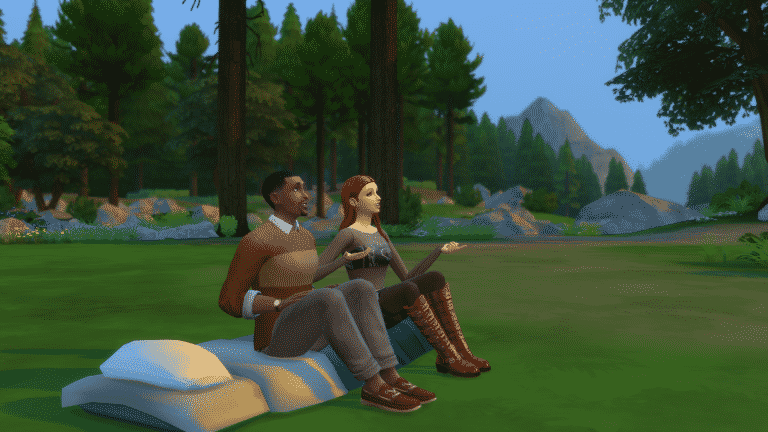
It’s just not camping when you can’t sleep out in the open. The Sims 4 Outdoor Retreat only came with tents which you couldn’t see what’s happening inside and there weren’t any options in other packs which could let you sleep out in the open.

Pickypikachu came up with a brilliant CC object which lets you sleep out in the open with the sleeping bags. You can put them in your inventory, place them anywhere in the world, sit and chat with other Sims and of course, sleep in them. There are some new poses when sitting and animations when going to sleep.

This awesome gameplay item can be installed easily. Just extract the content in the .rar file to Electronic Arts > The Sims 4 > Mods folder and make sure you have Mods / CC enabled in your game options.

Click the download button below to get this item!

[mks_button size=”large” title=”DOWNLOAD!” style=”rounded” url=”http://pickypikachu.blogspot.ba/2017/06/snug-as-slug-functional-sleeping-bag.html” target=”_blank” bg_color=”#1e73be” txt_color=”#FFFFFF” icon=”fa-arrow-down” icon_type=”fa” nofollow=”0″]