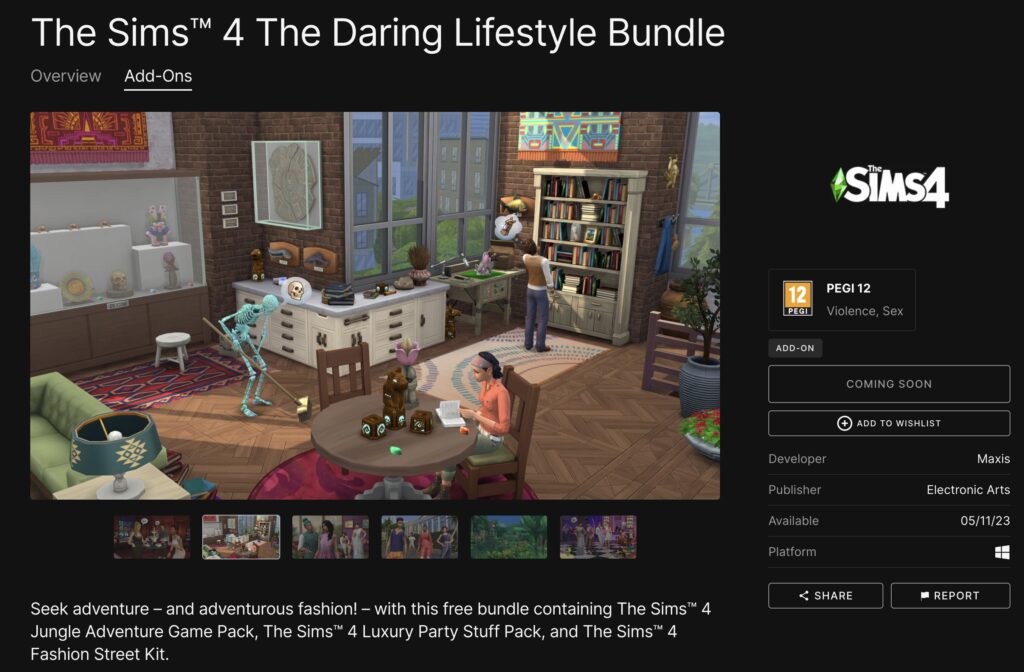
A couple of months ago The Sims Team had released The Sims 4 series on the Epic Games Store. The deal seems to be extending to exclusive offers, with the first one being a Free Bundle which consists of one Game Pack, Stuff Pack and a Kit.
Check out the information down below:
Sims 4 Daring Lifestyle: Epic Games Bundle Info
The Sims 4 Daring Lifestyle is an exclusive Bundle for people who have an account on Epic Games Store. If you don’t have an account yet you can easily create one!
The bundle consists of:
The Sims 4 Jungle Adventure Game Pack
The Sims 4 Luxury Party Stuff Pack
The Sims 4 Fashion Street Kit
You can check out the preview of the boxart below:
Sims 4 Daring Lifestyle: How to Claim on Epic Store
On May 11th, 2023 you’ll be able to claim this bundle entirely for free from the Epic Games Store. The Sims 4 Daring Lifestyle is only available for this Store and Launcher, meaning that you depend on it in order to launch these 3 Pack titles.
Furthermore, @TheKixg has found on the official page that this deal will last from May 11th to May 18th. Meaning that you have exactly a week to claim this bundle for free.
Sims 4 Daring Lifestyle – Availability Dates
In addition, the game page for this Epic Store Bundle can be found here! Remember, the Bundle will be yours to keep within this launcher if you claim it between May 11th and May 18th.
Seek adventure – and adventurous fashion! – with this free bundle containing The Sims™ 4 Jungle Adventure Game Pack, The Sims™ 4 Luxury Party Stuff Pack, and The Sims™ 4 Fashion Street Kit.
Players are unable to access their EA App Game Library or even Log In into their accounts.
ARTICLE UPDATE: Servers should be coming back up according to EA Help!
We've fixed the connectivity issues, so you should be able to get back online and play your games. Thanks for sticking with us! https://t.co/w1dEeadex8
It’s happening again! Players of EA titles have started reporting connectivity issues with EA App (for Windows) and Origin (for Mac).
Players of any Electronic Arts titles including The Sims 4 and the newly released Star Wars Jedi title are all reporting the same. Which is that the EA App won’t connect for them at all!
EA App Down: Issue & Statement
The EA App, also formerly known as Origin, is a desktop app (only for Windows now) that provides gamers with access to EA games and titles from other publishers. This app allows users to browse and download games, manage their accounts, and stay informant of new titles and offers.
The app also offers social features that enable users to connect with their friends and compete against each other in multiplayer games.
Unfortunately, the latest connectivity issue is still active and present. Customers are saying that they’re unable to see their Game Library. This error comes with the issues with EA’s online services.
The official EA Help account has released a statement on this issue, stating the following:
Something’s up with our online services, but we’re on it. In the meantime, you might not be able to connect to online modes, buy games, or log in to your account. We’ll get you back in your game as soon as we can.
As of now there aren’t any news regarding the further development and maintenance of lost connectivity. I’m still unable to access my Game Library, and I’m playing on Origin (Mac). It might take some time until we know more.
Are you still experiencing issues with the EA App? If so, let us know in the comments!
We’ll keep you posted about the state of EA App and Origin servers. Stay tuned on Sims Community!
The Sims 4 Growing Together introduces several new events that you can plan for your Sims. In this instance, we will be focusing on the new Stay Over feature. This new social event gives players even more ways to tell the stories they want to tell.
We’ll be telling you everything you need to know about this new event. From planning your own Stay Over event, preparing for your guests’ arrival, what to do during the event, and more!
What are you waiting for? Let’s take a look at everything you need to know about Stay Overs in The Sims 4 Growing Together.
Table of Contents
What is a Stay Over?
Sims 4 Stay Overs are a brand-new feature in the Growing Together Expansion. It opens up a number of possibilities for storytelling and gameplay in general. Finally, your Sims can
“Host a Stay Over at your household! Stay Overs can last multiple days, can occur during other events such as Birthday Parties, and allow guests to travel with your household too. Just make sure there’s enough room for everyone to sleep!”
Planning a Sims 4 Stay Over in Growing Together
There are two ways of initiating a Stay Over. The first way is by accepting one of the random event pop-ups in-game. By doing so, your household will have a Stay Over guest arrive shortly after acceptance and will stay with you for a few days. You’ll be able to view full details of the event in your Sims Household Calendar.
The second way to begin a Stay Over is by adding it to the Household Calendar manually.
Like with any event in The Sims 4, simply head over to your Sims Calendar, located at the bottom left-hand corner of the screen alongside the cell phone.
Once you are in your Sims calendar, head down to the Add Stay Over section of the calendar.
Household Calendar Events Panel
Here you will be greeted with a new pop-up option on the screen. This is where you will be able to select the finer details of your Stay Over.
From here, you will be able to select how many Sims you want to attend the Stay Over. Additionally, how many days the Stay Over visit will last, and what time you’d like your Sims to arrive?
Note:You can also use your Sims cell phone to create a Stay Over event. Simply head to the Social icon on the cell phone and you’ll see Plan Stay Over as one of the first options to choose from. You’ll then start the event planning process from the screen below.
Plan your Stay Over event even to the smallest detail!
If you are starting the Stay Over event straight away, you’ll be asked to confirm that you wish to start it there and then. If so, you’ll end any events that are currently taking place so that the Stay Over can begin.
Once you’ve finished planning your Sims 4 Stay Over, you’ll notice that the event will show on the calendar just like other events. You can also make edits to the event, and even delete it if needed.
The Household Calendar including the upcoming Stay Over.
Preparing for your Stay Over Guests
Now that you have planned or, accepted a Stay Over event prompt, it’s time to make sure your Sims and home are ready for their arrival.
As mentioned in the Stay Over description, it’s important to ensure you have space for your guests to sleep. Whether that is in a guest room or just placing a bed in an area of your house that works will be plenty.
Welcome to the Pancakes Household, Kyle!
When your Guests Arrive
Naturally, once your guests have arrived you want to welcome them to your home.
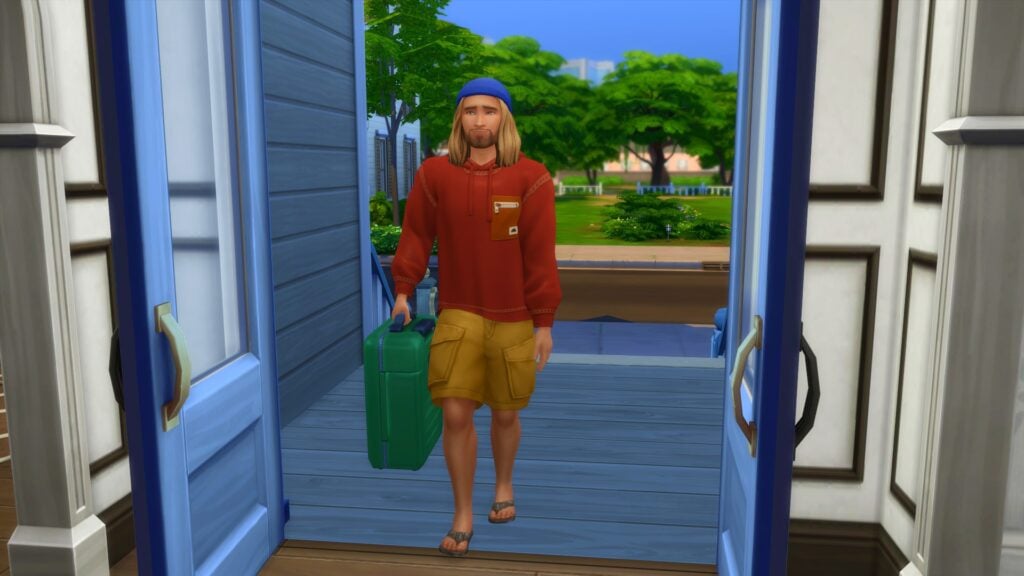
Your guest will arrive with a suitcase that will contain essentially contain what they need for the duration of their stay. However, it acts more as a dresser for your Sims that can be moved to where ever is needed in the lot.
Once they are settled in, they are a part of your household for the duration of their stay. Whether you are planning on staying in or taking a stroll around the world, they are with you every step of the way.
You can ask your guests to help around the home or take it easy and relax without feeling stressed. These interactions can be found under the Friendly tab of the social menu followed by the More Actions tab. If you ask your guests to help out, you’ll find they will automatically complete various tasks until they complete. Other than that, they will act independently for the most part unless you Sim or you as a player interact with the guest Sims.
Kyle and Bob enjoying a friendly conversation.
Ending a Stay Over in The Sims 4
If for whatever reason, you want to end the current Stay Over event you can! Simply head down to the household calendar and find the Stay Over event on the left-hand side. You’ll then see a small trash can icon. Select that and you’ll be able to end the current Stay Over event.
Stay Overs for Storytelling
The addition of the Sims 4 Stay Over feature in Growing Together not only lets players experience a new way of playing but also opens up more possibilities for Storytellers. The Sims you invite could be Grandparents visiting a new family like how we saw in the Growing Together gameplay trailer. You could have the Sims as long-lost friends or family, reconnecting after a number of years, or even simply just a Sim stopping by to spend some time with your household for a few nights. Whatever the reason may be, the Stay Over event opens up even more ways to tell your Sims stories!
Don’t Wake the Llama!
The Sims 4 Growing Together add some brilliant new features and experiences to the game. The new Stay Overs event gives players plenty more options to play with life and tell the stories they want to tell!
As always, stay tuned to Sims Community for all the latest news and information from The Sims franchise and for more about The Sims 4 Growing Together!
Build with Creativity using The Sims 4 Modular Furniture!
The Sims 4 modular furniture comes with the Dream Home Decorator game pack. an array of brand-new objects and two of the most interesting new additions is the new modular furniture and sectional sofas. In the past many of us have probably tried to create our own Modular style furniture and sectional sofas with what was currently available to us in game (with the help of bb.moveobjects) or by using custom content.
The Sims 4 modular furniture works similarly to how the many other items snap together. When you go to move them, they will move in a group rather than individually. You will still be able to move individual pieces as well if needed. Sectional sofas are also easy and straight forward to create too.
Now, you might have a few ideas of what you would like to build using The Sims 4 modular furniture. If not, we’ve put together a few ideas to help get you started!
The Sims 4 Modular Furniture Inspo
Dining
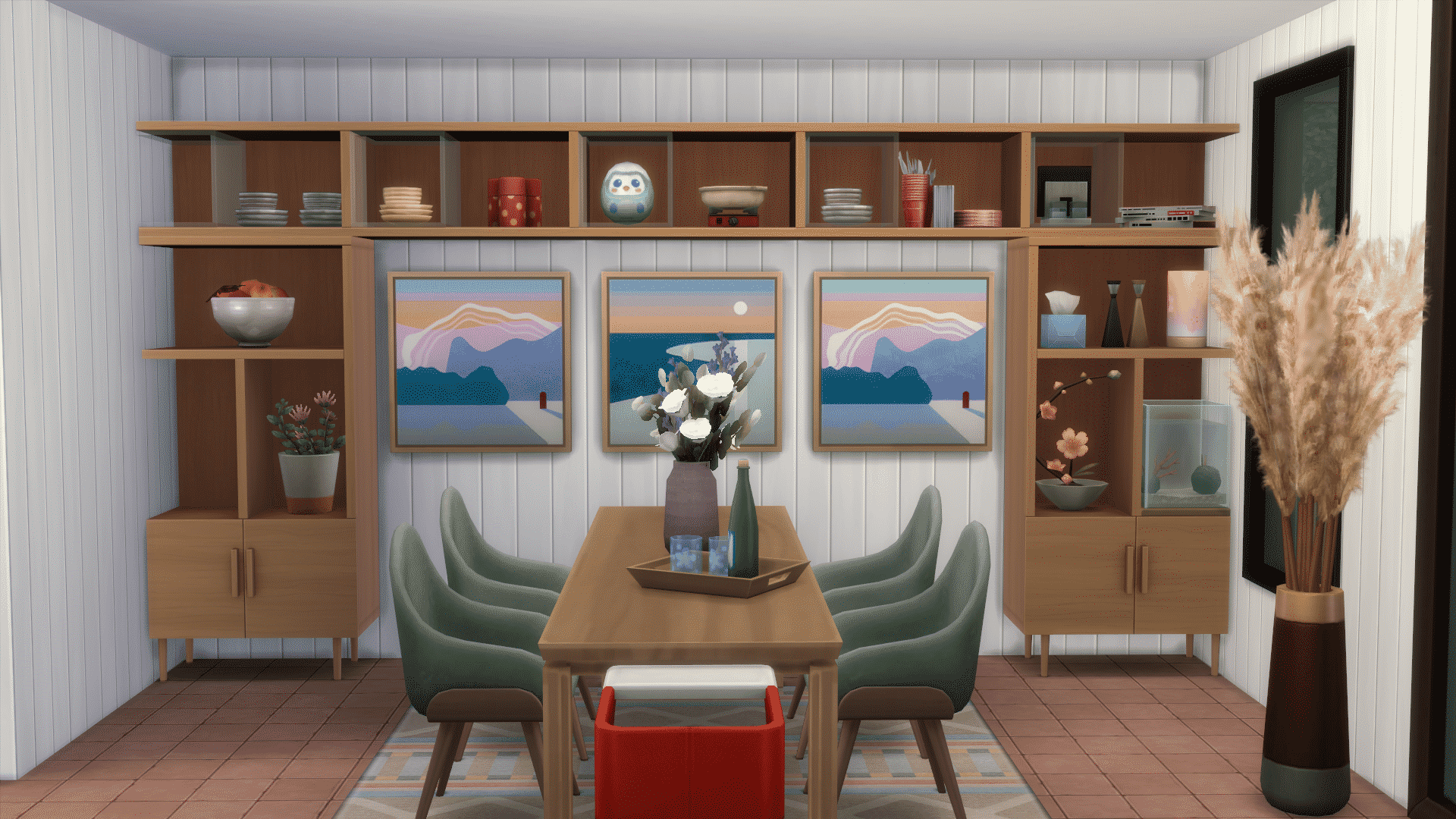
This dining room uses clean lines and a neutral wall colour to bring the focal point to The Sims 4 modular furniture shelving along the wall. Some paintings add a touch of warmth to the space and the dining table has some lovely accents to make you want to sit down and enjoy a meal here. If you look closely, the shelves are decorated with clutter items that suit a dining room aesthetic. Stacks of plates, decorative fruit bowls, and cutlery create a cohesive theme for the room.
Kitchen
This kitchen makes use of neutral furnishings against a patterned wall covering which makes the space look visually interesting without causing eye fatigue. When designing spaces in neutral tones, don’t be afraid to add a splash of colour here and there to make certain parts of the room pop. Here, we’ve paired grey with a pop of orange in the floor tiles, bar stools, and appliances. The Sims 4 modular furniture is great for this; recolour specific pieces of your custom furnishings to create variety.
Lounge
This lounge space uses darker tones paired with a pale yellow to tie together all the different parts of the room. Notice how The Sims 4 modular furniture shelving has dimension with one shelf jutting out from the rest of the entertainment unit. This adds depth and visual appeal to the room so don’t be afraid to play with dimension in this way. A large sectional sofa that wraps around the room creates a division of space without feeling closed in. Consider using furniture to divide open concept spaces like this.
Walk-In Closet
Use Sims 4 modular furniture to get creative with your walk-in closet spaces! This closet space is designed to be part of an open concept loft. The area is separated by a small set of stairs leading up to a platform. This clever use of space opens up smaller homes and creates visual appeal. Notice how dimension is used again with this space by having the shoes rest on a lower section of the modular shelving instead of everything being uniform.
Bedroom
This bedroom is perfect for two children! The pastel yellow tones are warm and inviting but still soothing enough to relax the busy mind of a young child when it’s bedtime. Open hangers above some drawers open up this fairly small space a little more. Plus, having the lower bunk create an L-shape in the room adds some visual variety. Again, it’s all about creating depth and dimension with your furniture placement! If both beds were against the same wall, this room would look very flat and empty. This shows how Sims 4 modular furniture can be used for so many different purposes.
Office
This desk slots right into a larger shelving unit which is a clever way to save space in a small area. You can create many different types of usable furniture that looks built into the surrounding Sims 4 modular furniture. A patterned rug adds some variety to a space that is otherwise mostly neutrals. Remember, a strategic pop of colour here and there can turn a neutral space from boring to beautiful very easily!
Outdoors
Sometimes, there’s no need for elaborate setups. There are times when less is more, which this elegant but simple outdoor seating arrangement showcases. This Sims 4 modular furniture features three lounge chair pieces put together to create a lovely space to relax, catch some sun rays, or take a nap. A tropical plant and a drink tray nearby add to the relaxing vibes. So if you’re worried your space isn’t fancy enough, remember that there is beauty in simplicity, too.
While this is just a small handful of ideas on how you can use The Sims 4 modular furniture from Dream Home Decorator, there are countless possibilities on what you can create!
Let us know what you plan to create using the new furniture in the new pack in the comments below and on social media.
Befriend or sabotage your workplace rival to get ahead in your career!
Sims now have a chance to get a The Sims 4 Growing Together workplace rival. Have you ever had that one person at work that’s determined to make your life difficult no matter what? Well, now your Sims can experience that, too. While your Sim has a rival, they won’t be able to gain promotions. Their rival stands in the way of their career progress. The only way to clear the path to promotion is to end the rivalry… by any means necessary.
Table of Contents
Getting a The Sims 4 Growing Together Workplace Rival
Getting a workplace rival is somewhat random. There’s no way to guarantee that your Sims will get one but if there are other Sims in the world in the same career track as your Sim, there’s a chance that any one of them may become your Sim’s workplace rival.
When your Sim gets The Sims 4 Growing Together workplace rival, you’ll receive a notification about it. You can see more details about your Sim’s workplace rival in their career panel. Their workplace rival exists to block your Sim’s path up the career ladder. They won’t be able to earn promotions while they have a workplace rival, no matter how well they’re doing at their job.
The only way to start getting promotions again is by ending the rivalry. There are several different ways you can achieve this.
Befriend Your Rival
The most amicable way to resolve a workplace rivalry is to befriend your Sim’s workplace rival. You can do this either on the job or outside your working hours.
When your Sim leaves for work, you’ll have the option to Befriend Work Rival if you click on the people icon on your Sim’s portrait while they are away at work. You’ll receive notifications throughout the day about how your Sim is going about trying to make friends with their rival. Successfully being nice to your rival while at work increases the friendship between your Sim and their rival.
However, spending so much time focusing on your The Sims 4 Growing Together workplace rival while at work will lower your work performance. If you don’t want your Sim’s work performance to suffer while they try to befriend their rival, they can see them outside of work to try and mend things. Invite them over or invite them out somewhere to be friendly with them. If your Sim becomes friends with their rival, the rivalry will end the next time they go to work.
Once the rivalry ends, your Sim will be able to gain promotions again.
Sabotage Your Rival
On the other hand, it might be more fun to sabotage your rival. You can do this either on the job or outside your working hours as well.
When your Sim leaves for work, you’ll have the option to Sabotage Workplace Rival if you click on the people icon on your Sim’s portrait while they are away at work. Goofball and Evil Sims will especially enjoy doing this; they will gain Fun from sabotaging their The Sims 4 Growing Together rival. You’ll receive notifications throughout the day about all your Sim’s efforts to make their rival completely miserable. Successfully sabotaging your rival while at work lowers the friendship between your Sim and their rival.
However, spending so much time focusing on your The Sims 4 Growing Together workplace rival while at work will lower your work performance. If you don’t want your Sim’s work performance to suffer while they try to sabotage their rival, they can see them outside of work to be a jerk to them. Invite them over or invite them out somewhere and use Mean or Mischievous interactions with them. Terrorizing your workplace rival outside of working hours can also end the rivalry.
Of course, there is an even faster way of ending a workplace rivalry… if you or your Sim are diabolical enough. If your The Sims 4 Growing Together workplace rival dies, the rivalry automatically ends since there is no rival to compete with anymore. You might want to help that along a little bit by, say, inviting them to a party then locking them in the basement with no food. Indefinitely. Just saying…
Once the rivalry ends, your Sim will be able to gain promotions again.
If you liked our The Sims 4 Growing Together Workplace Rival guide, check out our Milestones Guide!
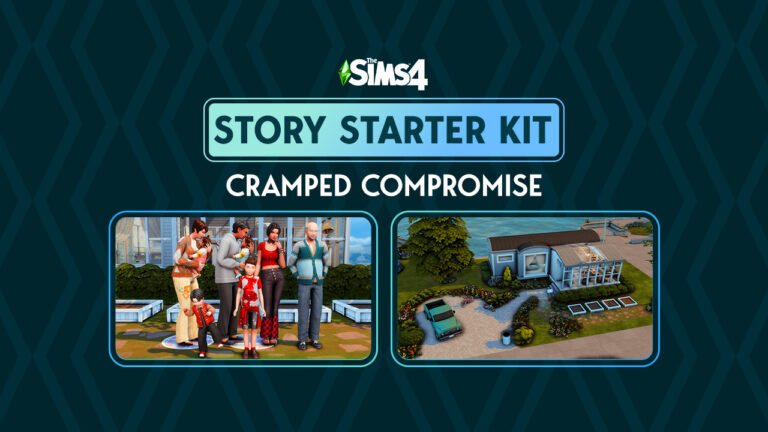
A big family down on their luck in a small trailer struggles to keep it all together
Welcome to our sixteenth official The Sims 4 Story Starter Kit! If you missed all the info on The Sims 4 Story Starter Kits, you can read more about what they are and how they work in our introductory article!
For this month’s The Sims 4 Story Starter Kit, we’re bringing you a big family that’s down on their luck. Can you fix all the problems these Sims have or will this family crumble to pieces in tight quarters?
Table of Contents
The Sims 4 Story Starter Kit: Cramped Compromise
Kaitlin met Adrian fresh out of high school at a bar. Adrian was nearly ten years older than her but that didn’t stop the sparks from flying. Kaitlin found herself pregnant with their daughter, Isabella, at a young age very early on into their relationship, much to her father’s outrage. Figuring he should do right by Kaitlin, Adrian stepped up and married her before Isabella was born.
In spite of Kaitlin’s father hating Adrian and in spite of everyone telling them their hasty shotgun marriage would never last, Kaitlin and Adrian built a good life for themselves and welcomed two more children into their family. Adrian had a good paying office job at a big company in the city which allowed Kaitlin to stay home and care for their children. They had a nice spacious home in the idyllic suburbs. Life couldn’t be better but that was all about to change very fast.
Adrian was suddenly laid off from his job without warning. It was the worst possible time to become unemployed because right after, they discovered Kaitlin was pregnant with twin girls that they hadn’t planned for. They went from being financially comfortable to living paycheque to paycheque. When Kaitlin’s pregnancy complications resulted in an emergency c-section and an extended hospital stay, they had no choice but to sell their house and move into a small trailer to pay off the medical bills and other debts that had accumulated.
Losing their home was the final straw that broke Adrian. He stopped looking for work, forcing Kaitlin to juggle two part time jobs just to keep the family afloat. He lost interest in everything, even his own family and spends all his time lost in video games on his phone. All the kids are lashing out at the sudden changes in their own ways and Kaitlin feels like a single mom married to a complete stranger. She doesn’t recognise her own husband anymore.
To make matters worse, Kaitlin’s mother recently passed away, leaving her ailing father, Richard, without anyone to care for him. They can’t afford to place him in a retirement home so the only option was to find space for him in that tiny trailer. Richard’s erratic behaviour and dislike of Adrian makes him more difficult to care for than all five kids combined!
Can you take this The Sims 4 Story Starter Kit and turn things around for this struggling and overwhelmed family? Or is it too late to salvage a marriage and a family that’s been falling apart for such a long time?
EverydayFormalAthleticSleepwearPartySwimwearHot WeatherCold WeatherHope and Faith also have customised outfits in each infant clothing category; they’re just not pictured. I use MCCC to change outfits quickly and this option is not available on infants yet.
The Sims 4 Story Starter Kit Household Info:
Kaitlin Cottrell
Age: Young Adult
Pronouns: She/Her
Romantic Interests: Men
WooHoo Interests: Men
Romantic Exploration?: No
Traits: Socially Awkward, Family Oriented, Foodie, Domestic (Bonus)
Aspiration: Super Parent
Likes: Yellow, Soul Music, Cooking, Basics Fashion, Hard-Working Sims, Family Motivated Sims, Small Talk, Discussing Hobbies, Affection
Dislikes: Black, Alternative Music, Video Gaming, Rocker Fashion, Streetwear Fashion, Ambitionless Sims, Argumentative Sims, Complaints, Pranks
Isabella Cottrell (Granddaughter) – Jokesters, Bad Compatibility
Mathew Cottrell (Grandson) – Jokesters
Jaxen Cottrell (Grandson) – Jokesters
Hope Cottrell (Granddaughter) – Jokesters
Faith Cottrell (Granddaughter) – Jokesters
Packs Used: Growing Together, High School Years, Parenthood
Household Notes:
This The Sims 4 Story Starter Kit household should be able to purchase their lot with their default starting funds. Make sure you import the family into CAS, then move them in. If you move them into a home straight from the Gallery, they will not have the funds I set for them.
The Sims 4 Story Starter Kit: Tight Quarters
ExteriorSunroom/LoungeSunroom/LoungeSunroom/Lounge (Richard’s Bed)KitchenHallwayKaitlin, Adrian & Jaxen’s BedsBack Sleeping SectionIsabella’s Bed & Faith’s CribMathew’s Bed & Hope’s Crib
This latest The Sims 4 Story Starter Kit build is a tiny one but don’t be fooled by the size; this trailer has space for 8 people to sleep and the sunroom extension on the front of the trailer offers some extra lounge space. It might not be luxurious accommodations but it could be worse! A small roof over one’s head is still better than no roof.
The Sims 4 Story Starter Kit Lot Info:
Lot Type: Residential
Price: §29,524
Size: 30×20
Beds: 8
Baths: 1
Lot Traits: Homey
Lot Challenges: None
Packs Used: Growing Together, High School Years, Parenthood, Greenhouse Haven, Basement Treasures
Your The Sims 4 Story Starter Kit is waiting for you! Get The Household and The Lot by downloading them from the official Gallery Website linked on the buttons below. Or, follow SnarkyWitch in the Gallery and look for Cramped Compromise and Tight Quarters!You can also find all our The Sims 4 Story Starter Kits by searching the hashtag #StoryStarterKit in the Gallery!
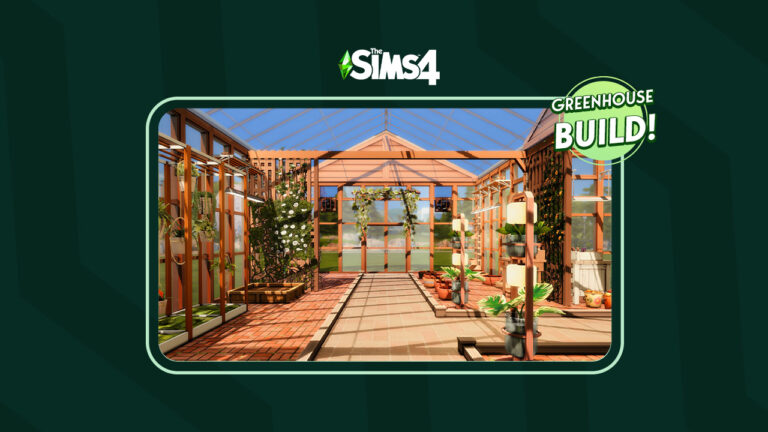
Let’s build a greenhouse with the Greenhouse Haven Kit!
The Sims 4 Greenhouse Haven is one of two recent additions to the game’s kit collection. The kit features a handful of Build and Buy content designed to build and decorate the greenhouse of your dreams. New greenhouse windows with matching doors, gables, and glass roofing allow you to create a seamless look for your greenhouse. Shelving, wall-hanging solar lights, seedling planters, air circulators, and other gardening clutter will help you decorate greenhouse spaces that look more true-to-life than ever.
We wanted to put this kit to the test and see if we could build a beautiful, realistic-looking greenhouse primarily using the Greenhouse Haven Kit with a handful of other packs to supplement the build. We knew not incorporating other packs like Blooming Rooms and Seasons would have been a missed opportunity here; they compliment the theme of The Sims 4 Greenhouse Haven so well.
So without further ado, let’s build a slice of paradise with the new kit!
Table of Contents
Building with The Sims 4 Greenhouse Haven Kit
The Blueprints
I decided to build a T-shaped greenhouse of medium size. Why a T-shape greenhouse? I just love them! Don’t ask me why. I couldn’t tell you. I just do! It makes for a more interesting layout than a simple rectangular greenhouse, at least.
I laid out the t-shape and then got to work making it look like a greenhouse. Of course, I wanted to check out the new windows and matching doors that came with The Sims 4 Greenhouse Haven kit. I was pleasantly surprised by the variety in the swatches. I could do French style glass windows, simple panes, and even wire mesh windows that would also look good on an enclosed sun porch. The doors matched perfectly with all the swatches.
I was especially happy to find a roof gable that matched the doors and windows, too! It always bothered me how the roof stuck out on my greenhouses. It was an eyesore and broke the seamless look I wanted for the building. The roof gable solves this issue, making your greenhouse look cohesive from top to bottom. Honestly, I think this one simple piece is my favourite item in The Sims 4 Greenhouse Haven kit just for this reason. The Sims 4 Greenhouse Haven Kit also comes with a matching glass roof which is nice.
Decorating the Space
Once the exterior looked like a greenhouse, I got to work filling the inside with plants. I tried to incorporate every single item from this kit into this build. That turned out to be easy to do because everything looked really nice and fit a greenhouse aesthetic perfectly. I laid out the stone flooring with overgrowth between the bricks and used some of the Country Kitchen floor tiles as a path through the greenhouse. The Sims 4 Greenhouse Haven kit does not come with wall coverings which makes sense since you wouldn’t really see anything but the windows in a greenhouse, but don’t forget to cover the walls anyway; Sims will notice an unfinished room.
I decided the greenhouse could use some earthy-looking partitions to divide the space a little. I used the Eco Lifestyle tall fencing to achieve this and covered it with ivy from the Vampires and Get Together packs. With all the structural stuff done, all that was left to do was fill the space with lots of beautiful plants! I realised as I decorated just how much more realistic this greenhouse looked thanks to the new objects. The seedling planters and gardening clutter like fertilizer bags, pesticides, and watering cans tied everything together so well.
I loved that the solar lights were wall-mounted and not ceiling lights. If you have a greenhouse with a glass roof, ceiling lights look very strange; they look like they’re hanging from nothing. The wall mounted solar lights match perfectly with where the window panels are and it looks much better. I also used some build cheats to place the new shelves over the lights where I put some more seedlings. A few wire mesh windows and air circulators complete the look.
Don’t Forget the Useful Stuff!
It was easy to get carried away filling up the whole greenhouse with decorative plants from The Sims 4 Greenhouse Haven and Blooming Rooms kits but I did want Sims to actually garden here. For that, I needed planter boxes. Since the greenhouse is not huge, I definitely took advantage of Eco Lifestyle’s space-saving vertical planter boxes. These are great in greenhouses and other confined garden spaces. You can have two plants growing in a single tile of space. However, if you want to grow a few trees, there are a couple large planter boxes for that. I filled up the rest of the usable space with small planter boxes and added a flower arranging table from Seasons.
Download This Build!
The results? A truly tranquil, warm, and botanical space where any avid gardener would love to spend their days! I’d consider this The Sims 4 Greenhouse Haven kit build a success. I love how this greenhouse turned out and I hope you will, too! You can download this greenhouse and use it in your own game! This build uses no custom content (CC) so console players can enjoy it, too.
Click the button below to download Little Sprout Greenhouse or search the ID SnarkyWitch in the Gallery!
New information about how life stages work in Life By You!
Rod Humble’s latest project is shaping up to be his greatest one yet! In case you missed the news, Rod Humble is working with Paradox Tectonic to release a direct competitor to The Sims; an open world life simulation game called Life By You. The development team has been very transparent about the features they’re working on and what will and won’t be included in the early access when it launches in September.
Their latest blog post goes over aging and life stages. Many player questions regarding how aging will work in Life By You have been answered and the dev team talks about which ages will be in the early access and which ages will be in the base game eventually but not included with early access. They also go over exactly how aging works in Life By You and how your characters will progress through their lives.
Table of Contents
Life By You: All About Life Stages
Which life stages will be in the game?
The blog post reveals that teens, adults, and elders will be available in Life By You at the start of early access in September. Currently, the team is unsure whether or not children will be included in the early access. They are still working on developing children and want to make sure they meet player expectations when they are introduced to the game. Here is what the team had to say about children:
We are still hard at work to determine if Children will be available at the start of Early Access. This will depend on how development of child visuals and bug fixing goes over the next few months. We have already created content for children, and also feel that the gameplay is rewarding, however we need time to bring visual charm and make sure that this life stage is working properly.
They also state that infants, toddlers, and children will all be part of the base game eventually. These life stages have been developed and playtested already but the dev team feels these life stages still need more development before they are introduced to the game. While this may be a bit disappointing to players who were looking forward to more family gameplay in September, they can at least take comfort in knowing the dev team is not keen on pushing out unfinished content just to meet a deadline.
A child’s bedroom in Life By You
How does aging progress?
Although Sims players might be familiar with the age progression from baby to elder, Life By You’s aging will be a little more true-to-life. Rather than only celebrating a birthday when a Sim enters a new life stage, the characters in Life By You will have a birthday every year, going up 1 year in age at every birthday. When it’s time for them to enter the next life stage, there will be an animation that happens to mark that larger change.
Right now aging follows the progression of in-game time and each human will have a birthday every year and go up 1 year in age. Visuals and animations are tied to life stages themselves and will update when a new life stage is achieved. We are still fine tuning the visuals across all of the life stages in the game right now. We can’t wait to see what you think of aging, so this is a major area where we will be watching player feedback during Early Access.
Interactions between characters will be appropriate for their life stage. For example, children’s speech patterns will sound like a child and the things they talk about will be relevant to a child’s unique interests. The dev team is continuing to add lots of new interactions between now and early access. They also plan to continue adding more interactions throughout early access. Players can look forward to lots of life stage specific content.
When it comes to what each life stage can do, this is also suited to the specific life stage. The blog post states that only teens and older characters can cook all the recipes. The way this was worded leads us to think that children will be able to cook some simple recipes that don’t require hot appliances or sharp utensils; however, this is just speculation on our part.
Work/School, Transportation, and Dating
For work, school, and relationships, the blog post reveals that only adults can have careers. It also states that when children are added to the game, there will “likely” be a school for them that is not a rabbit hole. They did not specify whether teens can go to school in the early access or if school will be added for them eventually. However, they did state that university will not be in the base game.
Children will have bikes, tricycles, and skateboards to travel around the world so transportation is also age-appropriate. Dating unlocks at the teen life stage. Teens can only date other teens and adults can only date other adults. There will also be unique conversations surrounding dating for those specific life stages.
Looking for more Life By You content? Check out the first detailed developer livestream and stay tuned for more Life By You News in the near future!
EA has released a new Fix Update for The Sims 4 across PC and Consoles.
The Fix Update
The Sims Team has just released their latest Patch drop for The Sims 4 Base Game. Featuring fixes for Bugs & Issues reported after the April 18th Update. Including the Face Glitch, Teeth Errors and more. Check out the full list of fixes in the Patch Notes below!
The Sims 4 Update: How to Install
You can download the latest version of The Sims 4 by checking for updates through the EA App / Origin. If you have Automatic Updates enabled the update will automatically download through your client program.
If you play The Sims 4 on Xbox Series and PS4 / PS5 you can request a new update by checking for updates under The Sims 4 game tag.
In case you have Mods or Custom Content, the game will automatically disable them for you after first launching The Sims 4 after the update. To re-enable all your Mods and Custom Content, select the Settings option in the Menu and select Settings. Under the ”Other” section you’ll find the ”Enable Custom Content and Mods” option. Check it and restart your game in order for it to take effect!
This patch re-enables the lose tooth feature from The Sims 4 Growing Together expansion pack. With much wiggling, pulling, and twisting those several pesky tooth issues have been yanked right out. Our Sims’ mouths have healed wonderfully and the over nine million recently created infants will once again have these next stages of life to look forward to. We appreciate your patience throughout this dental visit and wish you many Simoleons under your pillow in the morning.
– SimGuruNinja
Sims 4 Update: Bug Fixes
Base Game
An issue that was causing subtle adjustments to the appearance of Sims in the April 18th update has been resolved. You may have noticed this issue affecting the appearance of things such as a Sims’ eyes, teeth, and facial structure.
Any Sim that was created prior to the April 18th update should return to looking as they did before.
Any Sim that was created between the release of the April 18th update and this update will have minor adjustments to their appearance as a result of them now being correctly rendered.
Growing Together
The chance for a Child Sim to experience losing a tooth has been re-enabled.
A Child Sims’ skin material will no longer become corrupted after the Loose Tooth buff expires if the child was already missing two front teeth. ♫ All they really wanted were their two front teeth… ♪
A Teen Sims’ skin material will no longer become corrupted after the Loose Tooth buff expires. You get to decide how to corrupt your Sims, not loose teeth!
What are your thoughts on The Sims 4’s latest April 26th, 2023 Update? Join the conversation below!
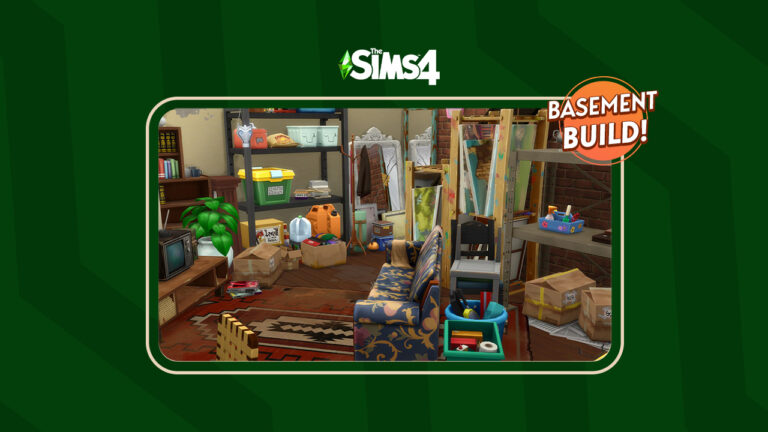
Do you know what treasures are hiding in your basement?
The Sims 4 Basement Treasures is one of two brand-new Kits recently added to our growing collection of smaller content packs. The Kit features a variety of new objects, albeit some that have seen better days! Featuring objects with a slightly more grungy style, as well as a nostalgic throwback or two. If you know, you know!
We wanted to put this new Kit to the test by creating our own basements using the new objects. However, looking at The Sims 4 Basement Treasures Kit, you can do more than just create Basements! A number of the new objects work well in various different themed builds and with other packs. One that I’m sure many will think to pair together is The Sims 4 City Living. Of course, there are a number of packs that this new Kit will work well with!
Now, without further ado, let’s build our own Basement filled with nostalgic memories and treasures galore!
Table of Contents
Building with The Sims 4 Basement Treasures Kit
Getting Started
As this is a basement build, I wasn’t too worried as to which lot I was going to build it on, as I had just created a new save. With a random pre-made lot selected, I jumped into trying to figure out how I wanted this basement to look.
The first few layouts seemed too large and would be overwhelming to fill all the space in some way. Taking it back to basics and keeping it simple, I eventually settled on one that I felt would work.
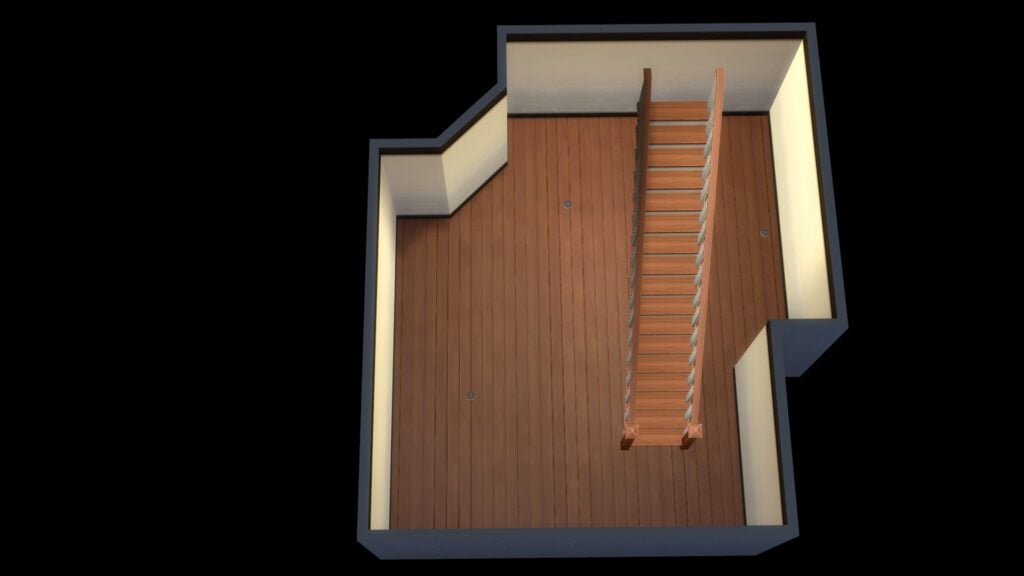
The beginning of our basement layout!
The basement started to take shape after placing a variety of different objects from The Sims 4 Basement Treasures and several other packs. At this moment in time, there was no real final placement for a lot of the objects just more experimenting with different combinations throughout the basement.
If you know, you know!
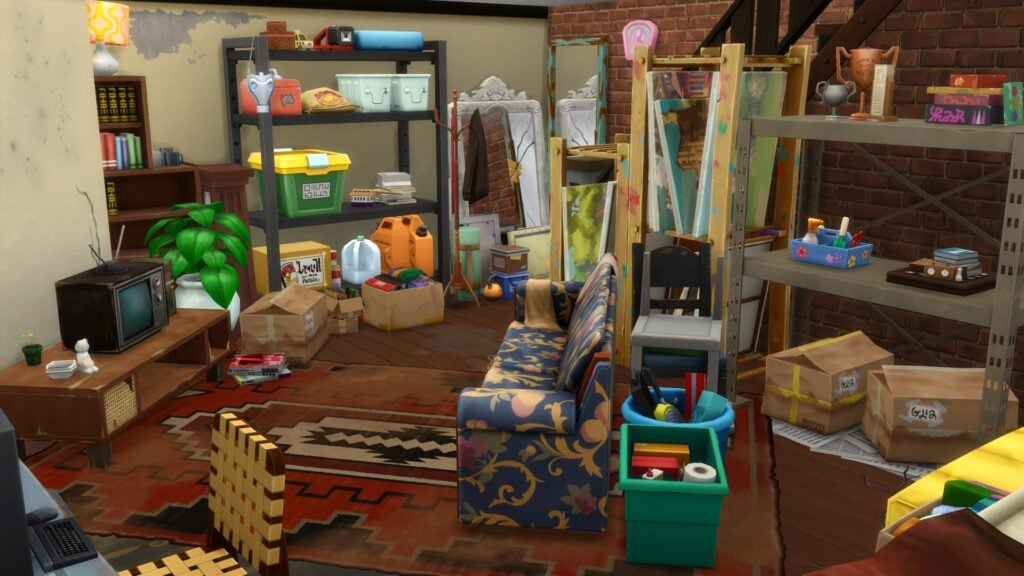
I had two things I wanted to achieve in this first basement build. The first was that it was a space where long forgotten furniture could be stored as well as having space to store those lesser used objects. Secondly, even though it would be somewhat cluttered, a usable area of the basement featuring a small seating area and television set up. It wouldn’t be the most aesthetically pleasing area of the basement however it would be perfect considering the surroundings.
It’s taking shape!
I have to admit, there was a moment when I absolutely hated how things were coming together. I ended up clearing the room of all the objects and starting over again. After some more trial and error, scrolling through the Build catalog and trying out objects from various different packs, slowly but surely it started to take shape.
Clutter, Clutter & More Clutter
One of my favorite things to do when building is adding a touch of clutter to my builds. Now with so many more options for adding clutter, especially with the likes of the Everyday Clutter Kit. There are so many more ways to help bring your builds to life now!
I found myself digging through the Build Catalog once again, looking at the likes of City Living, Strangerville, and more to find the perfect objects to add to this Basement Build.
A Basement full of treasures and memories!
The Sims 4 Basement Treasures and Other Packs
It goes without saying that the Basement Treasures Kits work perfectly with a number of other packs in The Sims 4! Be it wall decor, clutter objects, or even pieces of furniture that have seen better days, here are a few packs that we found worked well with Basement Treasures!
City Living
Growing Together
Strangerville
Werewolves
Vampires
Everyday Clutter
Bust the Dust
Another look at a Cluttered Basement for your Sims
Download This Build!
Overall this basement treasures-inspired build is not only cluttered and messy but also a useable space! Whether it is purely for storing furniture your Sims no longer need or a place for your teen Sims to hang out, there is plenty of options!
This build features no custom content and features objects from The Sims 4 Basement Treasures and several other packs. Full details of the packs used can be found in The Gallery listing.
Click the button below to download the Cluttered Basement or search the ID Leekseverywhere in the Gallery!
Give your green-thumbed Sims the Greenhouse of their dreams!
The Sims 4 Kits are small pieces of content that The Sims Team release periodically throughout the year. Since their release we’ve seen a wide variety of themes covered and Greenhouse Haven is one of two brand-new Kits released this April. We also know that both The Sims 4 Kit and the Basement Treasures Kit are just two of four we are to see between now and June!
Greenhouse Haven focuses on opening up more ways for our green-thumbed Sims to enjoy their outdoor spaces. With a variety of new Build and Buy mode objects to choose from, there will be no stopping our Sims from wanting to spend more time tending to their plants and those that are harvestable!
You’ll find that the new objects come in a variety of neutral-toned swatches, with the odd pop of colour here and there. Most objects have between 4–12 swatches to choose from, too.
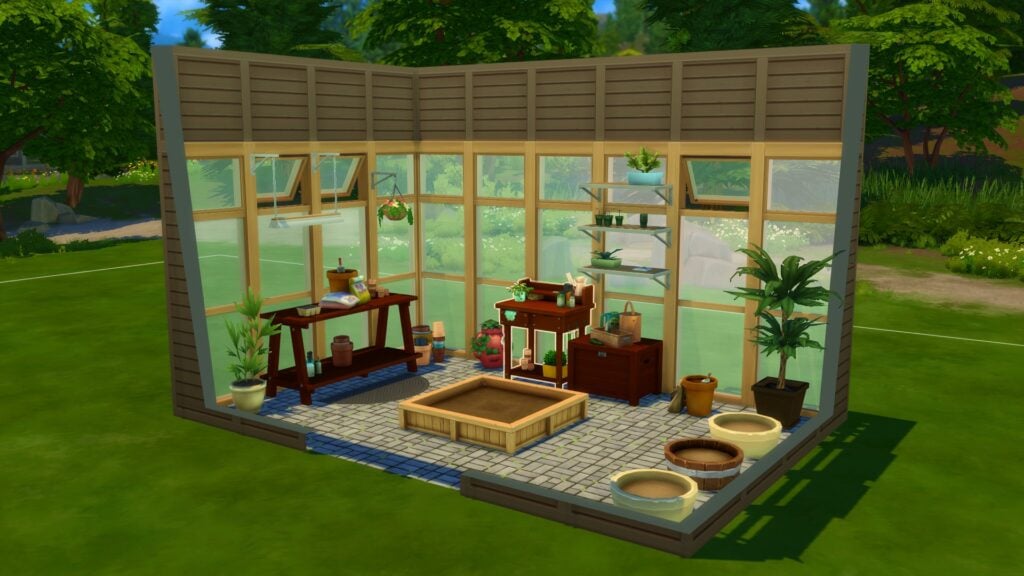
Let’s take a closer look at Greenhouse Haven Kit! This Sims 4 Kit comes with over twenty-five new Build/Buy items and one new styled room. You can check out all the swatches and catalogue entries below!
Tablet of Contents
Every Object in The Sims 4 Greenhouse Haven Kit
Let’s start by taking a look at all the new objects and their catalogue entries!
Build & Buy Mode
Styled Room
All the new objects that are included in The Sims 4 Greenhouse Haven Kit
Swatch Selections
First up are all the swatches from the new objects that you can find in Buy Mode!
Next up are the swatches from the new Build Mode objects!
And lastly, the swatches from the newly styled room.
All the new objects and their swatches with The Sims 4 Greenhouse Haven Kit
Our Review of The Sims 4 Greenhouse Haven Kit
The Sims 4 Greenhouse Haven offers players over twenty brand-new objects to expand and improve on their Sims gardening dreams!
When the new roadmap was first teased, like many, we were unsure what The Sims Team had planned when told us to get ready to reclaim our spaces at home. While being somewhat puzzled yet intrigued by what this meant, we started to think about the possible themes of these new The Sims 4 Kits. While we didn’t have to wait long for the first two to be revealed, we think it is safe to say we were pleasantly surprised at the teased images for Greenhouse Haven.
Now that the Kit has been released and we’ve had a chance to explore the new additions, the overall first impressions were promising. From the variety of smaller, more decorative objects to the new mesh windows and doors, it truly has inspired us to get into our Sims gardens and build them their own Greenhouse Haven!
From exploring the Kit ourselves over the past few hours since its release, we found ourselves gravitating towards the smaller decorative plant pots and saplings when experimenting with building ideas. Even the gardening tools added another level of depth to some of the small builds we played around with.
The addition of the meshed windows and doors is a nice touch and again helps create a number of different greenhouse styles. The new brick flooring option is also wonderfully detailed and we can see ourselves using it in a number of upcoming builds. All the new build objects would work well if you were wanting to add a sunroom or porch to the home of your Sims instead of a greenhouse. It definitely got us thinking about how these objects would integrate with objects from other packs! Two that stood out to us were how it would pair up with the Blooming Rooms Kit and even the Seasons Expansion Pack!
Overall, The Sims 4 Greenhouse Haven is a lovely Kit to have within your collection. Whether you are a builder or a storyteller, it does open up a number of possibilities. Would we say it is a must-have Kit? It’s hard to say because we all play differently, however, we feel it is a Kit to consider if you are looking to add one or two new Kits to your collection!
Looking for our overview and review of the Basement Treasures Kit? Look no further!
This brand-new lot type was introduced to players in The Sims 4 Growing Together.
Now you might be wondering, what is the purpose of the recreation center? Well, it is simply a place that is part of and at the heart of the community!
In Growing Together, a recreation center is described as the following:
A recreation center is the perfect place for family-friendly community learning and play. It’s an arts center, fitness zone, game room, and play space all in one.
A Ghost Sim using the Music Room at the Celebration Center
Table of Contents
Where in Growing Together do I find the Recreation Center?
To find the pre-made recreation center, simply visit the Gilbert Gardens neighbourhood in San Sequoia! You’ll then be looking for the lot called the Celebration Center. Once you’ve located the pre-made lot, simply select the Sims that you want to travel with, and off you go!
Introducing the Celebration Center
Now that you have travelled to San Sequoia with your Sims, let’s take a closer look at what the Celebration Center has to offer!
The Growing Together Celebration Center in San Sequoia
The lot is situated on a 64×64 also comes with the Fast Internet, Great Acoustics and Study Spot lot traits.
On the lower ground, you will find a kitchen and dining space, workout area, indoor play area as well as a welcome desk and a handful of tables dotted around.
The Lower Ground Floor of the Celebration Center
As for the upper level of the Celebration Center, you’ll find an arts and crafts room, study space and a music room!
The Upper Level Floor of the Celebration Center
Let’s not forget about the outdoor space at the Celebration Center!
Overlooking the lake in San Sequoia, you’ll find the outdoor play area for younger Sims, It features two sets of monkey bars and the Starcruiser X jungle gym! Additionally, you’ll find an outdoor seating area by the kitchen area and also some chess tables dotted around under a beautiful Cherry Tree.
Child Sims Play AreaOutdoor Areas at the Celebration Center
Did you know, that the recreation center that came with the Growing Together expansion pack was created by LilSimsie?
What can you do at a Recreation Center?
Well, you can do pretty much anything. As mentioned in the lot description, you can have elements of the recreation center dedicated to learning, arts, fitness, games, and more! While these may seem quite simple and straightforward activities, they are in fact also very broad, and there are a number of ways your Sims can get involved.
What if I want to create my own Growing Together inspired Recreation Center?
You certainly can!
Whether you want to revamp the pre-made recreation center or want to create your own, there are a number of ways you can do so!
A Recreation Center can be a number of different things. It’s not only a community orientated lot, but also a place where Sims can also focus on their own personal development. Let’s also not forget, you can even host events and club get together’s here too!
The Celebration Center in San Sequoia
Don’t forget, Recreation Centers are not just limited to being placed in San Sequoia! They can be placed in any world and on any lot size too!
Recreation Center Ideas
Here are some ideas of things you can incorporate learning into your own Recreation Center:
Skill based rooms – Either a particular skill in general or focused on a specific task Sims can complete to improve a particular skill.
Kitchen – Not only can Sims improve their cooking skills here but it can also be a way of developing friendships with other Sims from within the Community.
Events Space – The one-stop space for Sims to host their own events. These could include Baby Showers, Family Reunions,
Day Care/Play Area – We all know it’s sometimes hard to keep our younger Sims occupied, so why not dedicate a space where they can have some fun for a little while!
Computer Room – A space where your Sims can complete their homework, practice their computer based skills, apply for jobs or university and more!
Outdoor Fitness/Wellness Space – Whether that is adding a pool or a place for Sims to take part in Yoga Sessions, why not utilize some of that outdoor space for your Sims to use!
Gardening Space – The perfect place for our outdoor loving and green thumb Sims!
Requirements when Building a Recreation Center
As with any community lot build, there is a variety of requirements that your build must meet. Surprisingly, for a Recreation Center, they are relatively easy ones to fulfil!
Game x3
Musical Instrument x2
Workout Equipment x2
Sink x1
Toilet x1
Stereo x1
Jungle Gym x1
With only a handful of objects needed to fulfil the lot requirements, it really does leave it the rest of your Recreation Center open to plenty of other ideas!
Hold Up, isn’t a Recreation Center the same as Community Space?
Community Spaces were introduced in The Sims 4 Eco Lifestyle. You could say they are similar to a degree, however not at the same time.
While both focus on being at the heart of the community, there are actually four different kinds of Community Spaces. These being Community Garden, Maker Space and Marketplace along with a generic Community Space.
While these focus more on specific theme’s these can also be voted for by Sims via one of the community notice boards.
Ultimately, the new Recreation Center lot type is a lot more flexible and can be tailored to multiple different needs within the community compared to a Community Space.
A Market Place Community Space from The Sims 4 Eco Lifestyle
Want to find out more about Community Spaces from Eco Lifestyle? Find out everything you need to know and more here!
Community Creations
The community has been hard at work creating its own Recreation Center builds. There have been some absolutely incredible builds shared in the community.
Here are two of our many favourites from the community!
That’s everything you need to know about Recreation Centers in The Sims 4 Growing Together! Have you used this new lot type yet, or have you taken on the challenge to build your own? Let us know in the comments below!
As always, stay tuned to Sims Community for all the latest news and information from The Sims franchise!
Discover basement treasures hidden under the dust!
The Sims 4 Kits have become a staple for CAS enthusiasts and builders, often filling in gaps in the game’s existing catalogue. The Sims 4 Basement Treasures Kit continues this pattern, adding a variety of musty, outdated furniture and distressed décor that aims to help Simmers tell generational stories through the homes that they build. This kit embraces the idea that objects have a history and tell their own stories.
The Basement Treasures kit comes with a total of 26 Build/Buy items and 1 styled room inspired by old basements that have accumulated generations’ worth of well-loved but forgotten belongings. Most items have between 4-8 swatches and many of the objects in this kit come in both newer and more scratched up or damaged colour varieties.
Check out the catalogue entries, in-game swatch previews, and our review of The Sims 4 Basement Treasures Kit below!
Table of Contents
The Sims 4 Kits: Basement Treasures
Below, you can check out all the catalogue entries and in-game swatches for the latest addition to the The Sims 4 Kits collection. We left no stone unturned with this kit. You can see every single item and every single swatch available so you know exactly what you can expect to get if you purchase this kit!
Catalogue
Swatch Previews
Our Review
We were intrigued by the idea of a basement kit when it was first announced. Players have been complaining for years that there isn’t enough grungy, worn-out furniture in the game. What little we did have was often part of pricey expansion packs, so it’s nice to receive a whole collection of items in this theme for the much smaller price of The Sims 4 Kits.
There are many unique items that we love in this kit, such as the vintage television sets and the disassembled heart bed that leans against the wall. We think it’s hilarious that The Sims Team snuck in this reference to the famous Vibromatic Love Bed from past Sims games that is sadly no more. It’s in The Sims 4 Kits’ basement now.
A lot of the items do fill in gaps in the catalogue, such as the stacked chairs, the landline telephone off its hook, and the luggage bag sitting on an old dolly. These are truly unique items; we didn’t really have anything like them before and that’s going to allow players to create things that they couldn’t achieve before without either custom content or a lot of build cheats.
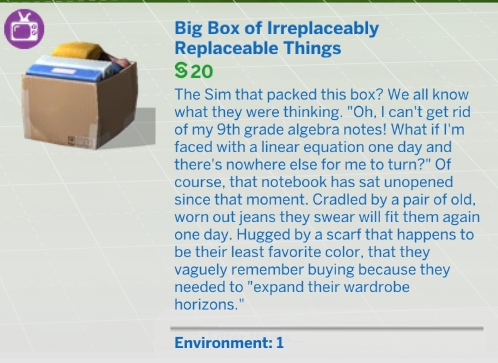
However, this doesn’t mean that we would go so far as to consider this a perfect build kit. There are a few instances where we feel The Sims Team missed a couple opportunities. We expect The Sims 4 Kits to be of the highest quality. Every item should look good both from afar and up close. To its credit, most of the items in this kit do hold up to that standard, but a couple of the items do not. We couldn’t help but notice that the box with clothes and binders in it gets quite blurry when zoomed in on it. The old telephone also has some issues with the cord looking flat or squished in some spots.
We were also hoping to see some of that 70s patterned wallpaper and wall paneling that was shown in the roadmap. Instead, we have one pretty boring wallpaper in pretty boring swatches that look a lot like many of the other plain wallpapers in the game. And while we do understand that this is a build kit and not a gameplay kit, having a home phone that’s just decoration feels like a bit of a missed opportunity. Especially since players have been asking for functional landline telephones for over eight years now.
It’s hard not to notice that this kit has no flooring options, either. However, we do think the floor decals make up for that and allow for more versatility overall than just a new floor. Players can now make any floor in the game look damaged and distressed with these decals. It’s also worth mentioning that in spite of these criticisms, this kit still shows a lot of attention to detail in other ways. The bookcase with that one shelf that isn’t level and the adjustable floor lamp we’re certain everyone over the age of 30 remembers from their childhood home are just a couple examples.
So what’s our final verdict on The Sims 4 Basement Treasures Kit? As far as The Sims 4 Kits go, we think it’s a pretty solid kit. Despite the criticisms we pointed out, we think this kit still adds a lot of value to the build catalogue. It has plenty of unique and nostalgic items, most of those items have great textures, and it really makes us envision a space that we couldn’t really envision before with The Sims 4 Kits. If you’re a fan of old, grungy items from decades past, we’re positive you’ll love this kit.
Looking for more The Sims 4 Kits? Check out our overview and review of the new Greenhouse Haven Kit!
If you’re a pose creator or an avid user of custom poses, posing infants in The Sims 4 might present a bit of a challenge. You may have noticed that infants disappear completely inside some objects, making them unclickable so you can’t assign them a pose. Or you teleport an infant and they don’t do the pose you assigned them. Maybe you can’t even pose your infants at all!
The good news is that posing infants really isn’t too difficult. They just have some unique quirks you need to be aware of and know how to get around. We’re going to show you how to successfully use custom poses with your infants in The Sims 4 for beautiful screenshots and family portraits!
First and foremost, posing infants in The Sims 4 works exactly the same way as posing any other Sim or pet. Teleport your infant where you want them to pose, click them and select Pose By Pack, then scroll through your list of poses and find an infant pose to assign to them. If you are new to using custom poses and need more help with this, check out our beginner’s guide to using custom poses.
However, players might run into several issues when trying to pose their infants this way. There are a few different reasons for this. We’re going to break down all the different issues you might be having and show you how to fix them!
Update the Pose Player
Posing an infant with the Pose Player
If your infants do not have a Pose Player option on them when you click them, or they are not available in the list of Sims when you teleport them, you probably have an outdated Pose Player. The Pose Player mod was updated following the infants patch. You will need to download the newest version of the mod to make it compatible with infants. Make sure you delete the old Pose Player files when you download the new version.
This is a common problem when posing infants in The Sims 4, particularly infants who have not reached the Sit Up milestone yet. The reason this happens is infants who can’t sit up will do a cute little flop down animation when they are teleported somewhere. If you assign a pose to an infant while they’re in the middle of this animation, the action drops and the infant does not do the pose.
This infant has learned to sit up on his own so he can be posed more easily
To get around this, all you need to do is wait for the infant to finish this animation after you teleport them somewhere. Once they’re done flopping backwards onto their back, you can assign a pose to them and the action won’t drop. Another solution is to have your infant reach the Sit Up milestone before you start posing with them. Infants who can sit up on their own will not do this animation when they are teleported.
Infants can be found in the teleport menu once they’ve finished their flop down animation.
Also, infants will not be available to select in the Sim teleporter menu if they are in the middle of this animation. If you have updated the Pose Player and you still don’t see your infant in the teleport menu, this is likely the reason. Again, just wait for them to finish this animation. Then they can be teleported.
My Infant Disappears Inside Objects! I Can’t Click Them!
Some infant poses that use large objects can present another challenge to players. When you teleport an infant inside of a large object, they can completely disappear inside the object. This makes it impossible to click on the infant to assign a pose to them. There are a few different ways to deal with this problem posing infants in The Sims 4, both with and without mods.
Try clicking the infant from underneath the object
The easiest way to deal with this problem is to just avoid using objects with no space underneath. Then you can tilt the camera lower to click on the infant in the space between the object and the floor. However, this isn’t always possible depending on the pose. Some poses only work well with a very specific item.
Another option for posing infants in The Sims 4 is to pan the camera very close to the infant so the object fades out, leaving the infant visible. It can be finnicky to get the camera just right in order to do this, but it is doable.
If you’re having a lot of problems manipulating the camera for the above methods, we recommend installing the Live Mode and Tab Mode Camera Mod by Buckley. It will eliminate drift, camera bouncing, and allow you to tilt the camera very close to the ground. Posing infants in The Sims 4 is much easier with this mod.
A posed infant being moved to a crib using the TOOL mod
Another solution for posing infants in The Sims 4 is to move the object out of the way, teleport the infant and assign their pose, first, then move the object back. However, most avid pose users know that doing this often breaks the pose. This is where the TOOL mod by TwistedMexi comes in handy. Moving objects in Live Mode using the TOOL mod does not break poses. It can even move posed Sims without breaking their pose! You can use TOOL to either move an object in place after posing Sims, or move posed Sims to an object. This mod is a real lifesaver for posing infants in The Sims 4.
The TOOL mod does have a learning curve, so make sure to watch TwistedMexi’s walkthrough of the mod. We’ve linked to the exact part of the video you’ll need to use for moving posed Sims around.
My Infant Stretches When I Pose Them!
This pose by Rebouks was made specifically for infants
If your infant looks stretched out and scary when posing infants in The Sims 4, make sure you are using a pose designed for an infant. Infants are an entirely new life stage with their own unique rig. You cannot use toddler poses for infants and vice versa. Toddlers are larger than infants so if you assign a toddler pose to an infant, the infant will look stretched out and bizarre.
Try looking on CurseForge or ts4-poses for infant poses! Make sure the creator specifically says the pose is for infants. Once you have poses designed specifically for infants, you’ll have no trouble posing infants in The Sims 4!
Now that you’re a pro at posing infants in The Sims 4, why not be extra ambitious and learn how to make poses?
Celebrate a new addition to the family with a baby shower!
In The Sims 4 Growing Together, Sims can celebrate a new addition to the family by hosting a baby shower social event. Learn all about this social event in our guide! We’ll walk you through how to start this event, the event goals, and all the rewards you can get from this event. We’re going to help you make sure all your baby showers in The Sims 4 Growing Together are a gold level success!
Table of Contents
Throwing Baby Showers in The Sims 4 Growing Together
Firstly, to throw a baby shower event, have any adult Sim in your household use the Social app on their cell phone to Start a Social Event. Select the Baby Shower event at the top of the list and decide whether you want to throw a goaled event or not. Goaled events come with event goals to complete and rewards for finishing the event at bronze, silver, or gold level. If you do not check the box for a goaled event, the baby shower will be a generic event with no goals and no rewards. If Seasons is installed, goaled events cannot be hosted on a holiday.
Once you’ve selected the baby shower event, choose the expecting parents, the guest list, and the caterer and mixologist if you want to hire those roles. A baby shower must have at least 1 expecting parent and 2 guests. Hired roles are optional. Then pick the location of the party.
You do not need to have a pregnant Sim in your household to throw a baby shower. Any adult can host a baby shower at any time. This allows adopting parents or parents who chose to have a science baby to celebrate their new child, too.
Sims 4 Growing Together: Baby Shower Goals
When the event starts, the guests will show up on the lot and everyone involved with the event will change into their party attire. If you chose not to have a goaled event, you are free to do whatever you like until the event timer ends. However, if you chose a goaled event, there are some unique goals to complete.
Main Goal: Talk about the baby
Other Goals:
Thank a guest for coming
Tell funny stories
Share baby gifts
Gush about new baby
Congratulate the expecting parent
Grab a drink
Take a photo
Use celebration cannon
Dance
New interactions will be available on Sims during the event that will help you complete some of the above event goals.
Guests can autonomously give the expecting parents a baby gift in this Sims 4 Growing Together social event. The gift will be an item for an infant. Any baby gifts received during the event will be in your Sim’s inventory or the household inventory, depending on the item. Also, you can have any other household member give a baby gift to the expecting parents. Click on the expecting parents and choose Purchase a Baby Gift if you don’t already have a baby gift to give to them. Then click on them and choose Give a Baby Gift.
Also, you will find some other new interactions on expecting parents during a baby shower event.
Congratulate! – Friendly > Compliments
Gush About New Baby – Friendly > Small Talk
Guess New Baby’s Future Career – Friendly > Small Talk
Suggest a Baby Name – Friendly > Small Talk
Confetti Chaos!
To use the celebration cannon in The Sims 4 Growing Together, purchase it from Build/Buy and place it outdoors away from any other objects! The cannon is highly flammable and will start a fire if set off indoors or near any other objects. Why is a confetti cannon so flammable? We have no idea, but it is.
Click the cannon to fire confetti into the air. Keep in mind that the cannon does have a chance of failing to fire properly. Basically, use the celebration cannon at your own risk. It has the potential to send a successful baby shower into absolute chaos very fast.
No matter what swatch you pick for the cannon, it will always fire multi-coloured confetti. So there is no pink-only or blue-only confetti option for gender reveals.
Baby Shower Rewards
Of course, you’ll want to aim to finish a Sims 4 Growing Together baby shower event at the gold level. The rewards for completing the event at bronze or silver are not great. They’re just cheap rattle toys you can easily purchase from Build/Buy for a few simoleons. However, finishing a baby shower event at the gold level unlocks a new item for your newborn baby.
Bronze Reward: Cute Critter Rattle
Silver Reward: Some-Bunny Loves You Rattle and Cute Critter Rattle
Gold Reward: Baby Bliss Bassinet, Some-Bunny Loves You Rattle and Cute Critter Rattle
Moreover, the Baby Bliss Bassinet is a reward item only unlockable by completing a baby shower event at gold level. Obviously, considering the pitiful shortage of bassinets in The Sims 4, this is a pretty great reward that’s worth getting. Also, the bassinet is for newborns (not infants) and comes in 12 swatches.
Additionally, looking for more family guides for The Sims 4 Growing Together? If so, check out our Infant Care Guide!