Home Blog Page 104

The Sims 4 Growing Together: The Fundamentals of Recreation Centers

Let’s talk about Recreation Centers!

This brand-new lot type was introduced to players in The Sims 4 Growing Together.

Now you might be wondering, what is the purpose of the recreation center? Well, it is simply a place that is part of and at the heart of the community!

In Growing Together, a recreation center is described as the following:

A recreation center is the perfect place for family-friendly community learning and play. It’s an arts center, fitness zone, game room, and play space all in one.

A Ghost Sim using the Music Room at the Celebration Center

Where in Growing Together do I find the Recreation Center?

To find the pre-made recreation center, simply visit the Gilbert Gardens neighbourhood in San Sequoia! You’ll then be looking for the lot called the Celebration Center. Once you’ve located the pre-made lot, simply select the Sims that you want to travel with, and off you go!

Introducing the Celebration Center

Now that you have travelled to San Sequoia with your Sims, let’s take a closer look at what the Celebration Center has to offer!

TS4 x64 2023 04 18 20 29 01
The Growing Together Celebration Center in San Sequoia

The lot is situated on a 64×64 also comes with the Fast Internet, Great Acoustics and Study Spot lot traits.

On the lower ground, you will find a kitchen and dining space, workout area, indoor play area as well as a welcome desk and a handful of tables dotted around.

TS4 x64 2023 04 20 11 17 43
The Lower Ground Floor of the Celebration Center

As for the upper level of the Celebration Center, you’ll find an arts and crafts room, study space and a music room!

TS4 x64 2023 04 20 11 17 09
The Upper Level Floor of the Celebration Center

Let’s not forget about the outdoor space at the Celebration Center!

Overlooking the lake in San Sequoia, you’ll find the outdoor play area for younger Sims, It features two sets of monkey bars and the Starcruiser X jungle gym! Additionally, you’ll find an outdoor seating area by the kitchen area and also some chess tables dotted around under a beautiful Cherry Tree.

Did you know, that the recreation center that came with the Growing Together expansion pack was created by LilSimsie?

What can you do at a Recreation Center?

Well, you can do pretty much anything. As mentioned in the lot description, you can have elements of the recreation center dedicated to learning, arts, fitness, games, and more! While these may seem quite simple and straightforward activities, they are in fact also very broad, and there are a number of ways your Sims can get involved.

What if I want to create my own Growing Together inspired Recreation Center?

You certainly can!

Whether you want to revamp the pre-made recreation center or want to create your own, there are a number of ways you can do so!

A Recreation Center can be a number of different things. It’s not only a community orientated lot, but also a place where Sims can also focus on their own personal development. Let’s also not forget, you can even host events and club get together’s here too!

Growing Together Pre Made Recreation Center, Celebration Center
The Celebration Center in San Sequoia

Don’t forget, Recreation Centers are not just limited to being placed in San Sequoia! They can be placed in any world and on any lot size too!

Recreation Center Ideas

Here are some ideas of things you can incorporate learning into your own Recreation Center:

  • Skill based rooms – Either a particular skill in general or focused on a specific task Sims can complete to improve a particular skill.
  • Kitchen – Not only can Sims improve their cooking skills here but it can also be a way of developing friendships with other Sims from within the Community.
  • Events Space – The one-stop space for Sims to host their own events. These could include Baby Showers, Family Reunions,
  • Day Care/Play Area – We all know it’s sometimes hard to keep our younger Sims occupied, so why not dedicate a space where they can have some fun for a little while!
  • Computer Room – A space where your Sims can complete their homework, practice their computer based skills, apply for jobs or university and more!
  • Outdoor Fitness/Wellness Space – Whether that is adding a pool or a place for Sims to take part in Yoga Sessions, why not utilize some of that outdoor space for your Sims to use!
  • Gardening Space – The perfect place for our outdoor loving and green thumb Sims!

Requirements when Building a Recreation Center

As with any community lot build, there is a variety of requirements that your build must meet. Surprisingly, for a Recreation Center, they are relatively easy ones to fulfil!

  • Game x3
  • Musical Instrument x2
  • Workout Equipment x2
  • Sink x1
  • Toilet x1
  • Stereo x1
  • Jungle Gym x1

With only a handful of objects needed to fulfil the lot requirements, it really does leave it the rest of your Recreation Center open to plenty of other ideas!

Hold Up, isn’t a Recreation Center the same as Community Space?

Community Spaces were introduced in The Sims 4 Eco Lifestyle. You could say they are similar to a degree, however not at the same time.

While both focus on being at the heart of the community, there are actually four different kinds of Community Spaces. These being Community Garden, Maker Space and Marketplace along with a generic Community Space.

While these focus more on specific theme’s these can also be voted for by Sims via one of the community notice boards.

Ultimately, the new Recreation Center lot type is a lot more flexible and can be tailored to multiple different needs within the community compared to a Community Space.

The Sims 4 Eco Lifestyle: All About Community Spaces
A Market Place Community Space from The Sims 4 Eco Lifestyle

Want to find out more about Community Spaces from Eco Lifestyle? Find out everything you need to know and more here!

Community Creations

The community has been hard at work creating its own Recreation Center builds. There have been some absolutely incredible builds shared in the community.

Here are two of our many favourites from the community!

Growing Together Recreational Center by SoSimsy

Modern Recreation Center by Simproved

That’s everything you need to know about Recreation Centers in The Sims 4 Growing Together! Have you used this new lot type yet, or have you taken on the challenge to build your own? Let us know in the comments below!

As always, stay tuned to Sims Community for all the latest news and information from The Sims franchise!

The Sims 4 Kits: Full Basement Treasures Overview

Discover basement treasures hidden under the dust!

The Sims 4 Kits have become a staple for CAS enthusiasts and builders, often filling in gaps in the game’s existing catalogue. The Sims 4 Basement Treasures Kit continues this pattern, adding a variety of musty, outdated furniture and distressed décor that aims to help Simmers tell generational stories through the homes that they build. This kit embraces the idea that objects have a history and tell their own stories.

The Basement Treasures kit comes with a total of 26 Build/Buy items and 1 styled room inspired by old basements that have accumulated generations’ worth of well-loved but forgotten belongings. Most items have between 4-8 swatches and many of the objects in this kit come in both newer and more scratched up or damaged colour varieties.

Check out the catalogue entries, in-game swatch previews, and our review of The Sims 4 Basement Treasures Kit below!

The Sims 4 Kits: Basement Treasures

Below, you can check out all the catalogue entries and in-game swatches for the latest addition to the The Sims 4 Kits collection. We left no stone unturned with this kit. You can see every single item and every single swatch available so you know exactly what you can expect to get if you purchase this kit!

Catalogue

Swatch Previews

Our Review

We were intrigued by the idea of a basement kit when it was first announced. Players have been complaining for years that there isn’t enough grungy, worn-out furniture in the game. What little we did have was often part of pricey expansion packs, so it’s nice to receive a whole collection of items in this theme for the much smaller price of The Sims 4 Kits.

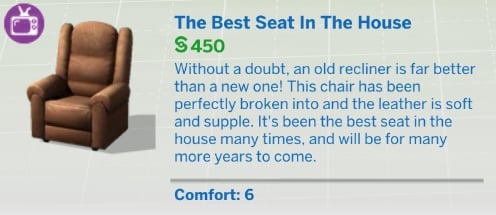
There are many unique items that we love in this kit, such as the vintage television sets and the disassembled heart bed that leans against the wall. We think it’s hilarious that The Sims Team snuck in this reference to the famous Vibromatic Love Bed from past Sims games that is sadly no more. It’s in The Sims 4 Kits’ basement now.

A lot of the items do fill in gaps in the catalogue, such as the stacked chairs, the landline telephone off its hook, and the luggage bag sitting on an old dolly. These are truly unique items; we didn’t really have anything like them before and that’s going to allow players to create things that they couldn’t achieve before without either custom content or a lot of build cheats.

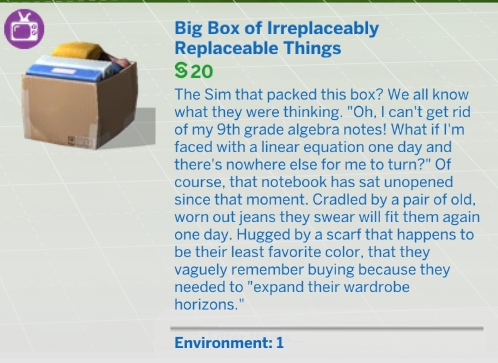
However, this doesn’t mean that we would go so far as to consider this a perfect build kit. There are a few instances where we feel The Sims Team missed a couple opportunities. We expect The Sims 4 Kits to be of the highest quality. Every item should look good both from afar and up close. To its credit, most of the items in this kit do hold up to that standard, but a couple of the items do not. We couldn’t help but notice that the box with clothes and binders in it gets quite blurry when zoomed in on it. The old telephone also has some issues with the cord looking flat or squished in some spots.

We were also hoping to see some of that 70s patterned wallpaper and wall paneling that was shown in the roadmap. Instead, we have one pretty boring wallpaper in pretty boring swatches that look a lot like many of the other plain wallpapers in the game. And while we do understand that this is a build kit and not a gameplay kit, having a home phone that’s just decoration feels like a bit of a missed opportunity. Especially since players have been asking for functional landline telephones for over eight years now.

It’s hard not to notice that this kit has no flooring options, either. However, we do think the floor decals make up for that and allow for more versatility overall than just a new floor. Players can now make any floor in the game look damaged and distressed with these decals. It’s also worth mentioning that in spite of these criticisms, this kit still shows a lot of attention to detail in other ways. The bookcase with that one shelf that isn’t level and the adjustable floor lamp we’re certain everyone over the age of 30 remembers from their childhood home are just a couple examples.

So what’s our final verdict on The Sims 4 Basement Treasures Kit? As far as The Sims 4 Kits go, we think it’s a pretty solid kit. Despite the criticisms we pointed out, we think this kit still adds a lot of value to the build catalogue. It has plenty of unique and nostalgic items, most of those items have great textures, and it really makes us envision a space that we couldn’t really envision before with The Sims 4 Kits. If you’re a fan of old, grungy items from decades past, we’re positive you’ll love this kit.


Looking for more The Sims 4 Kits? Check out our overview and review of the new Greenhouse Haven Kit!

Posing Infants in The Sims 4 to Get Beautiful Family Photos

Learn how to make the most of infant poses!

posing infants in The Sims 4
Pose by Rebouks

If you’re a pose creator or an avid user of custom poses, posing infants in The Sims 4 might present a bit of a challenge. You may have noticed that infants disappear completely inside some objects, making them unclickable so you can’t assign them a pose. Or you teleport an infant and they don’t do the pose you assigned them. Maybe you can’t even pose your infants at all!

The good news is that posing infants really isn’t too difficult. They just have some unique quirks you need to be aware of and know how to get around. We’re going to show you how to successfully use custom poses with your infants in The Sims 4 for beautiful screenshots and family portraits!

Posing Infants in The Sims 4

posing infants in The Sims 4
Pose by Rebouks

First and foremost, posing infants in The Sims 4 works exactly the same way as posing any other Sim or pet. Teleport your infant where you want them to pose, click them and select Pose By Pack, then scroll through your list of poses and find an infant pose to assign to them. If you are new to using custom poses and need more help with this, check out our beginner’s guide to using custom poses.

However, players might run into several issues when trying to pose their infants this way. There are a few different reasons for this. We’re going to break down all the different issues you might be having and show you how to fix them!

Update the Pose Player

Choosing a Pose
Posing an infant with the Pose Player

If your infants do not have a Pose Player option on them when you click them, or they are not available in the list of Sims when you teleport them, you probably have an outdated Pose Player. The Pose Player mod was updated following the infants patch. You will need to download the newest version of the mod to make it compatible with infants. Make sure you delete the old Pose Player files when you download the new version.

If you’re new to installing mods and need more help with this, check out our beginner’s guide to mods and CC.

Infants Don’t Pose! The Action Drops!

This is a common problem when posing infants in The Sims 4, particularly infants who have not reached the Sit Up milestone yet. The reason this happens is infants who can’t sit up will do a cute little flop down animation when they are teleported somewhere. If you assign a pose to an infant while they’re in the middle of this animation, the action drops and the infant does not do the pose.

posing infants in The Sims 4
This infant has learned to sit up on his own so he can be posed more easily

To get around this, all you need to do is wait for the infant to finish this animation after you teleport them somewhere. Once they’re done flopping backwards onto their back, you can assign a pose to them and the action won’t drop. Another solution is to have your infant reach the Sit Up milestone before you start posing with them. Infants who can sit up on their own will not do this animation when they are teleported.

Sim Teleporter Menu
Infants can be found in the teleport menu once they’ve finished their flop down animation.

Also, infants will not be available to select in the Sim teleporter menu if they are in the middle of this animation. If you have updated the Pose Player and you still don’t see your infant in the teleport menu, this is likely the reason. Again, just wait for them to finish this animation. Then they can be teleported.

My Infant Disappears Inside Objects! I Can’t Click Them!

Some infant poses that use large objects can present another challenge to players. When you teleport an infant inside of a large object, they can completely disappear inside the object. This makes it impossible to click on the infant to assign a pose to them. There are a few different ways to deal with this problem posing infants in The Sims 4, both with and without mods.

posing infants in The Sims 4
Try clicking the infant from underneath the object

The easiest way to deal with this problem is to just avoid using objects with no space underneath. Then you can tilt the camera lower to click on the infant in the space between the object and the floor. However, this isn’t always possible depending on the pose. Some poses only work well with a very specific item.

Another option for posing infants in The Sims 4 is to pan the camera very close to the infant so the object fades out, leaving the infant visible. It can be finnicky to get the camera just right in order to do this, but it is doable.

If you’re having a lot of problems manipulating the camera for the above methods, we recommend installing the Live Mode and Tab Mode Camera Mod by Buckley. It will eliminate drift, camera bouncing, and allow you to tilt the camera very close to the ground. Posing infants in The Sims 4 is much easier with this mod.

Another solution for posing infants in The Sims 4 is to move the object out of the way, teleport the infant and assign their pose, first, then move the object back. However, most avid pose users know that doing this often breaks the pose. This is where the TOOL mod by TwistedMexi comes in handy. Moving objects in Live Mode using the TOOL mod does not break poses. It can even move posed Sims without breaking their pose! You can use TOOL to either move an object in place after posing Sims, or move posed Sims to an object. This mod is a real lifesaver for posing infants in The Sims 4.

The TOOL mod does have a learning curve, so make sure to watch TwistedMexi’s walkthrough of the mod. We’ve linked to the exact part of the video you’ll need to use for moving posed Sims around.

My Infant Stretches When I Pose Them!

posing infants in The Sims 4
This pose by Rebouks was made specifically for infants

If your infant looks stretched out and scary when posing infants in The Sims 4, make sure you are using a pose designed for an infant. Infants are an entirely new life stage with their own unique rig. You cannot use toddler poses for infants and vice versa. Toddlers are larger than infants so if you assign a toddler pose to an infant, the infant will look stretched out and bizarre.

Try looking on CurseForge or ts4-poses for infant poses! Make sure the creator specifically says the pose is for infants. Once you have poses designed specifically for infants, you’ll have no trouble posing infants in The Sims 4!


Now that you’re a pro at posing infants in The Sims 4, why not be extra ambitious and learn how to make poses?

The Sims 4 Growing Together: Throw Perfect Baby Showers

Celebrate a new addition to the family with a baby shower!

Sims 4 Growing Together Baby Showers

In The Sims 4 Growing Together, Sims can celebrate a new addition to the family by hosting a baby shower social event. Learn all about this social event in our guide! We’ll walk you through how to start this event, the event goals, and all the rewards you can get from this event. We’re going to help you make sure all your baby showers in The Sims 4 Growing Together are a gold level success!

Throwing Baby Showers in The Sims 4 Growing Together

Choose a Social Event

Firstly, to throw a baby shower event, have any adult Sim in your household use the Social app on their cell phone to Start a Social Event. Select the Baby Shower event at the top of the list and decide whether you want to throw a goaled event or not. Goaled events come with event goals to complete and rewards for finishing the event at bronze, silver, or gold level. If you do not check the box for a goaled event, the baby shower will be a generic event with no goals and no rewards. If Seasons is installed, goaled events cannot be hosted on a holiday.

Sims 4 Growing Together Baby Showers

Once you’ve selected the baby shower event, choose the expecting parents, the guest list, and the caterer and mixologist if you want to hire those roles. A baby shower must have at least 1 expecting parent and 2 guests. Hired roles are optional. Then pick the location of the party.

You do not need to have a pregnant Sim in your household to throw a baby shower. Any adult can host a baby shower at any time. This allows adopting parents or parents who chose to have a science baby to celebrate their new child, too.

Sims 4 Growing Together: Baby Shower Goals

When the event starts, the guests will show up on the lot and everyone involved with the event will change into their party attire. If you chose not to have a goaled event, you are free to do whatever you like until the event timer ends. However, if you chose a goaled event, there are some unique goals to complete.

Event Goals

Main Goal: Talk about the baby

Other Goals:

  • Thank a guest for coming
  • Tell funny stories
  • Share baby gifts
  • Gush about new baby
  • Congratulate the expecting parent
  • Grab a drink
  • Take a photo
  • Use celebration cannon
  • Dance

New interactions will be available on Sims during the event that will help you complete some of the above event goals.

Sims 4 Growing Together Baby Showers

Guests can autonomously give the expecting parents a baby gift in this Sims 4 Growing Together social event. The gift will be an item for an infant. Any baby gifts received during the event will be in your Sim’s inventory or the household inventory, depending on the item. Also, you can have any other household member give a baby gift to the expecting parents. Click on the expecting parents and choose Purchase a Baby Gift if you don’t already have a baby gift to give to them. Then click on them and choose Give a Baby Gift.

Social Event Interactions

Also, you will find some other new interactions on expecting parents during a baby shower event.

  • Congratulate! – Friendly > Compliments
  • Gush About New Baby – Friendly > Small Talk
  • Guess New Baby’s Future Career – Friendly > Small Talk
  • Suggest a Baby Name – Friendly > Small Talk

Confetti Chaos!

Sims 4 Growing Together Baby Showers

To use the celebration cannon in The Sims 4 Growing Together, purchase it from Build/Buy and place it outdoors away from any other objects! The cannon is highly flammable and will start a fire if set off indoors or near any other objects. Why is a confetti cannon so flammable? We have no idea, but it is.

Click the cannon to fire confetti into the air. Keep in mind that the cannon does have a chance of failing to fire properly. Basically, use the celebration cannon at your own risk. It has the potential to send a successful baby shower into absolute chaos very fast.

No matter what swatch you pick for the cannon, it will always fire multi-coloured confetti. So there is no pink-only or blue-only confetti option for gender reveals.

Baby Shower Rewards

Of course, you’ll want to aim to finish a Sims 4 Growing Together baby shower event at the gold level. The rewards for completing the event at bronze or silver are not great. They’re just cheap rattle toys you can easily purchase from Build/Buy for a few simoleons. However, finishing a baby shower event at the gold level unlocks a new item for your newborn baby.

  • Bronze Reward: Cute Critter Rattle
  • Silver Reward: Some-Bunny Loves You Rattle and Cute Critter Rattle
  • Gold Reward: Baby Bliss Bassinet, Some-Bunny Loves You Rattle and Cute Critter Rattle
Sims 4 Growing Together Baby Showers

Moreover, the Baby Bliss Bassinet is a reward item only unlockable by completing a baby shower event at gold level. Obviously, considering the pitiful shortage of bassinets in The Sims 4, this is a pretty great reward that’s worth getting. Also, the bassinet is for newborns (not infants) and comes in 12 swatches.


Additionally, looking for more family guides for The Sims 4 Growing Together? If so, check out our Infant Care Guide!

Latest Sims 4 Update is causing a Face Glitch

0

The latest Sims 4 Update has a Face Glitch, morphing pre-existing Sims’ faces!

Have you noticed the Sims 4 Face Glitch? Wouldn’t be a Sims 4 Update rollout without a hiccup, right?

The April 18th Patch that’s been released for The Sims 4 Base Game yesterday has caused a visual issue for Sims’ faces in-game. Just a few moments after, The Sims Direct Team quickly issued a statement saying that they’re looking into it. What is the issue all about? Find out below:

The Sims 4: Face, Eyes and Mouth Bug

As reported first on the EA Answers HQ website, players have started noticing that their Sims now have a different face structure after The Sims 4 April 2023 Update. First noticed by Sean_Theriault on EA AHQ, Sims have slightly misplaced positioning for face, eyes and mouth compared to their original placement.

Sims 4 Bug Report

How can we find the bug ourselves? Download any sims from the gallery into CAS. All previously created sims in Save files are effected as well

What happens when the bug occurs? All previously created sims have a face bug. The eyes and mouth look weird. The eyes look mishappen and the pupils are really big. The mouth has a weird underbite to it. Even resetting the face with new eye presets doesn’t fix the problem. This only affect previously created sims. If you create a new sim the bug doesn’t occur.

Source

Check out the visual comparison shared by @onlyabidoang:

There’s also a good .GIF comparison shared on EA AHQ by member moxhollow, showing that the Face Glitch extends to the Body shape as well. And that it can also make your Sims cross-eyed:

Sims 4 Face Glitch: Before and After

New Tooth Mishap

Unfortunately, teeth haven’t been spared from the glitch either. EA AHQ user GiardiniDiMarzo has shared screenshots of this Bug affecting both Teeth and Mouth shape and positioning.

In less than a day, this Visual Glitch in The Sims 4 was reported by 700 players on the EA Answers forum. Players also reported that this issue persists for both old and new save files. No matter if you’re a CC / Mod user or not!

Sims 4 Face Glitch: Official Statement

The Sims Direct shared the following statement after the user reports, confirming that their team is now investigating this issue.

Sims 4 Face Glitch: Official Statement
Official statement on The Sims 4 Face Glitch

Have you encountered The Sims 4 Face Glitch in your game? Let us know and stay tuned for updates on this Sims 4 Bug!

The Sims 4 Greenhouses: Transform a Lawn into Paradise!

Everything you need to know to build your dream greenhouse in The Sims 4!

Curious about The Sims 4 greenhouses? You’re not alone! A question that still pops up from time to time in our social groups is “Where are the greenhouses?!” Players who have recently purchased the Seasons expansion pack are confused when they look through the Build/Buy catalogue and don’t see any greenhouse pieces to build with. It’s not a silly question; after all, all previous installments in the series that had greenhouses came with specific greenhouse pieces to put together.

The truth is, The Sims 4 does have greenhouses; they’re just integrated into the regular Build/Buy tools. While this makes them more work to build, it also gives you a lot more freedom to design the greenhouse of your dreams.

How to Build The Sims 4 Greenhouses

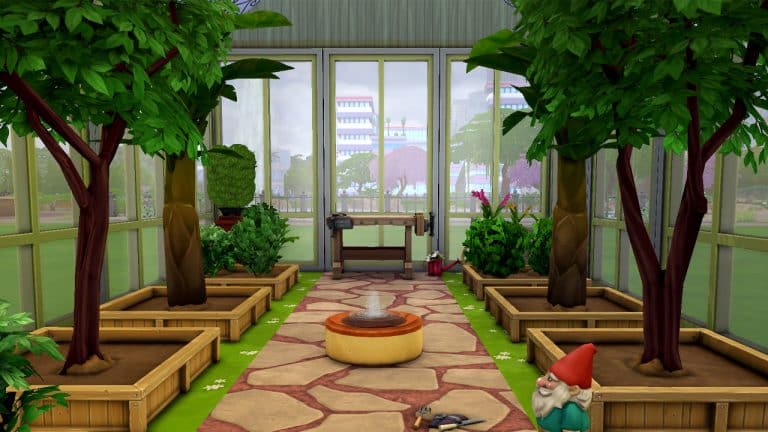
The Sims 4 greenhouses are just regular rooms! In fact, you don’t even need the Seasons expansion pack to build one. Any enclosed space protected from the elements in the game can function as a greenhouse for your plants but of course, you can make your greenhouses look more like greenhouses with windows and glass roofing. So let’s get into making a very basic greenhouse using just the base game!

The Sims 4 Greenhouses

First, build a simple rectangular room and pop some lights in just to be able to see what we’re doing. You can delete them and replace them with better lights later so don’t worry about what type of light. The plain saucer lights will do fine for now. Your The Sims 4 greenhouses are already comin together!

Building Greenhouses in The Sims 4

Next put the roof on. You can use any type of roof you want. Get as creative as you like but for this tutorial, I’ll just pop on a quick and easy gabled roof.

Now that you have the basic structure in place, you can start making things look like real The Sims 4 greenhouses. Start by picking out a nice glass texture for the roof. There are six different glass textures for roofs. My personal favourite is the ornate one but you can select any of the glass options that you like.

With your roof all glassy, it’s time to select some windows to let in light from the sides. Try to find a nice pair of windows to match the full length of your walls. If you plan to grow trees indoors, you’ll need at least medium wall height. Put the windows all around the building leaving space on one side for a door. To give the greenhouse a seamless look, it’s best to use a matching glass door that is as tall as the windows, like shown below.

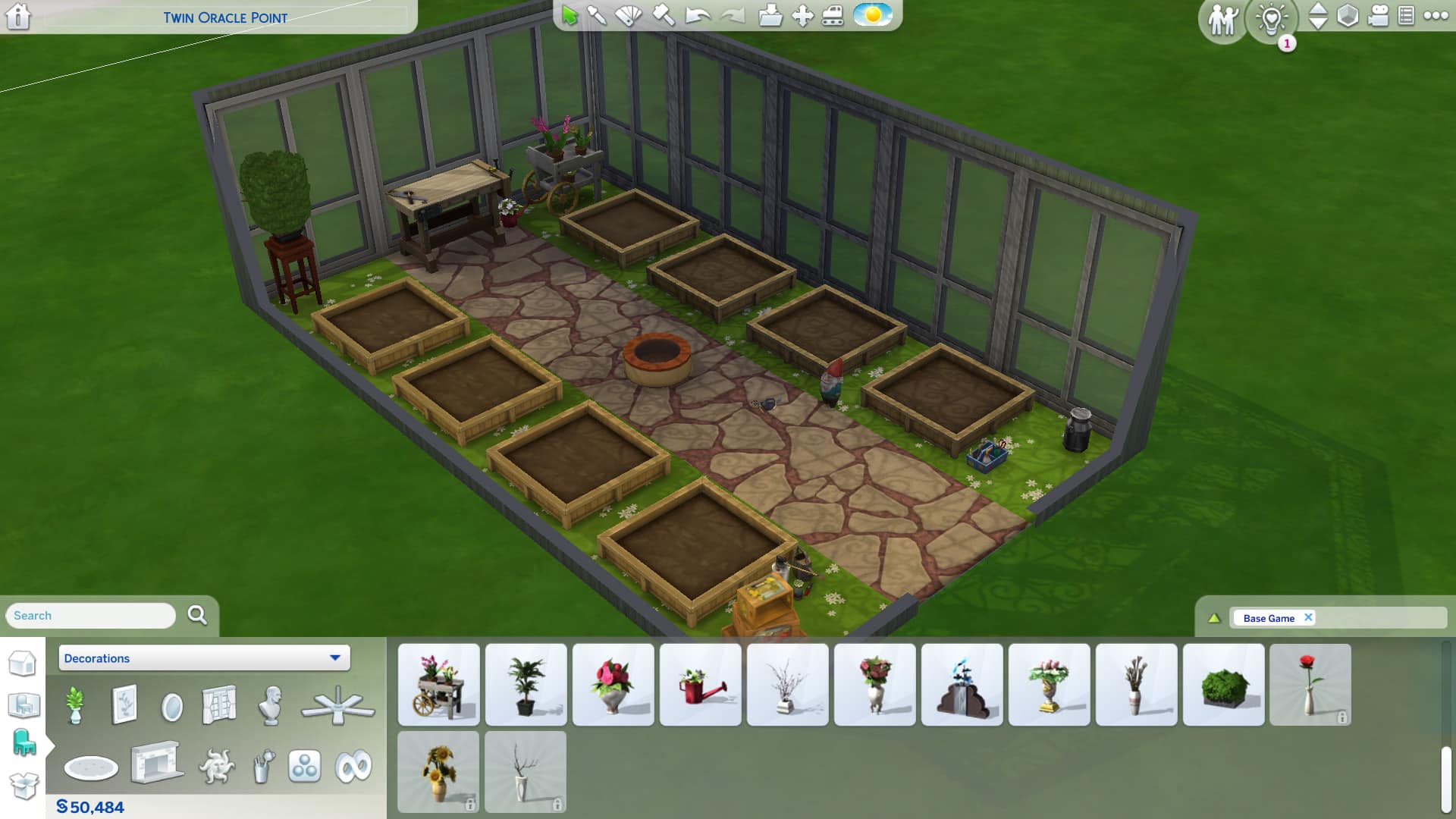
After a paint job, your The Sims 4 greenhouses are almost finished. You just need to handle the inside. Get rid of the saucer lights we put in earlier as they’ll be floating in the air under the glass roof and it’ll look strange. We have enough light coming in through the windows now. You can either demolish the floor and use terrain paints to put dirt and paths in your greenhouse or you can use floor tiles, it’s up to you.

The Sims 4 Greenhouses

Now you can do whatever you want! All The Sims 4 greenhouses need are some planter boxes in them. Otherwise, you’re free to get as elaborate and creative as you want. Make a tiny simple greenhouse with a few décor pieces like I’ve done here or create an elaborate sprawling estate with platforms and fountains and different sections for different species of plants. The great thing about The Sims 4 greenhouses is that they really don’t have any limits. You could turn your entire home into a giant greenhouse if you wanted to.

The Benefits of Greenhouses with Seasons

Of course, greenhouses are mostly just for looks if you don’t have the Seasons expansion pack. With no weather, plants don’t need protection from anything but if you do have Seasons, greenhouses are incredibly useful.

With Seasons installed, your plants will only grow during certain seasons. The rest of the year when they are not in season, they go dormant and stop producing flowers or food. This can be frustrating for Simmers with outdoor gardens, especially if their Sims family relies on their garden to put food on the table or to make a living off of. But there is a solution! Grow your plants indoors in a greenhouse!

Plants inside The Sims 4 greenhouses are protected from the changing seasons and won’t go dormant when the seasons change. They’ll stay in season all year long! So your Sims can keep harvesting their flowers and food in all four seasons no matter what the weather is like outside. The only downside to this is that your Sims will need to hire a gardener or water their plants themselves; since the plants are indoors, they can’t get watered naturally when it rains.

The Sims 4 Greenhouses
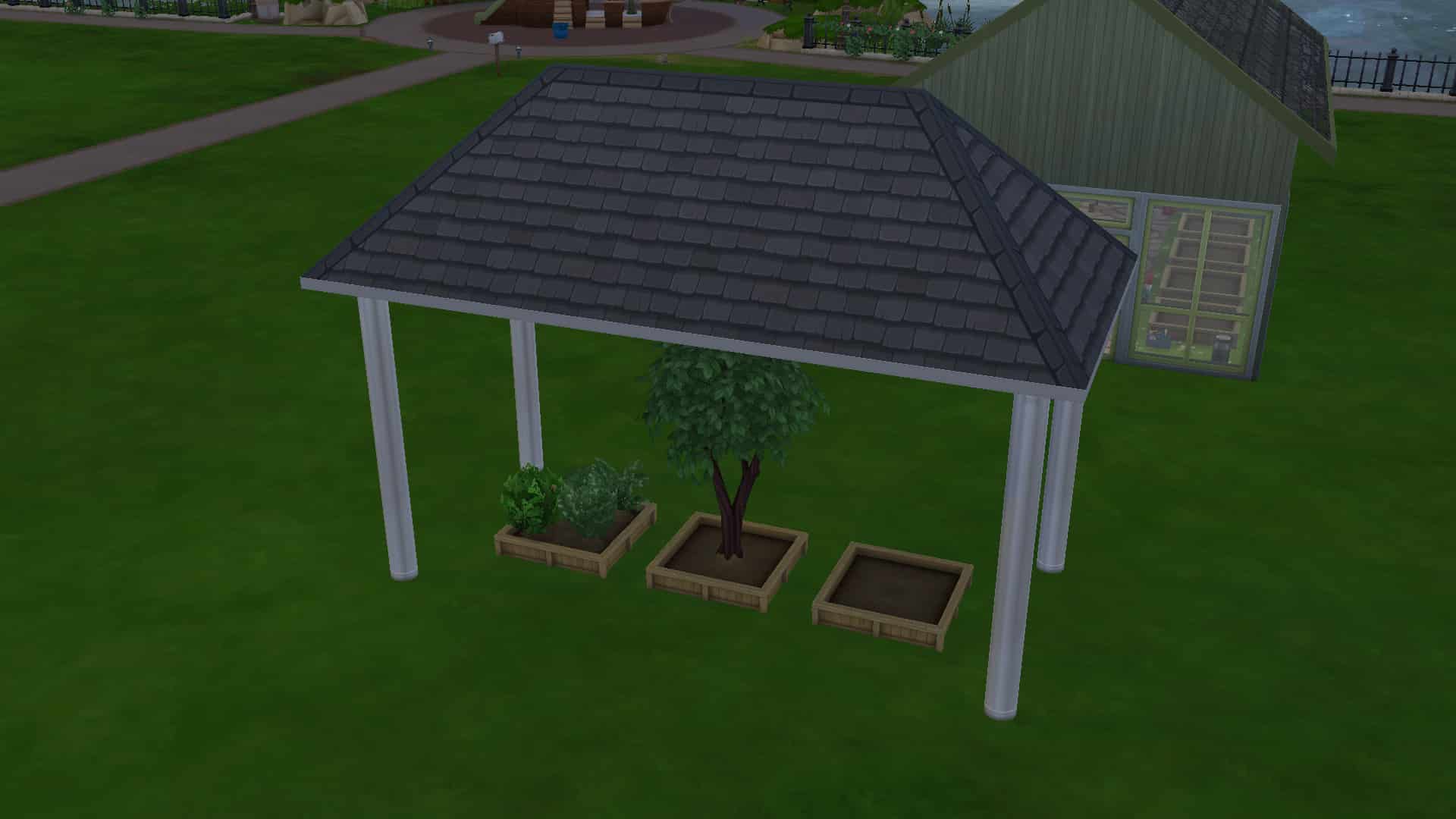
The only thing plants need to be sheltered is a roof over them. No walls required!

Of course, it doesn’t necessarily have to be a greenhouse. Since the game considers any room a “greenhouse,” you can also just keep your plants in your living room, your bedroom, anywhere you want indoors, really. As long as they have a roof over them, they are considered sheltered and won’t go dormant when out of season. You don’t even need walls! A roof piece outdoors with some pillars to hold it up like a gazebo will work just fine as well. Realistic? Perhaps not, but definitely handy for the gardener on a budget.


And that’s all there is to it! You know the basics of building The Sims 4 greenhouses now but like we mentioned before, there’s no limit to how elaborate and creative you can get with your greenhouses. Show us your favourite greenhouse you’ve ever built on any of our social media channels! We’d love to see them!

And if you’re looking for more greenhouse inspiration, learn how to build a greenhouse with Moschino Stuff!

The Sims 4 Basement and Greenhouse Kits: Items List

0

See all objects coming with Sims 4 Basement Treasures and Greenhouse Haven Kits!

It only took a couple of hours after The Sims 4’s latest update for players to discover a full items list for upcoming Kits. Yes, that’s right – two more Kits are joining the DLC collection for The Sims 4. Both Greenhouse Haven and Basement Treasures add accent items for such room types.

The $4.99USD Kits (each) will be available for release on 4/20, 2023 across PC, Mac and Consoles. Let’s see what the Kits are about!

New Sims 4 Kit Items: Full List

The new patch has prepared the game for Thursday’s Kit releases within the game files. It didn’t take much for @Simmattically to discover a full list of objects that are coming with Greenhouse and Basement Kits. Take a closer look at the screens they’ve provided below:

Sims 4 Basement Treasures Items

Sims 4 Kit Items: Basement Treasures
Image Source

Sims 4 Greenhouse Haven Objects

Sims 4 Greenhouse Haven Objects
Source: @Simmattically

What are your thoughts so far on the Sims 4 Kit Items list breakdown? Tell us in the comments!

Stay tuned on Sims 4 Kits News shortly after the Kits release for a full swatch breakdown of the new Kit items.

The Sims 4 April Update 2023: Every Cool New Feature in Your Game!
Check out all the new content that just dropped for The Sims 4 base game today!

The Sims 4 April update 2023 brings plenty of bug fixes as well as some new CAS parts and much needed quality of life tweaks. These new additions to the game are free and available for all The Sims 4 players to download right now! Just open the EA App or Origin and update your game to get access to all the latest base game content.

We’re going to cover what’s new in the April 2023 content update for The Sims 4 so you don’t miss anything!

Sims 4 April Update 2023 Content Overview

Today’s Sims 4 April update 2023 brings players some new masculine and feminine underwear in CAS, a new song on the Pop radio station, and the ability to place small and medium clutter objects in places we couldn’t before, such as toilets, sinks, bathtubs, and some décor surfaces.

CAS Underwear

Feminine and masculine Sims each get one new set of underwear available in CAS. Like most other clothing in the game, players can change the tags to make both sets wearable for all Sims regardless of their gender settings. The feminine underwear comes in 9 solid swatches. The masculine underwear comes in 5 solid swatches.

You can check out the new underwear below! You’ll find them in the Sleep category in CAS but as always, players are free to change the tags to make them available in any outfit category.

Bathroom Clutter Slots

Players have been using build cheats and mods to place clutter objects on bathtub rims, on the side of sinks, and on toilet tanks for years but we won’t have to do that anymore after this Sims 4 April update 2023! Toilets, bathtubs, and sinks now have small (and in some cases, medium) clutter slots on them for players to place all their bathroom clutter! There are also some slots on the top of certain bathroom décor items, like the stand-up shelves and the wall mounted towel shelf and bathroom medicine cabinet.

Bathroom Stand Clutter

Sinks and toilets can have two small clutter items placed on top of them. In some cases, toilets can have up to three small clutter objects placed on them. It depends on the size of the water tank. Toilets without a water tank do not have slots available on them, as there is no surface to put them on.

Most bathtubs with a wide enough rim have 4 small clutter slots; 1 at each corner of the tub. Some bathtubs with narrow, rounded rims have no object slots, such as some of the Victorian-style claw foot tubs. Other tubs may only have 2 slots depending on the available space on the rim.

In addition to new clutter slots added to the top of them, the medicine cabinet and wall-mounted towel shelves also have a couple new swatches.

Sims Sessions with Becca

This Sims 4 April update 2023 adds a new song to the game. The song Blessed by Australian singer Becca Hatch is now available to listen to in the game in Simlish. Players can find this song on the Pop radio station.

Sims 4 April Update 2023

If you don’t want to flick through each song on the Pop station, hoping to stumble across the new song, you can always go to the Music Tab in the Game Options and play it directly from the menu there.

Bug Fixes

On top of all the new content and quality of life tweaks, this Sims 4 April update 2023 also comes with a bunch of bug fixes. Most of the bug fixes focus on preventing infants from stretching. Many players will also be relieved that the game now remembers which foods their infant has tried.

For a full breakdown of all the bug fixes that came with the Sims 4 April update 2023, check out the patch notes here!


What’s your favourite part of today’s update? Tell us in the comments!

The Sims 4: NEW UPDATE! (April 18th, 2023)

There’s a new Update for The Sims 4 on PC and Mac. Check out the Patch Notes!

Sims 4 Update

The New Content Update

Maxis has just released a brand new version of The Sims 4 across PC, Mac, Xbox and Playstation Consoles. Check out everything new in the Patch Notes down below!

How to install the New Sims 4 Update

You can download the latest version of The Sims 4 by checking for updates through the EA App / Origin. If you have Automatic Updates enabled the update will automatically download through your client program.

If you play The Sims 4 on Xbox Series and PS4 / PS5 you can request a new update by checking for updates under The Sims 4 game tag.

In case you have Mods or Custom Content, the game will automatically disable them for you after first launching The Sims 4 after the update. To re-enable all your Mods and Custom Content, select the Settings option in the Menu and select Settings. Under the ”Other” section you’ll find the ”Enable Custom Content and Mods” option. Check it and restart your game in order for it to take effect!

For more information on how to ensure a healthy Sims 4 Game, click here!


The Sims 4: NEW UPDATE! (Aug 30th, 2022)

Patch Notes

Update 04/18/2023
PC: 1.97.42.1030 / Mac: 1.97.42.1230
Console: Version: 1.73

Hello Simmers

We had a case of stretchy Sims running around—especially in the younger ages. In this update, we’ve been working to get them back to their correct proportions—among other things.

What’s New in this Sims 4 Update?

In this update we have new decoration options to help you add that personal touch to your builds, new underwear options, and The Sims 4 gets Mac native support for those Simmers using M1/M2 processors. First on the What’s New? List though is a Sims Sessions collab with Becca Hatch, so let’s jump in.

Sims Sessions x Becca

Australian singer Becca Hatch and producer Tentendo have teamed up with The Sims 4 to bring Blessed, or should that be Boofed, to your Sims when they tune into the Pop radio station.

Be sure to watch this Sims Sessions episode where Becca describes her inspirations and shows off what goes into singing a song in Simlish in the Sims Sessions Episode below.

Becca Hatch & Tentendo – Blessed | Sims Sessions

That’s not all, Becca’s Simself will be available to download directly from the Gallery and can join your Sims in their worlds.

Sims 4 Update - New Simlish Song

Native support for the latest Mac CPU’s

This release brings native support for Apple silicon chipsets on top of the ongoing support for those with an Intel-based Mac

New underwear options

New underwear options for your Teen and older Sims are available in CAS (Create a Sim).

New Sims 4 Underwear
New Sims 4 Underwear – Part 1
New Underwear in The Sims 4 Update
New Underwear – Part 2

New ways to decorate!

Hi everyone, SimGuruBeth here! I’m very excited about today’s update, especially the new decor placement options you’ll find across various bathroom fixtures. It was so fun to work with the team and add new small decorative slots to toilets, standalone sinks, bathtubs and more! And in some cases there was room to support a medium decorative slot. These build mode quality of life updates are one of my favorite things to work on as an object modeler; they add so many more options for designing any build.

Sims 4 Update for Bathrooms
New Build Improvements

And in addition to the above updates, a few new color variants have been added to round out some of our basics for the Towel Storage Rack (full and empty version) and the Countryside Caress Medicine Cabinet.

Bug Fixes

Base Game

  • Infant food preferences no longer reset when going to CASfrom Manage Worlds and returning to the game.
  • Caregivers have a lot to tend to with a Newborn in the home… Between the crying, sleeping, eating, and diaper changing, their kid is always on their mind. They definitely shouldn’t forget who their Newborn is when they age up to an infant. Parents will no longer need to introduce themselves to their little one after they’ve aged up to an infant.
  • Toddlers can once again gain Movement Skill while using slides.
  • Weddings can be pretty boring when you’re young; you just want some cake and to play. But that’s no excuse for an infant to stretch while the couple are exchanging vows. Infants should be on their best behavior now… well, the best they can be at that age.
  • Toddlers can be mean, especially to their younger siblings. Infants will no longer stretch in response to being yelled at by a Toddler.
  • Top Surgery Scars are available when you re-enter CAS and not just when you create a new Sim.
  • Fashion is what you make of it, so if you pair the yfTop_GP04JacketCropped with yfBottom_SDX024FullBriefs you shouldn’t be judged by having the underwear clip through the top.
  • Infants like to chew things, it’s all part of teething. Our little ones decided that they wanted to autonomously Chomp their caregiver to the point the interaction queue was filled with the interaction. We’ve told them not to Chomp so much, so they seem to have stopped but what you tell them to do is up to you.
  • Sims with a customized physical frame now have access to a wide range of fingernail options.
  • Some say it’s adorable, others say it’s terrifying. Either way, checking out your infant’s teeth in CAS will not be accompanied by vampiric hissing. We aren’t sure if they retained a thirst for blood though so, don’t blink.

Console

  • We still can’t find a keyboard with the Any Key, but if you were to press Any Key on your keyboard while on the start screen, the game would load as it should.
  • While console Simmers can use both the Sims 4 Camera and Sims 3 Camera options when using a mouse and keyboard it wasn’t the intent that only one of the two camera modes would let you interact with objects in Build Mode. Console simmers using a mouse and keyboard and using either camera mode, objects can, again, be interacted with and adjusted as expected.
  • PlayStation Simmers visiting the Gallery will no longer see uploads and comments from profiles that have been blocked directly on PlayStation. This is in combination with the in-game provided block list which can still be used to block players from all platforms at the EA Account level.

Growing Together

  • Child Sims wearing Top_EP13SweatShirt will no longer distort while zooming the camera out in Live Mode.
  • Some of our Sims were a bit overeager to ask to move into your home after becoming friends. We’ve both reduced the frequency of how often you’ll be asked, and we’ve made some adjustments to who can ask. Teens are now excluded, as well as a number of special NPCs. As amusing as it is to have Grim slouching on the sofa all day, he’s got work to do.
  • yfTop_EP13TwoToneBaggyButtonup and ymTop_EP13TwoToneBaggyButtonup will now appear properly when filtering for Masculine and Feminine fashion.
  • yfTop_EP13Camisole no longer shows distortion when worn by your Sims.
  • No matter how well you prepare, you’ll always forget something when going on vacation. In those situations, you hope you can buy what you need when you need it. Sleeping bags will now be able to be purchased while on vacation using your phone.
  • Vegetarian and Child of the Ocean Sims will get negative moodlets if they decide to eat meat or fish from the food stalls when visiting Anchorpoint Wharf.
  • An issue that was occasionally causing a Sim’s pregnancy to not progress has been resolved.
  • Toddlers will now be able to successfully complete the Studied Numbers milestone.

High School Years

  • Sims that confront their fear of the dark will not continue to be affected by the Afraid of the Dark Scared Moodlet buff.

Snowy Escape

  • Adventurous Sims will once again be able to push on up to the peak of Mt. Komorebi during their climbing excursion. Onwards and upwards we always say!
  • Climbing gear can be expensive so you want it to last and if it breaks you want to be able to fix it. Now you can do just that and instead of just saying it’s fixed, when you go to equip it, it will actually be fixed and will be equippable.

Seasons

  • A mysterious **DEBUG** gift box (or “Unknown” gift box if you play on consoles) was mistakenly added to the Build Catalog. If you happened to place one on your lot, congratulations—not only do you get to keep it, it’ll even have a real name now. It still doesn’t do anything, but it sure does look like a gift box. Very festive! However, if you’re feeling like you missed out, fear not – you can find your own non-interactive Gift Box object hidden behind the bb.showhiddenobjects cheat.

Cats & Dogs

  • A dog being friendly to your infant will no longer cause your infant to stretch.
  • Trying to Go for Jog while your little pooch is hungry won’t cause your Sim to stand in place. Now where is that dog food?

Dine Out

  • When you open a restaurant, you want the best chefs. One thing to look for in an applicant is whether they can successfully manage to enter your establishment. It will be easier to find a suitable candidate now as all chefs should be able to get to the kitchen.

StrangerVille

  • Infants no longer stretch in reaction to government agents taking away your refrigerator. Also, what’s in that refrigerator?

Werewolves

  • When you are part of a pack, you expect order and values. Now you’ll be able to check what those values are by opening the Social Group panel and not seeing it be blank.
  • Moonwood Mill trees and vegetation will reflect the changing of the seasons from luscious greens to golden browns and back again.

My Wedding Stories

  • PlaqueWallGenCollections_01_Set30 PLACEHOLDER NAME wasn’t the name of the plaque that was intended. Apparently it was, and now is, Purveyor of Lost Messages. If you haven’t achieved this award yet, maybe pay a visit to the beach and have a look around.

Tiny Living

  • Infants no longer stretch when reacting to living inside a tiny home.

Looking for more Sims 4 releases? Check out the first look at two new Kits coming this Thursday!

NEW The Sims 4 Kits: Basement Treasures and Greenhouse Haven

0

EA and Maxis have announced two new Sims 4 Kits – Basement Treasures and Greenhouse Haven!

Just before the release of a new Sims 4 Update, The Sims Team has announced two new Kits for TS4!

Named Greenhouse Haven and Basement Treasures, the new $4.99 DLC additions for The Sims 4 contain themed items for Build Mode. Including for Greenhouse Decor and for Basement Decor.

Let’s dive deeper into the contents and first screen looks:

The Sims 4 Basement Treasures Kit

Uncover forgotten favorites & hand-me-down gems with The Sims 4 Basement Treasures Kit. With wear and tear from lots of use & love, create new memories from the old that add a little history to your décor.

Official Info

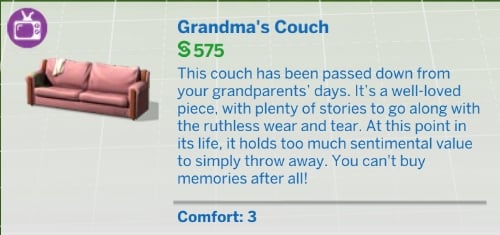
The Sims 4 Basement Treasures Kit encourages Sims to create the classic hand-me-down basement room, challenging Sims to deviate from the pristine and embrace the imperfect with grungy and aged decor. From Grandma’s old, worn furniture to thrifting finds, every piece has a story and potential for new life.

Sims can return home and relax in their favorite spot on worn, torn and well loved chairs or couches from the past. Life is for living – and Sims can walk down memory lane with a milk crate of vinyl records, old trophies and family photos, worn trunks and more.

From stains to soils and everyday wear and tear, there is comfort in the flawed, passed down and lived in. Items like an older model TV (still functional but not in its prime) and dusty trinkets add to the grungy space, with these lived-in items creating a comfortable basement.

New Sims 4 Kit: Greenhouse Haven

Build a tranquil retreat & spend some quality plant time with The Sims 4 Greenhouse Haven Kit! Organize your perfect planting workspace, take in serene greenery & live out your gardening fantasies.

Official Info

The Sims 4 Greenhouse Haven Kit provides a Sim with a serene retreat from the hustle and bustle of the busy world. Sims can create a peaceful and serene greenhouse in their home with lively and versatile gardening decor.

From weaving their way through a cluttered greenhouse, to relaxing alone amongst the foliage, The Sims 4 Greenhouse Haven Kit has something for every Sim with or without a green thumb in this new, dedicated gardening space.

Sims can design the greenhouse of their dreams with beautiful glass pane windows and doors that fit together seamlessly. In the gardening house, Sims can decorate their space with a plethora of gardening objects, including starter seedlings, stacks of pots, a planting table, hanging flower baskets and more.

Promo Assets

Along with the new Screenshots are also new art posters from both Kits. Across Social Media The Sims released an animated video teaser with a new look at some of the objects coming. Check it out yourself:

New Sims 4 Kits - Posters

Official Box Art

Want to know what the official cover art for The Sims 4 Greenhouse Haven and Basement Treasure Kits are? EA has released the official English covers. Check them out down below!


ARTICLE UPDATE: There’s a new Blog Post from TheSims.com talking about the two new Kits. Each Kit segment has been updated with new information!


When are the new Sims 4 Kits releasing?

Both Greenhouse Haven and Basement Treasures Kits are set to release on April 20th, 2023 across PC, Mac, Playstation and Xbox Consoles. You’ll be able to get the Kits on the official EA App, Steam and official Console Stores.

Stay tuned on Sims Community for more updates on these new Sims 4 Kits!


What are your thoughts on the upcoming releases? Join the conversation below!

The Sims 4 Growing Together and Infant Cheats

Enhance your game with these Growing Together and infant cheats!

Of course, using cheats is one of the building blocks of playing The Sims 4. So the newest pack, Growing Together, has plenty of unique cheats for players to enjoy! Additionally, we have some of the best Sims 4 Growing Together cheat codes and infant cheats for you!

The Sims 4 Growing Together Cheats

How to Use Sims 4 Cheat Codes

In order to use The Sims 4 Cheats, you’ll first need to pull down the cheats console in the upper left corner. Then, type in your cheat code!

PC cheats: Press Ctrl and Shift and C at the same time

Mac cheats: Press Ctrl and Shift and C at the same time

PS4 cheats: Press down all four shoulder buttons at the same time

Xbox One cheats: Hold down all four shoulder buttons at once

testingcheats

Testing Cheats

One of the most important cheats is Testing Cheats! For example, this cheat unlocks many more cheats from the cheats console to shift click options.

CheatDescription
testingcheats [on/off or true/false]Turn on Cheats

Sims 4 Growing Together Cheats: Infants

Sims 4 Growing Together Cheats

Sims 4 Growing Together Cheats: Infant Personalities

Infant TraitCheat
Cautioustraits.equip_trait trait_Infant_Cautious
Sensitivetraits.equip_trait trait_Infant_Sensitive
Calmtraits.equip_trait trait_Infant_Calm
Intensetraits.equip_trait trait_Infant_Intense
Wigglytraits.equip_trait trait_Infant_Wiggly
Sunnytraits.equip_trait trait_Infant_Sunny

Sims 4 Growing Together Cheats: Reward Traits

Reward TraitCheat
Top-Notch Infanttraits.equip_trait trait_Reward_Infant_TopNotch
Happy Infanttraits.equip_trait trait_Reward_Infant_Happy
Unhappy Infanttraits.equip_trait trait_Reward_Infant_Unhappy

Sims 4 Growing Together Cheats

Aspirations and Career Cheats

Of course, All Cheats by Twisted Mexi is REQUIRED to use these cheats.

Career CheatDescription
aspirations.complete_current_milestoneCompletes the current goal
careers.add_career [career]Adds the career
careers.promote [career]Promotes within Career
careers.retire [career]Retires from Career
aspirations.complete_aspirationComplete Aspiration
aspirations.complete_objectiveComplete Objective

List of Aspirations

Of course, to use these Sims 4 Growing Together cheats, make sure to use the following cheat:

aspirations.complete_aspiration

Additionally, All Cheats by Twisted Mexi is REQUIRED to use these cheats.

Gifted Fledglingaspiration_Child_creativeGenius_A1
Inspired Visionaryaspiration_Child_creativeGenius_A2
Best-In-Classaspiration_Child_creativeGenius_A3
Confident Kiddoaspiration_Child_mindAndBody_A1
Super Bike Tykeaspiration_Child_mindAndBody_A2
Master of Controlaspiration_Child_mindAndBody_A3
Silly Stomperaspiration_Child_playtimeCaptain_A1
Talky-Talkeraspiration_Child_playtimeCaptain_A2
Playground Royaltyaspiration_Child_playtimeCaptain_A3
Pajama Weareraspiration_Child_slumberPartyAnimal_A1
Storytelleraspiration_Child_slumberPartyAnimal_A2
Host with the Mostaspiration_Child_slumberPartyAnimal_A3

The Sims 4 Growing Together Cheats: Quirks

Infant Quirk

Make sure to use traits.equip_trait before each Infant Quirk.

DescriptionInfant Quirk
Pees During Feeding trait_Human_Infant_Element_PeesDuringFeeding
 Picky Eater trait_Human_Infant_Element_PickyEater
 Rises With The Sun trait_Human_Infant_Element_RisesWithTheSun
 Self Soother trait_Human_Infant_Element_SelfSoother
 Talker trait_Human_Infant_Element_Talker
 Frequently Hiccups trait_Human_Infant_Element_FrequentlyHiccups
 Frequently Sneezes trait_Human_Infant_Element_FrequentlySneezes
 Gassy trait_Human_Infant_Element_Gassy
 Good Appetite trait_Human_Infant_Element_GoodAppetite
 Happy Spitter trait_Human_Infant_Element_HappySpitter
 Hates Being Held trait_Human_Infant_Element_HatesBeingHeld
 Hates Waking Up trait_Human_Infant_Element_HatesWakingUp
 Loves Being Held trait_Human_Infant_Element_LovesBeingHeld
 Loves Waking Up trait_Human_Infant_Element_LovesWakingUp
 Messy Eater trait_Human_Infant_Element_MessyEater
 Obsessed WithSound trait_Human_Infant_Element_ObsessedWithSound
 Only Sleeps When Held trait_Human_Infant_Element_OnlySleepsWhenHeld
 Pees During Changes trait_Human_Infant_Element_PeesDuringChanges

Toddler Quirks

Sims 4 Infant Cheats

Make sure to use traits.equip_trait before each Toddler Quirk.

DescriptionToddler Quirk
Singer trait_Human_ToddlerPersonalityUpdate_Visible_Singer
 WaterLover trait_Human_ToddlerPersonalityUpdate_Visible_WaterLover
 Aggressive trait_Human_ToddlerPersonalityUpdate_Visible_Aggressive
 Audio Lover trait_Human_ToddlerPersonalityUpdate_Visible_AudioLover
 Book Lover trait_Human_ToddlerPersonalityUpdate_Visible_BookLover
 Destructive trait_Human_ToddlerPersonalityUpdate_Visible_Destructive
 Early Riser trait_Human_ToddlerPersonalityUpdate_Visible_EarlyRiser
 Good Appetite trait_Human_ToddlerPersonalityUpdate_Visible_GoodAppetite
 Hates Bedtime trait_Human_ToddlerPersonalityUpdate_Visible_HatesBedtime
 Hates Carry trait_Human_ToddlerPersonalityUpdate_Visible_HatesCarry
 Hates Wakeup trait_Human_ToddlerPersonalityUpdate_Visible_HatesWakeup
 Heavy Sleeper trait_Human_ToddlerPersonalityUpdate_Visible_HeavySleeper
 Light Sleeper trait_Human_ToddlerPersonalityUpdate_Visible_LightSleeper
 Loves Carry trait_Human_ToddlerPersonalityUpdate_Visible_LovesCarry
 Loves Wakeup trait_Human_ToddlerPersonalityUpdate_Visible_LovesWakeup
 Messy Eater trait_Human_ToddlerPersonalityUpdate_Visible_MessyEater
 Picky Eater trait_Human_ToddlerPersonalityUpdate_Visible_PickyEater
 Runs Away trait_Human_ToddlerPersonalityUpdate_Visible_RunsAway

Midlife Crises

To use these cheats, make sure to use aspirations.complete_aspiration before each midlife crisis.

Additionally, All Cheats by Twisted Mexi is REQUIRED to use these cheats.

DescriptionCheat
Desire for SuccessmidlifeCrisis_Active_DesireforSuccess
Desire to CreatemidlifeCrisis_Active_DesiretoCreate
Desire for AdventuremidlifeCrisis_Active_DesireforAdventure
Desire for RelationshipmidlifeCrisis_Active_DesireforRelationship

The Sims 4 Growing Together Cheats: Family Dynamics

Before the Family Dynamic Name, add relationship.add_bit, then Sim ID #1 and Sim ID #2. For example:

relationship.add_bit 1093830071664902160 1093830071664902161 familyTrope_Jokesters

To get a Sim’s ID, you can use this cheat: get_sim_id_by_name (First Name) (Last Name)

Of course, you might not want to retype the Sim IDs. So TwistedMexi has a mod that will allow you to copy and paste the Sim ID. Also, you can get Better Cheat Console here.

DescriptionFamily Dynamic
difficult familyTrope_difficult
  distant familyTrope_distant
  Jokesters familyTrope_Jokesters
  loving authority familyTrope_loving_authority
  loving subordinate familyTrope_loving_subordinate
  Not Close familyTrope_NotClose
  Not Compliant familyTrope_NotCompliant
  Not Difficult familyTrope_NotDifficult
  Not Distant familyTrope_NotDistant
  Not Jokesters familyTrope_NotJokesters
  Not Loving familyTrope_NotLoving
  Not Permissive familyTrope_NotPermissive
  permissive authority familyTrope_permissive_authority
  permissive subordinate familyTrope_permissive_subordinate
  close familyTrope_close
  compliant authority familyTrope_compliant_authority
  compliant subordinate familyTrope_compliant_subordinate

Milestones

Additionally, check out our The Sims 4 Milestone Cheats article for a list of Milestone cheats!

Debug Cheats

Sims 4 Growing Together Cheats

Moreover, Using MC Command Center, there are a number of extra Sims 4 Growing Together cheats you can use by shift clicking a Sim. So to turn on Debug Cheats, click on a computer with MC Command Center. Click on MCCC Settings, then Notification/Console/Menu Settings, next, Console Command Settings, and finally, Debug Commands in Cheats.

Also, some cheats in debug cheats include: Milestones, Set Family Dynamic, Infant Quirks, and Traits.

Check out more Cheats Guides!

Milestone Cheats
Get To Work Cheats
Eco Lifestyle Cheats
Money Cheats: Every Way to Get Rich Instantly!
Vampire Cheats Guide
Death Cheats Guide
The Essential List of The Sims 4 Cheats
High School Years Cheats Guide


This article was edited by SnarkyWitch

Community Poll: The Sims 4 Growing Together

Let us know what you think!

The recent release of The Sims 4 Growing Together has brought a huge variety of content to our community. Not only in the form of creations, but also what players have been feeling about the expansion pack.

With this being the first large release of twenty-twenty three, the excitement and anticipation for Growing Together was huge. It was a much requested theme for many players. Also paired up with the massively anticipated Infants update, the two went hand in hand!

Growing Together: Michaelson Family
The Michaelson Family from The Sims 4 Growing Together

Growing Together opens up family gameplay in ways we’ve never seen before in The Sims 4. Along with the new gameplay features, we also received a variety of CAS assets and new objects. It takes us deeper into learning more about our Sims and what makes them tick.

However, we also get to see our younger Sims take their first steps in San Sequoia! Watch them grow and develop. Hitting each and every milestone along the way from baby all the way through to being an elder as well as everything in between!

We love to hear the thoughts of the community when new content is released! In true Sims Community style, we’ve created a community poll based around the new expansion pack.

Growing Together Community Poll

This is a community-run poll and is not endorsed by or affiliated with EA or Maxis in any way. It’s just for fun!

[totalpoll id=”138679″]


Do you want to share more of your thoughts from the latest expansion pack? Join us in the comments below, where we will be keeping the conversation going!

Are you looking for more articles about Growing Together? We’ve got you covered with plenty of overviews and more right here!

As always, stay turned to Sims Community for everything you need to know about The Sims!

The Sims 4 Growing Together: Learning To Ride a Bike

Learn how to ride a bike in The Sims 4 Growing Together!

The Sims 4 Growing Together Bike

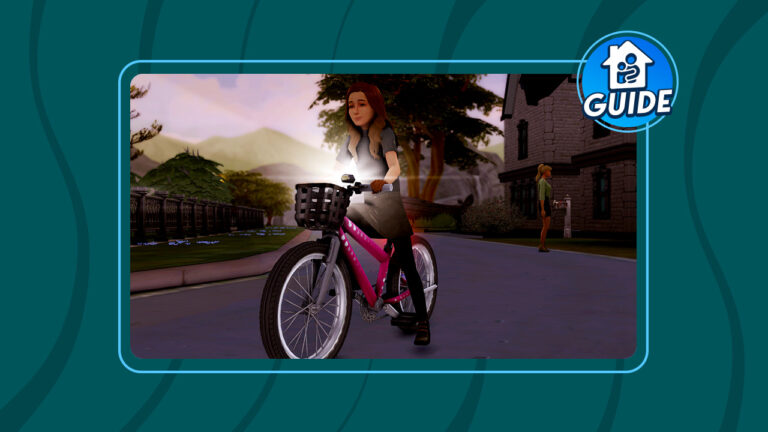
You’ve heard the old expression. “It’s as easy as riding a bike!” Well, in The Sims 4 Growing Together, that’s very true! This expansion pack adds bicycles for children to use for both recreation and travel between lots. But just like real life, kids aren’t born already knowing how to ride a bike. They need to learn how, first.

We’re going to walk you through how to help your child Sims learn to ride a bike!

The Sims 4 Growing Together: Bike Riding

Of course, to start riding a bike, you must own one. You can purchase bikes from Build/Buy. They are listed under the Activities and Skills category. When selecting a bike for a child, make sure the object description says “Supports Children.” Children can only ride child-sized bikes.

Teach to Ride a Bike

To start, children won’t be able to use their bike to ride around the neighbourhood or travel to other lots. They have to learn how to ride the bike, first. Children can practice riding a bike on their own or they can have a caregiver teach them how to ride it. The caregiver will encourage the child and give pointers to help them master riding their new bike in The Sims 4 Growing Together.

The Sims 4 Growing Together Bike

Learning to ride a bike can take quite a while. Our Sim was outside with her daughter all day long helping her ride her bike before she learned how to ride it. It will take several practice sessions before the child can ride the bike with ease on their own.

A new milestone!

Learned to Ride a Bike Milestone

You will know your child Sim has learned to ride their bike in Sims 4 Growing Together when you see a purple popup called “Learned to Ride a Bike.” Your child Sim will gain the Learned to Ride a Bike milestone for this achievement. Once your child Sim has reached this milestone, they will be able to ride their bike around their home neighbourhood, travel to other lots on their bike, and even do tricks without adult supervision.

The Sims 4 Growing Together Bike

Riding a bike builds the Motor skill quite fast for children so it’s a good way to build this skill. Riding a bike also builds childhood confidence. Our Sim went from Neutral Confidence to High Confidence just from learning to ride a bike.


Looking for more Growing Together gameplay guides for children? Check out our Child Aspirations Guide!

The Sims 4 Laundry List: April 11th, 2023

0

The next update for The Sims 4 is solving plenty of Bugs and Glitches. Learn more!

The Sims Team has just published a new Laundry List for The Sims 4. Covering Bugs, Issues and Glitches that are expected to be fixed within the next Patch drop for The Sims 4 Base Game!

In case you don’t know, the Laundry List contains player-reported Bugs and Issues that are expected to be fixed in the next Sims 4 Update. Featuring fixes across Base Game and Pack content!

Let’s take a look:

Wrench Icon

Hi Simmers!

Welcome to this month’s Laundry List, where we’re sharing our list of the top community concerns that we’re currently investigating and hoping to resolve in the next patch. This is only a list of upcoming fixes; there are more topics that have been reported by players that are not listed and are still being worked on.This list is reported by players on Answers HQ and helps us continue our work of improving the user experience on a regular basis. 

Please note that some topics can be tricky and require an extended investigation on our end, so even though we are actively reviewing, it’s not a guarantee that we’ll have an immediate fix in the upcoming patch.

Here’s the list of the community concerns we’re investigating and aiming to resolve in the game update this month:

Laundry List – Bugs & Issues

Thank you for all your patience and valuable help in reporting! Please continue sharing with us any issues you’re experiencing on Answers HQ.

We’ll continue to check in, and together we can make this game the best it can be.

Happy Simming! 


What are your thoughts on the newest Laundry List for The Sims 4? Join the conversation below!

The Sims 4 Releases New Roadmap!

0

Four kits and an update are on the way!

Sims 4 roadmap

The Sims 4 just dropped their latest roadmap for the game and it looks like we’re getting a whole bunch of kits with the theme of “home.” Given that Growing Together launched not long ago and was a huge hit with Simmers, we can’t say we’re surprised to see The Sims Team continuing to build on that warm, cozy, taste of home feeling.

Let’s take a look at the roadmap!

The Sims 4 roadmap shows some floral and wood wall paneling reminiscent of the 1970s. Then moving boxes with more information and clues about upcoming content. One box informs us we’ll be getting 4 “new and unique kits” and a “hot update” between April and June. It’s already April so we can likely look forward to either a kit or an update this month. The words “new” and “unique” are also capitalised, so we have high hopes these kits will offer something to players we didn’t have before.

New kits and update

More boxes appear and we begin to see previews of some clutter items being placed on top of them. TA plant, a stack of books, a hoodie, and what might be either gardening or home improvement tools (it’s hard to tell) are seen sitting on the boxes. The words “Take Me Home” pop up the end of The Sims 4 roadmap.

Let The Sims 4 roadmap speculation begin!

So what does this all mean? We can only speculate at the moment. If we had to bet, we’d be pretty confident betting on some kind of home improvement kit. The moving boxes, the “take me home” slogan, and the outdated 70’s décor in the background all make us think at least some of the content will be geared towards home renovations.

Sims 4 roadmap

What did you notice in The Sims 4 roadmap that we missed? Tell us in the comments! Also, check out our news category for more Sims news just like this!