Home Blog Page 299

The Sims 4 Cats & Dogs Console Announcement is being teased for Tomorrow

The Sims Team has just released a new teaser on their twitter, teasing that they could be revealing The Sims 4 Cats & Dogs Expansion Pack for Xbox One and PS4 tomorrow.

The tweet includes 3 emojis including a Dog, Cat and a Console controller, as well as the fact that they’ll be dropping a new trailer tomorrow.

Stay tuned to Sims Community to find out what tomorrow’s announcement is!

The Sims 4: Dev Cheats Removal and How To Bring Them Back

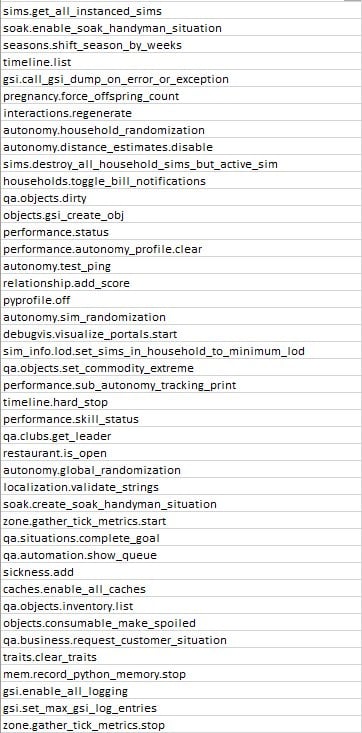
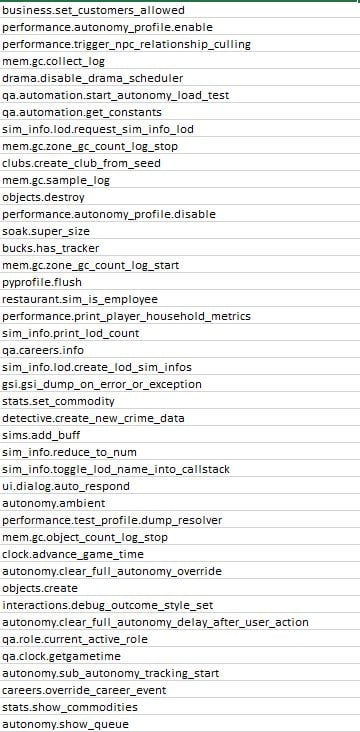
The Sims Team removed plenty of developer cheats with their recent update that were present in The Sims 4 since its launch. Some of them included the ability to spawn collectibles, reset certain objects and more which you can find on this list.

However, modder TwistedMexi was able to bring these back with his latest mod, allowing you to use all the cheats that we had since the beginning.

The mod can be installed just like any other. Simply paste the .ts4script file to Electronic Arts > The Sims 4 > Mods folder and make sure you have BOTH Mods / CC and Script Mods enabled in your game options. Enabling the Script Mods option is crucial for this mod to work.

Click below to be directed to the Cheat Fix Mod’s download page!

[mks_button size=”large” title=”DOWNLOAD!” style=”rounded” url=”https://www.patreon.com/posts/cheats-fix-get-19645059″ target=”_blank” bg_color=”#1e73be” txt_color=”#FFFFFF” icon=”fa-arrow-down” icon_type=”fa” nofollow=”0″]

Please note that the dev cheats that we have on The Sims 4 Cheats Page are now accessible only with this mod!

The Sims 4: Dev Cheats Removal and How To Bring Them Back

The Sims 4: List of Removed Cheats

SimGuruGrant has confirmed that with the recent update for The Sims 4 they’ve removed some cheats from the game for technical reasons.

The developer confirmed that Sims 4 Removed Cheats that have been excluded from the game will be making a comeback. All in a more “official” way as The Sims Team plans to add more cheats over time with better presentation and availability.


Sims 4 Removed Cheats statement from Developer

There is a specific bullet in the patch notes I want to talk about. You might be mad. But, let’s discuss. (This may take a few Tweets). This is in regards to Cheats. We create cheats in every pack to help us test and develop features.

— Grant Rodiek (@SimGuruGrant) June 26, 2018

We also discuss which cheats we can expose to the community. We know many of you use them to tell stories, get to the part of the game you like, all of that. Unfortunately, we exposed a handful of cheats that we really, really shouldn’t have. It was a mistake on our part.

— Grant Rodiek (@SimGuruGrant) June 26, 2018

Why shouldn’t we expose some cheats? Well, some cheats can REALLY mess up your game. In ways we cannot fix or reverse. It’s also very difficult for us to know what you did and what cheats you used when you come to us with glitches to fix.

— Grant Rodiek (@SimGuruGrant) June 26, 2018

While this will frustrate you, and that’s fair, we needed to remove some cheats to basically make sure you don’t get into a case where your game just doesn’t work. Long term, though, something we’d like to do is make many of our cheats more official. What does this mean?

— Grant Rodiek (@SimGuruGrant) June 26, 2018

The idea is that we would develop cheats and put them in the option menu, or in official game interactions. They would be fully developed so that the ones we release cannot break or ruin your game. Whether it’s “cheating” money, skills, and so forth, we’d make it “real.”

— Grant Rodiek (@SimGuruGrant) June 26, 2018

So, stay tuned. It’s “on the roadmap” so to speak. I’m sorry for the bad news. pic.twitter.com/bFairu9tW1

— Grant Rodiek (@SimGuruGrant) June 26, 2018

Grant also provided a useful list of all The Sims 4 Removed Cheats that have been removed from the game for the time being. Here’s the list:

The Sims 4: List of Removed Cheats

The Sims 4: New Update + Patch Notes! (June 27th, 2018)

The Sims 4: New Update + Patch Notes! (June 27th, 2018)

The Sims Team has released a brand new Update for The Sims 4 on PC and Mac!

To download the latest version of The Sims 4, simply open your Origin program and if the game doesn’t update automatically, right click on The Sims 4 and select ”Update”.

In case you have Mods or Custom Content, the game will automatically disable them for you after first launching The Sims 4 after the update. To re-enable all your Mods and Custom Content, select the Settings option in the Menu and select Settings. Under the”Other” section you’ll find the ”Enable Custom Content and Mods” option. Check it and restart your game in order for it to take effect!

Patch Notes

Update: 06/26/2018 – PC 1.44.83.1020 / Mac 1.44.83.1220

Hi Simmers!

With the launch of Seasons we encountered a few issues we weren’t expecting and wanted to quickly address as many issues as possible. We’re still following up on several community reports, so if you know of an issue that isn’t listed here, be sure to engage with us on the Forums or social media to continue the conversations.

Base Game

  • We addressed an issue where fireplaces wouldn’t remain lit. Now, they should remain lit, and if they could talk, they would probably tell their friends “come thru, it’s lit.” Because it’ll literally be lit.
  • We addressed some cases where players were experiencing severe lag when placing wallpapers in build mode.
  • They always say the grass is greener on the other side, but here at Maxis we try to innovate, and unfortunately we made the grass really brown in some cases, even if you don’t have Seasons installed. We’ve now returned to our regularly scheduled green grass.
  • Spliced plants now have a proper description so you know what comprises their genetic makeup.
  • The underside of roof eaves no longer have texture.
  • Plants were growing a bit too wildly out and about in the world. We’ve scaled them back with some digital, organic, completely sustainable pesticide.
  • In the past, we accidentally made available several cheats that are meant for debugging and developing the game only. To be frank, the cheats are VERY dangerous and can have very unpredictable effects on your games. We took these cheats away to be safe. However, we took a few TOO many away. We have added the following cheats back:

    stats.set_skill_level
    stats.set_stat
    sims.fill_all_commodities
    stats.fill_commodities_household

  • Plants inside a planter box can now receive water again.

Get to Work

  • As expected, any objects placed in the Modern Metallic Illuminated Display Case can now be moved, removed, and so forth.

Seasons

  • Calendar events will now occur on the day for which you planned them, thus ending centuries of debate on the purpose of a calendar.
  • Player created events will now appear on the calendar as expected.
  • NOTE: As a result of some calendar improvements, the dates for some of your currently scheduled events MAY change, but this will only happen once.
  • In an unexpectedly diabolical twist, Sims were hosting pool parties in the winter and their guests were freezing to death. Yikes! Sims invited to the pool party are now immune to the effects of the cold during the party.
  • We fixed an audio issue when Teen Sims plead for Forgiveness on gnomes.

The Sims 4 Seasons: Holiday Lookbook

Seasons Lookbook

With the amazing CAS items from Seasons, I knew I had to make a lookbook! The looks are inspired by Holidays and times of the year we got with Seasons. I have included some CAS items in shoes and makeup and I will link those. If there’s stuff from other packs I will also note it below. Otherwise, take a look at the 5 Looks below!!

Pretty In Pink

The Sims 4 Seasons: Holiday Lookbook

Pretty In Pink was inspired by Love Day! I went to town on the hearts and the Love Day dress was the perfect fit for the theme! The new Ombre hair has a subtle pink tinge to the ends of it which blends into the dress. I then went with these Heart White Tights from Get to Work, a cute accessory to the dress. Then these Custom Content shoes from Madlen which have a little bow on the toes.

Included:

Hair: Ombre Long Wavy in Dirty Blonde (Seasons)

Accessories: Pearl Bracelet (Get to Work)

Top: Love Day Dress in Pink (Seasons)

Bottom: Heart Tights (Get to Work)

Shoes: Madlen Carinet Shoes (CC)


Wicked Witch

The Sims 4 Seasons: Holiday Lookbook

Wicked Witch is my personal favorite! Though it only uses a few Items from Seasons I also used an Item from Spooky Day because this look is themed on Halloween! The dress is the Figure Skating Dress we get with Seasons using the purple swatch, I thought it fit so well with the spooky theme but used in a party way. The I brought in the Witch hat from Spooky Day stuff paired with the Maple Leaf Earrings from Seasons in a Black Swatch.

Included:

Hair: Medium Curls (Base Game)

Accessories: Witch Hat (Spooky Day Stuff) | Maple Earrings (Seasons) 

Top: Skate Outfit (Seasons)

Bottom: –

Shoes: Madlen Sylvie Shoes (CC)


Mrs Claus

The Sims 4 Seasons: Holiday Lookbook

When I saw this sexy Santa dress I just KNEW I had to make a look with it! I found this Pin Curl hair from Bowling Night and paired it with the new Snowman Earrings from Seasons. I then got some CC Tights from Blush Cat and some shoes from PTS Which have a nice bow on the toes.

Included:

Hair: Short Pin Curls (Bowling Night Stuff)

Accessories: Snowman Earrings (Seasons)

Top: Santa Dress (Seasons)

Bottom: Blush Cat Cold Weather Tights (CC)

Shoes: Sarah Bow Strap Heels (CC)


Reminiscing

The Sims 4 Seasons: Holiday Lookbook

Reminiscing was inspired by the New Years event. This is an Elderly couple looking back on their life and having fun in the colder weather. I used the new Sweater Dress from Seasons and paired the browns with the Tights from Get to Work and the Slouchy Boots from Seasons. For the Male, I used the new Santa Beard and paired it with Jungle Adventure Hair then for the jacket went with the Multi-Layer Trench Coat.

Included:

Hair: Swept Back Wavy (Jungle Adventure) | Santa Beard (Seasons) | Wavy Bob (Seasons)

Accessories: Zig Zag Bangles (Seasons)

Top: Scarf Trench Coat (Seasons) | Sweater Dress (Seasons)

Bottom: Tribal Brown Tights (Get to Work) | Linen Pants (Seasons) 

Shoes: Patch Boots (Seasons) | Slouchy Boots (Seasons)


Summer Holiday

The Sims 4 Seasons: Holiday Lookbook

Summer Holiday is inspired by the new Swim Items we got for Toddlers and Children. Here we have a brother and sister enjoying the sunshine together! Both hairs are from Seasons and I adore the baby Afro! The toddler Swimsuit comes in a variety of swatches but I chose orange and blue as it matched her little flower band. For the brother I chose this blue and yellow Swim Outfit to match the new toddler pool and because it also matched the Base Game Flip Flops.

Included:

Hair: Under Cut (Seasons) | Afro Flower (Seasons)

Accessories: –

Top: Ruffle Chevron Swim Suit (Seasons) | Rashguard Swim Outfit (Seasons)

Bottom: –

Shoes: Flippy Floppies (Base Game)

The entire Sims Franchise could be banned in these 7 countries

The Sims Franchise could be severely impacted by regional standards in some of the countries which are trying to get The Sims banned.

EA_Mai, the Community Manager at EA Answers HQ has posted a notice saying that The Sims FreePlay will no longe be available starting July 5th, 2018. Players will be able continue to play the game, however, the game will disappear from the iOS and Google Play stores, meaning that it will no longer receive new updates and support in these 7 countries.

Simmers,

We’ve always been proud that our in-game experiences embrace values as broad and diverse as our incredible Sims community. This has been important to us, as we know it is to you.

In light of regional standards, starting 5th July, 2018, The Sims FreePlay will no longer be made available in the following storefronts:

  • China
  • Saudi Arabia
  • UAE
  • Oman
  • Kuwait
  • Qatar
  • Egypt

You can keep playing after this date if you already have The Sims FreePlay installed on your mobile device, but further updates or purchases will not be available. Since we won’t be updating, the game could stop working at a later date. If you delete the game or switch to a new device, the game won’t be available to download.

We appreciate your support. Please be sure to download the latest update today to keep creating your story.

Thanks for playing!

The Sims FreePlay Team


The reason why The Sims FreePlay (and possibly other Sims games as well) are getting banned in these countries is because The Sims FreePlay and other Sims Games allow you to form and have same-sex relationships in the game. Countries listed above all share the same rule and that’s that they don’t allow “gay propaganda” in the public. For example, even though it’s not “illegal” to be gay in China, all LGBT content is banned from the Internet and TV.

How is this affecting the entire Sims Franchise? Well, considering that it’s the easiest to pull the plug on a mobile game, we could be expecting The Sims Mobile to be banned in these 7 countries as well, following the PC games such as The Sims 4 and previous entries. Still, there isn’t an official announcement talking about pulling the plug on The Sims Mobile and The Sims 4 for PC…yet.

We’ve already seen examples of The Sims Team showing support towards the LGBT community through their promotional material. One of the biggest things they’ve done to allow more inclusion and diversity in the game was the CAS Gender Update, letting your Sims wear masculine or feminine clothing, change their physical frames between masculine and feminine, change their voice types and even allow them to get pregnant regardless of their gender.

The entire Sims Franchise could be banned in these 7 countries

Considering the fact that EA and The Sims Team would rather show support and provide diverse gameplay to millions of players worldwide than to comply to homophobic regional standards, it’s only a matter of time before The Sims 4 and other Sims PC games also get banned in China, Saudi Arabia, United Arab Emirates, Oman, Kuwait, Qatar and Egypt.

The entire Sims Franchise could be banned in these 7 countries

The Sims Mobile, a game which was released worldwide in March 2018 is still not available to Russian App Stores – @TheSimsRU reports. The Sims 4 on PC currently has a 18+ rating in Russia due to diverse gameplay and freedom that players have to create LGBT characters, which Russia thinks is inappropriate for minors. This could be one of the reasons why, 3 months after, the mobile hit which has over 10 million downloads on Google Play still hasn’t been released in this country.

All The Ways you can earn Simoleons in The Sims Mobile

Simoleon is the unit of currency in The Sims games series.

We need Simoleons to purchase home items, clothing, unlock locations, land expansion, buy more rooms, switch jobs or hobbies, and repair furniture.

Simoleon is easy to earn. However, everything in the game gets more expensive the more you level up.

So how to earn Simoleons faster?

There are many ways to make Simoleons with a minimum to zero spend of real money.

Complete Daily To Do List

All The Ways you can earn Simoleons in The Sims Mobile                   Note: green tick indicates completed task.

You will get 180 Simoleons everyday by completing a few tasks in the Daily To Do List:

Remember to socialise

”Complete 2 Relationship or Family Events”

Family events

  • If you have a baby (note: Babies unlock at level 11), you can complete the family event by clicking on the Stork’s Visit Bassinet (with the baby) at home. The family event icon will pop up daily until you click on it. You can still complete the family events when the baby grows to a toddle, then child, until he/she becomes an adult.

And then you make more babies!

  • Retired sims (note: Retirement unlock at level 16), same as babies, you can complete family events with a retired sim. When a new day starts, the family event icon will pop up on your retired sim, click on it and they will prompt you to finish the event.

Relationship story

The simplest one!

You don’t need to have babies, you don’t need to retire your favourite sims, just simply click on any other sims* passing by (around your house or in town) and begin a friendship or complete a quick catch-up event if you are already friends.

*Tips: Other sims can be

  • Other players: sims with the blue Plumbobs;
  • In-game sims (created by the game with NO blue Plumbobs);
  • or Sims within your household: not recommended as you want your other sims to work in the meantime.

Improve your Lifestyle

There are 3 ways to complete this task:

  • Buy items from Build-Buy collection*
  • Buy new clothing, or purchase new items from Izzy’s Fashion Shop (using Fashion Gems)
  • Buy Heirlooms (Heirloom unlock at level 16)

*Tips: If you have limited Simoleons this is the most efficient way to do: complete the task Improve your home, which you only need to spend 75 Simoleons on home items. This will automatically green-ticked the Improve your Lifestyle task, meaning that you will complete 2 tasks by only one action.

Kill two birds with one stone!

Change Sims Appearance

This is pretty much a free and easiest step to get Simoleons. Go to Change Appearance and change your clothing. If you like what your sim is currently wearing then you just need to add earrings, glasses or shoes. You can always change back once the task is done.

NOTE that special events only appear in Daily To Do List when you are at level 12 (you won’t see Complete a Special Events task until you reach level 12).

Complete Quests
All The Ways you can earn Simoleons in The Sims Mobile

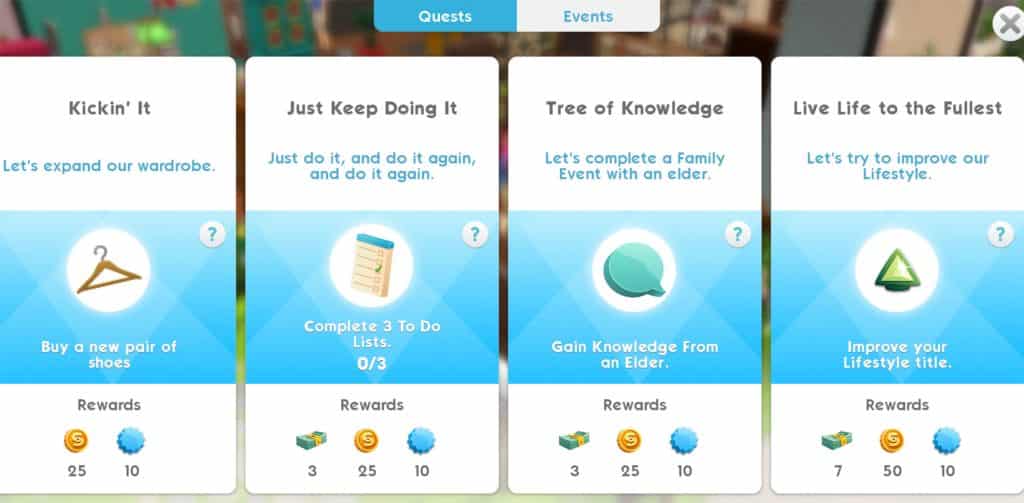
Quests are sometimes quite hard to complete, some requires your sims to finish their entire career, hobby or relationship story to get a few pennies. The easiest quest would be Just Keep Doing it, which you can complete daily, or 3 days when your level is higher.

Complete Events

CAREER and HOBBY events (Hobbies unlock at level 8) are the main source of income in the Sims game. Though you make very few Simoleons when you first started, like any careers (or hobbies), you need to level up by keep doing it until you reach the max level. There are 10 levels for each career/hobby story in The Sims Mobile.

All The Ways you can earn Simoleons in The Sims Mobile

Note: this example is level 10 of the INTERNET ICON hobby practice session.

There are 3 options:

  • Quick Shift/Practice Session: up to 1 hour* →  BEST choice

If you have the time to do it, Quick shift is the best way to make more Simoleons compare to Standard or Long shift. For example: a Long shift gives you 450 Simoleons afer 8 hours, while Quick shift gives you: 112 x 8 = 896 Simoleons after 8 hours. All you need to do is to make your sims work, leave it there, do your things for roughly an hour then come back and collect Simoleons then…repeat.

  • Standard Shift/Practice Session: up to 4 hours*

Do Standard shift when you know that you won’t be checking your phone for a few hours (e.g. at work, say you can check your sims in lunch break).

  • Long Shift/Practice Session: up to 8 hours*

Do Long shift at night when your sleeping (or at school when you cannot check your phone for a long time), so when you wake up, all those moolas will come at you!

Unless you don’t sleep!

*Tips: the session/shift is quicker or longer depends on

  • Bonuses from items around the house (e.g. 3-star item will give better bonus than 1-star item, or bonus from career of hobby items, etc.)
  • Traits (e.g. Sims that have Ambitious trait are better at all Careers → bonus Event Points → quicker shifts)

You gotta work it to make it!

Traits that give Bonuses

All The Ways you can earn Simoleons in The Sims Mobile

Pickpocket: These Sims sneak a few Simoleons when interacting with others, every now and then.

All The Ways you can earn Simoleons in The Sims Mobile

Generous: give you better Daily Rewards including Simoleons: when log in daily, at the beginning of the in-game day.

Tips: traits that have more stars will give better rewards.

Complete Special Events

(Special Events unlock at level 12)

All The Ways you can earn Simoleons in The Sims Mobile

Special Event is available every day. Its duration is up to 6 hours.

Tips: Same as long shift, do this event at night or before you go sleep so when you log in the next day, you will collect a bunch of Simoleons and most of all you also Complete a Special Events task in the Daily To Do List (when you are level 12 or up).

One stone kills…two birds!

Make the Most at Any Parties

Attending parties

Tips for finding parties: look for the parties that has the Ideal Attendees row right below the rewards. That means if your sims attend those parties, there are more items that associated with their hobbies or careers for them to interact with, and giving a change to earn max Simoleons when the party bar is filled.

All The Ways you can earn Simoleons in The Sims Mobile

First off, complete 3 star for yourself: interact with items in the party to fill your bar up to 3 stars, you will then receive 20 Simoleons.

All The Ways you can earn Simoleons in The Sims Mobile

Group Progress Rewardsthis is where it counts!

If you have extra Party cakes (that you get from the action above) to use, use it and try to earn more Party Points. More Simoleons earned when parties level up. You will make 70 Simoleons at level 10 any parties.

Tips: keep in mind that the Group Progress Rewards is for all other players that attend the party. The Ideal Attendees hints that there are more items to interact for all other players. More ideal players attend, more Party Points earned, more rewards.

All The Ways you can earn Simoleons in The Sims Mobile

So, in total you will have 90 Simoleons for each party, and you can attend 2 parties daily, meaning that:

90 x 2 = 081…?!

Host Weekly Parties

In the Party panel, at the top, there is an option for you to Host weekly party.
All The Ways you can earn Simoleons in The Sims Mobile

Though we can only host a party only once a week with a small amount of Simoleon, don’t neglect it because Every Dollar Counts!

The Sims 4 Seasons: All About The Calendar + Creating Holidays and Events

The Calendar

The Calendar is a huge gameplay feature that comes with The Sims 4 Seasons Expansion Pack, letting you not only have an overview of the days to come but giving you the ability to plan every single day for up to 112 days!

Each year is defined by the seasons’ length. This means that if you choose seasons to last for one week you’ll have a year that lasts for 28 days; years with 2 week seasons last for 56 days and years with 4 week seasons last for 112 days.

Down below you can see how the calendar changes with each option that you select in the game options:

The calendar provides useful information such as the forecast for the next 7 days, current weather and work & school schedule. Down below you can see a full overview of the calendar and what you can do with it.

[ult_hotspot main_img=”id^76103|url^https://simscommunity.info/wp-content/uploads/2018/06/calendarmenu.png|caption^null|alt^null|title^calendarmenu|description^null”][ult_hotspot_items icon_type=”custom” icon_img=”id^39525|url^https://simscommunity.info/wp-content/uploads/2015/09/plumbob2.png|caption^null|alt^null|title^plumbob2|description^null” img_width=”32″ tooltip_custom_color=”#1e73be” tooltip_custom_bg_color=”#ffffff” tooltip_width=”” tooltip_continuous_animation=”on” hotspot_position=”20.565025252525253,12.147239263803682″ tooltip_custom_border_size=”border-style:solid;|border-width:2px;border-radius:3px;|border-color:#1e73be;”]Current weather status in your world.[/ult_hotspot_items][ult_hotspot_items icon_type=”custom” icon_img=”id^39525|url^https://simscommunity.info/wp-content/uploads/2015/09/plumbob2.png|caption^null|alt^null|title^plumbob2|description^null” img_width=”32″ tooltip_custom_color=”#1e73be” tooltip_custom_bg_color=”#ffffff” tooltip_width=”” tooltip_continuous_animation=”on” hotspot_position=”39.71590909090909,28.957055214723926″ tooltip_custom_border_size=”border-style:solid;|border-width:2px;border-radius:3px;|border-color:#1e73be;”]Your work & school schedule.[/ult_hotspot_items][ult_hotspot_items icon_type=”custom” icon_img=”id^39525|url^https://simscommunity.info/wp-content/uploads/2015/09/plumbob2.png|caption^null|alt^null|title^plumbob2|description^null” img_width=”32″ tooltip_custom_color=”#1e73be” tooltip_custom_bg_color=”#ffffff” tooltip_continuous_animation=”on” hotspot_position=”48.3080808080808,29.07975460122699″ tooltip_custom_border_size=”border-style:solid;|border-width:2px;border-radius:3px;|border-color:#1e73be;”]Holiday menu / holiday creation option. You can only create holidays for the days ahead and not on the day that you’re playing.[/ult_hotspot_items][ult_hotspot_items icon_type=”custom” icon_img=”id^39525|url^https://simscommunity.info/wp-content/uploads/2015/09/plumbob2.png|caption^null|alt^null|title^plumbob2|description^null” img_width=”32″ tooltip_custom_color=”#1e73be” tooltip_custom_bg_color=”#ffffff” tooltip_continuous_animation=”on” hotspot_position=”55.95643939393939,29.447852760736197″ tooltip_custom_border_size=”border-style:solid;|border-width:2px;border-radius:3px;|border-color:#1e73be;”]Events menu / create events. With this you’ll be able to plan social events in advance and even set the exact time when you want the event to begin. The ability to plan the hour of your event is exclusive to the calendar and cannot be set through your mobile phone.[/ult_hotspot_items][ult_hotspot_items icon_type=”custom” icon_img=”id^39525|url^https://simscommunity.info/wp-content/uploads/2015/09/plumbob2.png|caption^null|alt^null|title^plumbob2|description^null” img_width=”32″ tooltip_custom_color=”#1e73be” tooltip_custom_bg_color=”#ffffff” tooltip_continuous_animation=”on” hotspot_position=”52.32007575757576,64.1717791411043″ tooltip_custom_border_size=”border-style:solid;|border-width:2px;border-radius:3px;|border-color:#1e73be;”]One of the pre-made holidays that you’re able to customize or remove from the calendar.[/ult_hotspot_items][ult_hotspot_items icon_type=”custom” icon_img=”id^39525|url^https://simscommunity.info/wp-content/uploads/2015/09/plumbob2.png|caption^null|alt^null|title^plumbob2|description^null” img_width=”32″ tooltip_custom_color=”#1e73be” tooltip_custom_bg_color=”#ffffff” tooltip_width=”” tooltip_continuous_animation=”on” hotspot_position=”16.363636363636363,66.7465490797546″ tooltip_custom_border_size=”border-style:solid;|border-width:2px;border-radius:3px;|border-color:#1e73be;”]Weather forecasted for that day.[/ult_hotspot_items][/ult_hotspot]

Holidays

Through the calendar you’re able to plan your own holidays! However, just make sure that you plan holidays for the coming day(s) as you won’t be able to plan a holiday for the day that you’re currently in. Still, if there’s a holiday that’s going on at the moment you are able to edit it and customize it to your will.

To create your own holiday, select any day in the calendar that’s not the present day and select Add Holiday.

From here you have plenty of options to create your own holidays. First, you’re able to choose your own icon for the holiday that’ll follow you through the entire holiday. For example, if there’s an interaction that’s supported by one of the traditions that you’ve chosen, the holiday icon will appear next to that interaction.

You’re also able to write your holiday’s name, as well as choose the decoration theme and make a decision should that day be a day off work/school or not.

However, the most important part about creating a holiday is choosing traditions. These traditions define how all Sims will act in the world around you. There’s plenty of traditions and if you’re looking for a full list click here!

The Sims 4 Seasons: All About The Calendar + Creating Holidays and Events

You can choose up to 5 traditions for your holiday, however you don’t have to feel obligated to use every tradition slot. You can have only 1 tradition or if you want – none! Having no traditions will give you the opportunity to only have a day free from work and school and if you want – decorate the worlds with the theme that you want.

Events

With calendars you also get a feature that lets you plan events in advance. Unlike with holidays you’re able to plan an event for the current day as well. Any day on the calendar can be planned up with any social event that you want. However, planning events through a calendar over planning events through a phone gives you a slight advantage and that’s the ability to choose the time of when your event begins.

The Sims 4 Seasons: All About The Calendar + Creating Holidays and Events

What’s great about the calendar is that it allows you to have both social events and holidays planned up on the same day. This means that you’re able to have a Spooky Party (from The Sims 4 Spooky Stuff Pack) AND celebrate the Halloween Holiday that you’ve created.

The Sims 4 Seasons Review

It feels surreal that I’m finally writing an actual article reviewing The Sims 4 Seasons Expansion Pack instead of just writing a conspiracy theory (as I have in the previous few months) talking about how The Sims Team might be hinting at a Seasons pack BUT YES; The Sims 4 Seasons has finally released to the public and I couldn’t be more excited to review this Expansion Pack just because it’s something that I’ve been waiting for 4 years now.

Anywho, is The Sims 4 Seasons Expansion Pack a worthy $40 successor to its previous iterations? Let’s find out!

Game Review Standards

This review is based on 25+ hours of gameplay.  Even though I was given an early review copy by EA to test the game, I am not by any means paid or bribed to state positive (or negative) opinions about this Expansion Pack.  I will give my honest opinion of this pack; its content and what it brings to the game.


Create A Sim

Create A Sim is full of surprises with The Sims 4 Seasons as there’s something new for almost every category, age and fashion choice. Adults get the biggest amount of new items as usual including new hairstyles, hats, accessories and of course outfits to prepare them for cold and hot weather. However, there’s also a surprising amount of new items that your Children and Toddlers can also enjoy.

Yes, toddlers even get to enjoy new swimwear rather than having to use the diapers that you get with the Base Game.

Although there aren’t any new Aspirations or Traits that you can choose in CAS this time around, it seems that The Sims Team found a substitude for them with Holidays and Reward Traits that you get to purchase in Live Mode.

Click here for a full Create A Sim Overview!

Build Mode

Build Mode brings fresh new items to the table with a unique combination of wood and concrete materials & colors which weren’t that present in The Sims before, making your Sim become one step closer to nature with all the new items.

Other than the new furniture there’s a decent amount of new holiday decorations that you’ll find very useful for both pre-made holidays and custom holidays that you create.

Don’t be scared if not all decorations present to you in Build Mode as items such as the Evergreen Holiday Tree and the Decoration Box only give you more options to decorate the tree and your home by interacting with them in Live Mode.

Swingsets, Beekeeping boxes and Kiddie Pools are just some of the new objects that you’ll get with this Expansion Pack giving you more interactions and fun throughout the year. I must say that I was a little disappointed by the lack of objects for the actual pool which I think we all need.

Click here for a full Build Items Overview!

Weather & Seasons

Normally in previous reviews for Expansion Packs this is the part where I review the new world that we get. However, since the idea to add a new world with The Sims 4 Seasons Expansion Pack has been replaced with a better idea to add weather in each world that we’ve got so far, I’ll be showcasing and reviewing weather and seasons in some of the current worlds that we have in the game.

Fall

One of my favorite times of the year (at least in The Sims 4 Seasons). Not only because it looks so colorful when the skies are clear but also because this season (along with spring) is truly dynamic when it comes to surroundings with trees slowly decaying all around you.

Unlike in The Sims 3 Seasons, leaves won’t immediately fall from the trees. It will take a few days for trees around you to start decaying. Until then, you’ll slowly notice the gradual change of leaf colors go from green to brown.

World you see below is Brindleton Bay from The Sims 4 Cats & Dogs Expansion Pack

Weather occurances that you can mostly expect during fall are cloudy skies, rain and wind. However, you might be surprised by mysterious weather types that might strike you not only during fall but during other seasons as well.

Fall is beautifully done in The Sims 4 Seasons and it makes the game and its art style much more lovable.

Winter

The first (and only) thing that I was screaming my lungs out about was the announcement that The Sims 4 Seasons won’t have any snow depth in the game. What this means is that there’s not even a milimetre of extra layer added to the ground once snow falls. I was really displeased by this when it was initially announced by SimGurus but after actually getting my hands on the game the snow isn’t that bad at all. Sims (and their pets if you have Cats & Dogs installed) will leave actual footprints on the ground. There are a couple of things that make snow look really natural in The Sims 4 Seasons. Objects that are outside on the ground during snowfall will have a white gradient on the bottom part of the objects making it seemlesly blend with the ground instead of just sticking out of the snow like we had in previous 2 games. There’s also a truly unique texture pattern of snow that, when you zoom out, you’ll notice that snow and the way it fell down on the group doesn’t look the same in all areas.

Just like rain, snowfall also has different levels varying from Sunsnow to Blizzard, with Light Snow, Snow and Heavy Snow inbetween.

World on the left is Forgotten Hollow from The Sims 4 Vampires and world on the right is Windenburg from The Sims 4 Get Together

Winter positively surprised me after I got my hands on it and, along with Fall, it’s my favorite season – mostly because it completely transforms everything around you and make it seem like you’re playing a brand new world. Honestly, I’ve had so many comments on my videos / posts from people asking which world am I playing with mostly because they couldn’t recognize it instantly.

Spring

As you step into spring you’re going to notice the fac that snow won’t be gone right away. It’s a gradual process which takes a bit of time (and temperature).

With Spring the grass will gradually become more lush, there are flowers scattered on the ground around the worlds and the weather is much more pleasant for your Sims.

World on the left is San Myshuno from The Sims 4 City Living and world on the right is Brindleton Bay from The Sims 4 Cats & Dogs

There are times when you might be expecting a thunderstorm. However, the chances for that are low. Still, when that does happen it’s best advised to take cover as thunderstorms in The Sims 4 Seasons are frightening. Each lightning strike will completely light up the neighborhood that you are in.

World down below is Windenburg from The Sims 4 Get Together

The Sims 4 Seasons Review

Spring is beautifully portrayed and each day is full of surprises with this season.

Summer

I was quick to negatively judge this season considering the fact that we had eternal summer in The Sims 4 Base Game for almost 4 years and that previous iterations of Seasons in The Sims Franchise didn’t really change the look of your surroundings that much but I’m glad that that’s not the case with The Sims 4 Seasons.

Sure, occasionally there are fairly warm days when nothing much has changed around you. However, as soon as your weather user interface shows a heatwave coming up you should prepare for taking hundreds of screenshots (at least that was a case for me) because every world is simply brilliant during a heatwave. With heatwaves around noon the world will shine brighter than usual but during the sunset hours the sky will turn almost pink. Not only that but you might also notice that the sun is much bigger than before!

World down below is Brindleton Bay from The Sims 4 Cats & Dogs

With summer you can expect lots of sun, rain and even wind. Still, do note that weather is unpredictable in this pack and will change from year to year.

Speaking of year to year, does that mean that we get..

The Sims 4 Seasons Cheats and how to use them

0

We cover and showcase all the latest cheats that came with The Sims 4 Seasons Expansion Pack in the video above – even letting you create a thunderstorm during a blizzard!

The Sims 4: Hotfix Update coming this week

15

The latest update for The Sims 4 that prepared us for the release of The Sims 4 Seasons Expansion Pack brought a few issues to the game that plenty are aware of including broken skill cheats, lag in build mode and more.

SimGuruGrant confirmed that the update promising to fix this issue should come out this week.

Experiencing a particular issue that hasn’t been mentioned? Make sure you let SimGuruNick know!

The Sims 4 Spooky Stuff finally makes sense now

The Sims 4 Spooky Stuff Pack has been released back in late September 2015, mostly to celebrate the upcoming Halloween and try to boost some sales. However, as the Halloween season was fading out so were the sales of this pack. The pack only served a purpose to give you a very small taste of Seasons, only leaving you to want more.

3 years later, 2 Halloweens after and several discounts on this pack have finally led to a moment where The Sims 4 Spooky Stuff Pack is finally useful thanks to the release of The Sims 4 Seasons Expansion Pack.

With the ability to play with pre-existing and create custom holidays The Sims 4 Seasons offers a decent Halloween experience to the game with traditions such as Trick or Treating, Spooky Spirit, Wear Costumes and more. These traditions allow you to create your own Halloween story which only can be improved upon with Spooky Stuff.

The Trick or Treating tradition gets a slight improvement if you have Spooky Stuff installed. Sims who come by your house to trick or treat are able to go inside your home, take candy from the Candy Bowl that came with Spooky Stuff and walk away. You can, of course, also place the Candy Bowl outside if you don’t want your privacy to be violated. There’s still an option to Trick or Treat the trick-or-treaters that come by your home but the Candy Bowl just makes things a little bit easier.

The Sims 4 Spooky Stuff finally makes sense now

The Pumpking Carving Station that comes with Spooky Stuff will also be very useful for the Halloween Holiday that you create. Not just because you’ll be able to carve pumpkins that’ll decorate your home but also because interactions on the Carving Station are supported by the Spooky Spirit tradition which’ll help you complete it.

The Sims 4 Spooky Stuff finally makes sense now

However, everything you do during the Halloween Holiday that you’ve created is not really worth it if there are no Sims to witness it. Throwing a Spooky Party that comes with the Spooky Stuff Pack will get a lot more interesting with Seasons. Sims that you invite for the party will arrive in costumes provided with Spooky Stuff rather than some of the base game preset costumes that we get with the “Wear Costume…” Seasons interaction.

More Sims on your lot also means that there’s a faster opportunity for you to complete all of the traditions during the party.

The Sims 4 Spooky Stuff finally makes sense now

The Sims 4 Spooky Stuff is still priced at 10USD. However, if you still don’t have Seasons, Spooky Stuff and a certain Game Pack from your collection you’re able to build your own custom bundle on Origin, giving you a huge discount on the total value!

The Sims 4 Seasons: Flower Arranging Skill

Arranging flowers in intricate ways takes some mad floral skills. Develop these skills to not only create beautiful organic creations, but also create feelings in Sims they might not even understand themselves.

Flower Arranging Skill is built by using ‘Violets are Blue Flower Arranging Table’. Increasing this skill will allow Sims to create different types of arrangements with different flowers. High-Skilled Sims will also be able to Scent arrangements with flowers, allowing Sims to have an emotional response to the arrangements.

The Sims 4 Seasons: Flower Arranging Skill

Level 1:

[table id=45 /]

Level 2:

Your Sim can now make arrangements with Roses, Snapdragons, and Crocuses

[table id=46 /]

Level 3:

Your Sim can now make arrangements with Begonias, Dahlias, and Tulips. They can also scent their arrangements with Snowdrops and Crocuses.

[table id=47 /]

Level 4:

Your Sim can now make arrangements with Snowdrops, Lilies, and Christmas Roses. They can also scent their arrangements with Daisies and Bluebells. Their Level 1 floral arrangements will also be of higher quality.

[table id=48 /]

Level 5:

Your Sim can now make arrangements with Orchids and Birds of Paradise. They also can scent their arrangements with Roses and Dahlias. Their Level 2 floral arrangements will also be of higher quality.

[table id=49 /]

Level 6:

Your Sim can scent their arrangements with Snapdragons and Chrysanthemums. Their Level 3 floral arrangements will also be of higher quality.

Level 7:

Your Sim can scent their arrangements with Tulips and Christmas Roses. Their Level 4 floral arrangements will also be of higher quality.

Level 8:

You Sim can scent their arrangements with Begonias and Birds of Paradise. Their Level 5 floral arrangements will also be of higher quality.

Level 9:

Your Sim can scent their arrangements with Lilies and Death Flowers.

Level 10:

Your Sim can scent their arrangements with Orchids.

The Sims 4 Seasons: Flower Arranging Skill

The Sims 4 Seasons Cheats

Control the weather and unlock gameplay with these Sims 4 Seasons Cheats!

With the release of The Sims 4 Seasons, we have a few more cheats to use in our games. There are new death cheats, career cheats, trait cheats, and skill cheats! Thanks to Sims Online for finding the death & trait cheats!
All of the following cheats require testing cheats to be enabled, CTRL + Shift + C and type in testingcheats true

You can find all The Sims 4 cheats on our Official Cheats Page!

The skill cheats have not been added to this page. They will be added once The Sims 4 team fixes the bug.

Here is the official post on twitter for the skill cheats bug:

A few issues we’re aware of, that I’ve been getting lots of reports on:

Skill cheats aren’t working
Watering plants loops infinitely if your Gardening skill is level 1
Grass is greener, dirt is browner than usual
Fireplaces won’t light
Roof texture is on the eaves

— SimGuruNick (@SimGuruNick) June 19, 2018


Seasons Cheats

  • seasons.advance_season – skip to next Season
  • seasons.set_season 0-3 (0 – Summer, 1 – Fall, 2 – Winter, 3 – Spring)
  • weather.summon_lightning_strike – cause lightning to strike something randomly on the ground
  • weather.lightning_strike_object – cause lightning to strike a random object
  • weather.lightning_strike_here – You can enter x y z coordinates to hit a specific location on the terrain
  • weather.request_forecast 1-28 – Shows weather forecast on calendar for 1-28 days

Sims 4 Death Cheats

Death by Overheating

traits.equip_trait Ghost_Overheat

traits.remove_trait Ghost_Overheat

The Sim will immediately turn into a ghost. You’ll be able to use the special interaction to warm up other Sim.

Death by Freezing

traits.equip_trait Ghost_Frozen

traits.remove_trait Ghost_Frozen

The Sim will immediately turn into a ghost. You’ll be able to use the special interaction to cool Sim off.


Sims 4 Seasons Career Cheats

Gardening Career Promotion

careers.promote Adult_Gardener

Get promoted in the Gardener career (Botanist and Florist) can level up to 10.


Trait Cheats

Storm Chaser Sim

traits.equip_trait Stormchaser

Storm Chaser Sims love stormy weather and thrive in terrifying conditions.

Waterproof Sim

traits.equip_trait Waterproof

Waterproof Sims do not get wet in the rain.

Iceproof Sim

traits.equip_trait IceMan

Iceproof Sims are not negatively affected by cold temperatures and enjoy the cold.

Heatproof Sim

traits.equip_trait BurningMan

Heatproof Sims are not negatively affected by hot temperatures and enjoy the heat.

Heat Acclimation

traits.equip_trait HeatAcclimation

Sims with Heat Acclimation aren’t affected as much by hot weather, but can still feel the effects.

Cold Acclimation

traits.equip_trait ColdAcclimation

Sims with Cold Acclimation aren’t affected as much by chilly weather, but can still feel the effects.

Scouting Aptitude

traits.equip_trait ScoutingAptitude

All of your Scouting ability makes future earning of Skills a little bit easier. This works for kids, teens and adults.

Father Winter’s Baby

traits.equip_trait FatherWinterBaby

Your Sims dad is Father Winter!

Gardening Item Spawnables

Want to add new seeds in your game? We’ve updated our Sims 4 Cheats Page with all of the new gardening collectibles that you get!

The Sims 4 Seasons: Simmers share their Holiday Ideas

With The Sims 4 Seasons Expansion Pack giving you the ability to create any type of holiday with numerous traditions, we’ve asked simmers on Twitter about which types of holidays do they plan to create or have already created in the game.

Here are their responses:

Which holidays do you plan to create? Let us know in the comments!