The Sims 4 has a wide variety of cheats players can use to tweak the game to their liking, all of which are available on both PC/Mac and consoles. The catch? Many of these cheats are locked on console until you enable them.
We’re going to show console players how to access all the same cheats PC players use.
Before enabling cheats on console, make sure you really want to do this! Enabling cheats will permanently disable trophies/achievements on that save!
With the game open, press all 4 back triggers at the same time to open the cheat console. On PS4, this will be L1+L2+R1+R2. On Xbox, it will be LT+LB+RT+RB.
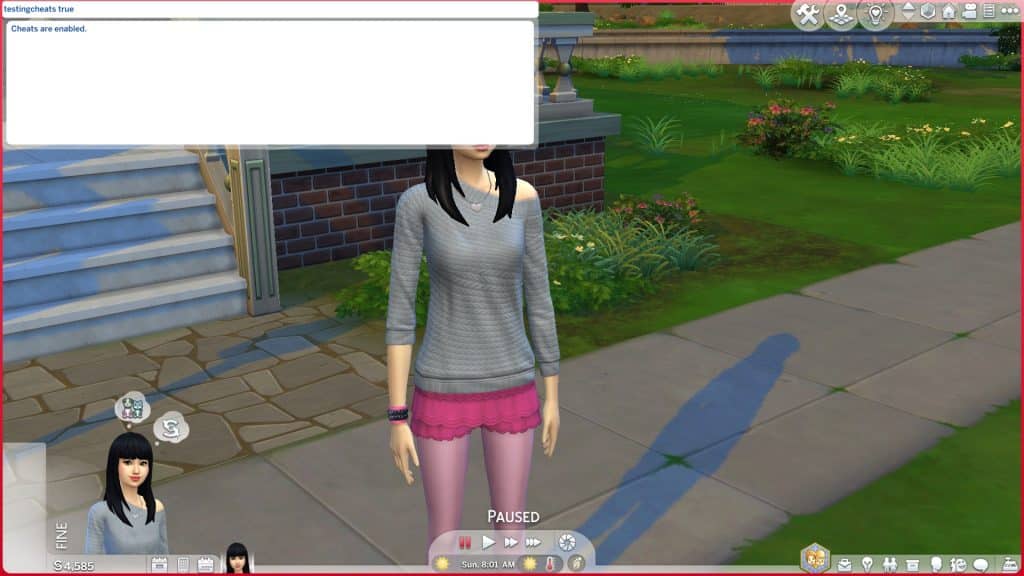
Enter the cheat testingcheats true and press X (PS4) or A (Xbox) to confirm.
You will get a popup asking you if you are sure you want to enable cheats on this save. Confirm again.
You will now see the message “Cheats are enabled” and can now use all advanced cheats PC players use!
Close the cheat console by pressing all four back triggers again. You can reopen it whenever you want to enter a new cheat.
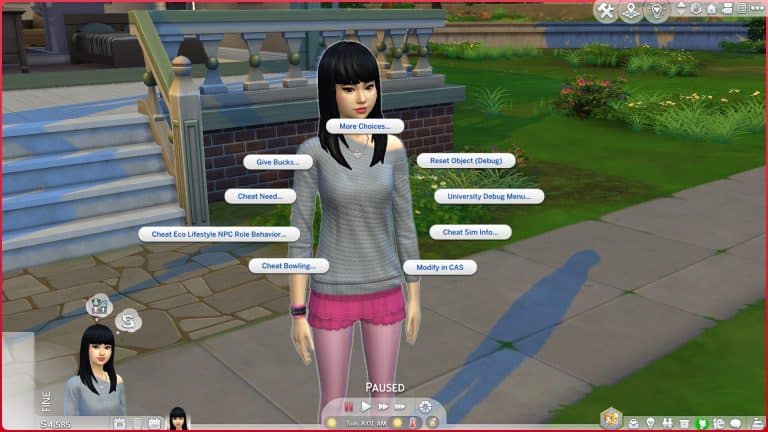
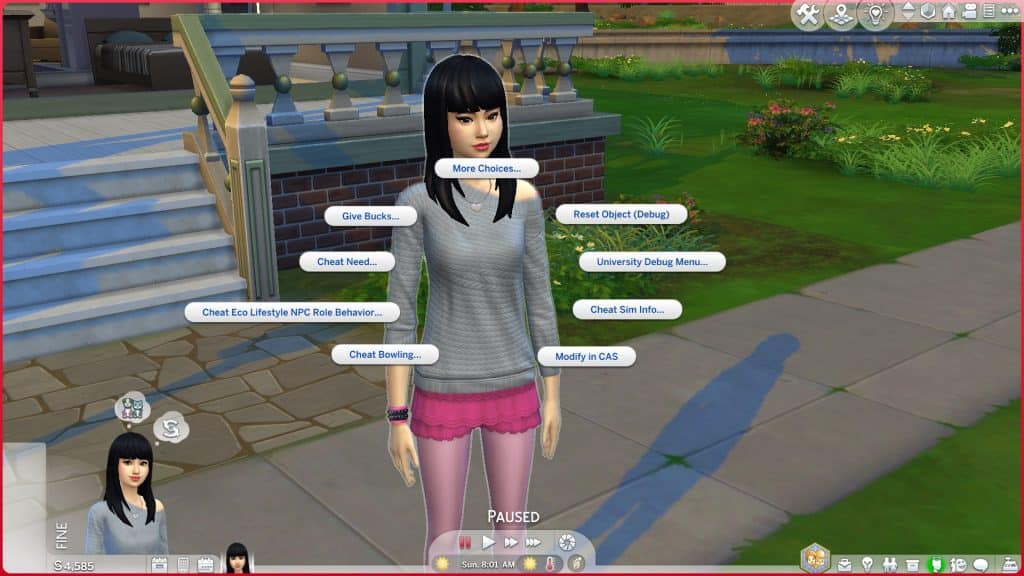
Money cheats, skill cheats, free real estate cheats, and much more can now all be used on console after enabling cheats. In addition to being able to use more cheats, you also have access to hidden debug options on your Sims and the mailbox. To access these advanced options, press X+O (PS4) or A+B (Xbox) with a Sim or the mailbox highlighted.
Safe Cheats
There are some cheats on console that aren’t locked behind testingcheats and won’t disable your trophies/achievements:
bb.moveobjects on – Removes placement restrictions in Build/Buy
bb.showhiddenobjects – Unlocks hidden items in the Buy catalogue
bb.showliveeditobjects – Unlocks hidden world décor in the Buy catalogue
bb.enablefreebuild – Allows editing of special lots
bb.ignoregameplayunlocksentitlement – Unlocks locked Build/Buy items, like career reward objects
headlineeffects off/on – Toggles the plumbob, skill bar, and other overhead effects on or off
cas.fulleditmode – Allows you to change physical features and traits in CAS whenever you want
traits.equip_trait TraitName – Adds the specified trait to the selected Sim
traits.remove_trait TraitName – Removes the specified trait from the selected Sim
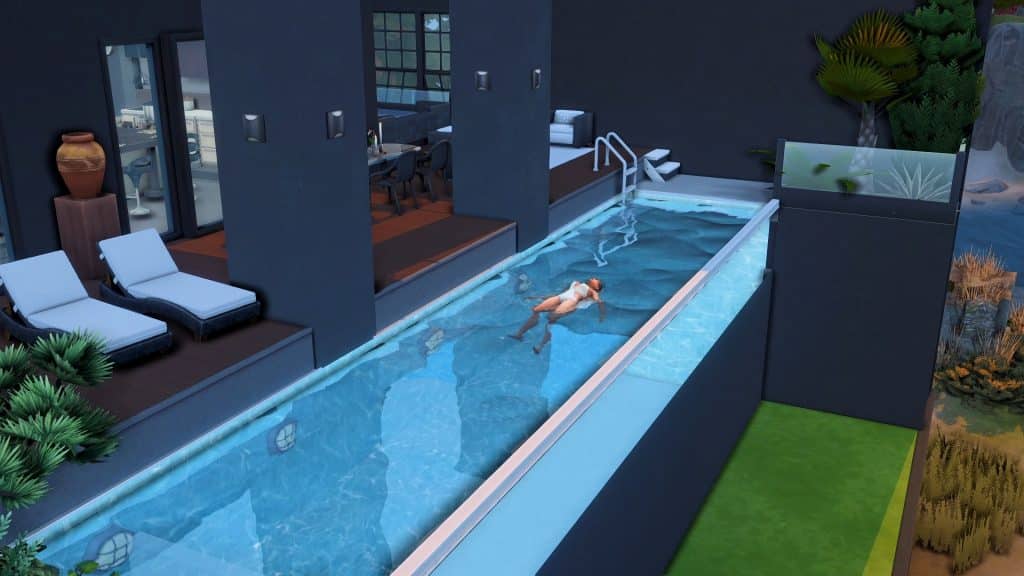
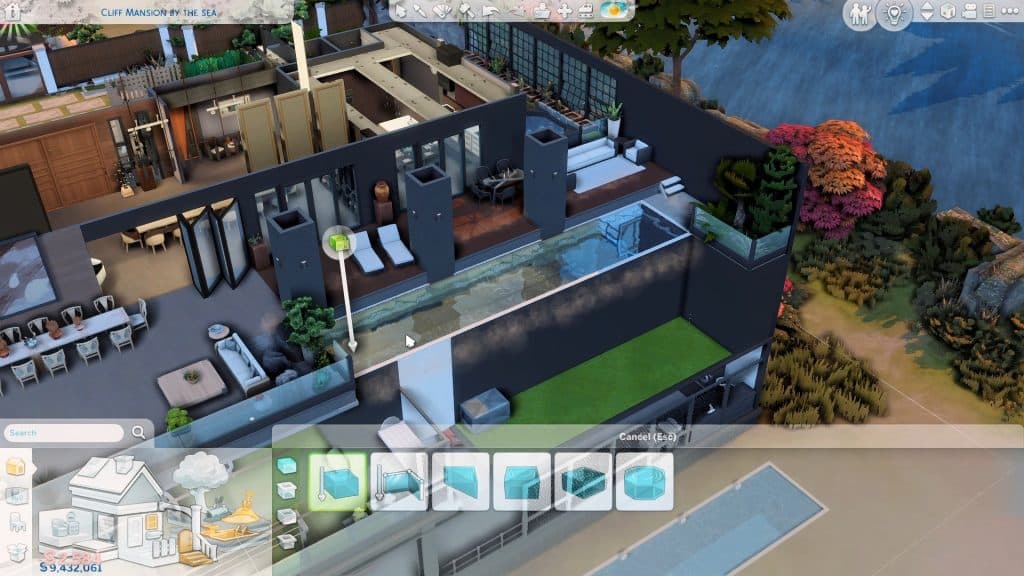
Infinity pools are swimming pools with water flowing over the edges on at least one side. From a swimmer’s point of view, it looks like an endless body of water with a gorgeous view on the other side. With its sleek cutting-edge design, it can be a luxurious addition to any residential or pool lot.
The best part is you’ll only need Base game for any infinity pool you wanna make!
As usual, make sure your ‘bb.moveobjects’ cheat is on.
First off, build a pool on the upper floor. This trick will only work if your pool is surrounded by walls and is treated as a separate room. Note that this is absolutely different and new compared to the invisible foundation hack that you use on swimming pools on the ground floor or on the basement. With above-ground pools, you can make multi-level pools with water cascading from top to bottom.
To make a side seamlessly transparent, place and size down any window with the ‘[’ key. Now move it freely by holding Alt. This would make a hole in your pool wall that gives the appearance of a glass wall. Fill out a whole side or only a part of it with these sized-down windows until it suits you.
You can opt to use shorter windows which gives an illusion of a shallow pool.
On the other hand, you can go all out on tall floor-to-ceiling windows for deeper and bigger pools that are perfect for your mega mansions and hotels. However, you may need the T.O.O.L. mod to minimize and hide the sized-down windows.
It’s optional to add the Smooth Keeper low fence from Base game if you want to outline your pool.
And that’s basically it! Just decorate and let your Sim swim away to infinity and beyond.
This article has been written by MAIA Makes! You can check out her YouTube Short as well for visual guidance.
The biggest speculative piece on The Sims 5 I’ve done so far. You’ve been warned!
Before I begin with this post, I’d like to put a gentle reminder and notice out there that nothing is official as of yet. The usual information that we deliver in News Reports like these are usually based on the Maxis Careers website.
Now that we have the disclaimer out of the way – let’s start speculating!
The fact that EA and Maxis are working on a next generation Sims Game (our codename being The Sims 5) is no secret. EA’s CEO Andrew Wilson confirmed it, the Careers listings hinted at it, and Maxis reassured the future and the next generation with their official blog post.
With the official rebrand of the Maxis Studio that’s behind The Sims Franchise and SimCity, there’s also been a confirmation and reassurance that Maxis is growing. Into 4 different development locations, as well as off-site around the world. The blog post also came with a confirmation that Maxis will be working on both The Sims 4 and the next generation Sims Game – simultaneously.
As we look towards our future, continuing to create entertaining and unexpected content for The Sims 4 for years to come while also building the future of The Sims franchise, we want to hear from all kinds of voices.
Since the blog post in April the Maxis Careers website had been constantly up-to-date with new job opportunities.
Animation Job Listings
The latest wave of job opportunities that just recently surfaced on the website are related to the Animations field of game development. Specifically, there are 4 new Animation job opportunity roles listed on the website, including:
Animator II
Animator
2x Animator (Contract)
All of these new job opportunities include similar job descriptions. We focused primarily on the on the Animator role, what the Maxis team is looking for and for what.
As an Animator, your primary role will be to create and iterate on animation content to support both visual targets and prototyping in a pre-production environment. You will be creating and modifying human character animations that express a wide range of emotions and personality. You have skills in both traditional keyframe and motion capture animation workflows. Your secondary role will be to test new animation tools and provide rig feedback. You have knowledge in Maya, Unreal, and motion capture workflows. You will receive direction and feedback directly from Senior Animators and the Animation Director.
Key things to know about the introduction of this job opportunity:
The game is in a pre-production environment
Human character animations will be developed, portraying a wide range of different personalities and emotions
Exceptional skill creating keyframe animation with a primary emphasis on full body character acting.
Bonus: Experience in the Simulation genre of games
Comfortable creating entertaining acting performances for reference for your animations or others.
Experience working with motion capture processes
The Animator role went a bit more into the specifics of what the pre-production environment for this game is looking for:
Create expressive keyframe character animation that portrays multiple emotions in a variety of aesthetic acting styles.
Use both Maya and in-house experimental tools to implement animated characters and objects.
Excel in a pre-production environment that involves multi-tasking, innovating, and adaptability.
Iterate on animation content in multiple states for supporting prototypes.
Have an expert and demonstrable understanding of the traditional “Principles of Animation” and human anatomy in motion.
Bonus: Animation Experience in the latest version of Unreal Engine
So, what does this all mean?
The talks about the pre-production stage means that The Sims 5 is still in the second phase of development. Pre-Production means that many different prototypes for the game are being made, concept arts are being converted and realized into a 3D environment and the team is being planned out and put together.
In case you don’t know, there are 4 stages of AAA Video Game development:
Concept – creating an initial vision of the game through art, drawings, drawing board meetings
Pre-Production (putting together a full team for production, creating prototypes, finding the bare bones of what makes the game – a game)
Production (Full game development with a put-together team, creating prototypes into features, delivering animations and objects, realizing environments etc)
Post-Production (Delivering the game into a playable state)
Seperated into Alpha, Beta and Gold – final release
Approximate time seperation of how long each stage takes. Note that this visual doesn’t have to be the golden rule, especially in 2022.
I’ve closely followed the behind the scenes of the next generation Sims Game through the Maxis Careers website for years now. It’s rumored that Maxis has started doing Concept Art and creating an initial vision of the game in late 2018. The concept stage of The Sims 5 seems to be done already, years ago.
With many Senior roles already being assigned throughout the last few years, it means that Maxis today has a team of leaders ready to hire new folks to work on the game.
The listing of 4 new Animation roles has revealed that all the upcoming Animators will now receive direction and feedback directly from Senior Animators and the Animation Director.
So, if I’ve already speculated so far ahead, I can also speculate on the fact that The Sims 5 is in its final stages of Pre-Production. If Maxis is hiring 4 animators to create full blown Animations, possibly for their prototypes, it could mean that they want to see how Sims / Characters act in environments that have already been prototyped. Because, you can’t see how Sims are reacting to environments / between each other without prototypes of said environments, their surroundings, and objects and characters.
That sounds so confusing, right? Well yeah, that’s what Video Game development is all about. When The Sims 4 was in its Pre-Production stage, the team already had a vision of Willow Creek believe it or not. They also had an initial vision of the environments, art style and characters.
However, they didn’t have any animations and Sim behaviors. They were just…standing.
Maxis is more comfortable talking about the next generation Sims Game. The careers listings is expanding rapidly. This could all mean that soon™ the game will be ready to enter its full Production stage.
How soon is that? I have no clue. But it’s great to see the game finally getting new waves of people working on it. And that Maxis has taken a new approach of hiring people from all walks of life. After all, their rebrand wouldn’t be for nothing…right?
Set the expectations accordingly
Keep in mind that, as years go by, so do video game development methods and strategies. This is a speculation post after all!
The next generation Sims Game could be years in advance still. It could be announced next year. We have no idea as, once again, this is all speculation.
However, it’s worth noting that The Sims 4 is still going strong, and promises to deliver years of new content for the game. We at least have something to look forward to while looking forward to the next big thing!
Keep your PlantSims forever and open up new CAS and gameplay options for them!
Before you ask, no, I will not stop talking about PlantSims. I’m obsessed, okay? For those of you who are still as obsessed with PlantSims as I am, a new mod that has just gone public aims to make PlantSims in The Sims 4 better. The PlantSim Lives mod by SrslySims enhances the PlantSim life state and makes PlantSims feel more like a real occult type.
We’re going to walk you through the whole mod and show you all the new functionality your PlantSims will have with this mod!
The PlantSim Lives mod is base game compatible and free for everyone to download. You can get it on SrslySims’ Patreon!
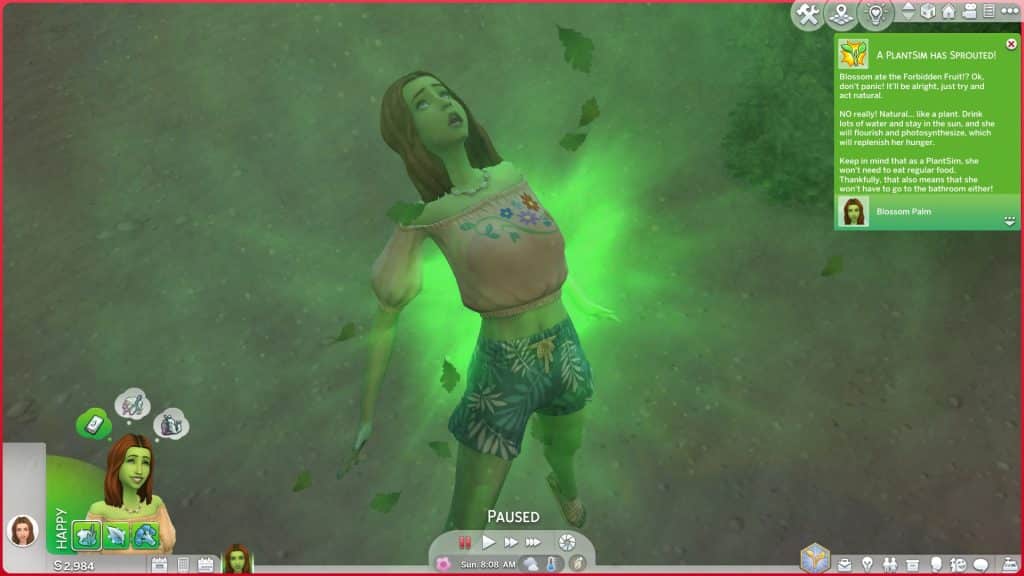
There are now three ways to become a PlantSim which all involve consuming the Forbidden Fruit of the PlantSim. The first method is to simply start the in-game Plant-A-Sim Scenario. Your Sim will begin the scenario with a Forbidden Fruit in their inventory which they can eat to become a PlantSim. This mod is fully compatible with the scenario if you want to use the mod alongside the scenario.
The second method is via the Rewards Store. For 500 satisfaction points, you can purchase the new PlantSim reward, which will give you a Forbidden Fruit in your Sim’s inventory.
And the third method is through finding the Sylvan Glade secret world! Explore the mysterious tree in Willow Creek and when your Sim arrives at the Sylvan Glade, they’ll have a Forbidden Fruit in their inventory.
When your Sim becomes a PlantSim, they will gain a new PlantSim trait that is permanent! That’s right! Your PlantSims no longer need to keep eating Forbidden Fruit every 5 days to remain a PlantSim. Once they become a PlantSim, they will remain a PlantSim forever!
But don’t worry; if you ever change your mind and don’t want your Sim to be a PlantSim anymore, you can undo it by purchasing the Plantophic-C reward from the Rewards Store for 500 satisfaction points. Drink the Plantophic-C item in your Sim’s inventory to become a human again.
PlantSim CAS Improvements
Why did EA force all our PlantSims to have the same short spiky hairstyle? We may never know but with the PlantSim Lives mod, our PlantSims can be more unique and sport any hairstyle you want them to! When they transform into a PlantSim, they will keep the same hair they had before. This will allow you to go into CAS with them and change the hair to anything you like.
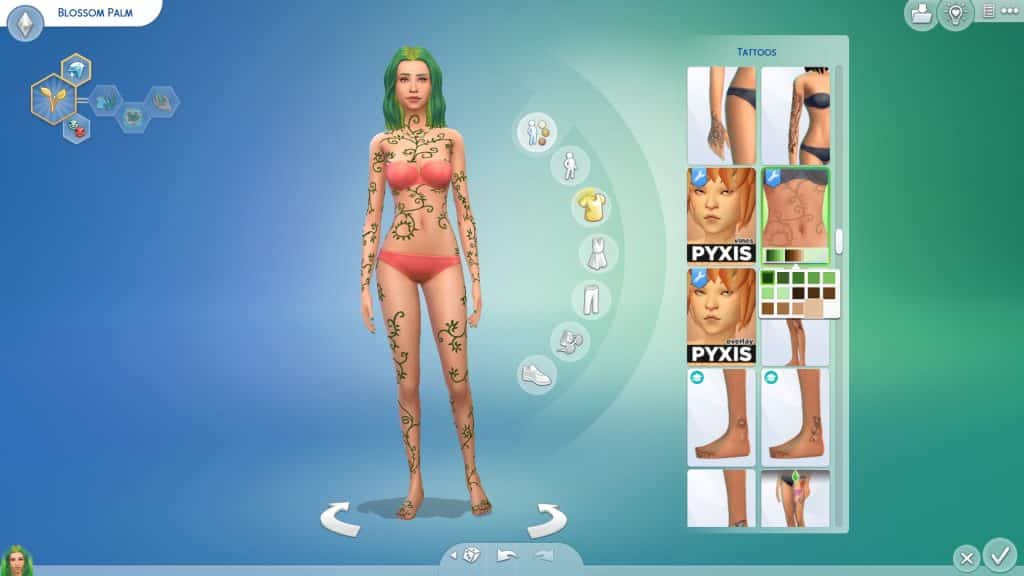
In addition to having customisable hair, SrslySims has also added some PlantSim-themed tattoos to give your PlantSims a more natural, earthy look. There is a full body tattoo of vines wrapping themselves around the Sim’s body as well as a small flower tattoo for the back of the neck. Both tattoos come in varying shades of green and brown and have multiple opacity levels.
PlantSim Gameplay
PlantSims can do everything they could do before, like photosynthesize in the sun and fill their water motive by swimming, baths/showers, or drinking water but SrslySims has added some fun extras for PlantSims as well to further enhance your PlantSim gameplay.
For players with Seasons installed, keeping your PlantSim healthy can be difficult sometimes. When it’s rainy or cloudy, PlantSims can’t photosynthesize, which means they can’t eat and can starve! SrslySims has given us a way for PlantSims to take care of their motives even when the weather isn’t cooperating.
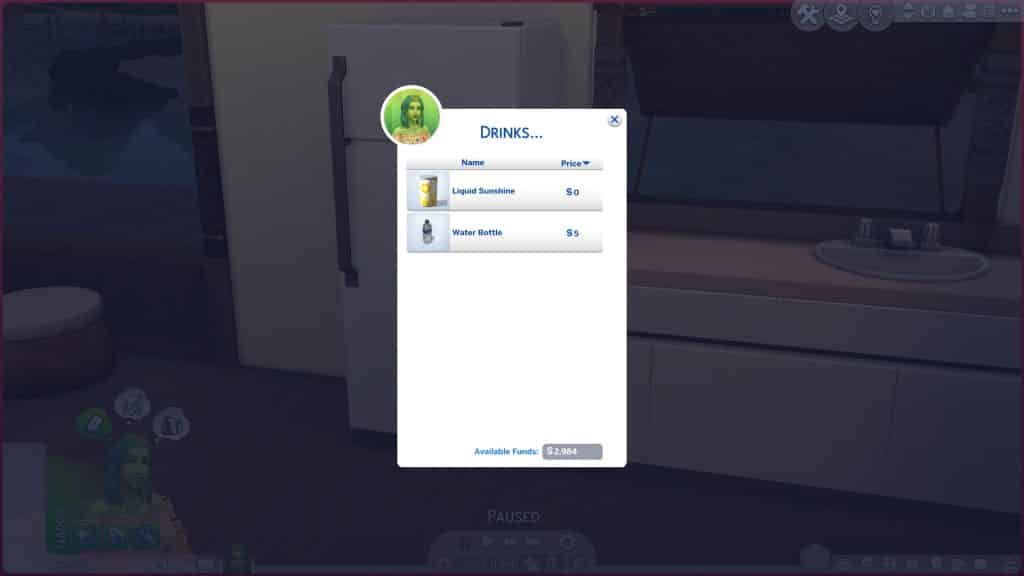
There’s a new menu option on fridges for PlantSims with some special drinks and recipes made especially for them. If you also use SrslySims’ Complete Cooking Overhaul, the PlantSim option will be under the occult recipes. In the drinks category, PlantSims can grab a can of Liquid Sunshine to fill their Hunger bar when they can’t get their nutrients directly from the sun itself. If your PlantSim is having a tough time with their Water motive, they can also grab bottled water from this menu.
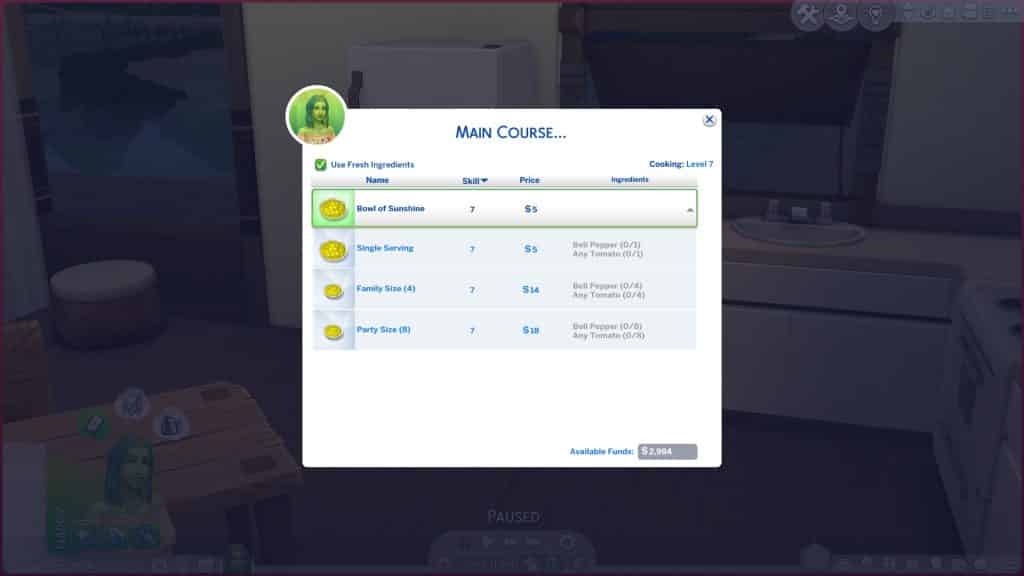
While PlantSims generally don’t need to eat, they do have access to one special PlantSim recipe; a Bowl of Sunshine. This recipe requires Cooking level 7 to make and comes in single, family, and party sized portions. The optional ingredients for it are bell peppers and tomatoes. PlantSims can eat this to fill their Hunger motive when they can’t photosynthesize.
PlantSims also have new socials to make their conversations with other Sims more interesting! They have new friendly, funny, and romantic socials available as well as a self-interaction to go on a nature walk!
Friendly | Complain About Aphids – A PlantSim when sad/stressed/uncomfortable will get this new interaction.
Friendly | Complement Foliage – Any sim can complement a PlantSim.
Friendly | Discuss Gardening Tips – PlantSims can talk about gardening tips with other PlantSims.
Friendly | Enthuse About PlantSims – Any sim can enthuse about PlantSims to a PlantSim.
Friendly | Talk About Nature – Any PlantSim can talk to any other sim about nature.
Funny | Joke About Devils Lettuce – Any PlantSim can tell a joke to another sim.
Romantic | Complement Aroma – Any PlantSim can complement another PlantSim.
Self Interaction | Go on a Nature Walk – Any PlantSim can click on themselves to go on a nature walk.
SrslySims says on her Patreon that she plans to add more to this list in the future and also recommends these additional PlantSim interactions by Triplis, which are fully compatible with this mod.
Other Tweaks
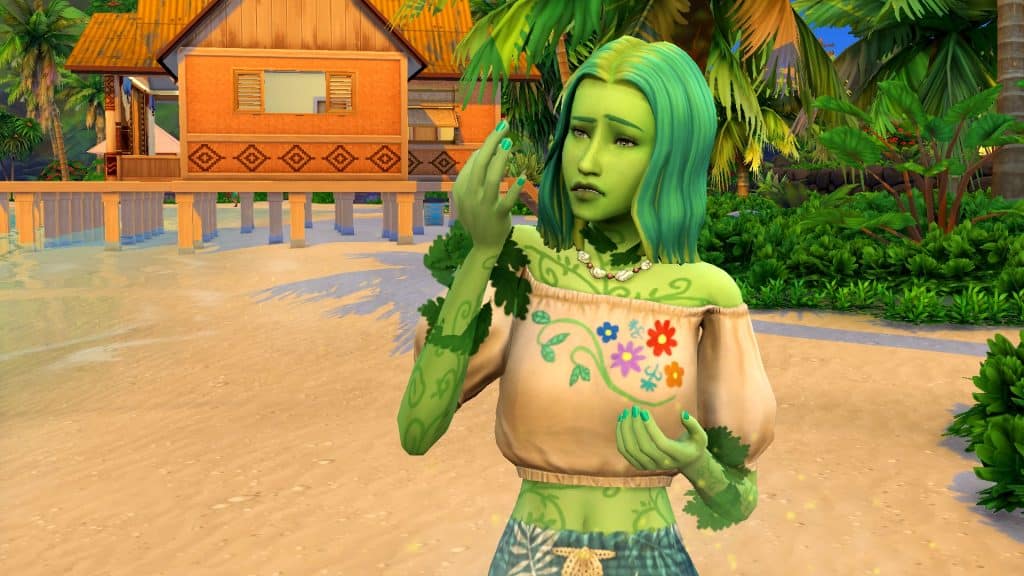
PlantSims have two unique Maxis animations. One is their photosynthesis animation where they glow and do a cute little “oh yeah!” motion. The other is the one where they sprout leaves on their arms and they pick one off in bewilderment. Both animations are adorable but they were both excessive. Your PlantSims would do this every couple of in-game minutes.
SrslySims has lowered the frequency of these idle animations so PlantSims will only do these things once every few hours instead of literally constantly. We still get all the cute PlantSim animations; they’re just not totally overwhelming anymore.
Our Thoughts
This mod is a complete game changer for anyone who likes playing with PlantSims! It pretty much has everything to make PlantSims feel like a proper, fleshed out occult like in previous Sims games. PlantSims have more customization options in CAS, special recipes to help them stay full no matter the weather, new socials and self-interactions, new ways to both become a PlantSim and reverse it, and did we mention PlantSims are a permanent life state now?
We cannot recommend this mod enough if you enjoy playing with PlantSims in The Sims 4. In fact, we’d consider it a must-have mod. I don’t think I could ever play with PlantSims again without this mod.
Feminine CC Clothing Collection for the Season ahead!
As a Simmer who lives in a country with icy, snowy winters that last a good six months of the year, I am more than ready to say goodbye to the cold and embrace summer! Of course, it’s still a bit early to be breaking out the swimsuits and beach towels so until the warm weather actually arrives, I’ll be enjoying the beach with my Sims.
And with this amazing beachwear CC set by Sentate, you can live the beach life with your Sims, too!
The Sentate April 2022 Collection sports a total of 8 different CAS pieces for adult female Sims that’s perfect for the swimwear and hot weather clothing categories! The pieces are all Maxis Match and base game compatible.
The full set includes:
1 bikini top
1 bikini bottom
5 full body outfits ranging from dresses to three piece swimsuits
1 pair of shoes
Each item in the collection has 25 solid colour swatches, plus 5 additional patterned swatches for a total of 30 swatches for every item. All the swatches match between all items so you can create a perfectly seamless look or play around with different combinations of patterns and colours.
We were very excited about this collection so we decided to jump in game and show off every item in three of the different swatches available for you. We were not disappointed at all. The quality and detail of all the clothes is lovely. I’m especially a fan of the sheer mini dress over the bikini and the hanging beads off the end of the one piece swimsuit and bikini bottom.
Long Sleeved Dress
Three Piece Swimsuit with Wrap Skirt
Puffy Sleeve Mini-Dress
One Piece Swimsuit
Sheer Mini-Dress Layered over Bikini
Bikini Top
Bikini Bottom
High Wedge Shoes
Clearly, everything in this collection looks amazing with literally hundreds of different colour combinations you can mix and match, but that isn’t even the best part. We actually saved the best for last because we wanted to draw attention to this part.
Everything looks good on all body types! That’s right! Plus size Sims and super muscular Sims, Sims with and without curves can all look absolutely beautiful in every single piece in this collection. There is no weird stretching or distortion anywhere on any of the clothing pieces for bigger Sims, Sims with bulkier frames, or Sims with an extremely petite build.
Here’s a picture we took of different Sims modeling every piece in the set in our personal favourite swatches for each piece. You can see they all have extremely varied body types and all of them look amazing in these clothes. Everything that looks good on petite hourglass figures looks just as beautiful and flattering on other body types as well. We are SO here for this kind of representation and body positivity in the custom content world!
There’s absolutely no way it’s anything else…right?
ARTICLE UPDATE: Player @_WolfieSimmer_ has noticed another revealing Translation. This time it comes from Danish, with a “Planning to Grow Fangs” rough translation. From Google Translate. Hey, it’s good enough to at least add another checklist to the list of Werewolf hints, right?
During the Roadmap reveal The Sims Team has already dropped some clues in the video. Sure, we have a fulll Moon over the night sky with lots of “Awoooo” wolf sounds in the background. We’ve all seen (and heard it).
But in case you haven’t, here’s the scene in question:
However, there is one frame. Just ONE frame. That could heavily hint at Werewolves. And it’s very hard to spot. You all saw this beautiful Sim flirting with the camera, right?
Well, right before this frame, there is only ONE frame that shows the Sim in, what appears to be, a Werewolf state.
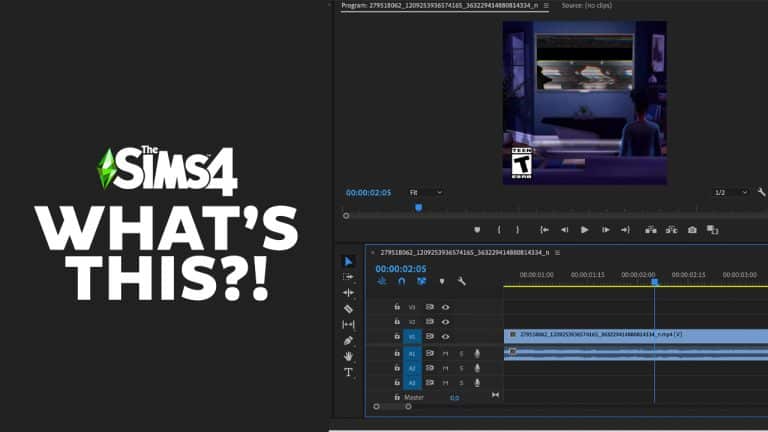
We were first notified about this by our reader @georgialoveoo12 with a screenshot provided from the Roadmap teaser. I didn’t even know that a frame like this was in the reveal, so I had to dissect the teaser in Adobe Premiere, a video editing tool.
At 2:05, by a split second, there’s a frame that shows the Sim in question with glowing eyes and different facial structure:
Here’s that same frame up close:
Player @viniaguiar18 also made an excellent point, saying that there are different translations of the Game Pack teaser tag from different languages.
Here’s how they sound:
According to Simmers, the game pack hint on the website in other languages also suggest that it will be about werewolves. A few examples:
Unleash the Beast?! I mean, there’s no other way that it’s anything but Werewolves at this point.
Nothing is official as of yet, so note that we could be wrong. Although at this point, the chances are slim that the theory about Werewolves is incorrect.
What do you think? Let us know in the comments below and stay tuned for updates on Sims Community!
If you still can’t get over how beautiful the world of Tartosa is, you’re in luck because today, we’re showcasing five amazing Mediterranean builds from the community that are perfect for your Sims looking to settle down in Tartosa!
We scoured the Gallery looking for some of the most stunning and creative builds out there that complimented Tartosa’s Mediterranean seaside vibe. Of course, there is never any shortage of talent and creativity in The Sims fandom but it wasn’t as easy to find Mediterranean builds as we thought. We noticed with some amusement that there is a wide variety of uh… interesting interpretations of the #mediterranean hashtag on the Gallery.
Creative spellings aside, let’s get into the creative builds!
6875 Rue D’Espagne
Creator: kingram3095
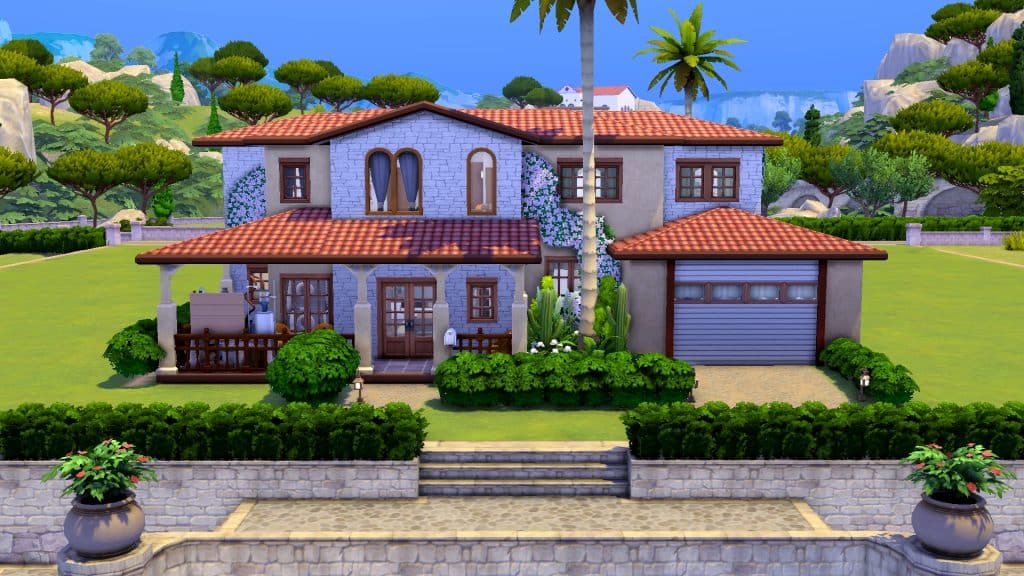
This charming Spanish villa is perfect for a Tartosa suburb. The stucco and brick paired with arched windows and flowers growing up the side of the home gives off a warm, inviting feel. The inside of this home comes fully furnished and decorated. It’s a great home for a large family with both children and toddlers!
This quaint home with shuttered windows and a faux iron balcony give us a cozy, romantic vibe. Interior decorators will love this house because the interior is an empty shell so you can really let your inner designer go wild turning this home into the perfect place for your Sims to live. The balconies and back patio are fully furnished, however, so your Sims will be able to put their feet up and relax while you’re busy renovating their new space.
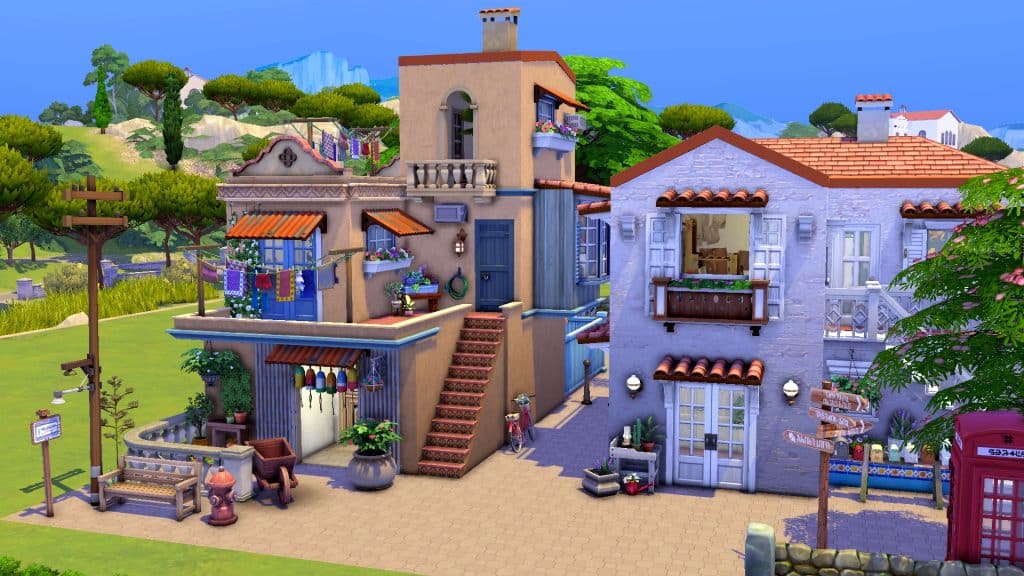
This build looks like a scene straight out of Mamma Mia and we’re in love! We can’t get over the small details that really bring this seaside village to life! The bicycle leaning against the wall in the alley, the clothes drying on the line on the balcony, the telephone box, and street signs all make this look like a place that’s bustling with activity. The buildings are fully furnished and decorated, too. How picturesque!
This grand estate has a slightly modern feel to it but still boasts many classic elements of Mediterranean architecture. The creeping foliage up the walls, arched front entryway, awnings over the windows and terracotta roof fit perfectly in Tartosa and we love the courtyard style driveway with the fountain in the centre. This high-end, fully furnished home has plenty of space for a large family of Sims and is set up to accommodate children and toddlers, too.
We were completely blown away by the scale and detail of this build! This is an entire Mediterranean village on one large lot and everywhere you look, there’s a thousand things to see! The covered bridge over the pond is beautiful and romantic. So are the docks where a boat waits patiently for passengers next to a restaurant’s patio. The hot air balloons are such a charming addition to the area, too. You could really have a whole community of Sims here inside their own little slice of paradise. It has everything your Sims could want, from living spaces to community areas and even a chapel up on the hill! Personally, I never want to leave and I don’t have to because every square inch of this lot is furnished and decorated to the nines!
Do you want new Occults or Improvements on the current ones? Time to vote in our Community Poll!
Lately, occult Sims have been a hot topic in the community. The Plant-A-Sim scenario has revived a new interest in PlantSims getting some improvements. It’s also been a while since we’ve gotten a pack that comes with a new occult type. The last one was Discover University which came with Servos. That was three years ago back in 2019.
We know there’s a lot of different occults Simmers want to see in the game but we want to know what the community’s most wished for occult is. We’ve put together a poll with some old favourites and some new ideas to ask you for your opinion!
Well? What are you waiting for? You get two picks. VOTE!
This is a community poll run by fans of the game. It is not an official EA/Maxis poll. The results will have no impact on the game; it’s just for fun.
In the beginning of 2022 The Sims Team has held a very important Maxis Monthly Livestream. In this stream Maxis has revealed that they’ve been working on a new feature in Create A Sim for The Sims 4 – Customizable Pronouns!
In the livestream the team has shown off the Work in Progress Concepts of the revamped User Interface. Now featuring new options for Pronouns right next to the Name input.
The upper right corner will say “Hello, My Name and Pronouns are…”. After selecting it you’ll get to enter the Name, as well as choose the Sim’s pronouns from the new dropdown.
The upcoming Update will also feature Custom Pronouns, allowing you to add your own. There are grammatical guidelines in the new User Interface prompt that lets you see how your Custom Pronouns will look like through different examples of gameplay and UI prompts and notifications:
In January 2022 the team has shared in their interview information regarding when we can expect this update, and also at which state the feature was back then:
As you saw this is still a work in progress and our research and design will continue until we feel the feature is in the good place to be launched into the game. That being said we still have a path ahead of us and we want to make sure to check on you along the way and keep you updated. Once the first version of this feature is out please know that we are continuously working on improving the game and each update brings us one step closer to a greater, inclusive experience in The Sims 4.
Yesterday, The Sims Team has announced a new Roadmap for The Sims 4. In the Roadmap the biggest focus was on the Paid Releases, including one new Game Pack and two Kits. Unlike with previous Roadmap Announcements, this one didn’t lay down specifics on Content Updates for The Sims 4.
That’s, of course, until we got an insightful tip from our reader @Mischaloola, who pointed out a very interesting clue. The Sim that’s featured in the main render on a redesigned layout of The Sims website is wearing a T-Shirt with the Trans Flag pattern on it:
To make things more interesting, we’ve checked out TheSims.com website today. The render that was shown yesterday got removed, with a new tagline:
Step into the Moonlight and explore who you are after dark!
Sure, it’s Pride Season this June. But that could only mean that The Sims Team has been preparing for that very special occasion to release the Customizable Pronouns Update!
We, of course, could be wrong. And this article is still purely speculative until we know for sure. But, the Trans Flag and the new tagline isn’t just there for nothing. And LGBTQ+ players all around the world, especially the Trans and Non-Binary Communities, need proper representation and escapism now more than ever.
Different flavors for existing CAS items in The Sims 4 My Wedding Stories
The My Wedding Stories game pack came with a fairly large variety of formalwear appropriate for weddings. Although players mourned the lack of proper wedding veils and big poofy princess ballgowns, the pack still came with a nice assortment of very pretty formal dresses and some formal attire for men as well.
But of course, whenever The Sims releases a new pack, creators are there to add onto them. Wild Pixel has released a small add-on kit of items based on some of the My Wedding Stories CAS assets. And if you don’t own My Wedding Stories, you’re in luck because this Dream Wedding CC Kit is base game compatible!
All the signs point at the big bright moon! And at the big bad wolf…
The teaser for new roadmap from May till the end of June is here, and it looks like Simmers who voted in our Quick Community Poll could be correct!
The Hints
The 14 seconds video gave some hints, one of them being a clear awooo under the moonlight! Combining the menacing howl, with the fact one of the hints is a game pack tentatively called Go Wild…
Is it possible? Is it? The Werewolves?!
The Werewolf History in The Sims
We’ve already seen them in The Sims 3: Supernatural Expansion Pack, alongside with vampires, witches, fairies, genies and zombies. The theory doesn’t sound too far fetched, as we already have some of those in The Sims 4.
Werewolves have been a staple in The Sims lore since The Sims: Makin’ Magic, where it was possible to cast a Beauty or Beast spell on other Sims, turning them into werewolves. They continued with The Sims 2: Pets, where Sims could become Werewolves when bitten by the leader of the pack or transformed by the savage interaction. Sims 2 werewolves could fight burglars, train dogs and if you get sick of the life as a night walking beast, get cured by the Gypsy matchmaker.
But I think I speak for everyone when I say werewolves made the biggest impression in The Sims 3: Supernatural, where they had a rich social hierarchy and a hidden werewolf skill, known as Lycanthropy. During a full moon, werewolf Sims will transform, weather you want it or not, and the chaos ensues. Causing the surrounding non-occult Sims into panic. So much fun to be had while climbing to the top of your wolf pack or implying mother was a poodle…
The Werewolf Possibilities in The Sims 4
What do all of these werewolf iterations have in common? Lunar cycles and body hair. They were a thing before and they could seamlessly work again. With the existing calendar system, lunar cycle seams obvious and body hair… Why don’t we have body hair yet?
Having in mind how the other occults function in The Sims 4, Werewolves could possibly work like vampires, aliens or mermaids, with a human form and a supernatural form. In this case it would make sense to bring back the Lycanthropy skill, since there has to be a top dog (pun intended).
The Sims Team released the second roadmap for 2022!
The second roadmap for The Sims 4’s series of new releases is finally here!
The team released a short video to showcase the three upcoming releases, including:
1 Game Pack for The Sims 4
2 Kits for The Sims 4
In the screens shown in the roadmap, there are different scenes corresponding to different types of content that we can expect.
In total, there are 4 different screens shown. In order we have:
A scene that showcases children hanging out at the barbecue
A glamorous scene with some CAS content
A howling scene, showcasing a new World, and a moon
An outdoorsy scene with a fire hydrant and a street block
The upcoming quarter for The Sims 4 will last from May till the end of June. Why is that the case? We have no clue. Previously, The Sims 4 Roadmaps included a time period of 3 months. This one lasts for less than two.
Any way, the fun teasing from Maxis doesn’t stop there! There’s new information on the official website for The Sims, including a new graphic and new teaser boxes that hint at upcoming releases:
STAY UP WITH THE SIMS
Step into the moonlight and explore who you are after dark!
Seize the night:
The fun starts when the sun goes down. Whether you’re dressing up for a big date, making memories in your backyard, or running wild this season will have you staying up late.
Chic Nights Out (The Sims 4 Kit)
Cozy Nights In (The Sims 4 Kit)
Go Wild (The Sims 4 Game Pack)
There’s also a short video showcasing the new Roadmap for The Sims 4:
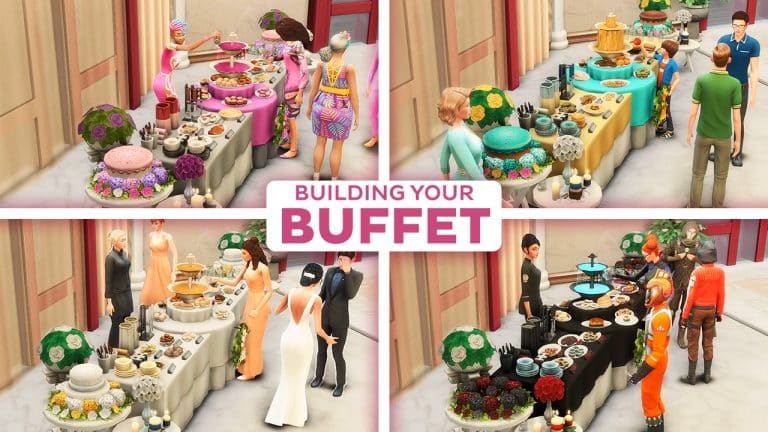
We know you love throwing social events for your Sims! It could be birthdays, costume parties, and wedding activities now that we have the My Wedding Stories game pack. At the center of every party, there should be plates of food and a centerpiece that would be the talk of the townies. Combine those two and you get a buffet table!
There are functional circular buffet tables from Luxury Party and My Wedding Stories but let’s spice them up a bit with extra garnish!
Before you start, type in the cheat ‘bb.moveobjects’.
Grab these skirted tables for a more refined look. The rectangular table is from Dine Out found in the the dining tables category. The circular one is from Luxury Party found in the Activities and Skill category in Creative. If you don’t own that pack, you can easily swap it for the banquet table from My Wedding Stories.
Align these tables accordingly (pretend your Sims could line up to get food by the buffet). This is where your main dishes will be.
For your cake display, set up these tables with different heights from Base game (find them in Misc. in the Surfaces category). You can place them on either side or both sides of the skirted tables.
Place the cake on the higher table (you can size it up however your Sims can’t interact with it). Now add the flowers or leaves from Seasons to act as decorative icing. To place them exactly around the cake, let them snap to the slots on the table first. Then, drag them away from the table and they would remain at that table height. Now you can use Alt place to move them freely and put them around the cake.
Going back to the main table, plan out your menu by arranging your food into courses. If you don’t want to cook a three-course meal, you can download food from rooms in the gallery. Just select the food and hit Backspace to save them to your Inventory.
Place your appetizers and main course on the rectangular tables. Your desserts can go to the center table around the fountain. Make sure you put them on the table slots or else your Sims won’t reach them!
Here comes the fun part: clutter! By simply adding plates and silverware, your buffet looks more realistic and lively. Do the drag-away-from-table trick again to Alt place them precisely. You can also add wall decor like wreaths to adorn the front of your table.
Check out the clutter items on this table:
The most practical clutter you could add is this Desk Nameplate from Base game. Access it in Misc. decor by typing ‘bb.ignoregameplayunlocksentitlement’ on the cheats box. Put it right in front of each dish and it’s as if they have their own title! Anyone care for a ‘Grilled Cheese a la mode’?
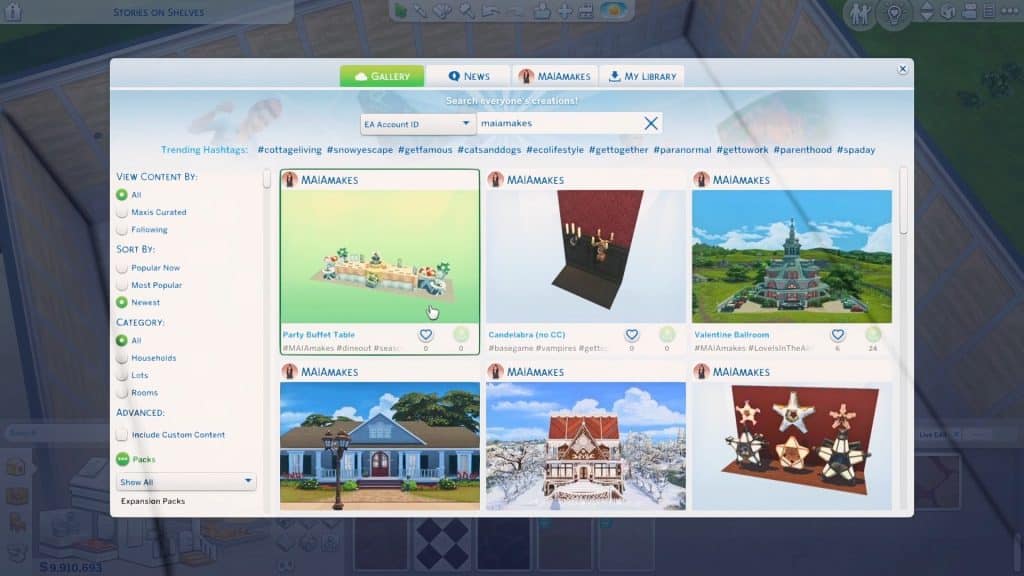
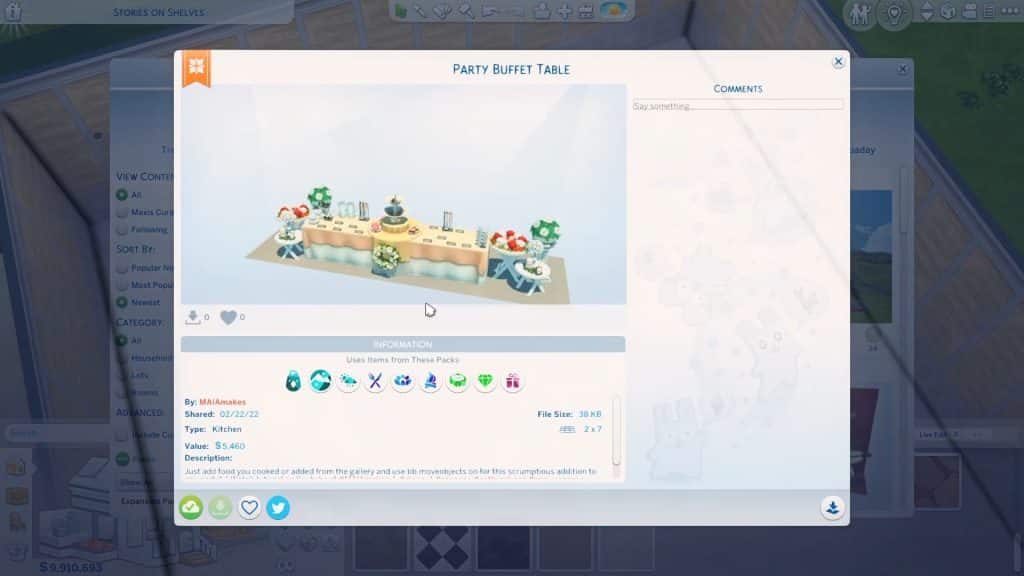
Whew! Was that too tiring for you? You can just download this buffet from the gallery by searching Party Buffet Table under the Origin ID MAIAmakes.
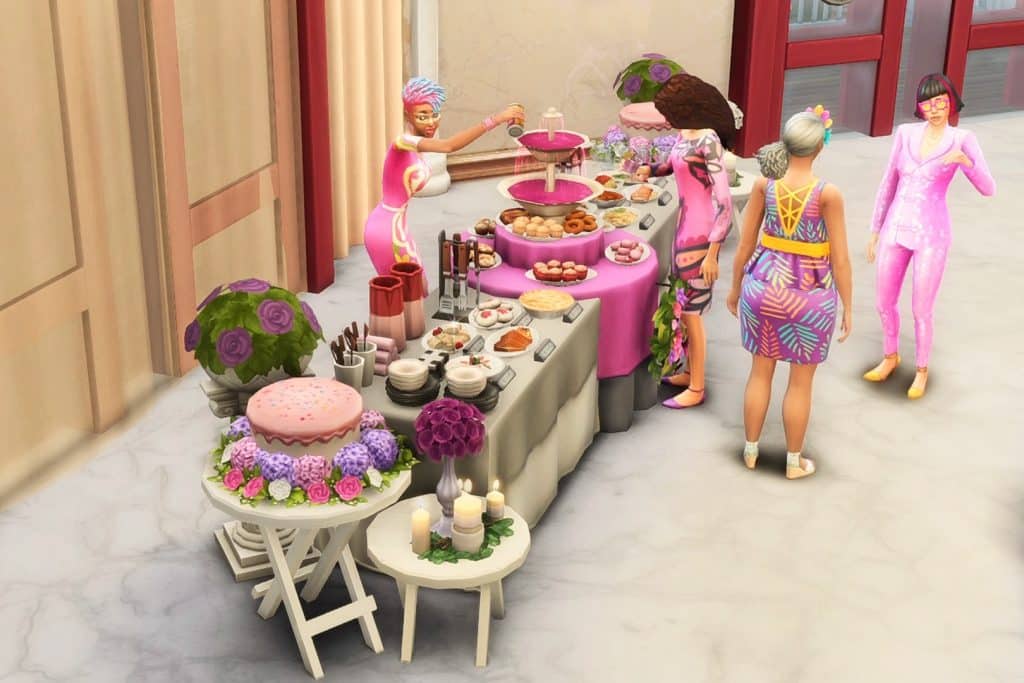
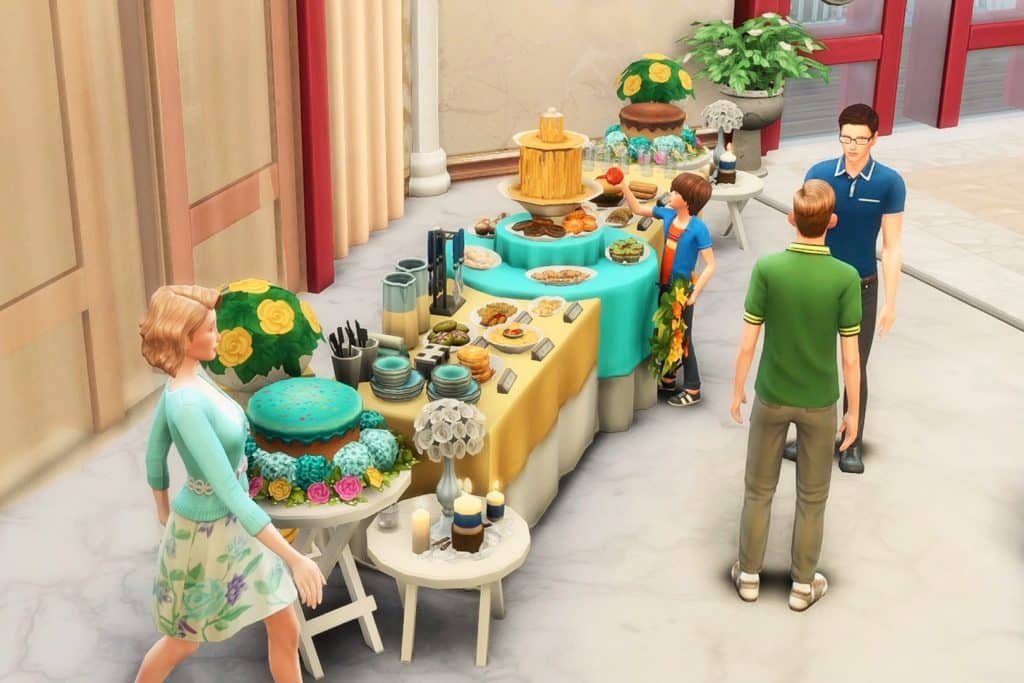
It’s perfect for any type of event! Look at what you can do by changing the swatches and switching up your menu:
A classic wedding buffet with only the fanciest of foods
A whole Buffet covered in Pink for with pretty pastries:
How about the coolest kid’s birthday party with a cheese fountain?
Perhaps something out of this world: an intergalactic space-themed costume party!
Those are just some of the ideas on how you can create a Buffet Table in The Sims 4.
What type of Buffet do you plan to Build in the game? Let us know in the comments!
Which Roadmap Theory for The Sims 4 do you believe in?
As with Maxis’ usual trend of announcing a teaser for a teaser (which in this case, is the Roadmap), the first teaser left many…confused to say the least.
The Roadmap Teaser revealed that for “This Season, It’s Lights Out”, featuring a starry background, neon font and plumbob, as well as the eclipsing shine of another Plumbob. There’s also this dark fog overlooking the plumbob that we’re still not certain what it means.
In fact, we have absolutely no idea. And neither does the community.
Some of the replies under the Roadmap Teaser Post have suggested plenty of different themes that the next Roadmap could cover. We’ve gathered all the replies in a Quick Community Poll that you can vote down below.
There are 12 suggestions written by the community that caught our attention. So let’s dig in! You can vote up to 3 selections and see the results after voting.
[totalpoll id=”110865″]
In the end, we won’t know for certain what the Roadmap is about until today’s reveal. Everything in this Community Poll is purely speculative.
However, the full Roadmap is expected to come out today, so stay tuned!
Also, the featured image for this Article is purely illustrative and been taken from The Sims 2 Nightlife. Don’t attack me if it’s something else rather than Poker!
For some reason, the teasers on Social Media are a bit different. The first one you see below is shinier, and posted on Twitter. The second one has more dark shadow / fog across the neon plumbob, and it was posted on Facebook.
Are we looking to much into it? Check out the differences below:
Whatever the new Roadmap reveals, we’ll be ready to cover it right here on Sims Community. Stay tuned!