Home Blog Page 219

The Sims Team is Celebrating Hispanic Heritage Month on Twitch

4

The Sims Team is hosting a livestream on Twitch today at 11AM PT to celebrate Hispanic Heritage Month in the US. The stream will be hosted by @SimGuruDana, @SimGuruRusskii, and @SimGuruSalo. The Sims 4 Global Community Manager, @SimGuruFrost, has also hinted in a tweet that there will be “surprises” included in the livestream (and it’s not babies).

https://twitter.com/SimGuruFrost/status/1313140237942493184

You can tune into the livestream on The Sims’ official Twitch channel.

REMINDER: New The Sims 4 Update is coming tomorrow!

112

In case you’ve missed the news, The Sims Team has announced that they’ll be releasing a series of new updates for The Sims 4, addressing the Skin Tones and representation in the game.

The first update that they’ve announced is coming tomorrow, October 6th on PC and Mac, which promises to fix blotchy artifacts and ashy appearance on darker skintones. The same update is set to release on November 10th on Xbox One and PS4 consoles. The update will also revisit two existing base game hairstyles:

The Sims team will be releasing a base game update around existing skin tones on October 6 for Mac/PC and November 10 for console. As we work on expanding skin tone variety, in this first step, we’ll be improving the blotchy artifacts and ashy appearance of darker skin tones on mid and high spec machines*. (Not sure whether this applies to your computer? See the note below!) As mentioned in our initial video, we recognize there is a need to improve the representation of hairstyles in our base game as well, so in October, we will start by updating two of the base game hairstyles.


In December 2020 The Sims Team will do a major revamp of CAS by adding 100+ Skin Tones and sliders for them, as well as adding a makeup slider feature.

Please make sure you backup your save game for tomorrow’s update just in case! It’s not known what else this update could bring other than Skin Tone and Hairstyle fixes but we’ll make sure to keep you updated when the update happens!

The Sims Blog: How We’re Addressing Skin Tone Improvements in The Sims 4

58

The leaked blog post from EA Answers Spain has now been confirmed by The Sims Team with their official post on TheSims.com. The post talks about adding new Skin Tones, Skin Tone and Makeup Sliders and more! Check it out:

The Sims team will be releasing a base game update around existing skin tones on October 6 for Mac/PC and November 10 for console. As we work on expanding skin tone variety, in this first step, we’ll be improving the blotchy artifacts and ashy appearance of darker skin tones on mid and high spec machines*. (Not sure whether this applies to your computer? See the note below!) As mentioned in our initial video, we recognize there is a need to improve the representation of hairstyles in our base game as well, so in October, we will start by updating two of the base game hairstyles.

Bigger changers are coming! In December, we’ll be rolling out at least a hundred new skin tone swatches in cool, neutral, and warm tones with a particular emphasis on darker skin tones. Beyond the new additions, we are introducing a slider on all swatches, both new and existing, that will allow you to modify each selected tone to be lighter or darker. We’ve heard your feedback on makeup as well. To truly complement the expanded library of skin tones launching in December, we’ll also be adding new sliders for makeup in Create-A-Sim mode. The updated customization options will offer an entirely new level of control of your Sim’s appearance so they can look as flawless as possible. Plus, the December update will include another two improved base game hairstyles.

Keep an eye out for more information from our team in late October or early November as we start to implement these changes. We’ll also be sharing more details about how we’re collaborating with external partners, including talented and diverse community members, to make sure we get this right. As always, we thank you for sticking with us as we continue to grow. We’re looking forward to sharing all of this with you in the coming months!

Thank you!

*Please note that the October PC update will, at this point, be visible only to those running the game with the “Uncompressed Sim Textures” graphics settings turned ON. This will not be the default setting on all machines, so follow these steps to check your settings and see the graphic updates. To turn ON “Uncompressed Sim Texture” in the game, go to Options > Game Options > Graphics Tab > Graphics Sections > check “Uncompressed Sim Textures.” If your machine has lower graphics settings and you attempt to run with uncompressed graphics, you may experience a crash; to recover, please re-enable graphic compression. Based on the current specs that default “Uncompressed Sim Textures” to ON, we recommend a graphics card rated medium, high, or ultra and at least 2 GB video RAM.

The Sims Blog: How We’re Addressing Skin Tone Improvements in The Sims 4

The Sims 4 is getting new Skin Tones, Skin Tone & Makeup Sliders and more!

137

In a leaked webpage released by the official EA Answers spanish page it’s been revealed that The Sims 4 is getting some major improvements in the CAS department.

SimGuruLyndsay shared a few weeks ago that The Sims Team will be focusing in the coming weeks and months to improve representation in Create A Sim. Those would include new Skin Tones, improvements to the existing hairstyles and more. However the details haven’t been shared exactly how that’s going to be done…until done.

The leaked page from EA Answers revealed that The Sims 4 will be getting multiple updates in the coming months. The first one, slated for PC on October 6th and November 10th for Consoles will be improving two existing hairstyles and adding more skin tones. There is going to be another update in December that will not only add new cool, neutral, and warm tones “with a special emphasis to darker skins” – but that the game will also offer Skin Tone sliders for both existing and upcoming skin tones “which will allow you to modify the selected tone to darker or lighter values”. The upcoming December update will have OVER 100 Skin Tones for you to not only use but make them darker or lighter using the brand new slider.

“To complement the expanded library of skin tones that we’re launching in December, we’re adding new makeup sliders in Create A Sim Mode. Updated customization options offer a new level of control over the appearance of your Sim, so you can create the most perfect looks possible” – said the leaked page.

The team will be sharing more information in late October and early November on how they’re implementing these features to The Sims 4. Maxis also said that they’ll be sharing details about collaborations with external partners, including different highly talented community members to make sure they’re doing the upcoming content updates right.

The updates and changes will require for you to have Uncompressed Sim Textures enabled in your Game Options if you want to use the new upcoming features.

We’re currently waiting for the official English post to make sure all information is correctly translated from the Spanish webpage, which has been found by PekeSims.

Origin is soon changing its name to “EA Desktop App”

38

Origin isn’t only changing it’s subscription name from Origin Access to EA Play and bringing a whole new program design to the table.

In an interview with GamesIndustry.biz EA’s SVP Mike Blank has confirmed that Origin will change its brand and name to “EA Desktop App” for a more streamlined experience. Not only that but he promises that the new EA Desktop App will offer a faster, frictionless, more socially-oriented experience for the players.

Hear what he has to say in a report from GamesIndustry.biz below:

Today, EA has yet another piece of interconnected news to share: it’s rebranding its Origin desktop app to simply be called the EA desktop app, alongside giving its PC platform a visual refresh.

Speaking to GamesIndustry.biz, EA SVP, strategic growth Mike Blank says the overhaul is intended “to create a more frictionless, fast, socially-oriented experience for our players, where it becomes the best place for them to connect with the people they want to play with in the games they want to play.”

That means making the app an overall more streamlined experience involving fewer clicks to navigate, along with other details such as desktop background updates, a “better patching experience,” and UI updates to login, registration, and game libraries to make them clearer and easy to understand quickly.

The rebranding itself, Blank says, ties in with a broader company strategy that EA has been executing visibly the last several months with all its aforementioned branding and EA Play-connected changes. EA, he says, wants to better enable player choice in regards to what platform they play EA games on, prioritize cross-platform play, and generally break down barriers to having access to EA games.

“All of that is signaled by creating a common and consistent brand that is centered around EA and what EA stands for,” Blank says. “And what signals it is this inflection about how EA stands for bringing your players together around the games they want to play on the platforms they want to play on. So yeah, it’s not just a name change. It really signals an ethos that is critically important to us and that we know that’s important to our players.”

Blank wasn’t just involved with the EA desktop app. He leads the team at EA that has been heavily involved with all of the recent changes, both related to branding and to game connectivity and access. Part of the way Blank’s team is pursuing its goals lately is through putting more EA games in more places, and implementing cross-platform play for as many as possible.

Origin is soon changing its name to “EA Desktop App”

The Sims 4 Star Wars Journey to Batuu: Collections Guide

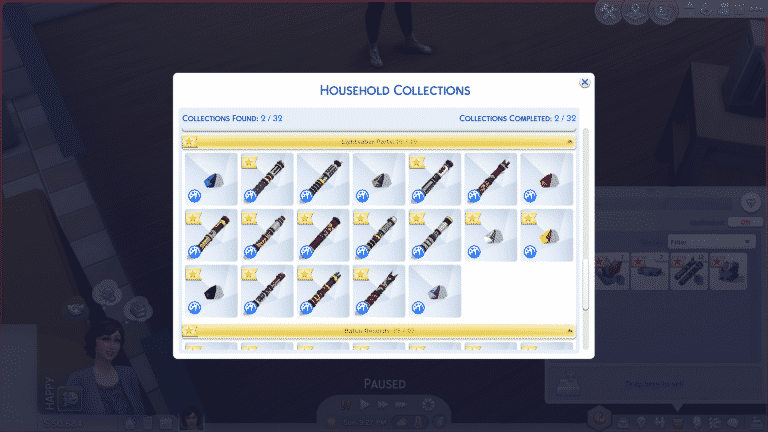
There are two new collections that come with The Sims 4 Star Wars: Journey to Batuu; Lightsaber Parts and Batuu Records.

Lightsaber Parts

The Sims 4 Star Wars Journey to Batuu: Collections Guide

There are a total of 19 Lightsaber Parts to collect. The collection consists of 12 Lightsaber Hilts and 7 Kyber Crystals. When a Kyber Crystal is attached to a Lightsaber Hilt, it becomes a fully functioning Lightsaber that can be used in practice and in duels with other Sims. When not in use, Lightsabers can be displayed as decorative pieces inside display cases which you can purchase from Savi’s Lightsaber Workshop in Black Spire Outpost.

There are a variety of ways to acquire Lightsaber Parts. Some can be purchased from Dok-Ondar’s Den of Antiquities and Savi’s Lightsaber Worshop. Others can be earned as rewards for rising in the ranks of any of the three factions. Lightsaber Challenges are a good way to acquire any remaining parts you’re missing and complete your collection.

For more information about Lightsabers, check out our guide, All About Lightsabers!

[table id=83 /]

Batuu Records

The Sims 4 Star Wars Journey to Batuu: Collections Guide

There are a total of 19 Batuu Records to collect. All the records look exactly the same, but contain different information about the world of Batuu when you scroll over them. You can collect the Batuu Records by scanning different objects around Batuu. Whenever you see an object you can scan, you should scan it to get yourself a new record.

[table id=84 /]

EA Playtesting is doing a Private Feedback Study for The Sims 4

55

EA Playtesting, an Electronic Arts division that handles feedback sessions for gamers with all sorts of different interest groups has sent out e-mails to various Sims players asking to participate in their upcoming feedback session.

The session will take place in a couple of weeks on two different dates – September 22nd and October 2nd and will be all about providing feedback on The Sims 4 and how The Sims Team can improve the game.

This private feedback session is only for those who have signed up for EA Playtesting opportunities on their website and the invitations for this feedback session is very limited. It’s also worth noting that everything mentioned during this session will probably be under strict embargo.

You’ve been selected to take part in an exciting Sims study! We need Simmers like you to give us your feedback so we can continue to improve the game you love. Please take a moment to read through the study details below, we’ll be taking 15 – 20 Sims Players to participate.

Session Length
1 hour
Location
Remote (US and Canada)
Reward
1 EA Games of your choice (including Sims packs)!
*** Please note, this session will require a connection to the internet, a microphone to speak with the Researcher and the ability to run The Sims 4 on your computer.

EA Playtesting is doing a Private Feedback Study for The Sims 4

The Sims 4 Star Wars: Journey to Batuu: All About Lightsabers!

In The Sims 4 Star Wars: Journey to Batuu, your Sims can purchase and customize their very own Lightsaber. There are a variety of ways to acquire Lightsaber parts and you’ll want to collect them all because Lightsaber Parts are a new collection that comes with this game pack.

How to Acquire a Lightsaber
The Sims 4 Star Wars: Journey to Batuu: All About Lightsabers!

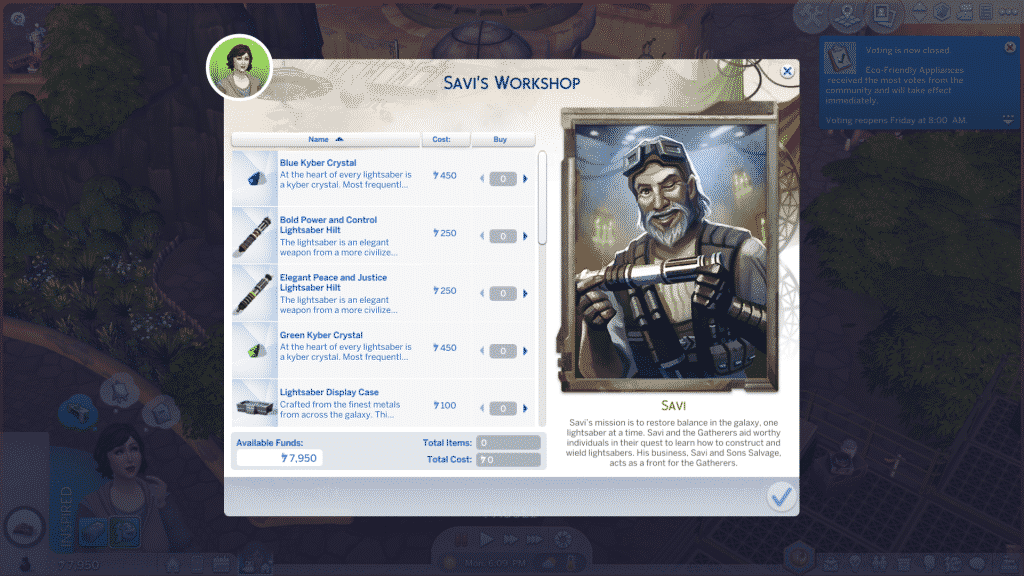
There are many ways to acquire Lightsaber Parts on Batuu, but the easiest and fastest way to get your very first Lightsaber is just to buy a Lightsaber Hilt and a Kyber Crystal with Galactic Credits. You can earn credits by completing missions for the different factions on Batuu or by completing the Lightsaber Challenges, but more on Lightsaber Challenges later.

Dok-Ondar’s Den of Antiquities

Dok-Ondar’s Den of Antiquities can be found in Black Spire Outpost across from the Ronto Roasters food vendor building. Dok Ondar will sell you a variety of rare treasures, including a Lightsaber Hilt and a couple Kyber Crystals. His wares don’t come cheap, but they are certainly one of a kind artifacts.

Savi’s Lightsaber Workshop

Savi’s shop is connected to the back end of Dok-Ondar’s Den of Antiquities. Unlike Dok-Ondar, Savi actually specializes in Lightsabers. He has a much wider selection of Lightsaber Hilts and Kyber Crystals. He even sells Lightsaber Display Cases so you can proudly decorate your home with all your prized Lightsabers.

Joining a Faction

If you join the First Order, the Resistance, or the Scoundrels and work hard at rising in the ranks with them, you will be rewarded with Lightsaber Hilts and Kyber Crystals at the higher ranks. This is a good way to get some free Lightsabers, but it doesn’t come without a lot of dedication to your faction’s cause. This is the slowest but most rewarding method of obtaining new Lightsabers.

Exploring the Cave in the Resistance Encampment

There is a cave near the base of the waterfall in the Resistance Encampment on Batuu. Your Sim may walk away from their explorations there with a new Kyber Crystal in their inventory, but finding Kyber Crystals is not guaranteed. Your Sim may walk out of the cave with other items instead, or completely empty-handed.

Lightsaber Challenges

Head on over to Savi’s Lightsaber Workshop and ask about Lightsaber Challenges. You’ll need a Lightsaber before you can complete these challenges, but since Savi sells Lightsaber Parts, that’s not hard to get. Winning a Lightsaber Challenge may reward you with a Lightsaber Part, but it’s not always guaranteed.

Using Your New Lightsaber

The Sims 4 Star Wars: Journey to Batuu: All About Lightsabers!

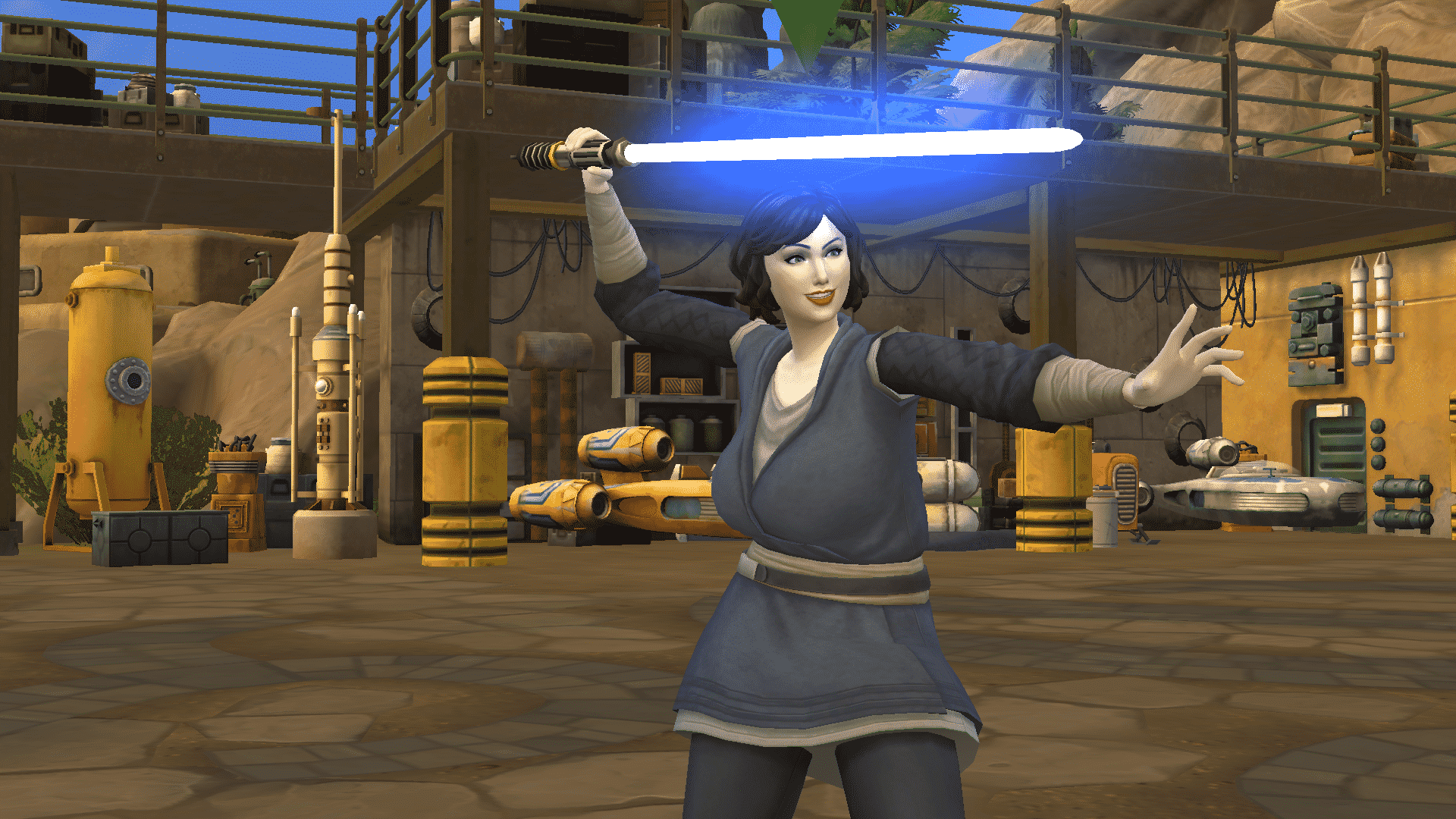
I was actually surprised to discover that Lightsabers don’t seem to play a large role at all in this pack. Lightsabers are the first thing most people think of when they think of Star Wars, but in terms of gameplay, their functionality is rather limited. If your Sim has a Lightsaber in their inventory, they can challenge Sims to Lightsaber duels and practice with the Lightsaber. Both dueling and practicing build the Fitness skill. Your Sim can also partake in Lightsaber Challenges if they have a Lightsaber. If you have multiple Lightsabers in your inventory, you can set one as your favourite Lightsaber. Your Sim will always use this Lightsaber until you select a different Lightsaber as the favourite Lightsaber.

As for the different types of Lightsabers, there seems to be absolutely no difference between them in terms of their strengths, weaknesses, or abilities. All Lightsabers have the exact same interactions available to them and they all function exactly the same in duels. You can remove and swap out Kyber Crystals in your Lightsaber Hilt anytime you like to change the colour of your Lightsaber, but this is purely an aesthetic change. The different types of Lightsaber Hilts seem to be purely for collection purposes and don’t affect gameplay at all.

Occasionally, having a Lightsaber can come in handy when piloting the starships. You might be presented with an option to use a Lightsaber in the mission popups if you have one in your inventory.

Overall, Lightsabers are mostly just there as a fun little extra to play around with when you need a break from missions.

Completing Your Lightsaber Part Collection

The Sims 4 Star Wars: Journey to Batuu: All About Lightsabers!As previously mentioned, Lightsaber Parts are a new collection that comes with the Star Wars: Journey to Batuu game pack. There are a total of 19 Lightsaber Parts to collect, made up of 12 Lightsaber Hilts and 7 Kyber Crystals.

Once you’ve acquired all the Lightsaber Hilts and Kyber Crystals from the different shops and your chosen faction, Lightsaber Challenges will be your main method of finding the remaining parts you’re missing and finishing your collection. Head to Savi’s Lightsaber Workshop to enquire about Lightsaber Challenges. You’ll need to own a Lightsaber to complete these challenges but since Savi sells Lightsaber Parts, this isn’t difficult to get.

The Lightsaber Challenges are side missions that can be completed separately from the main story missions. You don’t need to be part of any particular faction to participate in Lightsaber Challenges. All the Lightsaber Challenges are essentially the same; find a particular Sim in the area with a challenge icon above their head and challenge them to a Lightsaber duel.

Completing Lightsaber Challenges will always reward you with a nice sum of Galactic Credits so they’re a good way to make a living on Batuu when you aren’t doing missions for your faction. Sometimes, you may receive a Lightsaber Part for winning a challenge but it’s not always guaranteed. In my own experience, I tended to get a Lightsaber Part more often than not, so the chances of getting one seem to be fairly good.

You can display your Lightsaber collection in a variety of different coloured display cases (one for each Kyber Crystal, in fact). The display cases can be purchased from Savi’s Lightsaber Workshop.

The Sims 4 Star Wars: Journey to Batuu: All About Lightsabers!

For more information on the collections that come with this pack, check out our Collections Guide!


What kind of Lightsaber will your Sim wield? Let us know in the comments or come chat with us on social media!

The Sims 4 Star Wars Journey To Batuu: Aspirations Guide

Presented by EA Game Changers

The Sims 4 Star Wars Journey to Batuu comes with four brand new Aspirations for your Sims to choose from. Both of the aspirations come under the new Star Wars category in the aspirations panel. Simply chose either Hope VS Order or Galactic Privateer to get started and begin your Star Wars adventure!

The Sims 4 Star Wars Journey To Batuu: Aspirations Guide

Galactic Privateer

“This Sim isn’t about choosing sides, they’re happy just mingling among the smugglers, and bounty hunters on the fringe planet of Batuu. Earning a few extra credits along the way is just a bonus, no matter how they get them.”

The Sims 4 Star Wars Journey To Batuu: Aspirations Guide

First Steps

  • Order a drink at Oga’s Cantina
  • Play 5 Rounds of Sabacc
  • Reach Programming Level 3

Scum and Villainy

  • Swindle 2 Sims
  • Complete 5 Missions for the Scoundrel Faction
  • Open Supply crate

Lovable Rogue

  • Successfully Bribe a First Order Stormtrooper
  • Skim Credits from 3 Control Panels
  • Successfully Cheat and Win at Sabacc

Galactic Privateer

  • Have more than 5,000 Galactic Credits
  • Explore 5 times in the Millennium Falcon
  • Reach Scoundrel Reputation Rank 5

Completion Reward: Reward Trait

Sleight of Hand – Sims with a Sleight of Hand can Pickpocket other Sims and will never get caught cheating at Sabacc.

Hope VS Order

“On the world of Batuu there is a growing conflict. This Sim is out to explore Black Spire Outpost and understand whether they should stand with the Resistance of the First Order.”

The Sims 4 Star Wars Journey To Batuu: Aspirations Guide

First Steps

  • Visit Every Neighbourhood on Batuu
  • Ask About Resistance or First Order presence on Batuu
  • Complete a Mission for the Resistance or First Order Faction

Completion Reward: Reward Trait

A Gift of Credits – A payment of credits by your chosen faction for your support in their cause

The next two aspirations unlock once your Sim has completed both Hope Vs Order and Galactic Privateer aspirations and you can start with either. Both of the new aspirations are tailored towards either the Resistance or the First Order. You are able to freely swap between the aspirations as well as being able to change the faction your Sim is a part of.

Paragon of Hope

“This Sim looks to be the spark of hope that disrupts the First Order’s operations on Batuu and aid the Resistance cause.”

The Sims 4 Star Wars Journey To Batuu: Aspirations Guide

For The Resistance

  • Introduce Self to 3 Resistance Members
  • Explore the Caves of Batuu
  • Complete 2 Missions for the Resistance

Protector of Batuu

  • Recruit 3 Sims to the Resistance
  • Obtain a Droid Companion
  • Override Locks and Loot 2 Supply Crates in the First Order District

Paragon of Hope

  • Infiltrate the First Order Cargo Building and Slice the Holotable
  • Explore 5 times in the X-wing
  • Reach Resistance Reputation Rank 5

Completion Reward: Reward Trait

Heroic Presence – Heroic Sims gain Charisma more easily, and can also inspire other Sims with their presence.

Enforce of Order

“This Sim is out to prove their loyalty to the First Order by stamping out the Resistance presence on Batuu.”

The Sims 4 Star Wars Journey To Batuu: Aspirations Guide

Counter- Operative

  • Recruit 3 Sims to join the First Order
  • Seize Goods From 2 Supply Crates in Black Spire Outpost
  • Complete 2 Missions for the First Order

Do Not Resist

  • Check ID of 5 Batuu Citizens
  • Obtain a Droid Companion
  • Arrest a Member of  the Resistance

Enforcer of Order

  • Infiltrate the Resistance Bunker and Slice the Holotable
  • Explore 5 times in the TIE echelon
  • Reach First Order Reputation Rank 5

Completion Reward: Reward Trait

Supreme Authority: Sims with Supreme Authority have an edge during fights and can show their might, encouraging other Sims to back down from hostile socials with them. These Sims are also less likely to die from anger.

Are you going to join the Resistance or the First Order? Let us know in the comments or come chat with us on social media!

The Sims 4 Star Wars Journey to Batuu: Scoundrel Rank Overview

In The Sims 4 Star Wars: Journey to Batuu, your Sim will find themselves caught in the middle of three factions at odds with each other in Batuu; The First Order, Resistance, and Scoundrels. Each faction controls a different sector of the city and who you support is entirely up to you. Each faction has five ranks your Sim can progress through by completing missions for them. Each rank brings new rewards and unlockables, but beware; becoming friendly with one faction could make other factions hostile towards you.

This overview covers the Scoundrel ranks. Talk to Hondo Ohnaka in Black Spire Outpost to receive Scoundrel missions and begin rising in their ranks. He can often be found in Oga’s Cantina. It’s the only building in this district you can physically enter (ie: not a rabbithole).

Gaining ranks with the Scoundrels will not affect your status with any other factions. The Scoundrels like whoever they can make a profit off of. Due to the Scoundrels’ neutral stance on the First Order vs. Resistance conflict, your Sim can be part of the First Order or the Resistance and still work with the Scoundrels.

First Order Basic Info

  • Receive Missions From: Hondo Ohnaka
  • Batuu Location: Black Spire Outpost
  • Ship: Millennium Falcon
  • Main Hangout: Oga’s Cantina

Rank 1: Rookie

Rewards:

  • Galactic Credits
  • Swindle interaction

New Purchasable Items from Honda Ohnaka:

  • Dataspike

Other Notes:

  • Dataspikes can be used to slice into control panels. They are a one-time use and can get costly to purchase, so save all the ones you get as rewards for when you need them. You will be slicing into control panels frequently on missions. Alternatively, you can use a droid to slice into control panels if you have one.

Rank 2: Runner

Rewards

  • Galactic Credits
  • Scoundrel Uniform
  • Scoundrel Banner
  • Bribe interaction

New Purchasable Items from Hondo Ohnaka:

  • Thermal Detonator

Other Notes: 

  • The Scoundrel Banner won’t be usable on Batuu. When you travel back home, they will be in your Sim’s inventory and you can drag them onto the walls to display them.
  • The Thermal Detonator can be used on spacecraft explorations in Batuu. It can also be displayed as decor when you return home.
The Sims 4 Star Wars Journey to Batuu: Scoundrel Rank Overview
Scoundrel Uniform – Unlocked at Rank 2 of the Scoundrels

Rank 3: Rogue

Rewards:

  • Galactic Credits
  • Skim Credit interaction
  • Tell Exciting Tales of Smuggling interaction

New Purchasable Items from Hondo Ohnaka:

  • Comlink
  • DL-44 Blaster
  • Model TD2.3 Electrobinoculars

Other Notes:

  • The Comlink can be used on spacecraft explorations in Batuu.
  • The DL-44 Blaster can be used on spacecraft explorations in Batuu. It can also be displayed as wall decor when you return home.
  • The Electrobinoculars can be used on spacecraft explorations in Batuu. They can also be displayed as decor when you return home.

Rank 4: Bandit

Rewards:

  • Galactic Credits
  • Scoundrel Outfit
  • Purple Kyber Crystal
  • Lightsaber Hilt
  • Enthuse About Galactic Credit Skimmers interaction

New Purchasable Items from Holotable:

  • Fake ID Card

Other Notes:

  • Having both the Purple Kyber Crystal and the Lightsaber Hilt will allow you to combine them and create the Mighty Elemental Nature Lightsaber, which you can use to duel with other Sims on Batuu.
  • The Fake ID Card can be used on spacecraft explorations in Batuu. You may also be able to avoid arrest when a First Order member checks your ID if you have a Fake ID Card in your inventory, but confirmation is needed about this.
The Sims 4 Star Wars Journey to Batuu: Scoundrel Rank Overview
Scoundrel Outfit – Unlocked at Rank 4 of the Scoundrels

Rank 5: Outlaw

Rewards

  • Galactic Credits
  • White Kyber Crystal
  • Millennium Falcon Replica
  • Millennium Falcon Explore interaction

New Purchasable Items from Hondo Ohnaka:

  • None

Other Notes:

  • The White Kyber Crystal can be swapped with the Purple Kyber Crystal in your Lightsaber Hilt. There doesn’t appear to be any noticeable difference between the two lightsabers. The type of hilt appears to matter more than the type of crystal used to power it; however, I am still gathering info on this and will update this guide if I make any new discoveries about this.
  • The Millennium Falcon Replica is a decorative statue you can display in your Sim’s house when they return to their homeworld.

Will your Sim be falling in with the Scoundrels on Batuu? Let us know in the comments or come chat with us on social media!

Are the Scoundrels not for you? Check out our First Order Overview and Resistance Overview for more information on joining these factions!

Thank you to our Facebook Community member, Laura, for providing helpful info about the purchasable items from Hondo Ohnaka!

The Sims 4 Star Wars Journey to Batuu: Resistance Rank Overview

In The Sims 4 Star Wars: Journey to Batuu, your Sim will find themselves caught in the middle of three factions at odds with each other in Batuu; The First Order, Resistance, and Scoundrels. Each faction controls a different sector of the city and who you support is entirely up to you. Each faction has five ranks your Sim can progress through by completing missions for them. Each rank brings new rewards and unlockables, but beware; becoming friendly with one faction could make other factions hostile towards you.

This overview covers the Resistance ranks. Talk to Any Resistance Member in the Resistance Encampment to receive your first Resistance mission and begin rising in their ranks. After gaining their trust by completing a few missions, you will meet Vi Moradi. After that point, you can receive all your Resistance missions directly from her. She can often be found near the X-wing ship.

Gaining ranks in the Resistance will decrease your reputation with the First Order. Sims who are part of the First Order will be hostile towards you.

First Order Basic Info

  • Receive Missions From: Any Resistance Member, Vi Moradi
  • Batuu Location: Resistance Encampment
  • Ship: X-wing
  • Main Hangout: Resistance Outpost (embedded in a rockface between two clusters of tents)

Gaining the Trust of the Resistance

The Sims 4 Star Wars Journey to Batuu: Resistance Rank Overview
The first Resistance mission you will need to complete to earn their trust

Unlike the First Order and Scoundrels, you won’t be able to waltz right into Resistance territory and start getting missions from them straight away. The Resistance are suspicious of outsiders and won’t let you become one of them until you’ve proven yourself to be their ally. In fact, they won’t even introduce you to their leader at all until you’ve completed a few test missions for them to prove where your loyalties lie.

To get started, ask Any Resistance Member about the Resistance. They will tell you that using the phrase “Ignite the Spark” with a Resistance member will yield more information. Speak to any Resistance member and use the “Ignite the Spark” social on them. They will offer you a mission called Leap of Faith. Accept the mission.

Mission 1: Leap of Faith

Objectives

  • Talk to First Order Stormtroopers
  • Analyze the TIE echelon
  • Survey First Order Supply Crates
  • Report Back to any Resistance Member

Walkthrough

Head to the First Order District and do a Friendly Introduction on two Stormtroopers in the area. Then head to the TIE echelon ship in the same area and analyze it. Make sure there aren’t any First Order members on the ship platform when you do this or you’ll be issued a warning. Next, head to the First Order Cargo Hold and survey the supply crate located around back near the small circular garden. This supply crate is out of the way so there is less chance of getting caught by a First Order member, but Stormtroopers still like to patrol this little nook so wait for them to walk away before you survey the crate. Report back to the Resistance member you received the mission from to complete this mission.

Mission 2: Risks and Rewards

After completing Leap of Faith, talk to Any Resistance Member in the encampment and use the “Ignite the Spark” social again. You’ll get a new mission called Risks and Rewards. Nope, you haven’t earned their trust, yet. Get cracking on that mission!

Objectives

  • Acquire a Dataspike from the Scoundrel Contact
  • Obtain Comm Tower Access Codes
  • Disrupt First Order Transmission
  • Report back to any Resistance Member

Walkthrough

Head to Oga’s Cantina in the Black Spire Outpost and look for the Sim with the “Scoundrel Contact” role above their heads when you scroll over them. It might take them a while to spawn so wait around a bit. They’ll hand over the Dataspike easily when you ask. Then go to the First Order District and find any control panel. They look like apartment intercom boxes stationed outside many of the doors. Click directly on the panel (the casing isn’t clickable for whatever odd reason) to analyze it. Keep analyzing the control panel until one of the slicing options available has a green thumbs up next to it, then use that method to slice into it. Slicing the control panel will use up the Dataspike you got from the Scoundrel Contact. After successfully slicing the control panel, click it again to get the Comm Tower Access Codes. Next, go to the Comm Tower near the Droid Depot. It’s the control panel embedded into a large pole with wires and cloth strung from the top of it. Select Disrupt First Order Transmission on the control panel, then head back to the Resistance Encampment to report back and complete the mission.

Mission 3: Forest Flight

The Resistance now trusts you, but their leader wants to see you in action for herself to make sure you’re the real deal. Find Vi Moradi in the Resistance Encampment to receive your next mission, Forest Flight.

Objectives

  • Meet Vi Moradi
  • Scramble First Order Starfighter Traffic Monitoring Systems
  • Replace X-wing Parts
  • Fly Distraction Mission

Walkthrough

Find Vi Moradi in the Resistance Encampment and choose Meet Vi Moradi under the Resistance options. She’ll give you the rest of your mission objectives. Then head over to the First Order District and go back to the Comm Tower near the Droid Depot to scramble the Starfighter Traffic Monitoring Systems. Next, ask Any Resistance Member about X-wing parts. They’ll tell you to buy the parts from Scoundrels at Oga’s Cantina. Go there and start chatting up a Scoundrel. You’ll need to get your friendship bar filled roughly 1/3 before the option to purchase X-wing parts becomes available. Each X-wing part costs 100gc (Galactic Credits) and you need 5 X-wing parts, so you’ll be spending 500gc in total. You should have enough credits from the last two missions so this isn’t an issue. You can purchase all 5 X-wing parts from the same Scoundrel. After obtaining all 5 X-wing parts, go back to the Resistance Encampment and replace the parts on the X-wing. Then select the X-wing to fly the distraction mission. Click through the adventure popups until you return to Batuu, then report back to Vi Moradi to complete the mission.

Now that you’ve impressed Vi herself, your Sim is officially welcomed into the Resistance! From now on, you can get all your Resistance missions directly from Vi Moradi.


Resistance Ranks

You’ll already have gotten to Rank 1 of the Resistance by the time you complete the three missions to gain their trust. See below for a breakdown of each rank’s rewards and unlockables.

Rank 1: Sympathizer

Rewards:

  • Galactic Credits
  • Resistance Parka
  • Hatch Elaborate Plan interaction

New Purchasable Items from Holotable:

  • Dataspike
  • Model TD2.3 Electrobinoculars

Other Notes:

  • Dataspikes can be used to slice into control panels. They are a one-time use and can get costly to purchase, so save all the ones you get as rewards for when you need them. You will be slicing into control panels frequently on Resistance missions. Alternatively, you can use a droid to slice into control panels if you have one.
  • The Electrobinoculars can be used on spacecraft explorations in Batuu. They can also be displayed as decor when you return home.
The Sims 4 Star Wars Journey to Batuu: Resistance Rank Overview
Resistance Parka – Unlocked at Rank 1 of the Resistance

Rank 2: Recruit

Rewards

  • Galactic Credits
  • X-wing Pilot Outfit
  • Resistance Banners
  • Recruit interaction
  • Access through the Resistance Security Door

New Purchasable Items from Holotable:

  • Thermal Detonator

Other Notes: 

  • The Resistance Security Door is located in the Resistance Outpost in the Resistance Encampment on Batuu. It’s tricky to find as it is partially concealed in the side of a rockface. The door leads to the Resistance Holotable, which has a variety of useful functions for Resistance members, including the ability to buy various goods you may need on your missions.
  • The Resistance Banners won’t be usable on Batuu. When you travel back home, they will be in your Sim’s inventory and you can drag them onto the walls to display them.
  • The Thermal Detonator can be used on spacecraft explorations in Batuu. It can also be displayed as decor when you return home.
The Sims 4 Star Wars Journey to Batuu: Resistance Rank Overview
X-wing Pilot Outfit – Unlocked at Rank 2 of the Resistance

Rank 3: Lieutenant

Rewards:

  • Galactic Credits
  • Tell Tales of Galactic Adventure interaction

New Purchasable Items from Holotable:

  • DL-44 Blaster
  • Fake ID Card

Other Notes:

  • The DL-44 Blaster can be used on spacecraft explorations in Batuu. It can also be displayed as wall decor when you return home.
  • The Fake ID card can be used on spacecraft explorations in Batuu. You may also be able to avoid arrest when a First Order member checks your ID if you have a Fake ID Card in your inventory, but confirmation is needed about this.

Rank 4: Specialist

Rewards:

  • Galactic Credits
  • Blue Kyber Crystal
  • Lightsaber Hilt
  • Resistance Jacket
  • Resistance Vest
  • Resistance Hat
  • Enthuse About Stopping the First Order interaction

New Purchasable Items from Holotable:

  • Comlink

Other Notes:

  • Having both the Blue Kyber Crystal and the Lightsaber Hilt will allow you to combine them and create the Sturdy Protection and Defense Lightsaber, which you can use to duel with other Sims on Batuu.
  • The Comlink can be used on spacecraft explorations in Batuu.
  • Although the notification lists a vest, jacket, and hat separately as rewards for this rank, I was only able to find a full-body outfit and a matching hat as new CAS unlocks after reaching this rank.
The Sims 4 Star Wars Journey to Batuu: Resistance Rank Overview
Resistance Outfit – Unlocked at Rank 4 of the Resistance

Rank 5: Sergeant

Rewards

  • Galactic Credits
  • X-wing Replica
  • Yellow Kyber Crystal
  • X-wing Explore interaction

New Purchasable Items from Holotable:

  • None

Other Notes:

  • The Yellow Kyber Crystal can be swapped with the Blue Kyber Crystal in your Lightsaber Hilt. There doesn’t appear to be any noticeable difference between the two lightsabers. The type of hilt appears to matter more than the type of crystal used to power it; however, I am still gathering info on this and will update this guide if I make any new discoveries about this.
  • The X-wing Replica is a decorative statue you can place in your house back in your home world.

Will your Sim be joining the Resistance on Batuu? Let us know in the comments or come chat with us on social media!

Is the Resistance not for you? Check out our First Order Overview and Scoundrels Overview for more information on joining these factions!

Thank you to our Facebook Community member, Laura, for providing helpful info about the purchasable items from the Holotable!

The Sims 4 Star Wars Journey to Batuu: First Order Rank Overview

In The Sims 4 Star Wars: Journey to Batuu, your Sim will find themselves caught in the middle of three factions at odds with each other in Batuu; The First Order, Resistance, and Scoundrels. Each faction controls a different sector of the city and who you support is entirely up to you. Each faction has five ranks your Sim can progress through by completing missions for them. Each rank brings new rewards and unlockables, but beware; becoming friendly with one faction could make other factions hostile towards you.

This overview covers the First Order ranks. Talk to Lt. Agnon in the First Order District to receive First Order missions and begin rising in their ranks. He can often be found near the First Order’s Cargo Hold. It’s the only building in this district you can physically enter (ie: not a rabbithole).

Gaining ranks in the First Order will decrease your reputation with the Resistance. Sims who are part of the Resistance will be hostile towards you.

First Order Basic Info

  • Receive Missions From: Lt. Agnon
  • Batuu Location: First Order District
  • Ship: TIE echelon
  • Main Hangout: First Order Cargo Hold

Rank 1: Supporter

Rewards:

  • Galactic Credits
  • First Order Outfit
  • Check ID interaction

New Purchasable Items from Holotable:

  • Dataspike

Other Notes:

  • Dataspikes can be used to slice into control panels. They are a one-time use and can get costly to purchase, so save all the ones you get as rewards for when you need them. You will be slicing into control panels frequently on First Order missions. Alternatively, you can use a droid to slice into control panels if you have one.
The Sims 4 Star Wars Journey to Batuu: First Order Rank Overview
First Order Outfit – Unlocked at Rank 1 of the First Order

Rank 2: Recruit

Rewards

  • Galactic Credits
  • TIE Shuttle Outfit
  • First Order Banners
  • Recruit interaction
  • Access Through the First Order Security Door

New Purchasable Items from Holotable:

  • None

Other Notes: 

  • The First Order Security Door is located in the First Order Cargo Hold in the First Order District on Batuu. The door leads to the First Order Holotable, which has a variety of useful functions for First Order members, including the ability to buy various goods you may need on your missions.
  • The First Order Banners won’t be usable on Batuu. When you travel back home, they will be in your Sim’s inventory and you can drag them onto the walls to display them.
The Sims 4 Star Wars Journey to Batuu: First Order Rank Overview
TIE Shuttle Outfit – Unlocked at Rank 2 of the First Order

Rank 3: Trooper

Rewards:

  • Galactic Credits
  • Stormtrooper Outfit
  • Tell Tales of Galactic Conquest interaction

New Purchasable Items from Holotable:

  • F-11D Blaster

Other Notes:

  • The F-11D Blaster can be used on spacecraft explorations in Batuu. They can also be displayed on the wall as decor when you return home.
The Sims 4 Star Wars Journey to Batuu: First Order Rank Overview
Stormtrooper Outfit – Unlocked at Rank 3 of the First Order

Rank 4: Operative

Rewards:

  • Galactic Credits
  • TIE Pilot Outfit
  • Red Kyber Crystal
  • Lightsaber Hilt
  • Enthuse About Crushing the Resistance interaction

New Purchasable Items from Holotable:

  • Comlink

Other Notes:

  • Having both the Red Kyber Crystal and the Lightsaber Hilt will allow you to combine them and create the Fateful Order and Control Lightsaber, which you can use to duel with other Sims on Batuu.
  • The Comlink can be used on spacecraft explorations in Batuu.
  • The TIE Pilot Outfit comes in one piece that includes both the body and headgear. It is not two separate pieces like the previous outfits.
The Sims 4 Star Wars Journey to Batuu: First Order Rank Overview
TIE Pilot Outfit – Unlocked at Rank 4 of the First Order

Rank 5: Sergeant

Rewards

  • Galactic Credits
  • Stormtrooper Pauldron Outfit
  • TIE echelon Replica
  • Black Kyber Crystal
  • TIE echelon Explore interaction

New Purchasable Items from Holotable:

  • None

Other Notes:

  • The Black Kyber Crystal can be swapped with the Red Kyber Crystal in your Lightsaber Hilt. There doesn’t appear to be any noticeable difference in appearance or abilities between the two lightsabers. The type of hilt appears to matter more than the type of crystal used to power it; however, I am still gathering info on this and will update this guide if I make any new discoveries about this.
  • The Stormtrooper Pauldron outfit uses the same headpiece as the standard Stormtrooper Outfit unlocked at rank 3. You just unlock a new full-body outfit that features a variation of the Stormtrooper Outfit that has an orange shoulder piece.
The Sims 4 Star Wars Journey to Batuu: First Order Rank Overview
Stormtrooper Pauldron Outfit – Unlocked at Rank 5 of the First Order

Will your Sim be joining the ranks of the First Order on Batuu? Let us know in the comments or come chat with us on social media!

Is the First Order not for you? Check out our Resistance Overview and Scoundrels Overview for more information on joining these factions!

Thank you to our Facebook Community member, Laura, for providing helpful info about the purchasable items from the Holotable!

The Sims 4 Star Wars: Everything You Need To Know About Droids

Presented by EA Game Changers

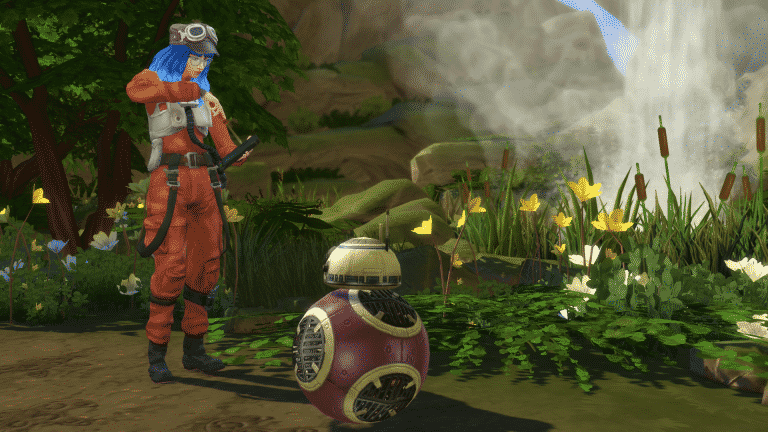
So, you want your Sim to have a companion while they explore the world of Batuu? Well, you are in luck because your Sim can have either a BB Unit or an R Unit as a companion!

You will need to head over to the First Order District and just around the corner from where your Sim spawns into the neighborhood, you’ll find  Mubo and the Droid Depot.

The Sims 4 Star Wars: Everything You Need To Know About Droids

Here you will find everything you need for your Sims’ BB and R Unit companion.

Getting Started

Firstly, once you have made your way over to the Droid Depot, you will be given an option to order either a BB or R Unit. Each unit costs 1,000 Galactic Credits.

Once you have chosen what kind of Unit you would like, you can go ahead and choose a head, body, and colour scheme. You will be able to see all the options in all the different colours in the body panel. You are also able to own multiple BB and R Units so you can have a variety of different ones to choose from.

Don’t forget you can also name your Droid on this screen or via the pie-menu after you have purchased them.

Droid Maintenance

Of course, you will want to keep your Droid well maintained during your adventures in Batuu and this is really easy to do. Simply click on your Droid and select the Droid maintenance submenu.

The Sims 4 Star Wars: Everything You Need To Know About Droids

Sometimes, interactions might not quite go to plan and backfire for your Droid. Don’t worry! Simply click on your Droid and you will be able to repair them.

Personality Chips

Personality chips can also be bought from the Droid Depot. You will find that the faction you belong to determines which Personality Chips you can buy. The Chips allow your Droid to have a new voice as well as a new personality and cost 175 Galactic Credits. Once installed, you are good to go!

The Sims 4 Star Wars: Everything You Need To Know About Droids

What else can you buy from the Droid Depot?

Your Sims can also purchase toys and scrap from Mubo. Prices range from 75 Galactic Credits to 350 Galactic Credits depending on what you buy. You can also purchase Toy BB Units and R Units to take home and decorate your Sims home.

The Sims 4 Star Wars: Everything You Need To Know About Droids

What Next?

There are a few things you can do with your Droid companion but how do you take the time to get to know them and build up that relationship? You will be going on some adventures with them!

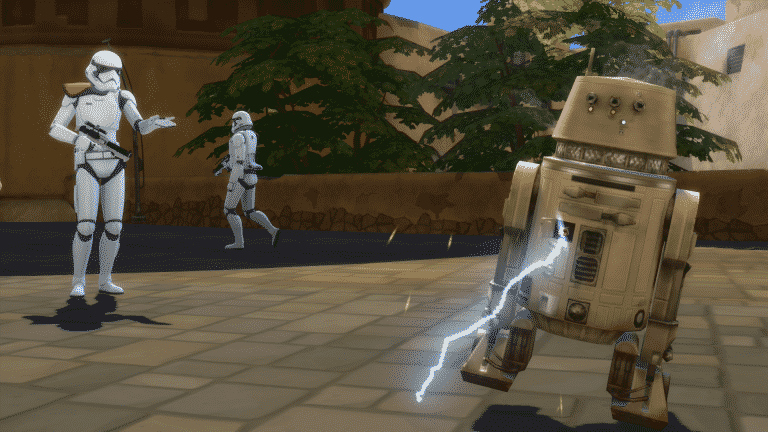
Your Droids have the ability to follow your Sim around but you can also ask them to wait in a specific place, cause a distraction, unlock supply crates and even shock other Sims.

The Sims 4 Star Wars: Everything You Need To Know About Droids

Your Droid companion is also able to play music from two new radio stations. Batuu and DJ R-3X Radio are available to listen to while out and about!

Droids at Home

Droids are not just limited to Batuu. While you can’t ask your Droid to follow you or cause a distraction, you can continue to listen to the Batuu radio stations and all of the normal radio stations and also play with your Droid. You are still able to replace Personality Chips that you have in your inventory and tinker with your droid as well.

The Sims 4 Star Wars: Everything You Need To Know About Droids

What kind of Droid are you going to build while in Batuu? Let us know in the comments or come chat with us on social media!

The Sims 4 Star Wars Journey to Batuu: World Overview

Presented by EA Game Changers

The world of Batuu is different from previous worlds we’ve seen added to the game previously. While there are no buildable lots for players to use (unless you wish to use cheats to have some aspects of building) there is still a variety of locations your Sims can visit.

The Sims 4 Star Wars Journey to Batuu: World Overview

Batuu is split into three districts, Black Spire Outpost, First Order District, and the Resistance Encampment. When you first travel to Batuu you will start off in the Black Spire Outpost but will then have the option to travel to the other two districts.

Black Spire Outpost

“This is the central hub of Batuu. Here you can find The Dwelling, Oga’s Cantina, Dok-Ondar’s Den of Antiquities, and a number of food and drink options.”

Docking Bay 7 – Food & Drink

The Sims 4 Star Wars Journey to Batuu: World Overview

Millennium Falcon

Go exploring or take part in a Kessel run with the Millennium Falcon.

The Sims 4 Star Wars Journey to Batuu: World Overview

Oga’s Cantina

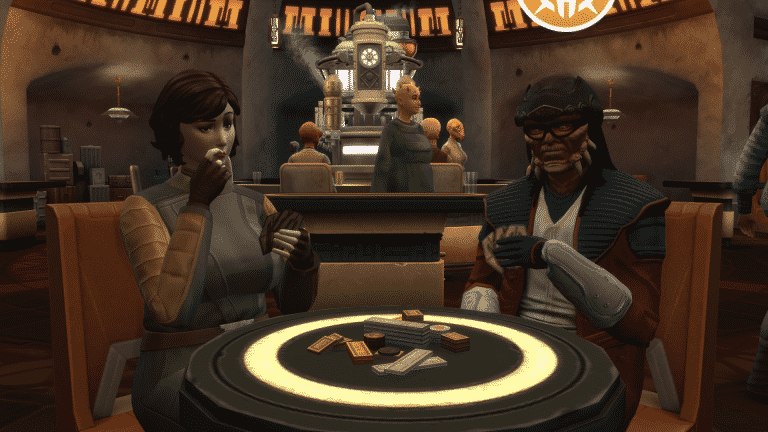
Take a seat and grab a drink or play a game or two of Sabacc.

The Sims 4 Star Wars Journey to Batuu: World Overview

Dok-Ondar’s Den of Antiquities

Here you can purchase a variety of different items including Porg and Ewok plush toys, Sith and Jedi Holocron’s, Kyber Crystals, and more!
The Sims 4 Star Wars Journey to Batuu: World Overview

Savi’s Lightsaber Workshop

Kyber Krystals, display cases, and Lightsaber Hilts. Savi’s shop is the place for all things Lightsaber related. You can also ask for Lightsaber Challenges here too.

The Sims 4 Star Wars Journey to Batuu: World Overview

The Dwelling

Whether you Sim needs to sleep, freshen up or change up their Batuu outfit, this is the place to go.

The Sims 4 Star Wars Journey to Batuu: World Overview

Ronto Roasters – Food & Drink

The Sims 4 Star Wars Journey to Batuu: World Overview

First Order District

“This is the First Order occupied sector of Batuu. Here you can find Lt. Agnon as well as the Droid Depot if you are looking to acquire your very droid companion.”

First Order Headquarters

Here you will find everything you need while climbing up the ranks with the First Order.

The Sims 4 Star Wars Journey to Batuu: World Overview

Droid Depot

Your one-stop-shop for everything Droid related in Batuu!

The Sims 4 Star Wars Journey to Batuu: World Overview

Resistance Encampment

“The Resistance Encampment is located deep in the forests of Batyy. Rumour has it you can find Vi Moradi, the famous Resistance spy. However, you will need to ear the trust of the Resistance before they will accept you with open arms.”

Resistance Camp

The main hub of the Resistance Encampment. Talk with other members of the Resistance or take a quick sleep ahead of your next adventure.

The Sims 4 Star Wars Journey to Batuu: World Overview

T-70 X-wing

Jump in and go and explore with the T-70 X-wing!

The Sims 4 Star Wars Journey to Batuu: World Overview

While you may not be able to properly explore every location in Batuu they do help provide a backdrop for when your Sim is completing missions for one of the factions. Don’t forget to keep a lookout for some of the mission locations while on your travels too.

The Sims 4 Star Wars: Journey to Batuu is out now!

The Sims 4 Star Wars: Journey to Batuu Game Pack has just been released on PC! The rollout for Steam and Consoles is expected to begin at 10AM Pacific Time today.

You can get this Game Pack for $19.99 on the following platforms and consoles:

  • Origin
  • Steam – releasing today at 10AM PT
  • PS4 – releasing today at 10AM PT
  • Xbox One – releasing today at 10AM PT

The Sims 4 Star Wars: Journey to Batuu is out now!