EA announced recently that they will be upgrading the minimum system requirements for The Sims 4 franchise, and users with Windows 32-bit operating systems and non-metal MAC OS will no longer be able to play future games. In a detailed post published on EA’s Answers HQ, Community Manager EA_Mai gave a detailed explanation of what the Legacy Edition is and which players should install it going forward.
In short, the Legacy Edition is a version of the base game that works with older computer technologies. You do not need to download and install it via Origin unless you turn on The Sims 4 and receive a message telling you to do so.
All previous expansion packs before University will work, but online features, including The Gallery, will no longer be available. For small children or ultra-casual players, this may not be a problem, but many others may now struggle to play The Sims without a machine that’s equipped to handle it.
What Does 32-bit Mean?
All computers have an operating system, and Windows comes in two versions: 32-bit and 64-bit. In short, these terms refer to how much data a computer can process at any given moment. A 64-bit processor processes over four billion times more memory than a 32-bit processor, according to Digital Trends.
A 64-bit processor can work with more RAM, which stands for “Random-access memory” and determines how much data a computer can process while it’s in use. When you play video games and don’t have enough RAM, they’re likely to lag, glitch out or even be totally unplayable.
Most computers have 64-bit processors nowadays, but laptops and PCs made before 2015 may still have 32-bit systems. In order to regain access to The Sims 4‘s online features and play Discover University and future packs, you’ll have to buy a 64-bit system.
All Previous Packs Still Work With The Sims 4 Legacy Edition
EA_Mai confirmed that previous Sims 4 stuff, game and expansion packs will be fully playable with the Legacy Edition of the base game. So, you haven’t lost all the money you’ve invested in the series so far if you’ve just discovered your computer is no longer supported. A small consolation, but worth noting nonetheless.
Switching to the Legacy Edition means that The Sims team wants to advance the series; not only are they ensuring that the game runs on the latest, mainstream technology, but they may also be hoping to expand future packs’ contents, which would require greater processing power to run efficiently.
The Sims 4 Legacy Edition is available for free on Origin for any player who has already purchased The Sims 4 base game.
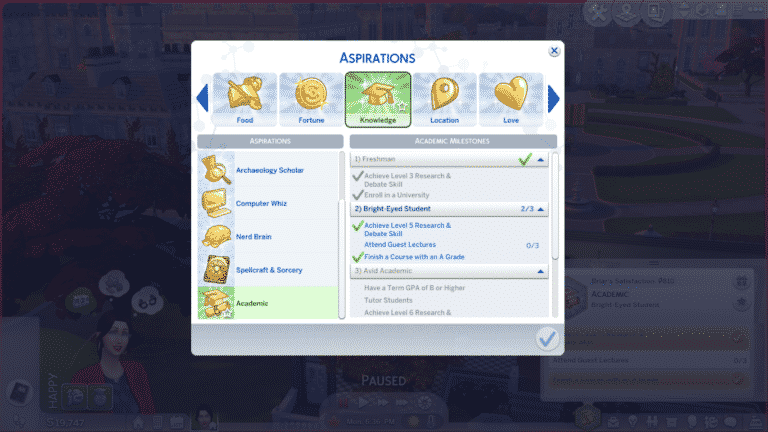
The Sims 4 Discover University comes with one new Knowledge aspiration: Academic. The Academic aspiration is focused on getting a higher education at university and will encourage your Sims to get good grades in university and do various university-related activities.
The aspiration is a good way for players to familiarize themselves with some of the new gameplay features of Discover University, but Sims do not need to have this aspiration to attend university or to explore any of the new features of Discover University.
Completing the Academic aspiration will grant your Sim the Higher Education trait.
Freshman
Achieve Level 3 Research & Debate Skill
Enroll in a university
Bright-Eyed Student
Achieve Level 5 Research & Debate Skill
Attend Guest Lectures (0/3)
Finish a Course with an A Grade
Avid Academic
Have a Term GPA of B or Higher
Tutor Students
Achieve Level 6 Research & Debate Skill
Senior Scholar
Earn a Degree
Contribute Knowledge on a Research Archive Machine
Achieve Level 7 Research & Debate Skill
Get a Job Using a Degree
Reward Trait
Higher Education: This Sim has proven they have what it takes to excel at University. Along the way, they learned a lot, allowing them to gain more skill using the Electromagnetic Research Archive Machine and earn more money from Publishing Research Papers and Contributing Knowledge.
Get your University Degree faster and Progress your new Careers and Skills with these Sims 4 Discover University Cheats!
The Sims 4 Discover University Expansion Pack is one of the most challenging pack in the series. We totally understand if you want to skip out on University but still want that degree, turn your Sim automatically into a Servo or help them progress in the new careers faster.
We’ve compiled a full list of new cheats that come with the pack down below. Huge thanks to @Dragonfreaky & Sims Online for helping uncover the Degree Cheats!
PLEASE NOTE: These cheats only work if you’ve enabled the testingcheats true cheat first! You can access the cheats console by pressing CTRL + SHIFT + C.
We’ve also explained each and every cheat category in the video down below:
Career Promotion Cheats
Part Time Careers
Soccer Team Volunteer – careers.promote careers_Volunteer_SoccerTeam
Turn Sim into a Servo – traits.equip_trait trait_Humanoid_Robots_MainTrait
Change Servo back to the Sim state – traits.remove_trait trait_Humanoid_Robots_MainTrait
Sims 4 Discover University Degree Cheats
Down below is a list of all the Degrees and Cheats that will give Sims the Degree of your choice instantly! There are 4 types of cheats for each degree:
Standard Degree
Standard Degree with Honors
Distinguished Degree
Distinguished Degree with Honors
To make things easier for you we’ve bolded the Distinguished Degrees!
With every new pack comes more possibilities for previous packs to have ways of integrating a range of different features into the newest expansion. The Sims 4 Discover University is no exception to this. Here is a look at some of the ways you can open up gameplay possibilities using previous The Sims 4 expansion packs.
Seasons
Britechester is known to have a similar weather system to that of England. You’ll find that it is likely to rain more often and be cooler a lot more. Regardless of the weather or the season Britechester always looks amazing. Don’t forget to keep an eye out for your Servo’s and Utili-Bots if it starts to rain!
Use the Household Calendar to schedule events including the new Keg Party event.
Create a Custom Holiday and get fellow students to join you in celebrating.
Get Together
One of the great things about the Get Together expansion is that it adds so many possibilities to expand your Sims University experience.
Clubs – Why not create your own Robot Building Club or even your own Debate club? The Sims 4 Discover University adds two new club activities in the Hobbies section.
You can also make the Club Requirements specific to one of the three new careers or even that members must be a part of the Soccer Team or E-Sports Team! You can also set the requirements so that members must have Level 2 or higher in the Robotics Skill!There are numerous possibilities!
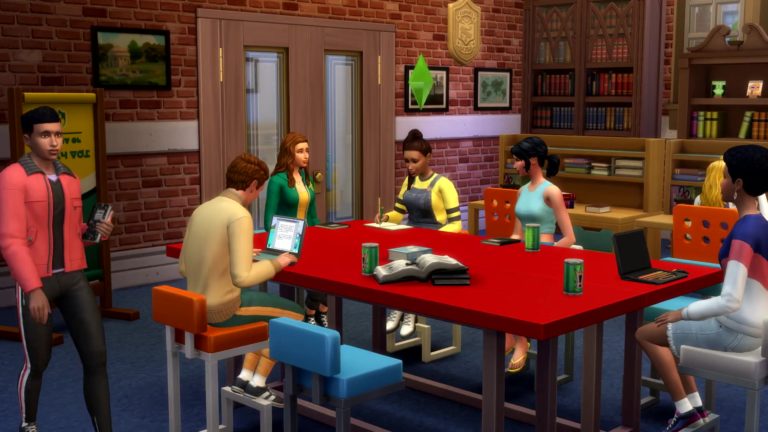
Create your own Student Cafe where Students from Foxbury Institute & University of Britechester can catch up with friends or find a quiet corner and study before that final exam! Alternatively, why not create a Student Hangout by using the Nightclub lot type?
City Living
Create a University Basketball Team by using the Get Together Club system.
While you can’t specifically change the Apartment lot type, you can turn them into Student-friendly housing. Perfect for those Sims who want to live off-campus but still want a dorm-like experience. Why not put an advert out for a roommate too?
Get Famous
If you have a Servo who has the Sim Defence Matrix, essentially Servo will become your own personal bodyguard. This comes in handy when the paparazzi want to ambush your Sim!
Fun fact: This feature also works when Vampires won’t leave you alone too!
Create a University Shop in Magnolia Promenade that sells everything from food & drinks, textbooks & study essentials to general clutter and furniture for those Sims just starting their University adventure.
Base Game
If you only have the Base Game and The Sims 4 Discover University, why not turn the world of Newcrest into an extended university campus for either Foxbury Institute or University of Britechester?
While this article mainly focuses on the gameplay features that crossover with each other, you will also find Build/Buy Mode objects and Create A Sim items that do the same too.
Let us know which expansions you plan to use alongside The Sims 4 Discover University.
Britechester may be a university town, but there’s so much more to Britechester than just its two rival universities. Namely, the residents of Britechester represent a wide variety of people who might find themselves settling in an old historical town like Britechester for one reason or another. From bright-eyed, bushy-tailed freshmans, to elderly folks who aren’t so happy about the influx of younger people taking over their once quiet neighbourhood, you’ll meet Sims from all walks of life in Britechester.
Best of Friends Household
11 14 19 11 53 20 AM
11 14 19 11 53 09 AM
Household Description
Julia and Becca have been the best of friends since they first met in kindergarten. Nobody that knows them could imagine them going to university without the other one by her side. Now as they’re starting a whole new journey into university it’s up to the pair to see if their friendship will survive this new adventure and carry them through to adulthood.
Julia Wright
Basic Info
Age: Young Adult Career: University Student Aspiration: Renaissance Sim Walk Style: Bouncy Voice: Lilted Traits: Ambitious, Perfectionist, Outgoing, Quick Learner (Bonus Trait) Skills: Charisma 4, Logic 5 Relationships: Becca Clarke – Best Friend,
University Info
School: University of Britechester Degree: Physics GPA: (none yet) Course Credits: 0 of 12 Term Days Left: (not yet started)
Class Schedule:
How Things Work: Physics I
Skill: Handiness
Times: Tuesday and Thursday from 8-9:25AM
Final Requirement: Term Paper
How Things Break: Physics II
Skill: Handiness
Times: Monday, Wednesday, and Friday from 1:30-2:55PM
Final Requirement: Final Exam
It’s Electric!
Skill: Robotics
Times: Tuesday and Thursday from 1:30-2:55PM
Final Requirement: Presentation
Becca Clarke
Basic Info
Age: Young Adult Career: University Student Aspiration: Academic Walk Style: Feminine Voice: Sweet Traits: Bookworm, Romantic, Active, Quick Learner (Bonus Trait) Skills: Programming 3, Writing 5 Relationships: Julia Wright – Best Friend
University Info
School: University of Britechester Degree: Language & Literature – Distinguished GPA: (none yet) Course Credits: 0 of 12 Term Days Left: (not yet started)
Class Schedule:
The Write Expectations
Skill: Writing
Times: Monday, Wednesday, and Friday from 11AM-12:25PM
Final Requirement: Final Exam
Pride & Prepositions
Skill: Writing
Times: Tuesday and Thursday from 8-9:25AM
Final Requirement: Term Paper
Telling Tales
Skill: Charisma
Times: Monday, Wednesday, and Friday from 3-4:25PM
Final Requirement: Final Exam
Household Notes
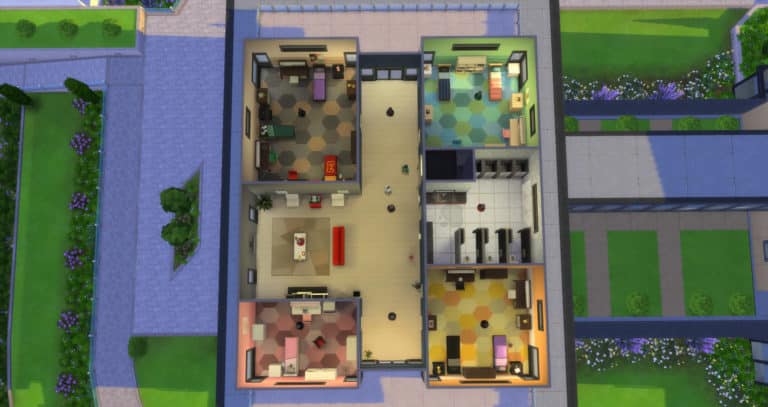
Julia and Becca live in University Housing on the UBrite campus. Their residence building has 2 small dorm rooms with 1 bed, 2 large dorm rooms with 3 beds, and 1 medium-sized dorm room with 2 beds. It’s up to the player to assign beds and decide which dorm room(s) Julia and Becca will live in.
The Sims 4 Discover University sees the long-awaited return of roommates! Now there are two variations of roommates. The first is those who are automatically assigned to live alongside your Sim in university housing. This could be on campus or on a specified university housing lot. Of course with the game automatically assigning roommates, you could be in for a few surprises!
The second way of gaining roommates is actually by placing an advertisement. This actually allows your Sim to get to know potential new roommates before asking them to move in. You also don’t have to be attending university to use this feature.
Placing an Advertisement
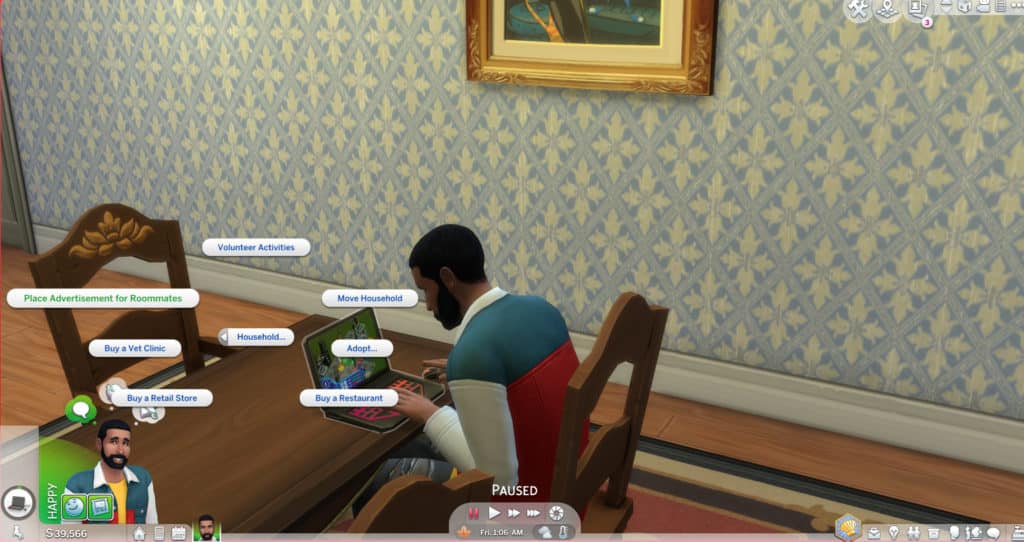
Placing an advertisement for a roommate is easy. Simply head over to a computer/laptop and under the Household menu, you will find the option to create an advertisement. Alternatively, you can use your Sims’ cell phone and again under the Household tab, you will find the option to place an advertisement.
Once you place the advertisement, you will receive a notification telling you that your advertisement has been placed for a new roommate.
If, once you have placed your advertisement you decide that you no longer want to look for a roommate, simply repeat the process again to cancel the advertisement.
After You Place The Advertisement
Once you have placed your advertisement you will need to make sure that you have space to accommodate a new roommate. Whether this is their own room or a bed and some simple furniture in an existing bedroom.
It can take a few Sim days for applications to arrive. You will be able to tell which Sims are coming to meet your Sim as they will have Potential Roommate above their name.
Once the applicants arrive, you can get to know them and interact with them just like you would with any normal Sim.
When you have decided on the Sim you want to become your new roommate, simply click on them and navigate to the Roommate menu. You can then use the Accept as new Roommate option. As soon as you select a Sim to be your Roommate your advert will be closed and taken down. The chosen Sim will also move straight in.
Living With Your New Roommate
Your new roommate is now a part of your everyday life. The fact you have handpicked this Sim will hopefully mean they will help out around the home with cooking and cleaning. Just watch out as you may end up with a disruptive Sim who will throw surprise parties and not help around the home.
Roommates will also help contribute towards the household funds via rent. The amount of rent varies depending on how many Sims you have as roommates.
You will find that Roommates won’t move out on their own and only if you kick them out if you need to. Once they have left you can place an advertisement again to help find a new roommate.
Additional Information
Roommates are not restricted just to the world of Britechester. Regardless of where your Sim lives or if they live in a standard home, apartment or penthouse you can have roommates.
The number of roommates depends on the number of beds. This is the same for both university housing and for normal gameplay.
University roommates are automatically generated. They will also claim their beds too.
You may notice that roommates will leave you little notes from time to time as well. You will be able to either compliment or complain to the roommate who left the note too!
What are you looking forward to the most when playing with roommates? Let us know in the comments below.
Twitter user and Simstuber Havana Sims has come up with a fun challenge for Simmers to give their Sims the ultimate college experience. For many readers, trying to pull this off may hit close to home. Not only does your Sim have to take four classes each term, but they must also earn straight A’s, participate in an organization and hold-down a part-time job.
📚Discover University Challenge 📚
1. Enroll your sim in 4 classes
2. Must get straight A’s
3. Live on campus
4. Join an organization
5. Have a part time job
The university, degree, organization and part-time job are all up to you! Your Sim may be so busy hitting the books and making money that they barely have time to sleep, let alone cook a meal bigger than ramen. Wow, doesn’t this feel familiar?
Getting started with this challenge might be a bit difficult if you’re still learning how to navigate campus. Here are two helpful guides that can give your Sim a head-start!
Robotics is a new 10-level skill that comes with The Sims 4 Discover University. Sims who are interested in crafting a variety of mechanical inventions to do all sorts of tasks for them will want to build the Robotics skill on the Robotics Workstation. Dedicating yourself to the study of Robotics has its hazards, but is ultimately very rewarding.
How to Craft Robots
In theory, it’s easy to craft a robot. Just click on the Robotics Workstation and tell a Sim to make one. In reality, making robots is much more involved than that.
Every robot requires a certain number of Robot Salvage Parts, Computer Chips, and Mechanisms in order to be crafted. Certain types of robots may also require other kinds of upgrade parts. Robot Salvage Parts can be purchased through the computer, but Computer Chips and Mechanisms must be crafted on the Robotics Workstation using Robot Salvage Parts. Your Sim will be spending a lot of time prepping their robot by crafting the materials required for it before they can get started building the actual robot itself.
An Expensive, But Lucrative Hobby
Sims who want to get heavily involved in Robotics should make sure they have the funds to do so. Crafting robots is not cheap. While Robot Salvage Parts are relatively cheap to purchase, you will need hundreds of them to craft your materials and robots. It also costs quite a lot to build the robots themselves. Not to mention how time consuming it is to have to craft your materials first before you can even craft your robot. This skill is not for the impatient or broke Sim.
However, the upside to this is that robots can be sold for quite a lot of money. You can make a good living off of crafting and selling your robots, especially at higher levels of the Robotics skill. Excellent quality Servos can be sold for thousands of simoleons! You can instantly sell a robot by clicking on it after it’s been completed and selecting the sell option. If Get To Work is installed, robots can be set for sale on retail lots, too.
The Dangers of Robotics
Building robots has its dangers! Be careful when using the Robotics Workstation. Sims can be electrocuted while working on the Robotics Workstation. If your Sim becomes Dazed from being electrocuted, it’s best to walk away from the Robotics Workstation for a while until the moodlet goes away. Sims who get electrocuted again while this Dazed moodlet is still active will die from electrocution. The Robotics Workstation can be deadly!
Sims at low levels of Robotics skill are more likely to be electrocuted. Sims in a negative emotional state have a higher chance of being electrocuted as well. Wearing cybernetics can help Sims sustain less injuries from the Robotics Workstation.
Utili-Bots
There are 4 types of Ultili-Bots that can be crafted on the Robotics Workstation. All Utili-Bots have battery charge and durability stats which can be seen when hovering over them. Tune up your Utili-Bots and recharge them when needed to keep them in working order. Make sure Utili-Bots stay away from water. Exposure to water will break them. This includes rain, if Seasons is installed.
Cleaner-Bots: Will clean your house for you. When activated, they will do this automatically. They do not need to be given specific tasks or supervised until it’s time for a recharge or tune up.
Party-Bots: These bots have more options than the other Utili-Bots. They act as a portable stereo. Sims can choose a music genre, set the music volume, and dance to music playing from Party-Bots just like any other stereo. They can also request food from Party-Bots and Activate Party Mode. Party-Bots will periodically shoot confetti into the air.
Gardener-Bots: Will tend your garden for you but won’t harvest from plants. When activated, they will do this automatically. They do not need to be given specific tasks or supervised until it’s time for a recharge or tune up. Make sure to turn them off when it’s raining if Seasons is installed. They aren’t very smart and will still try to tend the garden in the rain, which will cause them to break.
Fixer-Bots: Will fix any broken objects around the house for you, but will not repair themselves. When activated, they will do this automatically. They do not need to be given specific tasks or supervised until it’s time for a recharge or tune up.
Cybernetics
There is only one type of cybernetic that can be unlocked for the Robotics Workstation via the Robotics skill alone, which is the Robo-Arm. Sims who pursue a career in Engineering will gain access to advanced cybernetics that are career unlockables for their career branch.
Robo-Arm: Unlocked with the Robotics skill. Sims who wear the Robo-Arm build Robotics skill faster and are less likely to sustain injuries from the Robotics Workstation.
Exo-Mech Suit: Unlocked in the Mechanical branch of the Engineer career. The Exo-Mech Suit has two pieces; a helmet and a body suit. Sims can scan for mood and traits like a Servo while wearing the helmet. Sims can engage hover mode like a Servo while wearing the suit.
Computer Glasses: Unlocked in the Computer branch of the Engineer career. The Computer Glasses allow Sims to scan for traits and mood like a Servo.
Toys
There are two types of toys that can crafted on the Robotics Workstation; Chatter Bots and RC Quadcopters.
Chatter Bots: Children’s toys that look like miniature robots.
RC Quadcopter: Quadcopters are mechanical drones that can be played with and flown around by Sims like a remote-controlled miniature airplane.
Robotics Skill Levels
Level 1
Can purchase Robot Salvage Parts from the Computer
Can salvage Robot Salvage Parts from broken electronics
Can craft toy Chatter Bots on the Robotics Workstation
Level 2
Can craft Computer Chips and Mechanisms on the Robotics Workstation
Can craft RC Quadsopters on the Robotics Workstation
Level 3
New Ultili-Bot: Craft Cleaner-Bot on the Robotics Workstation
Level 4
New Ultili-Bot: Craft Party-Bot on the Robotics Workstation
Level 5
New Ultili-Bot: Craft Gardener-Bot on the Robotics Workstation
Level 6
New Utili-Bot: Craft Fixer-Bot on the Robotics Workstation
Level 7
New Cybernetics: Craft Robo-Arm on the Robotics Workstation
Origin.com has just updated their Build-A-Bundle feature for The Sims 4 with the latest release of Discover University Expansion Pack!
Now you’ll be able to create two types of bundles with this pack including:
The Sims 4 Base Game + Discover University (35% off on the total price)
The Sims 4 Discover University + Game Pack + Stuff Pack (35% off on the total price)
Building a bundle with the Base Game would require for you to not have either Discover University or the Base Game in your Origin game library while building the second bundle type would require you to not have at least 1 Game Pack and 1 Stuff Pack in your game library.
For more information about the Build Your Bundle feature on Origin – CLICK HERE!
The Sims 4 Discover University adds two brand new After School Activities. These are only accessible once your Sim has enrolled at either Foxbury Institute or the University of Britechester.
As with any career, your Sim can join the Soccer Team career simply by sitting down at a laptop, computer, using their cell phone or by the career tab on the user interface. You will then be given the option to choose which of the two new careers you would like your Sim to join. You can also click on the Foxbury Arena and Join a Sports Team.
Trainee
Schedule – Mon, Tues, Wed, Thurs, Fri 6 pm-9 pm
Advancement Tasks – Reach Level 2 Fitness Skill & Make 2 Friends with Teammates
Bonus – MVP! MVP! Soccer Trophy (this can be found in your Sims inventory)
Note: Each level of the Soccer Team Career has a daily task that is required to be completed every day to help your Sim advance to the next promotion. These tasks vary from day to day.
Future Opportunities
Being a part of the starting line up on the University Soccer Team also opens up the Professional Athlete branch of the Athlete Career for your Sims. This higher starting point means your Sims can jump straight into this profession. Your Sim will also receive a higher hourly rate, easier promotion opportunities and extra vacation days.
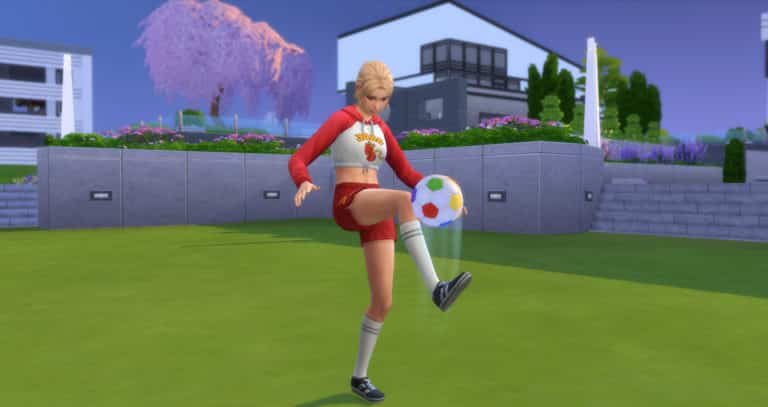
Soccer Games
Every Friday the Foxbury Arena will host the weekly Soccer game. These start at 6 pm and tickets are available to purchase at the start of the match from the arena. Tickets cost $45 and any Sim can attend.
Soccer Match Schedule
Foxbury Institute Arena – Friday at 6 pm
Ubrite Arena – Saturday at 6 pm
Sims that are due to play in the Soccer match will attend the match as if they were attending a shift at work and you can control how they perform by clicking on the two little Sims displayed on your Sim at the bottom of the user interface.
Every now and then you may receive a pop up to help influence an aspect of the match i.e – Whether a teammate should make a pass to your Sim or to another Sim.
Once the game is over you will be told how the match ended in the Notification Wall.
Whether you are Team Foxbury or Team UBrite head on down to the Arena and cheer for your favourite team!
Possibly one of the most exciting new additions with The Sims 4 Discover University is Servo! What is Servo, you ask? Well, in technical terms, Servo is a Sim! A robot Sim, specifically. That’s right! Servo is a fully playable life state in the game, just like Aliens, Vampires, Mermaids, and Spellcasters. Add Servo to your household and play with Servo just like any other Sim!
Guide to The Sims 4 Robots
Servo Biology
Unlike other life states, Servo cannot be created directly in CAS. This is largely due to the fact that Servo is meant to be a high level reward for the Robotics skill. Being able to create Servo in CAS would take away a huge gameplay portion of the Robotics skill. Servo also cannot wear clothes or change the physical structure of her appearance; only her colours, which can be changed in Live Mode. Servo’s traits and aspiration can also be changed directly in Live Mode, so there is no real need to be able to edit Servo in CAS. If the player wishes to add a Servo to the household immediately, a Servo can be purchased in Build/Buy after unlocking the debug menu with the bb.showhiddenobjects cheat.
All Servo are classified as Young Adults, but are immortal and will never age. Servo cannot die from old age. There are no teen, child, or toddler Servo and no Servo babies. However, Servo can still die! If Servo breaks down and is not repaired for a certain length of time, Servo will become scrap metal and be gone forever. Servo even has her own tombstone and urn! Servo also has her own special plumbob that features gears etched into a metal ring.
Servo can be programmed to be male or female upon activation. Since my Servo in the game is female, I’ll be using female pronouns in this guide by default, but you can absolutely have a male Servo as well!
Servo can WooHoo with Sims, but cannot Try for Baby. Due to Servo’s mechanical makeup, she is unable to produce biological children; however, Servo can adopt human children via the computer and raise them as her own. Any children adopted by Servo will become Servo’s children both on the family tree and in the Relationships panel, so this is a good way for Servo to raise a family in spite of her biological restrictions.
Servo has four motives: Fun, Social, Durability, and Battery Charge. Servo does not need to eat, bathe, or use the toilet. Sims can tell Servo to recharge when her battery is low, or Servo can recharge herself. While Servo is recharging, she will stop where she is and go into stasis where she will be unable to do anything for a period of time. Recharging is Servo’s equivalent of sleep. When Servo’s Durability motive is low, Sims can perform Tune Ups on Servo. If Servo has been Enhanced, Servo can also perform Tune Ups on herself. Don’t allow Servo’s Durability motive to deplete or Servo will break down and need to be repaired. A Servo that has not undergone any Enhancements will not be self-sufficient and will require a Sim with Robotics skill in the household to do Tune Ups. With enough Enhancements, Servo can become completely self-sufficient and perform all maintenance on herself.
Servo is NOT immune to water! Do not send Servo swimming or tell Servo to bathe. If Seasons is installed, do not let Servo go out in the rain without an umbrella. Water will cause Servo to break down and possibly die if Servo is not repaired soon enough. Servo cannot be enhanced or upgraded to be immune to water. All Servo will always be vulnerable to water.
How To Make A Servo Robot in The Sims 4
If you want a Sims 4 Robot Servo to become a member of your household, your Sim will need to invest a lot of time into the Robotics skill. Sims can build Servo on the Robotics Workstation at level 8 of the Robotics skill. Servo requires a lot of different parts in order to be constructed:
Electronic Upgrade Part (x10)
Common Upgrade Part (x15)
Kitchen Upgrade Part (x5)
Plumbing Upgrade Part (x2)
Mechanism (x18)
Computer Chip (x12)
Robot Salvage Part (x75)
Once a skilled Sim has all the required parts, they can begin constructing Servo on the Robotics Workstation. Constructing Servo takes quite a bit of time, but when completed, you can click on Servo to sell her or you can activate Servo. If you choose to sell Servo, she’ll disappear and simoleons will be added to your household.
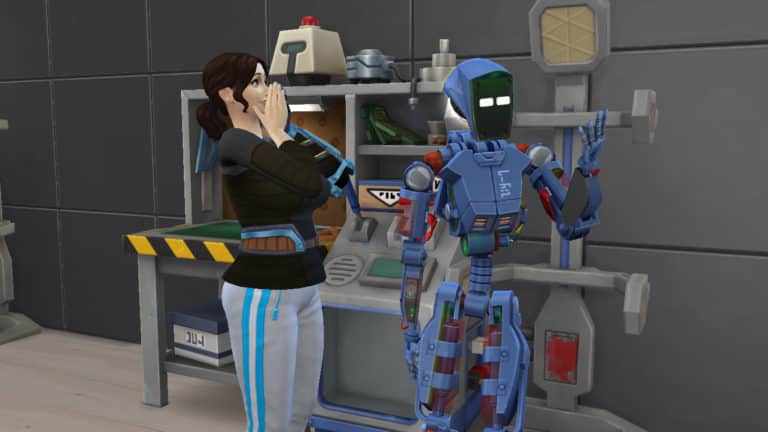
If you choose to activate Servo, your Sim will inject Servo with a large jolt of electricity and Servo will come to life! There is a very cute animation between Servo and your Sim when this happens. Once activated, Servo becomes a fully playable member of your household. Activating Servo will prompt you to select Servo’s programmed gender. Servo also starts out with level 3 Robotics skill.
By default, all Servo are called Servo Bot, but you can change Servo’s name by clicking on Servo and selecting the Servo options in the social pie menu. Servo will activate with randomly assigned traits which can also be reprogrammed by clicking on Servo. Change Servo’s aspiration the same way you would a normal Sim; through the Aspiration info panel.
Servo’s colours can also be changed by selecting Change Appearance in the Servo social menu options. There are six different colour variants you can select for Servo:
Black and Blue
Gold and Brown
Grey and Brown
Red and Green
Silver and Grey
White and Beige
Once Servo is customised to your liking, it’s time for Servo to go forth and live a life!
Sims 4 Servo Abilities
Servo can do anything a regular Sim can do (except water-related activities and Try for Baby). Servo can build relationships and skills, WooHoo, get married, go to university, get a job, raise an (adopted) family, and just about anything else you can think of that a normal human Sim would be able to do.
But of course, Servo wouldn’t be all that special if she could only do things a regular Sim can do. So what else can Servo do?
Scan Sims to find out all of their traits at once
Scan Sims to find out the Sim’s current emotional state
Toggle between hover mode and a regular walk style
“Discuss Important Robot Things” with Utili-Bots, which gives any nearby Sims a Tense “They’re Planning Something!” moodlet
Zap Sims, which will cause them to run away
Wait, that’s it? That’s lame! Or… it would be if Servo Enhancements weren’t a thing. Servo Enhancements are so detailed that they get two sections of this guide all to themselves! Servo Enhancement and Behaviour Modules.
Servo Enhancement and Upgrades
Servo Enhancement is technically a third skill that comes with Discover University; however, it is a hidden skill that only Servo can learn. Sims can perform enhancements on Servo, or Servo can perform self-enhancements.
Because Servo starts out as a brand new creation who is unfamiliar with the world, she needs to gain knowledge about the world in order to enhance her knowledge. Servo can make progress towards her next enhancement level by learning skills. Servo can also gain progress towards the next Enhancement level by Downloading Enhancement Data from the global Servo servers. Servo will go into stasis while downloading data and will stay that way until Servo becomes too Uncomfortable or until the player cancels the action. Check on Servo’s Enhancement Progress by clicking on Servo.
Enhancing Servo will unlock new behaviour modules for Servo, as well as improve her battery charge and durability decay rates. Servo can also learn how to become more self-sufficient by repairing and maintaining herself.
There are a total of 10 enhancements levels that offer new abilities and benefits to Servo:
Level 1
Increase Charge gain by 10%
Ability to Download Enhancement Data from the global Servo servers
Level 2
Durability decay decrease: 10%
New Behaviour Modules
Level 3
Gain skills 10% faster
Can self-repair
New Behaviour Modules
Level 4
Improve battery life by 10%
New Behaviour Modules
Ability to toggle Behaviour Modules on or off
Level 5
Increase Charge speed by 25%
Level 6
Improve Durability by 25%
New Behaviour Modules
Level 7
Gain skills 25% faster
Level 8
Decrease Charge decay by 25%
New Behaviour Modules
Level 9
Gain skills 50% faster
Level 10
Increase Charge speed by 50%
New Behaviour Modules
Behaviour Modules
Behaviour Modules are added functions Servo can learn which dictates Servo’s autonomous behaviour. Behaviour Modules tell Servo which tasks to prioritize. Behaviour Modules do not affect what Servo can do while you are actively playing with Servo; they only guide Servo’s autonomous actions when the Servo is not the active Sim.
There are six different Behaviour Modules. Servo can toggle Behaviour Modules on and off at Enhancement Level 4.
Eco-Friendly Tech: Prioritizes gardening tasks for Servo. Be careful not to have this Behaviour Module activated while it’s raining if Seasons is installed; Servo will attempt to garden in the rain, which will cause Servo to break down.
Fix-O-Matic: This prioritizes repair tasks for Servo. Servo will autonomously repair any broken objects and Utili-Bots on the lot.
Parameterize and Sanitize: Prioritizes cleaning tasks for Servo. Servo will autonomously clean any dirty objects on the lot, mop up puddles, and pick up trash.
Party Machine: Turns Servo into the ultimate party-goer! Servo will perform the functions of the Party-Bot by playing music, offering food, and keeping the party jumping.
RoboNanny: Prioritizes child care tasks for Servo. Servo will autonomously check on any children on the lot and take care of their needs. Sims can also install this module for Servo at level 9 of the Robotics skill.
Sim Defence Matrix: Turns Servo into your personal bodyguard. If any uninvited guests barge into your personal space, Servo is programmed to go confront them for you. Servo will also deal with annoying paparazzi and pesky vampires if Get Famous and Vampires are installed, respectively. Sims can also install this module for Servo at level 10 of the Robotics skill.
What kinds of stories will you tell with your Servo? Tell us all about it in the comments or come chat with us on social media!
The tradition of releasing brand new theme songs with Expansion Packs for The Sims 4 is still in full force since Cats & Dogs.
The Sims 4 Discover University Expansion Pack comes with a new theme song tune that randomly plays on par with other theme songs after opening up The Sims 4. We’ve extracted this theme song from the game files so you can listen to it!
The Sims 4 Discover University comes with several new Lot Types as well as two new Lot Traits. The great thing about both of these is that they are not completely restricted to being used in the world of Britechester. You can use them in any world providing that both the Lot Traits and Lot Types are compatible with each other. This means you can ultimately extend either University campus as much as you wish across the game.
Lot Types
Foxbury Commons – The Foxbury Commons is a place for students from the Foxbury Institute to get food and study. Between classes, the Foxbury commons hosts a variety of fun activities for students.
UBrite Commons – The UBrite Commons is a place for students from the University of Britechester to get food and study. Between classes, the UBrite commons hosts a variety of fun activities for students.
University Housing – University Housing is a place for students to live and rest their head while going to University. Each University Housing can be designated for one of Britechester’s two prestigious universities.
Each Lot Type will have requirements that will be displayed in a drop-down menu in the Lot Info Panel.
With University Housing, you are unable to enter Build/Buy Mode while there are active Sims living there. This is where the University Kiosks come in handy for purchasing a selection of live draggable objects. However, you can edit University Housing if you enable the freebuild cheat (bb.enablefreebuild). If you don’t wish to use the cheat, you will have to move any active Sims out to another lot first.
University Housing also means that depending on the number of beds that are present on the lot, the game will randomly spawn roommates to fill those. The roommates could be super helpful and keep on top of keeping things clean and repair broken objects or they could be very messy and not help with cleaning or repairing objects. You will see a Maid come in once a week who will clean up dirty objects but they will not pick up after messy roommates. You can also call for a Repairman for free if you are in University Housing.
Additionally with the University Housing Lot Type, you can choose the University, any gender restrictions and if there are any affiliations to any Organizations or Get Together Clubs. These settings can be found under the University Housing Configuration Menu which is located next to the Lot Info Panel.
Lot Traits
University Student Hangout – This spot has great prices on food and drink, so the university students are sure to flock to it.
Note: This Lot Trait is not available for Residential, Retail, Spa, Restaurant, Vet Clinic, University Housing or Rental lots.
Study Spot – A great place to enhance one’s mind in pursuit of higher education. Not only will Sims complete their homework faster, but they can study longer without getting mentally exhausted. They’ll also enjoy a slight bonus to all skill-building.
Note: There are no known restrictions for this Lot Trait.
Which lot trait or lot type are you most excited to play with?Let us know in the comments or come chat with us on social media!
The Sims 4 Discover University adds two brand new After School Activities. These are only accessible once your Sim has enrolled at either Foxbury Institute or the University of Britechester.
As with any career, your Sim can join the E-Sports Competitor career simply by sitting down at a laptop, computer, using their cell phone or by the career tab on the user interface. You will then be given the option to choose which of the two new careers you would like your Sim to join. You can also click on the Foxbury Arena and Join a Sports Team.
Practice Squad Member
Schedule – Mon, Tues, Wed, Thurs 6 pm-10 pm
Advancement Tasks – Reach Level 3 Video Gaming Skill
Note: Each level of the E-Sports Competitor Career has a daily task that is required to be completed every day to help your Sim advance to the next promotion. These tasks vary from day to day.
You will also notice that you will periodically receive sponsorship gifts from the Power-Sip Brand. This ranges from posters, drinks, a gaming chair and more.
Future Opportunities
Being a part of the starting line up on the University E-Sports Team also opens up the eSport Gamer branch of the Tech Guru Career for your Sims. This higher starting point means your Sims can jump straight into this profession. Your Sim will also receive a higher hourly rate, easier promotion opportunities and extra vacation days.
E-Sports Matches
Every Saturday the Foxbury Arena will host the weekly E-Sport Match for both the University of Britechester and Foxbury Institute. These start at 6 pm and tickets are available to purchase at the start of the match from the arena. Tickets cost $45 and any Sim can attend.
E-Sports Match Schedule
Ubrite Arena – Friday at 6 pm
Foxbury Institute Arena – Saturday at 6 pm
Sims that are due to play in an E-Sports match will attend the match as if they were attending a shift at work. Once the match is over you will be told how the match went in the Notification Wall.
Whether you are Team Foxbury or Team UBrite head on down to the Arena and cheer for your favourite team!
The Sims Mobile Team has teased another gif over on their Twitter ahead of next weeks big announcement.
Earlier this week in a previous article, we shared the first teaser GIF along with some Tweets from The Sims Mobile team. You can check those out here.
















 Soccer Games




 Lot Traits