The full reveal trailer is set for February 18th at 8AM PT / 5PM CET / 4PM BT. You can find when the trailer drops in your area by pressing the play button below.
Hopefully the new info and gameplay previews include a better look into Small Business ownership and more information onto who’s the Shady NPC coming to The Sims 4!
For all the latest on The Sims 4 Businesses & Hobbies, stay tuned on Sims Community!
Manipulate your Simology or turn your Sims into occults instantly. It’s up to you!
There are a wide variety of cheats that players can use in The Sims 2. However, you might be finding yourself wondering if there are any The Sims 2 UI cheats and if so, what exactly do they do, and how do they work?
Now, you could say in a way that these cheats are similar to the hugely popular and essential The Sims 4 UI Cheats Extension Mod from Weerbesu. However, back in the days of The Sims 2, we didn’t really have such a mod, so players relied on the use of cheats to manipulate different aspects that they needed to change.
These The Sims 2 UI Cheats as well as the shift clickable ones, were perfect back in the day and even now, in the Legacy re-releases, are perfect to use.
Table of Contents
How to activate cheats in TS2
Activating cheats in The Sims 2 is easy! In fact, it’s the same as how you do in The Sims 4, players just have a different starting cheat to allow the function to work.
Hold down Ctrl + Shift +C.
To activate cheats, type boolprop testingcheatsenabled true into the cheat bar and select Enter.
Type in the cheat code you want to use and select Enter.
You may also hear players call the above as the TestingCheats cheat, as this is what it is commonly known as across The Sims franchise. For each iteration of the games, the cheat has similar debugging possibilities within each game.
The Sims 2 UI Cheats (Interaction)
Before we get into the shift-clickable The Sims 2 UI Cheats, let’s take a look at a few quick and easy UI cheats that you’ll also find useful in game.
These cheats can remove various aspects of the game, such as the iconic The Sims Plumbob and even the Sim’s thought bubbles!
[table id=125 /]
Shift Click UI Interaction Cheats
Now, onto the good ones!
These Sims 2 UI Cheats were where you could easily change a Sim’s aspiration, birthday, spawn NPC’s and random objects (including the Magic Lamp and Voodoo Doll), give your Sim a handheld games console, spawn a Cat or Dog and more!
[table id=124 /]
How Do The Interaction Cheats Look In Game
If you’ve activated any of the standard The Sims 2 UI Cheats, you’ll notice the changes as soon as you have pressed enter. The same goes for the shift click Sims 2 UI Cheats, and you’ll see the results instantly.
Additionally, there are two pages of shift-click cheats when you start to explore them.
This image showcase the first page of the shift click debug cheats. Upon clicking on your chosen cheat, there are additionally options that allow players to choose more specific options that they are looking for. This goes into different NPC outfits, choosing aspirations, social debug and more.
The Spawn shift click cheat is incredibly interesting to explore as it can add a lot of different NPC’s, objects, different objects and more. With two pages to explore, there is certainly a lot to discover just in Spawn alone.
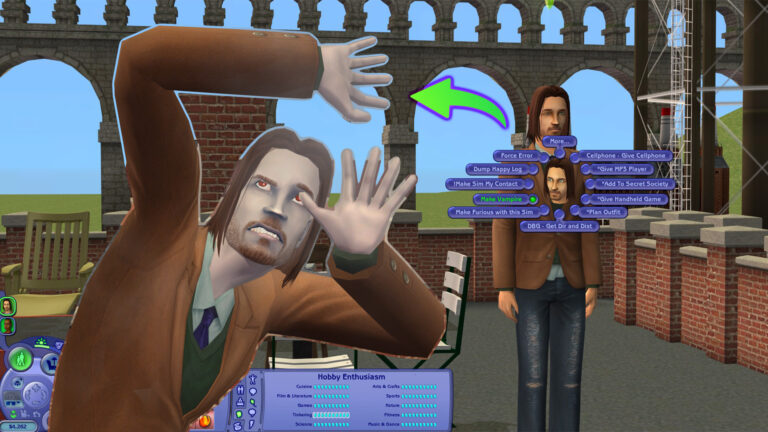
Likewise, the above image shows the second page of the shift click debug cheats that are available. This includes giving your Sim a cellphone, MP3 player or handheld game as well as making them a Vampire, planning an outfit and more. Yes, you can also join the Secret Society!
How about the Sims 2 UI cheats, you can activate by shift clicking on the mailbox?
Again, much like the Sim based shift click cheats, you have plenty of sub-menus you can explore to truly make use of the debug UI cheats.
The Advance UI Cheat for The Sims 2
Do you truly want to manipulate all the Skills, Careers, Relationships and more with just a click on the user interface? There’s an integrated Sims 2 UI Cheat that lets you manipulate all the elements and features within the game’s UI.
To activate advance UI Cheats for The Sims 2, you simply need to activate the following cheat while in Neighborhood Mode: boolprop testingcheatsenabled true.
Remember, this cheat activation needs to be done in Neighborhood view mode before loading up a Sims household.
How to Use
After loading up any Household, you can use your left click okn the user interface elements to manipulate them. For example, dragging the Needs bar to any point you want!
For Relationships, you can manipulate both meters by dragging the relationship bar left or right. Remember that this relationship manipulation will only work one-way!
Skill Sims 2 UI Cheats let you drag all the Skills and Max them out immediately.
In the Simology Panel, you’ll be able to manipulate Personality, Politics and Hobby Enthusiasm. Simply by dragging the bar left and right!
With that being said, this is everything you need to know about The Sims 2 UI Cheats, how to activate them and what they look like. They are good fun to explore as well as handy for storytelling in The Sims 2 as well.
Are you looking for more cheats? We’ve got you covered with the essential cheats you need for The Sims 2 right here!
Discover all the romantic interactions you can unlock in The Sims 4 Lovestruck!
The Sims 4 Romance Skill is one of the main features included with the 16th Expansion – Lovestruck. An alluring skill available for teens and older Sims. As Sims progress in the skill, they unlock social interactions and more.
If you’re interested in the new Romantic Consultant career or aspirations like the newly added Romantic Explorer and Paragon Partner, this is the skill for you. Keep reading to learn about each skill level!
The Sims 4 Romance Skill Tree
Building the Romance Skill
Simply unlock the Romance Skill by flirting! Performing romantic interactions like Flirt, Embrace, Compliment Appearance, etc. will increase your Sims’ Romance Skill and let them progress through the skill levels. Be sure to use the new romantic interactions your Sim unlocks along the way, too.
Like other skills, your Sim can read the related skill books to increase their Romance Skill. Bored of reading? Use the Research Romance Tips interaction on the computer or Sit in on a Skills Class via the phone to increase your skill, instead.
Personality traits like Lovebug and Romantic will help romantic interactions succeed, which will help your Sim progress through the Romance Skill. Watch out for personality traits like Romantically Reserved, Unflirty, and Jealous. These traits make it harder for your Sim to succeed in romance, which could make it challenging to learn the Romance Skill.
Level 1
Romantic Introduction & Research Romance Tips
As a romantic newby, your Sim unlocks the Romantic Introduction interaction, letting them shower their romantic interests in rose petals. Your Sim also unlocks the Research Romance Tips interaction on the computer, so they can learn all they need to learn about the romantic lifestyle.
Level 2
Share Sweetheart Box
Once your Sim starts to get a little more romantically savvy, they unlock the Share Sweetheart Box romantic interaction. Cuddle up and share treats with your sweetheart!
Level 3
Whisper About Desires
After learning more about romance, your Sim will unlock the Whisper About Desires interaction, letting them get even flirtier with other Sims.
Level 4
Perform Seductive Dance & Tender Neck Kiss
Ready to turn up the heat? At this level, your Sim unlocks the Perform Seductive Dance interaction, letting them show off their moves anywhere, anytime- no music needed! This level also adds the Tender Neck Kiss interaction, giving your Sim a new way to show their affection.
Level 5
Suggest Back-to-Back Woohoo & Recap Woohoo
Want to do what bunnies do? At this skill level, your Sim unlocks the Suggest Back-to-Back Woohoo interaction. This Sims 4 Romance Skill level also adds the Recap Woohoo interaction, keeping your Sims in a flirty mood.
Level 6
Scan the Room
At this level, your Sim unlocks the Scan the Room interaction to find nearby possible romantic interests. Keep an eye out for the floating hearts above other Sims’ heads. That’s how you’ll find your romantic matches!
Level 7
Steamy Make Out & Build Up Partner
As a true casanova, your Sim will unlock the Steamy Make Out interaction at this level. Sims in committed relationships will also unlock the Build Up Partner interaction.
Level 8
Emotionally Connect
Unlocking this skill level helps your Sim strengthen their Romantic Satisfaction with the Emotionally Connect interaction. Deepen your Sim’s relationship by sharing their heart with the Sim they love.
Level 9
Lovingly Dip Kiss
Blow your partner’s mind with the Lovingly Dip Kiss interaction, giving them a kiss that is one for the storybooks.
Level 10
Aura of Flirtiness
Now that they’ve learned the ins and outs of love, your Sim unlocks the Aura of Flirtiness interaction, keeping your Sim flirty for hours to help them find success in love.
Unlock the Hidden Romantic Sage Trait
Once your Sim starts researching romance, they start earning a hidden trait. After performing the Research Romance Tips interaction on the computer a few times, your Sim begins to understand healthy romantic relationships, and a notification will appear letting you know your Sim is on the way to earning the Romantic Sage trait.
Your Sim can continue learning about positive relationship dynamics through researching romance on the computer and talking to Sims in healthy relationships. Once they gain a true understanding of the inner workings of a strong relationship, your Sim will earn the Romantic Sage trait. With this trait, Sims earn Romantic Satisfaction quickly, can influence other Sims to earn the Romantic Sage trait, and unlock the Remember Positive Romantic Experiences interaction to boost their mood.
What will your Sim use their Romance Skill and other features from The Sims 4 Lovestruck Expansion Pack this Valentine’s season?
A PSA to everyone playing The Sims 4 For Rent Expansion!
Players are losing years of game progress due to a recent Sims 4 Save Game corruption issue. Which seems to be getting amplified with the Residental Rentals Feature from The Sims 4 For Rent Expansion Pack.
The corruption issue essentially acts like a virus. You won’t know that your Save Game is corrupted until it’s too late to make any changes or backups. The issue keeps persisting with the latest January 28th Sims 4 Patch, across PC, Mac and Console platforms.
Table of Contents
February 20th Update – Official Sims Direct Statement
The Sims Direct Team issued an official statement regarding the Sims 4 Residental Rentals issue in the For Rent Expansion Pack. Clarifying that they’re actively working on the solution.
We’re aware of issues impacting For Rent and save files, and are investigating this further. Please continue to share details through the EA Forums thread, and upload any impacted save files to assist our investigation.
The Sims 4 Save Game Corruption and Lots Disappearing
Creator @cyberthreed brought to attention an issue they’ve stumbled upon. The latest trend of Sims 4 Save Game corruption glitches caused them to lose over 6 months of saved game progress. They also brought up an EA Forum Thread that was posted two months ago, where several Sims 4 Players started reporting weird glitches they’ve encountered.
I lost my 2 year, 48 gen save when residential rentals were introduced. Yes, I have backups but had already progressed several gens and thought starting over was ok. Didn’t know it could happen again!
Forum expert crinrict brought together a useful list of all the Bug Symptoms that lead up to the recent Sims 4 Save Game corruption, including these official Bug threads:
The full thread in EA Forums contains multiple reports from players who lost their progress due to the latest corruption issue.
Player Experiences
This is such a devastating bug. I lost a seven-year save and rebuilt it only for it to happen again immediately in a new save. I really hope EA takes it seriously and fixes it quickly.
In my case, I’m not getting infinite loading screens. The lots do load. But just the lot I loaded. Everything else is just EA builds or in the case of Newcrest, completely empty. Like the previous comment said this is a MASSIVE bug that I don’t feel like EA is taking seriously. The game is unplayable but they’re releasing more DLC. Player experience is always a second thought. EA claims to be keeping the Sims 4 alive so players don’t have to start over again, but this is literally a save breaking bug where the only solution that’s being given is to start over or not use content that we paid for.
This is also happening to me in Willow Creek. Lots in the same neighborhood as a rental lot vanish when you go in live mode. They appear fine in Map view, but empty lots in live and build mode. When I try to go edit the rental lot to remove it it gives me Error 800 or endless loading screen.
100% I lost my oldest neighborhood. I am really excited about the new pack but I really don’t want to get it if it is going to keep destroying my game. the update they did a week ago complete destroyed my legacy lots, and I know no one is going to fix this. It is fully on the gamer to figure out how to code the game and find work around for a game they paid for. I want to play but I am too afraid I will spread it to another world. It is like a nuke went off in Willow Creek so I am trying to move my families to other worlds but what do I do when it moves to another. So frustrating I just want to play the game I paid for.
This is getting worse for me and is happening on pretty fresh saves of only 68 mBs. It’s gotten to the point where in some of my saves, the played household lot is bulldozed every single time I boot in, with no items in the household inventory (all items in the fridge and bookcase are also gone when replacing the lot). All of my save files are impacted to some degree, making the majority of them completely unplayable, or close to it. This is a massive bug and I won’t be spending money on a single S4 product until it’s fixed.
At the moment, the entire forum thread has been marked as “Under Investigation”. Meaning that EA and Maxis are currently collecting Bug Reports and Game Files. You can contribute your experience to the bug reports listed above!
However, if you want to avoid The Sims 4 Save Game corruption issue altogether and save your long progress, it’s best to avoid playing For Rent. Until at least we get a statement on when to expect a Hotfix Update.
Crinrict put together a Troubleshooting list, explaining some of the causes behind this issue.
Troubleshooting
The issue is really hard to pinpoint but there are a few things that can accelerated the issue.
This issue is not mod caused but it can be influenced by mods and cheats, especially if you create lots of Residential Rental units in your save game.
Save Game Size. The issue usually typically happens on larger save games. There are a few factors that contribute to save game size that you can keep an eye on
Lots of huge houses with lots of objects: Try to keep those down. Consider using empty houses for set decoration if you don’t play certain lots but want houses to make it look nicer
Photos Sims take ingame. Try to only keep the photos you really like and that contribute to your gameplay. Delete everything else. Photos take up a lot of space in the save.
Lots of Sims. The game creates Sims at abundance. Delete the ones you don’t use from time to time.
Usually there’s nothing you can do once it starts happening.
The Sims Direct Communications haven’t made any official statements as of yet regarding this issue. Considering that The Sims 4 Save Game corruption thread on EA Forums is “Under Investigation”, we’re hopeful to get an official announcement soon from Maxis.
Stay tuned on Sims Community for the latest Sims 4 Updates and Reports on this issue.
The Sims 4 Player shares new previews of the upcoming changes.
Last month we shared the news that there are going to be surprising Sims 4 Loading Screen changes hapening soon for players across all supported platforms.
The changes happened first Behind The Scenes in the Game Files back in October 2024, with the recent version of the new Sims 4 Loading Screen using dynamic web code. Using its technology to randomize in-game screenshots from The Sims 4’s entire catalogue of DLC and Content releases.
Today, we have more in-game screenshot previews of the new Sims 4 Loading screen changes rolling out across PC, Mac, Xbox and Playstation supported platforms soon.
New Previews of The Sims 4 Loading Screen Changes
The latest round of new screenshots comes from Sims Creator @S4NerdyDoll, who stumbled upon the recent Sims 4 Loading Screen changes after installing the game on the laptop.
Surprising to previous previews, there are also a lot of Base Game Screenshots that Maxis plans to put in rotation. See them below:
Base Game Loading Screens
Sims 4 DLC Loading Screens
There are also going to be random screenshots put in rotation from previous The Sims 4 DLC such as Expansion Packs, Game Packs, Stuff Packs, and maybe even Kits.
When are these Loading Screen changes being released fully?
There hasn’t been any confirmation as of now by EA and The Sims Team. It seems that their transition and third rebranding of The Sims 4 are still taking some time, considering the Plumbob, Font and some other User Interface elements of the game still need working.
We’ll make sure to update you on the new changes and when they arrive here on the website! Until then, let us know what you think of these upcoming changes in the comments down below.
Simmers are partying like it’s the 00s in The Sims & The Sims 2 Rerelease!
Since the recent Rerelease of The Sims 1 and The Sims 2, players have been sharing their in-game experiences across social media. For those who hadn’t previously played the first two instalments in the franchise, the gameplay difficulty can get some taking used to. Let’s dive in and take a look at some stories we’ve found!
My top tip for new players of The Sims 1 is: Make sure your Sim has obtained AT LEAST level 1 of the cooking skill before you have them step foot near that stove. Fires have been a staple of The Sims franchise since the first instalment, and since they were introduced they have been fine-tuned to be less frequent. Some players have experienced catastrophic results. Check out some of the hilarious stories shared below!
On Twitter (X), user @PenrosePOM shared these screenshots with us. The Sims 1 has been known to go from peaceful to chaotic in the blink of an eye.
@camissilia has also had a similar experience, this time with added audacity from fan-favourite Bella Goth.
And to make Twitter user @Mary_Sims_YT‘s day worse, the game decided to throw a trash-stealing Bear into the mix. Has their Sims’ day not already been hard enough?
The Sims 1 started its development as a simple house-building game – But I’m certain that Will Wright added fires simply to annoy @Symtherin! The Sims 1 didn’t include the insurance payout that players are offered after fires in The Sims 4 to cover the cost of some lost items.
With Seasons installed, players may find that with lightning comes fire! This is exactly what happened to @MiddletonPlays.
It’s the Little Big Things!
Many players are delighted to experience the minor details included in these games. Hopefully one day these can make a return in The Sims 4. Over on Reddit u/Dismal_Hand_4577 made a post about all the things they have loved so far.
The cutscenes!! I haven’t unlocked many but they are so cute, I especially loved the one where they go off to college
That your sims actually get things out of the cabinets while cooking. Just in general I’ve been really impressed by the cooking animations even if none of the food looks very appetising lol
That when you serve a meal, the sim who cooks sets out plates for the whole family and guests. It is such a pain trying to get my Sims 4 sims to sit down and have meal together so this was much appreciated.
That when you ask another sim to dance together, they actually dance together and not just next to each other like the Sims 4. It’s cute.
The dancing animations in general are fun. I like that the tradition of goofy dancing has been passed down through the eras.
How many different kinds of kisses there is. And how spicy some of them are!
That cleaning is a skill, it’s not something I ever would have thought of but you can definitely improve at cleaning
Clothes shopping and grocery stores! I’ve been playing as the Broke family and having Brandi go to the grocery store and not be able to buy enough food to fully stock her fridge is depressingly realistic.
Story mode!! I have been making PowerPoints documenting my sims lives with screenshots and you’re telling me this was an actually feature in earlier games?!? Amazing
Sometimes sims will read the newspaper on the toilet. And that’s funny to me.
Sims walking around the house while chatting on the phone.
Also on Reddit U/InsightsIE has shared an image of their custom town, built using The Sims 2’s map mode in which players can place lots and decorative objects to customise the world to its full potential.
Homes Under The Hammer
Building in-game is one of the highlights of the franchise for some players. Despite its faults, The Sims 4 made some major advancements in terms of build/buy features compared to the earlier games in The Sims series. Many users have been sharing their builds across social media. Let’s take a look.
The Landgraab House Recreation – InsightsIE
On Reddit, u/InsightsIE has shared their recreation of the Landgraab house from The Sims 4 within The Sims 2. The Base Game houses were recently refreshed in an update, and this InsightsIE’s recreation is almost a 1:1 recreation with the added addition of a driveway for Nancy and Geoffrey Landgraab’s cars.
And over on Youtube, longtime builder Aiden, AKA Devon Bumpkin, has built a stunning mid-century modern home in The Sims 2 rerelease. He has used items from many packs, notably The Sims 2 Vintage Glamour Stuff Pack and some gorgeous landscaping using The Sims 2 Mansion & Garden Stuff Pack. Hopefully, we see some more Sims 2 speed builds from Aiden. Make sure to check out his channel for more builds within The Sims 4.
CC Shoppers rejoice! – CC & Mods
Back in 2005, there was an abundance of CC for The Sims 2 on release. In 2025 it can be a struggle to find the appropriate forums, however, I have you covered. I have included a list of CC sites for both The Sims and The Sims 2 rereleases. I also want to highlight some recent additions to the ever-growing CC collection for both games.
Sims 2 Mod Masterlist – ACottonSocks
Over on Tumblr, user ACottonSocks has compiled a two-part mod masterlist for those who want extra additions to their game. It is important to note that ACottonSocks uses The Sims 2 Ultimate Collection rather than The Sims 2 rerelease. If a mod is incompatible or not needed for the legacy collection they have left a note for readers.
On Mod The Sims, user Nyami has re-created the iconic cake from The Sims 1, which has also recently been seen in The Sims 4 Blast from the Past Event! You can purchase this for §300 under the Party category which allows your Sim to hire either “Chip” or “Bunny” as entertainers. The dance that these entertainers will perform is a little racier than the original as they have been adapted from a separate mod, however, this is still perfect for veteran players of The Sims.
It’s not been fun and games for all Simmers. Both The Sims and The Sims 2 Rerelease have been plagued with bugs since launch, but thanks to an update on February 12th 2025 many of the issues players were experiencing have now been fixed. Some players have taken to social media to vent their frustrations with the rerelease. Take a look.
It is important to note that these errors were reported pre-patch and many have been fixed. For example: The alien abduction scene was fixed in the most recent update, and the causes of most crashes seem to have been resolved. The infamous “pink soup” bug has made a return which is often caused by modern graphics cards and CC with texture resolutions than the game can reasonably handle. Hopefully, we see more fixes coming in the future for both The Sims and The Sims 2 Rerelease.
What has your gameplay in The Sims and The Sims 2 rereleases entailed? Let us know in the comments below! For all updates on The Legacy Collection make sure to check back or follow us on Twitter or Bluesky @TheSimCommunity!
Electronic Arts plans to release new Sims Game content along with The Sims Movie.
It’s been a few months since we last talked about The Sims Movie on this website. The first rumors started back in March 2024 that Margot Robbie’s LuckyChap company will spearhead the production. And in September 2024, we got an official confirmation that The Sims Movie is in the works. Confirming production companies Vertigo Productions and LuckyChap. Also, Kate Herron will be the movie’s director, and Briony Redman will be responsible for the screenplay.
Some additional First Details were later revealed to Variety about the game’s lore inclusion. Up until today, when we got more information from a morning interview with CBS.
The Sims Movie Interview with Laura Miele
CBS Mornings hosted a TV interview with EA’s President of Entertainment and Technology – Laura Miele. The entire TV segment covered the franchise’s big 25th Anniversary celebration, but there was also a segment that talked about the upcoming movie.
See what EA has in plan for the upcoming Sims Movie release:
CBS Mornings: One of the things I know is out there – a movie! How excited are you all for all that?
Laura Miele: We’re so excited! We’ve been talking about [The Sims Movie] for many years. How do you create a Movie around a Game experience that players create and have self-expression around. But over the years we certainly have characters that players have come to love. With all things, the right creative idea, the right creative partnership has to come to play. We’ve landed our place with Vertigo Productions and LuckyChap.
There’s a great idea. A great idea that celebrates some of the lore and some of the history of The Sims that our fans are going to recognize and be excited about. Often times it’s, like just a few things have to line up and that’s where we landed. The brand is larger than it’s ever been, has tremendous awareness.
And then other thing I’m really excited about is that technology and innovation. We’re going to be in a place where [The Sims Movie] can come out and the Game Content can meet that Movie. It can be a multiplier for the experiences that players and fans are going to be able to engage in.
Like we’ve never been able to do before.
You can watch the full TikTok video clip down below:
@cbsmornings Margot Robbie's LuckyChap is teaming up with Vertigo Productions to develop a live-action adaptation of the beloved game "The Sims." President of EA Entertainment and Technology Laura Miele tells Dana Jacobson the highly-anticipated film will feature the "lore and some of the history of "The Sims" that fans will recognize. #TheSims#Sims#movie#margotrobbie#film#games♬ original sound – CBS Mornings
What does this mean?
The first part of The Sims Movie interview confirmed that the creators and writers of this Movie have landed on the movie’s plot. It seems that there will be iconic characters from all previous Sims Game releases to be considered for the big silver screen appearance.
But also, EA seems to not be shy away from confirming the enjoyment of additional game content releases with The Sims Movie. It was mentioned in the interview that “new technology and innovation” will allow for The Sims Game content to meet the movie. Not just by having the new Sims 1 and Sims 2 Rereleases out, but by possibly also releasing Sims Movie Limited Time Events in The Sims 4. And maybe a Kit release or two while we’re already here…
Are you looking forward to the new Sims Movie? Let us know your thoughts about the latest interview in the comments below!
The upcoming launch of the Businesses & Hobbies Expansion Pack seems to carry a mysterious new Sims 4 Character that’s yet to be revealed. We’ve seen “a Sim” wrapped in a fishy undercover costume in one of the Extended Key Features for Businesses & Hobbies. And now, there’s a new video teaser released by Electronic Arts.
Table of Contents
Feb 13th, 2025 Finding – New Leak
A new finding from @CBXSims confirms the name of the new Sims 4 Character. At least from the in-development files of The Sims 4 Businesses & Hobbies back in August 2024.
The files reveal the new NPC to be titled as “Shady NPC” – with a set of exclusive buffs and Sim characteristics.
As confirmed by the creator –“He can set you little tasks as past NPCs do. He does not have the autonomy to steal”.
As for Burglars, the Rumors about the mysterious February 25th date still remains. And if they’re now related to Burglars at all…
New Sims 4 Character Teaser
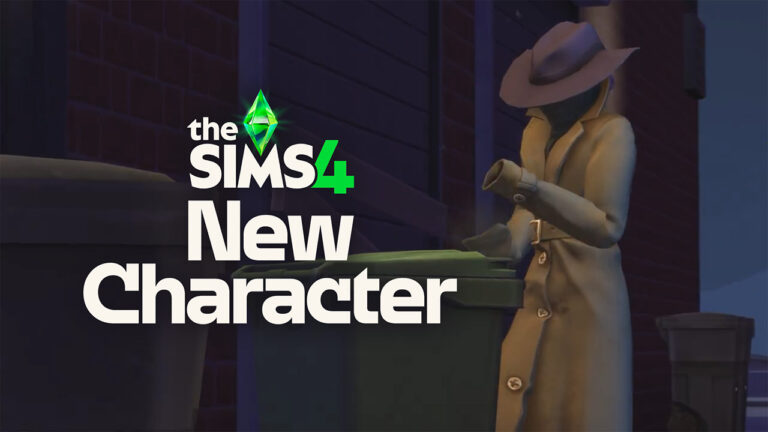
The teasing continued today when The Sims Team published a new video teaser, from what seems to be the similar frame scene from the screen above. Featuring the mysterious new character rummaging through the trash can, before running away to an unknown location.
Check out the five second teaser below:
The Mysterious Character Sim has some odd features underneath their trench coat. See if you can spot anything yourself:
Could it be Burglars?
The main speculation about the new Sims 4 Character coming to the game are Burglars. Which seems to be hinted so much already through the official In-Game Event, promotional material and teasers for extra reveals. Such as the one happening on February 25th, which is believed that’s when The Sims Team will do a surprise reveal of the return of this beloved NPC character. However, nothing is fully 100% confirmed yet – that is just based on community speculation.
One of our readers shared an interesting find and a theory from the video teaser itself. It seems that the new Sims 4 Character is actually a bunch of Raccoons stacked one on top of each other from the looks of it. Besides the missing hands on the new NPC, there’s also a Raccoon Tail poking out when the character turns around.
I think it’s three raccoons stacked up in a trench coat pretending to be a human. You can see that they have no human hands and there’s a visible raccoon tail. Probably a new type of burglars.
The arrival of this mysterious new Sims 4 Character could be both an exclusive part of the new Expansion Pack, or a free Sims 4 Content Update. No official confirmation has been brought as of yet, but we do have some extra leaks from the game files.
Modders couldn’t find any new references to Burglars in the leaked game files, but they did provide a look into one of the new Raccoon inspired objects in the game.
The same Raccoon motivation can be found in the new Sims 4 Character teaser above. Raccoons love rummaging through trash, but they also love stealing objects when nobody is looking.
What are your theories on the mysterious new Sims 4 Character coming to the game? Join the conversation below!
There’s a new Patch for The Sims 1 and The Sims 2.
After the last Sims 1 and Sims 2 Rerelease Update on February 6th, 2025, EA comes back with a new one for this week. Fixing new Game Glitches and Bugs for both The Sims 1 and The Sims 2 Rereleases.
The Updates are available right now on Windows PC systems. Through the official game launchers such as Epic Games, EA App and Steam.
Downloading the new Sims 1 and Sims 2 Rerelease Updates on EA App
Third Rerelease Patch
Check out the official patch notes down below:
Rerelease Updates
We’re back with another update. Our team is working hard to resolve issues related to crashes and usability that have been reported in the community. Thank you for your continued reporting efforts via the official EA Forums!
-The Sims Team
February 12, 2025 Patch Notes:
The Sims 1 Update Notes
Fixed Issues:
A memory issue could lead to various unexpected behaviors after playing for a period of time (random crashes, sluggish performance, missing objects, etc)
A memory management issue could lead to random crashes when traveling between worlds
The game could fail to launch on Snapdragon based computers in some situations
The movie player is temporarily disabled while we address a stability issue. We will provide an update when we are able to restore it. While it is disabled, you will no longer see the intro logo splash
The Relationship panel would show only five relationships
A memory management issue could cause random crashes when zooming in/out of Calamity Forrest and other dense lots
Blue panels that appear when selecting various game elements (e.g. grabbing an object) would not scale to fill the horizontal space
Tiles around pool edges would sometimes appear grey
Importing Sims or Households was looking in the wrong path. Sims and households to be imported can now be placed in “C:\Users\<username>\Saved Games\Electronic Arts\The Sims 25\UserData\Import”
Improved error reporting
On several hardware configurations, the game would display a “Unable to find a suitable Vulkan device” error (AMD Radeon RX 5700 XT, NVIDIA GeForce RTX 2060, NVIDIA GeForce RTX 3060, and others)
Spraying roaches (and other bugs?) was more difficult than it should have been
“Work” and “School” icons were missing from Sims portraits
General Notes:
The game by default adopts the aspect ratio of the monitor it is run on. The aspect ratio can now be specified with the launch option “-maxaspect::”. Examples: -maxaspect:16:9, -maxaspect:4:3 or bespoke ones like -maxaspect:16:10
Note that the option will only set the aspect of height to width. It will only restrict the maximum width – it can not increase it
In windowed mode the window will run at the aspect ratio; at fullscreen black bars will fill the unused space of the monitor
This will mostly be useful in situations where your monitor (virtual or real) is very wide, but you want the game to be a more traditional aspect ratio
Note that there are limitations on how extreme a ratio this will accept
There are some hardware configurations that we are seeing a disproportionate number of errors on and are actively investigating. Systems based on Intel ARC GPUs, and NVIDIA T600 GPU laptops are being investigated
Some players who have experienced problems with getting an error indicating a lack of Vulkan compatible devices have reported that in some cases removing “OpenCL™, OpenGL®, and Vulkan® Compatibility Pack” can resolve the issue
We have received reports of “random flies” appearing. This is working as designed
The Sims 2 Update Notes
Fixed Issues:
The game could unexpectedly show a “D3D” error, then crash or quit. This should happen less with this update
Improved error reporting
General notes:
In some cases, issues that have now been addressed might have corrupted game saves before they were addressed (e.g. when Sims could disappear, Sims can’t eat cooked food, etc). In these cases, please try starting a fresh save as the game won’t be able to correct the corruption, and working with corrupted saves may lead to unexpected behavior.
While the Alien Abduction scene now works, the scene is still missing the alien baby. We’ll continue working on that. In the meantime, you will have the alien baby in the game once the scene is done.
Some players have tried using Windows shortcut keys to move the full-screen game to another monitor. When in full-screen mode the game should not be moved to another monitor or this may cause issues.
There may be issues not listed here that are in the process of being addressed as certain issues require an extended investigation on our end. Even though these fixes may be in active review, it’s not a guarantee that we’ll have an immediate fix for it in an upcoming patch.
Dag dag,
The Sims Team
Have the latest Sims 1 and Sims 2 Updates fixed any of your current game issues? Let us know in the comments down below!
Sims 4 CC Sets for Build Mode – PCs, Printers, & Desks Oh My!
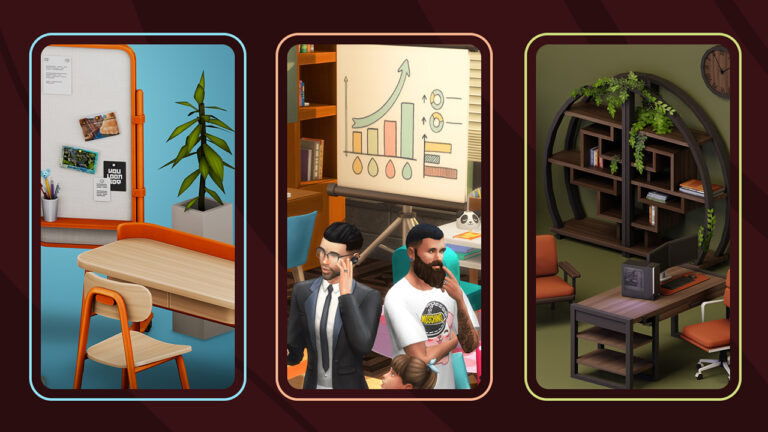
Recently we saw the release of The Sims 4 Business Chic, and next month The Sims 4 Businesses and Hobbies will launch for PC and console players. So if your tycoon itch hasn’t been scratched don’t worry, here are 10 Sims 4 Office CC Sets for your Sims’ study rooms and offices!
List of Sims 4 Office CC Sets
Arrie Office – Myshunosun
You may know Myshunosun from their amazing CC sets, or the release of The Sims 4: Cozy Kitsch Creator Kit, with Myshunosun being one of the first creators Maxis had partnered with. Known for their intricately detailed sets you’re sure to be blown away by the Arrie Office set.
This set comes with 10 new items with all new meshes and textures made from scratch. Some objects such as the chairs and shelves come in up to 30 different swatches. Once installed, search “arrie” or “myshunosun” into the catalogue search bar!
On to a slightly smaller set from Myshunosun now. This gorgeous kit includes four new items in 10 different matching swatches perfect for a teen bedroom, home study, or even a renovation of Copperdale High School! This set could be combined with the previously mentioned Arrie Office or some of the sets we will get on to later. The swatches are very reminiscent of The Sims 4 Cozy Kitsch Creator Kit – perhaps these items could be mixed and matched with those to create the ultimate cosy study spot.
Like Myshunosun, Pierisim recently collaborated with Maxis on his Creator Kit, The Sims 4: Refined Living Room. Known for his minimalist approach, this kit is no different. With 11 brand new Base Game-compatible items in a variety of swatches, this CC set is perfect for those looking for some little clutter objects to liven up their Sims’ study spots.
Next up is Illogical Sims ‘Home Office Kit’. Filled with 45 essential modern items perfect for a study corner, this kit even includes an animated floor fan and a functional ‘levitating’ plant pot. The set also includes a PC with two monitors, something not often seen in official game assets. A favourite of mine is the dual laptop and monitor set-up, perfect for those Sims who prefer hybrid working.
For players looking for something a little different, or those who enjoy historical gameplay, Surely Sims’ MidCentury Office Set might be what you’re after! Packed with a slew of new objects and re-colours of existing assets from The Sims 4 Get To Work, there is something for everyone here. Some of my personal favourite items are the Rolodex and the vintage PC console. There is also a brand new modular shelf that is Base Game compatible! This set requires Get To Work for some of the objects to appear in-game, however for those who just wish to handpick one or two items from this set – there is an unmerged file available.
Kaiso is a creator that I have hoped Maxis would collaborate with since the announcement of Creator Kits. While we wait for that – here’s a beautiful set they have created including one particular object I wish The Sims Team could implement officially: a printer! Each item comes in a series of both light and dark tones to create a cohesive look in your upmarket home office. Take a look at some of the fantastic new items below and don’t forget to take a look at some more of Kaiso’s amazing CC over on Patreon.
SnootySims is a well-known creator with many amazing CC sets and CAS items over on their Patreon. For those looking for “less studious, more cosy” then this set is perfect. Featuring 17 items in various pink and pastel swatches, this set can liven up your Sims gaming space, or teen’s study spot. The PC tower fits perfectly into the slots on the desk and the dual monitor set-up is ideal for Sims in the Social Media or Streamer careers!
Creator Leaf-Motif describes this set as “The perfect balance between classic elegance and mid-century whimsy” and I have to agree. Including many new office-related items, this set also comes with a shelf that has a large number of snappable spots to place clutter and decor to make your Sims’ space feel truly lived in. The frames come in 15 swatches with various artwork from the 19th Century American painter ‘Francis Coates Jones’ that comes in both wall-hanging and floor-leaning versions.
Next up is the ‘Study in Style’ Set from Aira! The set includes 20 new items including a functional tablet-style computer, desktop trash can, sticky notes, and much more. There are a handful of both colourful and neutral swatches for each item, including a gorgeous notice board to sit above your Sims’ desk. Much of Aira’s CC is simple, yet unique. Make sure to check out their Patreon to see all their amazing creations ready for download!
Ever since the pandemic began in 2020, many people have moved to either remote or hybrid models of working – so why shouldn’t your Sims? With this set from the artiste that is SixamCC, there is something for all ages! This set includes a variety of desks, clutter, and decorative pieces. The pull-down projector screen can be used by Sims as a TV, and your Sims’ home offices can be decked out with piggy banks, whiteboards, printers, routers, and many more mundane (yet much-needed) items. Be sure to check out the rest of SixamCC’s Custom Content Packs on their website!
And that brings us to the end of our list! There are many more CC sets to be found across the internet and I’m sure there are many more excellent sets yet to come. If you enjoyed this list be sure to check out our previous article on The Sims 4 Study Room Content. If we missed any of your favourites, or have any thoughts on our picks, let us know in the comments!
We have some raunchy new words added to the official Sims Dictionary.
There seems to be a new surprise addition with the last Sims 4 SDX Drop, and that’s a new Simlish Song added to The Sims 4 Pop Station. Kim Petras, a German pop singer and songwriter makes another Simlish debut after the song “Malibu” premiered with Eco Lifestyle Expansion in 2020.
“Kim Petras” Household on The Gallery (sirenv4mpire EA ID)
Song titled “XXX” from her 2022 EP “Slut Pop” is now a part of The Sims 4 Base Game, and we have a full simlish song preview and behind the scenes takes of this new Simlish Pop masterpiece.
Table of Contents
Behind The Scenes of New The Sims 4 Simlish Song
A new video of recording the “XXX” Simlish song version has been published on Kim Petras’ official Instagram Story. Pop Crave on X captures the entire behind the scenes look down below:
LA-based Pop Singer Kim Petras also revealed on her IG Story the full Simlish lyrics translation. Giving us some new official Simlish words that we can add to the dictionary.
The new Simlish Song by Kim Petras can be found in The Sims 4 Base Game with the latest SDX Drop. Simply head over to the Music > Pop Radio Station and find the “XXX” song title.
If you can’t jump into your Sims 4 game straight away we have a full Simlish Song that you can listen below:
What do you think about the new Simlish Song in The Sims 4? Join the conversation below and stay tuned on Sims Community for more Sims Celebrity updates!
Complete walkthrough of Week 2 Quests and Rewards!
The Sims Team has just rolled out Week 2 for The Sims 4 Blast From The Past Event. Bringing two new quests for you to accumulate new Points and unlock new Rewards.
In the new Quests you’ll have to do extra research at the Library and Museum, gather needed materials and craft a Time Travel Component. With new Rewards such as the Alarm Clock, Banquet Table and Emit Relevart Costume in CAS!
Without further ado, let’s jump into the new Quests and Rewards for this week:
Table of Contents
Echoes Of Time Quest
After discovering the IOU Note, you realize that understanding the secrets of time travel is crucial to stopping the thief. With Emit’s guidance, continue learning everything about this mysterious phenomenon.
Read the History of Time Travel at a Library (+25 Event Points) – A little knowledge of time travel might help on where to begin! Go to a Library Venue, and select Read History of Time Travel from a bookshelf.
Experience the Past by Playing The Sims Archives vol. 2 (+25 Event Points) – The book at the library had some interesting theories about time travel and video games. Select Play Game and then Play The Sims Archives vol. 2 on a Computer to explore the past.
Study a Historical Display at a Museum (+25 Event Points) – A museum might help to find additional clues. After all, that’s where the past comes to life! Travel to a Museum Venue, select Study Historical Display on any work of art or sculpture.
Personal Tip: All you have to do is select the View interaction on any painting or sculpture inside of a museum!
Ask an Elder about the Shard (+15 Event Points) – Maybe someone who has been around for a while knows something about the Shard. Find an elder Sim, and select Ask about Shard.
Elder Story
I never thought they were real! I remember stories from when I was a youngster about something like this. People believed it was an echo from the past which could be used for time travel. But, I always thought they were just that, stories.
Research Shards of Time (+25 Event Points) – The internet has the answers to everything! There must be more information on the Shards of Time there!
Select Web… and then Research… and then Research Shards of Time on a Computer to do one last search.
Search Objects for Shards of Time (3 Required) (+35 Event Points) – Even everyday items can contain echoes of the past. Select Search for Shard of Time on items such as Sofas, Bookshelves, Computers, Refrigerators or maybe other objects. If you’re observant, you will find one…or three!
Show Emit the Shards of Time (+25 Event Points) – Emit absolutely must see the Shards! Maybe he knows something more. Select Show Shards of Time on Emit.
Emit can be found at Magnolia Blossom Park, or select the Social category on the Phone to Invite Emit Over.
Inventing The Past Quest
Having discovered the secret element of time travel, Emit has challenged you to become a time traveler as well! Continue this quest to find out how to build a time travel component.
Read Theoretical Electronics at a Library (+25 Event Points) – Nikolai Volt was a genius in the field of theoretical electronics before his time. His book is kept at the library for historical preservation.
Go to a Library Venue and select Read Theoretical Electronics from a Bookshelf.
Collect Plathinum (+35 Event Points) – To find Plathinum, search for rocks or dirt mounds ready to be dug up. Look closely for when they appear, or speed up the process of rock formation by using Ultra Speed from the time controls.
Explore areas like parks, and seek out rocks with crystals or dirt mounds, and select Dig. A great place to look is Desert Bloom Park in Oasis Springs!
Repair Something while Handiness Level 2 or Higher (+35 Event Points) – Build Handiness skill by fixing broken items, upgrading objects such as Sinks or Toilets, or reading books on Handiness. With a skill level 2 or higher, select Repair on a broken object.
Obtain an Electronic Upgrade Part (+25 Event Points) – Electronic Upgrade Parts can be obtained in a couple of ways. Repairing a broken electronic object may yield an upgrade part. Be careful, as fire can easily be the outcome of the unskilled. Or Select Order and then Purchase Upgrade Parts… from a Computer.
Exercise Your Mind while Level 2 or Higher in Logic (+35 Event Points) – Spend some time preparing to expand your mind by performing any logic activity. Logic is built on things like Playing Chess, Using the Telescope or Microscope, or Reading a Book on Logic.
Collect Ironyum (+35 Event Points) – To find Ironyum, search for rocks or dirt mounds ready to be dug up. Look closely for when they appear, or speed up the process of rock formation by using Ultra Speed from the time controls.
Build the Time Travel Component (+15 Event Points) – To build a time travel component, first make sure you have:
Level 2 in both Handiness and Logic
A piece of Ironyum and Plathinum
An Electronic Upgrade Part
A Shard of Time
If any of the components are missing, select Replace on a Mailbox to recover the needed parts. From your inventory, select Build Time Travel Component on a Shard of Time.
Sims 4 Blast From The Past Event: Week 2 Rewards
The Week 2 of The Sims 4 Blast From The Past Live Event contains 10 total new rewards. Including six exclusive event items and four base game prizes. Here’s what you’ll be able to unlock during your second week:
Handiness Vol 1: Try Not To Die! Skill Book
Get Up! Alarm Clock
Missing Sim Milk Carton (Bella Goth)
500 Simoleons
The Relevart Neck Stabilizer Bowtie
Bigger Gatherings Banquet Table
Logic Vol 1: An Introduction To Reason Skill Book
Missing Sim Milk Carton
Be “The Emit” Full Body Outfit
Programming Vol 1: Turn It Off And On Again Skill Book
Reward Overviews
Two New Missing Sim Milk Cartons
This week’s new Missing Sim Cartons from The Sims 4 Blast From The Past Event are Bella Goth, Starry-Eyed Stargazer and Skip Broke, Prolific Father.
New Items In Build Description
Get Up! Alarm Clock
The Get Up! Alarm Clock comes in 10 different unique swatches, including:
This object is fully functional. Meaning that you can set the time for the alarm to ring at any time of day to get your Sim up and ready.
Bigger Gatherings Banquet Object
A massive amount of 28 swatches is included with the Bigger Gatherings Banquet Table. Allowing you to set the tone for any Social Event – from Weddings to Funerals.
The object lets you serve a premade assortment of dishes, or you can choose to stock it with any recipe of your choice:
The Relevart Neck Stabilizer Bowtie
Be “The Emit” Full Body Outfit
The third week of The Sims 4 Blast From The Past Live Event is set to begin on February 18th, 2025 at 9AM Pacific Time. To make things easier for everyone we’ve included a handy countdown below which should let you know when to expect Week 3 of this live event!
Countdown to Week 3 of The Sims 4 Blast From The Past Live Event
Did you enjoy the latest two new quests from The Sims 4 Blast From The Past Event? Let us know your opinion in the comments below and stay tuned for all the latest Live Event Updates!
Prioritize your Bucket List Goals with these Hot Takes!
We all have wants, dreams, and goals we hope to achieve in life, right? Well, so do Sims! The Sims 4 Life & Death expansion pack introduced an aspect of gameplay called the Bucket List, and we are loving it. The Bucket List lets your sim live their life (and…afterlife) to the fullest. Keep on reading for our Sims 4 Life and Death guide including tips, tricks, and hot takes on this exciting feature!
The Bucket List Guide
What are Bucket Lists in The Sims 4 Life & Death?
Bucket Lists are available in The Sims 4 Life & Death pack for teens, young adults, adults, and elders. Kids, toddlers, and infants need time to grow a bit first! Once your sim becomes a teen, their Bucket List will appear in the aspiration tab with four slots for their Undiscovered Goals.
To write goals, select the “Unfinished Business” option from a computer or diary. These can be random goals (Write Goal), goals from certain categories (Write Goal from Category), or even specific goals (Write the Perfect Goal). If you’re not a fan of the goals your sim writes, you can select Scrap Bucket List to start over. This will erase all current Bucket List goals, including goals that are in progress, and open up space to choose new ones.
Make sure to hover over the goal in your Bucket List to read the description with hints on how to achieve it. Completing these helps your sim progress through their Soul’s Journey.
Ghost Sims
Did your sim laugh at a joke so hard that they died? Try fixin’ up the stove without any practice, and get electrocuted to death? Or even just decide they want to give the afterlife a shot as a ghost? No matter how they met Grim, don’t worry! The ghost sim you know and love can still cross items off their bucket list.
Living sims can only progress to the Dreams Fulfilled tier, but there’s much more to explore in the afterlife. If they didn’t give it a try in their living form, your ghost sim can choose to start their Soul’s Journey now and check goals off their bucket list. Ghost sims that made progress on their Soul’s Journey during their life will pick up where they left off and take care of any unfinished business.
The Soul’s Journey is made up of eight tiers
The Road Ahead-Unlocking thistier gives your sim the ability to gain extra Satisfaction Points going forward in life.
Making Headway- Reaching this tier gives your sim extra skill gain bonuses.
Finding Purpose- With this tier unlocked, your sim will receive bonus gains to their career performance, extra discounts on computer purchases, and access to the Share Soul’s Journey interaction.
No Regrets- Unlocking this tier will extend your living sims lifespan. Ghost sims will get the option to Move Onto the Grave to move on from this world and enjoy peace.
Quite a Journey- Sims who have reached this tear will be able to use the Pass Down social interaction and create additional Heirloom objects.
Dreams Fulfilled- Living and Ghost sims alike who reach this tier will unlock the Rebirth option. Living sims will be given the choice to be reborn at death, but Ghost sims will be able to make this choice at any point by going for a swim in the Baleful Bog in the Mourningvale neighborhood of Ravenwood.
Newfound Purpose- Unlocking this tier gives your sim the ability to gain extra Ghost Mastery experience points. *This tier is only available to ghost sims.
Big Picture- This tier will give your sim enhanced stamina when performing Ghost Mastery, the Burning Soul trait, and the Peer into Soul interaction on mirrors. *This tier is only available to ghost sims.
Tip: Timing, Timing, Timing
Completing your sim’s Soul’s Journey is not an easy task. It shouldn’t be! It is your sim’s soul, after all. If that is your goal, you’d better focus on timing. Start working on the journey as a teen to set your sim up for success.
The goals for teens tend to be tailored to the teenage lifestyle, so activities like attending prom, having their first kiss, or getting a part-time job will appear as options. These are (usually) easier to complete than some of the more time-consuming goals that appear later in your sim’s life.
Entering young adulthood with a tier or two of the Soul’s Journey completed gives you plenty of time to finish it out through a few more goals. The goals during adulthood can range from easy-as-pie to what-did-I-get-myself-into, sometimes having multiple tasks per goal. Once you have progressed to the fourth tier, your sim’s lifespan will extend, giving you even more time to cross goals off of your Bucket List.
Remember: time is of the essence!
Trick: Two Birds, One Stone Method
To quickly complete your sim’s goals and progress through their Soul’s Journey, I recommend using something I call the “Two Birds, One Stone Method”. This means you choose similar goals that your sim can complete simultaneously or soon after. When writing your sim’s goals, select four goals of the same category. Usually, the steps taken to achieve goals in the same category are the same or similar.
Choosing “I want to get busy” four times created four Woohoo-related goals. Once my sim finds a Woohoo Partner, she is set to cross off these goals and progress through her Soul’s Journey! If you choose this method, you may need to scrap your Bucket List a few times before goals with similarities appear.
Hot Take: Creative or Genius?
Notice anything interesting about your goals? A lot of these goals are pretty mundane tasks like, “Enjoy a trip to the countryside”, which asks your sim to spend a day frolicking through Henford-on-Bagely with the rabbits and locals. Or “I want to climb a mountain!”, asking your sim to climb to the top of Mt. Komorebi. It seems like the Sims creators found a creative (dare I say…genius?) way to get our Sims out to explore parts of the world and interact with items that are sometimes overlooked during gameplay.
These goals might not fit into your storyline at first, but letting your sim complete them may lead you to all new in-game experiences. Who knows what you’ll uncover!
What are your thoughts on Bucket Lists in The Sims 4 life & death pack?
Family Recipe System, difference between Small Business and Retail and more interesting discoveries!
It’s been an interesting week for EA and Maxis revealing the upcoming The Sims 4 Businesses & Hobbies Expansion Pack. Just a few short hours after its announcement, @anadius reported about an incident of EA accidentally exposing an earlier build of the 18th Expansion Pack on Steam. Revealing hundreds of megabytes of in-development files.
Now, it’s worth noting that all the information you’ll see below belongs to a feature time capsule from August 2024. Which is from when these files supposedly date back to. We have a lot more to learn about the upcoming Pack with the next Gameplay reveal set for this month. Until then, let’s see what the developers have been cooking up!
New Sims 4 Businesses & Hobbies Gameplay Discoveries
Newer discoveries about The Sims 4 Businesses & Hobbies revolve around random features coming with the pack. Including a new Pack-exclusive fear of being cancelled, “customer appreciation days” and more!
Something called customer appreciation day?
You can make jellybeans out of any harvestable
New fear: Fear of being cancelled.
“Family Recipes” system – pass down family recipes (Including new baked goods)
Tattooing and Pottery Likes & Dislikes
Jazz, Vintage, & Contemporary BB tags
New stalls: Bakery & Crafts
New mystery surrounding “Hoffmans” & “Loudens”
Reward trait: Hidden Spice
Small Business Events & Business Perks
As you progress through running your small business you’ll be greeted with different “Chance Card” opportunities. Either rewarding you with business progress, reputation and simoleons or cursing you with negative buffs.
Business Events (Chance Cards)
Computer virus
Investment Grant
Money Interview
Competition
Celebrity
Tax Audit
Online Review
Fake Payment
Business Perks:
Muscle Memory
Store Pheremone
Sway To Buy
Schemer
Dreamer
Skilful
Sleep
SimoCoin
Final Touch
Get Together Pack Integration
We now know the four group interaction activities that you’ll be able to customize with Clubs from The Sims 4 Get Together Expansion. There are four additional activities that Sims 4 Businesses & Hobbies will provide for creating more personalized Clubs, including:
There’s a reason Maxis keeps implying the word “Small Business” throughout the features of The Sims 4 Businesses & Hobbies expansion. And that’s because there are some constraints to running a Retail Business.
welp i think i found the only sales related thing in the entire ep files, which calls it “light retail”, checking for decoration slots, meaning this is where the actual retail business is being “superior”. you can only sell slottable items (clutter, crafts) nothing else
what does bother me about the retail aspect of small businesses is that the customers will do this amazing, never seen before animation that every simmer at heart loves to witness when purchasing an item and walking away
So if you’ve been looking to sell bigger objects like couches and chairs, you’ll still need The Sims 4 Get To Work Expansion for bigger retail store features.
Skill Classes
Did you know that there’s a great way of earning Simoleons by teaching classes in this Expansion Pack? Check out the full list of Cross-Pack Skill Classes coming!
Residental Rentals Do NOT Work with Small Business Lots
A feature that some simmers speculated about wanting to play with The Sims 4 Businesses & Hobbies Expansion Pack seems to be put to rest with the latest leak. Player @lunar_britney discovered that there are clear limitations in the code that prevent you from creating a Small Business within a Residental Rental Lot.
To be fair though, a similar scenario was put in place with The Sims 2 Open For Business and Apartment Life. Although I am still hoping for additional feature improvements like we’ve gotten with a Lovestruck update that allowed for Penthouse Rental Lots.
11 Sims 4 Main Menu Mods with new layouts, features, and more!
In January, players were introduced to the new main menu layout in the Behind The Sims livestream. Since this redesign, we have seen it go through a couple of iterations already. Most recently the backdrop has been reworked to fit the 25th anniversary aesthetic.
The current design of the main menu.
Since then many content creators have released mods overhauling the main menu for those wishing for a different aesthetic, with some even introducing new features. So if the current menu isn’t fitting your current vibe, then look no further as I have compiled a list of [NUMBER] of Sims 4 Main Menu Mods to restyle your game with.
Table of Contents
Online Backgrounds Disabled – Lunar Britney
This simple mod is highly recommended if you want to use custom backdrops in the main menu. It is not required for all in this list, however, if you are having trouble with getting your newly installed main menu mod to work then this may be the key to fixing it. You can find this over on Lunar Britney’s page on Mod The Sims.
Another fantastic mod from Lunar Britney! If you’re feeling nostalgic for simpler times then this redesign is perfect. Thanks to Lunar Britney on Mod The Sims we can now travel back to 2019 when the main menu wasn’t filled with adverts, and you could easily see every pack you own.
An added bonus of this mod is the inclusion of the splash screen you used to get when you installed a new pack. This works with all new packs yet retains that classic-style pop-up players would get.
This beautiful redesign from Simsiboy is reminiscent of last years roadmap in the leadup to the release of the Life and Death Expansion Pack. With this new main menu, you can hit ‘H’ to show/hide your most recently played household. This menu is also fully animated with a bright shimmer rippling across the mystic plumbob. If you’re not already in love with Simsiboy’s design, just wait until you see the next entry on our list.
Another fantastic redesign from Simsiboy. If you aren’t a fan of the occult then this might be more your speed. This main menu mod features 12 backgrounds that will randomly rotate each time you load up the game and can be manually switched by hitting the spacebar. The mod includes backdrops from locations across a variety of packs such as Strangerville, San Sequoia, Henford-on-Bagley and many more.
Over on Patreon, user Nenusia has created 10 stunning backgrounds featuring locations from around SimNation. My examples above show just a handful of the stunning views. Similar to Simsiboy’s Mod you can show/hide your current household by pressing ‘T’ on your keyboard. Locations Included:
For those of you who enjoy either the History Challenge or Ultimate Decades Challenge then creator VII has you covered with two new Medieval-themed backgrounds. This backdrop is perfect for players like myself who enjoy historical gameplay. If you want to find out more about the decades challenge we recently covered it in an article all about challenges for The Sims 4! VII’s mod is available from the Curseforge page linked below. Be sure to also check out their other amazing pieces of historical CC.
If you haven’t got your nostalgia fix from the recent re-release of The Sims and The Sims 2, then this main menu Mod by Viddfork is perfect. Featuring the iconic loading screen from The Sims 2 with the icons redesigned to fit The Sims 4’s aesthetic, this mod is sure to bring back memories of the family computer circa 2008. You can find the Mod on Viddfork’s Tumblr below.
Last month Jovan covered the Refreshed Main Menu Mod by Simmattically and if you are not already familiar with it then you’re missing out! There are plenty of fantastic screenshots that suit the main menu perfectly and the Mod even includes some functionality. You can press ‘R’ to cycle through the various backgrounds, press ‘S’ to show/hide the News tab, and there is no annoying red notification on the Store button for those who don’t own all packs.
This Mod comes in a variety of flavours including a dynamic edition, a Fall edition, and a dark mode edition for those who don’t want to be blinded in the middle of a midnight sims session! A new update is coming soon for the mod and will be available for public release soon so keep an eye on Simatically’s Patreon for updates.
Another amazing Mod from Simmatically, this one being slightly less functional but just as beautiful as the Refreshed Main Menu Mod. This ‘frames’ your family front and centre and if you’re not a fan of the modern frame there is also a wooden version available. There are three styles of wallpaper; Green, Sky Blue, and Deep Blue. And good news for those who hate ads, the News panel is now hidden by default. You can unhide it by hitting ‘S’ on your keyboard.
Similar to Nenusia’s Mod mentioned earlier, this tranquil background comes from Nekochan on Patreon. This snapshot of a custom build is perfect for anyone whose favourite world is Mt Komorebi. Be sure to check out Nekochan’s other CC before we move on to another one of their Main Menu Mods next!
For those of you who like the current main menu design, but just aren’t vibing with the choice of colour, then Nekochan has come up with a variety of pastel colours to replace the harsh blue with. I am a big fan of the pink background, however, you can also choose a pastel purple tone, and a shade of blue that is less garish than the default.
As a lifelong fan of the colour yellow, I could not pass up the opportunity to try out Amethyst-Lilac’s Pastel Gradient Mod. This is for players who prefer their experience to be simpler without the distraction of animations and flashy graphics. The background comes in a handful of colours such as pink, orange, and blue, and even has a rainbow swatch. Amethyst-Lilac also has several other Main Menu Mods that feature in-game locations including the often forgotten ‘Forgotten Grotto’.
What are your thoughts on these Sims 4 Main Menu Mods? Let us know if you’ve spotted – or created – a similar Mod yourself and stay tuned for all the latest Sims 4 Mods updates!