Home Blog Page 259

The Sims Mobile: Quality of Life Update Patch Notes

SimGuruVix has revealed over on Twitter that the highly anticipated Quality of Life patch for The Sims Mobile is due to be rolled out in the coming hours. However, you can check out exactly what is a part of the upcoming patch by checking out the patch notes below.

Please note: At the time of publishing this article the Quality of Life update has not been rolled out.

The update is due to be released on 5th June 2019 at 6 pm PDT/6th June 2019 at 11 am AEST. (This is subject to change)


Via EA.com

Sul, sul!

You’ve asked, Sims Mobile fans, and we have heard you! Our Quality Of Life Update goes live today – YAY! Everyone on The Sims Mobile team here at Firemonkeys Studio was absolutely thrilled to hear how excited you all were to get this one in your hands!

Here are the full patch notes of the changes we have made:

Wumples’ Quests

Wumples, the sassiest Sim in the land, has arrived in town with all-new special quests. Each quest will come with new and exciting prizes, and prizes earned from these quests will unlock multiples of that item – which means you can purchase extra copies of the item for your Sims’ homes.

Storage Categories

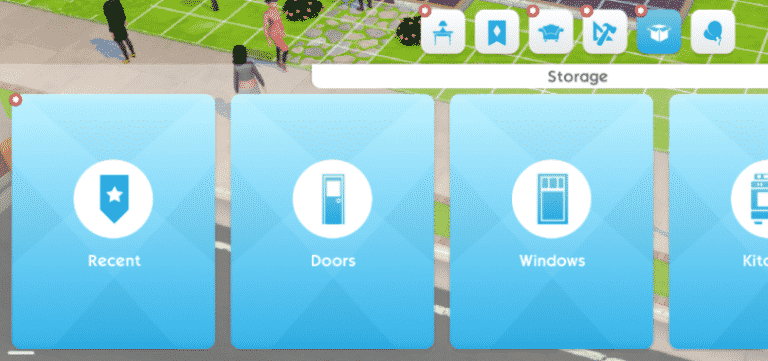
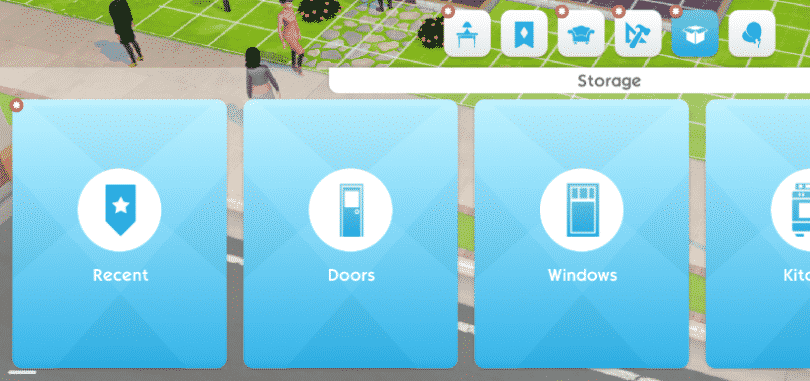
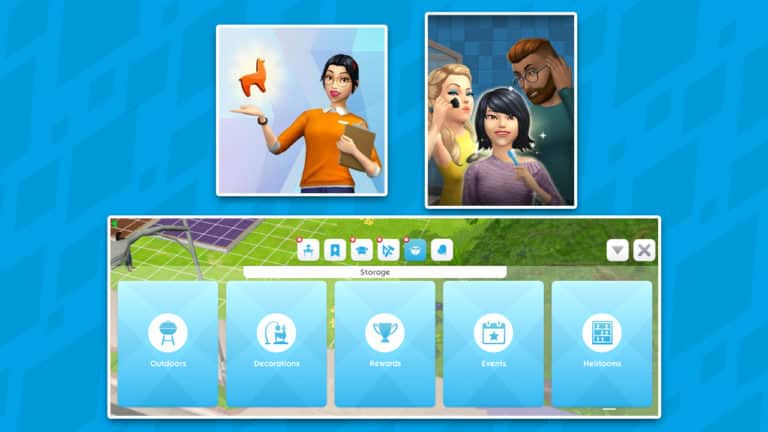
Brand-new Storage Categories allow you to browse everything you own with ease! We’ve added sorting categories to Storage, which means items will be much easier to find, and recently used or earned items will appear in a special  ‘recent’ category!

New quest for 3rd Sim slot unlock
Expand your Sim family by adding a third Sim to your posse!  You now have an extra chance to unlock your third Sim with the new quest “Roommate Race”. Complete the quest and unlock the third Sim slot. The quest is available at player level 13.

Surprising choices adjustments
We made some adjustments to Surprising Choices to ensure there’s always a neutral option available, and removed some of the outcomes that have drawbacks.

LlamaZoom adjustments
We made a variety of tuning adjustments to the LlamaZoom system to make it more enjoyable:

  • The amount of tasks required by LlamaZoom has been reduced for high level players. This change affects players from approximately level 35 and up – with level 50 players receiving the largest reduction
  • The effort required to complete a LlamaZoom is now less variable. Previously each LlamaZoom could differ quite largely in effort required – they are now more consistent and predictable
  • Any stack of tasks will now always begin with a task that asks for events to be complete (say that five times fast!). This is to help those of you who enjoy preparing for LlamaZoom by having Sims do events before Emily arrives
  • Rewards have been rebalanced – including extra Simoleons upon completion. The rewards have been increased overall.

Hobby and Relationship rewards
The amount of Simoleons awarded from Hobbies and Relationships has been increased. The rewards are more on-par with Career rewards now.

Event Duration Surfacing
Events now clearly showcase the exact duration that they will take to complete. Now you can plan your Sims’ routine more easily.

Create-a-Sim variant pricing
Clothes and other items within Create-a-Sim have had their variants re-priced. All variants of an item will now share the same price, rather than varying from each other.

Photography and Influencer Quests
These two quests have been added to the level progression. You now have the opportunity to play the Photography quest once you reach level 8, and the Internet Icon quest when you reach level 15. These quests will trigger retroactively for those of you who are already above these levels

Some quests are now structured in Chapters

  • The first chapter begins unlocked
  • Each day a new chapter will become unlocked
  • Chapters will continue to unlock, even if you haven’t finished the previous one
  • The goal is to give players a chance to take a break and not need to go “full speed” from day one until the end of the quest

Heirloom Shelves

The maximum number of heirloom shelves has been increased from 3 to 6

Aaaaaaand that’s a wrap on this update! Download it now! <3

Until next time, enjoy Simmers!

Vix xo
Possible Leak: The Sims 4 Island Living Coming Later This Month

28

PLEASE NOTE: This post is pure speculation and doesn’t contain any official confirmation (yet) about the theme or content of The Sims 4’s upcoming pack.

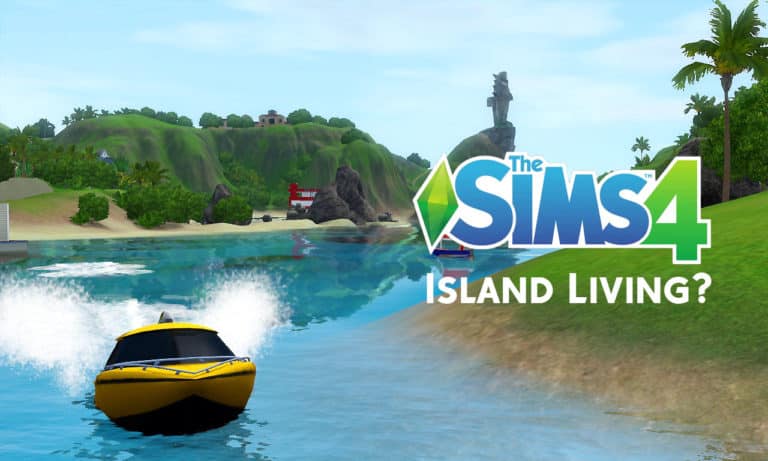
Nordic retailer Pan Vision has uploaded a listing for The Sims 4 Island Living to their site very recently. Pan Vision has previously listed The Sims 4 Get Famous and The Sims 4 Seasons just ahead of their official announcements from The Sims team. More recently we have seen listings for a new expansion pack with the name Tropical Paradise.

Now while there seems to be a theme running with the leaks we have seen so far, this new listing gives us a few more details about when to expect the new pack which, in fact, is incredibly soon on 21st June 2019 and also a description about the pack too.

The Sims 4 Island Living Expansion Pack

  • Escape the ordinary and enjoy a laid-back lifestyle surrounded by beaches in The Sims 4 Island Living. Explore a breezy world drenched in sun, sand and endless fun as your Sims make their own paradise.

Possible Leak: The Sims 4 Island Living Coming Later This Month

What do you think of this new leak about the upcoming new content for The Sims 4?

We will make sure to keep you updated with more information on the upcoming The Sims 4 content when it becomes available.

The Sims 3 Anniversary: SimPoints are 50% Off!

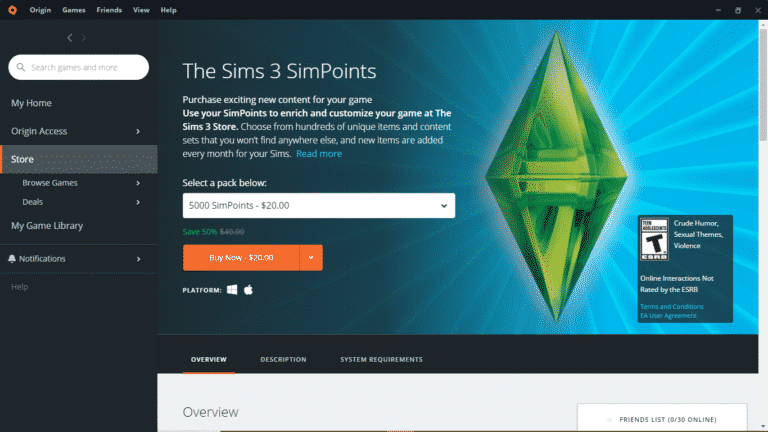
To celebrate The Sims 3’s 10th anniversary, Origin is having a huge sale on SimPoints. All SimPoint bundles are currently 50% off!

The Sims 3 Anniversary: SimPoints are 50% Off!

If you were planning on grabbing some new Store content for your Sims 3 game, now is the perfect time to do so! Stock up on those SimPoints while this sale is still running and get some great savings!

SimGuruKate announces resignation from The Sims Team

SimGuruKate who worked in The Sims Team as a Global Community Manager has announced today that she’ll be leaving EA / Maxis.

In the forum post that she wrote, the reason for her resignation is to focus more on her personal life and family.

We wish her all the best with her future endeavours!

SimGuruKate announces resignation from The Sims Team

Hello SimFam –

It is with sadness that I am letting you know that today is my last day with EA/The Sims. While this wasn’t an easy decision, I am stepping away from the world of community management to focus on being with and taking care of my family. Working on this game, and with this amazing Development Team, as Global Community Manager has been a dream come true and the highlight of my career. As a lifelong Simmer (who was inspired to get into this industry because of The Sims) getting to help build and grow this community has been nothing short of incredible. I am looking forward to all of you doing amazing things as Simmers, Creators, and Game Changers. I know you will absolutely love what the team has in store for you this year.

My ask to you as I leave is that you be kind and support one another, and do all you can to make this and the community a safe and happy place. Continue to welcome and support SimGuruFrost as he and all the SimGurus guide this amazing community.

While this is goodbye for now, I love this game/franchise and community so much and I promise you I won’t disappear for good, though now I get to enjoy this game just as another fan and Simmer. If you’d like to keep in touch feel free to follow me on my personal Twitter at https://twitter.com/KatWhispurrer or my Instagram at https://www.instagram.com/katwhispurrer/.

The Sims 4: May 2019 Community Survey is up!

6

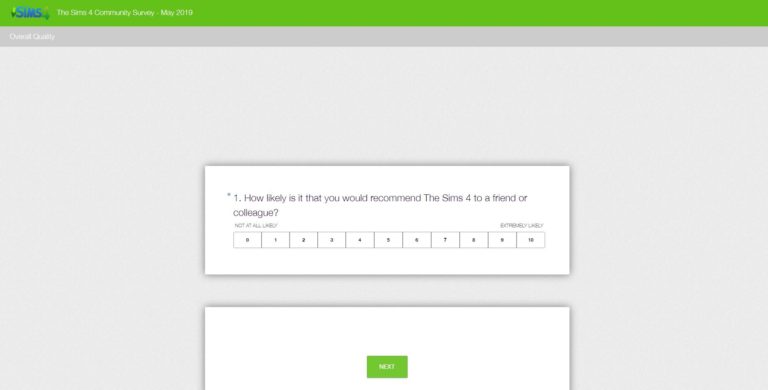
SimGuruFrost has just released a brand new Community Survey for The Sims 4!

The Survey mostly revolves around community-related questions and feedback regarding the communication between The Sims Studio and the players, including the questions such as:

  1. How likely is it that you would recommend The Sims 4 to a friend or colleague?
  2. What improvements could the Community Team make for you to give it a higher rating?
  3. What is your primary community channel of choice?
  4. On a scale of 1 to 10 (where 1 is very poor and 10 is excellent) how would you rate the communication and engagement you receive from your Community Team?
  5. On a scale of 1 to 10 (where 1 is very poor and 10 is excellent) how would you rate the Maxis Monthly program?
  6. How can we improve the Maxis Monthly program?
  7. What does the Community Team do really well?
  8. On a scale of 1 to 10 (where 1 is not interested and 10 is very interested) how interested are you in the following?
    1. New Stuff Packs
    2. New Game Packs
    3. New Expansion Packs
    4. Bug Fixes
    5. Base Game Content Updates


You can take the survey by clicking the button below!

[mks_button size=”large” title=”TAKE THE SURVEY!” style=”squared” url=”https://www.surveymonkey.com/r/JLGNWMB” target=”_blank” bg_color=”#81d742″ txt_color=”#FFFFFF” icon=”” icon_type=”” nofollow=”0″]

The Sims 4: May 2019 Community Survey is up!

The Sims Mobile: Storage Changes Preview

0

The Sims Mobile Team has shared a little more details beyond their latest official blog post.

SimGuruVix has shared another preview of the upcoming Storage changes coming to the game soon. Not only will the storage categorize the items that you keep in it, it’s also going to make it easy for you to find items that have just been added to the inventory!

The Sims Mobile: Storage Changes Preview

The Sims Mobile Official Twitter has also clarified more information about the Recent tab, saying that it will keep up to 20 items that you have moved to the storage – including the items that you’ve unlocked through quests and events!

We’re giving away 8 copies of The Sims 4 Get Famous for Consoles!

It’s time for our final Console giveaway to celebrate our 6th anniversary!

This time we’re giving you an opportunity to win 1 out of 8 copies of The Sims 4 Get Famous Expansion Pack for Xbox One and PS4, more specifically:

  • 4 copies of The Sims 4 Get Famous for Xbox One
  • 2 copies of The Sims 4 Get Famous for PS4 (North American Region including Canada, United States, Mexico, and Bermuda)
  • 2 copies of The Sims 4 Get Famous for PS4 (European Region including Western Europe, the Middle East, South Africa, Egypt, and Japan)

The giveaway codes for Xbox One are universal for all regions. However, considering that PS4 has several regions with codes locked away for each region specifically we had to make a decision to create 3 giveaways in total, covering each platform and console.

The giveaway is live right now and for better organization we’re hosting it on Sims Community Social. If you don’t have an account you can easily create one and enter the giveaway. Just make sure you follow the specific rules that we’ve linked within the giveaway links down below!

Here are the giveaways that you can enter right now that last until June 2nd at 8PM CET:

We’re giving away 8 copies of The Sims 4 Get Famous for Consoles!

Make sure you also follow us on the following social media outlets as there are going to be a few more giveaways on our social platforms:

The Sims 4: EA Play Announcement Stream Details

3

Electronic Arts has just announced more details regarding their EA Play 2019 livestream that they’ll be doing on June 8th, 2019. The stream will be covering multiple franchises, including The Sims 4!

The Sims 4 is scheduled to be streamed at 12:00PM Pacific Daylight Time / 9PM CET / 8PM BT. In case you don’t know there are going to be announcements for The Sims 4 during this stream so buckle up!

We’ll be covering all the details and will be providing you with a shared livestream + an exact countdown as we get closer to the date so stay tuned!

The Sims 4: EA Play Announcement Stream Details

SimGuruFrost has also shared that there are going to be LOTS of exciting announcements for The Sims 4 during the stream and that due to the event there will be no June Maxis Monthly.

The countdown is on! EA PLAY is only 10 days away. We’re here today for two things: a reminder to register for tickets if you want to join us in Hollywood, and for everyone else, a rundown on all the great content we’re set to bring you through live streams.

First things first: if you don’t have your ticket already, let’s fix that. Apex Legends™Star Wars™ Jedi: Fallen Order™, Battlefield™ VAnthem™The Sims™4 and some of your favorite EA SPORTS™ games will all be at EA PLAY, and best of all, the event is completely free*.

First things first: if you don’t have your ticket already, let’s fix that. Apex Legends™Star Wars™ Jedi: Fallen Order™, Battlefield™ VAnthem™The Sims™4 and some of your favorite EA SPORTS™ games will all be at EA PLAY, and best of all, the event is completely free*.

For those that can’t make it out to Hollywood, we have a whole lot of content for fans to get into. We’re taking you deeper into our games this year with three hours of live stream content on Saturday, June 8, bringing you gameplay and insights from six of our biggest franchises. It all starts at 9:15 a.m. with the Countdown to EA PLAY followed by the franchise live streams.

Here’s the schedule for the live streams (all times PDT):

  • 9:15 am: Countdown to EA PLAY
  • 9:30am: Star Wars™ Jedi: Fallen Order™
    • Hosted by online personalities Greg Miller and Andrea Rene
  • 10:00am: Apex Legends
    • Hosted by commentator Alex “Goldenboy” Mendez
  • 10:30am: Battlefield V
    • Hosted by online personality Julia Hardy and EA’s Adam Freeman
  • 11:00am: EA SPORTS FIFA
    • Hosted by Alex “Goldenboy” Mendez
  • 11:30am: EA SPORTS Madden NFL
    • Hosted by NFL Network’s Adam Rank
  • 12:00pm: The Sims 4
    • Hosted by Andrea Rene

To watch, be sure to tune in to EA.com or EA’s YouTube or Twitch channels. If you are only interested in a couple of the games, you can also tune in at the specific times listed. For all EA PLAY content throughout the weekend, including exclusive gameplay reveals, trailers and breaking news, be sure to stay locked to EA.com. 

EA PLAY is all about the games and all about the fun, so here are a few other things to expect from our two-day celebration:

  • Try to score a touchdown via The JuJu Smith-Schuster Fan Experience
  • Star Wars™ Jedi: Fallen Order™ theater experience
  • Star Wars™ Jedi: Fallen Order™ photo opportunity
  • Merchandise booth with brand-new Apex Legends gear for sale
  • Custom EA SPORTS FIFA soccer pitch
  • And more!

Please download the EA PLAY app to get more information and timings for all of these great onsite experiences! The app is available on the App Store or Google Play.

Join us at the Hollywood Palladium on June 8th and 9th for a weekend of games and fun with your family and friends.

The Sims Mobile is getting a Quality of Life Update Soon

0

The Sims Mobile Team has just announced their first ever update for the game that they’ve done with Firemonkeys and it’s a BIG one!

The upcoming update that they talk about more in the blog post below promises some of the long-awaited features we’ve all been wanting such as an Inventory Revamp, LlamaZoom changes and more.

Sul, sul!

As many of you will know TSM is now being developed by a brand spanking new team at the Firemonkeys (FM) Studio in Melbourne. While the team may be new on this specific title, the team has a long history with the franchise, where many members have previously worked on The Sims Freeplay. With this in mind, I think it’s safe to say we are prepared for this challenge!

The question we know many of you have now, is what’s next for The Sims Mobile?

Our First Update – Coming soon!

For our very first update, we thought it was essential to focus on Quality of Life. Our goal was to focus on changes Simmers wanted to see. Changes that would make the game FEEL better in your day-to-day play! Throughout the blog, we’ve added some quotes from members of the dev team to provide some extra insight. First up, here is SimGuruIlya with some thoughts going into this update:

When we got together with the team for the first time to think about what the next update should be, we almost instantly landed on the Player Quality of Life theme. It felt just right for our first ever update to be focused on our players! We’ve reached out to our Community, QA and Maxis team to identify the general pain points in the game. On top of that we’ve all been playing The Sims Mobile for a long time (some since Soft Launch) and we’ve got some things we wanna improve too! We’ve put a lot of effort into this and hope you guys love it! 😉’ – SimGuruIlya, Producer on TSM

While we couldn’t tackle everything, we dug into some of your most requested areas!

What’s new this Update?

All the juicy details of the changes we’ve made will be in our upcoming patch notes, however we want to share a few changes early!

(SPOILER) Inventory Changes (SPOILER)

We’ve completely overhauled Storage in TSM! Categories are clearer, and recently selected objects are quicker to access! ✨

It was such a popular request from everyone and when playing the game, I definitely felt it was important too! I spent a number of days making sure every item in the game has a Storage category – it’s much easier to find everything and the best part is, now Heirlooms are tucked away in their own category!’

– Laura, Game Designer on TSM

The Sims Mobile is getting a Quality of Life Update Soon

3rd Sim Quest

We’ve made it possible to unlock the 3rd Sim Slot for free through a Quest called, “Roommate Race”.

“What’s better than 2 Sims? 3 Sims! We’ve added a new way for all players to earn their 3rd Sim via Limited Time Quest. You’ll also get to experience some of the little improvements we’ve made to Quests! I’m going to lose my freakin’ mind I’m so excited!”
– SimGuruJack, Associate Game Designer on TSM

The Sims Mobile is getting a Quality of Life Update Soon

LlamaZoom

We’ve adjusted the time to complete tasks to be more consistent each day, making it easier for you to choose how you want to play.

‘We know a lot of players have expressed frustrations with LlamaZoom, so we wanted to see what we could do to make the system feel better and worth the effort. We’ve made a variety of tuning changes, which we’ll go into more detail about in the patch notes, and we also added some extra rewards!’
– Steve, Lead Game Designer on TSM

The Sims Mobile is getting a Quality of Life Update Soon

June is Pride Month

This update also happens to land during a very special month of the year: PRIDE! 🏳️‍🌈 You can expect a new quest with some rainbow goodies as well as some FREE things in the store!

SimGuru Update!

With the original team moving on, it means we have some SimGuru-shaped holes to fill in our community! So, we are creating a brand new merry band of SimGurus!  While only I, SimGuruVix, am currently on Twitter, the rest will be joining us soon!

In our SimGuru Squad so far, we have:

SimGuruVix – Community Manager
Twitter Account: https://twitter.com/SimGuruVix

Previously worked on: The Sims Freeplay, Real Racing 3, Need for Speed No Limits
😍 ‘s: People, talking, makeup, ska, cute socks, being EXTRA
😒 ‘s: Coffee, not being able to edit Tweets, silence

SimGuruIlya – Producer

Previously worked on: The Sims Freeplay
😍 ‘s: Guitars, skateboards, my 2yo daughter Nika, building stuff
😒 ‘s: Emails!, when it’s too hot outside, when it’s too cold inside

SimGuruBerty – Associate Technical Director

Previously worked on: The Sims Freeplay
😍 ‘s: Coffee, chocolate, pastries, soccer, romance, DOGS!
😒 ‘s: Bad coffee, slow internet, bad coffee, socialising at parties, glasses without lenses

SimGuruJack – Associate Game Designer

Previously worked on: Real Racing 3
😍 ‘s: Indoor Plants, coffee, Indian food, groovin’
😒 ‘s: Discussing my mysterious past, staring at the sun for long periods of time, celery

Looking to the Future! 

With this update almost ready to get out the door, we are already deep into working on the update that will follow it.

‘Every time someone new comes into the team, they bring a fresh view of the game. This allows all aspects of the game to be questioned and challenged! The entire TSM team is currently thinking like that, and are excited about all the potential new things we can do with this game, both in features for our players, but also for our tools and tech’.
– 
SimGuruBerty, Associate Technical Director on TSM

When the Patch Notes are live – we’ll post them on our blog, The Sims Mobile Forum, and let you know on Twitter! Until then, we’d love to hear your thoughts on these changes, either on Twitter or on forums.

Talk soon Simmers!

SimGuruVix xo

The Sims 4: “Announcements” Confirmed for EA Play

26

UPDATE: SimGuruGibson has deleted the tweet and posted a new one, saying that “he shouldn’t have declared anything about content releases”.

We’ve speculated about the possibility of a brand new announcement happening for The Sims 4 at EA Play. However, nothing was officially stated or said by The Sims Team that it’s 100% happening – until now.

SimGuruGibson revealed that The Sims Team has shared a few interesting details over the last couple of days (such as 350 New Swatches for Base Game Objects) but that they’re keeping the main announcements (yup, plural) a secret until EA Play.

In case you don’t know the EA Play 2019 event starts on June 8th, 2019! We’ll be attending the event as well and bring you the latest news and updates straight from the event!


Another Simulation Lag Fix for The Sims 4 is releasing soon

Just a few weeks ago we reported on the revival of thepancake1‘s Simulation Lag Fix Mod for The Sims 4. The mod has been successfully updated by SrslySims for the latest version of The Sims 4 and can even be downloaded right now!

However, if you prefer having more than just one solution for this fix and if you prefer a faster alternative there’s another Simulation Lag Fix in the works by thepancake1, the same modder who is currently working on speeding up the loading times in The Sims 4!

This Simulation Lag Fix Mod is called Llama Supersmooth, promising reduced simulation lag when playing the game. This means that Sims will have shorter breaks inbetween the interactions they’re performing and that the general responsiveness of the game will increase rapidly.

This mod is currently in the early access phase and you can get it from thepancake1’s Patreon Page with a full free release coming really soon.

Basically, it picks and chooses the sims that you’d perceive as lagging, and prioritizes them to run their AI first. By itself, that isn’t enough.

To reduce the perceived simulation lag (the head bobbing and the creepy stare sims occasionally have when it’s lagging), the game allows sims to continue their current interaction until they have received another AI update.

https://www.youtube.com/watch?v=B6LFdXxq2JA

This The Sims 4 Lighting Map Guide Will Help You Showcase Your Lots Better

Don’t you just hate when you spend hours working on your Lot in The Sims 4 and right as you decide to share the lot to The Gallery, you immediately find out that there’s an object blocking the view?

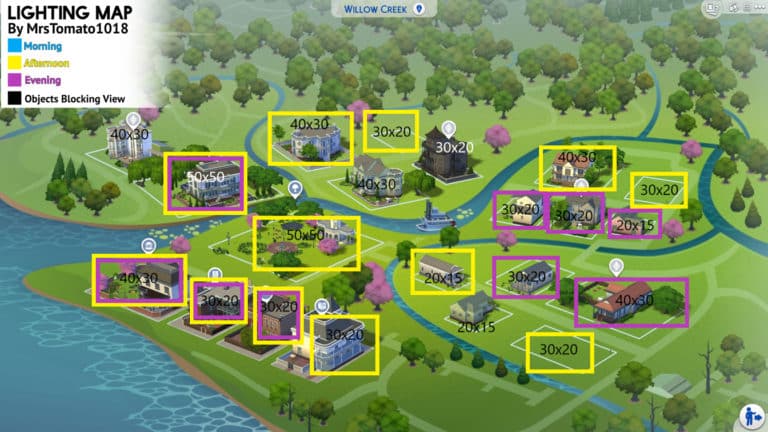
Sure, it doesn’t have to be all that bad. But sometimes you just want to know which lot has the perfect lighting for certain times of the day. That’s why the amazing @MrsTomato1018 has found the perfect solution to share with other players and that’s The Sims 4 Lighting Map Guide!

In the pictures down below you’ll be able to see each map (excluding StrangerVille) we currently have in The Sims 4 with each lot marked with lot size details and lighting / view information which is mostly just useful for lots that you plan to share on The Gallery.

Here’s more information for each color and outline shown in the maps below:

  • Blue – Morning
  • Yellow – Afternoon
  • Purple – Evening
  • Black – Objects Blocking the View
  • No Box – Generally bad lighting

Willow Creek

This The Sims 4 Lighting Map Guide Will Help You Showcase Your Lots Better

Oasis Springs

This The Sims 4 Lighting Map Guide Will Help You Showcase Your Lots Better

Newcrest

This The Sims 4 Lighting Map Guide Will Help You Showcase Your Lots Better

Granite Falls

This The Sims 4 Lighting Map Guide Will Help You Showcase Your Lots Better

Magnolia Promenade

This The Sims 4 Lighting Map Guide Will Help You Showcase Your Lots Better

Windenburg

This The Sims 4 Lighting Map Guide Will Help You Showcase Your Lots Better

San Myshuno

This The Sims 4 Lighting Map Guide Will Help You Showcase Your Lots Better

Forgotten Hollow

This The Sims 4 Lighting Map Guide Will Help You Showcase Your Lots Better

Brindleton Bay

This The Sims 4 Lighting Map Guide Will Help You Showcase Your Lots Better

Selvadorada

This The Sims 4 Lighting Map Guide Will Help You Showcase Your Lots Better

Del Sol Valley

This The Sims 4 Lighting Map Guide Will Help You Showcase Your Lots Better


The creator of this Lighting Map Guide has also made a useful video overview of this map that you can check out down below:

Make sure you follow her on Twitter @MrsTomato1018 if you want to stay up-to-date on her latest Gallery creations!

The Sims Mobile: Official Survey Suggests Possible Upcoming Features

3

The Sims Mobile Team has just recently published a brand new survey!

The survey covers a lot of topics, from how satisfied you as a player is of the game to possible upcoming features for the game.

You can take the survey yourself and fill it out with your honest opinions and wishes for the game by clicking the survey button down below.

[mks_button size=”large” title=”TAKE THE SURVEY!” style=”rounded” url=”https://eaca.co1.qualtrics.com/jfe/form/SV_5mr4F1lWe1FzHhz” target=”_blank” bg_color=”#81d742″ txt_color=”#FFFFFF” icon=”” icon_type=”” nofollow=”0″]

We’ve pulled out some interesting questions and ideas that talk about possible upcoming features that might be added later to The Sims Mobile. Check them out!

  • Which of the following Seasonal Themes are you interested in?
    • High Fashion Events (eg: NY Fashion Week, Met Gala)
    • Halloween
    • Tropical Holiday
    • Back to School
    • Christmas
    • Valentine’s Day
    • Chinese New Year
  • Which of the following Build Features would you like to see add to The Sims Mobile?
    • Pools
    • Basements
    • Garage
    • Terrace / Verandah
    • Multi-Story Houses
    • Skylights
    • Multiple Houses
    • House Templates
  • Which of the following Build Mode Collections would you like to see add to The Sims Mobile?
    • Italian Riviera Villa
    • Magical / Castle
    • Log Cabin
    • French Countryside Villa
    • Beach House
    • Country Farmhouse
    • Victorian House (British Colonial)
    • Futuristic House)
    • Honeymoon Suite

The Sims 4: Getting Started With Building

Whether you have played The Sims before or are new to The Sims 4 you may find that building your own lots can seem difficult or just a little bit overwhelming with all the different features. Don’t worry! We’ve got you covered with some helpful tips and tricks on how to not only get started with building in The Sims 4 but also help you improve your building skills.

Pre-Built Rooms (Styled Rooms)

The Sims 4 comes numerous pre-built styled rooms that you can drop straight into your game. Each styled room comes in several different colour swatches and there is plenty of variety for each room type. You can also use the Styled Rooms as a starting point and swap out the interior to reflect your Sims personality even more.

The Sims 4: Getting Started With Building

The Gallery

The Gallery is another great resource to discover pre-built rooms and homes from other Simmers across the world. With millions of uploads, there really is something for everyone. You can even upload and share your creations for others to see.

The Sims 4: Getting Started With Building
The Gallery is located in the top right-hand corner of the screen and is the icon with the photographs on.

To upload your own creations to The Gallery simply go to the “Save To My Library” icon at the top/center of your screen. Select either the room or lot to be saved and either select “Share Lot/Room to the Gallery” which is at the bottom left-hand corner of the pop-up or “Save Lot to My Library” which is on the bottom right-hand corner of the pop-up.

Remember: If you are uploading to The Gallery, don’t forget to add a description to your build!

Lot Traits

The Sims 4: Getting Started With Building

Lot traits are very similar to your Sims traits. They can be applied to most lot types and can help with increasing certain skills and relationships as well as some lot traits changing the way certain aspects of the game happen.

Great Acoustics and Homey are examples of Skill building lot traits whereas Teen Neighbourhood and Private Dwelling can have an effect on gameplay.

Terrain Manipulation

Gone are the days of flat terrain! Now you can have your Sims live on top of a mountain or at the bottom of a valley. Terrain manipulation can seem a little difficult to start with so it may be best to practice on an empty lot until you feel more confident with the tools.

Terrain Tools can be found under the Terrain Tools option in the Build Menu and then by selecting the shovel at the bottom of the menu.

The Sims 4: Getting Started With Building

Terrain Paint

Terrain Paints really can help take your builds to the next level. By simply using a Dirt and Sand terrain paint on flower beds or using a different Grass and Flowers terrain paint from the default one on the lot you will notice how much difference it makes. You can even go as far as mixing several different terrain paints together if you want!

You can find the Terrain Paints under the same Terrain Manipulation option in the Build menu and by selecting the paintbrush to bring up the different terrain paints. If you don’t like the way the terrain paint looks or you make a mistake all you have to do is hold down CTRL and you’ll notice a little eraser appear by your cursor instead of the paint brush.

The Sims 4: Getting Started With Building

Start Small or Dream Big

You may already have an idea of what kind of home you want to build your Sims but you might not. You might want to start small with a starter home for your Sims, a family home or even build a mansion for them. The possibilities are endless. Most importantly, don’t be afraid to experiment. A lot of building in The Sims is trial and error until you find what works for that particular build or room. You may even find that you like to build in a certain style.  The more you build the more you will get used to the different features of building and you’ll find what works best for you and each of your builds.

Building Shortcuts

Build Mode would not be complete without some super handy shortcuts. You’ll soon find yourself swapping between them during builds with no issues.

[table id=30 /]

Tutorial Links

This is just an overview of what Building in The Sims 4 looks like. Below are some handy links to more building tutorials.

You can find all these tutorials and more by heading over to our The Sims 4 Tutorials and our Building Library pages on the website.

We’re giving away 5 copies of The Sims 4 Seasons for PC/Mac!

336

PC and Mac players, it’s time to test your luck!

This time we’re giving away five copies of The Sims 4 Seasons Expansion Pack for PC and Mac! The codes that we’re giving away are universal and can be redeemed by any Origin user.

The giveaway is being held on Sims Community Social for better organization considering we’ll be sending out 5 different codes to lucky winners. If you don’t have an account you can easily create one and enter the giveaway. Just make sure you follow the specific rules that we’ve linked within the image down below! The giveaway ends on June 1st at 8PM CET.

Click the image down below to enter the giveaway!

We’re giving away 5 copies of The Sims 4 Seasons for PC/Mac!

Make sure you also follow us on the following social media outlets as there are going to be ja lot more giveaways on both Sims Community Social and some of our social media platforms: