Home Blog Page 174

The Sims 4 Fixer Upper: Challenge #2

We had a lot of fun creating and sharing our first Fixer Upper build challenge that we are back with a new one!

Now, if you missed our first challenge, you can take a look at what was involved by clicking here. Alternatively, you can also take a look at the challenge showcase featuring a number of  brilliant renovations of our build here.

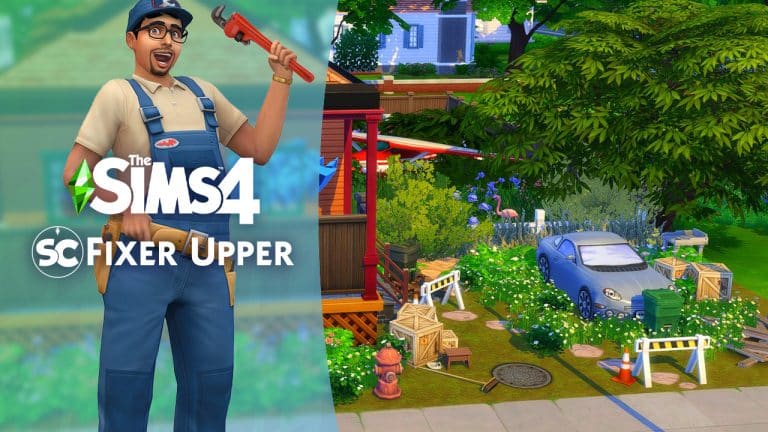
This time we are heading to the Daisy Hovel lot which can usually be found in Willow Creek. Known as a frequently used starter home for many players, this lot in particular has seen better days in recent years.

Your task will be to renovate Daisy Hovel and modernize it. It must be suitable for one or two Young Adult/Adult Sims who are moving into their first home.

Are you up to the challenge?

The Sims 4 Fixer Upper: Challenge #2

Build Gallery

Challenge Guidelines

  • Total Lot Value of §55,000
  • Must be placed on any available 30×20 Lot you have free in your game
  • You can not change any of the existing internal or external walls. You may add additional walls/basement if you wish
  • It must be modernized and a suitable first home for one or two Sims
  • You can use any packs you own, but please do not use any Custom Content
  • T.O.O.L & DEBUG allowed
  • Have fun and get creative!

Note: While you may delete items already on the lot for additional Simoleons in your budget, the total lot value once you have finished renovating this lot must be $55,000 or less. 

Lot Information

  • Lot Size: 30×20
  • Lot Value: §19,620
  • Lot Type: Residential
  • Packs Used: Base Game
  • DEBUG items used

Gallery Information

  • Username: LeeksEverywhere
  • Build Name: Daisy Hovel Fixer Upper

[mks_button size=”medium” title=”The Lot” style=”rounded” url=”https://www.ea.com/games/the-sims/the-sims-4/pc/gallery/F86C112C496611EC8D772E2CE62140A4?category=lots&searchtype=ea_origin_id&sortby=newest&time=all&searchquery=LeeksEverywhere&max=50&maxis=false” target=”_blank” bg_color=”#4aa500″ txt_color=”#FFFFFF” icon=”fa-arrow-down” icon_type=”fa” nofollow=”0″]

Once you have renovated our Fixer Upper Build, upload it to The Gallery and use the hashtag #SCDaisyHovel as we will be showcasing some of our favourites in a future article!

Showcase

To have the chance of being included in the showcase for this Fixer Upper challenge, make sure you upload your version of the build by Monday 29th November 2021 at 6pm GMT.

We can’t wait to see how you fix our build! Be sure to tag us on social media, so we can see any videos or screenshots you share!

Note: This build is not a part of our monthly Sims Community Challenges. To find out more about the Sims Community Challenges click here.

The Sims 4 Island Living is on a FREE Trial!

0

The Sims Team has announced their latest Expansion Pack Trial for The Sims 4!

The Sims 4 Island Living Expansion Pack has just gone on a Free Weekend Trial. Compared to previous Expansion Pack Trials this one is further extended until Tuesday – meaning that you have unil November 23rd to try out the Pack!

Like previous Expansion Pack Trials this one is exclusive to the Origin Platform. The Free Island Living EP Trial is set to end at 10AM Pacific Time.

You can obtain the Trial Copy of The Sims 4 Island Living from Origin!

Here’s everything you need to know about the trial:

Frequently Asked Questions

ABOUT THE TRIAL

When does The Sims 4 Island Living Trial take place?

The Sims 4 Island Living Trial will be available between the following dates and times:

  • Start:
    November 19 2021
    10:00AM PST / 18:00 UTC
  • End:
    November 23, 2021
    10:00AM PST / 18:00 UTC

During this time, you will be able to play as much Island Living as you like.

What do I need to know about the Island Living Trial?

There are a few prerequisites to using the Island Living Trial.

You must:

  • Have the most up to date version of The Sims 4 installed on your PC/Mac
  • Have the most up to date version of Origin installed on your PC/Mac. EA app is not currently supported by the Island Living trial.
  • Claim the Island Living Trial through the Origin client, Origin.com or from The Sims 4 Main Menu.

What can I use in The Sims 4 Island Living Expansion Pack during the Trial?

You will be able to use every part of Island Living including the island paradise of Sulani where you can soak in the local culture and traditions, take to the beaches to build a sandcastle, meet mermaids, and swim with dolphins found in the glistening waters surrounding the islands. If you are more of a creative Simmer then all of the pack content is available to you in CAS and Build mode.

SUPPORTED PLATFORMS & ENVIRONMENTS

Can I run The Sims 4 Island Living Expansion Pack Trial on my PC/Mac?

If you have the latest version of Origin and your PC or Mac meets The Sims 4 minimum and recommended system requirements then you can take part in the Island Living Trial

Can I play The Sims 4 Island Living Expansion Pack Trial on PlayStation or Xbox consoles?

Currently our DLC Trials are only compatible with the Origin client for PC and Mac.

Can I play The Sims 4 Island Living Expansion Pack Trial with an EA Play subscription?

Yes. If you have an active EA Play or EA Play Pro subscription for PC, you can download The Sims 4 from Origin, claim the Island Living Trial and play with the pack content.

Can I play The Sims 4 lsland Living Expansion Pack Trial with The Sims 4 Legacy Edition?

No, The Sims 4 Legacy Edition does not support pack Trials. You must have the latest version of The Sims 4 and Origin to take part in the Trial.

Can I play The Sims 4 Island Living Expansion Pack Trial with The Sims 4 Trial?

Yes. If you do not currently own The Sims 4 and haven’t previously used The Sims 4 Trial, you can claim the 48 hour trial from Origin and the Island Living Trial and try out everything in one go.

SAVE FILES

Why does it ask me to Restart The Sims 4 when switching between Trial Saves and my existing Saves?

The Sims 4 will ask you if you want to restart your game so that it can include or exclude the Island Living Trial from your current session.

Selecting to restart when going back to a non-trial save will keep the Island Living Trial on your PC/Mac for when you want to come back to the trial later. When you want to play with Island Living again, load a saved game or start a new trial save and you’ll be asked to restart the game so that Island Living can be included in your session for as long as the trial is available.

Can I use my saves with the Trial?

Yes. If you want to put Island Living into saved games you have already created, you can. Simply select your Save from the LOAD screen on the Main Menu and when asked if you want to PLAY WITH TRIAL? Select Yes, Start as New Trial Save. Once you do that, The Sims 4 will make a copy of your save to use with the trial and lets you save your progress without affecting your original saved game files.

I created a new Trial save based on my existing save, how do I tell the difference?

If you load an existing save while using the Island Living Trial, we will copy your save and rename it for you so that it can be identified as a Trial save. Once you have loaded your save, you can hit Save to finish applying the Trial to your save game. If you do not save your session, you will still have a Trial save but it will not use Island Living and you will be able to use the save without the Trial content.

What happens to my Trial Saved Games when the trial ends?

Your saves created while using the Island Living Trial will still be available after the trial ends. If you choose to add Island Living to your collection, you will be able to pick up where your saves left off.

AFTER THE TRIAL

The Trial has ended. Now what?

Island Living will stay installed on your machine and if you purchase Island Living, you will be ready to start playing with your content straight away.

If you have decided that you do want to remove Island Living Trial from your PC/Mac follow these quick steps.

PC Steps

  • Find your The Sims 4 installation directory (Default C:Program Files (x86)Origin GamesThe Sims 4)
  • Look for a directory called EP07
  • Select the directory, Right Click and select Delete
  • This will move Island Living to your Recycle Bin
  • Right click on Recycle Bin and select Empty Recycle Bin to free up disk space
  • If you decide to purchase Island Living in the future, you will need to re-download the pack from Origin or EA app.

Mac Steps

  • Find your The Sims 4 Packs directory (usually located in the same place as The Sims 4.app, which is located in ~/Applications by default)
  • Look for a directory called EP07
  • Select the directory, Right Click and select Move to Trash
  • This will move Island Living to your Trash
  • Right Click on the Trash, and select Empty Trash to free up disk space
  • If you decide to purchase Island Living in the future, you will need to re-download the pack from Origin

Black Friday 2021 Deals Megapost: Save big on The Sims 4 Games!

1

It’s that time again for big Black Friday Deals!

Many video games and products are going under huge sale offers, and games like The Sims 4 are no exception!

Like every year we’ve created a handy list of all the discounts from several official retail websites where you can purchase games. Platforms like Steam, Origin, Playstation and Microsoft Stores have all started rolling out their Black Friday Deals.

Without further ado, let’s see those discounts!

Origin Sale

Origin is currently having a huge sale on many EA games and franchises – including The Sims 4! Down below are all the Origin offers for these games.

The Origin Black Friday Sale is live right now and will last until November 30th at 10AM Pacific Time!

  • The Sims 4 Base Game – up to 88% off
  • The Sims 4 Expansion Packs – 50% off
  • The Sims 4 Cottage Living Expansion Pack – 38% off
  • The Sims 4 Game Packs – 20% off
  • The Sims 4 Stuff Packs – 20% off
  • The Sims 4 Pre-Made Origin Bundles – 20% off

Steam Sale

The Black Friday Steam Sale has officially begun!

  • The Sims 4 Base Game – up to 88% off
  • The Sims 4 Expansion Packs – 50% off
  • The Sims 4 Cottage Living Expansion Pack – 38% off
  • The Sims 4 Game Packs – 25% off
  • The Sims 4 Stuff Packs – 25% off
  • The Sims 4 Steam Pre-Made Bundles – 54%-57% off

These offers are available now until December 1st at 10AM PT.

Playstation Store Sale

Certain Packs and Games for The Sims 4 have been listed for Playstation’s Black Friday Sale.

The Playstation Store Black Friday Sale is live right now and will last until November 29th at 10AM PT! Here are all the deals:

  • The Sims 4 Base Game – Deluxe Party Edition – 88% off
  • The Sims 4 Plus Cats & Dogs Bundle – 50% off
  • The Sims 4 Cats & Dogs Plus My First Pet Stuff Bundle – 50% off
  • The Sims 4 Cottage Living – 38% off
  • The Sims 4 Seasons – 50% off
  • The Sims 4 City Living – 50% off
  • The Sims 4 Get Famous – 50% off
  • The Sims 4 Island Living – 50% off
  • The Sims 4 Get Together – 50% off
  • The Sims 4 Eco Lifestyle – 50% off
  • The Sims 4 Get to Work – 50% off
  • The Sims 4 Snowy Escape – 50% off

Microsoft Store

The Microsoft Store has started with their Black Friday Sale! Unlike with the Playstation Sale, the Microsoft Store sale covers more packs and pack types!

The Microsoft Store Sale is expected to last until the end of November. Here are all of their deals:

  • The Sims 4 Base Game – 88% off
  • The Sims 4 Plus Cats & Dogs Bundle – 50% off
  • The Sims 4 Cats & Dogs Plus My First Pet Stuff Bundle – 50% off
  • The Sims 4 Expansion Packs – 50% off
  • The Sims 4 Cottage Living Expansion Pack – 25% off
  • The Sims 4 Game Packs – 25% off
  • The Sims 4 Stuff Packs – 25% off

Amazon

The deals over at Amazon are almost identical as from the official platforms we’ve listed above. However if you want to check out the catalogue yourself you can do so here!

Let’s Build a Weaving Studio in The Sims 4 with the Functional Loom Mod!

A while ago, I wrote a walkthrough of PiedPiper’s amazing Functional Loom Mod. I was so inspired by this mod that I felt compelled to build with it. This mod offers so much functionality for retail businesses and really any lot because of all the incredible decorations it comes with. While a whole retail store was a bit too much for me to take on, I really wanted to showcase this mod in a smaller build so I decided to create a textiles workshop using just some of PiedPiper’s awesome content.

Of course, the textiles workshop would feature the loom that comes with the mod. Sims need a way to be able to weave all of the clothes and décor that the mod comes with. But I felt that the loom paired perfectly with the knitting and cross stitch baskets from Nifty Knitting Stuff and Cottage Living so I really went all-in with stuff from these packs. Paranormal Stuff was a big influence as well. The floral wallpaper and beaded curtains felt perfect for the cozy vibe I was going for.

Let’s Build a Weaving Studio in The Sims 4 with the Functional Loom Mod!

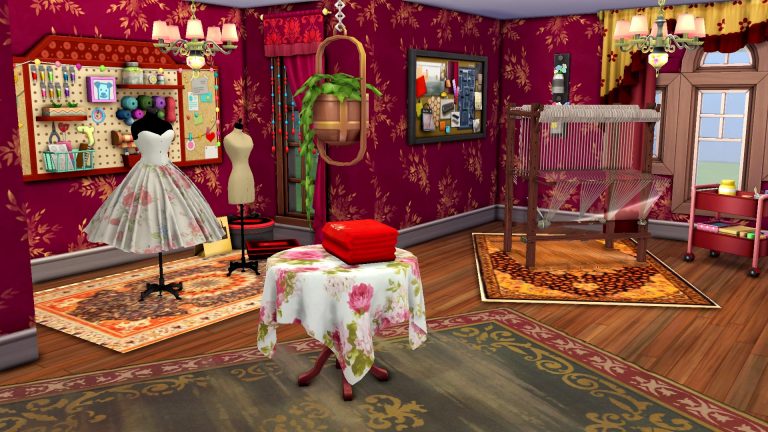
I started with creating the shape of the room. I wanted the decorative mannequins that come with the mod to have their own focal point in a small nook of the room. I then decorated this area with a rug from the mod as well as a few clothing bags and boxes in the corner. On the wall behind it, I put the craft board from Nifty Knitting Stuff. Sadly, when I went to upload this room to the Gallery, the mannequins were the only things that disappeared so the Gallery version does not feature them. I replaced them with the Get To Work mannequins which are wearing some gorgeous custom dresses from this mod, instead. They look amazing wearing those custom dresses. I wanted to show off the decorative mannequins in this article, however, just to show you my original design concept.

Let’s Build a Weaving Studio in The Sims 4 with the Functional Loom Mod!

I placed the loom at a flattering angle in another corner, accented with another custom rug to draw the eye to it. I also popped in the Nifty Knitting craft tray on rollers for easy access to supplies while weaving. To fill up the rest of the space, I used mostly Nifty Knitting desks and accent tables as well as wall décor to really give it that artsy and crafty vibe. Many of the Nifty Knitting Stuff items have lots of shelves and cubbies with yarn, fabrics, and other crafting tools in them. These were perfect for my textiles workshop. Wherever there was open shelving, I used the custom fabric bolts and clothing bags and boxes to give the space a haphazard feel to it. I wanted the room to look like it was in frequent use by a creative Sim whose ideas explode everywhere onto every surface.

Let’s Build a Weaving Studio in The Sims 4 with the Functional Loom Mod!

In another corner of the room, I put a rocking chair and the knitting basket with custom clothing hanging on the wall behind it. There are a few dresses and a suit, as well as scarves hanging from hooks on the other side of the door. To give the centre of the room a bit of a focal point instead of just empty space, I covered a round dining table with a custom tablecloth and displayed some embroidered custom towels on it. I hung a ceiling plant from Paranormal Stuff over it to draw more attention to it.

Let’s Build a Weaving Studio in The Sims 4 with the Functional Loom Mod!

I absolutely loved the finished product. It came out exactly as I envisioned it and really looks like a messy but cheerful arts and crafts space for creating lovely textile art and clothing.


Let’s Build a Weaving Studio in The Sims 4 with the Functional Loom Mod!

If you’d like to grab this room for yourself, it’s called Woven Wonders Workshop and my ID is SnarkyWitch! Remember to tick the box that says Show Custom Content! This room requires the Functional Loom Mod by PiedPiper and uses a lot of custom content from that mod!

And if you can’t use mods, check out our whole Let’s Build series! The vast majority of our builds are 100% CC-free and some use limited packs! In fact, CC builds from us are pretty rare but every once in a while, we do get inspired by talented creators and really want to show off their work in our own creations.

The Sims 4 World Mod Overview: Welcome To Simtorini

Grab your suitcase Simmers as we are jetting off to Simtorini!

Nando and SixamCC have joined  together to create the beautiful Breeze of Greece World Mod and Custom Content Pack. The two part collaboration pack is perfect for Sims wanting to escape their everyday lives and relax in the beautiful scenery of Simtorini.

Take a look at The Sims 4 Breeze of Greece reveal trailer below!

Nando, who is well known for his previous world mods such as Romance in France and Trip to Egypt as well as the custom content packs like the Fashion Store Kit, created the gorgeous world of Simtorini.

SixamCC on the other hand created a variety of Greek inspired items to help bring your Sims’ Simtorini vacations alive! You might recognize SixamCC’s name as they are the creator of the Hotel Bedroom CC Pack, Charming Chalet CC Pack as well as smaller object packs packs such as the Birker Series and Artiu Series.

The Sims 4 World Mod Overview: Welcome To Simtorini

Features

The world of Simtorini replaces the world of Granite Falls from The Sims Outdoor Retreat. It transforms the world into a scenic and romantic getaway inspired by Santorini. Your Sims will be able to experience everything Simtorini has to offer, including fabulous food from the food carts and enjoying a variety of entertainment in the local plaza.

Requirements

  • To experience everything that the Breeze of Greece World Mod and Custom Content pack has to offer, you will need to own The Sims 4 Get Together and Discover University expansion packs and The Sims 4 Outdoor Retreat Game Pack.

Items Overview

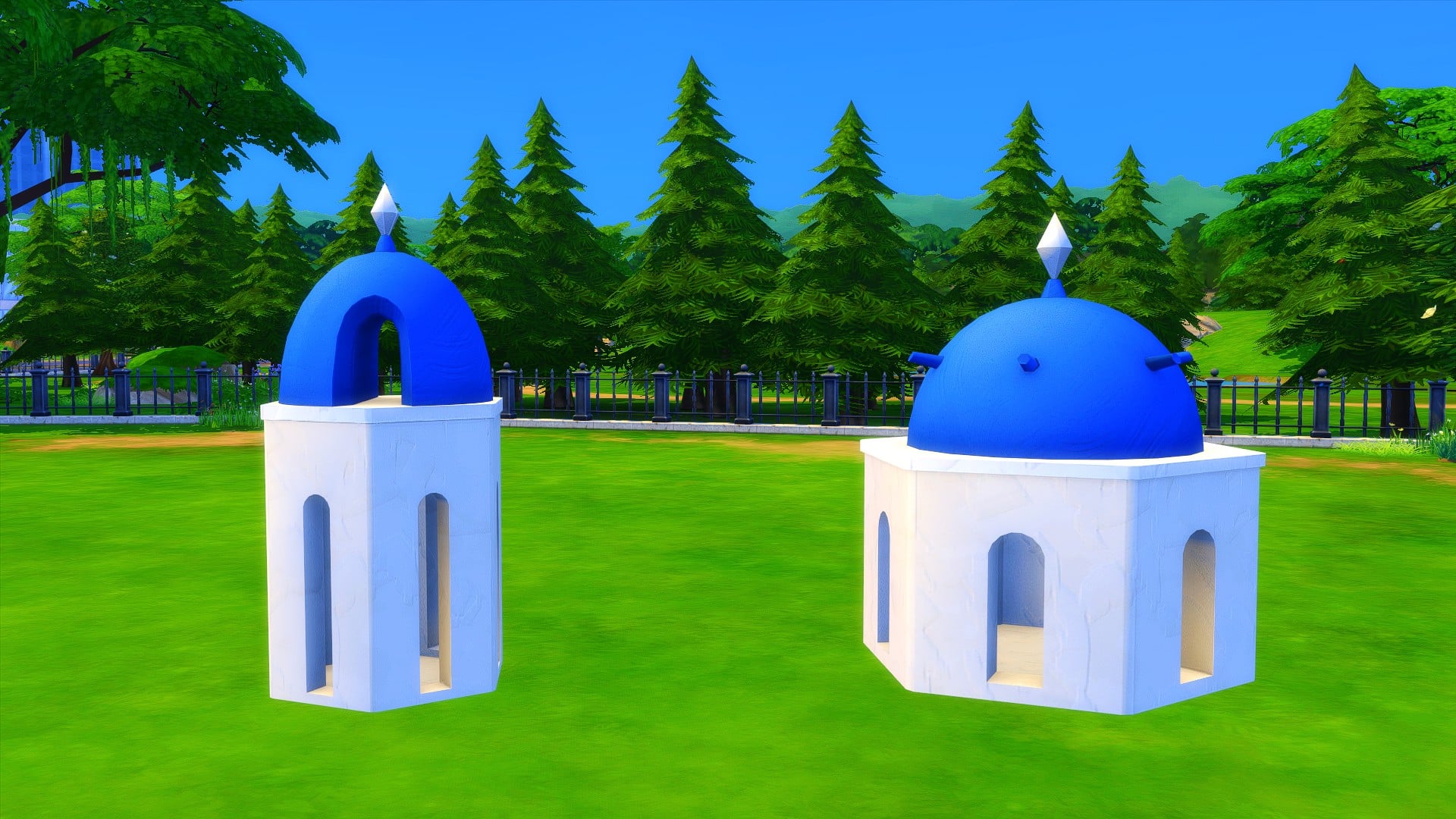
With over forty new objects spanning both Build and Buy Mode, spanning a variety of neutral and colourful swatches, the Breeze of Greece Custom Content Pack has everything you need to create your own Simtorini!

Objects

Build Mode

World Overview

You will still have the same six lots with the same lot sizes as if you were playing in Granite Falls as normal. So there is no need to worry about changing lot sizes or lot placements. When you first load into Simtorini, you will need to remove any existing lots you had so that you can create your own Simtorini. Every Simtorini will be different and unique for each player, depending on how you decide to place and create your lots.

Even though  the world of Simtorini doesn’t come with any new lots as such, you have the freedom to build your own Simtorini inspired lots or add some from The Gallery.

SixamCC has also created the Simtorini Resort that you can add into your own game right now. The lot also utilizes a number of the new objects from the Breeze of Greece Custom Content Pack as well!

The Sims 4 World Mod Overview: Welcome To Simtorini

To find out more about the Simtorini Resort, click here!

The Plaza is where your Sims will spend a lot of time while in Simtorini if they are not staying in their vacation home. Get to know other holidaymakers, try the local delicacies and take part in any events.

The Sims 4 World Mod Overview: Welcome To Simtorini

Of course, there are plenty of other locations to explore while you are on vacation too! You’ll also find a number of details that help bring Simtorini to life!

How to Download

The Sims 4 Breeze of Greece World Mod and Custom Content Pack is available for download right now. It is currently in Early Access and will be entering Public Release shortly.

Follow the links below to download the two different parts of the pack.

Note: You will require both Nando’s and SixamCC’s parts to have the full Simtorini experience.

Keep up to date with Nando and SixamCC’s creations via the links below

The Modern Menswear Kit is a wrong answer to The Sims 4’s existing problem

Ever since The Sims 4 came out we’ve been doing Create A Sim Overviews for each Update, Pack and Kit release. Almost throughout every single CAS Overview that we’ve done there’s always been the same problem – a drastically lower amount of new CAS items for Masculine Sims compared to the amount of additions for Feminine Sims. The trend was most apparent in some of the recent Packs such as Cottage Living where important additions (such as hairstyles and clothing) are dramatically more in favor for the feminine fashion choice. This of course wouldn’t be much of a problem if The Sims 4 had a good balance of masculine and feminine options.

Instead, players find themselves either downloading Custom Content for Masculine Sims or just creating feminine characters more often as a response to this problem.

The Sims 4’s gender update from 2016 that allows players to attribute feminine fashion to masculine Sims would’ve been a partial solution to this problem as well…if it worked. Many clothing pieces in The Sims 4 do not translate well from masculine to feminine – and vice versa.

The Modern Menswear Kit is a wrong answer to The Sims 4’s existing problem

This fashion preference gap combined with badly translated meshes when playing with fashion prefence options results in a catalogue that doesn’t seem to understand the basics of what players want.

The Sims Team’s announcement of The Sims 4 Modern Menswear Kit probably would’ve gone better if these problems didn’t exist in the game.

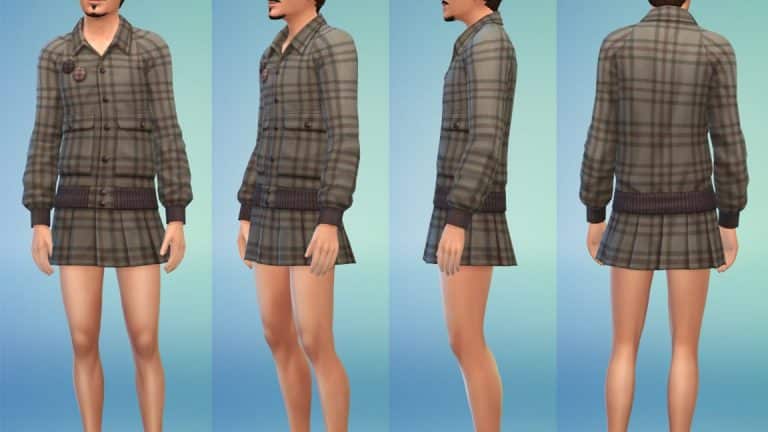
This upcoming CAS Kit has been made in collaboration with Stefan Cooke whose real life clothing catalogue has been converted into the world of The Sims 4. There are some interesting pieces that have been revealed in the official screenshots and it’s a breath of fresh air to see The Sims Team finally breaking the stigma of “Skirts and Dresses are for feminine characters only!”.

The Modern Menswear Kit is a wrong answer to The Sims 4’s existing problem

However, the issue with this Kit specifically isn’t that, nor will it ever be. It’s the fact that this high-end fashion collaboration is being done as a direct response to the current problems of masculine fashion in the game:

The creation of the pack came in response to demand from The Sims players, who felt like this modern menswear was underrepresented in the options for dressing characters. “The thing with The Sims, and one of the reasons that it’s lasted so long, is that it listens to its players,” continues Cooke. “It’s about making sure that there are enough options of everything.”

Hypebeast.com

Instead of fixing the existing catalogue and ensuring all clothing fits on all body frames, we’re getting a Kit with 23 masculine pieces, only which some of them are considered to be aimed towards more feminine fashion. The rest of the catalogue is unfortunately detached from the community’s expectations of “Modern Menswear”:


The Sims 4 Modern Menswear Kit in collaboration with Stefan Cooke is set to release on December 2nd, 2021. Sadly, the need for functional cross-fashion clothing and actual “modern” menswear will probably last long after that…

The Sims 4 Scenario Playthrough: Perfectly Well Rounded

Today we said goodbye to the timed Too Many Toddler scenario and said hello to a brand new limited-time scenario called Perfectly Well Rounded! The aim of this scenario is to create a well-rounded Sim who is successful in aspirations, skills, and their social life. It’s a bit like a SuperSim Challenge for newbies. The scenario will be available to play until December 1st, 2021, so that gives you exactly 2 weeks to start this scenario if you don’t want to miss out on it.

Since I’m well-acquainted with the much longer and harder SuperSim Challenge, I thought taking this scenario on would be a breeze. Was I right? Well, here’s how I did in this scenario!

The Sims 4 Scenario Playthrough: Perfectly Well Rounded

Us scenario lovers know the drill by now. To start a scenario, we click the scenario button on the Main Menu screen and select the scenario we want. There’s a new Perfectly Well-Rounded scenario available to start. It informs us that this is a limited-time scenario that will only be available until December. When we click it, we get a rundown of the scenario requirements, outcomes, and a description of the scenario. This scenario requires 1 Young Adult or older Sim and there is only 1 outcome; to have this Sim have five friends, complete an aspiration, and master 3 different major skills.

The Sims 4 Scenario Playthrough: Perfectly Well Rounded

I just so happened to build a medieval microhome last night which I knew would help immensely with a scenario like this so I made my scenario Sim medieval as well. This is mostly just for fun and flavour; as you’ll see throughout the scenario, our Sim will be using a lot of distinctly not-medieval gadgets to complete this scenario. She has the Genius, Maker, and Outgoing traits and the Master Maker aspiration. You can pick whatever traits and aspiration you want for this scenario, however.

The Sims 4 Scenario Playthrough: Perfectly Well Rounded

After moving her in, I plopped down a recycler, a candle-making station, and purchased some chickens and bugs for some extra cash and recycling materials. I also planted a small garden for the same reasons. I started by gathering collectibles and harvesting plants in the area to recycle and get some bits and pieces to make my candles but the Welcome Wagon interrupted me. For once, I wasn’t annoyed by this! We need five friends so the Welcome Wagon is a good thing! She invited everyone inside and wow, I forgot how powerful microhomes are. She was friends with everyone after 3 or 4 positive interactions. By the time the Welcome Wagon left, she already had five friends. Goal one complete just a couple hours into our first day! Nice!

The Sims 4 Scenario Playthrough: Perfectly Well Rounded

Next on the list was her Master Maker aspiration. Aspirations take the longest, especially since we get big skill boosts in microhomes. The skills will be the easiest part. I wanted to get the hard stuff out of the way so she started making candles and listing them on Plopsy. I’ve done this aspiration before with my SuperSim and it was a breeze! She started and finished the aspiration in just a couple days. However, I forgot that my SuperSim had every reward trait so her motives didn’t decay and she got additional skill boosts on top of her microhome skill boosts. This aspiration took a lot longer than I anticipated this time around without all those extra perks.

It didn’t help matters that the entire season was rife with thunderstorms. When my scenario Sim wasn’t terrified and trying to run indoors, she was getting struck by lightning. That, combined with the chickens, bees, grubs, and garden she was maintaining made things move very slowly. In hindsight, perhaps taking on so many other responsibilities was not a good idea. Or maybe it was just because it made this scenario more interesting!

The grubs, at least, paid off. She needed to harvest from them three times for her aspiration. She also needed to use the big fancy fabricator which I had no space for and just dumped on her front walkway. Just walk around it, guys. No big deal. After juggling candle making, grub care, and fabricating for a while, she eventually made it to the final tier of this aspiration. She had to master the Fabrication skill, complete five gigs as a freelance crafter, and make 20 candles. It wasn’t so much challenging as it was tedious but I’ve always liked the freelance careers so I found it to be both lucrative and fun.

The Sims 4 Scenario Playthrough: Perfectly Well Rounded

I only selected candle-related gigs for her so by the time she had completed her five gigs, she had also made 20 candles. All the candle making maxed out the Fabrication skill for her as well so that’s that aspiration out of the way. Finally! It took quite a while thanks to the bad weather and demanding critters eating up half her days.

But we were in the home stretch now! This was the easiest part. All we had to do was master two more skills to complete this scenario. I purchased an easel and smartly put it indoors so more bad weather wouldn’t dampen her progress. Painting is a very straight-forward, easy skill to master. It’s also very lucrative and it’s easy to stay inspired. Still, I took the easier route and just kept purchasing potions to replenish her needs and put her into the right emotional state. I had enough points from completing the aspiration. I might as well spend them.

The Sims 4 Scenario Playthrough: Perfectly Well Rounded

She mastered painting in a couple days, no problem. The microhome skill boost combined with being Inspired made the skill fly by easily. She made a lot of money selling her paintings on Plopsy, too. We just had one more skill left to master. Since she’s a Genius and naturally Focused a lot of the time, I decided to focus on Logic and swapped out the easel for a chess table. Once again, it flew by with hardly any effort on my part. All she had to do was play chess for hours on end. She only left the chess board to tend to the critters and her motives. I didn’t even need to use Focused potions which was good because I was low on points. She could become Focused by Pondering Moves at the chess board, plus her Genius trait made her Focused often, too.

The Sims 4 Scenario Playthrough: Perfectly Well Rounded

Another couple days and the Logic skill was mastered. That made five friends, a completed aspiration, and three completed major skills! I’d completed the scenario! It took me 16 days to finish this one which is longer than I expected. If I were to speed run this again, I think I’d focus more on buying traits that decrease motive decay and I wouldn’t have so many extra responsibilities. Chickens, bees, grubs, and a garden was a bit much, even if I did manage to juggle it all.

The Sims 4 Scenario Playthrough: Perfectly Well Rounded

So what are our final thoughts on the Perfectly Well-Rounded Scenario? It’s a thumbs up from us! Unlike the boringly linear Too Many Toddlers scenario, there’s a lot of freedom to play this scenario almost countless different ways. You get to pick which aspiration you want to finish, who to befriend, and what skills to master. There’s also a lot of strategy involved in selecting your Sim’s traits and preferences in CAS. You could give yourself a real challenge by having a Lazy Sim who hates Fitness master the Bodybuilder aspiration. Or you could set yourself up for success by combining complimentary traits with an easy aspiration. This scenario is a grind like the Too Many Toddlers scenario but the grind was a lot more fun and had more ways to make it your own. I definitely recommend checking this one out before it ends on December 1st.


How did you complete this scenario? Did you manage to finish it faster than we did? Let us know in the comments or come chat with us on social media!

The Sims 4: Two Mini-Mods to Help You Run the Perfect Bakery!

Since our latest Story Starter Kit features a bakery all set up for you to hop in and play, I thought I’d share a couple mods I love to use when running my own bakeries in The Sims 4! None of our Story Starter Kits require any CC or mods; they can be fully enjoyed by everyone on all platforms but if you are a mod user playing on PC, you might find these mini-mods by Ravasheen to be extremely useful if you’re playing with our Sugar and Secrets Story Starter Kit!

A-Dough-Able Cupcake Maker

The Sims 4: Two Mini-Mods to Help You Run the Perfect Bakery!

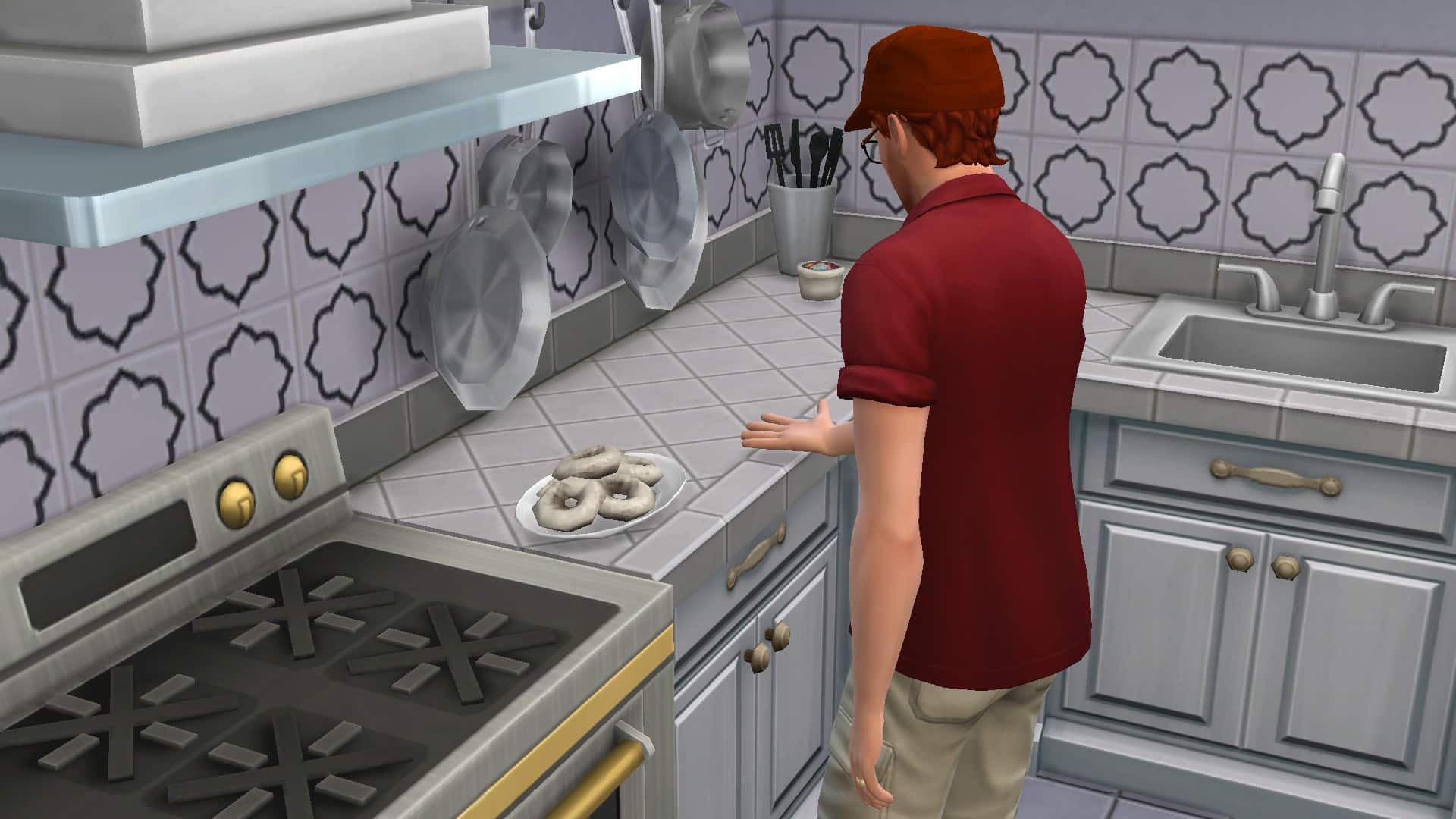
First of all, that title is a-dough-able! The A-Dough-Able Cupcake Maker has all the functionality of the base game cupcake factory but doesn’t take up the entire room! Seriously, why did they make it so big? No one wants that in their kitchen, okay? You listening, EA?

Ravasheen’s much smaller cupcake maker is a cute little icing piping bag and sprinkle bag you can purchase out of the Build/Buy catalogue and store in the world, in your Sim’s inventory, or in the fridge! It’s super versatile and will allow you to bake not just the base game cupcakes, but all of the baked goods that come with the Baking skill from Get To Work. Sims will use any available oven to cook their delicious treats, including CC ovens and the countertop ovens from Dream Home Decorator! Ravasheen has even made matching baking trays for each item, how a-dough-able! (One day, I’ll stop using that pun but not today).

The mod is base game compatible but players with the Get To Work expansion pack will get the most functionality out of this mod. The piping bag requires Get To Work and will allow you to bake both the base game cupcakes and the Get To Work baking recipes. The sprinkle bag is base game compatible but will only allow you to make the base game cupcakes. If you’re having trouble putting your baked goods on a surface that will allow your Sims to decorate them, the object also come with a handy placement helper feature that will tell your Sim to move the desired dish to the correct placement for decorating.

Oh, and if you use Srsly’s Complete Cooking Overhaul mod, this mod is fully compatible with that, too!

Kiss of Fresh Hidden Lot Modifier

The Sims 4: Two Mini-Mods to Help You Run the Perfect Bakery!

Another fantastic mod you’ll get a lot of use out of if you run a bakery is the Kiss of Fresh Hidden Lot Modifier by, you guessed it, Ravasheen! This mod is super simple but incredibly helpful! It adds a hidden lot trait that keeps all perishable items fresh forever! It also prevents flower arrangements from wilting so it’s useful for florists, too.

The Sims 4: Two Mini-Mods to Help You Run the Perfect Bakery!

All you have to do to use this mod is find the Kiss of Fresh sign in Build/Buy and place it anywhere on the lot. It will make everything on the lot fresh forever. The sign also disappears when in Live mode so you don’t need to worry about the sign not fitting in with your lot’s design scheme. There are no lot or venue restrictions on the sign so you can place it anywhere you want! And since this lot trait is hidden, it won’t take up one of your three lot trait slots.

When you want to get rid of the hidden lot trait, just delete the sign! That’s it! I told you it was super simple!


These aren’t Ravasheen’s only mods you might find helpful for running a retail business! I just picked the two that I find myself using the most! Go check out her full catalogue on her website!

What are some of your favourite mods you find helpful for running a retail business? Let us know in the comments or come chat with us on social media!

The Sims 4 Story Starter Kit: Sugar and Secrets

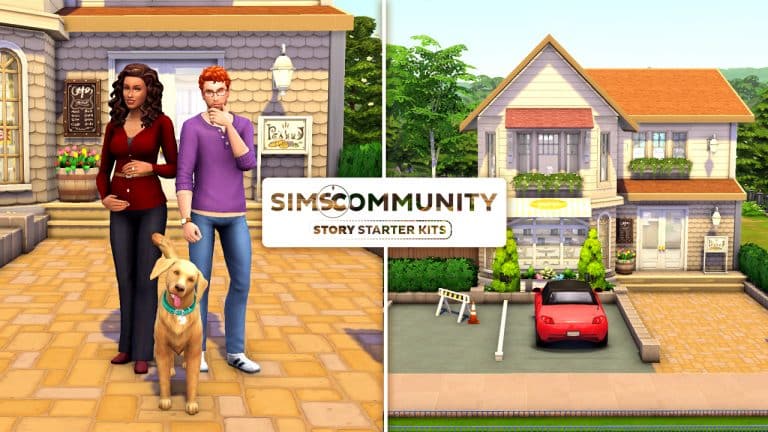
Welcome to our second entry in our new Story Starter Kits series! If you missed all the info on Story Starter Kits, you can read more about what they are and how they work in our introductory article!

This month, we’re bringing you a happy little family who’ve just launched a new bakery. They seem like the perfect couple… but are they, really?

Sugar and Secrets

The Sims 4 Story Starter Kit: Sugar and Secrets

By day, she’s known as Grace Shepherd. By night, she’s known as the vigilante Nightstalker. Or, she was until she and her husband Clark found out they were expecting twins. That’s when everything changed for Grace. That’s when Nightstalker disappeared from the streets and crime rates in San Myshuno went up without Nightstalker to take the law into her own hands.

Clark has no idea about his wife’s secret identity. As far as he knows, Grace has a cushy government job working in a high rise office in Uptown. As for him, he’d been having trouble finding steady employment in the city and had planned to be a stay-at-home dad when he found out about Grace’s pregnancy until he got a brilliant idea! Now was the perfect time to start a new business venture! He’d always had a passion for baking and decorating delicious treats and now was finally the time for him to launch his own bakery! He could even work from home so he could be close to the twins while he made a living to support them.

So they sold their home in San Myshuno and headed out to the suburbs of Newcrest, pouring all their savings into purchasing a bakery with a small apartment on the second floor. The living space is significantly smaller than their old home but the spacious yard sold them. It’d be perfect for the twins to run around and play with their dog, Biscuit.

Clark is beyond excited to be starting this new chapter in their lives. He hopes his bakery will be successful and that his wife and children will be happy here in Newcrest. But Grace is having misgivings; she’d planned to give up her secret life as a vigilante to raise her children but every day she turns on the news and hears the people crying out “Where is Nightstalker?! We need her!” The people of San Myshuno are suffering without their vigilante protector and she’s finding it harder and harder to ignore their desperate pleas for help. The bad guys need to be punished for their wrongdoing and the police keep failing to deliver swift justice time and time again. Can she really be both Nightstalker and Grace Shepherd, wife and mom of two? And in a much smaller living space than before, can she keep her true identity a secret from Clark?

If Clark ever finds out who his wife really is, would he want to work things out for the kids or would the betrayal be too much for their marriage to handle?

Other Info:

Grace Shepherd
  • Age: Young Adult
  • Traits: Active, Self-Assured, Family-Oriented, Dastardly
  • Aspiration: Chief of Mischief
  • Likes: Black, Alternative Music, Fitness, Mischief, Mission Décor
  • Dislikes: Pink, Easy Listening Music, Baking, Farmhouse Décor
  • Skills: Logic (5), Fitness (4), Mischief (3)
  • Career: Secret Agent (8 – Villain Branch)
  • Packs Used: Cats & Dogs, Get To Work, Parenthood
  • Misc. Notes:
    • Grace does not require Get Famous, but if you do own Get Famous, she will come with an Awful reputation.
    • Grace does not require Discover University, but if you do own Discover University, she will come with a distinguished degree in Villainy
Clark Shepherd
  • Age: Young Adult
  • Traits: Good, Foodie, Family-Oriented, Domestic
  • Aspiration: Big Happy Family
  • Likes: Purple, Easy Listening Music, Baking, Mission Décor
  • Dislikes: Black, Alternative Music, Mischief, Contemporary Décor
  • Skills: Baking (5), Cooking (4), Parenting (2)
  • Career: Self-Employed (Bakery Owner)
  • Packs Used: Cats & Dogs, Get To Work, Parenthood
  • Misc. Notes:
    • Clark does not require Get Famous, but if you do own Get Famous, he will come with a Good reputation.
Biscuit
  • Age: Adult
  • Gender: Male
  • Species: Large Dog
  • Traits: Friendly, Loyal, Playful
  • Breed: Golden Retriever
  • Status: Neutered
  • Packs Used: Cats & Dogs

Clark’s Confections

This bakery was once a spacious two-story suburban home until a young businessman purchased it with dreams of turning it into a profitable business. The first story was renovated into a pizza joint and the second story was converted into a small apartment for rent. Sadly, the business went bankrupt less than a year after its grand opening and the place has been changing hands ever since. The newest owners are currently operating a bakery on the first floor and using the upstairs apartment as their personal residence. The spacious yard was a big selling point for them, as they have a large dog and are expecting twins soon.

Lot Info:

  • Lot Type: Retail
  • Price: §116,307
  • Size: 30×20
  • Beds: 1
  • Baths: 2
  • Lot Traits: Homey
  • Packs Used: Cats & Dogs, Get To Work, Parenthood, My First Pet Stuff
  • Tips to Use This Lot:
    • Grace and Clark come with enough simoleons to purchase their bakery and have some savings leftover.
    • To live at the bakery without using any mods, have Grace and Clark purchase a small blank lot as their “home,” then purchase the bakery. Have them travel there and just stay there! The upstairs apartment and yard has everything they need to use the bakery as their home.
    • It’s recommended to lock the back door and the door behind the checkout desk for everyone but the household. That way, customers and staff won’t wander down to the bakery kitchen or upstairs into the apartment.
    • You can also lock the secret bookcase door in the bakery’s kitchen to everyone but Grace if you’d like to keep her secret lair, well… secret.

Your Story Starter Kit is waiting for you! Get The Household and The Lot by downloading them from the official Gallery Website linked on the buttons below. Or, follow SnarkyWitch in the Gallery and look for Sugar and Secrets and Clark’s Confections!

[mks_button size=”medium” title=”The Household” style=”rounded” url=”https://www.ea.com/games/the-sims/the-sims-4/pc/gallery/F24E3A4E471711EC8A7F2E638F0580EA” target=”_blank” bg_color=”#4aa500″ txt_color=”#FFFFFF” icon=”fa-arrow-down” icon_type=”fa” nofollow=”0″][mks_button size=”medium” title=”The Lot” style=”rounded” url=”https://www.ea.com/games/the-sims/the-sims-4/pc/gallery/0C64AD8C471811EC8AE42E638F0580EA” target=”_blank” bg_color=”#4aa500″ txt_color=”#FFFFFF” icon=”fa-arrow-down” icon_type=”fa” nofollow=”0″]


Credits

The Sims 4 Laundry List: November 16th, 2021

1

The Sims Team has published the latest Laundry List for The Sims 4!

The Laundry List as you see down below lists all the notable issues and bugs in The Sims 4 that have been reported by the community. All of these bugs and issues are currently being addressed by The Sims Team and should be resolved in the upcoming patch update for The Sims 4.

Check it out:

Hi Simmers!

Welcome to the Laundry List where we’ll share a list of the top community concerns that we’re currently investigating and hope to have resolved in the upcoming patch. This is just a top list, there are more topics that we saw reported by players that are not listed and being worked on.

These concerns were reported by players who help us continue our work of improving the user experience on a regular basis.

Please note that some topics can be tricky and require an extended investigation on our end, so even though we are actively reviewing it’s not a guarantee that we’ll have an immediate fix for it in the upcoming patch.

Here’s the list of the top community concerns we’re investigating for the game update this month:

Thanks for all your patience and valuable help! Please continue telling us about any issues you’re experiencing on Answers HQ, we’ll continue to work on improving our transparency, and together we can make this game the best that it can be. Happy Simming

The Sims 4 Modern Menswear Kit Blog: Redefining London Classics

13

TheSims.com has published a brand new blog post about the upcoming Kit for The Sims 4. In case you’ve just heard the news, The Sims 4 Modern Menswear Kit has been announced and will be releasing on December 2nd!

Check out more details and screens on this upcoming Kit:

The Sims™ has always been a creative destination where players come to express themselves, discover new experiences and play with life.

To further empower players to find new and expressive paths to self-discovery, and to deliver on the promise of providing more contemporary menswear options, The Sims worked with the British Fashion Council – a not-for-profit organization supporting British design talent and championing responsible and creative businesses to further strengthen British fashion around the globe – to Simify an up-and-coming menswear brand and help stretch style boundaries with its next fashion kit, The Sims™ 4 Modern Menswear Kit.

Welcome to The Sims’s virtual closet, Stefan Cooke.

The Sims 4 Modern Menswear Kit Blog: Redefining London Classics

Helmed by Central Saint Martins graduates Stefan Cooke and partner Jake Burt, the award-winning, London-based label – named after Cooke – is un-defining traditional menswear. “We’re taking quintessential menswear items and repurposing them, whether it’s through textiles or silhouette,” explains Cooke.

“The brand is about redefining masculinity,” continues Cooke. “We always try to be authentic, and without excluding anyone. We’re about redeveloping and refining old ideas, but making them incredibly modern, and pushing that idea to the point that it transcends things like gender.”

For The Sims 4 Modern Menswear Kit, Stefan Cooke worked with The Sims team to bring a wide-range of new-age menswear to players and creators around the globe. Consisting of 23 pieces, all of which are Simified recreations of real-world Stefan Cooke collections, the garments range from the traditional to the revolutionary, masculine to effeminate, and fusions of them all. There’s jackets, trousers, suits, and shoes, as well as some of the designers’ favorite pieces, including the Stefan Cooke Wool Varsity Coat with Skirt, a design that perfectly encapsulates the evolution of modern menswear.

The Sims 4 Modern Menswear Kit Blog: Redefining London Classics

Alongside the dynamic shapes and silhouettes, fabric is another quintessential Stefan Cooke characteristic. The former brings us deeper into the boundless future of menswear, while the latter pays homage to the familiar classics.

“Each material was carefully hand-painted to emulate the texture qualities by doing somewhat of a caricature of the details,” explains Vincent Joly, Senior Art Director for The Sims. “Exaggerating the shapes and controlling the contrast to not look too busy or photorealistic, at the same time not reducing the details too much to lose the essence of the fabrics. Each piece was tuned to find that sweet spot.”

The Sims 4 Modern Menswear Kit Blog: Redefining London ClassicsThe Sims 4 Modern Menswear Kit Blog: Redefining London ClassicsThe Sims 4 Modern Menswear Kit Blog: Redefining London Classics

Burt and Cooke are not just looking forward to seeing their styles democratized and digitized, they’re also excited for the self-exploration that their kit will inspire, both within The Sims and in the real world.

“I hope people become more explorative with what they’re wearing, especially if they’re guys,” says Burt. “I think it’s a good thing if people feel more comfortable and unafraid to wear what they want to wear.”

“Fashion can be about identifying as part of something, but also as your own person. It’s both for community and individualism,” adds Cooke. “That’s why fashion is so amazing. It can be the slightest thing, and it can really change how you feel about yourself or what you want to put across to the world.”

The Sims™ 4 Modern Menswear Kit will be available beginning December 2, 2021 on PC and Mac via Origin™ and Steam®, PlayStation®5, PlayStation®4, Xbox Series X|S and Xbox One systems.

The Sims 4 Modern Menswear Kit: Official Announcement & Assets

12

The Sims Team has shared with us first information about their upcoming Kit for The Sims 4 – the Modern Menswear Kit!

Down below you’ll see the official description, key features, and official assets. This Create A Sim Kit focuses solely on adult Masculine Fashion and is set to release December 2nd, 2021 on PC, Mac and Consoles worldwide!

Check out what this Kit has to offer:

Revolutionize the classics with The Sims™ 4 Modern Menswear Kit*, featuring a thought-provoking, accessible collection designed by Stefan Cooke. Reimagined shapes redefine traditionally masculine fashions, while textiles and patterns elevate each unique piece for today’s style.

Get into the Details

Update your Sim’s closet with trendy wardrobe staples. Fluid shapes add intrigue to any outfit, while zippers, cutouts, and pleats lend everyday outfits a touch of the contemporary.

Experiment with Style

Refined and subversive, these looks reinvigorate the basics. Play with scalloped or pleated skirts and latticed sweaters, or pair a polished shirtdress with iconic loafers to model up-and-coming culture.

Sims4 SP28 Modern Menswear PA Keyart Full RGB 3840x2160

Official Screens

The Sims 4 Modern Menswear Kit: Official Announcement & AssetsThe Sims 4 Modern Menswear Kit: Official Announcement & Assets

Official Boxart

The Sims 4 Modern Menswear Kit: Official Announcement & Assets

Official Logo

The Sims 4 Modern Menswear Kit: Official Announcement & Assets

The Sims 4: Navigating the bb.showliveeditobjects Cheat

Show Hidden World Objects with the Live Edit Objects Cheat for The Sims 4!

Are you a new builder just starting to learn the ropes of advanced building in The Sims 4? Have you ever wondered where all those pro builders get all those items you’ve never seen before for their CC-free builds? How do they do it? It’s not magic. It’s a nifty little cheat called bb.showliveeditobjects. Knowing how to use this cheat effectively will take your builds to the next level!

Enable the Live Edit Objects Sims 4 Cheat

Navigating the bb.showliveeditobjects Cheat in The Sims 4

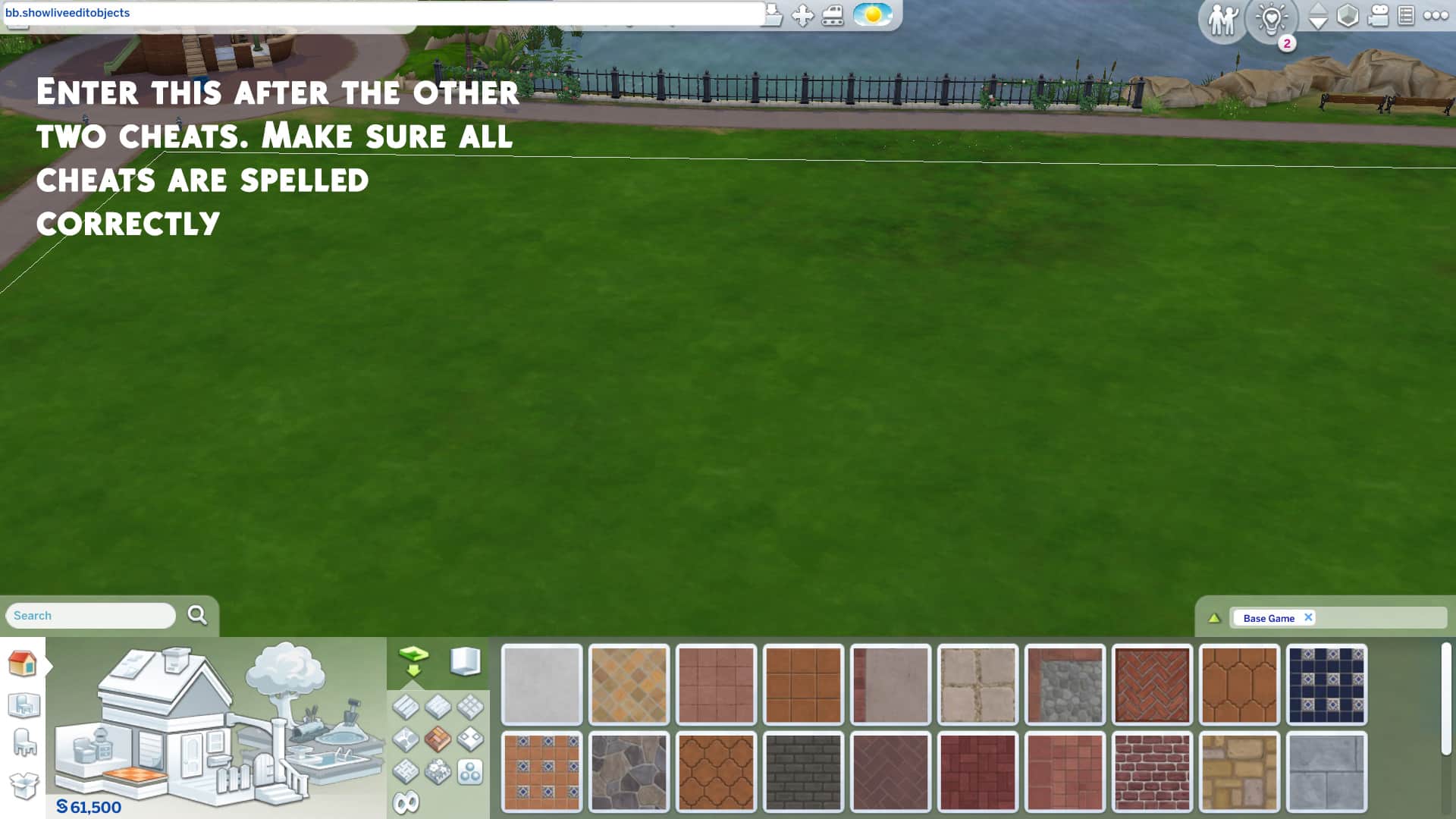
This cheat is a little quirky. It doesn’t work unless you enable certain other cheats, first. To access the hidden live edit menu items, you’ll have to enter the following cheats in order:

  1. bb.moveobjects on
  2. bb.showhiddenobjects
  3. bb.showliveeditobjects

Make sure they’re all spelled correctly. When done correctly, you’ll be able to see a bunch of options called *** DEBUG *** show up when you start typing “debug” in the search bar.

Console players can also use this cheat without worrying about their trophies or achievements. None of these cheats will disable them.

How To Access the Live Edit Menu

Once you’ve confirmed the cheat is active, the easiest way to access the hidden menu is by typing “DEBUG” into the Build/Buy search bar and hitting Enter. All of the hidden objects in the game will pop up for you to browse through. This menu is also commonly called the debug menu. The debug menu can be very cluttered and confusing to navigate. There are literally thousands of objects in this menu, none of them are organized properly and many of them are just called ** DEBUG ** which makes it difficult to search for exactly what you need. There is a mod that can help with this but if you are not a mod user, you’re going to have to slowly memorize where things are which will naturally happen the more you use this menu.

Live Edit Menu of Items in Build Mode

The Live Edit (or Debug) Menu contains a huge variety of items to help you with your builds. There are so many items that we couldn’t possibly break down every single one but we have broken most of the menu down into categories of items to give you a general idea of the kinds of things you can use.

  • Building Shells: If you’re building a diorama of sorts or if you’re recreating one of the building shells and want a reference on the lot to refer to, these can come in handy. These are the empty building shells that the devs use to decorate the non-routable areas of the worlds in the game. Some buildings are small, others are massive. Some have separate foundation pieces that go underneath them.
  • Vehicles: Planes, trains, and automobiles, they’re all here in the debug menu! They are not functional of course but they’re better than sizing up the toy vehicles in the regular Build/Buy menu because they won’t look blurry. You can use these to make your parking lots look more realistic or to place in your Sim’s driveway so it doesn’t look so barren. There are some rusted out and damaged vehicles you can use in apocalyptic builds or run-down builds, too.
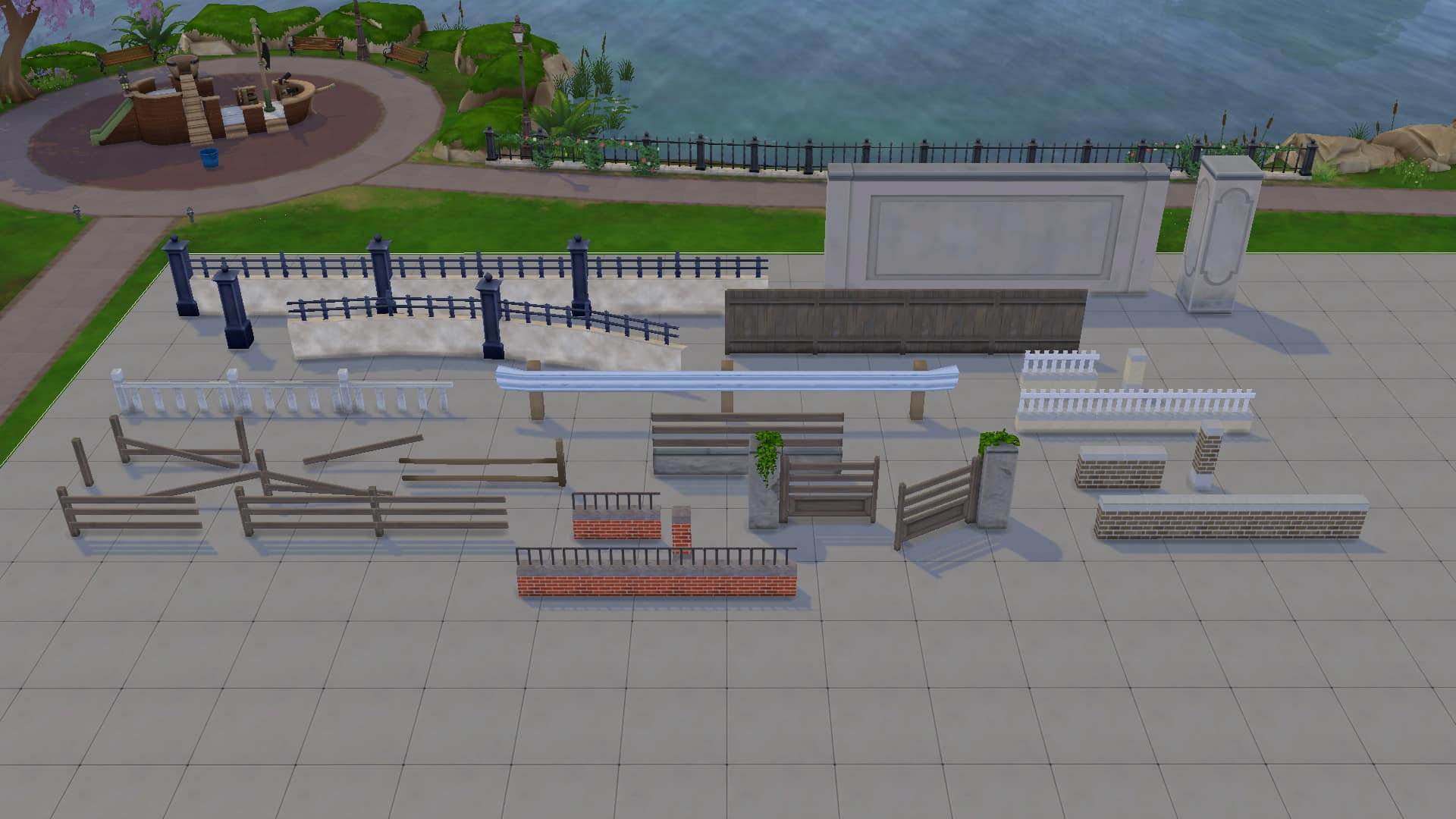
  • Fencing: There are so many fencing and gate options in the debug menu that just look so much better than what we have in the regular catalogue. There’s rounded fence pieces, run-down and broken fence pieces, fancy new fence pieces, wooden fencing, stone fencing, brick fencing. It’s all there and most of it comes with several matching pieces to let you customize the look of your fence.
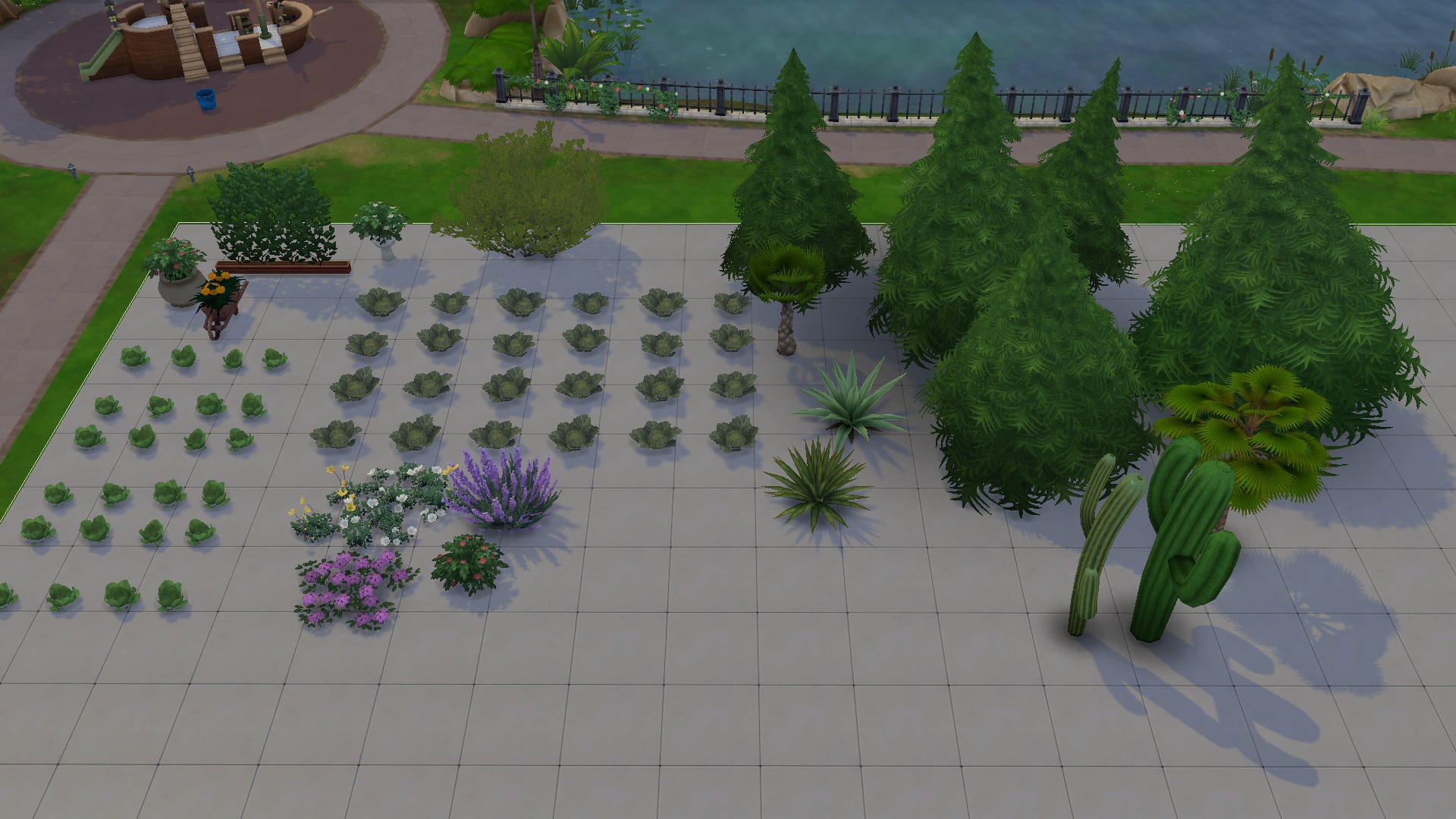
  • Plants: What’s so special about plants? Don’t we already have plants in the regular catalogue? Why yes. Yes, we do but these plants cost $0, making it easy for you to do some elaborate landscaping without bloating the cost of your build. All of the plants in the regular catalogue have a debug version that costs $0 and there are some special plants that aren’t in the regular catalogue, like the Sixam plants and glowing Realm of Magic mushrooms.
  • Outdoor Décor: Benches, tables, lamp posts, telephone boxes, street signs, sculptures and more can be found in the live edit menu! The upside to using these objects is that they’re all free and won’t make your build cost more. The downside is that none of it is usable; it’s just for looks, so if you want Sims to be able to sit down at the benches and tables, it’s better to use the ones in the regular catalogue.
  • Knick Knacks & Clutter: You can really go crazy decorating the inside of your builds with clutter items from the live edit menu! There are so many items that aren’t in the regular catalogue and all of it is free! Go crazy decorating your vanity tables with blush, face powders, lipsticks, eyeliners, and lipsticks! Or add a touch of realism to your kitchen with a used coffee pot in the sink and a bag of coffee sitting next to the coffee machine. For some reason, I’m obsessed with tucking a plunger next to the toilet in all my bathrooms. There’s way more cool clutter pieces than just those so go check out the full catalogue for yourself!

Take a look at just a small assortment of each category of items below! Again, this isn’t everything in the catalogue but we hope this gives you inspiration to go exploring through the catalogue yourself! All of the items shown are from the base game but the more packs you have, the more great stuff you’ll find in the catalogue!

What the Live Edit Objects Can (and Can’t) Do

Using the live edit menu is useful for many different things but it also has some drawbacks. The live edit menu makes it much easier to build elaborate and detailed starter homes since you can go all-out decorating the house and landscaping the yard without spending a single simoleon. It also allows you to add visual interest and realism to your builds by adding things you ordinarily can’t find in the regular catalogue, like cars and certain unique clutter objects.

However, there are some limitations with this cheat, too. The reason many of these objects are in a hidden menu and not in the regular catalogue is because the devs did not apply routing rules to most of these objects. This means that Sims will not see these things as obstacles in their path and are likely to walk straight through things like fence pieces and lamp posts. The objects were originally intended to be used in non-routable areas of the worlds so Sims would not need to route around these things. If you use them on a lot, though, your Sims may not know to walk around things and could walk through them, instead. This doesn’t cause any serious game issues. It just looks funny.

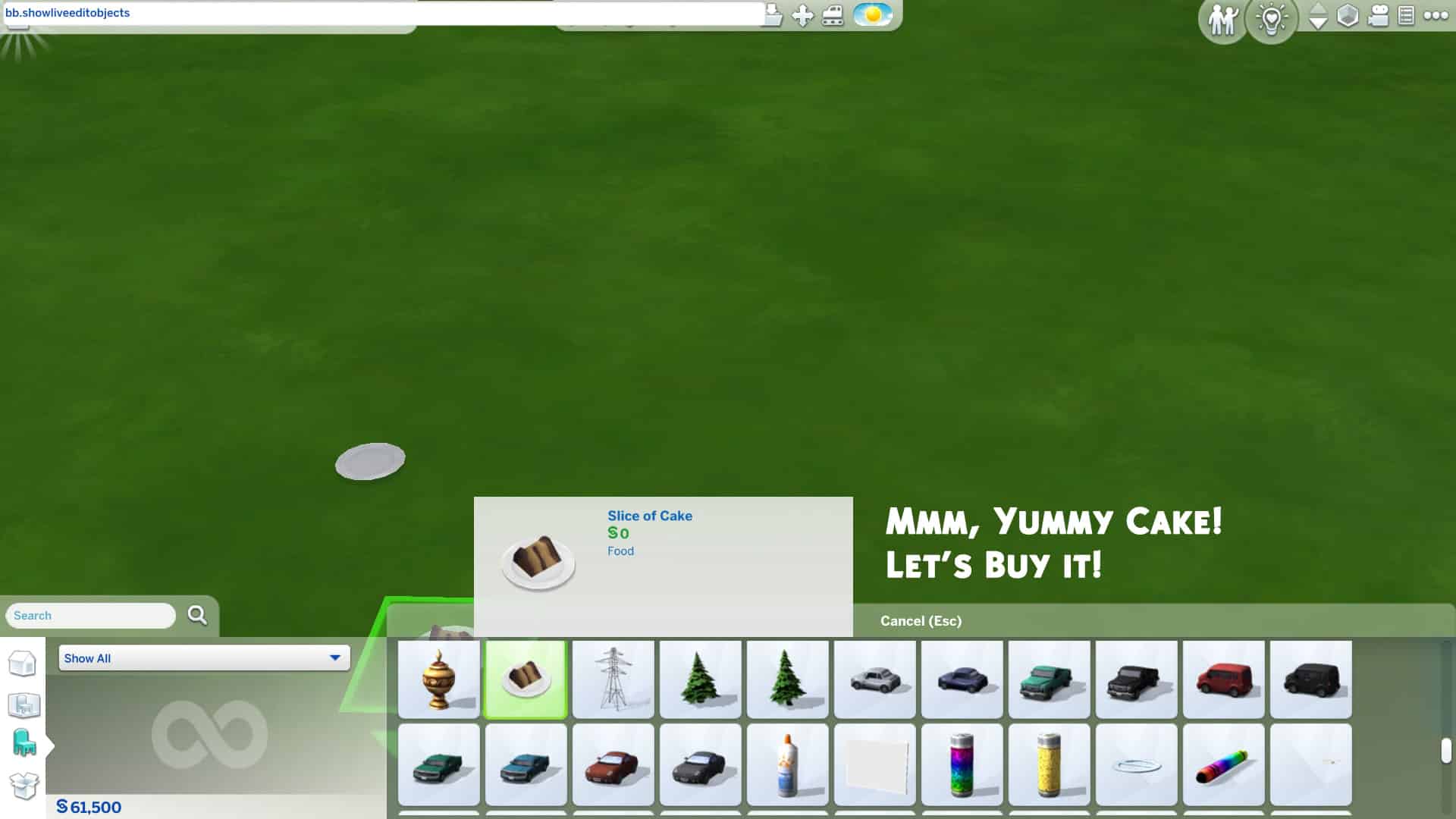
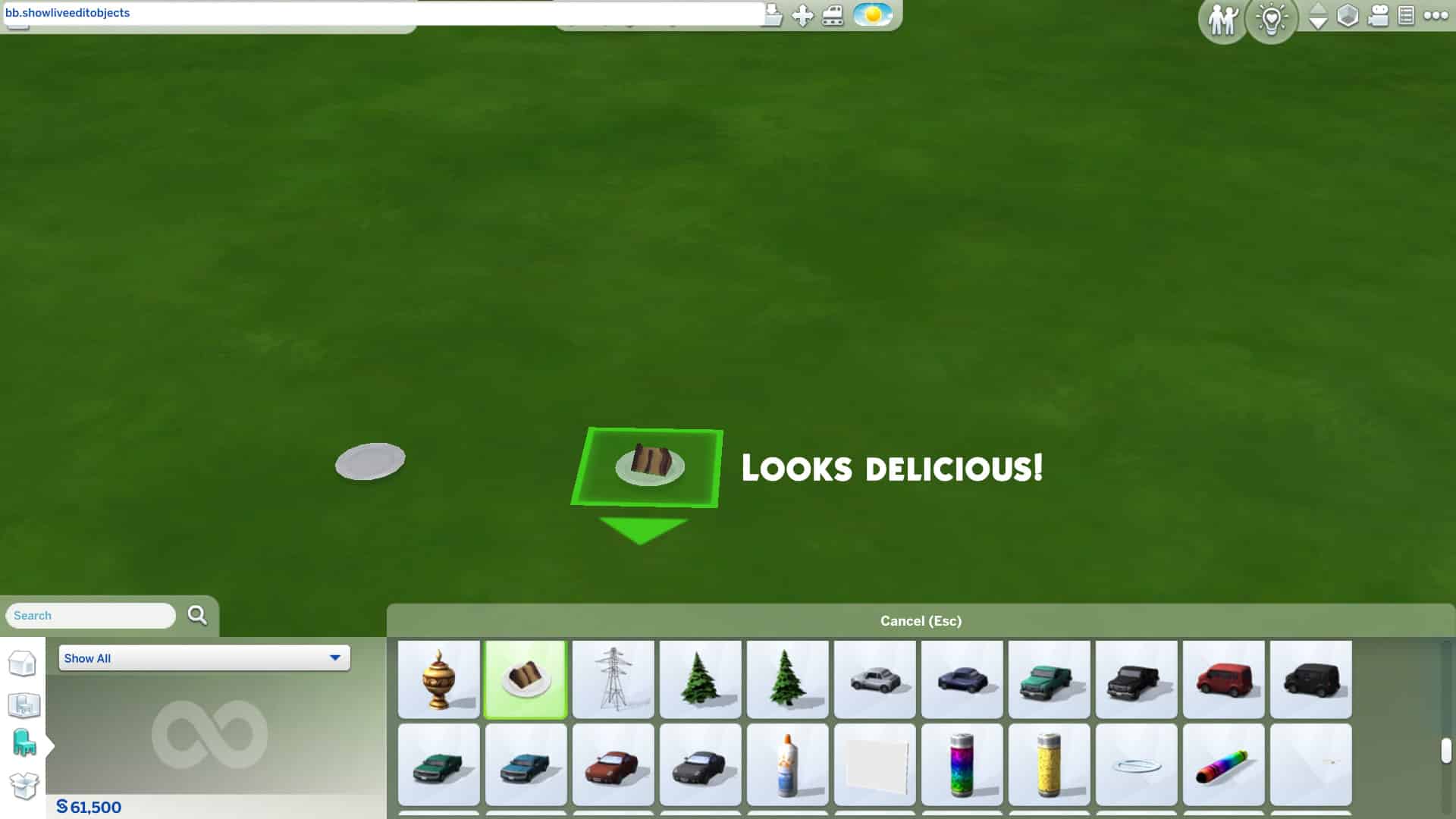
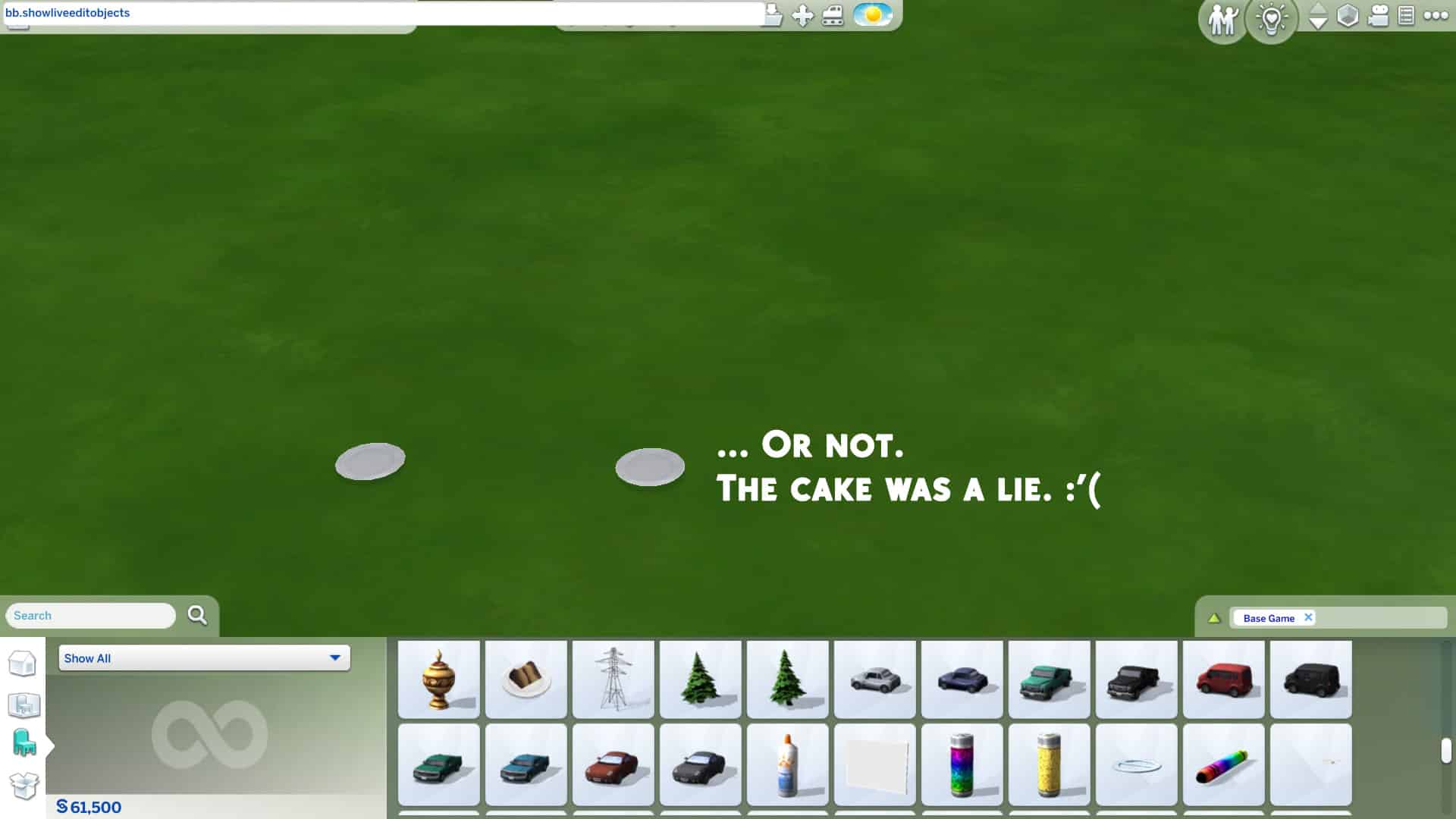
Some of the live edit objects are glitchy when you place them down as well, especially food, drinks and other food-related things like baking trays. Most of the food and drinks disappear when you place them down leaving only an empty plate or cup. Baking trays can’t be clicked on or deleted once placed down. We recommend staying away from food-related things in the live edit menu for the most part and just sticking to decorative clutter and architectural pieces.

As mentioned before, the live edit menu is also very disorganized and almost everything has the same name, making it time consuming to navigate through all the objects. You are also unable to copy live edit objects and most of the objects don’t have swatch variants to cycle through. If you want to place multiple of the same live edit object, you have to find it and pull it out of the catalogue each time.

Tips to Make Life Easier Using the Live Edit Menu

Gallery Builds with Object Unlocks for The Sims 4

If you find yourself using the live edit menu a lot and wasting a lot of time scrolling through so many objects, you can save collections of your favourite pieces to your library as a room and place them down whenever you need them while building. This can help save time and give you quicker access to some of your frequently used go-to items in the live edit menu.

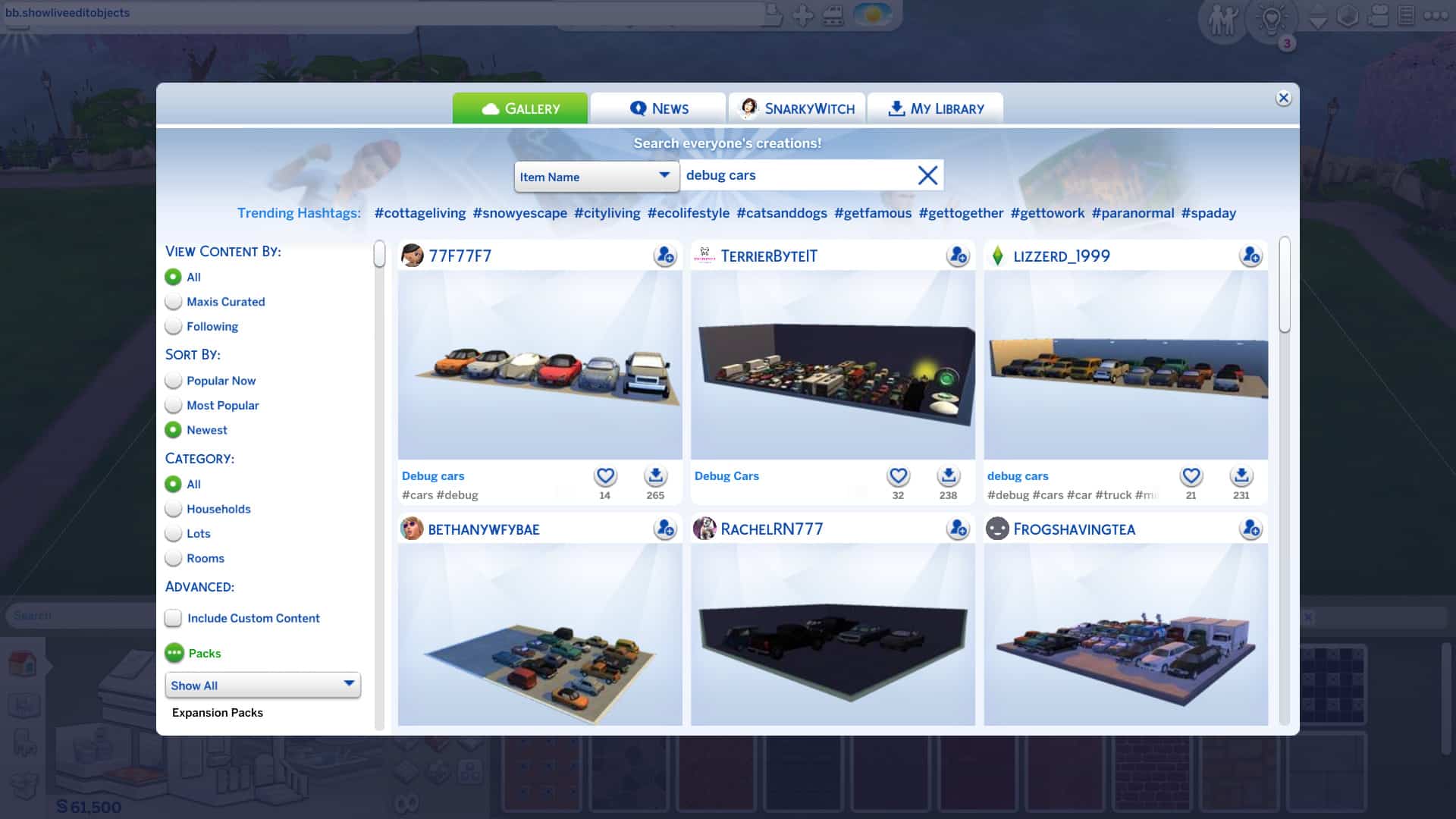
Other Simmers have also done the same thing and uploaded their rooms full of live edit objects to the Gallery! Just search “debug clutter” or “debug cars” or whatever type of debug item you’re looking for in the Gallery and a selection of these items will pop right up for you to download and use in your own builds! I find this really handy because I love using the debug items but I’m a lazy builder and don’t have the patience to scroll around forever.


And that’s the rundown of this amazing cheat! Will you be using the live edit menu in your next build? Let us know in the comments or come chat with us on social media! Feel free to share your creations with us as well! We love to see them!

The Sims 4: RED (Taylor’s Version) Look Book!

0

What’s a Swiftie Simmer to do when Taylor Swift releases the re-recording of the iconic RED album? Create a RED-inspired lookbook, of course! This lookbook is for you, fellow Swiftie Simmers! We’ll be taking a trip down memory lane, recreating just some of Taylor’s best looks from the RED era!

Do you remember these looks all too well? We were there, and we remember them all too well!

RED: Live in Concert

The Sims 4: RED (Taylor’s Version) Look Book!

“I never saw you coming, and I’ll never be the same”

Inspired by Taylor’s opening song, State of Grace from RED Live in Concert. This cool and casual look paired with the song being performed on stage is the perfect look and one that is even a perfect everyday look! 

Hair: Parted Waves (Romantic Garden Stuff)

Top: White Zipped Top (Discover University)

Bottom: Detailed Shorts (Realm of Magic)

Shoes: Red Ankle Boots (Get Together)

Accessories: Feather Detail Hat (Paranormal Stuff)

Makeup: Lipstick, Eyeshadow and Eyeliner (Base Game) Blush (MAC Cosmetics) Medium Red Nails (Spa Day)

We Are Never Ever Getting Back Together… Like EVER!

The Sims 4: RED (Taylor’s Version) Look Book!

“So he calls me up and he’s like ‘I still love yooouuuu,’ and I’m like– I’m just… I mean, this is exhausting, you know? Like we are never getting back together. Like ever.”

Taylor’s high ponytail and thick glasses paired with patterned PJs became everyone’s favourite breakup outfit when she rocked this look in the We Are Never Ever Getting Back Together music video. This fun, silly look that doesn’t take itself too seriously is perfect for such an equally silly, fun song about dumping a loser. We’ve all been there, haven’t we?

Hair: High Ponytail with Fringe (Get Famous)

Body: Patterned Orange Jumpsuit (Dream Home Decorator)

Shoes: Fluffy Bunny Slippers (Base Game)

Accessories: Nails, Glasses, and Striped Socks (Base Game)

Makeup: Eyeshadow, Eyeliner, Blush, and Lipstick (Base Game)

I Knew You Were Trouble

The Sims 4: RED (Taylor’s Version) Look Book!

“He was long gone, when he met me and I realize, the joke is on me, hey!”

After a whirlwind romance with a bad boy, this messy hair, graphic tee and ripped jeans, this I Knew You Were Trouble is a look that many of us will remember from such an iconic song! 

Hair: Ombre Hair (Seasons)

Top: Skull Tee (Base Game)

Bottom: Ripped Jeans (Dream Home Decorator)

Shoes: Laced Up Platforms (Discover University)

Accessories: Layered Necklace (Dream Home Decorator)

Makeup: Nails, Eyeliner and Eyeshadow (Base Game), Lipstick & Blush (MAC Cosmetics/Base Game), Highlighter (The Sims x peachyfaerie – 21st Birthday Update),

Begin Again

The Sims 4: RED (Taylor’s Version) Look Book!

“But on a Wednesday in a café, I watched it begin again.”

This whimsical and heartfelt song about finding love again in an unexpected place following a bad breakup calls for some equally whimsical looks and Taylor does not disappoint. In the Begin Again music video, she shows off several classy outfits but this dreamy flowing chiffon dress with large dangling earrings really takes us to her dreamland and we’re here for it!

Hair: Sideswept Waves (Base Game)

Body: Sheer Purple Dress (Luxury Party Stuff)

Shoes: Lacy Wedges (Cottage Living)

Accessories: Chandelier Earrings (Fashion Street Kit) / Bracelet and Ring (Base Game)

Makeup: Eyeshadow, Eyeliner, Blush, and Lipstick (Base Game)

The Moment I Knew

The Sims 4: RED (Taylor’s Version) Look Book!

“And it was like slow motion, standing there in my party dress, in red lipstick, with no one to impress”

Listening to the album, something stood out about this song and I kept being pulled back to it time and time again. The more I listened to the song the more this outfit came together inspired by. The red accents in the shoes, nails and the lipstick brought this look to life and resonates the lyrics from the song. It was in that moment I knew that this was a look for Taylor.

Hair: Side Parted with Loose Waves (Paranormal Stuff)

Body: Mesh Dress (Cottage Living)

Shoes: Red Buckle Shoes (Cottage Living)

Accessories: Geometric Earrings (Tiny Living) and Watch (Vintage Glamour)

Makeup: Eyeshadow, Eyeliner and Lipstick (Base Game) Blush (MAC Cosmetics) Medium Red Nails (Spa Day)

RED (Taylor’s Version)

The Sims 4: RED (Taylor’s Version) Look Book!

“But loving him was RED…”

Of course we couldn’t do a RED (Taylor’s Version) lookbook without incorporating at least one look from, well, Taylor’s Version! This look inspired by the new album cover shows a mature side of Taylor who’s ready to both embrace the past and move on from it at the same time and we have nothing but respect for her for that!

Hair: Long Waves (Discover University)

Body: Town Coat Layered Over Turtleneck and Blouse (Incheon Arrivals Kit)

Shoes: Leather Work Boots (Base Game)

Accessories: Newsgirl Cap and Jeweled Ring (Base Game)

Makeup: Eyeshadow, Eyeliner, Blush, and Lipstick (Base Game)


Credits

This post was a collaboration between Krista and SnarkyWitch!

  • We Are Never Ever Getting Back Together… Like EVER!, Begin Again, & RED (Taylor’s Version) Looks: SnarkyWitch
  • RED Live in Concert, I Knew You Were Trouble, and The Moment I Knew Looks: Krista
  • Photo Edits: SnarkyWitch
  • Poses: SnarkyWitch [1][2], KatVerse, [1] [2], RatBoySims, CassandraGrusel
  • Taylor Swift Sim: SnarkyWitch
  • Red Convertible in Featured Image: Breeze Motors

Did we forget your favourite RED era look? Recreate your favourites and share them with us on social media!

Creator Spotlight: Aretha

If you follow our content regularly, you may notice there is one Sim who I often use with a custom hairstyle. I’m always being asked about who the creator is. Well it is none other than Aretha! I absolutely love Aretha’s creations and use them throughout my game now!

I first discovered Aretha when I first started getting back into Custom Content, and it was the So Casual collection that caught my attention. From there, I started exploring more and more creations and collaborations from Aretha.

Creator Spotlight: Aretha

Aretha’s custom content covers a vast number of different styles, of which are Maxis Match and work brilliantly with in game items and other pieces of custom content.

The Secret Society Collection is the most recent release from Aretha and is in collaboration with Quirky Introvert CC. It has a mysterious feel to it and is full of a variety of different Create A Sim items that I know will work amazingly not only in my game but also many other Simmer’s games too!

Creator Spotlight: Aretha

Of course, I can’t forget to mention Aretha’s other collaborations, like the IDORU collection with Serneity or the Midnight Collection featuring Aladdin. Both of these collaborations are excellent custom content packs as well.

Not only are the custom content collaboration packs brilliant, Aretha has a number of sets that are worth taking a look at including the Sunbeam Set, Feels Like SummerPretty Savage and Wildflowers packs. There really is something for everyone!

You can find all of Aretha’s custom content creations here.

You can find and follow Aretha using the links below!

Credits