

SimGuruChibi shared a new screenshot on her twitter profile header of The Sims 4 Cats & Dogs Expansion Pack; showcasing two dogs, a Sim and new terrain texture.

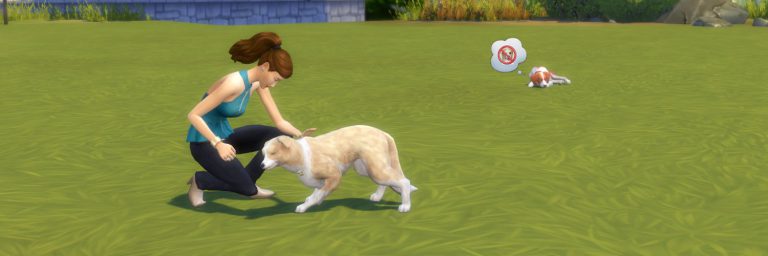
SimGuruChibi shared a new screenshot on her twitter profile header of The Sims 4 Cats & Dogs Expansion Pack; showcasing two dogs, a Sim and new terrain texture.
Hi, I’m Jason Sterling. I see Steampunk as a mixture of high technology and steam power with a Victorian decor. This style is one of my favorite and the Sims 4 catalog is easy to use to create it. This is the second of a series of three articles to help you on the road to the future, firmly rooted in the past.
I am going to use the two examples below in all three articles. The RM Cascadian Airship and the Worldport Airship Waiting Room were conceived as Steampunk designs from the start. I’ll highlight some key ideas from both. As well I’ll showcase some tips not incorporated into these builds for inspiration. I hope this will provide you with some ideas for your Sims.


From my point of view Steampunk is a retrofitted world. I use three essential cheats to create that look and I have listed these cheats below. Press the “CTRL SHIFT C” buttons at the same time while in game. The cheat box will open at the top left of the screen. You can then enter any of the cheats you wish to use in the box. Press the “ESC” button to close the cheat entry box when you are done.
I also heavily use the “]” and “[“ keys to enlarge and shrink objects and the “9” and “0” keys to raise and lower objects. Hold onto the object and press the key to use the function.
Layering to Create Detail
Victorians were in love with ornamentation. So, it plays a role in Steampunk as well. If one bit of extravagant detail is good then ten are better. The Sims catalog does have some options that support this style. However, I think it’s more fun and more creative to design your own using MOO. The following series of photos outline a few different techniques I use to created layers of detail.

I thought the “Auld Crow Wood-Burning Cookstove” could use slightly more industrial look to better pass as Steampunk. Stove #1 is the original. I have inserted the “It’s a gas gas gas” tank into the stove #2 to provide a steam gauge for the appliance. Then, I used the “Copperrr and Otherrr Metal Stove Hall-Wall” to act as both front panel and legs on stove #3. I have reversed it, raised it by pressing the “9” key and then slid it into place for the front panel. After turning it inward, I raised it and slid it back along each side of the stove to create the appearance of feet at the bottom. The stove works very well as it stands in #3. However, I added “The Big Achievement” by flipping it around and sliding it into place on the front of the stove #4. I did this to cover the wood at the bottom but it’s not necessary. Stove #4 is used in the RM Cascadian Airship.

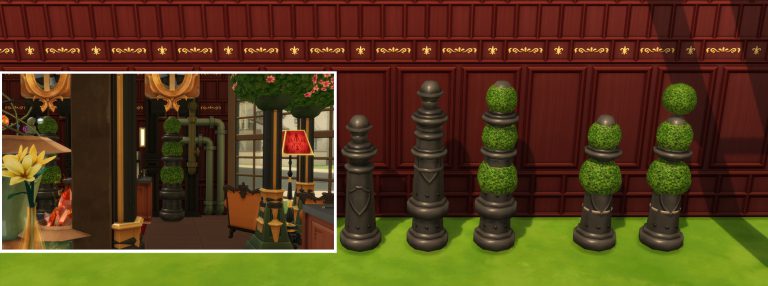
In a blending of Victorian and Industrial I used the “Classic Bollard” and the “Tri-Piary”. I placed the construction as additional greenery in the Worldport. You can see it’s placement in the inset photo below. Next to that you can see the building of the piece starting from the left and moving right. First, I doubled the size of two bollards using “]”. Second, I intersected the two of them using MOO. Followed by lifting one of them by pressing the “9” key to the height shown. Lastly, I inserted the topiary into them to create the final look. There are two additional alternative designs on the right.

The next picture is not something that I used in either of the above builds. Though, it does show how simple items combined with complex ones can create a luxurious and dramatic result. It also works well in a Steampunk room. I started with the flat plain “Tall Classic Curtain”. Then, I added the white, swept back, modern “Some Like It Plain” curtain. Lastly, I layered both of those with the “Victorian Over-Indulgence Curtain” with its heavy crown molding.

I hope you’ve enjoyed this second article. Please join me tomorrow for the final part in this Steampunk series: One Machine to Run Them All
You can see the RM Cascadian Airship in action during my live Twitch feeds on channel: JasonAnthonySterling and you can follow me on Twitter @JasonSterling70. Both the builds shown here are available on the Sims 4 Gallery.

The sims Team has released a new render celebrating The Sims 4’s 3rd Anniversary including content that’s been released in the last 12 months (and Cats & Dogs EP which is coming in November).


The 4th installment for The Sims has been released on September 2nd, 2014 with not much offering. As we covered in an article a few weeks ago which talked a lot about the missing features and bugs that were presented in the first version of the game – the game has dramatically changed. From simple UI changes to adding an entire new life stage The Sims 4 had a lot to offer during the last 12 months, but was it enough?
The team released a couple of important updates to the game. There were plenty of updates which only addressed bug fixes for the game but there were also updates which really added more to The Sims 4 base game. Here’s an overview of every important update that was released in the last 12 months:

[/icon_timeline_item][icon_timeline_item time_title=”Lot Traits Update” title_font_size=”desktop:24px;”]October 27th, 2016

[/icon_timeline_item][icon_timeline_item time_title=”Holiday Celebration Pack Update” title_font_size=”desktop:24px;”]December 1st, 2016

[/icon_timeline_item][icon_timeline_item time_title=”Toddlers Update” title_font_size=”desktop:24px;”]January 12th, 2017

[/icon_timeline_item][icon_timeline_item time_title=”Main Menu Update” title_font_size=”desktop:24px;”]February 2nd, 2017

[/icon_timeline_item][icon_timeline_item time_title=”PlantSim Challenge Update” title_font_size=”desktop:24px;”]April 13th, 2017

[/icon_timeline_item][icon_timeline_item time_title=”Load / Save UI + Feature Update” title_font_size=”desktop:24px;”]May 25th, 2017

[/icon_timeline_item][/icon_timeline]
What stood out the most from all of these updates is definitely the Toddlers Update. It didn’t just bring more to the game – it brought a lot more players to the game. The “players currently online” section in The Sims 4 Gallery Menu has spiked up ever since and even EA has confirmed that “the last 12 months have been the best in title’s history”.
In terms of game updates The Sims Team really delivered this year.
For the 2nd year in a row The Sims Team only offered one Expansion Pack – The Sims 4 City Living. It would’ve been great if the pack had more options that would let you build apartments on any lot but nope. I was bored of it in a matter of few weeks but some simmers still enjoy it to this day.
However, they made things up with the release of 2 Game Packs – Vampires and Parenthood. Surprisingly these Game Packs released in a matter of 5 months and they both offered something unique. With Vampires you could rank up your Vampire Sims and unlock all sorts of abilities that would help you through the day in Forgotten Hollow (the second world that was added with a paid pack this year). Parenthood, a Generations-themed pack which focuses on Toddlers, Kids, Teenagers and their caregivers really expanded and reimagined the family gameplay.
Now, to talk about your favorite packs – Stuff Packs! For the 2nd year in a row, The Sims Team released 4 Stuff Packs for the game (I think we have a pattern here)
Looking back at these 4 stuff packs I think we got a good variety of things that were offered – new makeup gameplay, bowling alleys, climbing walls and playground equipment for toddlers.
Let’s take a look at how these packs were released chronologically:

[/icon_timeline_item][icon_timeline_item time_title=”Vintage Glamour Stuff Pack” title_font_size=”desktop:24px;”]December 6th, 2016

[/icon_timeline_item][icon_timeline_item time_title=”Vampires Game Pack” title_font_size=”desktop:24px;”]January 24th, 2017

[/icon_timeline_item][icon_timeline_item time_title=”Bowling Night Stuff Pack” title_font_size=”desktop:24px;”]March 29th, 2017

[/icon_timeline_item][icon_timeline_item time_title=”Parenthood Game Pack” title_font_size=”desktop:24px;”]May 31st, 2017

[/icon_timeline_item][icon_timeline_item time_title=”Fitness Stuff Pack” title_font_size=”desktop:24px;”]June 20th, 2017

[/icon_timeline_item][icon_timeline_item time_title=”Toddler Stuff Pack” title_font_size=”desktop:24px;”]August 24th, 2017

[/icon_timeline_item][/icon_timeline]
Some Simmers are closely following the release pattern of previous Sims installements and fear that The Sims 4 is coming to an end. But, looking at what The Sims Team is currently making the game is far from over! Here are something to get excited about for the next few months:
Are you satisfied with the last 12 months and do you think it could’ve been improved? Let us know in the comments!

A huge day in the history of The Sims today, on this day just three years ago The Sims 4 officially launched, a new chapter in the series. Missing quite a few features but with a promise to bring them back the game wasn’t the best launch in the franchise but it marked the day The Sims 3 officially died and we had a better and more stable engine to build upon hopefully with a longer life and the ability to push it further than ever before.
https://www.youtube.com/watch?v=z00mK3Pxc8w
The base game was surrounded by controversy, missing toddlers being the biggest but even so it was such a massive step forward for the series with the addition of emotions and our sims could finally do multiple things at once, something we’d been missing since the very start. It was features like these which filled players with hope that the series was heading in the right direction and three years on it’s safe to say those initial feelings were spot on.
It wasn’t just the sims who made the game, the brand new build mode made it easier than ever to build amazing homes with just a few clicks, intuitive tools and pre-made rooms meant anyone could create something to be proud of, that and the fact the base game launched with the most items of any in the series meant there was plenty to be doing.
 As said previously we got a much more stable engine, built to be added to and with absolutely nothing recycled from previous games it was a fantastic start and the development team ensured we’d have years of great content. What were your thoughts on the base game at launch and what about now? Let us know in the comments.

Amazon has listed The Sims 4 Cats & Dogs Expansion Pack which is now available for Pre-Order! If you’re looking to get a hands on the physical version of the 4th Expansion Pack this is the perfect opportunity.
Click below to pre-order the game on Amazon!

Hi, I’m Jason Sterling. I see Steampunk as a mixture of high technology and steam power with a Victorian decor. This style is one of my favorite and the Sims 4 catalog is easy to use to create it. This is the first of a series of three articles to help you on the road to the future, firmly rooted in the past.
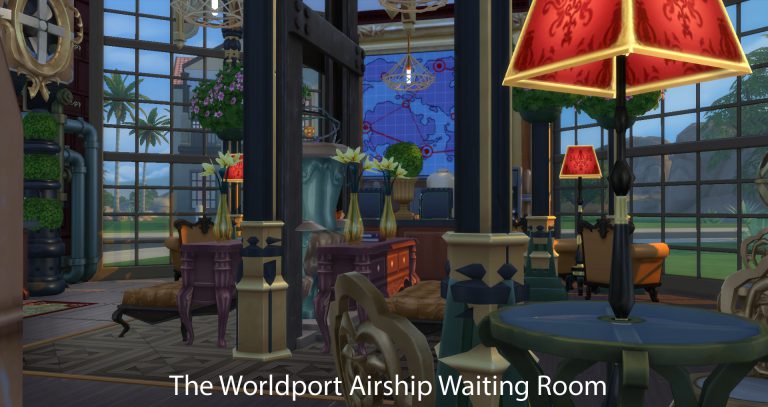
I am going to use the two examples below in all three articles. The RM Cascadian Airship and the Worldport Airship Waiting Room were conceived as Steampunk designs from the start. I’ll highlight some key ideas from both. As well I’ll showcase some tips not incorporated into these builds for inspiration. I hope this will provide you with some ideas for your Sims.
From my point of view Steampunk is a retrofitted world. I use three essential cheats to create that look and I have listed these cheats below. Press the “CTRL SHIFT C” buttons at the same time while in game. The cheat box will open at the top left of the screen. You can then enter any of the cheats you wish to use in the box. Press the “ESC” button to close the cheat entry box when you are done.
I also heavily use the “]” and “[“ keys to enlarge and shrink objects and the “9” and “0” keys to raise and lower objects. Hold onto the object and press the key to use the function.
Steampunk tech is often covered in Victorian cosmetic detail. I have three examples below as illustration and tutorial.
I have placed the “Tactical Map” in the Worldport to act as a destination board for airship travel. (#1) Then I’ve used an enlarged “Portrait of the Lady Mimsy” to frame the map. Along with the “Unfulfilled Wall Sign” which is hiding the lower portion of the painting from view. (#2) Then I chose the “Compound Clearing Industrial Pipe”, the “Galvanized Industrial Wall Pipe” and the “Large Energy Emitting Transistor” to provide our steampunk mechanical and power source for the map. (#3) The area is finished out with “Modern Victorian Counters”. Atop these is the “Arctic Kiss Fan”. (#4)

We have the Transistor again here to act as a control board for the telescope. While the telescope is acting as the navigational aid for the airship. I’ve softened the device by using “Portrait of a Marriage” to frame it in carved wood. Further I added the “Mega Wall Lanterns” as a source of Victorianesq light. The “Antique Book Stand” acts as a manual for the controls. Lastly, I’ve added the “Gate of Wonders” for access and for additional Victorian flare.

This last example I’ll include for inspiration. It’s not perfect. It can also be tricky aligning the “Invisiview Flat Screen HDTV” using MOO. However, I still use this technique occasionally.
I start with the “Etude in Blue Painting” placed as shown. (#1) It fits the television best. You can also use “Viva More of La Landscape” shown as an example on the ground. I like the carved wood frame better in fact but it does not fit as precisely with the television.
After I hang the painting I remove the section of wall behind it. (#2) Next I raise the television using the “9” key to the same height as the painting. While holding it, I slide it back until it intersects the frame and covers the art. (#3) Lastly, I place Holder Upper Pillars to frame out the wall break as a retro-fitted opening between rooms. (#4) I like the use of these pillars here better than other choices as there is a bit of overlap of the columns onto the screen that look like brackets screwed into place to hold the television in place. To me it fits with the retro-fitted look in this case. I’ll often duplicate this on the other side of the opening.

I hope you’ve enjoyed this first article. Please join me tomorrow and read part two in this series: Layering to Create Detail
You can see the RM Cascadian Airship in action during my live Twitch feeds on channel: JasonAnthonySterling and you can follow me on Twitter @JasonSterling70. Both the builds shown here are available on the Sims 4 Gallery.

Via TheSims.com!
Hi Simmers! We were thrilled to finally announce The Sims 4 Cats & Dogs*. It’s a huge relief to finally get it out in the open. One of the first questions the community asked after our big reveal: Can I control my cats and dogs?
This is appropriate, because it was one of the first questions we asked ourselves long before we started working on the game itself. It’s one of the most important design questions for the entire pack, so we want to dive a little deeper into what it means. Early on our team was almost evenly split and gearing for a creative fight. Folks (me included!) had (and have) VERY strong opinions on this topic. We knew it was incredibly important. In The Sims 2, you couldn’t directly control pets. In The Sims 3, you could. We went back and played the old games, read the forums, and conducted survey research on this topic specifically to fully consider every angle.
We went back and forth, and finally our creative director made a very important point. The question isn’t control or not control? It’s what can we do with either solution, and why is one solution superior? What do we gain? What do we lose?
Before we continue this, let’s take a step back and examine other aspects. I’m a dog owner and have been almost my entire life. My corgi, Peaches, is often the focus for my weekends. My wife and I take her to the beach, throw her in the car to shop, and we read in the backyard so she can enjoy the sun. We dote on her.
I’m not alone in being obsessed with my dog or cat on the team. When discussing this pack, we tried to really dive deep into the essence of our pets and why we love them. Why they make us laugh. Why they make us angry. Why we photograph them constantly. We found out that we were all drawn to what made our pets special. How they sleep on their backs. How they always bark at a certain person. How they listen for the crinkle of a plastic bag as they know it’s a walk.
We knew our cats and dogs in The Sims 4 Cats & Dogs needed to be responsive, observant, and obsessed with the Sims. Their owners. Their companions. We also knew we wanted them to be surprising, to act in unexpected and delightful ways, and to be living creatures. We were guided by the idea that cats and dogs would be like Sims for your Sims.
This brings us back to control. There are many factors at play here, some technical, some design, but in a nutshell, if players could see and control every aspect of their cat or dog, it made it difficult for us to make them do surprising, fun, and unexpected things. When we compared all the options, we knew that our game would be the most fun if we didn’t let players select cats and dogs, but instead gave you other ways to interact with them. When we made this decision, it fundamentally opened up things we could do with cats and dogs that we can’t do with Sims even!
This doesn’t mean they’re wild and without control. Far from it. I’m going to give some examples, but before that, let me ask: How do you control your dog or cat in real life? How do you get them by your side when you want to pet them, or get them to sit when they’re misbehaving? The answer in your mind, it’s how it works in the game too. When your Pets need your attention to solve their needs, they’ll animate, act in certain behaviors, communicate with your Sims, and yes, the UI will tell you what they need. You can even ask them!
When they act badly, you can train them to stop. When you want them by your side, you can call them immediately over to you. But, like all good dogs and cats, there is a good chance they’ll be at your feet, walking along side you, or snoring on the couch next to your Sims already. If you want your dog to breed with another dog, you can instruct them to do so. When you need your cat to sleep in a certain bed, you can call them to do so.
In a nutshell, you won’t be frustrated by a lack of control. We’ve taken great pains to design, implement, and test an assortment of solutions and content to make sure that isn’t the case. But, we’ve also filled the game with unique behaviors and attributes for your cats and dogs so that you’ll be observing and telling stories for years.
We think The Sims 4 Cats & Dogs is the best pets expansion we’ve ever made, and a big reason for that is the freedom we were granted by removing control. Some of you may not agree, but don’t worry, The Sims 4 Cats & Dogs will be out soon and we’ll be talking more about it in the coming months. Soon you’ll agree that this is the most pawesome decision!
Until next time.
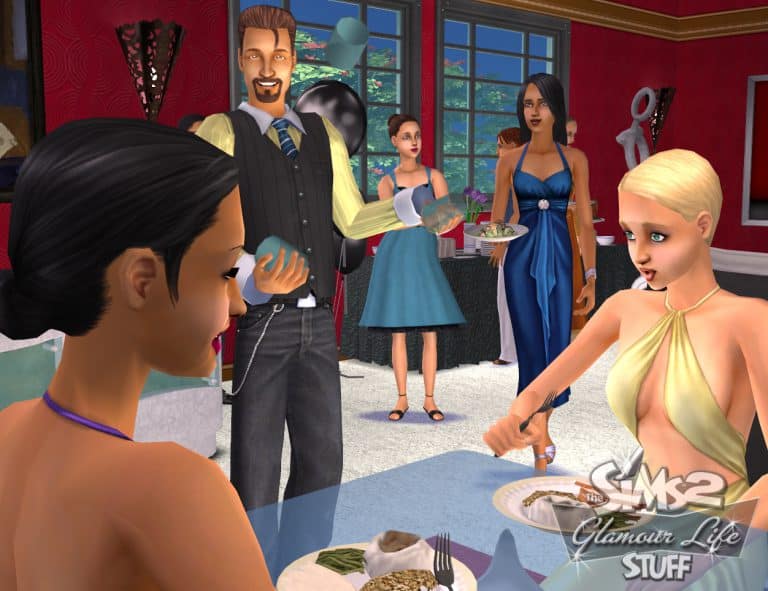
On this day 11 massive years ago the third stuff pack for The Sims 2 launched, allowing sims to add a touch of class to their wardrobes and homes, The Sims 2: Glamour Life Stuff released. This pack gave our sims the chance to live the high life and make sure everyone in the neighbourhood was jealous of their luxurious homes.
As well as adding a whole load of new gorgeous items of furniture it added loads of fancy new clothing items, hair and accessories to give our sims a look to match their homes.
https://www.youtube.com/watch?v=3wY2_jdDWE8
The pack was quite popular, this was most likely down to the fact it added more modern furniture to the game as it was quite clear the games furniture and clothing was a bit stale at that point, but this pack changed that and was a great addition to the game. Did you pick up this pack all those years ago? Let us know in the comments.

SimGuruEmory is recreating pets tweeted at him in The Sims 4 Cats & Dogs Expansion Pack and she shared two new images!


Want to see your pet recreated in The Sims 4 Cats & Dogs? Reply to his tweet down below with a picture of your cat / dog!
I’ll try to make one pet per day, so tweet at me with a pic & breed of your cat / dog and I might paws from work to make it #TS4CatsAndDogs
— SimGuruEmory (@SimGuruEmory) August 31, 2017
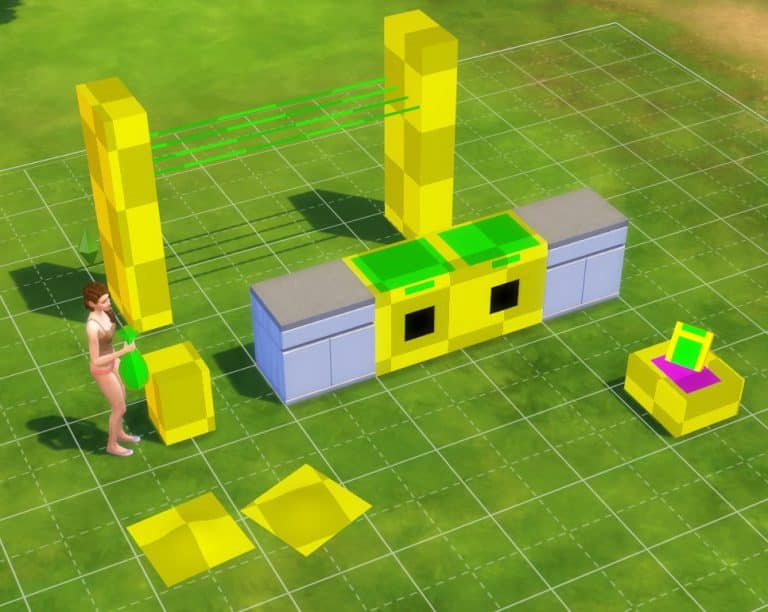
SimGuruGraham shared an image of a rough prototype of the new gameplay objects that come with The Sims 4 Eco Living Stuff.

An early prototype of laundry is taking shape! Clothes can now be taken through a basic laundry flow. Can you tell which object is which? pic.twitter.com/UaSyMLwdHM
— Graham Nardone (@SimGuruGraham) August 31, 2017
Thanks 😉 We’re planning on having the Sim hang the laundry up on the line by hand.
— Graham Nardone (@SimGuruGraham) August 31, 2017
That’s the wash tub, it’s shaping up nicely 🙂
— Graham Nardone (@SimGuruGraham) August 31, 2017
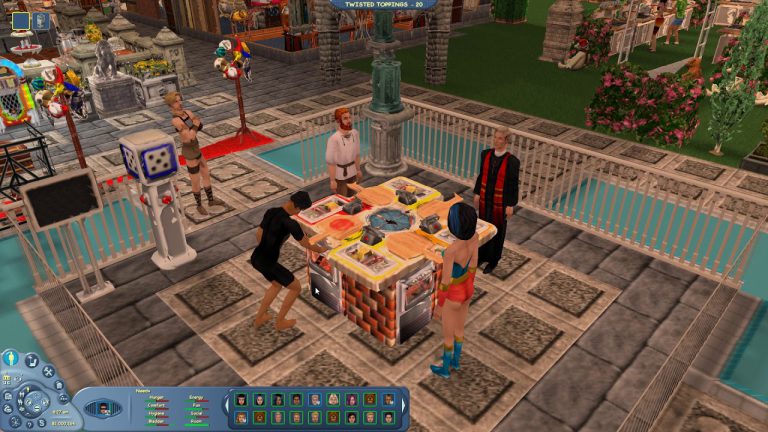
FreeSO is getting its biggest update this week!
The latest installment of Sims Online’s reincarnation called FreeSO will let you play with other simmers with similar Sims 1 graphics – only this time in 3D!
Three years ago, any chance of anyone reviving The Sims Online looked very slim. Any existing project seemed to either fall off in activity, be a hoax in the first place, or burn hopeful fans with controversial donations for a server that was never meant to be. Despite all the ruckus, three years ago is when we got the first glimmer of hope that TSO would be back again – a convincing UI recreation of the initial few screens of the game including Create A Sim, with a lot of backend work to load important game content. Developed by Afr0 and ddfczm, this recreation was called Project Dollhouse, and it’s what inspired me to work towards this same goal. Despite exciting developments in SimAntics emulation by me and ddfczm, with ingame footage of TSO objects somewhat working, this community stayed at only a few members – nobody believed anymore in TSO ever returning. Our community slowly grew as I implemented the online sandbox mode and split into FreeSO, and people finally started believing that it was possible. The launch into beta was a spectacular surprise.
Today, we’ve almost done it. It has been a heck of a long journey, and finally people don’t have to believe in something anymore – it’s right here. A fully re-implemented TSO client and server is available for all to use, with source available so it can be developed further by anyone in the future, maybe tens of years from now. The ability to play TSO will never truly disappear, thanks to the efforts of its community.
Wonder how it all looks like in motion? Check out the video below and read their latest blog post HERE!
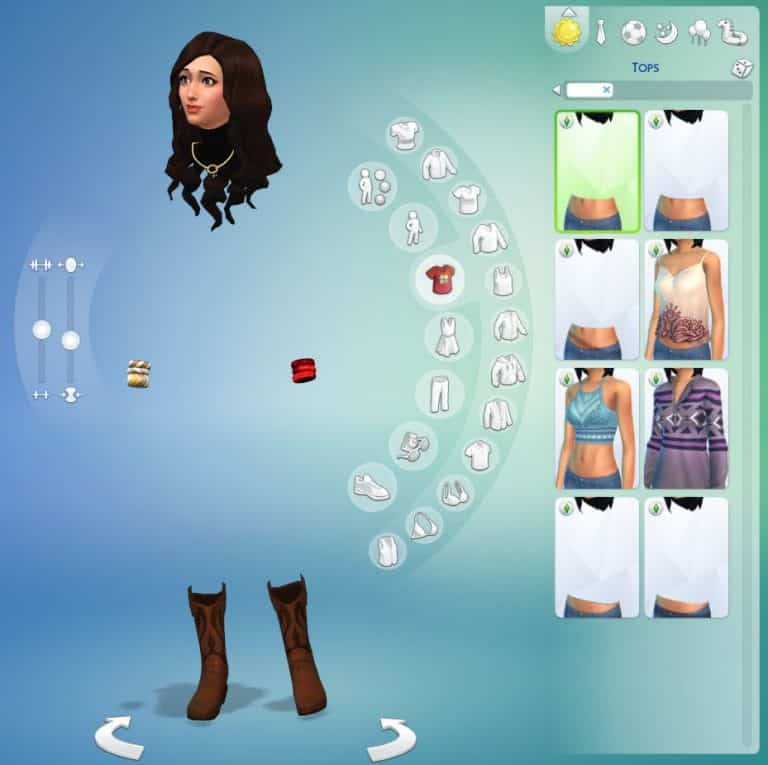
SimGuruGraham gave us a first look at some of the new items that are coming with The Sims 4 Eco Living Stuff – a community Stuff Pack which we all helped build together throughout this year.
As you can see on the panel on the right there are some new clothing items and some that still need to be created by the development team.

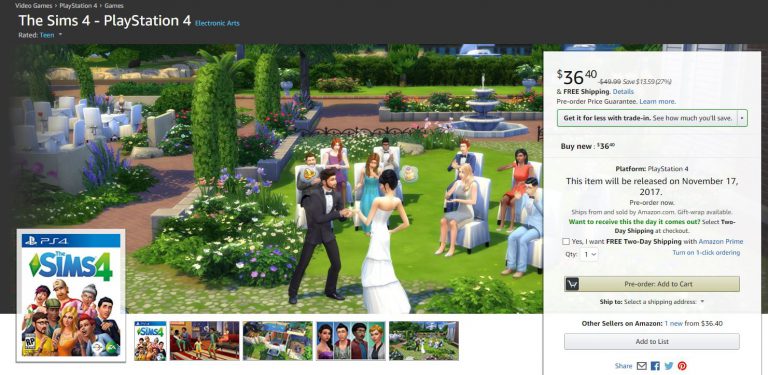
The Sims 4 Standard Edition for PS4 is currently being sold on Amazon for just $36,40, which is 27% off from the original, $49,99 price. It’s unknown for how will this limited-time sale last but one thing is certain: if you’ve been wanting this game for your PS4 now’s the time to pre-order it!
Click below to check out this offer!

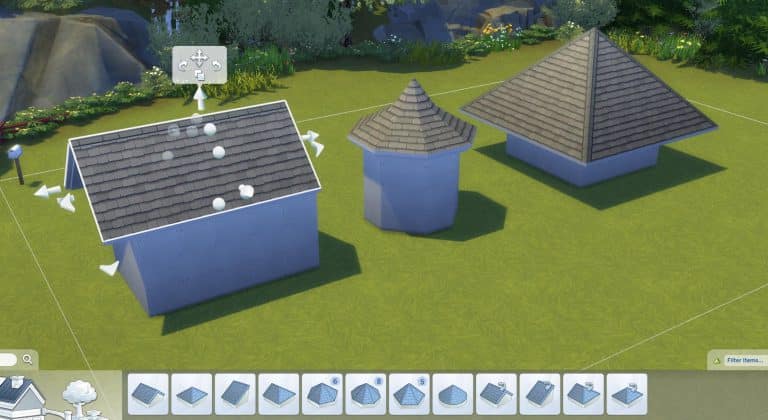
As we reported on a few days ago it was rumoured and then seemingly confirmed on Twitter by SimGuruHouts that we’d be getting new roof types in game, today they’ve been well and truly shown off.
New roof stuff! pic.twitter.com/wrfUUtDkgc
— Aaron Houts (@SimGuruHouts) August 29, 2017
As you can see from the image we’re getting pentagonal, heptagonal, octagonal and round roofs added, but there’s more. The selected roof clearly has way more white spheres and arrows around it than we have now, this could mean that the way roofs can be manipulated has been vastly improved.
 But that’s not all, as you can see from the image there is a hidden surprise, we’ve had hipped roofs since the launch of The Sims 4 but they were awkward and restricted as they lacked the ability to have their eaves altered, it appears this is no longer the case. The image shows a hipped roof with its eaves pulled right down.
These new features will most likely be released as a free update before the new Cats & Dogs expansion pack is released.

