Home Blog Page 253

We’re giving away 8 copies of The Sims 4 Get Famous for Consoles!

It’s time for our final Console giveaway to celebrate our 6th anniversary!

This time we’re giving you an opportunity to win 1 out of 8 copies of The Sims 4 Get Famous Expansion Pack for Xbox One and PS4, more specifically:

  • 4 copies of The Sims 4 Get Famous for Xbox One
  • 2 copies of The Sims 4 Get Famous for PS4 (North American Region including Canada, United States, Mexico, and Bermuda)
  • 2 copies of The Sims 4 Get Famous for PS4 (European Region including Western Europe, the Middle East, South Africa, Egypt, and Japan)

The giveaway codes for Xbox One are universal for all regions. However, considering that PS4 has several regions with codes locked away for each region specifically we had to make a decision to create 3 giveaways in total, covering each platform and console.

The giveaway is live right now and for better organization we’re hosting it on Sims Community Social. If you don’t have an account you can easily create one and enter the giveaway. Just make sure you follow the specific rules that we’ve linked within the giveaway links down below!

Here are the giveaways that you can enter right now that last until June 2nd at 8PM CET:

We’re giving away 8 copies of The Sims 4 Get Famous for Consoles!

Make sure you also follow us on the following social media outlets as there are going to be a few more giveaways on our social platforms:

The Sims 4: EA Play Announcement Stream Details

3

Electronic Arts has just announced more details regarding their EA Play 2019 livestream that they’ll be doing on June 8th, 2019. The stream will be covering multiple franchises, including The Sims 4!

The Sims 4 is scheduled to be streamed at 12:00PM Pacific Daylight Time / 9PM CET / 8PM BT. In case you don’t know there are going to be announcements for The Sims 4 during this stream so buckle up!

We’ll be covering all the details and will be providing you with a shared livestream + an exact countdown as we get closer to the date so stay tuned!

The Sims 4: EA Play Announcement Stream Details

SimGuruFrost has also shared that there are going to be LOTS of exciting announcements for The Sims 4 during the stream and that due to the event there will be no June Maxis Monthly.

The countdown is on! EA PLAY is only 10 days away. We’re here today for two things: a reminder to register for tickets if you want to join us in Hollywood, and for everyone else, a rundown on all the great content we’re set to bring you through live streams.

First things first: if you don’t have your ticket already, let’s fix that. Apex Legends™Star Wars™ Jedi: Fallen Order™, Battlefield™ VAnthem™The Sims™4 and some of your favorite EA SPORTS™ games will all be at EA PLAY, and best of all, the event is completely free*.

First things first: if you don’t have your ticket already, let’s fix that. Apex Legends™Star Wars™ Jedi: Fallen Order™, Battlefield™ VAnthem™The Sims™4 and some of your favorite EA SPORTS™ games will all be at EA PLAY, and best of all, the event is completely free*.

For those that can’t make it out to Hollywood, we have a whole lot of content for fans to get into. We’re taking you deeper into our games this year with three hours of live stream content on Saturday, June 8, bringing you gameplay and insights from six of our biggest franchises. It all starts at 9:15 a.m. with the Countdown to EA PLAY followed by the franchise live streams.

Here’s the schedule for the live streams (all times PDT):

  • 9:15 am: Countdown to EA PLAY
  • 9:30am: Star Wars™ Jedi: Fallen Order™
    • Hosted by online personalities Greg Miller and Andrea Rene
  • 10:00am: Apex Legends
    • Hosted by commentator Alex “Goldenboy” Mendez
  • 10:30am: Battlefield V
    • Hosted by online personality Julia Hardy and EA’s Adam Freeman
  • 11:00am: EA SPORTS FIFA
    • Hosted by Alex “Goldenboy” Mendez
  • 11:30am: EA SPORTS Madden NFL
    • Hosted by NFL Network’s Adam Rank
  • 12:00pm: The Sims 4
    • Hosted by Andrea Rene

To watch, be sure to tune in to EA.com or EA’s YouTube or Twitch channels. If you are only interested in a couple of the games, you can also tune in at the specific times listed. For all EA PLAY content throughout the weekend, including exclusive gameplay reveals, trailers and breaking news, be sure to stay locked to EA.com. 

EA PLAY is all about the games and all about the fun, so here are a few other things to expect from our two-day celebration:

  • Try to score a touchdown via The JuJu Smith-Schuster Fan Experience
  • Star Wars™ Jedi: Fallen Order™ theater experience
  • Star Wars™ Jedi: Fallen Order™ photo opportunity
  • Merchandise booth with brand-new Apex Legends gear for sale
  • Custom EA SPORTS FIFA soccer pitch
  • And more!

Please download the EA PLAY app to get more information and timings for all of these great onsite experiences! The app is available on the App Store or Google Play.

Join us at the Hollywood Palladium on June 8th and 9th for a weekend of games and fun with your family and friends.

The Sims Mobile is getting a Quality of Life Update Soon

0

The Sims Mobile Team has just announced their first ever update for the game that they’ve done with Firemonkeys and it’s a BIG one!

The upcoming update that they talk about more in the blog post below promises some of the long-awaited features we’ve all been wanting such as an Inventory Revamp, LlamaZoom changes and more.

Sul, sul!

As many of you will know TSM is now being developed by a brand spanking new team at the Firemonkeys (FM) Studio in Melbourne. While the team may be new on this specific title, the team has a long history with the franchise, where many members have previously worked on The Sims Freeplay. With this in mind, I think it’s safe to say we are prepared for this challenge!

The question we know many of you have now, is what’s next for The Sims Mobile?

Our First Update – Coming soon!

For our very first update, we thought it was essential to focus on Quality of Life. Our goal was to focus on changes Simmers wanted to see. Changes that would make the game FEEL better in your day-to-day play! Throughout the blog, we’ve added some quotes from members of the dev team to provide some extra insight. First up, here is SimGuruIlya with some thoughts going into this update:

When we got together with the team for the first time to think about what the next update should be, we almost instantly landed on the Player Quality of Life theme. It felt just right for our first ever update to be focused on our players! We’ve reached out to our Community, QA and Maxis team to identify the general pain points in the game. On top of that we’ve all been playing The Sims Mobile for a long time (some since Soft Launch) and we’ve got some things we wanna improve too! We’ve put a lot of effort into this and hope you guys love it! 😉’ – SimGuruIlya, Producer on TSM

While we couldn’t tackle everything, we dug into some of your most requested areas!

What’s new this Update?

All the juicy details of the changes we’ve made will be in our upcoming patch notes, however we want to share a few changes early!

(SPOILER) Inventory Changes (SPOILER)

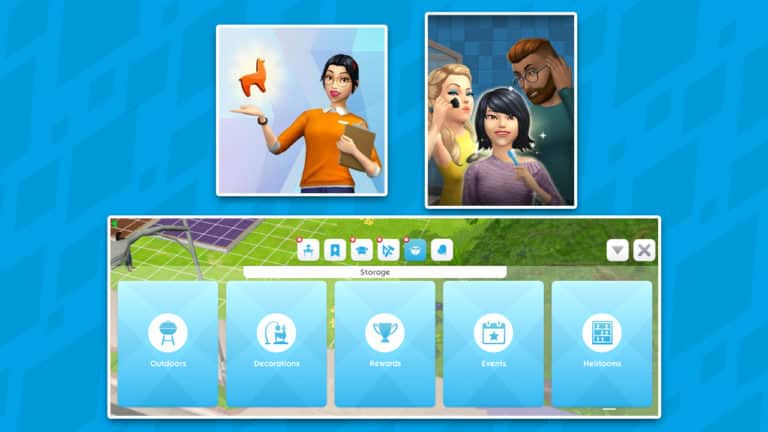
We’ve completely overhauled Storage in TSM! Categories are clearer, and recently selected objects are quicker to access! ✨

It was such a popular request from everyone and when playing the game, I definitely felt it was important too! I spent a number of days making sure every item in the game has a Storage category – it’s much easier to find everything and the best part is, now Heirlooms are tucked away in their own category!’

– Laura, Game Designer on TSM

The Sims Mobile is getting a Quality of Life Update Soon

3rd Sim Quest

We’ve made it possible to unlock the 3rd Sim Slot for free through a Quest called, “Roommate Race”.

“What’s better than 2 Sims? 3 Sims! We’ve added a new way for all players to earn their 3rd Sim via Limited Time Quest. You’ll also get to experience some of the little improvements we’ve made to Quests! I’m going to lose my freakin’ mind I’m so excited!”
– SimGuruJack, Associate Game Designer on TSM

The Sims Mobile is getting a Quality of Life Update Soon

LlamaZoom

We’ve adjusted the time to complete tasks to be more consistent each day, making it easier for you to choose how you want to play.

‘We know a lot of players have expressed frustrations with LlamaZoom, so we wanted to see what we could do to make the system feel better and worth the effort. We’ve made a variety of tuning changes, which we’ll go into more detail about in the patch notes, and we also added some extra rewards!’
– Steve, Lead Game Designer on TSM

The Sims Mobile is getting a Quality of Life Update Soon

June is Pride Month

This update also happens to land during a very special month of the year: PRIDE! 🏳️‍🌈 You can expect a new quest with some rainbow goodies as well as some FREE things in the store!

SimGuru Update!

With the original team moving on, it means we have some SimGuru-shaped holes to fill in our community! So, we are creating a brand new merry band of SimGurus!  While only I, SimGuruVix, am currently on Twitter, the rest will be joining us soon!

In our SimGuru Squad so far, we have:

SimGuruVix – Community Manager
Twitter Account: https://twitter.com/SimGuruVix

Previously worked on: The Sims Freeplay, Real Racing 3, Need for Speed No Limits
😍 ‘s: People, talking, makeup, ska, cute socks, being EXTRA
😒 ‘s: Coffee, not being able to edit Tweets, silence

SimGuruIlya – Producer

Previously worked on: The Sims Freeplay
😍 ‘s: Guitars, skateboards, my 2yo daughter Nika, building stuff
😒 ‘s: Emails!, when it’s too hot outside, when it’s too cold inside

SimGuruBerty – Associate Technical Director

Previously worked on: The Sims Freeplay
😍 ‘s: Coffee, chocolate, pastries, soccer, romance, DOGS!
😒 ‘s: Bad coffee, slow internet, bad coffee, socialising at parties, glasses without lenses

SimGuruJack – Associate Game Designer

Previously worked on: Real Racing 3
😍 ‘s: Indoor Plants, coffee, Indian food, groovin’
😒 ‘s: Discussing my mysterious past, staring at the sun for long periods of time, celery

Looking to the Future! 

With this update almost ready to get out the door, we are already deep into working on the update that will follow it.

‘Every time someone new comes into the team, they bring a fresh view of the game. This allows all aspects of the game to be questioned and challenged! The entire TSM team is currently thinking like that, and are excited about all the potential new things we can do with this game, both in features for our players, but also for our tools and tech’.
– 
SimGuruBerty, Associate Technical Director on TSM

When the Patch Notes are live – we’ll post them on our blog, The Sims Mobile Forum, and let you know on Twitter! Until then, we’d love to hear your thoughts on these changes, either on Twitter or on forums.

Talk soon Simmers!

SimGuruVix xo

The Sims 4: “Announcements” Confirmed for EA Play

26

UPDATE: SimGuruGibson has deleted the tweet and posted a new one, saying that “he shouldn’t have declared anything about content releases”.

We’ve speculated about the possibility of a brand new announcement happening for The Sims 4 at EA Play. However, nothing was officially stated or said by The Sims Team that it’s 100% happening – until now.

SimGuruGibson revealed that The Sims Team has shared a few interesting details over the last couple of days (such as 350 New Swatches for Base Game Objects) but that they’re keeping the main announcements (yup, plural) a secret until EA Play.

In case you don’t know the EA Play 2019 event starts on June 8th, 2019! We’ll be attending the event as well and bring you the latest news and updates straight from the event!


Another Simulation Lag Fix for The Sims 4 is releasing soon

Just a few weeks ago we reported on the revival of thepancake1‘s Simulation Lag Fix Mod for The Sims 4. The mod has been successfully updated by SrslySims for the latest version of The Sims 4 and can even be downloaded right now!

However, if you prefer having more than just one solution for this fix and if you prefer a faster alternative there’s another Simulation Lag Fix in the works by thepancake1, the same modder who is currently working on speeding up the loading times in The Sims 4!

This Simulation Lag Fix Mod is called Llama Supersmooth, promising reduced simulation lag when playing the game. This means that Sims will have shorter breaks inbetween the interactions they’re performing and that the general responsiveness of the game will increase rapidly.

This mod is currently in the early access phase and you can get it from thepancake1’s Patreon Page with a full free release coming really soon.

Basically, it picks and chooses the sims that you’d perceive as lagging, and prioritizes them to run their AI first. By itself, that isn’t enough.

To reduce the perceived simulation lag (the head bobbing and the creepy stare sims occasionally have when it’s lagging), the game allows sims to continue their current interaction until they have received another AI update.

https://www.youtube.com/watch?v=B6LFdXxq2JA

This The Sims 4 Lighting Map Guide Will Help You Showcase Your Lots Better

Don’t you just hate when you spend hours working on your Lot in The Sims 4 and right as you decide to share the lot to The Gallery, you immediately find out that there’s an object blocking the view?

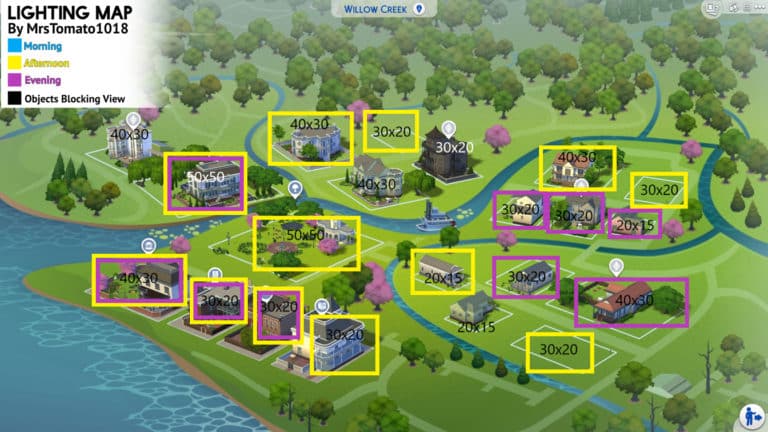
Sure, it doesn’t have to be all that bad. But sometimes you just want to know which lot has the perfect lighting for certain times of the day. That’s why the amazing @MrsTomato1018 has found the perfect solution to share with other players and that’s The Sims 4 Lighting Map Guide!

In the pictures down below you’ll be able to see each map (excluding StrangerVille) we currently have in The Sims 4 with each lot marked with lot size details and lighting / view information which is mostly just useful for lots that you plan to share on The Gallery.

Here’s more information for each color and outline shown in the maps below:

  • Blue – Morning
  • Yellow – Afternoon
  • Purple – Evening
  • Black – Objects Blocking the View
  • No Box – Generally bad lighting

Willow Creek

This The Sims 4 Lighting Map Guide Will Help You Showcase Your Lots Better

Oasis Springs

This The Sims 4 Lighting Map Guide Will Help You Showcase Your Lots Better

Newcrest

This The Sims 4 Lighting Map Guide Will Help You Showcase Your Lots Better

Granite Falls

This The Sims 4 Lighting Map Guide Will Help You Showcase Your Lots Better

Magnolia Promenade

This The Sims 4 Lighting Map Guide Will Help You Showcase Your Lots Better

Windenburg

This The Sims 4 Lighting Map Guide Will Help You Showcase Your Lots Better

San Myshuno

This The Sims 4 Lighting Map Guide Will Help You Showcase Your Lots Better

Forgotten Hollow

This The Sims 4 Lighting Map Guide Will Help You Showcase Your Lots Better

Brindleton Bay

This The Sims 4 Lighting Map Guide Will Help You Showcase Your Lots Better

Selvadorada

This The Sims 4 Lighting Map Guide Will Help You Showcase Your Lots Better

Del Sol Valley

This The Sims 4 Lighting Map Guide Will Help You Showcase Your Lots Better


The creator of this Lighting Map Guide has also made a useful video overview of this map that you can check out down below:

Make sure you follow her on Twitter @MrsTomato1018 if you want to stay up-to-date on her latest Gallery creations!

The Sims Mobile: Official Survey Suggests Possible Upcoming Features

3

The Sims Mobile Team has just recently published a brand new survey!

The survey covers a lot of topics, from how satisfied you as a player is of the game to possible upcoming features for the game.

You can take the survey yourself and fill it out with your honest opinions and wishes for the game by clicking the survey button down below.

[mks_button size=”large” title=”TAKE THE SURVEY!” style=”rounded” url=”https://eaca.co1.qualtrics.com/jfe/form/SV_5mr4F1lWe1FzHhz” target=”_blank” bg_color=”#81d742″ txt_color=”#FFFFFF” icon=”” icon_type=”” nofollow=”0″]

We’ve pulled out some interesting questions and ideas that talk about possible upcoming features that might be added later to The Sims Mobile. Check them out!

  • Which of the following Seasonal Themes are you interested in?
    • High Fashion Events (eg: NY Fashion Week, Met Gala)
    • Halloween
    • Tropical Holiday
    • Back to School
    • Christmas
    • Valentine’s Day
    • Chinese New Year
  • Which of the following Build Features would you like to see add to The Sims Mobile?
    • Pools
    • Basements
    • Garage
    • Terrace / Verandah
    • Multi-Story Houses
    • Skylights
    • Multiple Houses
    • House Templates
  • Which of the following Build Mode Collections would you like to see add to The Sims Mobile?
    • Italian Riviera Villa
    • Magical / Castle
    • Log Cabin
    • French Countryside Villa
    • Beach House
    • Country Farmhouse
    • Victorian House (British Colonial)
    • Futuristic House)
    • Honeymoon Suite

The Sims 4: Getting Started With Building

Whether you have played The Sims before or are new to The Sims 4 you may find that building your own lots can seem difficult or just a little bit overwhelming with all the different features. Don’t worry! We’ve got you covered with some helpful tips and tricks on how to not only get started with building in The Sims 4 but also help you improve your building skills.

Pre-Built Rooms (Styled Rooms)

The Sims 4 comes numerous pre-built styled rooms that you can drop straight into your game. Each styled room comes in several different colour swatches and there is plenty of variety for each room type. You can also use the Styled Rooms as a starting point and swap out the interior to reflect your Sims personality even more.

The Sims 4: Getting Started With Building

The Gallery

The Gallery is another great resource to discover pre-built rooms and homes from other Simmers across the world. With millions of uploads, there really is something for everyone. You can even upload and share your creations for others to see.

The Sims 4: Getting Started With Building
The Gallery is located in the top right-hand corner of the screen and is the icon with the photographs on.

To upload your own creations to The Gallery simply go to the “Save To My Library” icon at the top/center of your screen. Select either the room or lot to be saved and either select “Share Lot/Room to the Gallery” which is at the bottom left-hand corner of the pop-up or “Save Lot to My Library” which is on the bottom right-hand corner of the pop-up.

Remember: If you are uploading to The Gallery, don’t forget to add a description to your build!

Lot Traits

The Sims 4: Getting Started With Building

Lot traits are very similar to your Sims traits. They can be applied to most lot types and can help with increasing certain skills and relationships as well as some lot traits changing the way certain aspects of the game happen.

Great Acoustics and Homey are examples of Skill building lot traits whereas Teen Neighbourhood and Private Dwelling can have an effect on gameplay.

Terrain Manipulation

Gone are the days of flat terrain! Now you can have your Sims live on top of a mountain or at the bottom of a valley. Terrain manipulation can seem a little difficult to start with so it may be best to practice on an empty lot until you feel more confident with the tools.

Terrain Tools can be found under the Terrain Tools option in the Build Menu and then by selecting the shovel at the bottom of the menu.

The Sims 4: Getting Started With Building

Terrain Paint

Terrain Paints really can help take your builds to the next level. By simply using a Dirt and Sand terrain paint on flower beds or using a different Grass and Flowers terrain paint from the default one on the lot you will notice how much difference it makes. You can even go as far as mixing several different terrain paints together if you want!

You can find the Terrain Paints under the same Terrain Manipulation option in the Build menu and by selecting the paintbrush to bring up the different terrain paints. If you don’t like the way the terrain paint looks or you make a mistake all you have to do is hold down CTRL and you’ll notice a little eraser appear by your cursor instead of the paint brush.

The Sims 4: Getting Started With Building

Start Small or Dream Big

You may already have an idea of what kind of home you want to build your Sims but you might not. You might want to start small with a starter home for your Sims, a family home or even build a mansion for them. The possibilities are endless. Most importantly, don’t be afraid to experiment. A lot of building in The Sims is trial and error until you find what works for that particular build or room. You may even find that you like to build in a certain style.  The more you build the more you will get used to the different features of building and you’ll find what works best for you and each of your builds.

Building Shortcuts

Build Mode would not be complete without some super handy shortcuts. You’ll soon find yourself swapping between them during builds with no issues.

[table id=30 /]

Tutorial Links

This is just an overview of what Building in The Sims 4 looks like. Below are some handy links to more building tutorials.

You can find all these tutorials and more by heading over to our The Sims 4 Tutorials and our Building Library pages on the website.

We’re giving away 5 copies of The Sims 4 Seasons for PC/Mac!

336

PC and Mac players, it’s time to test your luck!

This time we’re giving away five copies of The Sims 4 Seasons Expansion Pack for PC and Mac! The codes that we’re giving away are universal and can be redeemed by any Origin user.

The giveaway is being held on Sims Community Social for better organization considering we’ll be sending out 5 different codes to lucky winners. If you don’t have an account you can easily create one and enter the giveaway. Just make sure you follow the specific rules that we’ve linked within the image down below! The giveaway ends on June 1st at 8PM CET.

Click the image down below to enter the giveaway!

We’re giving away 5 copies of The Sims 4 Seasons for PC/Mac!

Make sure you also follow us on the following social media outlets as there are going to be ja lot more giveaways on both Sims Community Social and some of our social media platforms:

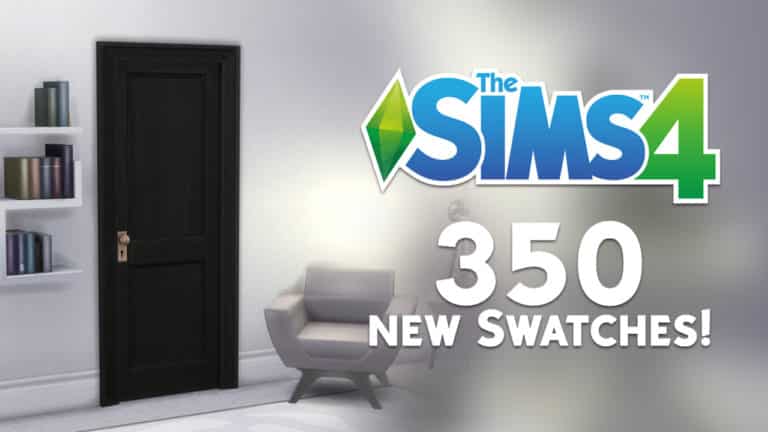
The Sims 4 Base Game is getting 350 New Swatches for Items!

59

A few days ago SimGuruLyndsay posted a cryptic tweet with numbers. The numbers she posted were 2, 18 and 350.

Although she has already revealed that 18 was a countdown to EA Play and 2 was the number of special presentations she was working on, it still remained a mystery what the number 350 was all about.

Well, just now she has revealed the true meaning behind the number 350. The Sims 4 will soon be getting a new update that includes 350 new swatches for items in the game!

SimGuruFrost has also shared the excitement over on Twitter:

It’s also been confirmed that the upcoming Swatch Update for The Sims 4 will be only for the Base Game items!

Just a few weeks ago it was confirmed that we’ll be getting an all-black door for one of the base game doors we currently have in the game. However, it was not known until now that there will be at least 349 other new color swatches for other items in the game!

The Sims 4 Base Game is getting 350 New Swatches for Items!

SimGuruLyndsay teases a possible The Sims 4 Announcement at EA Play

3

Just 2 days ago SimGuruLyndsay, General Manager for The Sims Franchise has posted a cryptic tweet involving a mysterious numbers game:

The numbers she included are 2, 18 and 350. She let the community try to decipher what these numbers mean but eventually she decided to share the true meaning behind the numbers two and eighteen:

350 still remains a mystery but what’s interesting is that she decided to give out a hint by counting down to the exact date when EA Play will be doing multiple livestream sessions covering multiple gaming franchises on June 8th.

We knew a few days ago that The Sims 4 will be present during EA Play. Although the EA Play App didn’t give out any details, they did include information that you’ll be able to reserve gameplay time beforehand meaning that they’ll definitely be showcasing something new.

SimGuruLyndsay teases a possible The Sims 4 Announcement at EA Play

There are also several clues, speculations and hints pointing at a new announcement happening at EA Play, including:

The Sims 4 is Free? Top 10 Reasons to Get Started Now!

So Sims 4 is nearing five years and the game is now free to get for the next few days, and to celebrate this occasion, I thought it was a perfect opportunity to follow up my first article by giving you rundown of the Top 10 Best Things About The Sims 4.

10 – Hobbies

You can’t start appreciating The Sims 4 without giving a nod to all the side-activities and hobbies your sims can do. Even with its bare contents back in 2014, Sims 4 still came with a colourful selection of hobbies ranging from fishing, to gardening, to painting, to Rocketship building. When Sims 1 first came out, there wasn’t that much activities to do in just the base game, all you could really do is skill. Painting was really the only thing that was different since you could make extra simoleons out of it, but other than that, your sims pretty much just filled their needs every day.

With Sims 4, your sim can spend their spare time (especially with the introduction of weeks to the series) doing some hobbies.

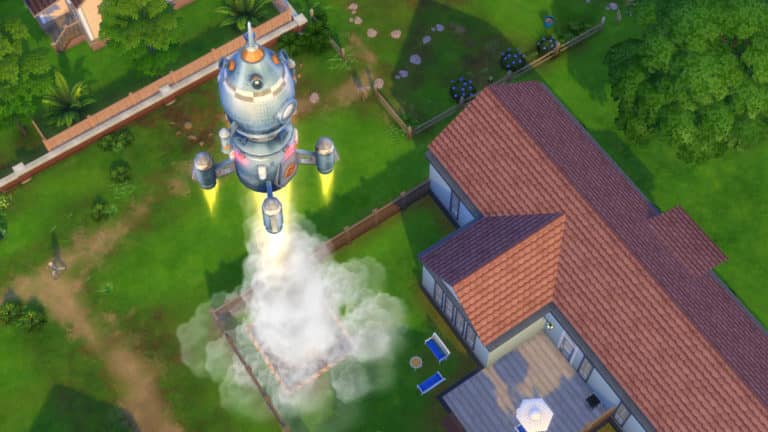
One of my favourites is the Rocketship. Its ridiculousness is so endearing but it’s also an incredibly fun object. Your sim can go on adventures into outer space (choose-your-own-adventure style) and with Get To Work can even visit Sixam (which I’ve yet to do, but working on it slowly). It also reminds me a lot of the fixer-upper car from Sims 2 Freetime, because it is a slow process to get completed, and it provides a new spot for WooHoo.

But even the other hobbies like Gardening (which can yield you a nice Cowplant), Mischief and the Voodoo Doll, and even objects like the Microscope and Telescope (which are incredibly gigantic for some strange reason) are just fun side-activities that can enhance their digital lives, especially since a lot of these influence your sims emotions which was a key selling point of the game, but these hobbies also just add a little bit of flavour to your sims personalities if you’re the story-telling kind.

The Sims 4 is Free? Top 10 Reasons to Get Started Now!

9 – Attention to Detail

One of many beautiful things about the game is the attention to detail put into the many things, and it does require keen observation skills to notice them. From animations, to little gameplay features, to just the way a Sim will react to certain things, just injects so much more life to the game.

In Sims 4 Laundry Day Stuff Pack, your sims can get hampers to put their dirty clothes when they change outfits, this is one of those little automatic things where it just automatically puts clothes in the nearest hamper, but if your sim has the lazy trait, they will always just drop the pile under them, and it’s just like such a funny little detail. It not only enhances the way a Lazy sim acts, but it just brings some joy.

Other things include like the animations. I think one of my favorite things to do is just to watch sims cook. Low-level chefs just make some many funny fails like dropping an entire salt shaker into their food or drop glasses when mixing drinks. All of these were done by hand (as far as I recall) and none of it was done with mo-caps. And as someone who has a little background in animation I know just how hard and tasking it is to make these animations and bring them to life, and yet, these animations have made these sims feel so much more alive and real, as well as relatable.

It’s these little things in the game that make the game feel so much more, it’s an already complex game and to see our little sims have so much spirit in the way they move, act, and feel, gives them such depth that you would never really think of otherwise.

The Sims 4 is Free? Top 10 Reasons to Get Started Now!

8 – Creative Outlet

Any Sims game wouldn’t be a Sims game without all the amazing creations the community makes, from the beautiful and genius builds, to the unique and gorgeous Custom Content hair, objects, swatches, all the way to the modding community.

Honestly when Zerbu’s “Get To School” released my jaw literally dropped. The idea of having such a unique and innovative mod. I do not recall anything as big and functional as that mod in the previous instalments. It felt like an entire add-on to an expansion pack. An Expansion pack for an expansion pack you may say.

But I’ve just seen such a unique vast array of modifications to the game, people have built flying houses, underwater mansions, created new traits, new aspirations, and just gives the player the power to enhance their experience so much more. Want your bills cheaper? Get a tuning mod! Want crazy hair!? Get some Custom Content! Need your sims to look like creepy dolls? Get some replacement skins!

Anything you imagine is possible thanks to the creativity of the Sims community, and while I personally do not use Custom Content in Sims generally, I have seen many amazing mods, tunings and pieces that make me amazed at the creativity that ours from the people in the community.

7 – Free Updates

With the Sims 4 initial release, the game was very much controversial as many expected features were missing, pools, toddlers and ghosts to name a few. And while many expected it to come eventually, many people were fearing the worst: these features were going to be trapped behind a paywall.

But that wasn’t true, and I think credit is due to the team for giving us these for free without any catches. Over the years the game has existed the team has graced us with several updates that added new features and over-hauled existing ones, and a lot of these weren’t things that was needed, but the team still gave us free stuff.

Things like the Freelancer career, the overhaul to the Gardening system, basements, and even the staples were all added for free for all players to enjoy and expand the already impressive toybox for the player. We even got short-time features like skill boosts weekends, and special challenges that unlocked unique objects and activities for your sims to do.

The Sims 3 nor The Sims 2 had this kind of update system, The Sims 3 did get some updates, but it was only during releases of Expansion Packs, and Sims 2 only added certain functionalities if you had the latest expansion pack installed.

I look forward to what the team has up their sleeves because there’s still so much we can see coming, there’s a huge list of features the fans want to see back in Sims 4 and I’m sure we’ll see many of these being eventually included, and many of them likely for free. The game is far from completed.

The Sims 4 is Free? Top 10 Reasons to Get Started Now!

6 – The Expansion Packs

You can’t talk about what makes any Sims game great without mentioning what the game is just as famous for. The various Expansion Packs, Stuff Packs, and Sims 4’s new Game Packs, give the player the optional but valuable additions to the game. From making the worlds feel more real with Seasons, to enjoying a good night out in Dine Out, to infecting your sims with the deadly rabid rodent fever from My First Pet Stuff Pack (yes, I do like the pet cages, but I get why the controversy exist, it’s worth a read).

From Windenburg, to San Myshuno all the way to Selvadorada, there’s so much content to get that really expands the world of the Sims, and I have yet to play many of these packs! The game becomes so much more vibrant and colourful with the various activities your sims can do. Want to travel to a strange new world? Use the Rocketship to travel to Sixam (available in Get To Work), want your sim to become a saboteur and wreak havoc with your band of bandits? Create a club (available in Get Together). Want your sim to become a 5-star celebrity and be stalked by Bob Pancakes? Become an actor (available in Get Famous).

Each expansion pack, game pack and stuff pack enhance your game and fills up your catalogue of not only new objects, but things to do. And the best part? None of it is needed! Your game is just as fun without these packs, but believe me, once you become a simmer, it’s only time before you end up with the entire Sims collection.

The Sims 4 is Free? Top 10 Reasons to Get Started Now!

14 struggles that New The Sims 4 Players will never have to experience

The Sims 4 has just received a huge wave of new players thanks to the free-to-claim offer that’s currently available now until May 28th, 2019.

It’s no secret that The Sims 4 has come a long way since its release on September 2nd, 2014. The game has been getting new updates regularly that included new content, features and bug fixes that have made the game that it is today.

The game, no matter how many new features it brought to The Sims Franchise was also extremely lacking in content on the release date. No pools, messy user interface and a whole lot of worrying bugs are just some of the things that were present.

Here are just some of many things that players struggled with in the beginning of The Sims 4 that new players will never have to worry about:

1) This blinding loading screen

I had to put on eyedrops before opening up the game just to make sure I don’t go completely blind.

14 struggles that New The Sims 4 Players will never have to experience

2) Lack of Pools and Ghosts

A video game franchise that’s mostly known for killing Sims off in the pool and controlling the ghosts of those drowned Sims didn’t have either of those things at launch…oof.

3) A Messy User Interface

The    entire    user    interface     had     text     with       at       least    5      spacebars      between       each     word.

14 struggles that New The Sims 4 Players will never have to experience

4) Demon Babies

YIKES.

14 struggles that New The Sims 4 Players will never have to experience
Via Kotaku.com

5) No Toddlers

When aging up babies would literally jump from their crib and immediately move onto the Child age phase.

14 struggles that New The Sims 4 Players will never have to experience

6) Dishwashers? Forget about them!

Poor Sims had to wash the dishes exclusively using the sink for about a year.

14 struggles that New The Sims 4 Players will never have to experience

7) The Family Tree? Nope. Wasn’t a thing.

14 struggles that New The Sims 4 Players will never have to experience

We’re giving away 8 copies of The Sims 4 Cats & Dogs for Consoles!

We’re still going strong with our 6th Anniversary Giveaway!

This time around we’re giving you an opportunity to win 1 out of 8 copies of The Sims 4 Cats & Dogs Expansion Pack for Xbox One and PS4, more specifically:

  • 4 copies of The Sims 4 Cats & Dogs for Xbox One
  • 2 copies of The Sims 4 Cats & Dogs for PS4 (North American Region including Canada, United States, Mexico, and Bermuda)
  • 2 copies of The Sims 4 Cats & Dogs for PS4 (European Region including Western Europe, the Middle East, South Africa, Egypt, and Japan)

The giveaway codes for Xbox One are universal for all regions. However, considering that PS4 has several regions with codes locked away for each region specifically we had to make a decision to create 3 giveaways in total, covering each platform and console.

The giveaway is live right now and for better organization we’re hosting it on Sims Community Social. If you don’t have an account you can easily create one and enter the giveaway. Just make sure you follow the specific rules that we’ve linked within the giveaway links down below!

Here are the giveaways that you can enter right now that last until May 29th at 8PM CET:

We’re giving away 8 copies of The Sims 4 Cats & Dogs for Consoles!

Make sure you also follow us on the following social media outlets as there are going to be giveaways on both Sims Community Social and some of our social media platforms:

Getting started with the world of The Sims 4

One of the great things about The Sims is that there is no set way on how to experience the game. It really is down to you how you play but ultimately there are endless possibilities on how to play The Sims. If you are new to The Sims 4 firstly Sul Sul and welcome to the community and secondly this article is going to take a look at some of the things that The Sims 4 Base Game and the game as a whole has to offer.

Challenges

There are numerous challenges out there for The Sims 4 which can help vary your gameplay and there is a challenge to suit everyone’s playstyle. One of the most popular challenges is the Legacy Challenge and another is the 100 Baby Challenge.

Here are some of our favourite challenges that you can play with The Sims 4 base game.

There are hundreds of different challenges out there just waiting to be played through and this is just a small selection of them. To discover more challenges, take a look at this article here and also this thread over on The Sims Forum by clicking here.

Achievements

As with most games, The Sims 4 comes with some in-game achievements too. These can range from having a Sim stay awake for twenty-four hours straight to maxing out skills to even having woohoo with a ghost!

You can find the full list of in-game achievements here.

Getting started with the world of The Sims 4The Gallery

The Gallery is essentially the library of where players across the world can upload their builds and Sims for others to download into their game. You can follow your friends and many others in the games community. You can share, like and comment on uploads that you love too!

Why not check out some Base Game friendly builds in one of our Gallery Spotlight articles here.

Collections

There are numerous collectibles that your Sims can collect. You can start a collection by searching logs and rocks around the world and even by fishing. In fact there are a variety of ways that you can start and complete collections. There are numerous collections that your Sims can work through including frogs, fish, MySims dolls, crystals and more.

Need some tips on completing collections? Take a look at this article here.

Secret Locations

Willow Creek and Oasis Springs are both home to a secret location. Firstly discover where they are in the world and follow the on screen prompts to see if your Sim is worthy enough to enter the location or not.
Getting started with the world of The Sims 4Custom Content & Mods

A popular way to enhance your gameplay in The Sims 4 is through the use of Custom Content and Mods which are created by talented members of the games community. These are easily available online via dedicated websites and Tumblr.

Mods

There are countless mods available to add into your game. Some expand on features already in the game, some allow you to manipulate and cheat aspects of the game and some even add new gameplay and options into the game. There really is such a large variety of mods out there. Below are a few of the mods that we recommend for The Sims 4.

You can also find more Mods for The Sims 4 via these links.

Custom Content

Likewise, with Mods for The Sims 4, there are thousands upon thousands of pieces of Custom Content available for The Sims 4. There are two different kinds of Custom Content, Alpha and Maxis Match. Alpha custom content looks more realistic whereas Maxis Match fits The Sims 4 style. You can stick to one style or have a mix of the two. It really is up to you.

Below are some links to some Custom Content sites.

NOTE: When adding custom content or mods into your game do so with caution and ensure you have read all of the installation instructions prior to adding it to your game. It is also important to note that when the game receives a new patch that you back up your saves and remove you mods folder from the game. It is also a good idea to ensure all your mods and custom content are up to date at this time as well.

You can also follow this handy tutorial on how to install custom content and mods into your game here.

Downloadable Content

There are three different types of downloadable content for The Sims 4 which are Expansion Packs, Game Packs, and Stuff Packs. Downloadable content is available from the Origin Store and trusted retailers like Amazon, GAME UK and GameStop.

  • Expansion Packs – Get to Work, Get Together, City Living, Cats & Dogs, Seasons & Get Famous
  • Game Packs – Outdoor Retreat, Spa Day, Dine Out, Vampires, Parenthood, Jungle Adventure, StrangerVille
  • Stuff Packs – Luxury Party, Perfect Patio, Cool Kitchen, Spooky Stuff, Movie Hangout, Romantic Garden, Kids Room, Backyard Stuff, Vintage Glamour, Bowling Night, Fitness Stuff, Toddler Stuff, Laundry Day, My First Pet Stuff.

You can also check out our The Sims 4 Essentials: Expansion Pack, Game Pack and Stuff Pack We Recommend article where we share our recommendations for each pack type.

Getting started with the world of The Sims 4

Other than what has been mentioned above The Sims 4 Base Game has plenty to offer. Here are a few more ideas of what you can do in game.

  • Completely rebuild a world
  • Recreate your favourite TV & Movie characters in game
  • Makeover all the Townies
  • Build your dream home, a mansion, a tiny home or just about anything that you can think of!

With endless possibilities, you can really make your The Sims 4 experience your own. Create your own stories and builds and let your imagination run free as you play with life!

Don’t forget you can explore our full list of tutorials from help with building, skills, taking photos and using cheats via our Tutorial Library here.