Here’s the first look at new The Sims 4 Kits releasing in April 2024!
Woops! An EA Creator has accidentally leaked the theme of two upcoming Sims 4 Kits on Twitter.
All including the official names and the first screenshots! According to the giveaway advertisement posted by the official EA creator @Nick_Baker777, the two upcoming Kits are called Party Essentials and Urban Homage. Each being $4.99USD (or a price equivalent to your country).
Take a first look at the new Kits below:
The Sims 4 Party Essentials Kit
The Party Essentials Kit is a Build Kit, consisting of new celebratory objects in Build Mode. From Balloons, Disco Balls and Neon Signs to all kinds of Clutter, Confetti and more. Oh, and a Smoke Machine!
Take a first look:
Editor’s Note: The picture above contains a fixup of the OP’s accidental red markup over the image. You can find the original here:
The Sims 4 Urban Homage Kit
The Sims 4 Urban Homage Kit is a CAS Kit, consisting of new cultural Create A Sim fashion and looks for your Sims to celebrate diversity.
Take a first look at the new CAS items below:
It all matches the Roadmap!
The Sims 4 Party Essentials and Urban Homage Kit are the last piece of the paid content puzzle for the first Sims 4 Roadmap of 2024. As teased in January, the two remaining Kits were teased as “One Celebratory Kit” and “One Co-Created Style Kit”. So the leak from the EA Affiliate seems to only further confirm this.
And the Release Date?
The release date for the new Sims 4 Kits coming out in April are not officially confirmed. However, the EA Affiliate did suggest that their giveaway for the upcoming Sims 4 Kits ends on 18th of April. Which could be the farthest speculated date for the joint release of these two Kits.
We’ll know more about the official release date and time this in the coming days. Stay tuned!
What are your thoughts on the upcoming Sims 4 Kits? Join the conversation in the comments below and stay tuned for the latest Sims 4 News and Updates!
This nostalgic Sims 4 UI Mod should be ready for everyone soon!
The modding community keeps pushing the limits and possibilities of what a mod can do. Sure, we’ve seen a few aesthetic mods for The Sims 4 that change the look of Loading Screens, Main Menu and even the User Interface Color. However, no mod yet has managed to bundle it all up into one sweet nostalgic package!
For those who have played The Sims 2 (and still do!) and want to inject the feeling of future nostalgia within The Sims 4, you’re in luck. Modder and creator vyxated on Tumblr has posted a series of photos about their Work in Progress Sims 4 UI Mod. Completely revamping all of the User Interface elements into the style of Sims 2.
Table of Contents
The Sims 2 UI for The Sims 4 – First Look
The creator of this Mod has gone to great lengths to refurbish every aspect of The Sims 4 UI with this Mod. Including Create A Sim, Build Mode, Live Mode and all of the interactable and visual elements within the interface.
From fonts to tiny little icons, almost every segment of the game is covered in iconic 2004 look. With more being polished as we write this article!
Create A Sim
Fans of The Sims 2 will immediately notice the Body Shop background being an integral part of this Sims 4 UI Mod. With traits, sliders and thumbnail previews all showcasing the content in its nostalgic way like never before.
Build Mode
This Sims 2 to Sims 4 UI Mod also refurbishes the entire Build Mode interface. With house segment icons on the bottom left corner all professionally redesigned to match this era. Arrows for placing down walls have also been successfully revamped, and lot properties and settings should all have matching looks.
Live Mode
I was so surprised to see The Sims 4 Live Mode redesigned completely like this. From the interactions menu to the Events and Sim info panel, everything’s matching just perfectly. I also prefer the new look of notifications on the top right corner!
Even the Plumbob got an update, although we’re not sure if it’s the final one or if they plan to polish that diamond a little more.
Travelling Loading Screen and Cars
The modder didn’t just stop at the amazing interface designs. They’ve brought additional nostalgia back with Taxi cabs from The Sims 1. Allowing you to commute by yourself or with others to different lots and locations in The Sims 4.
Doing so will reveal a new loading screen in the style of Sims 2. With Sims 4 game lessons and even iconography all matching perfectly with the new look.
One caveat remains though, and that’s the static loading bar at the top that will always be filled up. But hey, at least the cute taxi icon levitates while you wait!
The Sims 4 UI Mod in the style of Sims 2 is still a work in progress. Considering that the modder had to strip away and reconstruct everything from one game to another, what we see already is so much work done. Vyxated claims that they’re about 99% done with the work on the mod, with only a few icons and interfaces left to finish.
Since The Sims 4’s collection of tens of packs that add onto the game’s interface and design, it’s understandable why additional care and check needs to be done before the mod is pushed out to the world.
It’s OUT NOW!
Modder Vyxated has just released their Sims 2 UI inspired recolor for The Sims 4. The Mod is easy to download and install, and only requires you to have one additional Mod alongside this one to make it work. (UI Cheats Extension)
The creator also included a handy list of extra Mods and recommended ones to help you immerse yourself even more. Take a full list at the official Mod listing below:
Mod Features
PC: 1.105.345.1020 / Mac: 1.105.345.1220 Older game versions will not work with this mod.
UI overhaul in the style of The Sims 2’s UI.
Over 500+ additional icons recolored for CAS & BuildBuy!
Sims 2 style cursor recolors.
Most text are kept in their original color, though they might get changed/updated down the line.
How to Install the Main Mod
Download & extract the zip file within your Mods folder.
Install the latest UI Cheats Extension mod and make sure it loads after the Sims 2 UI mod. Current version needed: v1.40
Installing Extra Mods
Loading screen: download only one loading screen file. Available in: 4:3 – 16:9 – 16:10 aspect ratio.
Opening screen: file to replace the intro TS4 screen. Choose the file that pertains to your game language.
TS2 Cursor: recolored TS4 cursor to match with TS2’s cursor. Unfortunately, some cursors are missing their recolors (rotate cam & grab+arrows in CAS).
EA Notif: optional file if you prefer to keep the notification in its original color scheme.
Recommended Mods for Extra Immersion (Not Required)
What are your thoughts on this cool Sims 4 UI redesign? Let us know your thoughts in the comments below and check out more awesome Sims 4 Mods right here!
Vibrant new colors added for existing Sims 4 Hairstyles!
The Sims Team has dropped a new Sims 4 SDX drop on April 2nd, 2024. Adding two new Hair color variants to the existing feminine hairstyles already available in the Base Game!
The new Drop is a part of the Hairstyles Diversity Updates announced for The Sims 4 a couple of days ago. You should be expecting more for masculine Sims in the July content drop!
Preview of July’s Sims 4 SDX Drop
The latest Sims Delivery Express is already available for download on Desktop and Consoles. In case you don’t know how to install the latest content, here’s a quick guide to help you explain best:
How to download and install the latest Sims 4 SDX
With Sims 4 SDX (Sims Delivery Express) you are able to download new CAS Content, Build Mode Content and small bug fixes and improvements into your game. All straight through The Sims 4! Simply open up The Sims 4 and your game should automatically check for new content.
If not, go into Game Options > Sims Delivery and Check for new Content. This method of bringing new Sims 4 SDX content into your game works both on PC and Consoles! Note that you will have to restart your game in order to obtain new content. You can select “Yes, Restart Now” for the game to restart automatically for you.
Sims 4 SDX Overview – April 2nd, 2024 Drop
New feminine hairstyle ombres await with the newest Sims 4 SDX Drop. Just like their single colored counterparts, these hairstyles can be found under their standalone selection in the Hairstyles CAS category.
With 24 ombre variants for each one, you’ll find radiant colors matching to your feminine Sims however you please. Check out the full gallery preview below for each one!
Hairstyle #1 Preview
Hairstyle #2 Preview
That’s all there is to the newest Sims 4 SDX Drop! Make sure you stay tuned on Sims Community for more updates on the latest Sims content.
We explore the History of all Sims 4 DLC being released for Free and where it all began.
EA has quietly announced this week that they’ll soon be making another one of their Sims 4 DLC free for PC and Mac players. The upcoming Free release of The Sims 4 Blooming Rooms Kit has continued the debate and conversations within the community about paid DLC going free. And what’s in it really for dedicated players who purchase said content on day one.
Spoiler alert – nothing much. Stuff Packs, Kits, the Base Game and even a Game Pack have all at one point gone free as a hidden promotional mean from Electronic Arts to bring back new players. But why are they doing this?
We dug deeper into all of The Sims 4 Content that eventually went free, along with a community poll for players to see what they think about the recent deals trend.
The History of Free Sims 4 DLC
If we’re going to track down all of The Sims 4 DLC that went free, we need to go back to where it all started.
Back in 2019, Maxis have revealed their first ever permanent deal for The Sims 4. Allowing players to claim The Sims 4 Base Game free of charge for the entire week duration. This later became a permanent deal in October 2022 when the video game publisher made the Base Game Free to Play. Forever.
Such decision made somewhat sense to the majority of existing players in The Sims 4 community. Considering that up until that point the Base Game has been available for paid customers for over 8 years.
The Base Game went through three significant price changes. Going from $60USD on the release day, to $40USD a couple of years later. With the $20USD tag being the final price cut. In occasional promotions before the game went free the game was charged from $5USD to $10USD.
As long as it’s not Paid DLC…oh wait!
There were a couple of times where The Sims Team tried to test out the theory of will Free Pack promotions result in better user retention and in-game engagement. The biggest telemetric update that could’ve paved the way for bigger Free Sims 4 DLC promotions are Expansion Pack trials. Which happened mostly in the year of 2021 when City Living, Eco Lifestyle, Get Famous and Island Living Expansion Packs went on Free Trial Weeks. During which players could download a Pack and play it for 7 days until the timer runs out.
And then, the first permanent Free DLC happened on the same week of The Sims 4 Base Game going free. By making the up and coming Sims 4 Desert Luxe Kit free of charge for the seven day duration of the big promotional week.
This still somewhat seemed like an understandable deal. Considering that the Kit hasn’t even come out yet. This Sims 4 DLC was put behind a $5USD paywall seven days after the promotion.
Free Paid Content in 2023
Things really picked up the pace in 2023 with the first release of a Free Bundle. An exclusive deal between EA and Epic Games that helped congregate Sims players onto a new Epic Games launcher platform. Allowing players to claim Jungle Adventure Game Pack, Luxury Party Stuff Pack and the Fashion Street Kit free for a limited time. Only this time the deal was only available for PC players.
This was the first time both a Stuff Pack and a Game Pack were offered for free claim. And those who were techy enough to figure out connecting two launchers were able to have them on their EA App / Origin launchers.
Afterwards, with each coming season came a new Free Deal, including:
If we exclude the Base Game, so far EA has given out $70USD of Free Sims 4 DLC content to the new players. With three recent packs focusing solely on the outdoors, gardening and plants.
At the moment, we’re at 74 DLC paid releases into The Sims 4 series. 10 years down the line. The russian roulette of which Sims 4 Content gets to shine in the free monthly spotlight is fun, but also raises serious questions from the community about is it safe to buy any more content in the future.
Time is money, and that saying also goes in the case of The Sims 4’s collection. Previous Sims Games had a more rigid structure when it came down to price cuts and releases. Still, the same Sims games didn’t knock up more than 70 Packs (and counting) to their name.
Each Sims 4 DLC release is an extension of the Base Game’s legacy. And the more time passes away, the more they’re forgotten and moved onto the next big thing that’s coming out.
If you rely heavily on The Sims 4 Gallery then you probably noticed how hard it is to make that Family Home or Household port in your game just like from the pictures. The segregation of Sims 4 DLC structure and its variety makes it hard for players to enjoy Gallery creations without being reminded that they don’t own a certain Pack or Kit.
In my opinion, what harm could a free Sims 4 Blooming Rooms Kit do when a newcoming player will still be reminded that they don’t own The Sims 4 Greenhouse Kit. And so back and so forth.
Let’s ask the audience!
But enough about my theory. Let’s ask Simmers what they think about the recent trend of Free Sims 4 DLC.
[totalpoll id=”152788″]
What are your thoughts on The Sims 4 Content going free? Join the friendly constructive conversation with us and stay tuned on Sims Community for the latest Free Sims 4 DLC updates!
The latest round reveals the Beta World Map, Object Placement Physics and last minute marketing changes.
Remember when we said that there’s going to be more leaks happening of The Sims 5’s playtest build? Turns out we were right! And the recent round of images and videos seem to confirm multiple exciting features, as well as theories about the game’s past name.
After the entire Project Rene test build leaked for Desktop and Android devices just last month, a dataminer was able to obtain several images of the game’s early build state. A couple of players were also able to see and test out the build itself and play with the game’s Open World, Build Features and even Object Physics.
Let’s break it all down in our latest round of The Sims 5 News report:
The Sims 5 Beta World Map
For a couple of months we’ve been seeing the French-inspired world where the Project Rene playtests and first reveals have taken place. However, we’ve never been able to see the full scale of this World until now.
The Sims 5 World Map, at least in its early exploration phase, seems to be focusing on a heavily populated play zone. With a few dozen district zones, a river flowing right across the new city and apartments and houses that have yet to be populated throughout the development.
Dataminer DzXAnt22 uncovered the original World Map created for playtesting. According to their report, the area covered in red is what we’ve seen originally so far from the Project Rene leaks and reports. Everything else beyond the red area is non-playable and undiscoverable.
This map was datamined from myself through the Project Rene Playtest build that was leaked a few weeks ago.
The area coloured in red on the map indicates the playable area in the playtest. Here are some comparisons between the map and some in game screenshots which shows the map lines up correctly. The map is also based on Paris I believe as i have also found actual IRL photo references in the game files as well (I will share if there’s a demand for it but they’re not really that interesting)
To compare the scale of the current known Sims 5 World Map, the OP shared additional images that compare the red playable area to the in-game look and feel:
The dataminer also included some information about the game’s current performance, and how well the game is optimized right now on Android devices:
Based on the build I’ve got there isn’t a whole lot to go off of, however I can tell you a few pointers that leads us to believe it COULD be open world:
Project Rene utilizes asset streaming and LODs to keep everything running smoothly. Seriously, this thing runs at ~30fps on my galaxy s9. This tells us at the very least performance is rock solid even when fully zoomed out.
There is no “travel” UI icon anywhere in the game files (or anything like it).
No string references found for “travelling” to other lots or locations.
Do keep in mind that this build is over a year old and things could have changed from then and now, however we strongly believe this will be an open world game much like TS3 was.
With the way The Sims 5 beta is structured right now, the OP strongly believes that the game could eventually be a full Open World game just like The Sims 3. Still, it’s fair to say that the playtest still doesn’t represent the potential full game that Project Rene could end up being. After all, we were told that The Sims 4 was going to have Toddlers at launch in 2014 and we ended up waiting 3 years for them to get patched into the game.
Realistic Object Physics
But wait, we’ve just scratched the surface of new Sims 5 discoveries! Maxis is taking a realistic route for object placement and customization.
The game will allow you to add accent decor and functional objects to already existing ones that you’ve placed down. Let’s say that you want to make your bed a little more comfortable with few extra pillows. You’ll be able to simulate real world physics by placing the pillows above the bed (or wherever you please) and watch them fall down. Becoming a realistic part of the object’s body structure.
After clicking the objects gravity feature, the extra objects placed down will naturally fall to the closest surface area. If the surface is stabile enough to support the object’s weight then it’ll remain there. However, pushing an object next to the side will cause it to fall down.
Take a look at some visual examples shared by @LunarBritney:
This gives opportunity for not only realistic decoration in The Sims 5, but also possible gameplay effects that the realistic physics engine could provide. Let’s hope those smarter Sims are next on radar!
Item Stretch and Pull
Intuitive creative tools seem to only get better with Project Rene. With certain customizable items having options to be stretched, pulled and expanded to your heart’s desire.
What if that cute dining table that you wanted to use for your large household just isn’t big enough? With just one drag you’re able to extend and manipulate the table’s look. With the game’s engine smartly extending added objects to their according place.
To my surprise, it seems most objects in The Sims 5 have insane levels of control points and customization. Down to the smallest of details!
Creator @Simmattically shared additional footage showing just how much you can do with customizing objects. And all of that from the comfort of your smartphone.
My biggest surprise was seeing wallpaper customization of Sim laptops. You can apply different patterns and change colors all while having the in-game’s laptop user interface remain intact.
Closing down the laptop can also be done from Build Mode, where you can select different parts of an object and apply and change different skeletons to it. For example, beds have different categories for each object part from top to bottom. If you’d want to change the faucet on the sink you can now do so. And players who have been asking for different varieties and options for kitchen counters and cabinets will be happy to know that they also come with modular functionality. Allowing for endless variations!
Project Rene used to be Project Lotus
And now for the final discovery! It turns out we knew the name of the next generation Sims game way back in 2021 when we reported about the next generation Sims game being titled “Project Lotus”.
The rebrand of Project Lotus to Project Rene must have happened shortly before the official announcement of the game in 2023. Considering that there are still code string references and even in-game Car license plates that reference Project Lotus.
EA has been quiet recently in regards to their development progress of The Sims 5 and what the current state of the game is. Let’s hope that we won’t have to wait soon enough to see more of this game’s promising potential.
What are your thoughts on the newest Project Rene features and finds? Share your opinions in the comments below and stay tuned for the latest and greatest Sims 5 News updates!
The switch from Origin to EA App is easier and faster than I expected.
If you’re a Mac player who’s been waiting to move away from their outdated Origin launcher well boy do I have some good news for you!
The EA App platform has just now begun launching for Mac players. And to my surprise – the integration process has been much smoother than I initially expected!
Quick Links
Current Reported Issues
Please note that the text below represents only a surface level experience with the new game launcher. Down below we’ll be creating a list of game issues reported by other players, including:
Can’t play game in other languages!
Multiple players reported that they’re unable to play The Sims 4 in other languages – only in English.
How to Switch from Origin to EA App
To be completely honest, I didn’t even manage to capture all the essential screenshot to explain this process from you. However, I’ll try to go into as much detail as possible about my initial experience with this switch. There’s also a more in-depth official tutorial if you plan to take extra precaution when making this switch.
Step 1: Open Origin
After logging into your Origin account you’ll be quickly prompted to switch from Origin to the new EA App. From there you’ll have to authorize the installation of the new EA App, while Origin completely removes itself from your Mac computer.
Step 2: That’s pretty much it?
All you have to do now is open your brand new EA App (unless the installer does it for you already) and you’re able to enjoy the new EA App. Which, to my experience, has been a much faster and easier game launcher experience than compared to Origin for Mac.
I can’t share the same sentiment that EA App Windows players have gone through, considering that the whole switch for Windows players was a slow and steady disaster. Still, it seems that Electronic Arts have learned from their mistakes and made the integration for Mac players a much more pleasant experience.
Now, how does the new launcher work for The Sims games on Mac? I was able to test out both The Sims 3 and The Sims 4 to see upgrade in action!
The Sims 4 on EA App for Mac
My experience opening The Sims 4 through the new EA App launcher for Mac seems to have gone a bit faster than usual. At least when it comes to the speed time from clicking the play button to the game itself actually opening.
Origin was clearly making the process of launching a game much harder than it should’ve been. And I’m glad to see that being resolved with the new launcher.
Packs and Sims 4 DLC can be found under multiple sections. With two most popular being through the “Manage Add-Ons” section (which lists all the DLC you have) as well as the game’s own Add-ons store page.
The Sims 3 on EA App for Mac
I’m not sure why opening The Sims 3 (64bit version) on the new EA App launcher got me more excited than a few miliseconds of speed improvements when launching TS4.
Possibly because trying to play The Sims 3 through the Origin client program was an unpredictable disaster. On some days I would barely be able to open The Sims 3 with huge lag happening between pressing Play and actually waiting for the game to open. With some days where I’m not even able to open the game at all due to unexpected errors and crashes.
The EA App experience has been surprisingly quick and straightforward for a game that’s about to turn 15 years this year. The Sims 3 launcher seems to open very quickly now, with the game itself launching super quick after hitting the play button. Almost to the point where it can be compared to the speed of The Sims 4!
It’s fair to note all The Sims players out there that your game and launcher experience may vary depending on the Mac device you’re playing on. My best recommendation out there is to consider playing The Sims 4 (and even The Sims 3) through an Apple Silicon processor. The game runs super fast on M1, M2 and M3 chips, and is even competing with the best specifications that there are for Windows players.
Plus, it seems that overheating shouldn’t be much of an issue going forward for Apple Silicon devices.
Have you migrated from Origin to EA App on Mac yet? Let us know your experience in the comments below!
The EA App Mac program is currently available for existing Origin launcher players and will soon rollout for everyone. Click here to be taken to EA App’s official download page!
Let’s talk about Life by You gardening! If you’ve been following the life sim genre of video games for a while, you’ve probably heard of Life byYou. While the game’s early access launch has been delayed a couple times, that hasn’t stopped the developers from continuing to share their progress on YouTube and their social media platforms. And it hasn’t stopped us from talking about it!
Craft your own seeds, fertilizer, and sprinklers!
One of the game designers talked about the Life by You gardening mechanics in a YouTube video. As you might expect, the basic concept is pretty straight-forward. Plant seeds, water them, harvest the produce. It’s similar to many other life sim and gardening games. But Life by You gardening makes good use of the game’s crafting system, which not every other similar game does (yes, we mean The Sims).
Table of Contents
Get Crafty with Life by You Gardening
Let’s dig into Life by You gardening and learn all about how this familiar mechanic with a crafty twist works in this highly anticipated upcoming life sim game.
Acquiring Seeds
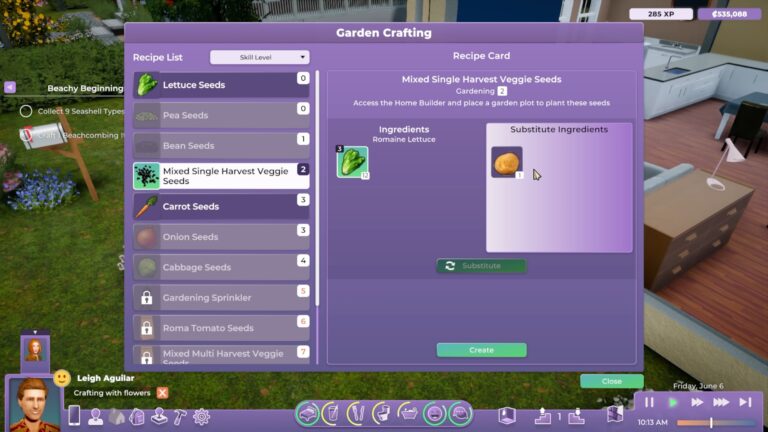
Seeds can be acquired in two ways; your humans can purchase them at a grocery store or online through the computer. They can also craft them! That’s right; if you have freshly harvested produce, you can use some of it to produce seeds to plant your next harvest.
Having the option to craft your own seeds can really help save a lot of money and allow your humans to run a completely self-sufficient farm if they want to. It may seem like a simple mechanic, and it is, but it’s a pretty powerful one in terms of the freedom it offers players.
Planting and Tending
Like pretty much every other gardening game, planted crops need to be watered and weeded regularly to grow into healthy adult plants you can harvest from. All plants need to be watered once a day but different plants have different growth times. Rarer plants take longer to grow than common ones.
Plants that have weeds won’t die, but they will stop growing. It’s to your benefit to weed your garden as promptly as possible to keep your plant growing so you can harvest it. The longer you leave it, the longer you delay your harvest and by extension, your profits (or your dinner).
Plants that don’t receive enough water will wither and die. Plants tat have withered completely cannot be revived. They’re dead and need to be removed and replaced with a new plant.
If your human is just starting out as a gardener, you’ll want to have them working in their garden as much as possible, especially if you want to turn it into your main source of income. Why? Because skilled gardeners can harvest more produce from a plant than an unskilled gardener! So there’s a real benefit to developing your gardening skill.
Highly skilled gardeners can also craft sprinklers for their garden! Unlike seeds, sprinklers cannot be purchased. They are a reward for building up your gardening skill. They are quite expensive to craft but if you’re planning on running a huge farm operation, it’s going to be worth your while to craft those sprinklers because they will keep your garden watered forever!
Fertilizing
While plants don’t need to be fertilized, they will benefit greatly from it. Fertilized plants yield more produce than unfertilized plants. Since skilled gardeners also harvest more produce than unskilled gardeners, you can imagine how a skilled gardener could use fertilizer to benefit even further and collect the most produce possible.
Like seeds, fertilizer can be purchased or crafted. You can craft your own fertilizer using seashells collected from beaches. Being able to craft your own fertilizer is another way to save money and maximize profits.
Harvest Your Produce
With Life by You gardening, there are two types of plants; annuals and perennials. In other words, single-harvest plants and multi-harvest plants. Some plants can be harvested from multiple times while other plants need to be replanted again after harvesting.
The amount of produce you get from harvesting depends on both your human’s gardening level and whether the plant was fertilized or not.
It’s up to you whether you want to treat Life by You gardening like a hobby or a business. Both are possible. It just depends on how much time you want to dedicate to it.
https://www.youtube.com/watch?v=H8IwOPS_kRg
Not interested in having your own garden but still want to dabble in it? Check out these community gardens in Life by You!
EA will gift another Sims 4 DLC for free in the coming days.
If you’ve been planing to make a purchase of The Sims 4 Blooming Rooms Kit soon enough then DON’T! Well, at least not if you’re a PC and Mac player.
Electronic Arts has just made an announcement on their official blog post that they plan to release their EA App platform for Mac platforms in the coming days. At the same time when that happens they’ll be launching their Free Sims 4 Kit promo campaign, letting you claim Blooming Rooms Kit for free.
Learn more about the details of this Kit offer down below:
How to Claim the Free Sims 4 Kit
The Sims 4 Blooming Rooms Kit is not yet available for Free. According to the ea.com post, the free Sims 4 Kit deal will activate the moment EA App becomes available for Mac players. Don’t worry, Electronic Arts plans to make this gift available for both PC and Mac players!
In the coming weeks, EA app players on both Mac and PC will receive The Sims 4™ Blooming Rooms Kit! Delight your Sims in a lush, soothing atmosphere of growth all around with unexpected leafy details and natural beauty.
As of now we don’t know about the exact date of The Sims 4 Blooming Rooms going free. However, we’ll keep you posted on this article as soon as we know more information! Better to keep you posted now rather than worry about having paid $5 USD later.
The offer end date of Backyard Stuff Pack going free might be a clue for when the Blooming Rooms will become available for free claiming. However, no official confirmation as of now.
Those who get to claim the free Sims 4 Kit in the coming days will get to keep it in their Sims 4 Collection forever! So, stay tuned on Sims Community to be the first to know when the Kit goes free.
EA has announced two new Sims 4 Content Updates for April and July!
The first Sims 4 Roadmap is slowly coming to an end, and EA is letting you know about their last bit coming in April!
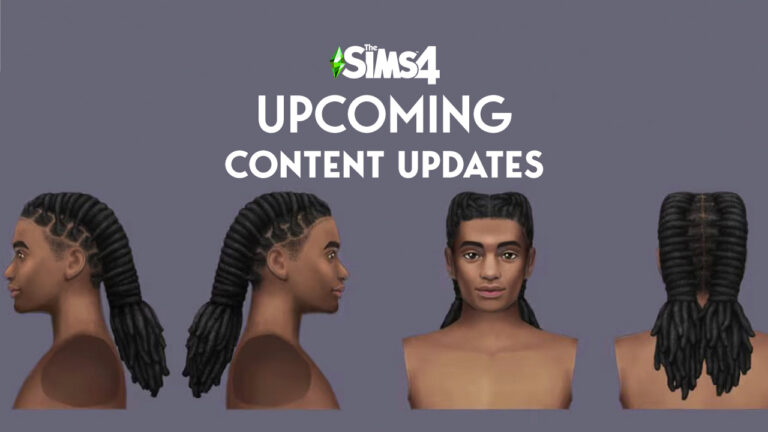
The new Sims 4 Content Updates, scheduled first for April and then July 2024, are all about adding better representation of Black hairstyles and visual features. In a yet to be released blog from thesims.com, we’ve discovered that there’s going to be two drops:
24 new color combinations for two existing Hairstyles (April 2024)
New locs Hairstyle (July 2024 Content drop)
What’s the new content going to look like? Check out the first previews from the official blog release:
Here at Maxis, inclusivity is one of our key values. We know that inclusion matters, and we aim to ensure that everyone feels represented — not just in our games but also in how we work; it’s ingrained in the very culture of our studio.
So when we got the opportunity to work with both legendary beauty brand Dark & Lovely and multi-award-winning gaming content creator and DE&I advocate Danielle “Ebonix” Udogaranya, we leaped at the chance. The result is “Play in Color,” a campaign and documentary that shines a spotlight on the importance of authentic representation in gaming.
For much of the history of the video game industry, authentic representation and features of people of color and other marginalized communities have been significantly underrepresented. These groups have made up a substantial segment of the gaming community from the very beginning, but games have often dramatically underrepresented Black hairstyles in particular.
At Maxis, we’ve been grateful for the chance to help make progress toward better representation through in-game releases. This includes Vitiligo skin features; updates to Townies, in-game characters, incorporating different backgrounds, regional features, and skin tones to match their story; and collaborations with our extensive community of talented creators. Our updates give players of The Sims the resources to create characters that look like them and tell stories that reflect their lived experiences – but there is so much more room to grow.
This is why we’re so pleased to be collaborating with Dark & Lovely and Ebonix to help draw attention to both the progress being made and the need for continued improvement. To start, we’re supporting our partners with the launch of this campaign that includes a documentary video showcasing the voices of Ebonix, The Sims 4 teammates Senior Creative Director Anna Huerta and Assistant Producer Kaelah Smallwood, and Taireek Simms from the Dark & Lovely team who are helping to drive this progress.
Next, building on previous collaborations with Ebonix on in-game features like skin tones and nail options, we’re working with the hair professionals at Dark & Lovely to introduce 24 color combinations across two existing hairstyles in April 2024, inspired by the company’s newest color Immersive Bolds collection.
Then, in a free content drop, we’ll introduce a new locs hairstyle that’s also developed in collaboration with Dark & Lovely and available to players in July 2024.
When is the Update?
One of the new Sims 4 Content Updates is set to release on April 2nd, 2024. The first Content Update should cover two vibrant recolors of the existing hairstyles already available in the game.
Check out the preview of the new variants in-game below:
Excited for the new Sims 4 Content Updates? Let us know your thoughts in the comments below and stay tuned for the latest updates on The Sims Franchise!
Modder does the unthinkable with the Fairies vs. Witches 2.0 Mod Update!
The Sims modders keep pushing the limits of whats possible in this ten year old game. The Sims 4 Fairies Mod created by SpinningPlumbobs is a living proof of that. With the latest update to their Fairies vs. Witches Mod Pack adding options to shrink your Fairy dramatically. And have their same characteristics remain intact!
What’s included in Fairies vs. Witches 2.0? Find out in this update breakdown!
What’s New in Fairies vs. Witches 2.0
Modder SpinningPlumbobs has shared their first preview of The Sims 4 Fairies Mod update in their four minute trailer. Revealing some shocking features that left the community speechless!
Check out the first look below:
The upcoming re-release of The Sims 4 Fairies vs. Witches Mod features additional gameplay such as:
20 new spells and several abilities
An Alchemy skill with cauldrons to brew unique elixirs
Ritual Circle for witch covens to use
New Magic Energy feature with various effects and consequences
and more!
This update has been in progress for quite some time and I can’t wait for you all to enjoy it!
The biggest part of this Update that hasn’t been mentioned above is the fact that Fairies can now shrink down to the size of Sprites. All while performing new interactions that are supported by this Mod!
The first segment of the Fairies vs. Witches Mod Trailer shows a Fairy Sim with all their shrinking possibilities. Hiding in the wood log and giving another Sim a kiss all while being in their miniature Fairy form!
My favorite aspect of this Mod Update however wasn’t shown in the trailer. The modder released a video on Twitter showcasing how Fairies can now take a shower. By simply transforming to their miniatures and taking a bath under the sink!
Players who are more inclined to play as a Witch in The Sims 4 will be happy to know about the new Alchemy Skill and Ritual Circle object. If you’ve been wanting to take revenge on a specific someone then now’s the time!
The Sims 4 Fairies Mod Update goes to great lenghts to add support for Toddlers. There are new interactions and Occult details that you can use as a Fairy or Witch Toddler, depending on the magical route you’ve taken.
Just look at those little wings!
About Fairies vs. Witches Mod
You might be thinking to yourself why are Witches a part of this Sims 4 Fairies Mod if we already have them with the Realm of Magic Game Pack. They are completely seperate from Spellcasters, and have more dark, powerful magical abilities and spells that you can cast onto other mortal Sims.
The addition of Fairies within this Mod Pack goes great, as they serve the purpose to balance out all the evil features and possibilities that Witches bring. These contrasting Occult forms already bring enough variations in terms of Spells, Skills and Occult Archetypes. Among new objects, interactions and rich animations that come along.
We have a full guide on the original features of The Sims 4 Fairies vs. Witches Mod, and how to progress in the new ranks and skills.
The Sims 4 Fairies Mod Update Release
If you’re excited as I am to get your hands on the miniature new fairies, you’ll be happy to know that there aren’t many days left until the first release!
SpinningPlumbobs has set the Early Access release date for Fairies vs. Witches 2.0 Update on March 26th, 2024. With the Public Release set for April 9th, 2024.
It’s time for a Paralives news roundup; one of The Sims’ biggest competitors! Although the game is not yet released, it has been in development for several years now with an expected early access release in 2025. There’s been a lot of news rolling out about the game from the Paralives developers so let’s go through all the latest news together!
Check out what’s new with Paralives!
The Live Mode reveal for Paralives was a pretty big deal. It was the first time players got to see gameplay outside of character creation and build mode. But that’s not all Paralives has been talking about recently. We’ve also gotten some new info about food and fashion in the game so you won’t want to miss out on this Paralives news!
Table of Contents
Paralives News Roundup
If you’re looking for a detailed summary of everything that’s been happening in the world of Paralives in recent weeks, you’re in the right place! Catch up on all the latest Paralives news right here.
Live Mode Preview
A few weeks ago, Paralives unveiled its Live Mode for the first time. This was huge Paralives news because up until that point, all players had seen of the game so far was character creation and build mode. Understandably, players were excited to see what actually playing the game would be like.
The reveal was seven and a half minutes long and showed off quite a bit for such a short time frame. We’re introduced to a character and shown how we can customise aspects of their personality directly in-game. Bills were also shown, which might not be interesting in itself but what is interesting is how bills are broken down. Utilities have an individual breakdown and unemployed characters receive a small benefit to help them stay afloat, which is a nice touch, although this might make rags to riches playthroughs a bit more difficult.
Characters can look for jobs while walking around town and interacting with job posting signs in business windows. Unlike The Sims, characters can’t just apply for any job. Jobs require application points. Entry level jobs require less application points than higher paid positions. Your characters can’t apply to jobs they don’t have enough application points for.
Employed characters earn both money and upgrade points by going to work. Job upgrades can be a position raise or simply a perk that will help keep your character happy at work or do their job more effectively.
When it comes to skills, characters won’t just learn one skill at a time. They’ll also gain knowledge in a broader subject. For example, playing the guitar will build your skill with that particular instrument but it will also build your knowledge of music in general. The more knowledge you have in a subject, the faster you’ll build skills in all skills related to that subject.
All of that Paralives news sounds great of course but one of Paralives’ most powerful Live Mode tools is the multi-select tool. By clicking and dragging, you’ll be able to select multiple characters at once, whether they’re in your household or not, and direct that entire group of people to do something together as a group. Including talking to each other!
Socialising with someone fills up what’s called the “Together Bar.” When that bar fills up, you’ll get a socialisation card that will help you steer the relationship in the direction you want. You’ll unlock new relationship labels with people as you continue to build that relationship. Characters can also socialise while doing activities together, such as exercising. It’s beneficial to build relationships because townies can take the initiative to ask you things, such as offering you a better job.
Oh, and remember when we mentioned being able to edit your character’s personality in game? Well, as you navigate Live Mode and build relationships, you can upgrade their personality. A character’s vibe is their overall personality and general disposition. You get to select this early on but as you play through Live Mode, you’ll be able to upgrade that vibe with an evolution which will provide your character with new perks and benefits.
Okay all of that Paralives news sounds amazing but won’t a game like that be just as bogged down with paid DLC as The Sims? Well, actually… nope! While we expect the base game will cost money to purchase, the Paralives team has promised that the game will never have any paid DLC whatsoever. All expansions will be free! So it’s a “buy once and get everything forever” kind of deal which is pretty unheard of in today’s gaming industry.
Food
While perhaps not quite as exciting Paralives news as everything discussed in the Live Mode preview, foodies are sure to appreciate it. Paralives recently showed off a wide variety of dishes that you can prepare and eat in the game. Many were quick to point out not just the huge variety but also the high detail of the dishes shown. It’s been a long time complaint of Sims players that most of the food looks blurry and pixelated close up. Not the case here from what we’ve seen!
Fashion
Character customisation will of course be a significant aspect of the game but the Paralives team went a step further in showing off that customisation with a small preview of items on a masculine character. This character is dressed in clothes that are both traditionally masculine and traditionally feminine in the preview so it’s safe to presume that gender norms won’t be a thing in Paralives. Probably a good move, as The Sims and many other games have made the shift to more gender-inclusive terminology and fashion.
Never miss out on the latest Paralives news when you bookmark our Paralives category!
Do you want to learn how to shine and sparkle? Maybe you want to learn the mysterious powers of the crystals? Maybe you want to create and sell beautiful jewellery? Well, the shimmering new Sims 4 Gemology Skill will help you do just that!
This exciting new skill in The Sims 4 Crystal Creations Stuff Pack comes with ten levels to complete and will allow your Sims to explore a variety of different aspects of gemology. You’ll discover how to create your own gem-based creations and turn them into something your Sims can wear, gift them to other Sims or even sell them.
Table of Contents
What is Gemology?
While ever Sim may appreciate a shiny gem, those with Gemology Skill learn to create their own gem-based creations for wearing, gifting, or turning a little profit.
Gemology is built primarily by crafting on a Gemology Table, supplemented by finding metals and crystals. Increasing this skill will unlock new jewellery designs and gemstone cuts, as well as increase the number of metals and crystals a Sim finds!
The Sims 4 Gemology Skill Description.
Getting Started
There are a couple of ways you can get started with The Sims 4 Gemology Skill. You can purchase the Crystal Creations Skill books from a bookcase or computer. There are three available which get your Sims started with the basics.
Alternatively, you can jump straight in with purchasing a Gemology Table instead. This can be found under the Study tab of the catalogue and then in the Hobbies & Skills section. It will set your Sims back $650 but will open up so many shimmering opportunities instead!
The Gemology Table at a Glance
The All-in-One Gemology Table by Humphrey Inc. serves a number of purposes for Sims looking to become a Master of Gemology.
Starting off, The Gemology Table will allow your Sims to Cut Gemstones, Design Various Jewellery, and Design Random Jewellery for $300 or will allow you to store materials within it.
As you make your way through this Sims 4 Gemology Skill, you will unlock more recipes for making different pieces of jewellery.
Sims 4 Gemology Skill Overview
The Sims 4 Gemology Skill allows your Sims to explore a craft like never before. As your Sim progresses through the skill, they’ll unlock not only their knowledge but also learn more about gems and the power of crystals.
Essentially as your Sim levels up you’ll be able to craft different jewellery pieces, create different gemstone cuts and design some truly unique pieces.
So, are you ready to learn what it takes to become a master of the Gemology Skill?
Below is an overview of what your Sim will learn along the way with the Sims 4 Gemology Skill!
[table id=123 /]
Skill Rewards
Upon completion of The Sims 4 Gemology Skill, your Sim will receive 1,000 Aspirations points that can be spent in the reward store. Your Sim will also be able to explore and create a wide range of jewellery styles and various Gemstone Cuts.
There are no Build Buy Mode unlockables for this Skill as a reward.
Next Steps
What can players do next once mastering the Sims 4 Gemology Skill?
They can continue to create dazzling pieces of jewellery to wear on a day-to-day basis, gift them to their loved ones and friends or sell them on Plopsy.
Why not look into what different crystals will do and how their mysterious and magical properties work with one another?
Did you Enjoy this Sims 4 Crystal Creations Skill guide? Why not check out our in-depth Crystal Effects guide!
It’s actually REAL! A live action Sims movie is finally becoming a reality and has been confirmed to be being produced by Margot Robbie, the star and producer of the viral Barbie movie. 2024 just keeps getting better and better so far!
What do you want to see in a live action film about The Sims? Tell us!
This isn’t the first time there’s been talk about a Sims movie. Every few years, rumours seem to swirl and circulate that a film is in the works only to hear it’s been scrapped a few months later. Or we just never hear anything about the film again. So we were, understandably, a little sceptical when we caught wind of this news. But after some digging, it turns out that this rumour’s actually true!
After being involved in a blockbuster hit about a popular children’s toy, Margot Robbie seems like a great choice of producer for a film about a popular video game marketed to teenagers. Will this film actually make it to the big screen, though? After all, previous attempts at turning The Sims into a feature length film have crashed and burned. Only time will tell but we have a good feeling about this one considering who’s involved and the massive success of their previous projects.
Table of Contents
The Sims Movie Poll: Give Us Your Thoughts
Which brings us to our poll! With so much excitement and speculation surrounding this news, we wanted to get your thoughts on a potential Sims movie. Not just your positive or negative feelings about it, but also your ideas! Who should star in the film? What should the plot be about? Should it take itself seriously as a gritty drama or poke fun at itself as a comedy?
We want to know everything so we’ve put together a poll for you to share your thoughts. Most of the questions have an “Other” option if your answer doesn’t fit with any of the choices we’ve provided. If you select “Other” for any of the questions, be sure to share your answer in the comments! Remember to be respectful of your fellow Simmers and Sims Community staff when sharing your thoughts.
Disclaimer:This poll is made by fans for fans. Sims Community has no affiliation with EA, Maxis, or any company or persons involved in the making of this film. The results of this poll will have no impact on the film; it’s just for fun.
[totalpoll id=”152603″]
We can’t wait to see what the future has in store for The Sims movie and we especially can’t wait to see the results of this poll! There are a lot of opinions on this latest piece of news and it was hard to capture them all in 11 brief questions so if you’ve got something to say that didn’t get touched upon in our poll, don’t hesitate to share your thoughts with us in the comments. Just remember to keep the conversation friendly and respectful.
We want everyone to feel safe to share their thoughts and opinions about what a live action feature length film about The Sims should look like. Margot Robbie and everyone else involved have a lot to live up to to impress such passionate Sims fans, that’s for sure!
Can’t get enough of the Sims movie? Want to know all the tea about this latest scoop? Look no further because we’ve got you covered! See all the details that have come to light so far about the Sims movie right here on Sims Community!
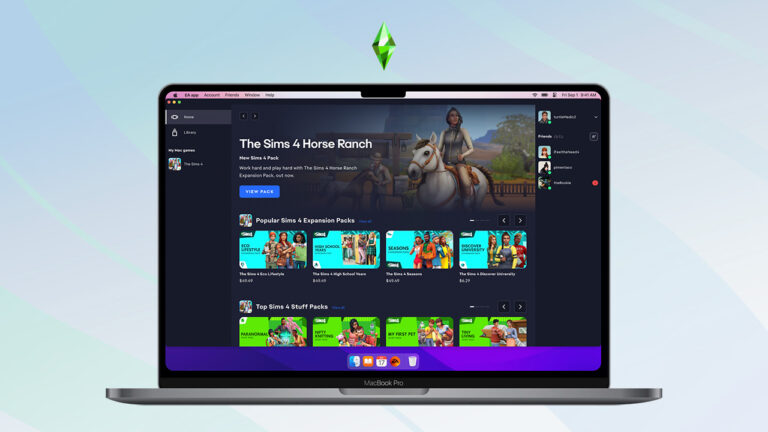
Back in September 2023 Electronic Arts released an official statement about EA App for Mac. The new desktop app was first introduced for Windows players in October 2022, with a promise to deliver the new client for Mac players “soon”.
Almost two years later and here we are! The latest statement from EA is letting players know that the Mac switch is happening “in the next few weeks”. Including a list of Frequently Asked Questions about the switch from Origin to EA App on Mac.
Origin Notification on Mac OS
If you’re a Mac player like me then you’ve probably been notified about the upcoming upgrade to EA App. According to Origin, the platform upgrade is “just days away” from happening.
To ensure a smooth transition process from an old game launcher to a new one, EA has prepared a list of questions and answers that will help you ensure to make this transition as harmless as possible.
Still, we strongly advise you to make any and every precaution necessary to ensure your game files and save games remain intact during the switch.
General Questions
When will the EA app be available for download on the Mac?
Soon! We’ll be in touch in the next few weeks to let you know when it’s available.
What is the EA app?
The EA app for Mac is Electronic Arts’ all-new, enhanced Mac platform where you can easily play any of your supported Origin games and discover new favourites.
Origin is a platform that’s been around for over ten years. Given its age, it unfortunately has performance and reliability limitations, and we’ve heard our players’ feedback about those issues.
The EA app is meant to be an answer to that feedback: it’s built from the ground up to be a faster, lighter and more modern app built with the future in mind.
Your EA account
Does my account transfer to the EA app?
Yep, you can log in to the EA app with the same credentials you use for Origin.
Will my saved data and in-game hours transfer over?
Yes. Any game that lists in-game hours on Origin will list those hours on the EA app. Saved data currently on your Mac or saved via Origin’s cloud will also transfer.
Your EA games
What will happen to my Origin games?
Once you download the EA app onto your supported MacOS device and log in to your account, all your games should be ready for play. If you find something to be missing from your library on the EA app, please contact us.
What if I notice one (or more) of my games is missing? What do I do?
We’ve worked hard to ensure all games and content previously available on Origin are ready for you on the EA app. If something is missing, and you believe it should be in your library, please contact us.
Will I have to re-download my games?
No re-downloading is necessary. Any games you already installed on Origin will appear in your collection on the EA app, ready to play.
If you don’t see any of your games, DLC or other content please contact us so we can help resolve the issue.
Troubleshooting
The EA app won’t launch no matter what.
Please attempt a full restart of the application. Please also ensure Origin is not running on your PC.
If a restart of the app doesn’t work, try restarting your computer.
Please run an App Recovery. If that does not work, you can contact us so we can help you.
The EA app is crashing
Contact us so we can help you resolve this issue. If you received an error code, please reference it when reaching out.
EA app and Functionality/Features
What will happen to my friends list?
Your Origin friends list automatically transfers over once you log in to the EA app, so you don’t have to worry about remembering all those player IDs.
Origin used to have “x” feature (wishlist, gifting, etc.) when will “x” be available in the EA app?
We aim to consistently update the EA app to serve all players better over time. If we see significant demand for “x” feature, we’ll be sure to use that feedback to craft the future of the app.
Where can I access advanced launch options?
The game tile in your library has a button to access game properties, which contains the advanced launch options.
I’ve been waiting for a moment like this for two years now, considering how unsupported Origin currently is on Mac OS.
Let’s hope for better results than the chaos Windows players have gone through.
A beloved feature from The Sims 3 returns in The Sims 4 Crystal Creations in the form of brilliant gemstones! Sims can once again cut the crystals they find into a variety of gorgeous gemstone shapes, ranging from hearts to skulls to plumbobs and even crystal gnomes!
Make the most of gemstones in The Sims 4 Crystal Creations
Gemstones are not only beautiful display pieces but they have an interesting effect when charged. Just like crafted jewellery pieces, gemstones can be charged under the moon on a crystal grid but their effect works slightly different from the effects of a worn jewellery piece.
Table of Contents
Sims 4 Crystal Creations Gemstone Guide
In this Sims 4 Crystal Creations guide, you’ll learn all about the different gemstone shapes, how to cut them, and how they work differently from worn jewellery pieces. Essentially, gemstones are more powerful than a worn piece of jewellery!
Gemstone Shapes
As you level up in the new Gemology skill, your Sims will be able to cut the crystals they collect into stunning works of art called gemstones in The Sims 4 Crystal Creations. There are a total of 11 different gemstone shapes you can cut. You can take a look at each gemstone cut down below. Sims will need to build the Gemology skill to cut all the gemstone shapes.
Gnome ShapeEmerald ShapeStar ShapeBrilliant-Cut ShapePlumbob ShapeSkull ShapeSpire ShapePear ShapeCabochon ShapeHeart ShapeSeed ShapeEach shape of gemstone, pictured in diamond
The examples above show the gemstones cut out of a diamond but depending on what type of crystal you use to cut the gemstone, the colour and effects of that gemstone will differ according to the colour and effects of the crystal that was used to cut that gemstone.
Room of all gemstone variants by odaphii in The Sims 4 Gallery
The shape of gemstone you select does not have any effect on its powers; it’s purely aesthetic preference. Only the type of crystal you use for the gemstone will change the gemstone’s effects. For example, a heart shaped ruby gemstone will have the same effects as a star shaped ruby when charged. It’s what the gemstone is made out of that matters, not the shape of the gemstone. The only (and big) exception to this is the gemstone seed shape, but more on that soon!
Gemstone Effects
So we’ve talked at length about gemstone shapes and that their effects on Sims differ slightly from crafted jewellery made from the same crystals. You might be wondering how are gemstone effects different from jewellery effects in The Sims 4 Crystal Creations?
Well, think of crystal jewellery as affecting the wearer only. When you create a necklace, set of earrings, bracelet, or ring using a crystal and you charge that piece of jewellery, only the Sim wearing that piece of jewellery will gain the effects of the charged crystal that was used to make it. It’s on that person’s body so only that person is affected.
The neat thing about gemstones in The Sims 4 Crystal Creations is that they have an area of effect. Because they are primarily display pieces not intended to be worn, if you charge a gemstone made from a crystal, all Sims that are near that gemstone gain the effects of that crystal. These effects persist until the Sims are no longer near the gemstone or until the gemstone loses its charge. For this reason, gemstones are more useful for affecting groups of Sims rather than just one Sim.
It’s important to note that the effect itself does not change. For example, a charged gemstone made from hematite and a charged necklace made from hematite both ensure that the affected Sim(s) cannot die. The only difference is that all Sims near the hematite gemstone will be immune to death, while only the Sim wearing the necklace will be immune to death.
The Gemstone Seed
We mentioned earlier that the seed shaped gemstone is an anomaly of sorts and doesn’t follow the same rules as other gemstones. That’s because the seed shaped gemstone serves an important and unique purpose apart from just sitting around looking pretty.
Any type of crystal can be cut into a seed shaped gemstone but the seed shaped gemstone will always appear the same in colour no matter what crystal it’s made out of. The seed shaped gemstone is also… plantable! Yep! It’s a literal seed you can plant in your garden like any other seed! What does it grow into? A crystal tree!
The crystal tree is not only gorgeous but incredibly valuable to collectors and jewellery crafters because as you might have guessed, you can harvest crystals from it daily. Every day at 5am when plants respawn their harvestables, the crystal tree will spawn a random assortment of crystals for your Sims to collect. You never know which crystals you’ll get that day but they will range from Common to Rare. If you want to ensure you get rarer crystals more often, focus on caring for your crystal tree so you can evolve it to the highest quality. Perfect quality crystal trees yield rarer crystals.
Having a perfect quality crystal tree in The Sims 4 Crystal Creations can help your Sims keep a good stock of rare crystals without having to sink so much time into hunting them down out in the world. This means they can spend more time crafting jewellery and gemstones and less time looking for the crystals to make them so it’s definitely worth having a crystal tree in your garden!
Want to learn more about each crystal and their unique effects when charged? Check out our full crystal guide!