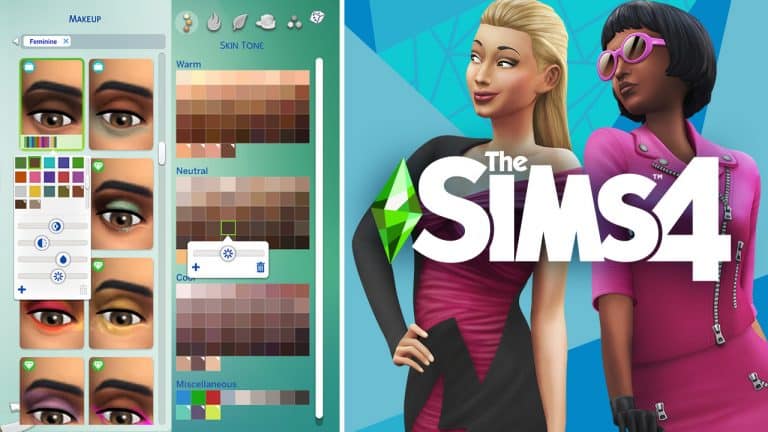
The latest update for The Sims 4 that introduces Skin Tone and Makeup Sliders and options has also given a major revamp to the Main Menu of The Sims 4!
The Sims Team has released a brand new Update for The Sims 4 on PC, Mac, Xbox One and PS4!
To download the latest version of The Sims 4, simply open your Origin program and if the game doesn’t update automatically, right click on The Sims 4 and select ”Update”.
In case you have Mods or Custom Content, the game will automatically disable them for you after first launching The Sims 4 after the update. To re-enable all your Mods and Custom Content, select the Settings option in the Menu and select Settings. Under the”Other” section you’ll find the ”Enable Custom Content and Mods” option. Check it and restart your game in order for it to take effect!
Patch Notes
PC:1.69.54.1020 / Mac: 1.69.54.1220
Console: Version 1.35
Happy Holidays Simmers!
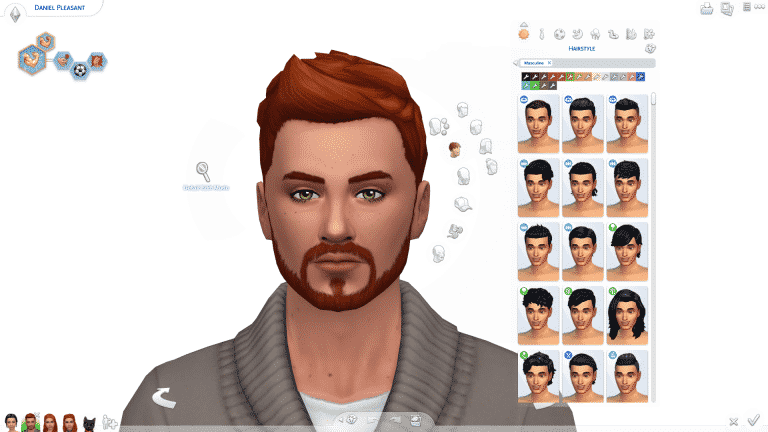
It’s time to go back in to Create a Sim! Where in this update you will find 100+ new skin tones, customization sliders for skin tones and makeup, and three improved base game hairstyles!
Every skin tone now has a value slider that allows you to change the light to dark value of that skin tone, unlocking a much wider variety of skin tone options for you to play with! You will also find that our skin tones are now filterable to warm, cool, and neutral tones (as well as miscellaneous that covers our occult skin tones).
The new makeup sliders add more choices and opportunities for you to customize your Sims, and express your Sim’s style! Hue, saturation, value or brightness, and opacity are now available to modify on the makeup. We have locked some of the sliders where it did not provide an optimal experience or make sense for the makeup. Expect us to continue our work on these issues into the future to provide you with more.
In addition to the customization opportunities provided, you can also save custom swatches as you tweak your sliders to get the perfect look. When you click on the swatch (for skin tones and makeup) as you modify the sliders, you will have an opportunity to save your custom settings, so you can re-use it later without having to remember your perfect looks!
Did we mention that we made some hair updates? We did – we updated a base game child hair (cfHair_BraidedPonyTail), and we added a second version of that hair that removes the baby hairs (cfHair_BraidedPonyTailPlain). And we updated a base game male hair that you may find difficult to recognize from the original hair (ymHair_flatTopTextured)!
fqo6lk53yfpg
rsg8dwiflyhu
2l675aicbvrx
We have updated the Main Menu!… Again! The idea behind this change is to create a more cohesive experience and give Packs a more proper space as we continue to grow our content lineup. As a nice bonus, we highlighted the Gallery in a more meaningful way to inspire you.
-SimGuruGnome & SimGuruRusskii
Now onto the fixes:
Sims 4
Sketching so much that the Digital Sketch Pad just quit on you? Never fear! Freelancer Sims that use the Digital Sketchpad will now be able to complete designs without being reset abruptly.
Happy Birthday to all! Sims will now properly Age Up. Adulting is hard but they will make it, don’t worry.
Fixed an issue in which Doors, Windows, and Arches had cutouts when being reflected in Mirrors. Rorrim Rorrim no eht llaw, ohw si eht tseriaf erutaef fo meht lla?
Sims that do not have the Fishing Skill, or have not been Fishing at all, will not get notifications about identifying Fish. THEY WERE FISHING WITH THEIR MINDS.
The following careers have added the “Take Vacation Day” option, yay!
Gardener (Seasons)
Military (Strangerville)
Lifeguard for Teens and Conservationist (Island Living)
Law, Education, and Engineer (Discover University)
Civil Designer (Eco Lifestyle).
Editor Russkii note: I didn’t want to add each line in each pack for this fix, it would have looked weird and robotic so that is why I chose to do one bullet point for all in this section.
Child Sims will no longer forget they are in their Sleepwear when they go to school. Though in these times of Work and School from Home, I don’t blame them one bit.
The Sweet Escapes Country Toilet will no longer be Comfortable AND Uncomfortable at the same time… There can only be one!
Sims with the Best Selling Author Aspiration can now complete their task of writing 3 Best Sellers.
Fixed an issue in which resized objects would disappear when they were part of downloaded Gallery items.
We revised our Careers (Pack specific and not) and we made sure there were no Chance Cards that were repeated constantly.
We noticed we had added the option to Clean Up Toddler on kitchen and bathroom sinks for both Toddlers and Children by mistake, so we removed it for both age groups from the sink… but how would have they fit? Like… how? These are the questions that keep me up at night.
Build Snowpal interaction is no longer available on non-natural ground (For Simmers that own Seasons and/or Snowy Escape). That’s why it’s called a Snowpal, not a Floorpal!
Get to Work
We made a clarification on the Xenophilia moodlet when interacting with Alien Sims. It should no longer say “From Discovering Aliens” but now it correctly reads “From Interacting with Aliens.”
Fixed an issue in which childbirth was not possible if Simmers changed the color swatches of the Surgery Tables. Now listen, I have heard about renting whole hospital wings for a birth in real life and other eccentricities, but this… was really something.
Get Together
Male Sims will no longer get Pregnant after receiving calls from NPC Sims.
City Living
NPC Sims will now text and call with invitations to Festivals. I personally welcomed the calm and quiet of my phone not beeping about constantly. But I can’t miss a Festival!
Sims rejoice! Yard sale customers will no longer invade their Home Lots and use Household objects. It is a Yard Sale… OUT in the yard, not an Open House.
Did you ever regret trusting some Sims enough to give them your apartment keys to constantly get visits from them for Milk and Juice? You can rest assured that they will no longer visit you for this purpose. I think some neighborly love is appreciated, but this went beyond the proverbial “May I have a cup of sugar?” type of situation.
Fixed an issue in which interactions to participate on GeekCon contests would not appear when interacting with objects.
We decided to give a bit more clarity when displaying the location of Festivals, so now it will display as “Near <insert location>” and not a distinct location that is not entirely correct. This is true for Festivals in Snowy Escape as well.
Cats and Dogs
Pets will no longer sleep in random places when told to sleep on their Pet beds. In my world they can sleep where they are most comfortable, my conspiracy… allegedly.
Seasons
Sims can now Shower in the Rain… Jury is still out on Singing and Dancing.
Sims will no longer “lose” their shovels when performing other autonomous activities while performing the interaction “Shovel Snow.”
Our friendly neighborhood Snowpal has been properly renamed to Chill from Chil. Everything I knew before was a lie… a LIE!
Ever felt like the Holiday spirit has just been too much to handle, and Father Winter starting to show up everywhere and not letting you do much of anything getting a bit… out of hand? Fear not! Father Winter will stop replicating himself* to spread holiday cheer. *Note this fix is not entirely retroactive, new saves should see this without issue. Existing saves will correct themselves over time.
Get Famous
Duck Security SCROO9E Super XL Smart Vault will no longer disappear after Sims Woohoo in it… you can say Woohoo can be romantic and magical, but maybe not to this extent?
NPCs from the Actor Career sometimes would never show on Set, making gigs impossible to complete. We’ve spoken with their union reps and everyone has agreed to stop this ridiculous strike. What were they striking about? Was there even a Strike? We may never know.
Island Living
Mermaids and other Occults should no longer be able to make hybrid occults. How were they making them? Oh boy, I’m not sure if it’s appropriate for me to give you the mermaid-birds and spellcaster-bees talk.
Randomly generated Mermaid Sims will no longer be seen without some features in affected Simmer Saves. However this fix is not retroactive, so it should be seen fixed in new saves.
Pizza delivery to Lagoon Look Lot has been fixed to arrive promptly.This is Sulani Deep Lagoon Pizza, home of the 2×1 Mermadic Kelp Pizza and the Salty Llama Combo, may I take your order?
<Descriptive Simlish on the line>
Uh huh… uh huh…
<Indescribable Simlish on the line>
Yes, we now can ACTUALLY deliver to Lagoon Look…
<Interrogative Simlish on the line>
Yes, we told our delivery Sims that they need to deliver it there and not keep the pizza for themselves… like give it to the actual client.
<Surprised Simlish on the line>
Discover University
Has this ever happened to you? Your Sim is ready to make an offering to the Sprites only to find a crystal stuck without being able to move it? No longer a problem, Sims now can remove offerings so all their rituals can resume. Sprites rejoice.
We fixed an issue for our Console Simmers that wouldn’t allow them to close the Humanoid Robot’s Behavior Module Menus correctly.
Fixed an issue that would cause items to be repossessed when loans were fully paid. That is NOT how it worked Repo Person… NOT how it worked.
Sims with Research & Debate Skill 3 or higher will no longer be able to “Convince to” with Toddler Sims.
Masquerade Secret Society Masks are now properly unlocked in Create a Sim when joining the Secret Society.
Fixed an issue in which Heckle animation was sometimes not being performed autonomously by Sims while playing Ping Pong.
Eco Lifestyle
Fixed an issue that triggered the Off-the-Grid notifications after traveling to different Lots in Evergreen Harbor, even when they are not labeled as Off-the-Grid.
We spoke to all Eco Inspectors, and they have agreed that they should NOT be charging the Energy efficient appliances fine if your appliances are fully upgraded to be super efficient and amazing. I mean all that work and still get fined? Not in this house!
Fixed an issue in which some placeholder text was showing in notifications after Dumpster Diving.
The Americana Station Speakers will now play Music… as the prophecy foretold.
When the We Wear Bags N.A.P is active, Grim Reaper will not be partially invisible when appearing on a Lot. Grim Reaper contributes!
Living the No Appliance lifestyle? We’ve got news for you! Sims will no longer be penalized for not having “Eco-Friendly Appliances.” No appliances, no fines!
Snowy Escape
Vending Machine Canned Soups and Drinks won’t spoil anymore. Time to stock up!
Sims can no longer go on Hikes while holding their Toddlers.
Space Heaters will now be able to be placed on Lots from Inventory. Sharing the warmth everywhere!
Fixed an issue in which the Shoe Removal Sign in 5-1-2 Kiyomatsu was not working properly. We also added Shoe Removal Signs in 5-1-1 Kiyomatsu and 2-4-2 Wakabamori.
Sims will now be more visibly furious when having the appropriate furious sentiment toward other Sims. “Yes, I’m mad!… No! This IS my furious face!”
Fixed an issue with some animations that would stutter while Snowboarding or Skiing. We also made sure that Sims with a high level of those skills would not always choose the Bunny Slopes.
Izzy Fabulous’ Star Simmi Rank was just too fabulous so we had to correct it to be one star less than displayed. Don’t worry Izzy, you are a full 4 stars in my book, you are that fabulous to me.
After much debate of whether it is the Cave Shrine or the Mountain Shrine for Hiking destinations we finally decided to just call it Mountain Shrine.
We revised the Snoop-Proof Bamboo Blinds and it is now possible to drop’em like they’re hot with the Thousand Words Window.
NPC Sims will no longer “take over” the Slopes for themselves for an indefinite period of time, now they will be sharing with all Sims the joys of the Slopes.
Fixed an issue in which Sims would get highlighted in the Sentiment Panel as if receiving new Sentiments every time traveling is involved.
Sims with Rock Climbing Skill 7, or higher, are able to autonomously climb the Tall Wall (Such tall! So much wall!). There is no need to not face what makes you uncomfortable… autonomously.
Had a chat with Yamachan and asked if he was ok, he seemed to start random conversations and then randomly say goodbye without reason. We are happy to report that he is OK now and will try not to do that. Give us a hug Yamachan.
Food Stalls at Mt. Komorebi Festivals won’t be closing shop randomly during Festival hours anymore. <guitar and piano intro> Closing time, open all the Stalls and eat all the food in the world…Closing time, turn all the lights on and let Yamachan greet you heeeere…
Create a Sim asset ymHat_EP10HelmetGoggles has been fixed to no longer display clipping around the neck area as well as we made sure no facial hair is removed when wearing this asset.
Dine Out
Experimenting with photo frames will no longer use the same picture of an Experimental Meal when displayed.
Hot Pot meals are now part of Restaurant Menus! I miss the times I would go to eat Hot Pot at a restaurant. One of my favorites has a conveyor belt that carries your fixings never leaving your table for a thing. *happy sigh*
Vampires
Vampire Sims will no longer be affected by temperature, so they won’t be constantly obsessed with lighting fireplaces trying to get warm.
The Sims Team will be releasing a big Create A Sim Update on December 8th – giving over a hundred new Skin Tones to choose from as well as new Skin Tone and Makeup tools and options. Before I explain how you can prepare your game for this big update let’s quickly talk about what are some of the announced features coming with the update.
The Skin Tones update will now include a completely seperate Skin Tones category in Create A Sim, giving you the option to choose from 4 different Skin Tone categories: Warm, Neutral, Cold and Miscellaneous. With each Skin Tone there’s also a hue slider that lets you make any Skin Tone of your choice darker or paler depending on your preference. Each custom Skin Tone preset that you make with the slider can also be saved so you can quickly use the same Skin Tone variant for your next Sims that you create.
When it comes to new Makeup Features – there’s a lot of them. Not only that there are 4 new sliders that will let you customize makeup but each slider will work for ANY piece of makeup we’ve gotten over the last 6 years – including the Makeup from Base Game as well as all the packs we have so far.
There are 4 new sliders for Makeup: Hue, Brightness, Saturation and Transparency. One of the most important things to note here is that the Hue Slider will allow you to change the color of the makeup to any color you want – meaning that you’re no longer limited to the preset variants that each makeup option offers.
Another part of this update that’s been announced is adding and improving some of the Base Game hairstyles.
Three more base game hairstyles will see improvements in the December update. These include two children’s hairstyles—the braided ponytail with baby hairs and the braided ponytail without baby hairs—and the flat-top texture hairstyle.
The team also revealed that they’ll be improving the Base Game afro hairstyle, however that won’t be included in this month’s update.
So, what does this update mean for your game and the possible Custom Content / Mods you might have already installed in your mods folder?
It’s not known yet what else might be included in this update beside the CAS features that I’ve talked about above, however with big updates like these it’s always important to play it safe and remove any CC / Mods you might have installed. The game will automatically disable them after opening up The Sims 4 for the first time after the update but it’s important that you leave them disabled until your favorite Mod creators confirm that their Mods work, don’t work and / or are planning to release an updated version of their creations to work with the latest update.
One thing is 99.9% certain – any Custom Skin Tones / Makeup that you’ve possibly installed will probably be broken after this update considering that this update is changing the way Skin Tones / Makeup work and function from the ground up.
There is a chance that the talented modders over at Sims4Studio might come up with a batch-fix solution that will fix CC Skin Tones / Makeup to work with the latest update. We’ll definitely keep you posted when and if that happens!
The Sims Team released an official survey for The Sims 4 Snowy Escape Expansion Pack!
The survey mostly asks questions regarding where you’ve heard about the pack, which features you like / dislike and what is your general impression of the pack.
You can take the survey by clicking the button below!
The Sims Team is already wrapping up the production for The Sims 4’s 11th Expansion Pack!
Maxis’ official Careers Website has published a new job opportunity looking for a Voice Editor. There are two job opportunities listed for the same Voice Editor role looking for someone who will help ship The Sims 4’s next Expansion Pack.
It’s known generally in the video gaming industry that some of the final steps of creating a new video game (or in this case a Sims 4 Pack) is recording and editing audio / voice material for the game. For example, we’ve published the same finding back in March 2020 regarding the same job opportunity and about 2 months after The Sims 4 Eco Lifestyle has been announced.
If all goes according to plan The Sims 4’s next Expansion Pack should be announced and released in the first quarter of 2021 according to previous patterns.
At Maxis, we excel at outrageous thinking. It’s the fuel that inspires the best games in the world. We’re trailblazers and great storytellers. But it’s not just about amazing your peers – it’s about amazing yourself and our fans. Take risks. Work with dazzling minds and dare to dream big. Together, we can change the way millions play every day. The Sims 4 has an extremely unique player base, with 60% of our audience being women between the ages of 18-24. We are looking for someone with deep insights on how to create the best experience for our players.
The Maxis Studio of Electronic Arts is looking for a Voice Editor to join the Audio team and help us ship an upcoming expansion pack for The Sims 4.
When The Sims 4 first came out for Xbox One and PS4 back in November 2017 I was excited to test out just how well it runs on my PS4 Pro. The optimization of the game in the beginning wasn’t too bad but there was room for improvement. The Sims Team released multiple updates for the Console version that somewhat solved the issue but there was something they couldn’t stop – releasing new Packs.
Before I begin with explaining why The Sims 4 (with Packs installed) is no longer playable on Xbox One and PS4 I’ll have to first explain the way those consoles have been built. Both Consoles have been released in the holiday season of 2013 and both rely on the now outdated method of storaging files – Hard Disk Drives. The introduction of SSDs (or Solid State Drives) was already on its way for PC computers during that period and players have already started adapting and upgrading their desktop computers with SSDs. By the time The Sims 4 came out along with some of the first packs PC and Laptop manufacturers have already started creating pre-built computers with SSDs that are way faster than HDDs. This made plenty of video games, including The Sims 4, skip the loading screen in just a matter of seconds. This was all thanks to the power of SSDs providing enormous writing and reading speeds for their disks.
61ryVJLDlFL. AC SX466
3max
Skip to 2020 and we have The Sims 4 series that, at the time of writing this article, has 10 Expansion Packs, 9 Game Packs and 17 Stuff Packs. For players that have almost all or all packs installed on their desktops that have SSDs this really isn’t an issue considering that the game still switches between loading screens in a matter of seconds. However, players who are stuck with older computers where The Sims 4 is installed on an HDD playing the game becomes difficult. This really isn’t an issue for PC players considering that doing an SSD upgrade is really cheap in 2020. However Console players who aren’t tech-savvy and expect The Sims 4 with multiple packs installed to run smoothly on their PS4 / Xbox One will be unpleasantly surprised.
I’ve gotten a chance to revisit The Sims 4 with all of the Packs installed on my PS4 Pro and I was shocked to discover how slow the game runs on the platform. It took me 4 minutes of loading to just enter the game’s Main Menu and additional 6 minutes to load my save game and enter Live Mode. In comparison it takes me about a minute on my PC to get into the main menu, load up my save game and jump into Live Mode.
The struggles of playing The Sims 4 on my PS4 Pro didn’t just stop there – after finally jumping into Live Mode I’ve encountered a huge fps (frames per second) drop that lasted for a minute – probably because the game was still loading assets even after the 6-minute loading process. The game somewhat normalized and was running at around 20 fps but there were still occasional lags that occured in-between, including when I was switching between Sims and anything that included loading additional assets such as Sim Profile thumbnails. The loading struggles continued after switching into Build Mode as the game had to additionally load object thumbnails and features that are exclusive to that mode. In conclusion – the game’s performance felt like the console didn’t even meet the minimum system requirements that are listed for PC players.
The loading struggles were best shown by Moonlight Gem on YouTube who recorded the loading process and compared it to the newly released PS5.
In the video below the player had a regular PS4 console with almost all the Packs installed (excluding Snowy Escape, Star Wars and Tiny Living Stuff). It took exactly 4 minutes and 35 seconds to load up the game’s main menu. By the time the player entered live mode it took the player roughly 12 minutes in total to start playing their game.
Thankfully PS5 and Xbox Series X have been released this month and both consoles rely on super-fast SSDs that can load up games in just seconds. Moonlight Gem recorded their loading process of The Sims 4 on their new PS5 console and with almost all of the packs installed it took roughly 2 minutes to load up the main menu, the save game and jump in straight into Live Mode. The game was also running smooth from that point as it was able to reach 60fps.
Of course the loading speeds on PS5 and Xbox Series X should be even faster considering their SSD capabilites but we should expect further game optimizations for The Sims 4 (and other video game titles) on PS5 and Xbox Series X in the upcoming months.
Playing The Sims 4 Base Game with maybe two or three packs isn’t a bad experience on PS4 and Xbox One. However you’ll be more and more disappointed in the game’s performance as you keep installing more packs on your Console.
At the moment I’m still waiting for my PS5 order to arrive so I can record and compare the game’s performance with the next-gen specs so I can showcase how well each segment of the game loads up. Still, I can tell you upfront even without the next article showcasing the comparison – The Sims 4 with all Packs isn’t a playable experience on older consoles. If you plan on expanding your Sims 4 collection for your Console it’s best to also start considering getting a new, next generation Console.
The Sims 4 recently introduced Sentiments – a new way for Sims to build (or destroy) relationships with each other. Although the current list of Sentiments in The Sims 4 is pretty big (over 50 if you count the ones that come with Snowy Escape), there is still a lot of room for improvement and new Sentiment additions.
Considering the Sentiments feature is pretty new to the Base Game we could see a lot of new additions in the future. Until then Sims 4 modder @lumpinou decided to take the matter into their own hand by exploring the possibility of Custom Sentiments!
They explained that creating Custom Sentiments for the game is possible (using external modding tools of course) and that there’s almost an unlimited amount of Custom Sentiments you’ll be able to add into the game.
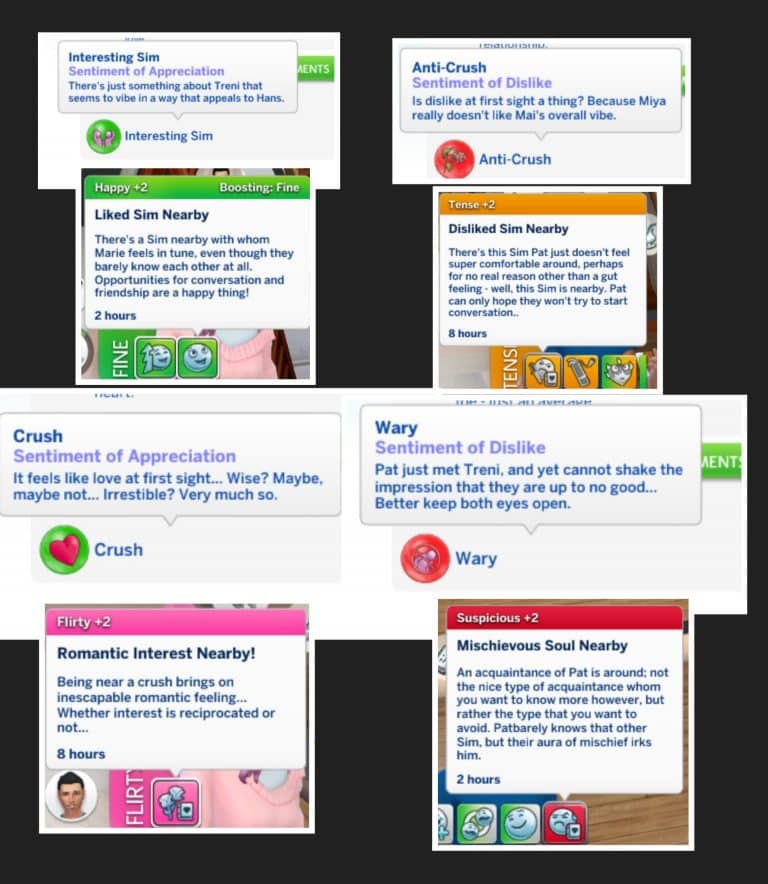
Are custom Sentiments doable? yes. Will I make roughly a billion of them to put in my mods? yes. Am I by any chance making a First Impression system for Sims when first meeting each other, which will influence friendship & romance development? You know it.
Some examples. Aiming for a November release. Using the moods mod as well to vary up reactions, see that ‘suspicious’ moodlet? 😉 First impressions don’t last forever & can be overcome…. Hopefully there’ll also be time for a very tiny Woohoo Wellness update.
The modder confirmed that they’ve already started working on some of the Custom Sentiments that will build interesting chemistry between two Sims. You can check out some of the examples above!
They’ve later explained some of the technical details behind Custom Sentiments:
They definitely are doable! They can be tricky to work with because adding certain ones will ditch existing ones, so it’s important for us modders to be careful and not make overly powerful sentiments that wouldn’t warrant it… But I hope creators will go crazy with this anyway!
Traits mostly to start with, as well as incorporating the results of other mod’s systems. It will make more sense once you see it in action. This is a small project though, keep in mind 😂 I’m still mainly working on Woohoo Wellness & Pregnancy Overhaul, and on partial break 😂
Lifestyles are on a list together so until someone figures out how to inject into that, the only potential way to have custom ones would be overriding the file and that means all mods with them would conflict with each other. IF the UI lets us make custom ones to begin with.
The Sims 4 still has a lot more content to provide according to the latest interview with Graham Nardone, Snowy Escape’s Lead Producer.
In the interview with Gamesradar Graham talked about the meaning and development of Snowy Escape as well as some of the game’s core features like Lifestyles and Sentiments:
“Players did not expect that out of us,” Nardone admits. “But it is something that they have been highly discussing and requesting… I think that increased depth to the simulation is a big thing for players.” EA’s strategy, when filling a long-time request for more depth, is to occasionally subvert expectations. “I think it’s cool, playing with those expectations a little bit while still delivering on the things that people really want at that core level,” Nardone says.
Later in the interview Graham talked more about the community’s requests for adding disability options such as wheelchairs, disabled-friendly home objects, service dogs and more:
“We’ve had active outreach with players in the community and asked, ‘what are better ways that we can represent you? What are some of the things that we can do to recreate those moments, or lived experiences, respectfully within The Sims 4?'” Nardone points out. “I think the thing that we want to avoid is turning it into a feature.”
When asked about if there are any plans for a next installment of The Sims Graham stated the following:
“There’s such a diverse range of topics and features that we could cover, the possibility space of what we can do within The Sims 4 is just humongous,” Nardone tells me when I ask about the potential of a new game. “I think that just goes to show that there’s way more that we can still do within this title, and our players are plenty hungry for more content that we can give in. That’s a good problem to have.”
If you’re thinking that this means that EA is still only focusing on The Sims 4 don’t worry. Developers can’t talk about or confirm something major as a next generation Sims game. If you’re wondering if the next Sims Game (or The Sims 5 if you will) is being developed we can answer that for you – yes. There’s more than enough evidence, even a confirmation from EA’s CEO, that Maxis is working on a next Sims Title. Check out some of the articles here:
There are different development teams working on the next-gen Sims Game and on The Sims 4, and according to the latest interview there’s a lot more left in store for The Sims 4!
The Sims Spark’d has a new challenge waiting for you in The Sims 4!
From November 23rd to December 14th 2020 create and submit Sims, Builds and Stories that revolve around holidays!
You’ll be able to submit your creations straight from The Sims 4’s Gallery for CAS and Build portions and upload your Storyline videos via YouTube. For a full set of information check out the rules breakdown for each category:
HOLIDAY MAGIC: STYLIST
Create four Sims living in your snow globe. Are they mystical creatures, mischevious sprites, an adventure seeking family? Style and showcase their life inside.
Style four Sims using the Everyday Outfit category living in a snow globe.
Your Sims do not have to be winter themed, so find inspiration in anything from holiday characters to mischevious troublemakers!
Each Sim should have a distinct personality, so try to be as original and unique as possible!
STYLIST GUIDELINES
Submission Window: 10am PST November 23 – 10am PST December 11, 2020
Voting Window: 10am PST November 30 – 10am PST December 14, 2020
DLC not required.
Sims’ ages must be toddler and up
Do not use the CAS Stories feature
No Simoleon (§) limit
Full edit cheat (cas.fulleditmode) and Unlockable CAS Content allowed
Custom Content (CC), custom thumbnails, poses, and mods are not allowed (Stylist, Builder)
HOLIDAY MAGIC: BUILDER
Imagine and create a magical snow globe world and what it would look like given a swirl.
Build a scene inspired by a shaken snow globe!
Pull inspiration from any theme, not just a winter scene. Build your world in any season and surprise us with something special!
What happens when you shake up your build? Are houses turned upsidedown, have structures crumbled, has a holiday wreaked havoc?
STYLIST GUIDELINES
Submission Window: 10am PST November 23 – 10am PST December 11, 2020
Voting Window: 10am PST November 30 – 10am PST December 14, 2020
Any gallery sorting lot size and type, in any world
DLC not required.
No Simoleon (§) limit
All build cheats and hidden object allowed
Custom Content (CC), custom thumbnails, poses, and mods are not allowed (Stylist, Builder)
Use of mods for building (TOOL, Red Shelf) is not permitted
HOLIDAY MAGIC: STORYTELLER
Portray what happens when Sims living in a magical snow globe are taken for a swirl. Share your Holiday Magic story!
Tell us a story about the world inside the snow globe, and what happens when it’s shaken up by an outside force! • How did this happen and how did it affect the Sims inside?
Was it an accident? Or was the chaos intentional?
Make your story as original or creative as possible. It can be holiday themed, fantastical, or something completely new!
STORYTELLER GUIDELINES
Submission Window: 10am PST November 23 – 10am PST December 11, 2020
Voting Window: 10am PST November 30 – 10am PST December 14, 2020
Must be in English or contain English subtitles
Must be original content created by the uploader
Video length cannot exceed three minutes
Any genre of storytelling (horror, sci-fi, romance, comedy, etc.)
DLC not required
No Simoleon (§) limit
Use of Custom Content (CC)/Mods for video creation is allowed only for the Storyteller Challenge (not permitted for Stylist/Builder)
Certain retailers in United States have already started launching some crazy offers for video games. Those now include both Amazon US and Best Buy, who are now the only one at the moment offering The Sims 4 Snowy Escape Expansion Pack for 50% off!
The copy that both of these retailers are selling is a physical one, meaning that you’ll have to either wait for the delivery or go directly at Best Buy and purchase Snowy Escape for only 20USD.
It’s not known how long will the sale last but it’s better if you act quick before Black Friday deals run off after November 27th!
Sims in The Sims 4 all speak one language – Simlish. However, what if there were different language branches within the Simlish universe?
Over the last few years we’ve gotten packs for The Sims 4 that explored numerous cultures. Now, with the Language Barriers mod you’ll be able to have different Languages within the game for different cultures that have been introduced through some of the previous packs!
Within the Language Barriers Mod there are six different languages your Sims can learn: Komorebigo (Snowy Escape), Selvadoradian (Jungle Adventure), Simlish, Sixami (Get to Work), Sulani (Island Paradise) and Windenburgish (Get Together). Sims who live natively in one of the worlds from these packs will automatically have a proper language assigned to them – for example Sims from Mt. Komorebi automatically getting the Komorebigo language skill. However, if other Sims want to communicate with such Sims fluently they’ll have to get to work and learn all about the language of the Sim they want to speak with.
There are many ways Sims can learn languages including reading a textbook, using the “Simlingo” app and interacting with other Sims who speak the language.
This great Mod is fully functional with the latest Sims 4 Update and pack and will provide great depth to social interactions! You can learn more about the mod, along with the download link listed below:
A world where everyone speaks the same language is unrealistic. This mod adds new languages to the Sims universe, which introduces a unique challenge to the game.
features
Six languages: Komorebigo, Selvadoradian, Simlish, Sixami, Toki Sulani, and Windenburgish.
Native languages are assigned to sims (children and older) depending on their home world, traits, and occult type.
Toddlers will acquire their native language(s) once they become children. The languages they acquire depends on which ones they have been exposed to while growing up.
Sims can learn another language by using Simlingo, reading a textbook, or interacting with other sims who speak it.
Communication between sims is limited when they do not share a language. New interactions unlock as you learn more of the other sim’s language(s).
Sims may miscommunicate when they do not share a language. This results in an embarrassed, angry, or tense moodlet that will get worse the more they talk.
Looking to get into the world of The Sims 4 Snowy Escape Expansion Pack or just want to know more about a certain feature in the game? We’ve got you covered!
Down below is a full list of articles, guides and overviews from Snowy Escape that we’ve created over the last couple of days. These articles will help you find out more about what’s included within the pack, which features are included, how to unlock a certain something and more!
From Lifestyles to Hiking and which objects are included – it’s all there. We’ve categorized the guides in several different categories that you can check out below:
Hey Simmers, long time no speak, this year has been crazy! But I’m back with a quick article on my must have mods for The Sims 4. If you’re an avid player like me chances are you already know about these mods but there’s probably some Bob and Betty Newbies out there looking to mod their games for the first time, so I hope this helps!
1. UI CHEATS EXTENSION:
Want to be able to control everything about your game with a few clicks or a button? This is the mod for you!
The UI Cheats Extension mod allows you to do just about anything you could dream of, does your Sim need a certain skill level for a promotion? Don’t have the time? Just right click the desired skill and cheat your way to the top. It’s the same for almost anything, Right click almost anywhere on the UI and something should pop up, more money? add it. Better relationships? set them. It’s as easy as that.
An example of using UI cheats to set relationship values.
To install this mod just locate your mods folder and drag in the files, I recommend using a sub folder for this mod.
2. MC COMMAND CENTER:
Now this mod lets you control pretty much the whole game on a level easy enough to understand for everyone, and I know for a fact me trying to describe it wouldn’t do it justice so here’s a link to the components and how they enable you to control your game. Give it a try, I promise it’s not as overwhelming as it seems!
An example of MC Command Center with all the modules installed.
to install this mod drag the files into your mods folder, you are able to pick and choose the components, I recommend putting this mod in its own sub folder
3. MORE CAS COLUMNS:
Does exactly what it says on the tin, adds more columns in Create A Sim, for simmers with wider screen resolutions or people who just want to be able to navigate their content better, we all know two is not enough, this mod allows you to have three, four or even five columns for you extra wide bois out there.
To install this mod just drop it in your mods folder, I suggest a sub folder for your important mods such as this.
4. BETTER BUILD/BUY:
This mod right here saved The Sims 4’s build/buy catalog. Organized, swatched and named debug? Yeah, you’re not dreaming it’s real. This mod is an entire overhaul of the debug section, remember having to scroll endlessly to find something because it wasn’t named? Now you can search for it! If it comes in more than one colour there are now swatch options to flick through to avoid having duplicate items taking up room in the catalog, it’s also organized so the objects can be found in their proper categories such a decor, plants trees and so on, this is not all, the mod also comes with many more great features, check it out for yourself below!
An example of the new filters added to build/buy and a named debug object.
To install the mod just extract the .rar file into your mods folder, there a folder should appear named Tmex-BetterBuildBuy, DO NOT remove the files from this folder and it should work fine.
And there you have it, these are the mods I can’t play my game without, I hope this helps you enhance your gameplay. Please leave any questions or suggestions on what you’d like to see an article on next and I’ll see you soon!
There’s a HUGE Black Friday promotional offer for all EA Games this year – including The Sims 4 its packs!
Like every year I’ve gathered all the important Black Friday Deals on various websites for various platforms. Please note that what I’ve listed below might be subject to change – meaning that some discounts may be increased / changed as we get closer to Black Friday on November 27th so make sure you bookmark this post!
There are plenty of good deals for Simulation games over at Origin! Down below we’ve listed all the important ones and YES – even The Sims 4 Stuff Packs are included for a very generous discount!
All the deals that you see listed below are valid until December 1st, 2020 at 10AM PT!
The Sims 4 Base Game – 88% off
The Sims 4 Expansion Packs (excluding Snowy Escape) – 50% off
The Sims 4 Game Packs – 25% off
The Sims 4 Stuff Packs – 50% off
SimCity – 75% off
Steam
The sale is live right now! The Steam Fall Sale offers almost exactly the same deals as on Origin and will last until December 1st, 2020!
The Sims 4 Base Game – 88% off
The Sims 4 Expansion Packs (excluding Snowy Escape) – 50% off
The Sims 4 Game Packs – 25% off
The Sims 4 Stuff Packs – 50% off
Playstation Store
Plenty of Sims 4 titles for PS4 are up for the Black Friday Sale on the official Playstation Store! Check out the full list of titles available below:
The Sims 4 Base Game – 75% off
The Sims 4 Eco Lifestyle – 50% off
The Sims 4 Seasons – 50% off
The Sims 4 Realm of Magic – 25% off
The Sims 4 Parenthood – 25% off
The Sims 4 Movie Hangout Stuff – 25% off
The Sims 4 Vampires – 25% off
The Sims 4 Dine Out – 25% off
The Sims 4 StrangerVille – 25% off
The Sims 4 Toddler Stuff – 25% off
The Sims 4 Kids Room Stuff – 25% off
The Sims 4 Backyard Stuff – 25% off
The Sims 4 Laundry Day Stuff – 25% off
The Sims 4 Outdoor Retreat – 25% off
The Sims 4 Cool Kitchen Stuff – 25% off
The Sims 4 Moschino Stuff – 25% off
The Sims 4 Spa Day – 25% off
The Sims 4 Romantic Garden Stuff – 25% off
The Sims 4 Jungle Adventure – 25% off
The Sims 4 Fitness Stuff – 25% off
The Sims 4 Perfect Patio Stuff – 25% off
The Sims 4 Plus Cats & Dogs Bundle – 25% off
The Sims 4 Vintage Glamour Stuff – 25% off
The Sims 4 Spooky Stuff – 25% off
The Sims 4 Bowling Night Stuff – 25% off
The Sims 4 Luxury Party Stuff – 25% off
The offers are available right now and will end on December 1st, 2020!
Microsoft Store
Looking for cool discounts for The Sims 4 on Xbox? Check out the official deals from Microsoft’s Store!
The Sims 4 Base Game – 75% off
The Sims 4 Plus Cats & Dogs Bundle – 75% off
The Sims 4 Cats & Dogs Plus My First Pet Stuff – 50% off
The Sims 4 Bundle – City Living, Vampires, Vintage Glamour – 50% off
The Sims 4 Bundle – Get to Work, Dine Out, Cool Kitchen – 50% off
The Sims 4 Expansion Packs (excluding Cats & Dogs & Snowy Escape) – 50% off
The Sims 4 Game Packs – 25% off
The sale is active right now and will end around December 3rd, 2020!
Amazon
The deals over at Amazon are almost exactly the same as from the official platforms we’ve listed above. However if you want to check out the catalogue yourself you can do so here!
Ever wanted to meet up with other Simmers, share your creations and stay up to date on all the latest? We’ve got you covered!
Announcing the Sims Community Discord Server – a place where you can do all that plus more! This Discord server is a collection of mutliple different channels that allow you to chat with all your fellow Simmers, share your creations, Mods, CC, Stories, Videos, Streams – basically ANYTHING Sims related.
For those who are out of the Discord loop – Discord is a social networking platform available on both desktops and smartphones that allows you to meet up with fellow gaming community members. The tools within the Discord platform have been specifically adjusted to suit any gamer so they can meet fellow gamers and share their passion for their favorite video game.
With the Sims Community Discord we’re inviting ALL kinds of Sims Players – no matter if you’re playing The Sims 4 or are still in The Sims 1 era (there are seperate channels for each Sims game).
Another thing about the Sims Community Discord – we’ll be closely watching for all your creation submissions as they might just get published on Sims Community and our social media!
So what are you waiting for? The Sims Community Discord is NOW OPEN! Click the button below to join us: