Sims can now discover new traits or swap traits through gameplay!
For the longest time, our Sims were stuck with the same 3 traits we picked out for them in CAS for their entire lives. Regardless of the direction their life took afterwards, there was no personal growth to reflect those changes in habit. The Sims 4 Growing Together changes that in a big way. Sims can gain an entirely new personality based on the way they live their lives. Their personalities grow and change alongside these new life experiences. See how trait changes work in The Sims 4 Growing Together!
The Sims 4 Growing Together Personality Changes
As your Sims go through life, you may receive popups that give you the opportunity to add a new trait to your Sim’s existing set of traits. You might also get the opportunity to swap one of your Sim’s traits for its opposite! These Sims 4 Growing Together trait change popups are not entirely random; they trigger based on what your Sim is doing at the time. However, it can be tricky to deliberately trigger them. You’re not guaranteed to receive one of these popups every single time your Sim does a specific action. This creates a lot of variety in storytelling. No two Sims will have the exact same trajectory of character growth even if they lead mostly similar lives.
You are not forced to accept these personality changes. You can decline the opportunity to change your Sim’s traits if you wish. So you don’t need to worry about the game forcing your Sim down a path you don’t want. However, accepting these trait changes in The Sims 4 Growing Together at least some of the time can lead to more exciting gameplay you didn’t expect.
Trait Additions
You will periodically get the opportunity to add a new trait to your Sim’s existing traits. These are not reward traits; they are core CAS traits. This is exciting because additional CAS traits are normally not available to change or add to after you initially select them.
Each Sim can gain up to three additional CAS traits through gameplay. So in total, our Sims can actually have up to 6 CAS traits; 3 that you selected, and 3 gained throughout their life. You can really expand your Sims’ personalities in Live Mode using The Sims 4 Growing Together’s trait change feature.
For example, our Sim started out with the Loves Outdoors, Dog Lover, and Active traits. As she started learning new skills, she was quite clumsy at them. She would accidentally slice her finger while cooking and stumble while running on a treadmill. After a few of these incidents, we were asked if we wanted to give her the Clumsy trait. We said yes, giving her a fourth CAS trait. Later on, we had the opportunity to give her the Cheerful trait as well since she was frequently Very Happy.
One of our other Sims had the opportunity to add the Family-Oriented trait to their existing CAS traits because he was spending a lot of time caring for his children. Another cool Growing Together trait change!
Trait Swaps
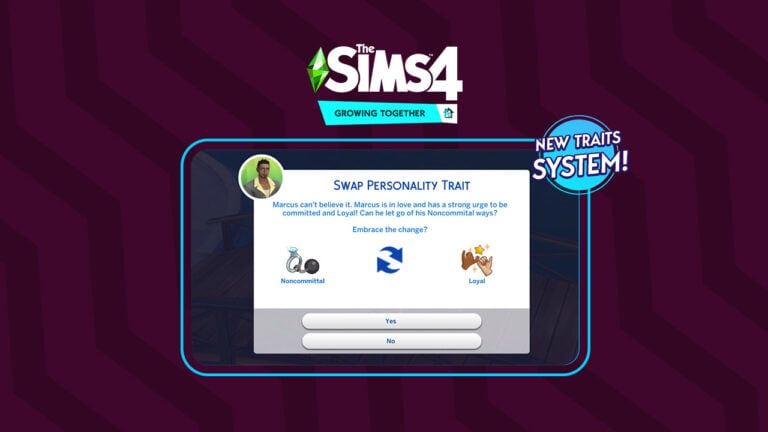
Additionally, Sims can have their traits swapped out for its opposite if their life is going in a direction that conflicts with one of their existing CAS traits. Our Sim met and fell in love with Marcus Flex, a premade Sim from the Get Together expansion pack. Marcus has the Noncommittal trait, so he is unlikely to want to settle down in a marriage. However, he and our Sim were extremely compatible and we thought she could be the one for Marcus. So we had him propose to her.
When he proposed, we received a popup asking us if Marcus should lose his Noncommittal trait and gain the Loyal trait, instead. We said yes and Marcus was a changed man thanks to the power of love!
This powerful feature allows for so many different types of storytelling and personal development in Sims.
What stories have you told through using The Sims 4 Growing Together’s personality change feature? Tell us about your Sims in the comments!
Everything you need to know about Slumber Parties in Growing Together!
Have you longed for your Sims to be able to experience slumber parties? Stay up all night telling stories, having snacks and playing games? Well, now’s the time for your Sims to experience the ultimate slumber party in the new Growing Together expansion pack!
Sleepovers are one of several new events that come with The Sims 4 Growing Together. The last time we saw any kind of sleepover was back in The Sims 3!
Story Telling at a Slumber Party
But how do my Sims host a Slumber Party? Well, we have you covered!
Planning a Slumber Party in Growing Together
“Gather your pals together to stay up late, tell stories, and eat snacks, Don’t fall asleep first or you may get pranked!”
Like with any event, simply head over to your Sims Calendar, located at the bottom left-hand corner of the screen alongside the cell phone.
Once you are in your Sims calendar, head down to the Add Event section of the calendar. From there, simply scroll through your events list until you find the event.
The Sims 4 Calendar Screen
It’s important to note that there are two versions of this event. A goaled and non-goaled event. The main difference is that the goaled one will allow you to earn rewards depending on what your overall result is.
Now you have chosen which type of event you want to complete, you can head over to the next screen.
Here you will select your host, guests, event time as well as the location of the Slumber Party. When it comes to choosing the location, you can select your current property or from selected community locations around the world, including the Recreation Center!
Once you’ve finished selecting planning, you’ll notice that the event will show on the calendar just like other events. You can also make edits to the event and even delete it if needed.
Slumber Party – Calendar Display
It’s Slumber Party Time!
Now that your Sims have finished planning the party, it’s time for the event itself to happen!
Make sure your Sims have a sleeping bag in their inventory ahead of time. You can find them by searching for Sleeping Bags in the search bar or in the Bed category.
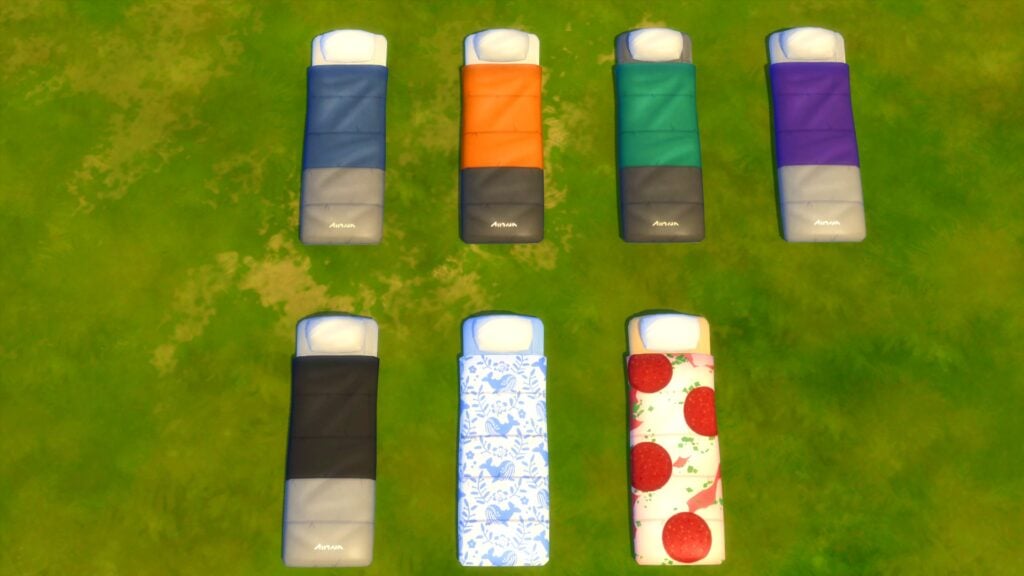
Sleeping Bags from Growing Together
If you do forget to purchase a sleeping bag, you can quickly hop into Build Buy Mode and place down any that you need.
So, what can your Sims do during a Slumber Party? Well, it depends on if you are playing the goaled event or not.
If you are playing the goaled version of the event, you’ll be focusing more on those tasks to obtain a Silver or Gold medal and unlock the exclusive sleeping bags. If you are just hosting a standard Slumber Party, then you can do pretty much anything you want.
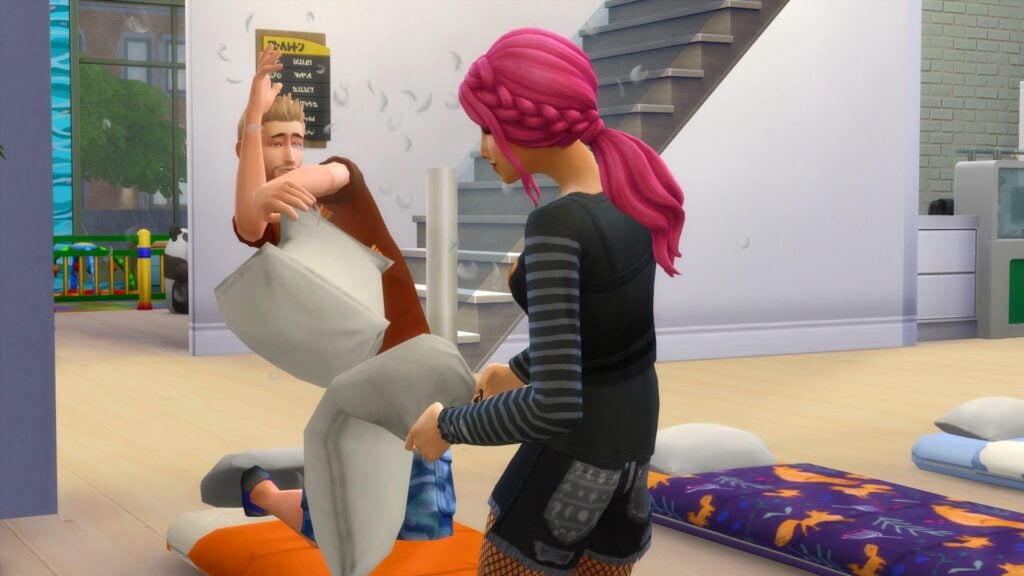
Pillow Fights at a Slumber Party
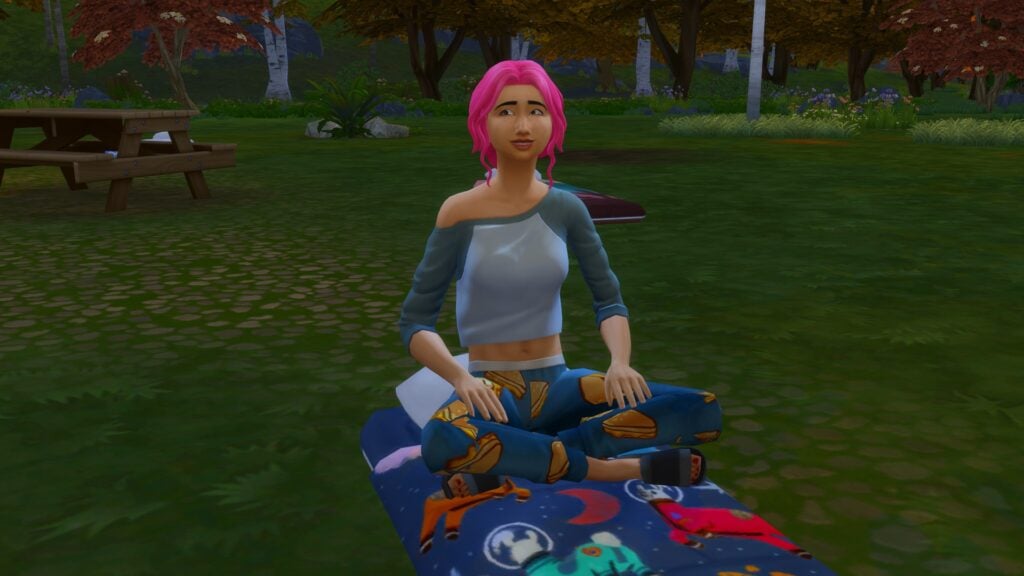
The sleeping bag also comes with some interactions such as Pillow Fight and Tell a Story. Additionally, you can sit, sleep and nap like normal with sleeping bags. Don’t forget, if your Sim is the first to fall asleep, your Sim could get caught up in a prank or two!
You can ask guests to set up their own sleeping bags as well. To do this, simply click on any Sim that is a gust and you’ll see the interaction appear in the pie-menu.
Example of Goaled Event Tasks
Here are some examples of tasks your Sims could be asked to complete during a Slumber Party in Growing Together.
Get Some Sleep
Have Sims Chatting at the Same Time
Have Sims Playing Games at the Same Time
Have Sims Eating at the Same Time
Dance to Music
Tell Stories on a Sleeping Bag
The Sleeping Bags
We briefly mentioned needing the sleeping bags for the event. There are a total of four that support your Sims from the age of Toddlers. Two that you can buy directly from the catalogue, and two that are unlocked through rewards.
Firstly, let’s take a look at the two sleeping back options that come as standard with The Sims 4 Growing Together!
The Cosy Camper Sleeping Bag – $220
“Cocoon yourself in comfort like a caterpillar waiting to transform. Stay cozy while catching up on some Zzz’s, and emerge as a beautiful, well-rested Sim.”
All Available Swatches of The Cosy Camper Sleeping Bag
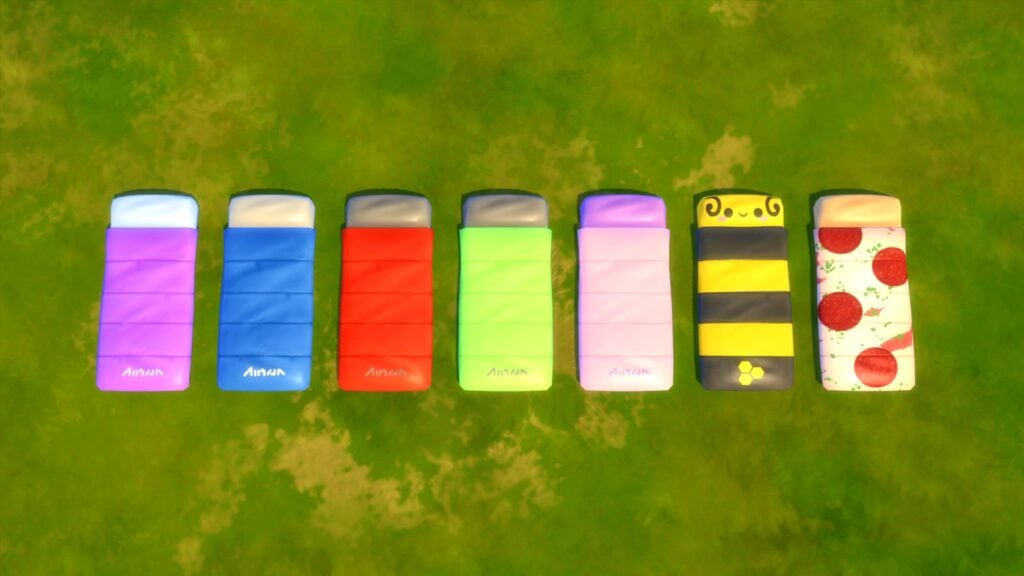
The Mini Camper Sleeping Bag – $140
“The Toddler Version of the well-loved Cozy Camper line. All the frills of the original but smaller!”
All Available Swatches of The Mini Camper Sleeping Bag
Do you want more sleeping bag options? Check out the ones that come as part of the Slumber Party rewards!
Slumber Party Rewards in Growing Together
Like most events, this event is no different for having a goaled version. To be able to unlock these rewards, make sure you tick the checkbox for the Goaled Event when you start setting it up!
Goaled Event Screen for Slumber Party Event
Silver Slumber Party Reward
For completing a Slumber Party and receiving a Silver Medal, you’ll unlock a cute new sleeping bag for your toddler Sims.
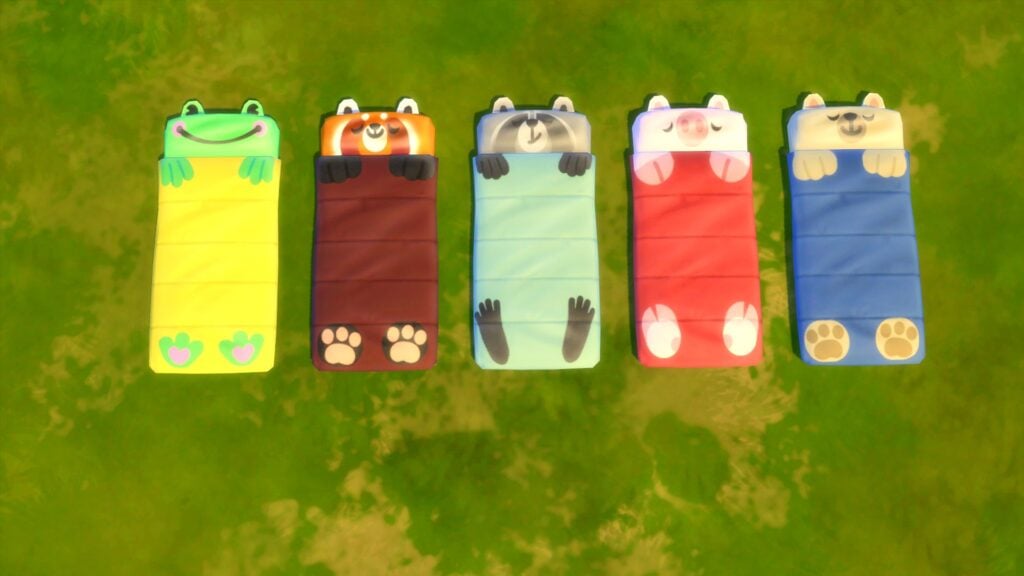
Sleepy Critter Sleeping Bag – $140
“Toddlers are sure to squeal in delight at the sight of this warm sleeping bag. They can sleep on the floor and look cute doing it!”
All Available Swatches of the Sleepy Critter Sleeping Bag
These swatches are so adorable, right!
Gold Slumber Party Reward
However, if you complete the Slumber Party and are awarded ta Gold Medal, you’ll unlock another sleeping bag suitable for all your Sims!
Whimsical Dreams Sleeping Bag -$180
“For the Sim who wants to be warm and fashionable, this bag is the way to go. Show your true colours in the great outdoors!”
All Available Swatches of the Whimsical Dreams Sleeping Bag
Tips, Tricks & More
Here are a few tips and tricks for the ultimate sleep over experience!
Why not get into the slumber party mood by having your Sims wear their best or favourite sleep outfit?
Make sure you place a sleeping bag in your Sims inventory ahead of time!
When choosing a location, lots which have proper cooking facilities will ensure that any food related tasks go more smoothly.
If you are having an outdoor event, beware of thunderstorms and rain!
Electronics won’t work in the rain – be warned!
Additionally, make sure any outdoor lot has suitable objects to help keep Sims needs topped up! If they are not on the lot, make sure they are nearby at least!
The Slumber Party event in Growing Together is great fun for Sims of all ages to take part in. Better still, the possibilities as to what can happen during that time is endless!
What do you think of the new events in The Sims 4 Growing Together? Let us know in the comments below, and stay tuned for more here on Sims Community!
A modder-driven life simulation that puts the world entirely in your hands!
The livestream for Rod Humble’s new life simulation game, Life by You, happened today! There was an almost overwhelming amount of information. Some of the most exciting new info revolves around all the built-in creator tools that will allow players to mod their games even if they have no modding experience. Much of the gameplay itself for Life BY You looks promising as well.
Let’s get into everything that was discussed in the Life by You livestream, including pre-order info and the early access release date!
Life By You Livestream Information
Here’s all the exciting information released during the Life By You livestream!
Open World
Life By You is a true open world game. Nothing in the game is a rabbithole. There are no loading screens anywhere. Every location your characters can visit is a real location you can see, explore, and control your character in.
Not only can you swap between different household members in different locations at any time in Life By You, you can also swap to a different household directly in-game without a loading screen.
Lots of transportation options; not just cars. There are skateboards, bicycles, motorbikes, and your characters can walk or jog anywhere they like as well.
Transport has two modes in Life By You; you can choose to send your character somewhere in a vehicle and they will navigate there on your own. Or, you can directly control the vehicle and drive it yourself. You can do this with your mouse and keyboard or with a compatible console controller.
There are lots of spawnables and collectibles throughout the world in Life By You for your characters to discover, such as seashells at the beach. Players can also add collectible spawners to the world if they wish.
The world is not just open spacially. It’s open in terms of time, too. Players can skip time forward a decade if they want to in Life by You.
Building Tools
The lot editor tools allow players to create and edit existing lots, including the size of the lot. You can choose a business’ working hours or designate a lot as a home workplace.
Everything in the world is customizable and editable. Players can also create their own buildings from the ground up.
Life By You’s regional editor allows players to place homes wherever they want in the world. Clump multiple homes together for a true suburban experience or just pick up your character’s workplace and plop it down next door if you’re tired of the long commute.
The World tool also allows you to add people to the world.
Socialization
Life By You uses full, real-language conversation. You will be able to read full conversations happening between your characters.
The conversations are generated in real-time based on the situation in Life By You, so no two conversations will be exactly alike. You can really respond to people the way you want and your responses will inform the direction of the conversation.
Where you are, who you’re talking to, and the type of relationship you have with that person all shape how conversations between the two of you play out in Life By You.
Almost every choice you make will affect the relationship in some way. You can be friendly, romantic, and antagonistic with people.
In Life By You, other characters you aren’t playing with will be out having their own conversations, too, and you can listen in on those conversations.
There are thousands of lines of conversation already in Life By You but players also have the power to write their own stories through the game’s built-in conversation tool. This is the same tool the developers used to quickly and easily create conversations for the game.
Players can edit existing dialogue in Life By You or create entirely new dialogue with their own choices and options, then share those stories they create with the community. Other players will be able to play through your stories.
Players who really love to write a lot of stories and dialogue in Life By You can batch import and export large groups of their custom conversations at a time.
Modding
Players have the power to easily make gameplay modifications to any object, even if they have no modding experience. Life By You has a built in script editor that allows players to quickly and easily make almost endless modifications to an object. This tool is very visual to make object modification easy for anyone in Life By You, regardless of their coding knowledge.
The livestream example showed how players can easily take a flower bush and make it function as a toilet with just a couple clicks of your mouse directly in-game.
The script editor is what the developers used to make Life By You and they wanted to make all the different tools they used to make the game available to players.
More editor tools will be revealed in the coming weeks and months for Life By You, including a model editor tool that will allow you to change the look and feel of objects.
All of the editor tools discussed in the livestream will ship with the game, directly in the game itself. No external programs required.
Rod Humble also mentioned things like a Quest Editor and Skill Editor in Life By You. However, more information on those is still to come.
Release Date & Preorder Info
Life By You is available for preorder right now on Epic Games. Players who preorder the game will get the Life Begins bonus content. This includes a vintage scooter, a fashion pack, and a décor pack.
Early Access begins on September 13th, 2023. Players who preordered will be able to play Life By You in early access before the full launch.
The first 100,000 early access players will also get a special invite to a private Discord server. They can share their feedback directly with the developers.
The early access of Life By You will not be the full, complete game. The early access period is intended to give players a chance to test drive the game so the developers can see what players enjoy, what they don’t enjoy, and how they can continue to build upon the overall experience. However, all the core features of Life by You are available in early access and should prove to be a very fun and immersive experience for players.
Trailer Screens
The screens shared above only scratched the surface of what we got to see in the livestream. The extended trailer shared at the beginning and end of the stream was full of plenty more to see. We’ve got all the best Life By You trailer screens right here for you!
I’ve already preordered my copy of Life By You! Will you be preordering the game, too? Share your thoughts in the comments.
The parent company of this game publisher “Paradox Tectonic” is announcing its new life simulation game called Life by You. Interestingly enough, the team behind the new game consists of several developers who previously worked for EA. Including several Sims Titles!
The team is lead by Rod Humble who lead The Sims Studio until 2010, having a lot of experience in the development of The Sims 2 and The Sims 3. Another developer who previously worked on The Sims 3 is King Choi, who confirmed that he’s now working for Life By You as a Director of Marketing.
Paradox Interactive has already shown first footage from Life By You, showcasing an Open World, House Building and more.
Preview of house building features in Life by You
Where to watch the Life by You Announcement?
The official livestream for the Life by You Announcement is set at 5PM CET / 9AM PT / 4PM BT. The livestream is being held on YouTube, which you can watch down below:
https://www.youtube.com/watch?v=7zmUQfTodoE
What to expect?
The announcement of Life By You will reveal the release date, supported platforms, gameplay features and so much more. It’s already speculated from the Paradox Showcase that Life By You might get a release date this year, but nothing’s been officially confirmed as of now.
There’s so much that we’re looking forward to from the Paradox Tectonic team. However, for now – let’s wait for the show start!
We’ll make sure to keep you posted on all the latest news about Life By You – right here on Sims Community!
Having trouble using infant carriers? We’re here to help!
So you just purchased The Sims 4 Growing Together and you can’t figure out how the infant carriers work. We don’t blame you; it’s not exactly intuitive and the game doesn’t really point it out to you. The good news is that using the infant carrier is actually very easy once you know where all the options are! This guide will show you how to use your new infant carriers in The Sims 4 Growing Together expansion pack and troubleshoot some common issues that might prevent players from using them.
Select Your Preferred Infant Carrier
Before you go running around the neighbourhood with your infant carriers in The Sims 4 Growing Together, you’ll want to choose which style of infant carrier you want to use. Your Sims will automatically use the infant carrier you selected as your preferred carrier whenever they put an infant in it.
To do this, click on your infant and under the Baby Care category, select Set Preferred Back Carrier. You may need to click More Options if you do not see it right away.
Select the carrier you want from the menu that pops up and you’re done! All players who purchase Growing Together by April 27th, 2023 will have access to the additional bonus PowerWalk Companion infant carrier. If you did not purchase the pack on or before this date, you will only see the Infant Wrangler carrier in a variety of different colour options.
Using the Infant Carrier
Once you’ve picked out a carrier that you like, you’re ready to take your infant on the go with you! Whenever you’d like to take your infant out into the big wide world beyond, just click on the infant and under Baby Care, select Put [Infant Name] in Back Carrier.
Of course, carrying an infant on your back is super handy for a wide variety of things! Infants love to sleep in their infant carriers in The Sims 4 Growing Together so it’s an easy way to help them catch a quick nap while allowing your Sim to continue on doing whatever they were doing. You can take your infant with you on walks, hikes, and even go jogging with them! You can carry them around public venues with ease and not have to worry about where they are. Also, you can even carry multiple children using an infant carrier. Having an infant in a back carrier frees up your Sim’s arms for carrying a second infant or a toddler.
The Sims 4 Growing Together Infant Carriers: Common Problems
A common problem many Simmers have is that they do not see the option to use The Sims 4 Growing Together infant carriers under the Baby Care options. This is caused by outdated mods. Here’s how to fix this problem:
Shut down the game and remove any outdated mods. Alternatively, you can just remove all of your mods to guarantee a working game. If you are not familiar with how to maintain and update your mods, see our guide for beginners.
Navigate to Documents > Electronic Arts > The Sims 4 and delete the following files. It is perfectly safe to delete these folders and files. The game will generate new ones the next time you launch the game, which is what you want.
The cachstr folder
The onlinethumbnailcache folder
The avatarcache.package file
The localthumbcache.package file
Launch your game. You should now see the option to use your infant carriers in The Sims 4 Growing Together.
If the above does not fix the issue, you still have outdated mods that you missed. In this case, the only effective, foolproof method of tracking it down is the 50/50 method. If you do not know how to do this, see our guide. Also, remember to delete the folders and files listed above each time you test a new batch of mods.
Additionally, looking for more information about infants? Why not check out our infant care guide?
The Sims 4 Growing Together comes with a new world called San Sequoia. Of course, there are already some families living in San Sequoia, ready for you to hop in and play with! We have all the information on every premade Sim that comes with this expansion so your Sims can get to know their new neighbours easier! Let’s learn all about The Sims 4 Growing Together premades!
Celeste and Christopher met working at the same startup. They couldn’t believe how much they had in common when they first went out for coffee together! After they got married, they adopted Atlas and promptly began spoiling him rotten. Now they’ve also adopted Orion and are hard at work raising two kids to be just as nerdy as they are.
Celeste Michaelson
Age: Young Adult
Pronouns: She/Her
Gender Settings:
Feminine frame
Prefers feminine clothing
Can get other Sims pregnant
Can produce milk
Cannot use the toilet standing
Sexual Orientation:
Romance: Men
WooHoo: Men and Women
Exploration?: Yes
Traits:
Self Assured
Cheerful
Ambitious
Domestic (Bonus)
Aspiration: Big Happy Family
Likes:
Programming
Video Gaming
Mixology
Cerebral Sims
Dislikes:
Yellow
Classical Music
Homebody Sims
Complaints
Voice: Sweet
Walk Style: Default
Career: Tech Guru (Start Up Branch – 10)
Skills:
Charisma (6)
Programing (9)
Milestones:
First Promotion (Firsts)
First Time Burning Out (Firsts)
First WooHoo (Firsts)
Had a Baby x2 (Life)
Got a Job (Life)
Fell in Love (Social)
Got Married (Social)
Relationships:
Christopher Michaelson
Husband
Amazing Compatibility
Atlas Michaelson
Son
Good Compatibility
Strict Dynamic
Orion Michaelson
Daughter
Ian Robles
Friend
Christopher Michaelson
Age: Young Adult
Pronouns: He/Him
Gender Settings:
Masculine frame
Prefers masculine clothing
Can get other Sims pregnant
Cannot produce milk
Can use the toilet standing
Sexual Orientation:
Romance: Women
WooHoo: Men and Women
Exploration?: Yes
Traits:
Art Lover
Geek
Family Oriented
Quick Learner (Bonus)
Aspiration: Nerd Brain
Likes:
Gardening
Rocket Science
Painting
Spirited Sims
Pet Enthusiasts
Dislikes:
Electronica Music
Gossip
Voice: Clear
Walk Style: Default
Career: Tech Guru (Start Up Branch – 9)
Skills:
Charisma (7)
Programing (5)
Painting (8)
Milestones:
First Promotion (Firsts)
First WooHoo (Firsts)
Had a Baby x2 (Life)
Got a Job (Life)
Fell in Love (Social)
Got Married (Social)
Relationships:
Celeste Michaelson
Wife
Amazing Compatibility
Atlas Michaelson
Son
Good Compatibility
Permissive Dynamic
Orion Michaelson
Daughter
Xochitl Luna
Good Friend
Amazing Compatibility
Atlas Michaelson
Age: Child
Pronouns: He/Him
Traits:
Hot Headed
Aspiration: Playtime Captain
Likes:
Cerebral Sims
Dislikes:
N/A
Voice: Warm
Career: Grade School C Student
Skills:
None
Milestones:
None
Relationships:
Celeste Michaelson
Mother
Good Compatibility
Strict Dynamic
Christopher Michaelson
Father
Good Compatibility
Permissive Dynamic
Orion Michaelson
Sister
Close Dynamic
Orion Michaelson
Age: Infant
Pronouns: She/Her
Traits:
Wiggly
Milestones:
Born (Life)
First Smiled (Social)
Relationships:
Celeste Michaelson
Mother
Christopher Michaelson
Father
Atlas Michaelson
Brother
Close Dynamic
Sims 4 Growing Together Premades: Household Notes:
Atlas and Orion are both adopted, as stated in their family bio
Both Celeste and Christopher have friends outside the household. This is a rarity for The Sims 4. We didn’t see Sims with connections outside their household until Snowy Escape.
Christopher seems very close with Xochitl (pronounced SO-CHEEL). He is Good Friends with her with amazing compatibility. This might be an invitation for the player to use this to cause tension in the household.
Celeste appears to be the stricter parent due to her having a strict dynamic with her son, while her husband has a permissive dynamic with him. Another potential opportunity to create tension.
The Michaelsons’ backyard has an unfinished treehouse so the player can jump right into building a treehouse when they enter this lot.
If Get Famous is installed, Celeste starts out with a Pristine Reputation
If Parenthood is installed, Atlas starts out with low Conflict Resolution
The Luna-Sullivan Household
Xochitl LunaEleanor SullivanKarmine Luna
Household Description
The Luna-Sullivan family’s a little unusual; Karmine’s dad died in a tragic cooking accident, and her mom needed help…so Gramma Eleanor moved in to be the Gramma-in-charge-ish. Except Gramma’s just as silly as Karmine is!
Xochitl Luna
Age: Young Adult
Pronouns: She/Her
Gender Settings:
Feminine frame
Prefers feminine clothing
Can become pregnant
Can produce milk
Cannot use the toilet standing
Sexual Orientation:
Romance: Neither
WooHoo: Men and Women
Exploration?: Yes
Traits:
Athletic
Outgoing
Loyal
Alluring (Bonus)
Aspiration: Soulmate
Likes:
Fitness
Guitar
Wellness (with Spa Day)
Idealist Sims
Funny Sims
Dislikes:
Cooking
Egotistical Sims
Voice: Lilted
Walk Style: Feminine
Career: Athlete (Professional Athlete Branch – 8)
Skills:
Fitness (6)
Handiness (7)
Milestones:
First Fire (Firsts)
First Promotion (Firsts)
Reached Mt. Komorebi Summit (Firsts – with Snowy Escape)
Had a Baby (Life)
Got a Job (Life)
Got Married (Social)
Relationships:
Eleanor Sullivan
Mother-in-Law
Good Compatibility
Karmine Luna
Daughter
Supportive Dynamic
Christopher Michaelson
Good Friend
Amazing Compatibility
Bernice Robles
Good Friend
Good Compatibility
Ian Robles
Disliked
Eleanor Sullivan
Age: Elder
Pronouns: She/Her
Gender Settings:
Feminine frame
Prefers feminine clothing
Can become pregnant
Can produce milk
Cannot use the toilet standing
Sexual Orientation:
Romance: Neither
WooHoo: Men and Women
Exploration?: Yes
Traits:
Childish
Cheerful
Neat
Dastardly (Bonus)
Aspiration: Chief of Mischief
Likes:
Mischief
Comedy
Emotional Decision-Makers
Family-Motivated Sims
Dislikes:
Arguments
Alternative Music
Voice: Lilted
Walk Style: Default
Career: Babysitter (3)
Skills:
Comedy (6)
Mischief (7)
Milestones:
First Promotion (Firsts)
Got a Job (Life)
Had a Midlife Crisis (Life)
Relationships:
Xochitl Luna
Daughter-In-Law
Good Compatibility
Karmine Luna
Granddaughter
Close Dynamic
Karmine Luna
Age: Child
Pronouns: She/Her
Traits:
Evil (*)
Creatively Gifted (Reward)
Neutral Confidence
Aspiration: Creative Genius
Likes:
Blue
Dislikes:
Romance Music
Homebody Sims
Voice: Warm
Career: Grade School C Student
Skills:
None
Milestones:
Learned to Ride a Bike (Firsts)
Lost First Tooth (Firsts)
Relationships:
Xochitl Luna
Mother
Supportive Dynamic
Eleanor Sullivan
Grandmother
Close Dynamic
Sims 4 Growing Together Premades Household Notes
The household description states that Xochitl recently became a widow but it appears she is ready to move on and find love again, since her aspiration is Soulmate.
Curiously, Xochitl has a milestone for getting married, but not falling in love. This could indicate that she didn’t love her late husband. It would also explain why she’s looking for romance again so soon after his passing.
Xiochitl’s dislike of cooking may stem from the kitchen fire that killed her late husband.
It can be inferred that Eleanor is the mother of Xochitl’s late husband, since she is Karmine’s grandmother but not Xochitl’s mother. This would make Eleanor Xochitl’s mother-in-law or former mother-in-law, depending on how one chooses to see it.
Xochitl is a feminine name of Mexican origin and is pronounced SO-CHEEL.
There is a lot of cross-pack integration with this household, which is not common to see in The Sims 4.
Although Karmine has the Creatively Gifted reward trait, she has no skills, so she could not have completed the Artistic Prodigy childhood aspiration in order to get this trait.
(*) Karmine’s traits appear to be bugged. Numerous players report that Karmine’s traits are different every time you start a new save file. In our save, she was Evil but other players report her having the Kleptomaniac trait and Self-Assured trait in their games. Some players even report that her traits appear as glitched invisible icons.
The Robles-Ruano Household
Doli RuanoJay RoblesTala Ruano
Household Description
The Robles-Ruano Family is a bit on the unconventional side, but being conventional is soooo boring, right? These folks are all about expressing themselves and their personality no matter what. Both parents are hoping that their unique ways will rub off on their slightly clingy daughter, Tala. With a little love, Tala is sure to grow into a confident (and creative!) kid.
Doli Ruano
Age: Young Adult
Pronouns: She/Her
Gender Settings:
Feminine frame
Prefers feminine clothing
Can become pregnant
Can produce milk
Cannot use the toilet standing
Sexual Orientation:
Romance: Men
WooHoo: Men and Women
Exploration?: Yes
Traits:
Art Lover
Materialistic
Romantic
Quick Learner (Bonus)
Aspiration: Renaissance Sim
Likes:
Romance Music
Comedy
Mixology
Hardworking Sims
Deep Thoughts
Dislikes:
Wellness (with Spa Day)
Ambitionless Sims
Voice: Sweet
Walk Style: Feminine
Career: Style Influencer (Trend Setter – 8)
Skills:
Mixology (9)
Milestones:
First WooHoo (Firsts)
First Promotion (Firsts)
Got Married (Social)
Had a Baby (Life)
Got a Job (Life)
Quit Job (Life)
Fell in Love (Social)
Got Married (Social)
Relationships:
Jay Robles
Spouse
Amazing Compatibility
Tala Ruano
Daughter
Difficult Dynamic
Christopher Michaelson
Friend
Jay Robles
Age: Young Adult
Pronouns: They/Them
Gender Settings:
Feminine frame
Prefers masculine clothing
Can get other Sims pregnant
Cannot produce milk
Can use the toilet standing
Sexual Orientation:
Romance: Men and Women
WooHoo: Men and Women
Exploration?: Yes
Traits:
Foodie
Ambitious
Hot Headed
Essence of Flavour (Bonus)
Aspiration: Master Chef
Likes:
Purple
Hip Hop Music
Cooking
Dancing (with Get Together)
Emotional Decisionmakers
Homebody Sims
Dislikes:
Black
Boho Décor (with Dream Home Decorator)
Potty Humour
Voice: Melodic
Walk Style: Default
Career: Freelancer (Undecided Branch)
Skills:
Gourmet Cooking (7)
Logic (5)
Milestones:
First WooHoo (Firsts)
First Promotion (Firsts)
Fell in Love (Social)
Got Married (Social)
Had a Baby (Life)
Got a Job (Life)
Relationships:
Doli Ruano
Wife
Amazing Compatibility
Tala Ruano
Daughter
Supportive Dynamic
Aurelio Robles
Nephew
Jokesters Dynamic
Bernice Robles
Sister
Good Compatibility
Distant Dynamic
Ian Robles
Brother-In-Law
Ignacio Robles
Father
Good Compatibility
Supportive Dynamic
Tala Ruano
Age: Toddler
Pronouns: She/Her
Traits:
Clingy
Ambitious
Hot Headed
Essence of Flavour (Bonus)
Voice: Sweet
Skills:
Movement (1)
Milestones:
First Time at Daycare (Firsts)
Learned to Walk (Motor)
Relationships:
Doli Ruano
Mother
Difficult Dynamic
Jay Robles
Parent
Supportive Dynamic
Aurelio Robles
Cousin
Bernice Robles
Aunt
Jokesters Dynamic
Ian Robles
Uncle
Ignacio Robles
Grandfather
Close Dynamic
Sims 4 Growing Together Premades Household Notes
If Get Famous is installed, Doli starts out with a Pristine reputation
Jay’s sister and father live on the other side of San Sequoia and are also premade Sims that ship with this pack. Jay also has a brother-in-law and nephew outside the household. This is the first time a premade Sim has been given extended relatives outside of their own household in The Sims 4.
For whatever reason, Jay and their sister, Bernice, have a negative romance bar with each other. Since it is not possible for siblings to be romantic with each other without the use of mods in The Sims 4, we’re not sure if this was a mistake on the devs’ part or if they were intending to allude to something not so T-for-Teen there…
Jay has high Gourmet Cooking skill but no Cooking skill. This is interesting because ordinarily, Sims must reach level 5 in the Cooking skill in order to unlock the Gourmet Cooking skill.
Although Jay seems to be very passionate about food and cooking and has the Master Chef aspiration, they are in the Freelancer career. Perhaps Jay longs for a career change?
The lot this family lives on has some interesting features. Most notably, a fenced off play corner in the upstairs hallway and what appears to be an unfinished storage room with an easel and Tala’s old baby bassinet.
The Robles family is pretty entrenched in this community—they’ve been here ever since the fishing trade started taking off, and for years had a thriving family business. Ignacio’s the patriarch of this family, but just because they have deep roots doesn’t make them all that conventional. They know everyone and anyone, and love being a part of everything this community has to offer—from spending way too much of their free time down by the waterfront to organizing big family gatherings at Gilbert Gardens park.
Ignacio Robles
Age: Elder
Pronouns: He/Him
Gender Settings:
Masculine frame
Prefers masculine clothing
Can get other Sims pregnant
Cannot produce milk
Can use the toilet standing
Sexual Orientation:
Romance: Neither
WooHoo: Men and Women
Exploration?: Yes
Traits:
Family Oriented
Foodie
Geek
Alluring (Bonus)
Aspiration: Serial Romantic
Likes:
Purple
Cooking
Piano
Romance Enthusiasts
Stories
Dislikes:
Retro Music
Deception
Voice: Warm
Walk Style: Default
Career: Unemployed/Retired
Skills:
Cooking (8)
Gourmet Cooking (8)
Logic (7)
Milestones:
Had a Baby x2 (Life)
Had a Midlife Crisis (Life)
Retired (Life)
Got Married (Social)
Relationships:
Bernice Robles
Daughter
Supportive Dynamic
Jay Robles
Child
Good Compatibility
Supportive Dynamic
Aurelio Robles
Grandson
Close Dynamic
Tala Ruano
Granddaughter
Close Dynamic
Ian Robles
Son-in-Law
Doli Ruano
Daughter-in-Law
Bernice Robles
Age: Adult
Pronouns: She/Her
Gender Settings:
Feminine frame
Prefers feminine clothing
Can become pregnant
Can produce milk
Cannot use the toilet standing
Sexual Orientation:
Romance: Men
WooHoo: Men and Women
Exploration?: Yes
Traits:
Cheerful
Geek
Neat
Collector (Bonus)
Aspiration: Angling Ace
Likes:
Fishing
Piano
Mischief
Nature Enthusiasts
Dislikes:
Pink
Funny Sims
Egotistical Sims
Voice: Lilted
Walk Style: Default
Career: Business (Investor Branch – 9)
Skills:
Comedy (6)
Charisma (1)
Logic (5)
Piano (5)
Fishing (8)
Milestones:
First WooHoo (Firsts)
First Promotion (Firsts)
Had a Baby (Life)
Got a Job (Life)
Got Married (Social)
Fell in Love (Social)
Relationships:
Ignacio Robles
Father
Supportive Dynamic
Jay Robles
Sibling
Good Compatibility
Distant Dynamic
Ian Robles
Husband
Aurelio Robles
Son
Difficult Dynamic
Tala Ruano
Niece
Jokesters Dynamic
Doli Ruano
Sister-in-Law
Xochitl Luna
Good Friends
Good Compatibility
Ian Robles
Age: Adult
Pronouns: He/Him
Gender Settings:
Masculine frame
Prefers masculine clothing
Can get other Sims pregnant
Cannot produce milk
Can use the toilet standing
Sexual Orientation:
Romance: Women
WooHoo: Men and Women
Exploration?: Yes
Traits:
Bookworm
Active
Ambitious
Domestic (Bonus)
Aspiration: Successful Lineage
Likes:
Pop Music
Wellness (with Spa Day)
Photography
Physical Intimacy
Ambitionless Sims
Dislikes:
Gardening
Malicious Interactions
Voice: Clear
Walk Style: Default
Career: Writer (Author Branch – 9)
Skills:
Charisma (1)
Handiness (6)
Video Gaming (1)
Writing (9)
Fishing (7)
Selvadoradean Culture (with Jungle Adventure – 1)
Milestones:
First WooHoo (Firsts)
First Promotion (Firsts)
Had a Baby (Life)
Fell in Love (Social)
Got Married (Social)
Relationships:
Bernice Robles
Wife
Aurelio Robles
Son
Permissive Dynamic
Ignacio Robles
Father-in-Law
Jay Robles
Sibling-in-Law
Tala Ruano
Niece
Doli Ruano
Sister-in-Law
Celeste Michaelson
Friend
Xochitl Luna
Disliked
Aurelio Robles
Age: Teen
Pronouns: He/Him
Gender Settings:
Masculine frame
Prefers masculine clothing
Can get other Sims pregnant
Cannot produce milk
Can use the toilet standing
Sexual Orientation:
Romance: Neither
WooHoo: Men and Women
Exploration?: Yes
Traits:
Perfectionist
Music Lover
Muser (Bonus)
Aspiration: Musical Genius
Likes:
Latin Music (with Jungle Adventure)
Video Gaming
Piano
Romance Enthusiasts
Funny Sims
Dislikes:
Violin
Fitness
Flirtation
Voice: Warm
Walk Style: Default
Career: High School B Student
Skills:
Video Gaming (1)
Violin (6)
Milestones:
None
Relationships:
Bernice Robles
Mother
Difficult Dynamic
Ian Robles
Father
Permissive Dynamic
Ignacio Robles
Grandfather
Close Dynamic
Jay Robles
Mother’s Sibling
Jokesters Dynamic
Tala Ruano
Cousin
Doli Ruano
Aunt
Sims 4 Growing Together Premades Household Notes:
Players may be confused to see a baby nursery in the home despite there being no baby in the house and no mention of a baby anywhere in the household description. It makes more sense once you realise that Bernice is pregnant.
Bernice is in her first trimester and is carrying a baby boy. The baby’s father is her husband, Ian.
Aurelio appears to be somewhat neglected by his parents. He has a difficult relationship with his mother and a permissive relationship with his father. He’s closest to his grandfather and his mother’s sibling, Jay.
Bernice has the same surname as her father, which her husband also shares. This indicates that Ian took his wife’s name when they married. He is the second male Sim in the game who is confirmed to have taken his wife’s name. The first was Geoffrey Landgraab.
Ian may have taken his wife’s name to embrace the culture he married into, which would also explain why he has Selvadoradean Culture skill even though he does not appear to be of Spanish descent.
This household is full of contradictions. Bernice has high Comedy skill but dislikes Funny Sims and Aurelio has high Violin skill but dislikes the Violin, just to name a couple obvious examples.
Even though everyone in the household is related to Doli Ruano through marriage, none of them actually know her.
The Kyleson Household
Household Description
Kyle’s just, like, a guy, okay?
Kyle Kyleson
Age: Young Adult
Pronouns: He/Him
Gender Settings:
Masculine frame
Prefers masculine clothing
Can get other Sims pregnant
Cannot produce milk
Can use the toilet standing
Sexual Orientation:
Romance: Neither
WooHoo: Men and Women
Exploration?: Yes
Traits:
Genius
Lazy
Clumsy
Gregarious (Bonus)
Aspiration: Party Animal
Likes:
Handiness
Comedy
Mixology
Optimistic Sims
Dislikes:
Fishing
Research & Debate (with Discover University)
Voice: Brash
Walk Style: Default
Career: Unemployed
Skills:
Comedy (6)
Knitting (9)
Milestones:
Survived 7 Nights in a Haunted House (with Paranormal Stuff)
Crumplebottomed! (with Cottage Living)
Relationships:
None
Sims 4 Growing Together Premades Household Notes:
Kyle Kyleson is a homeless NPC who is connected to Growing Together’s extended visits system. He will occasionally invite himself over to stay for a while, acting like he’s an old buddy of your Sims from way back when even if your Sims don’t actually know him.
Kyle has a lot of humorous things to say if you talk to him about local gossip while he’s staying with your household.
Kyle’s name and general appearance/personality is a play on the cultural stereotype of a young, lazy guy who gets through life by mooching off of everyone around him and generally making irresponsible and immature choices. These types of people are often colloquially called Kyle or Chad.
Want a closer look at the world these Sims 4 Growing Together premades live in? Check out our San Sequoia World Overview!
Everything you need to know about San Sequoia, Neighborhoods, and Lots!
Welcome to San Sequoia!
San Sequoia began as a small fishing town, then became a hub of the fishing and canning industry due to the influence of local fisherman-turned-entrepreneur, Bayani Robles. The Robles family is still very much entrenched in the area even as it has expanded over time thanks to Gilbert Gilberts. Today, San Sequoia is home to cozy streets, a beautiful park with gardens, and quiet suburban neighborhoods. It’s the perfect place to raise a family!
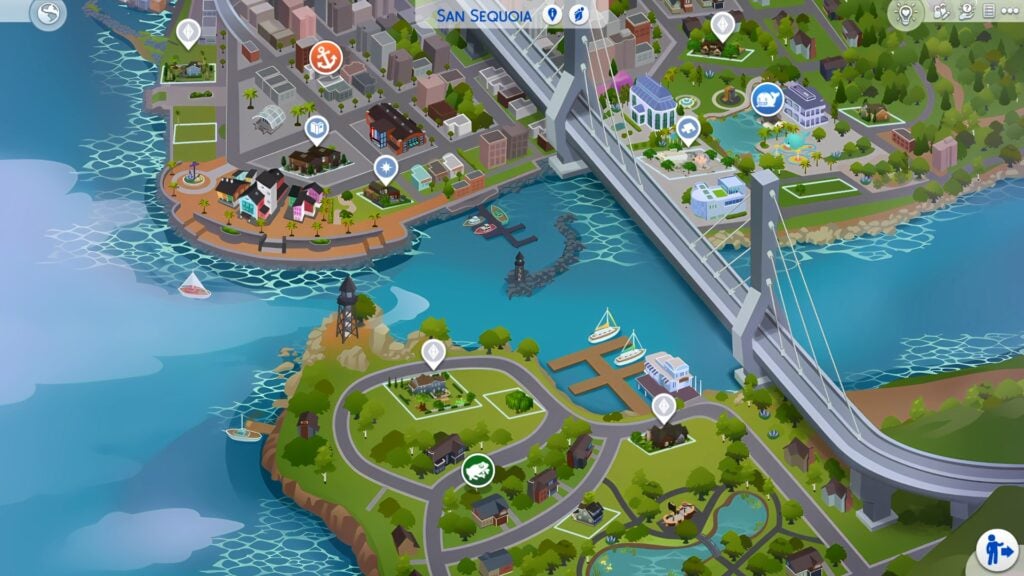
San Sequoia World Map
San Sequoia is the brand new world with The Sims 4 Growing Together expansion. The new world features twelve new lots spread across three neighborhoods.
Anchorpoint Wharf, San Sequoia
Once the center of a bustling fishing and canning industry. Anchorpoint Wharf is known as a vibrant downtown area. featuring a movie theater, parklets, and more. There’s plenty to keep all ages entertained.
Anchorpoint Wharf – San Sequoia
The Lots
Robles Point
Manzanita Terrace
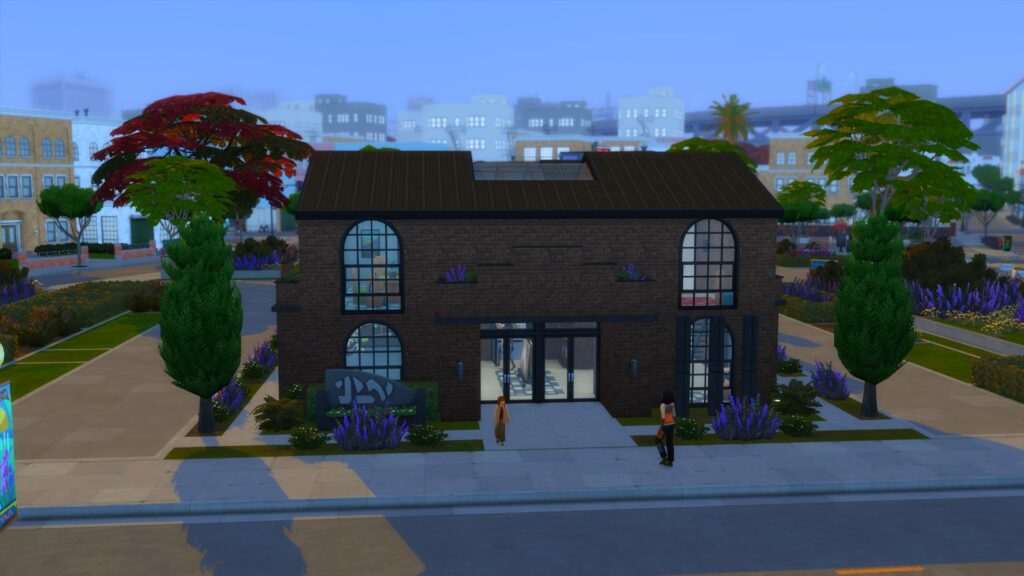
Anchorpoint Libray
Anchorpoint Abode
Anchorpoint Movie Theater (Rabbit Hole Lot)
Robles Point
Robles Point, Anchorpoint Wharf
Home to the Roble’s Household, this 50×40 residential lot is located in the heart of Anchorpoint Wharf. Featuring four bedrooms and three bathrooms, this modern family home is perfect for any Sims family.
Lot Price – $97,168
Traits – Convivial and Homey
Challenges – Quake Zone
Manzanita Terrace
Manzanita Terrace, San Sequoia
The only empty lot in Anchorpoint Wharf. This 30×20 lot comes in at $2,245 and comes with the Bracing Breezes and Natural Light Lot Traits. Just look at that view across the water!
Anchorpoint Library
Anchorpoint Library, San Sequoia
This 30×20 lot is the heart and soul of Anchorpoint Whaft. Featuring Fast Internet and plenty of Natural Light this is certainly one modern library!
Anchorpoint Abode
Rental Lot, Anchorpoint Abode
A beautiful Rental property in the heart of San Sequoia’s Anchorpoint Wharf. This 30×20 lot comes with three bedrooms and three bathrooms. It also boasts big open spaces and gorgeous views of the San Sequoia bridge!
Rent Per Day – $926
Lot Traits – Natural light and Bracing Breezes
San Sequoia Movie Theater
San Sequoia Movie Theater
Even though this is a rabbit hole lot type, you will be able to find the movie theater in the Anchorpoint Wharf Neighbourhood.
Next up is the quiet and cozy suburb of Hopewell Hills!
Hopewell Hills, San Sequoia
Hopewell Hills is a cozy spot away from the hustle and bustle of town; the perfect place for anyone who wants, well, space! If the suburbs are your idea of paradise, you’ve found it here in this quiet neighborhood.
Hopewell Hills, San Sequoia
The Lots
7 Eucalyptus Lane
23 Eucalyptus Lane
7 Bayani Place
Sequoia Cottage
7 Eucalyptus Lane
7 Eucalyptus Lane, Hopewell Hills
Home to the Michaelson Household, this beautiful family home features three bedrooms and two bathrooms. That’s not to mention plenty of space for all the family across the whole home!
Lot Price – $89,833
Lot Traits – Homey and Convivial
23 Eucalyptus Lane
23 Eucalyptus Lane, Hopewell Hills
This empty 30×20 residential lot will cost your Sims $2,290. Despite the low price, this lot also features great acoustics and plenty of natural light!
7 Bayani Place
7 Bayani Place, Hopewell Hills
Home to the Luna-Sullivan household, this modern and spacious family home sits on a lovely 30×20 lot looking over the water.
Lot Price – $63,328
Lot Traits – Fast Internet, Bracing Breezes, and Homey
This lot features three bedrooms and three bathrooms
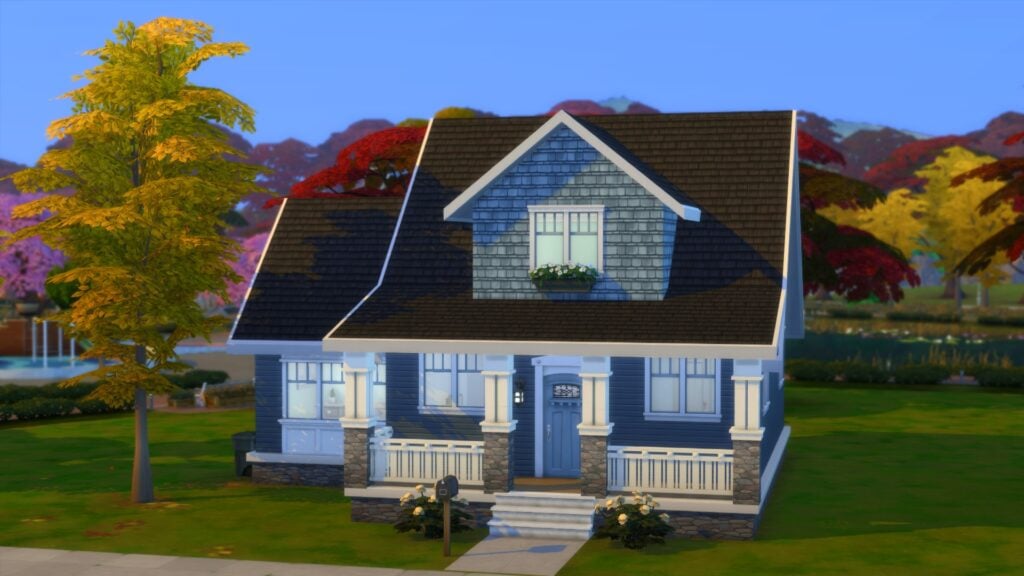
Sequoia Cottage
Sequoia Cottage, Hopewell Hills
This pre-made cottage comes in at $21,599 and is located right in the heart of the suburb of Hopewell Hills. Included in this cottage are four bedrooms and two bathrooms and is conveniently located near the local play park. This lot also boasts fast internet and bracing breezes.
We’ve got one more neighborhood to explore! Are you ready to discover Gilbert Gardens?
Gilbert Gardens, San Sequoia
Gilbert Gardens’ gorgeous park was once owned by Gilbert Gilberts, a land developer who helped establish the area. Now, it’s the perfect locale for family trips to the gardens – where amongst other activities Sims can take a walk on one of the three scenic lake walking paths or visit the community’s Splash Pad play area. Whalebert is hoping to see you soon!
Gilbert Gardens, San Sequoia
The Lots
13 Acacia Avenue
18 Celebration Way
Parkside Place
Celebration Centre
13 Acacia Avenue
13 Acacia Avenue, Gilbert Gardens
Home to the Robles-Ruano household, this 40×30 lot is the perfect family home. Located at the very north of Gilbert Gardens, this home has views toward the lake and is in close proximity to the Celebration Center.
Lot Price – $83,772
Lot Traits – Convivial, Bracing Breezes, Romantic Aura
This lot features two bedrooms and one bedroom
18 Celebration Way
18 Celebration Way, Gilbert Gardens
This unique empty 40×20 lot is perfect for Sims looking to build their first family home! Costing just, $2,685 it has the potential to become the perfect home! You’ll also get great views and plenty of natural light too!
Parkside Place
Parkside Place, Gilbert Gardens
This ready-to-move-into home is perfect for a small Sims household. Featuring two bedrooms and a bathroom is not only cozy but homey too! Costing $18,800 it is great value for money. It’s just important to remember that this 30×20 lot is located in a quake zone though!
Celebration Center
Celebration Centre, Gilbert Gardens
A brand new lot type for The Sims 4! The recreation center is your Sims’ one-stop location for a variety of activities and events. This is also the only 64×64 lot that comes in The Sims 4 Growing Together world of San Sequoia.
Lot Price – $170,951
Lot Traits – Fast Internet, Study Spot, Great Acoustics
Well, that’s everything that you need to know about the world of San Sequoia! Which area of the new world will you be moving to with your Sims? Let us know in the comments below!
You can find more information about both San Sequoia and The Sims 4 Growing Together, here.
Find out which Milestones you can unlock from previous Sims 4 Packs!
The latest Patch release for The Sims 4 has brought plenty of new information under the hub. And by under the hub we mean the game files!
Modder @ChippedSim was quick to spot a full list of Cross-Pack Compatible Milestones coming with The Sims 4 Growing Together. The EP is set to release on March 16th, and we’ve already started our countdown!
Until then, find out more about the new Milestones:
The Sims 4 Pack Milestones
In case you don’t know, the newest Expansion Pack for The Sims 4 features an important Milestones feature. This system allows you to track progress of important moments that happen to your Sims across all ages.
Sims 4 Milestones Preview
Beside the new milestones exclusive to Growing Together, there are going to be Pack exclusive milestones as well. The developers confirmed that previous Expansion Packs and Game Packs will also unlock new milestone moments.
It wasn’t known until the Update release what the new Pack Milestones are. Down below we’ve listed all the Milestones that you’ll be able to unlock through various Packs. Huge thanks to @ChippedSim for the find!
Growing Together Pack Milestones: Full List
As you can see, the list of Milestones shown below contains special tags. You’ll be able to use these tags as special Cheats to assign Pack Milestones onto your Sims immediately. All tags have a lifeMilestone_ prefix on which you can add Milestone tags to unlock them in your game. Finally, let’s see that full list!
Occult Milestones
AbductedByAliens
Unlock this Milestone by getting abducted by Aliens with Sims 4 Get to Work!
The following list of Pack Milestones are from The Sims 4 Discover University. Including the following degrees: Art History, Biology, Communications, Computer Science, Culinary Arts and Drama. Also, Economics, Fine Art, History, Language Literature, Physics, Psychology and Villainy.
Learn how to keep your new bundle of joy happy and healthy!
Infants are finally here and they’re the best free addition to The Sims 4 since the arrival of toddlers back in 2017. Of course, infants are not nearly as self-sufficient as toddlers and require more of your Sims’ undivided attention and care. Don’t worry, we’re going to walk you through every step in The Sims 4 infant care process! Learn how to satisfy their basic needs and maintain high attachment in our complete infant guide!
This guide covers base game infant care only. Stay tuned for our companion guide covering infant care with Growing Together content!
The Sims 4 Infant Care Guide
Welcoming an Infant
To care for an infant, you first need to add one to the household! There are a few different ways you can do this. You can create an infant alongside their family in CAS if you are creating a new household for the first time.
If you want to add an infant to an existing household, you can do this via pregnancy, adoption, or by having a science baby. Infants can be adopted directly through the phone or computer but if you have an infant via pregnancy or science baby, your new baby will start out as a newborn. Newborns are the bassinet babies we were already used to but they’ve had some improvement tweaks. Age your newborn up to get an infant!
Sims 4 Infant Care: Attachment
It might seem odd to discuss something abstract like infant attachment before covering basic needs but it’s important to understand how attachment works, first. How you tend to your infant’s basic needs will form their attachment level. Attachment determines whether your infant grows up to see the world as a good place or not.
Infants are trying to gauge whether this new world they’re a part of is a safe place. Infants who have their needs tended to immediately will feel safe and secure. They’ll learn that the world is good and that they can trust people to help when they need it. However, infants who are neglected will learn the world is not a safe place for them and that other Sims can’t be trusted.
As you can see, everything you do or don’t do with your infants affects their attachment. From feeding to bedtime to playtime and everything in between, your infant is constantly learning from you. Tend to their needs promptly and you’ll teach them to trust others when they grow up. Let them cry for long periods of time and you’ll teach them not to trust people when they get older.
Keep an Eye on Moodlets!
You’ll be able to gauge how your infant’s attachment is developing from their moodlets. If they frequently have positive moodlets from being well cared for, they are likely to grow up with good attachment. If you often see sad moodlets from them feeling neglected, you should pay more attention to your infant if you don’t want them to grow up with bad attachment.
Assuming you’ve been doing a good job at building attachment with your infant, they won’t get sad as quickly when a caregiver doesn’t immediately tend to their needs. They trust from past experiences that someone will come to help them.
Infants will age into toddlers with one of three reward traits:
Top Notch Infant: These infants were extremely well cared for. They have a very positive outlook on the world and trust other Sims very easily thanks to that early childhood bond with their caregivers.
Happy Infant: These infants formed a good attachment with their caregivers. They see the world as a good place and find it easier to trust other Sims.
Unhappy Infant: These infants were neglected and as a result of this neglect, they see the world as a cruel, unforgiving place. They don’t trust that other Sims have good intentions and are highly skeptical of others.
Sims 4 Infant Care: Basic Needs
Now that you understand how attachment works, you’re ready to start building it by caring for your infants’ needs! Infants have all the same basic needs that older Sims do but they need a grown up’s help to do just about everything.
Sleep
As any parent in the real world knows, getting an infant to go to sleep isn’t as easy as just putting them in a crib and walking away. Even if your infant is exhausted, they may have trouble falling asleep without extra assistance. Your infant’s traits also play a part in this. Calm infants will fall asleep quickly but Wiggly infants will need to be coddled until they fall asleep.
When your infant is sleepy and needs a rest, put them in their crib. While the infant is in the crib, new options will appear on them. Your Sim can tell them a bedtime story and soothe them to sleep. If your infant isn’t falling asleep on their own, spend some time doing these interactions with them to help them drift off to dreamland. If you’ve upgraded your infant’s crib to have a mobile, you can make things easier on yourself by playing a lullaby on the mobile. The mobile’s music will lull any infant right to sleep.
Infants don’t just need sleep when they’re tired, though! They need regular naps throughout the day. You’ll know your infant needs a nap when they have a sad moodlet informing you that they’ve been awake for too long. Click on the infant and select Give a Nap to let your infant take a little snooze in their caregiver’s arms.
Feeding
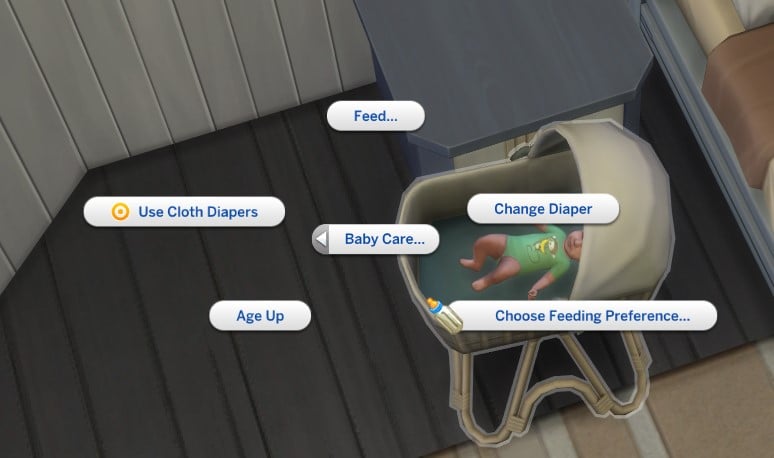
Of course, it’s important to feed your infant. That should go without saying. The quickest and easiest way to feed an infant is by bottle feeding or breastfeeding them. Click on your infant and set your feeding preference. The feeding preference applies to all Sims in the house; if you set the feeding preference to breastfeeding, all Sims who can produce milk will always choose to breastfeed the infant. Make sure any Sim you don’t want to breastfeed cannot produce milk in their CAS settings.
Breastfeeding or bottle feeding will quickly solve your infant’s hunger but you miss out on an opportunity for bonding and exploration with your infant. Your infant will have a more enriching feeding experience if you try new foods with them in a high chair. Click on a high chair to try new foods with your infant!
You’ll see a menu displaying a number of mashed baby foods to choose from. The menu keeps track of which foods your infant has tried and whether or not they liked those foods. Needless to say, once you’ve tried all the foods with your infant, it’s best to stick to the foods they like. Trying new foods together is a great way for your infant to explore new tastes and textures while bonding with their caregiver.
Depending on your infant’s traits, they may be more or less receptive to new foods. Cautious infants might need to try a new food several times before they decide if they like it, for example.
Hygiene
Of course, infants are messy. They soil their diapers, they smear food all over their faces, they drool all over themselves. They’re kind of… well, gross. You can help make them less gross by changing their diapers and giving them baths often.
If you’re looking for changing tables for your infant, don’t bother. Changing tables are not part of the infant base game update. They are exclusive to the Growing Together expansion pack, which was an odd choice. You would think changing tables would be an essential infant care item worth putting in The Sims 4 base game, but oh well. That doesn’t mean you can’t change your infant’s diaper, however. Just click your infant and under Infant Care, you’ll see the option to change their diaper. No changing table required.
But diaper changes alone aren’t enough to keep your infants clean. They require regular baths. Thankfully, it’s not too different from bathing a toddler. The only real difference is that the infant sits in a little baby bath seat in the tub during baths. Caregivers can give infants regular baths or bubble baths just like toddlers. The animation is very cute and a good bonding opportunity between caregiver and infant.
Play
Additionally, infants need plenty of play time! Fun is also one of their motives that needs to be maintained. Infants can play with any of the toy box toys that toddlers and children can play with. They can also interact with the toddler blocks. Also, there are a few new infant sensory toys available in Build/Buy.
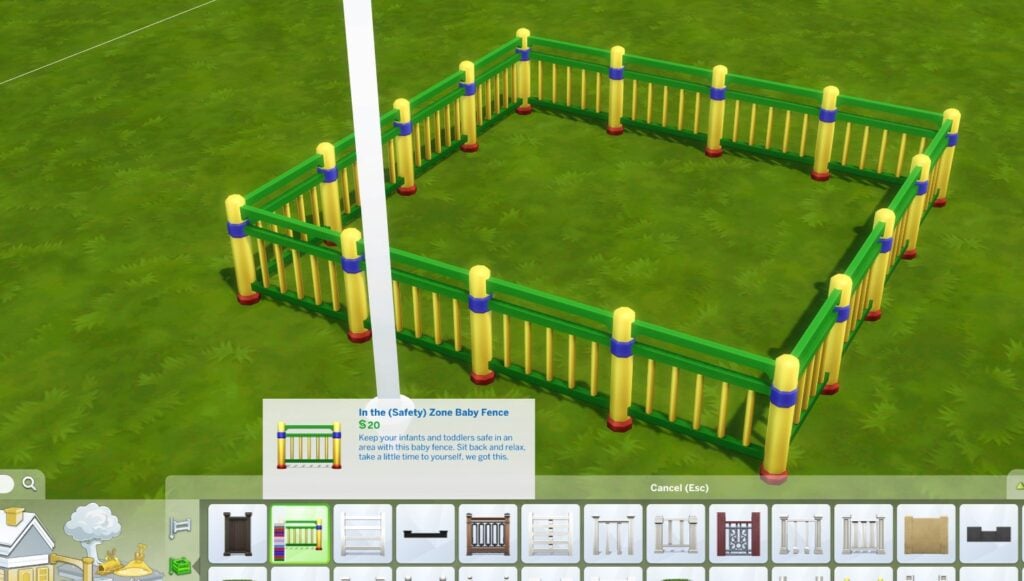
Set an infant on the ground and let them crawl around and explore with their toys. You can give yourself peace of mind by using the new baby fence to contain them inside a play area. The fence is located with all the other fencing and works exactly like a regular fence but you can click on the gate to apply baby proofing to it. In fact, you can apply baby proofing to any fence gate now.
Beware! Baby proofing is infant-proof but not always toddler-proof! A determined toddler can try to break out of their play prison!
Love
Sometimes, infants will just be angry or sad for no reason. They’re infants. They don’t understand how emotions work, yet. It’s not uncommon for an infant to wake up from a nap feeling angry just because! In cases like this, all they really need is love.
Caregivers can bounce an infant, cuddle them, and comfort them at any time. These interactions are helpful for soothing an infant who is fussing for no good reason. If you’ve met all your infant’s basic needs but they are still screaming or crying, these interactions calm them faster. Infants who are comforted or cuddled during one of these random bouts of grumpiness build a strong attachment with their caregiver, so don’t ignore them when they’re pitching a fit for no reason!
The recent update not only gave The Sims 4 Infants, but it also means life span of each life stage has changed! It comes as no surprise that this has changed, but it will make playing Sims more interesting with the new adjusted life spans.
An Infant Sim playing with toys
If we were to look at what the life spans were previously in The Sims 4, we can get an idea of just how much they have changed now that Infants are in the game.
[table id=108 /]
Pre-Infants Update Life Span for Sims in The Sims 4 shown in Sim Days. Information Courtesy of Carl’s Sims 4 Guides,
Updated The Sims 4 Life Spans
Now, depending on how you play, or even if you play with ageing off, Sims life span could be either too short or even too long in some way.
However, let’s take a look at what changes have been made to the life spans in The Sims 4.
[table id=109 /]
New Update Life Span for Sims in The Sims 4 shown in Sim Days. Information by Kimbasprite.
If we are comparing both the old and the new life span days, in places there are some real differences. For example, where Teen Sims would normally age up after seven days, they now age up at nearly eleven days. Another observation is if playing on a short life span, Toddler Sims will now age to a child after four days instead of three. Over all life stages, Sims have gained additional days so that players can get the most out of each age bracket. This is reflected well across each different play style, too!
The addition of Infants and updated life span in The Sims 4 is definitely welcomed to the game. It not only opens up more gameplay opportunities, but story telling as well. It also makes challenges like the 100 Baby Challenge and Legacy Challenges more interesting, too!
What do you think of the addition of Infants and the updated life spans? Let us know in the comments below, and stay tuned for more about Infants right here on Sims Community!
Child Skill Upgrades, New CAS Options and Gameplay Improvements. This is The Sims 4 March 2023 Update!
Maxis has released a New Patch for The Sims 4 on March 14th across PC and Consoles, featuring the long awaited Infants. However the 3.15GB Update (on PC at least) boasts other big improvements and additions as well. There are upgrades for Newborns, Life Span Changes and so much more. Let’s dive into each important feature added to The Sims 4 Base Game!
This is an overview of the general new features added with The Sims 4 March 2023 Update. Expect a full guide to Infants very soon!
Face and Body Scars
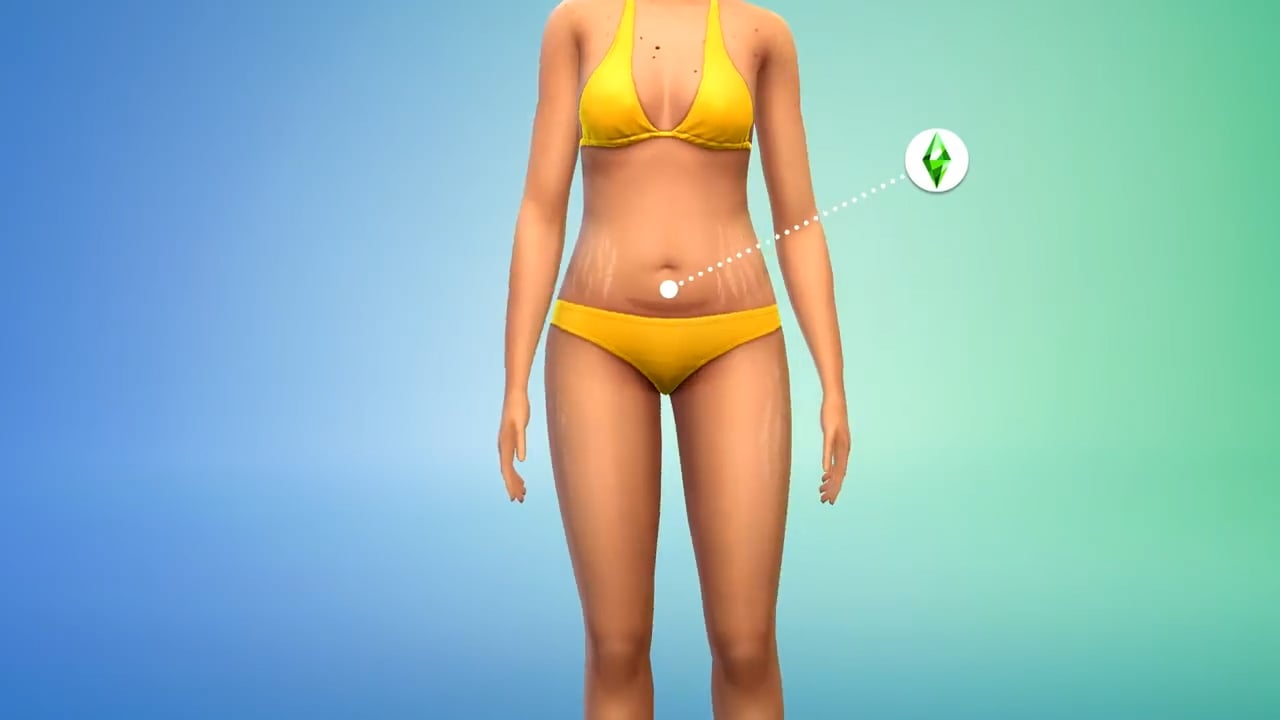
There are two new Create A Sim categories for Face and Body Scars! The new Scars cover different aspects including Birth Marks, Cesarean Scars and Stretch Marks.
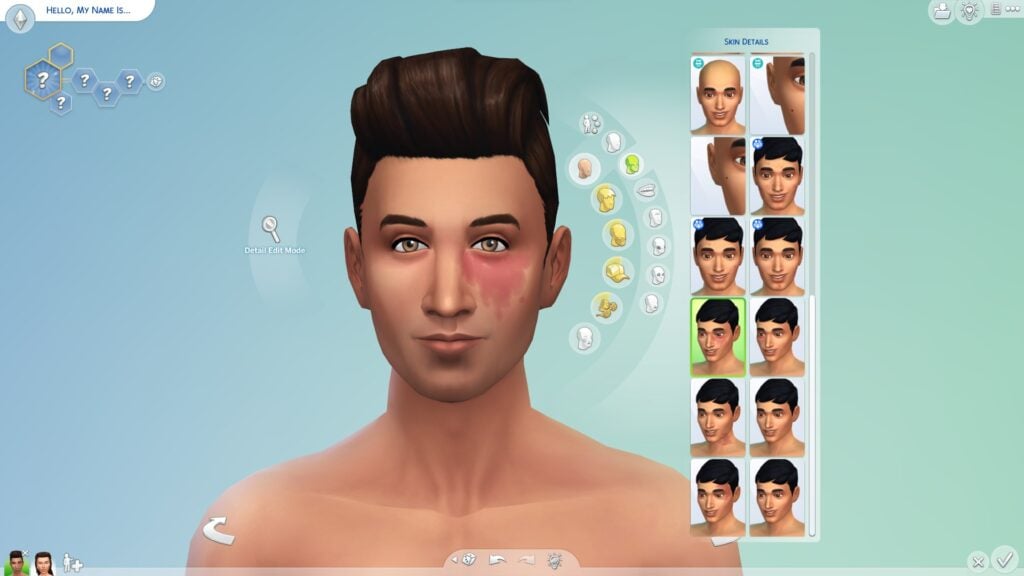
When it comes to Face / Birth Marks, you can find them in the Skin Details section when creating a Sim. There are 5 different variants to choose from, which go from light red to and pink to shades of brown, to greyish.
Face Scars in The Sims 4 CAS
Check out the 6 different options for Face Scars:
Body Scars and Skin Details
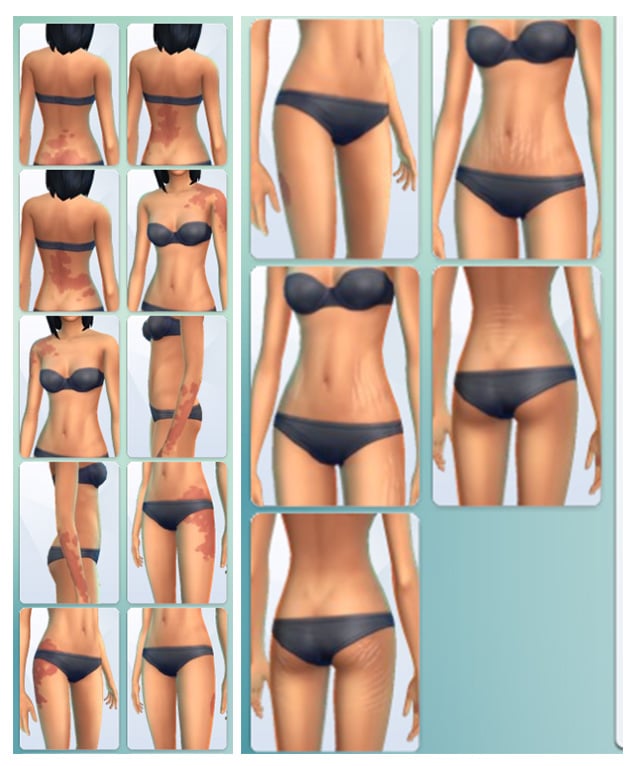
There’s now a new category in the Body section of CAS – Body Scars! This category now includes the Cesarean Scar. However, if you have The Sims 4 Werewolves Game Pack installed, you’ll be able to see Claw Scars too.
Check out the preview:
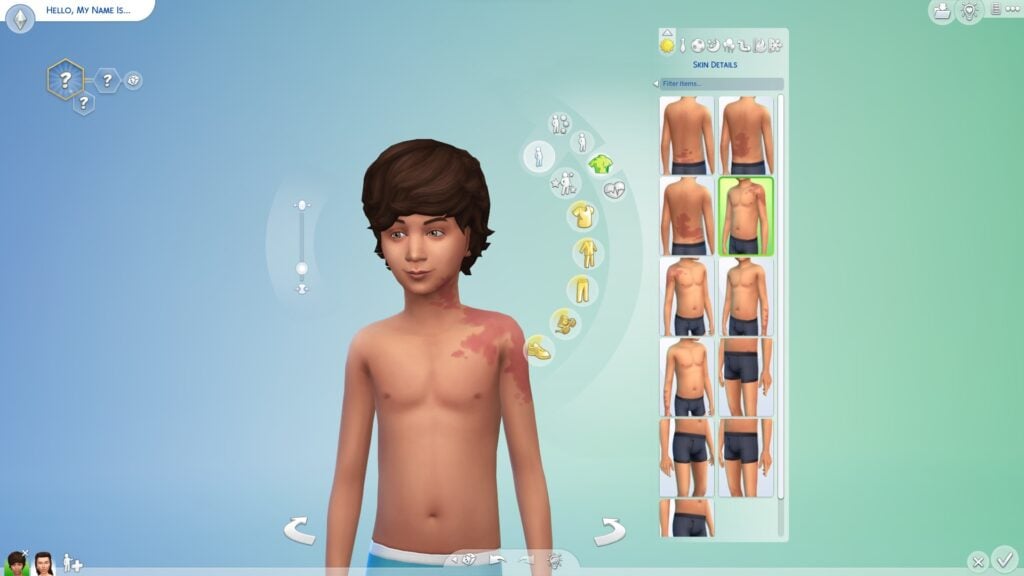
The Skin Details Category is also new, bringing different variants of Stretch Marks and Birthmarks.
Preview of new Skin Details
The availability of these new Categories goes across all Life Stages, thanks to The Sims 4 March 2023 Update. Starting from Infants all the way to Elders!
Sim Lactation Features
There’s a new feature in the Customize Gender section in Sims 4 CAS. You’ll now be able to select will your Sims be able to produce milk or not. This toggle is available for both Masculine and Feminine Sims!
“Can this Sim produce milk?” Option
Likes & Dislikes Upgrade
The previous cap limit for selecting Likes & Dislikes has now been lift in preparation for Sims 4 Growing Together. The new limit for all Base Game players is now 50!
Crib Upgrades and Conversions
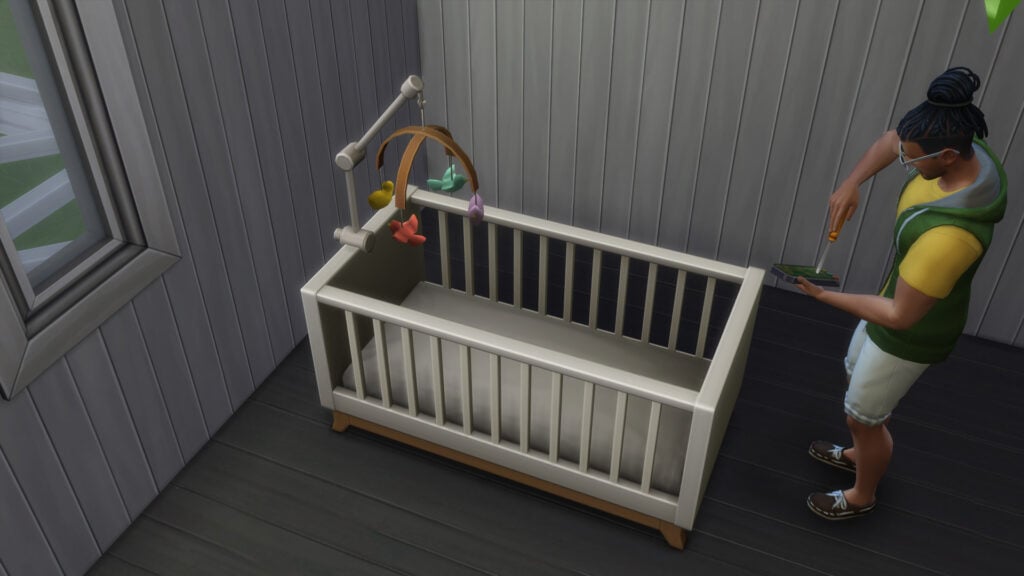
Did you know that certain Cribs and Toddler Beds can be converted in Live Mode? All you need is a Handiness Skill at Level 2 and 50 Simoleons. You’ll be able to switch a Crib into a Toddler Bed and vice versa!
Crib Baby Mobiles
Yet another Upgradable addition for Cribs are Baby Mobiles! If you go into the Upgrade > Add Baby Mobile – you’ll be able to select two new decor addons for your Crib. Both Birds and Space Baby Mobiles can be upgraded for 100 Simoleons!
These are convenient for Infants as they help them go to sleep faster. Plus they’re really cute.
Baby Mobile Upgrades
Looking for a full Build Mode overview of the new objects? We got you!
What is a Science Baby? A Sims 4 explanation!
Truth be told, you might’ve already noted that The Sims 4 is introducing Surrogacy in the form of Science Babies! But still, it’s worth explaining that the existing option we have feels a bit incomplete. Luckily there’s a quick mod solution for that!
Either way, to get a Science Baby all you need to do is click on your Phone, select the Home Category and you’ll be given two options:
Have Science Baby as Single Parent
Have Science Baby With…
If your Sim has formed a romantic (or non-romantic) relationship with other Sims they can choose this option!
Having a Science Baby with other Sims will also correctly predisposition the offspring’s genes.
If you’re looking for a solution that lets your Sims go through a whole pregnancy with the Science Baby option – there’s a Mod for that! Lumpinou’s Mods have released a new addon which lets you choose to go through a Pregnancy. Click here to learn more!
Sims 4 March 2023 Update – Newborn Updates
Newborns now have important visual and gameplay enhancements. The Newborn offspring will now accurately depict a more accurate skin tone depending on the parents skin tones. Also, certain animations have been enhanced. Plus, they now sound and scream differently. What joy!
New Sim Life Span
Of course, the addition of a new life stage means that some tweaks need to be made to the Sim life span!
@TheMarshyBear confirmed for us the new Normal Sim Lifespan, including:
Newborns – 1 Day
Infans – 5 Days
Toddlers – 7 Days
Children – 14 Days
Teens – 21 Days
Young Adults – 28 Days
Adults – 43 Days
Elders – 14 Days
Aging up from Newborns to Infants. And from Infants to Toddlers!
We’ve recorded a short video showcasing the Age Up animations from Newborns to Infants, as well as Infants to Toddlers. Check it out!
Social Interactions – Pie Menu Revamp
Finally, no more going through endless social interactions searching for the one! There are now new categories in Friendly, Funny, Romance, Mischief and Mean interactions. Properly organizing the interactions for their meaning and conversation topic.
New Sims 4 Feature – Pie Menu Revamp
Other than the new Social interaction categories, you’ll also find more meaningful organization depending on your Sim’s personality. The Sims 4 March 2023 Update might need some time to getting used to when it comes to Social Interactions. Still, the categorization isn’t too hard to grasp!
Child Skill Upgrades
Your Child Sims can now start practicing early because Children Skills have been improved!
There are now two Skill Categories for Children: Fundamentals and Skills.
Child Sims can now build both Fundamental and Adult Skills where appropriate!
Fundamentals are usual skills that are age-appropriate to your Child Sim. On the other hand, Skills is a category that lets you get an advancement in more adult Skills as you age up.
For example, you can have your Sim practice in front of the mirror and they’ll advance in both the fundamental Social Skill and bonus points for Charisma.
Still, there are certain Adult Skills that your Child Sims won’t be able to develop until they age Teen and up.
Skill UI Improvement
Sims across all ages get the new Skill User Interface revamp. Above the skill bar you’ll now find a clear Skill indicator in the circle, letting you know exactly which Skill your Sim is building.
New Pack Features
The Sims 4 March 2023 Update introduces new gameplay if you have select Expansion, Game or Stuff Packs installed.
Got Laundry? With The Sims 4 Laundry Day Stuff, you can choose between Cloth and Disposable Diapers for Newborns!
Parents can brush up their Parenthood Skills with Infant Care if you have the Parenthood Game Pack.
If you have the Cats & Dogs Expansion, you can unlock new interactions between Infants and Pets!
And finally, players who have Nifty Knitting Stuff will unlock a new Hat and Outfit for Infants!
That about settles it! Let us know if we’ve missed anything down in the conversation down below. And of course, let us know what you think about the Sims 4 March 2023 Update.
A couple of days ago we covered the news of Science Babies coming in the latest Patch. The new feature allows players to mimic Surrogacy in the style of The Sims. Letting players choose to have a Science Baby alone, or with a Sim that they have a relationship with. Note that it doesn’t have to be a romantic one!
Either way, players reported that the Science Baby feature could do some tweaking. Specifically in the area where Sims immediately go to have a new Baby, rather than endure the pregnancy. Well, not anymore!
The Sims 4 Science Baby Mod – New Pregnancy Option
Modder @Lumpinou has released an excellent new Mod for The Sims 4, giving you an additional option for having a Science Baby.
When having the Science Baby Tweak Mod installed, you’re given an additional option when going to the Hospital Rabbit Hole. Rather than just having an Instant Baby which would have your Sim return with a Newborn immediately, the latter added option makes things more natural.
Choose between having an Instant Baby or enduring a Pregnancy!
Going down the Pregnancy route you’ll have your Sim return with a successful Science Baby operation. Having your Sim start off their Science Baby adventure in the 1st Trimester!
The countdown is on!
This Mod from Lumpinou’s Mods is a perfect addition for players who are seeking family realism. The mod also doesn’t have any compatibility issues, considering it was created with the latest Sims 4 version.
Install The Mod!
Lastly, you can install the Mod for improving Science Babies very easily. Simply download the .package file that we’ve linked down below and paste it into the Electronic Arts > The Sims 4 > Mods folder. Make sure you have Mods and CC enabled in your game options!
The Sims 4 got updated with a new catalogue of Build Mode objects!
The latest Patch for The Sims 4 has just dropped. Featuring the long awaited addition of the Infants Life Stage!
The update carries a lot of new stuff in Sims 4 Build Mode. Including a new selection of Objects, Styled Rooms and Baby Proof Fences! Those who are looking for new upgrades, there’s a huge improvement with Stairs.
Let’s look at everything new!
New Objects
There’s a wide selection of new objects available, mostly revolving around Infants gameplay, clutter and toys. The total number of new items is 26 – and that’s excluding the new fence and gate!
Take a look at the objects and descriptions:
New The Sims 4 Objects
Baby Fences and Gates? We got them too!
Another new addition to the Sims 4 Build Mode is the (Safety) Zone Baby Fence that lets you create a playground for your little ones. Both Infants and Toddlers can be kept within the Baby Safety Zone.
The only difference is that Toddlers can learn how to get past the fence!
New Baby Fence!
When it comes to the Baby Gate, there’s a new “In the (Safety) Zone Baby Gate”. Check out the preview below:
Just like regular gates, these can be placed down within a tile of your liking. There are 9 different variants that you can explore!
new baby gate
New Bassinet for Newborns!
The Infants Update has prepared something for the smallest of Sims – Newborns. The new Wicker-Work Bassinet is yours to grab for 150 Simoleons!
New Bassinet
Styled Rooms Galore
The new Styled Rooms included with the latest Sims 4 update span across all life stages! Check out the new Styled Rooms and their variants. Most span across the Newborn, Infants and Toddler life stages:
Sleep Mission: Possible (Infant and Toddler)Cloudy With A Chance of Newborns / Infants / ToddlersTo The Moon (Newborn, Infant, Toddler)
Stair Rails – Visual Upgrade
Stair Rails have had a weird visual glitch for a few years now. The rails that lead to the upper story would usually overlap with an existing fence placed up. That or they’d get displayed on both sides when placed next to the wall.
The latest update addresses some of those issues in Sims 4 Build Mode. Take a look at the visual comparison from @LuddySimmer as a good example!
Stairs – Before and Afterthe New Update / screens by @LuddySimmer
The developers noted that there could still be a few visual glitches, but that they’ll always be working on improvements.
What are your thoughts on the new objects and additions in Build Mode? Let us know and stay tuned for more news on the patch!
You can download the latest version of The Sims 4 by checking for updates through the EA App and Origin. If you have Automatic Updates enabled the update will automatically download through your client program.
If you play The Sims 4 on Xbox Series or PS4 / PS5, you can request a new update by checking for updates under The Sims 4 game tag.
In case you have Mods or Custom Content, the game will automatically disable them for you after first launching The Sims 4 after the update. To re-enable all your Mods and Custom Content, select the Settings option in the Menu and select Settings. Under the ”Other” section you’ll find the ”Enable Custom Content and Mods” option. Check it and restart your game in order for it to take effect!
Today is an exciting day; we’ve heard you, and it’s time to free the infants! Learn about what’s new in the Base Game, what you can expect from Growing Together, and some issues the team has dealt with.
What’s New
Infants are now in the game! With the free base game update, you’ll now be able to interact with your young Sims earlier than before and set them up for a lifetime of excitement. Once your family’s newborns age up into Infants (or if you decide to go the adoption route), they’ll have their own needs, emotions, and sentiments about their caretakers.
If your Sim doesn’t want to adopt or want to (or can’t) go through a pregnancy, they now have a brand new option. Sims can have babies with the power of science! They can now ask others to use a mix of their genetic material to create new life or just do it themselves…as long as they’ve got the funds.
Sims will spend less time as Newborns. This life stage will last only a few days before they age up into Infants. That doesn’t mean they haven’t gotten new stuff too! From the very beginning, Newborns are going to seem like more of the family with the addition of the range of skin tones other Sims have. They also will have the eye color they’ll have for life. There are some other changes to their appearance and movements that will really help Newborns feel like an active members of the household. Caregivers will no longer put them back into a bassinet between reactions, making caring for a Newborn feel more natural than before. Plus! Toddlers and Children will be able to interact with new family members by doing things like entertaining a Newborn in a bassinet with child-like behavior.
New Stuff!
With a new life stage comes new looks! Infants have their own clothing, hairstyles, accessories, and most excitingly: personality traits. Find these new options in Create a Sim! There is also the addition of new furniture, decor, toys, and more to help make those Infants feel at home and truly part of the family. You can find these new items in the kids’ section in Build mode.
Once an Infant is crawling, they’re ready to go exploring. Keep them where they belong with the new baby-proofing option for doors. Sims can get kept out with door permissions, and now, Infants and Toddlers can get kept in.
Misc Additions
Child skills have gotten a few adjustments. Sims will gain some skills quicker now, and the things they learn as Children will now matter as they grow. Plus: UI Improvements!
Don’t worry, there’s new stuff for your older Sims too. With this new update, there are new skin details in Create a Sim for Sims of all ages. Your Sims can now have birthmarks from birth. As they age, they can have stretch marks and C-Section scars.
CAS has another great new feature: you can now decide whether or not a Sim can produce milk. This new option can be found in the Gender section of the More Details menu.
With more ways for Sims to interact than ever before, it was getting a little overwhelming to try and find what you want to tell your Sim to do. The good news is that Interactions have been reorganized! The Interactions menu now has new sections based on the type. If you want your Sim to ask another Sim to have a science baby, for example, that’s a Deep Thoughts kind of conversation. Want to give a funny gift? Try the Silly Behavior menu. There are 19 new sections in the Interactions menu to help you find what you’re looking for in less time!
Bug Fixes
Base Game
Babies’ skin tone in the skewer and household portraits should now match their skin tone in-game
Aging up a Baby will now properly take into consideration the genetics of the parents’ skin tone
Live Streaming as a Tech Guru should no longer reset your Sim
Family members will now call your Sim less often to ask their opinion about trying to have a baby (Instead, they’ll just hear the news from their chatty aunt)
Hair Swatches in Create a Sim will now be more consistent across hairstyles and ages
We have addressed an issue where sometimes after traveling Toddlers would no longer be able to interact with extended family members (Who could blame them, just finished a long trip, you’re tired, probably need a change of clothes, a bath, a good sippy cup… who wants to talk with family?)
Fear of Unfulfilled Dreams and Fear of Dead End Job will appear less often and feel appropriate when they do
Neighborhood Stories will now welcome fewer newborns into the world. They’ve come to realize the amount of care Infants require and don’t want a miss a single precious moment
Sims won’t constantly drop everything in their queue to Check Toddler
Food that’s in a container inside the fridge will take longer to spoil
Moving to a new lot with twin babies will no longer ostracize one of the twins at the edge of the world (flat-worlders rejoice!)
Tell a Toddler to run around? Now, they’ll actually run when the Run Around interaction is selected (wait, you have to tell a Toddler to run around?)
If you were able to get a Toddler to Run Around they would never stop (this sounds more like the toddlers, I know), this should no longer occur.
Sims will now be able to perform the Read to Child interaction while kneeling or standing
The ymBody_JumpSuitLongSleeve outfit is now available to male Sims in Create a Sim
When choosing Decor Likes and Dislikes in Create a Sim, Industrial, Holidays, Events, Vintage, Art deco, Luxe, Shotgun, and Shabby Décor are now available options
Styled looks are a little less styled now. Choosing one won’t change a Sim’s hairstyle, eye color, eyebrows, or facial hair
Thumbnails are fixed in Create a Sim to show off cheek scars properly
Several nursery wall decorations have had a color consistency update
Toddler Create a Sim has gone through spring cleaning a bit early; if they can’t wear it, it’s not an option in the menu
Toddlers are now taken care of at Daycare instead of taking care of themselves (how did they even manage that?!)
Alien diapers are now only available to Aliens
Sims will now keep skin details added while on Outfit Categories besides Everyday when re-entering Create a Sim. You’re you regardless of your clothing choices
Child, Toddler, and Infants are being a little stubborn when it comes to birthmarks which we are continuing to look into, but as long as birthmarks are selected while on the Everyday Outfit Category, they will keep their birthmarks
…more fixes!
Toddlers can now pick up toys that ended up under bookcases
Sims will now scoot more often as expected when directed to sit or nap on a single or double bed
Several gates, fences, and stairs were casting improper shadows. We’ve spoken to their architects and instructed them in proper shadow-casting behavior
The Sim Stats panel now tracks Total Wants Completed
Sims will no longer mistake the outdoor mailbox for a wall mailbox when publishing a book. It all gets to the same outcome, just without the shoving a book through the side of a metal mailbox part
Child Sims underwear category will now properly display according to their preferred clothing option
Be aware: Acting, Debating, and Dancing in front of the mirror do actually increase your skill. I’m not really sure how that is possible…I have spent hours dancing in front of the mirror, and I’m still horrible
Sims can properly use a Mirror to Practice Dancing… I’m just going to say this is why I have not gotten better at dancing
Searching for Stuffed Animals will now result in even more stuffed animals, even if they aren’t stuffed, but are more of a molded plastic
Stuffed toys are now also toys and will count towards the Play with 3 Toys goal of the Artistic Prodigy child Creativity aspiration
Several text updates have been made to skill level up Text Notifications to clarify the benefits provided by the skill…
Attempting to sleep or nap in a bed your Sim can’t get to will now tell you that they can’t get there
Toddlers are more likely to be content in their high chairs when their needs are taken care of. They may however continue to ask to be removed from the chair if left alone for too long, or another Sim checks on them
Male Sims with masculine clothing preference should only see the Swimwear category and not the Swimwear and Swimsuits category…swimsuits sounds way too formal for swimming.
Toddlers asking for Book Help that are greater than 3 spaces away from the location of wherein the Book Help action shall be set forth to take place, shall forthwith no longer sense a failure of action to the desired outcome, but shall rather expect that the Book Help shall be unto provided to said Toddler
Intimate Sims that choose to Chat will no longer reset and cancel the interaction. “How was your day?” in the middle of an intimate moment feels like a reset moment to me
Console players should see an improvement to input performance after opening the Relationship panel
The Singing Skill tooltip has been added to all showers that support Singing. Those showers that don’t support singing are too critical of my talent!
Randomizing likes and dislikes in Create a Sim will no longer collapse the likes and dislikes panel
Cats & Dogs
Ultra speed is as ultra-fast as it’s supposed to be, even if there’s a stray on the lot
Pets will now Be Nice To… other pets when they’re told to
Cats and small dogs should once again be able to route under dining tables. Yay, more efficient begging!
Get Famous
Shoes are no longer distorted when Sims are wearing any color of ymBottom_EP06PantsVinyl_SolidBlack
Island Living
The Marine Biologist uniform now has work-appropriate shoes
yfShoes_SP26CalfBoot_2ToneBrownBlack no longer includes missing leg sections on lower graphic settings
Discover University
Seems the institution has faith after all! Sims who Sit In on Skill Classes will get the proper certificate in their inventory when they’re done, not a Mixology one for every class
Passing the Lawyer’s Exam will now let you try to pass the lawyer’s exam, rather than just failing you right off the bat
It’s supposed to be hard, but not that hard…
Eco Lifestyle
Maker mentors will no longer speak in a strange Coming Soon language in their speech bubbles
Your Sim will know where to go when trying to upgrade Hot Tubs with the Water Recycler using Eco Parts option
Items that can be used Off-Grid are now labeled as such
Cottage Living
Wooden bridges now sound like…well…bridges made of wood
Vampires
Sims who were vampires but are now Sims that aren’t vampires will now be able to sleep more than 3 hours when tired
Realm of Magic
Randomized Sims will no longer randomize with curse warts
Star Wars: Journey to Batuu
Moonbathe interaction has been removed as an option for Sims while on Batuu
My Wedding Stories
That pesky empty blue screen is no more! You’ll be able to plan wedding events through the phone or calendar now that the menus show up as intended
Finnish, Norwegian, and Swedish options when choosing a bouquet now have fewer mid-word line breaks
You can now schedule your Wedding Event on the same day as holidays in the calendar
Werewolves
The Icon Coming Soon… icon for the Full Moon Dream buff has been replaced with a really cool Moon icon. Totally worth the wait!
Toddlers wearing the puBody_GP12OnesieWolf should be safe to wear shoes now, no more fear of their shoes ripping through the feet of the onesie. Werewolves… ripping clothing… I’m sure it was fine, but Sims were getting tired of the darn hole thing
Ok so if we don’t translate the issue from dev speak for players, what happens?
Werewolf Sim LOD (level of detail) model displays pixel tearing deformation for HH (household) and pre-made Sims when they are in beast form
Hmm… that, that’s fixed now
The Agave Abode washroom will no longer trap your Sim within its four walls… closing in on you, refusing to let you leave, even if you wash your hands after use…which you should do
Nifty Knitting
Sims can now add the same knitted items in different colors to their wardrobe
Bathroom Clutter
Wall decals should no longer disappear when viewed from the back
In the meantime, The Sims Team has released an official statement regarding Patch download issues on EA App:
Sims 4 Update – EA App Issues
Sul Simmers! We’ve noticed several players using the EA App to access The Sims 4 are unable to log in. We’ve connected with the team @EAhelp to work towards providing a solution as soon as possible.
So, how’s the progress of the update? What are your first impressions on Infants? We’d love to hear from you down below!
Make sure you stay tuned on detailed walkthroughs and overviews of the new Sims 4 Update. Stay tuned!
This week is full of releases! Learn how you can prepare.
Starting the 14th of March 2023, players will receive the highly anticipated Base Game update for Infants. Additionally, this update also prepares us for The Sims 4 Growing Together Expansion Pack that releases later that same week.
There’s no denying that this will be a huge update to the game! Of course, it does mean that there is a little bit of recommended preparation work required. Doing this will hopefully keep the update process as smooth as possible!
A Sim playing video games on their Console
However, we have got you covered with everything you need to know to help you prepare for both the update and expansion pack launch!
The Base Game Update
The upcoming update for The Sims 4 is bringing lots of new content, including:
This is alongside any bug fixes that The Sims Team has been working on to include in this patch.
Fear not, as there are a few ways to ensure that the process goes as smoothly as possible!
Save Files
It is recommended that you back up any save files prior to updating just to be on the safe side!
If you play on PC/Mac you can back up your saves by going to the following location, Documents > Electronic Arts > The Sims 4. From here, you can copy and paste your save files to another location on your PC or an external hard drive/USB stick.
However, if you play The Sims 4 on either Xbox or Playstation, you can back up your saves using your console settings. This can be either via cloud storage or external memory. Take a look at our handy tutorial below that shows the process on PlayStation consoles. The process will be similar for those on Xbox as well.
Due to the nature of the update, mods and custom content are likely to break. However, remember that the creators of your favorite creators will be working hard to get updates out as quickly as possible.
It’s important to keep track of the creators whose content you have in your game. It will help with ensuring the content in your game is compatible with the latest version of the game. You can keep track of all the latest updates via our dedicated channel on our Discord Server!
While the game will automatically disable any mods and custom content when you first launch The Sims 4 after updating, it’s best to not re-enable them until Mod creators confirm they are safe to use. If you do enable your mods before ensuring they are confirmed safe to use, you could be at risk of breaking your game.
You can, however, test out your current mods and custom content in the game once updated to see if any do work. It is strongly advised that you back up your current save prior to doing so just in case there are any issues. Your save files can be found in Documents > Electronic Arts > The Sims 4.
Updating The Sims 4 ready for Infants and Growing Together
Here are some helpful articles that will help ensure a smooth patch day process for players who use mods and custom content in The Sims 4:
Even though this update for The Sims 4 prepares us for Growing Together, there are a few more things players can do to get ready for the new content.
The Sims 4 Growing Together Release & System Requirements
The upcoming expansion pack is set to release on March 16th, 2023 at 10 am PT. The EA App will display the exact time the pack is released in your area.
It is also important to ensure that your device meets the system requirements too! Take a look at the full system requirements for PC and Mac below.
DISC DRIVE: DVD Rom Drive required for installation only
HARD DRIVE: At least 25 GB of free space with at least 1 GB additional space for custom content and saved games
VIDEO: 128 MB of Video RAM and support for Pixel Shader 3.0. Supported Video Cards: NVIDIA GeForce 6600 or better, ATI Radeon X1300 or better, Intel GMA X4500 or better
DirectX: DirectX 11 Compatible
INPUT: Keyboard and mouse
ONLINE REQUIREMENTS: Internet connection required for product activation
HARD DRIVE: At least 25 GB of free space with at least 1 GB additional space for custom content and saved games
VIDEO: Support for Metal. Intel HD 4000 (Integrated Graphics) or better
INPUT: Keyboard and Mouse
ONLINE REQUIREMENTS: An Internet connection is required for product activation.
Recommended
OS: Mac OS® X 10.11 or later
PROCESSOR: Intel Core i5 (4 cores), or better
VIDEO CARD: Intel HD and Iris Graphics from the HD 4000 series or newer
MEMORY: 8 GB RAM
HARD DRIVE: 50 GB of free space, with at least 1 GB additional space for custom content and saved games
For Xbox or PlayStation players, you will need to ensure you have enough storage space on your console to download both the update and expansion pack.
Growing Together with a new Household
With Infants being added and the expansion launching later in the week, why not create a new household? You can use this opportunity to explore new content that comes with the patch and be ready for the expansion. Alternatively, you could use it as a chance to tell a new story you’ve been wanting to tell. You could also use this time to prepare a household ready for a new challenge.
It’s Time to Build!
You can’t create a new household without creating a new home for your Sims! Even if you just spend the time creating a basic home with an aim to furnish it more once The Sims 4 Growing Together is released! There is something about creating a new home that just adds to the excitement of a new pack being released!
Growing Together: A New Family Home Ready for the Expansion Launch
With so much new content coming our way this week, it’s going to be hectic for many players. We hope that this information helps you have a smooth patch day and prepares you for Infants and Growing Together!