Home Blog Page 84

The Sims 4 Teen Mods: New Gameplay for your Teenage Years

Sims 4 Teen Mods: The Ultimate High School Experience Awaits!

If you don’t have the High School Years expansion pack, teen life in the Sims 4 can be, well, kinda basic. Don’t worry though, we got you! We’ve scoured the Internet to bring you the list of Sims 4 Teen Mods that will actually improve your Sims gameplay!

These mods are like cheat codes you didn’t know you needed. Think of turning that boring high school experience into a rollercoaster of drama, romance, and fun after school activities! From prom nights to part-time jobs, we’ve got it all covered. So, if you’re looking to add some extra spice to your Sim teenager’s life, you’ve come to the right place. Let’s dive into the amazing world of Sims 4 Teen Mods!

How to Install Sims 4 Teen Mods:

Okay, we hear you—mods can be a little intimidating, especially if you’re new to the game. So we prepared a short guide for all our new Simmers on how to install these Sims 4 Teen Mods:

  • Download the mod.
  • Once downloaded, unzip the zipped file or paste the .package.
  • Copy the mod file and paste it to the mod’s directory located at “[Drive Name]:\Users\[User Name]\Documents\Electronic Arts\The Sims 4\Mods. For Mac, move the unzipped file to “Documents/Electronic Arts/The Sims 4/Mods”.
  • Restart the game and enjoy your new content!

TIP: If you can’t find the Mods folder in your Documents, simply create one with the same name.

Are Sims 4 Teen Mods Really Worth It?

The short answer is, yes. Why? Because regular high school is so last year. First off, let’s talk about why you might even consider downloading the Sims 4 Teen Mods. One word: realism. Because let’s get real, who wouldn’t want their Sim’s high school experience to be as real as possible?

Apart from that, we have game enhancement. The base game is great and everything, but after a while it can get repetitive. That’s where these mods come in! They’ll add layers of fun to your gameplay by deepening your Sim’s teen life, without you having to purchase another pack. We’re sure these mods will keep you glued to your screen, so don’t be shocked when you find yourself caring about your Sim’s grades or whether they’ll make the cut for the school soccer team.

So, are teen mods worth it? In a word, absolutely. They add depth, realism, and a dash of chaos to your Sim’s teen years. But to add even more of a realistic teenager vibe, check out our Teen Style Custom Stuff Pack Review!

The Sims 4 Teen Mods List Screen

The Best Sims 4 Teen Mods You Must Try!

So you’re sold on the idea of teen Mods, but you’re probably wondering “Where do I start?” Well, that’s what this list is for. We’ve done our homework (so your Sims don’t have to—just kidding, they totally still do) and gathered a list of the absolute must-try Sims 4 Teen Mods! Buckle up, because we’re about to show you how to give your Sim the true teenage dream they deserve!

1. Sleep In Mod by Little Miss Sam

Sims 4 Sleep In Mod
Image taken from Little Miss Sam’s Tumblr.

Ever found yourself yelling at your screen because your teen Sim is up at 6 am on a weekend? It’s like what’s so important they have to do that early in the morning? Yeah we’ve all been there, so that’s why we’re starting this Sims 4 Teen Mods list with Sleep In by Little Miss Sam.

This mod will let your teen and child Sims hit the snooze button on comfy weekends and school holidays! No more 6 a.m. wake-up calls, they’re gonna be asleep until something—or someone, wakes them up. And don’t worry, on school days, their schedule will be good as always, so no missing the school bus!

Apart from teens, this mod also acts as an add-on for Sims who are either unemployed or self-employed. Now, they too can enjoy the luxury of sleeping in until they’re good and ready to face the day.

download icon

Sleep In Mod is available to download on CurseForge for FREE!

2. University for Teens by Tecnic

Sims 4 University for Teens
Image taken from Mod The Sims.

Ever wondered what it’s like to be the high school genius? If so, it’s maybe time to fast-track your teen Sims to university life! The “University for Teens” mod allows any teen Sim to enroll in college, regardless of their age. This is one of the most interesting Sims 4 Teen mods on this list, as it allows your intellectually gifted teens to study alongside Sims of similar intelligence. As a result, dedicated teen Sims can fast-track their education and make quicker progress toward their future careers.

In addition, your teen Sims will be also able to help with university homework, join sports teams and even participate in e-sports! To use, simply apply to universities via the mailbox and enroll just like you would with an adult Sim. So say goodbye to high school and let your Sim jump on the train straight to college!

download icon

University for Teens is available for download on Mod The Sims for FREE.

3. Pre-Teen Mod by It’s Katato

Sims 4 Preteen Mod
Image taken from Its Katato Mods.

This is one of the best Sims 4 Teen mods hands down! The Sims 4 Preteen Mod introduces a new life stage to bridge the gap between childhood and teenage years. A mean, a whole new stage! How better can it get?

This is the rundown of the mod: when your Sim child ages up, they’ll automatically gain a pre-teen trait, enroll in middle school, and become shorter. The mod also adds frequent mood phases and voice cracks to mimic real pre-adolescence. Talk about realism!

Also to help pre-teens out a bit, a simple hygiene system is included, offering options like having lotions and body spray which have various effects. One of the best things about this mod is that it gets frequently updated, making it a must-have in your game!

download icon

Pre-teen Mod is available for download on It’s Katato’s Website for FREE.

4. Teen Exclusive Traits by Triplis Sims 4 Mods

Sims 4 Teen Mods
Image taken from Triplis’s Github

The world of teens and adults in the Sims is completely different, EA seems to forget that sometimes. That’s why these Sims 4 Teen Mods are here, and this one is no exception, offering traits exclusively designed for your teen Sims.

Say goodbye to all the generic personalities and say hello to a range of unique traits that cover the whole teen spectrum—from perfectionists and punks to band geeks and class flirts. These mods are sure to give your teen Sim the individuality factor they deserve! Set your teens apart from their adult counterparts and add more depth to your gameplay today!

download icon

Teen Exclusive Traits Mod is available for download on Sim File Share for FREE.

5. More Best Friends by Little Miss Sam

Sims 4 Make more friends mod
Image taken from Little Miss Sam’s Tumblr.

Navigating friendships during teen years can be the toughest thing ever. One minute you’re BFFs, and the next, you’re not even speaking to them. That’s why LittleMsSam’s Best Friends mod is a fantastic addition to your collection of Sims 4 Teen Mods. While it’s not exclusively for teens, it adds that layer of realism to your Sim teen’s social live.

This mod does exactly what you’d expect—it lets your Sim have more than just one BFF. This means your teen Sims can juggle multiple close friendships without having to give anyone the boot. It’s a great feature that makes managing friendships in your teen Sims’ lives feel more authentic.

download icon

More Best Friends Mod is available for download on Little Miss Sam’s Tumblr for FREE.

6. Teen Lifestyle Mod by Snowiii95

Sims 4 Teen Life Mods
Image taken from Snowii95’s Patreon.

Ever felt like your teen Sims are just lacking that teenage spark? Well, you’re not alone. Snowiii95 felt that vibe and decided to do something about it. Thus, we’re adding their Teen Lifestyle Mod to our Sims 4 Teen Mods List.

First up, this mod is packed with a lot of goodies. We’re talking fresh aspirations like Emo Soul and Heartbreaker (because as we remember it, high school was all about the drama). Additionally, there are two new careers— the Tutor and the Cheerleader.

From Band Nerd to Prankster, your Sims aspirations will be getting a whole lot more interesting. This mod introduces 8 brand new traits, specifically made for teens! And the cherry on top? Each trait comes with its own unique social interactions.

download icon

Teen Lifestyle Mod is available for download on Snowiii95’s Patreon for FREE.

7. Shorter Teens Mod by MenaceMan44

Sims 4 Shorter Teens Mod
Image taken from Mod The Sims.

We’ve always been kind of low-key annoyed that our teen Sims look like they could be paying a mortgage. I mean seriously, why do they go overnight from cartoons to job interviews? Well, if we’re in the same boat, we have some good news for you! There’s a mod that will be able to solve this height dilemma and make your teen Sims actually look like teens.

So, what’s the 411? This is one of those Sims 4 Teen Mods that’s all about adding a touch of realism to your game. It’s designed to auto-adjust your teen Sims’ height—meaning you won’t have to do any of the work. Just create or age up a teen Sim, and they’ll automatically be shorter than adults. And no need to stress about leaving them at that hight, they’ll grow back to adult height as soon as they age up!

download icon

Shorter Teens Mod is available for download on Mod The Sims for FREE.

8. Online Learning System by Little Miss Sam

Sims 4 Online  Learning System Mod
Image taken from Little Miss Sam’s Tumblr.

Ready to level up your Sims’ skills game without even leaving the house? Then say hello to the Online Learning System mod, one of the coolest Sims 4 teen mods out there! This mod lets your Sims learn up to 41 different skills from their PC, tablet, or phone. The process is pretty easy, your Sim just needs to register for a small fee and voila, they’re good to go!

So here’s how it works: Once registered, your Sims can study for 60 Sim minutes, with a skill gain rate set at 1.5. Just keep in mind that this can vary depending on traits and other buffs. One cool thing about this mod is that it pairs up really well with the Parenting Skill for Teens Mod, adding even more layers to it!

download icon

Online Learning System is available for download on Little Miss Sam’s Tumblr for FREE.

9. Parenting Skill for Teens by Zafisims

Sims 4 Parenting Skills mod
Image taken from Mod The Sims.

Speaking of which, the next one on this Sims 4 Teen Mods list is the Parenting Skill for Teens mod. Ever felt like your teen Sims should be more responsible, especially when they have younger siblings running around? Well, your wish is this mod’s command! We’ve got something that’s going to make your Sims 4 Teen Mods collection even more awesome!

Introducing the Teen Parenting Skill mod, a game-changer that allows your teen Sims to acquire parenting skills. Now, your teens can be more than just homework-doing, mood-swinging high schoolers; they can also be responsible caregivers as well. From forcing their younger siblings to do homework to disciplining them for recent behavior, this mod lets your teens do it all. It’s like a parenting trial run before they hit adulthood.

download icon

Parenting Skills for Teens Mod is available for download on Mod The Sims for FREE.

10. Obsessive Teen Mod by Ozzy

Sims 4 Obsessive Teen Mod
Image taken from Ozzy’s Patreon.

If you’ve ever wanted to capture that quirky teen essence in your Sim, then you’re in for a treat. We present to you the Obsessive Teen Mod, a mod certain to enhance your teen Sims gameplay! This is one of those Sims 4 teen mods that brings high school stereotypes to life with 10 new interactions. That can by the way be performed on various objects like benches, armchairs, and even on your Sim’s crush!

Want to be a selfie king or queen? Buy a selfie stick and snap to boost social skills and fun. If you’re more of a foodie, the “Eat A Burger Babe” interaction will fill you right up. The list of interactions goes on, but that’s not all. This mod also includes a “FaceTime Interaction” for stronger teen friendships and a “Pout and Soothe” interaction for those moody teen moments. Each interaction fulfils different needs, making your Sim’s life more balanced and way more entertaining.

download icon

Obsessive Teen Mod is available for download on Ozzy’s Patreon for FREE.

11. Teen Runaway Mod by Wicked Pixxel

Sims 4 Runaway Teen Mod
Image taken from Wicked Pixxel’s Patreon.

This one will really kick things up! The “Runaway Teen” mod adds a new layer of emotional complexity, making it a standout automatically in Sims 4 teen mods. With this mod, your teen Sims can plan their escape from home, complete with a “Troubled Teen” trait and a Street Survival Skill to help them navigate life on the streets.

Starting the runaway plan is simple, just click on your teen Sim and select “Start Runaway Plan” option, which unlocks a new social menu and interactions. These interactions will help build the Street Survival Skill, which will be necessary because life on the streets won’t be easy!

Your Sim might fail at begging for food or money, resulting in different downfalls. Kind-hearted Sims might offer some fruit, while others might give a random amount of money. So, if you’re looking to add more challenge and depth to your game, this mod is a must-add to your Sims 4 teen mods collection!

download icon

Teen Runaway mod is available for download on Wicked Pixxel’s Patreon for FREE.

12. Delinquent Teens Mod by A Deep Indigo

Sims 4 Delinquent Teens Mod
Image taken from A Deep Indigo’s website.

Since we’re on the troubled Sims 4 teen mods wagon, might as well include this one. Not only can your Sims run away, but they can now also engage in rebellious activities—both legal and not-so-legal. Just don’t forget, all actions have consequences! So make sure you Sim teen knows that.

The mod introduces a “Teenage Miscreants Scenario” and a “Teen Runaway Rabbithole,” along with a system for getting caught and paying up. Depending on what your Sim gets caught doing—be it pranking at school or tagging a building—they could face a range of consequences. These might include in-school suspensions, warnings, community service, or a trip to juvenile hall.

Compatibility-wise, this mod is base game friendly, but for the best experience, it’s recommended to have Parenthood, City Living, Get Together, and High School Years packs. If you don’t have these packs or certain other Sims 4 Teen Mods, your Sim simply won’t have those specific interactions.

download icon

Delinquent Teens Mod is available for download on A Deep Indigo’s website for FREE.

13. Keep Childhood Skills Mod by PBHiccup

Sims 4 Kinds Keep Skills Mod
Image taken from The Sims 4 Updates.

One of the things that don’t make sense in the game is losing your skills as a child Sims, am I right? Like, why even bother getting to level 7 in Motor Skills if it’s gonna vanish upon hitting teen years? Well, guess what? This is one of those Sims 4 Teen Mods that’s got your back. With this mod when your Sim kids age up, those hard-earned skills won’t just disappear. They’ll actually level up into something useful.

Here’s the tea: When your Sim kids age up to a teen, their skills will evolve too. So, that Creativity Skill they’ve been working on? It turns into the Painting Skill. Those Motor Skills? Say hello to Fitness. Mental Skills turn into Logic, and Social Skills become Charisma. Trust us when we say, it’s way better than starting from scratch!

So, if you’re tired of feeling like your Sims’ childhood is just a skills waste, this mod is perfect for you. It’s like your Sim’s childhood grind sets them up for teen success, making it a super cool addition to your Sims 4 Teen Mods lineup.

download icon

Keep Childhood Skills Mod is available for download on The Sims 4 Updates for FREE.

14. Prom Night Event by KawaiiStacei

Sims 4 Prom Event Mod
Image taken from The Sims 4 Updates.

This is one of those Sims 4 Teen Mods that let you skip out on buying the High School Years pack, by adding the prom event to your base game! You can choose to either go with a date or solo, making it a night full of memories. Although currently not available, we’re expecting it to come back soon.

Once the mod is installed, your Sim will have the option to attend prom and there will be goals to complete with your prom date, but it’s also cool if you just wanna mingle with your classmates. So, if you’re looking to add some high school milestones to your Sims’ lives, this prom mod is a fabulous addition. Get those fancy outfits ready and hit the dance floor!

download icon

Prom Event Mod is available for download on The Sims 4 Updates for FREE.

15. Dynamic Teen Life by A Deep Indigo

Sims 4 Dynamic Teen Life Mod
Image taken from A Deep Indigo’s website.

Out of all the Sims 4 Teen Mods, this one carries the customisation to the win! If you’re looking to add some serious drama and depth to your Sim teens’ lives, you’ve got to check this one out. With this mod, you can pick and choose from one core and nine modules to customise your gameplay.

Want to focus on emotions and mental health? There’s a module for that. More into after-school clubs and activities? Don’t worry, this mod has it. It also features “The Romantic Life” module where from now on, your Sim teens have to ask for parental permission to date…talk about awkward! Plus, the Social Groups feature is like the cherry on top. Your Sim will be sorted into cliques, making your Sim’s high school experience as legit as possible.

Personally this is one of my favourite Sims 4 Teen Mods, because it gives your teen Sim an actual teenager life. Your Sim can get invited to everything from bonfire parties to sleepover events. And if you’re looking to do even more, the New Activities module offers a range of clubs for your Sim to join. Oh, and for those of you who love a little gossip, you can now spill the tea about your classmates. Talk about the true high school experience!

download icon

Dynamic Teen Life Mod is available for download on A Deep Indigo’s website for FREE.

16. Drop Out of High School and Get a Real Job by Telford

Sims 4 High School Drop Outs Mod
Image taken from Mod The Sims.

Just when you thought the Sims 4 Teen Mods couldn’t get any cooler, our Sims Community never ceases to amaze us! Now with this mod, your Sim teens can now drop out of high school and jump straight into adulting!

Let’s talk about the High School Dropout method. You can now safely let your Sim quit high school without causing any errors to your game. Your teen Sim can either use their phone to quit high school or you can use the cheat careers.remove_career highschool. It’s that simple!

The best part is that now your teen Sims can dive into careers and true adult lives. Whether it’s the base game careers or the specialized jobs from the Get to Work and City Living expansions, your teen Sims can now experience the grind just like the adults.

download icon

Drop Out of High School and Get a Real Job Mod is available for download on Mod The Sims for FREE.

17. Teen Aspirations Bundle by IlkaSimming

Sims 4 Teen Aspirations Mod
Image taken from Ilka Simming’s website.

One of the more popular Sims 4 Teen Mods, we present to you the Teen Aspirations Bundle! As you know, in High School Years teens get a new set of aspirations. Now our Sim teens can aspire to be more than just “good students” or “party animals.” With Ilka’s mod, you can choose from four new aspirations that are all base game compatible! Whether your Sim is aiming to be Prom Royalty or an Overachiever, these aspirations come with a set of objectives that’ll bump up your game to a whole new level.

It doesn’t end there though! If your Sim is all about that independent life, the “Towards Independence” aspiration will be perfect for you. Your Sim can start with basic tasks like cooking and cleaning, and eventually move out to live on their own. And for those who like to walk on the wild side, but didn’t like the other rebellious Sims 4 Teen Mods, the “Teenage Rebellion” aspiration is where it’s at. From arguing with parents to resulting in some not-so-legal activities, this aspiration is all about pushing boundaries.

Whether they’re climbing the social ladder to become Prom Royalty or embracing their rebellious side, these new aspirations make your Sims teen years way more interesting. So go ahead, pick an aspiration and broaden your teen Sims experience!

download icon

Teen Aspiration Bundle Mod is available for download on IlkaSimming’s website for FREE.

18. Education Overhaul by A Deep Indigo

Sims 4 Education Overhaul Mod
Image taken from A Deep Indigo’s website.

Another one from the guru of Sims 4 Teen Mods, we present to you The Education Overhaul Mod by A Deep Indigo. If you’re looking to give your Sim’s educational journey a serious upgrade, you’ve got to check this mod out. We’re not talking about just a few tweaks here and there, we’re talking a full-blown rebrand of the entire Sims 4 education system!

From preschool for your toddlers to new career paths for Young Adults, this mod has got it all. Toddlers can now attend preschool from Monday to Friday, where they’ll develop essential skills and character values. But the real stars of this mod are the teens. They get a ton of new options like in-school interactions, field trips, and even the dreaded return of detention and military school. Yep, it’s like the Sims 4 Teen Mods just got a Ph.D. in awesomeness!

So, if you’re ready to take your Sim’s education to the next level, this Sims 4 Teen Mods addition is a must-have. Just make sure to read the mod description and installation instructions carefully to get the best experience.

Need an outfit for the new school year? Check out our Sims 4 School CC Shopping Guide!

download icon

Education Overhaul Mod is available for download on A Deep Indigo’s website for FREE.

19. Let Friends Age Up by Little Miss Sam

Sims 4 Let Friends Age Up Mod
Image taken from Little Miss Sam’s Tumblr.

Here’s one more relatable struggle in the Sims world—keeping your Sim’s social circle age-appropriate. I mean, how many times have you had a teen Sim who’s BFFs are still running around in diapers? Or maybe your Sim is ready to take on the world, but their childhood friends are, well, still children. But don’t worry, Little Miss Sam’s got our backs when it comes to Sims 4 Teen Mods!

This mod is a lifesaver for those of us who value our Sims’ relationships and want to keep their social lives. While it’s not exclusively for teens, it’s a game-changer for them. Let’s face it, teens are a rare breed in the Sims 4, and finding friends their own age can be a mission. With this mod, you can age up a bunch of Sims to join your teen Sim’s friend circle!

download icon

Let Friends Age Up Mod is available for download on Little Miss Sam’s Tumblr for FREE.

20. Summer Camps by A Deep Indigo

Sims 4 Summer Camp Mod
Image taken from A Deep Indigo’s website.

Okay, last one from A Deep Indigo, but we can’t help to love their Sims 4 Teen Mods! If you’ve been searching for the perfect way to keep your teen Sims (and their younger siblings) busy during summer days, look no further. We’ve got the scoop on one of the coolest Sims 4 Teen Mods that’ll turn your Sim’s summer into an unforgettable adventure—we’re talking Summer Camps!

Picture this: It’s summer, school’s out, and your Sim teen is already bored. Enter Summer Camps, a mod that offers 11 different camps to choose from, each designed to boost your Sim’s skills and character values. Whether your Sim is a budding scientist, a theater kid, or an aspiring athlete, there’s a camp that’s just right for them. And the best part? Signing up is a breeze! Just use the phone or computer, and voila, your Sim is all set for a summer of fun.

download icon

Summer Camps Mod is available for download on A Deep Indigo’s website for FREE.


Why These Sims 4 Teen Mods Are Game-Changers

That’s it, we came to an end of our Sims 4 Teen Mods list. The Sims 4 is already a game that offers a wide range of possibilities, but these Sims 4 Teen mods take it to a whole new level. From managing your Sims’ education and career paths to moods and aspirations that shape the teenage years, these mods provide a layer of complexity that the base game alone can’t offer. They allow you to tailor your Sims’ lives in ways that make the game feel more dynamic, more challenging, and ultimately more rewarding.

Whether it’s sending your Sims to summer camp, allowing teens to acquire parenting skills, or even something as simple as sleeping in, these Sims 4 Teen Mods are here to make life of a Sims teenager, well, feel like a teenager. So if you’re looking to breathe new life into your teen Sims, these Sims 4 Teen mods are a great place to start!


If you’re interested in more Sims 4 Teen Mods, check out our best mods for the ultimate high school experience!
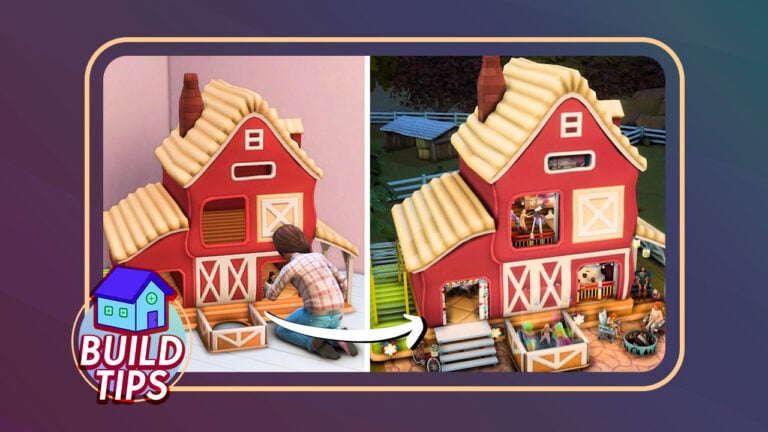
Converting this Sims 4 Dollhouse into a Fun Kid’s Clubhouse

The Sims 4 Dollhouse Build Tutorial

Sims are basically dolls, so why not put them in a dollhouse?

We’ve showed you how to make debug shells into a usable space. Up your building skills and turn this adorable Sims 4 dollhouse into a 2-floor play place for your child Sims!

Sims 4 Dollhouse Build

You won’t need any custom content or mods to build this! You can also do this with just Sims 4 Base Game and the Horse Ranch pack.

Just toggle bb.moveobjects on before starting.

Building the structure

Start off by placing a 2×7 open platform on the 1st floor. Build an 8×6 room beside it. Then, copy the platform on the other side of the room. This is how it should look like:

Building a House in The Sims 4: Dollhouse Tutorial

Now raise the whole structure by sliding the white foundation arrow 2 times. Next, raise the platform of the closed room 2 times as well.

Inside the closed room, block off the room into 3 sections with these sizes:

Sims 4 Dollhouse Rooms

Add stairs in the middle room to access the 2nd floor and place archways inside. Also add stairs behind the outdoor platforms so your Sims can do more activities there.

On the 2nd floor, build a 5×6 room on top of the closed room below. Add some fences around the stairs for safety.

Once the whole structure is done, don’t forget to color in the walls and tiles both inside and outside the build.

Adding the dollhouse

To make this whole build functional, create a basement 1 tile bigger than the build.

The Sims 4 Rooms

Place your dollhouse on the basement and size it up 6 times using the ‘]’ key. Then elevate it with Ctrl+9 until the item’s green grid reaches the top of the basement wall.

Then place the dollhouse in the middle of the room to align it with the build upstairs. You may need to toggle quarter-tile placement by clicking Shift+F5 or hold Alt to adjust the dollhouse from time to time.

Once the dollhouse covers the walls and floors of the build above, you can add in a door and stairs for the main entrance. Add a fake window by using a doorway and adding a fence along with it.

Decorate

The last step is to fill up the dollhouse with activities for kids. For this dollhouse, there’s a Don’t Wake the Llama table, a chemistry table, a crafting station, and even a tiny version of the dollhouse itself on the 1st floor.

On the 2nd floor, you can add a sleepover area with bunk beds and sleeping bags.

Stargazing in The Sims 4 Dollhouse

You can even add a functional telescope inside. Do that by closing off a room by the open window. Go up one level and click on the room below. Click ‘Remove Ceiling‘ so that this space will be outdoors for the telescope to work. Then just delete the walls after.

Outside, you can fit a monkey bar on the left porch. In the middle, there’s a space that can have Blicblock gaming station just elevate it 2 times using Ctrl+9. On the right side, you can add a camping area and a small porch area for a rocking chair.

If you are done decorating, delete the basement to remove the dark lighting on the dollhouse. You must delete it by using the white arrow sliders as to not delete the dollhouse with the room.

Dollhouse Shell

Download this Sims 4 Dollhouse

If you want to skip all the above steps, feel free to download this build in the gallery so you can add this to your build too.

sims 4 dollhouse in the gallery

Video tutorial

Or watch this quick tutorial to learn how it’s really done in the Sims 4:


Have you built your own Doll House build in The Sims 4? Let us know in the conversations below and stay tuned for more Sims 4 Build Tips!

Take Control of Your Game with MC Command Center for The Sims 4!

What is MC Command Center in The Sims 4? Learn in our extensive guide of the latest version!

MC Command Center Sims 4

If you have ever been frustrated with the lack of options in your game, the MC Command Center Sims 4 mod will change the way you play forever! This powerful mod by Deaderpool gives you the ultimate control over just about every aspect of The Sims 4 and adds so many new features to the game. Fine tune how story progression works, implement child support payments for separated couples with children, set up automatic bill payments, and so much more!

Your Guide to the MC Command Center Sims 4 Mod

The Sims 4 MC Command Center mod (or the MCCC Sims 4 mod for short), is a huge mod but many of its features work quietly in the background. So you may not even notice it’s working at all and you may not know just how much you can do with it. But don’t worry! We’re going to break down every major feature of the MC Command Center Sims 4 mod for you! You’ll become a pro at taking advantage of the M C Command Center Sims 4 mod’s full potential in no time!

The MC Command Centre Sims 4 mod is fully compatible with the base game but if you own additional packs, you will be able to control many pack-specific features with this mod as well.

How to Get MC Command Center for Sims 4

Screenshot 3892

There are numerous ways to download and install the MC Command Center Sims 4 mod but the easiest way for beginner mod users is through CurseForge. CurseForge is a mod hosting platform fully endorsed by EA. It is the Official Mod Hub for top-quality Sims 4 mods. The best part about CurseForge is all mods hosted there are free of viruses and malware. CurseForge also makes installing and updating your mods super easy.

All you need to do is download and install the CurseForge App. Then, inside the app, search for MC and click Install on the mod page. CurseForge will automatically put all the files for MCCC inside your mods folder for you.

MC Command Center Sims 4

The MC Command Center Sims 4 mod receives frequent updates. It is constantly adding new features and keeping up with game patches. CurseForge also makes it easy to stay on top of updating MCCC. Whenever an update for the mod is available, the CurseForge App will let you know and you can update it with just the click of a button!

For more advanced mod users who still prefer to install and update all their mods manually, the MC Command Center Sims 4 mod can also be downloaded directly from Deaderpool’s website and from his Patreon. If you’d like to learn how to manually install and upkeep your mods, check out our Getting Started with Mods and CC article.

Overview of The Sims 4 MC Command Center Mod

The MC Command Center Sims 4 mod has so many game options available, it can be dizzying to find what you want but we’re going to give you a quick breakdown of each part of the mod so you know exactly where to start looking for the options you’d like to adjust.

MC Global Settings

Most of the global settings for the MC Command Center Sims 4 mod can be found in the main menu, located on any computer in your worlds. Click on any computer and look for the MC Command option. This is where you’ll find the menu to adjust many of the settings in your game.

  • MC Command: This is the main module of the MC Command Center Sims 4 mod. No other files will function without the main mod file installed. They all rely on this core mod. On a computer, this is where you’ll be able to change general global settings like the world time, set up child support and inheritance payments nd more.
  • Career: This section of the MC Command Center Sims 4 mod handles all career related settings. Control career difficulty, how fast teens and kids finish their homework, and more!
  • CAS: This portion of the MC Command Center Sims 4 mod allows you to control global settings for many different CAS features. Control how slim or big your townies can be or what body shapes they are or aren’t allowed to have, prevent Sims from gaining or losing weight and muscle mass over time, and lots more stuff.
  • Cheats: If you need to cheat a Sim’s motives, career, skills, or pretty much anything else, you’ll find the option to do so here! This is handy because it saves you time typing out long cheat codes.
  • Cleaner: This is kind of like a data cleaner. Clean up messy relationships, properly delete any culled Sims still floating around, and tidy up stray items.
  • Clubs: This module of the MC Command Center Sims 4 mod is specific to the Get Together pack’s clubs feature. Increase the max number of Sims allowed in a club, monitor club members and more.
  • Dresser: Set facial hair and makeup settings, clean up messy outfits, and more on a global scale.
  • Occult: If you own any packs that come with an occult life state, you’ll find this section useful for controlling those occults. Control how many occults can be in your world at a time, how often alien abductions happen and many other things.
  • Population: Control how many Sims are in your world, under what circumstances they should move to a new residence, whether you want the Maxis Neighbourhood Stories to handle their lives or your custom settings you’ve set up with the MC Command Center Sims 4 mod and more!
  • Pregnancy: Although this section says Pregnancy, it handles adoption and marriage settings, too. Control how many Sims adopt children, who can get married, whether to take personality compatibility into account when setting up marriages or not, control divorces, and a tonne more stuff!
  • Tuner: This is more of a technical portion of the MC Command Center Sims 4 mod but it’s useful for controlling Sim autonomy.
  • WooHoo: Since this module has more “M for Mature” features such as teen pregnancy and teen/adult romantic relationships, it’s not hosted on CurseForge. If you want this part of the mod, you will have to download it directly from Deaderpool’s website and manually install it into your Mods folder. Control Sim nudity, set up Risky WooHoo and autonomous Risky WooHoo, enable or disable teen pregnancies and many more settings related to WooHoo in the game.
  • Reset Settings: If your settings have gotten all convoluted and you just want to reset everything and start fresh, this menu will allow you to reset all of the MC Command Center Sims 4 mod’s settings to their default states.

MC Sim Settings

In addition to the global settings you’ll find on any computer in the game, you can also click on your Sims to bring up individual settings with the MC Command Center Sims 4 mod. When you want to change things that affect all Sims in your save, use the computer. However, if you want to change settings for just one individual Sim, use the MC Command option on that Sim.

You’ll find most of the same categories as you would see when clicking on a computer but you’ll have different options available tailored to that specific Sim rather than all the Sims in your world.

  • Modify Household in CAS: This takes you directly into CAS to edit the household without having to find and interact with a mirror or dresser. If you have increased the household limit above 8 using the MC Command Center Sims 4 mod’s settings, this will appear as just Modify in CAS and you will only be able to edit that Sim, not the whole household. This is to prevent the game from deleting extra household members when leaving CAS.
  • Sim Commands: Maintain your Sim here. Rename them, kill them, delete them, change their age, and more. Occult commands are also in this section.
  • CAS: Copy and paste body presets between Sims or different outfit categories, adjust your Sim’s physique, choose their favourite drink and favourite umbrella, manage their traits and more!
  • Cheats: Cheat your Sim’s career, skills, satisfaction points, retail/restaurant/vet clinic points, their money, and more.
  • Cleaner: Move your Sim’s inventory to another Sim and delete or sell their personal and household inventories.
  • Dresser: Copy/paste CAS parts between Sims, instantly change their outfit without having to go through the Change Outfit animation, disallow specific clothing items, remove all accessories, and many more options here.
  • Pregnancy: Manage your Sim’s pregnancy. Start an alien pregnancy or control the genders and offspring count of a currently pregnant Sim. You can also set the trimester, pause, and terminate the pregnancy.
  • Tuner: Enabling this allows you to click on almost any object in the game and set the autonomy settings for that object. For example, if you don’t want Sims to autonomously get water from the sink, you can click on any sink on the lot and disable the Get Water interaction for it.
  • Sim Flags: Flags are custom settings that determine what a specific Sim is or is not allowed to do. For example, you can assign a flag to a Sim to never marry and that specific Sim will never get married even if they are eligible for marriage with your Neighbourhood Stories or the MC Command Center Sims 4 mod’s story progression settings.
  • Flag Active Sims: This does the same thing as the Sim Flags options, except it affects the entire household, not just the Sim you have selected.
  • Relationships: Control your Sim’s relationships through this menu. Set another Sim as their relative and adjust their friendship and romance levels with other Sims.

Detailed Breakdown of All MC Command Settings

You should have a pretty solid idea of the kinds of things you can do with the MC Command Center Sims 4 mod by now, but there is still so much more that can be done with this mod. If you’re looking for a detailed breakdown of every single option available in this mod’s settings, read on!

Computers

2023 08 17 19 02 03 760 ellanora by ellcrze

Here’s a full, detailed breakdown of every single option available to you in the MC Command Center Sims 4 menu when clicking on a computer. All computer settings you adjust with MCCC will be applied globally across your entire save. This is where you control big things that affect all your Sims, like story progression, and gameplay difficulty.

MCCC Settings
MC Command Center Sims 4
  • Auto-Save: You can use the following settings to auto-save your game. This can be great for ensuring you don’t lose game progress in the event of a crash but if you are the type of player who frequently restarts your game whenever something bad happens to your Sims, we don’t recommend enabling auto-save.
    • Auto-Save Name: Choose what name to save your game under. It can be anything you want to call it.
    • Auto-Save Slot Number: The Sims 4 uses slot numbers to keep saves in order. If you want to change this, you can, but you can also leave it set to the default setting.
    • Maximum Save Slot Number: Set the maximum number of save slots for the MC Command Center Sims 4 mod to use when saving the game. Maximum is 10. Default is 1.
    • Save Interval Amount: Set how often you want the MC Command Center Sims 4 mod to save the game automatically.
    • Save Interval Type: Set auto-save to every Sim-day, every Sim-hour, every real world hour, or just before midnight in the game. The default is once every real world hour.
    • Show Confirmation Dialog: In case you don’t want the MC Command Center Sims 4 mod to auto-save all the time, you can enable this to be prompted to cancel the auto-save whenever it’s time to auto-save the game..
    • Use Auto-Save: Global toggle to enable or disable the auto-save feature entirely.
  • Gameplay Settings: There is a lot you can do in the gameplay settings option! You’ll likely be using some of the features in this section frequently so let’s break them down!
    • Adopt Neglected Child: By default, the game just deletes children who are taken by social services due to neglect. Enabling this setting prevents this from happening. When a child is neglected, the MC Command Center Sims 4 mod places the child with an adoptive family in the world. This can be useful for getting your children back if social services takes them, but you will have to set your Sims as the child’s parents again. The child’s parents will change to their adoptive parents.
    • Adopt No Caregiver: Enabling this setting does the exact same thing as Adopt Neglected Child, except it places children with adoptive families who have been abandoned due to every possible caregiver in the home passing away.
    • Character Values Difficulty Adjustment: If you own Parenthood, you can set how fast or slow character values will increase or decrease.
    • Fame Difficulty Adjustment: If you own Get Famous, you can set how fast or slow fame increases.
    • Game Time Speed: If the game clock moves too fast or slow for your liking, you can change it here.
    • Maximum Household Size: Increase the maximum household limit. The default is 8 but you can have up to 104 Sims in a household if you want to. This only applies to adding Sims to the household via pregnancy and cheats. You are still restricted to 8 Sims when trying to move Sims between households using CAS and the household menu.
    • Maximum Rename Length: Increase the maximum number of characters you can use when renaming Sims using the MC Command Center Sims 4 mod. However, if you try to edit that Sim in CAS later, you’ll get an error because their name is too long.
    • Motive Decay: If you want to control how fast or slow your Sims’ motives decay, this is where you can do that!
      • Baby Motive Decay Percent: You can slow down or speed up the decay of newborns here. (not infants).
      • Cat Motive Decay Percent: If you own Cats and Dogs, you can control the motive decay for cats.
      • Dog Motive Decay Percent: If you own Cats and Dogs, you can control the motive decay for dogs.
      • Fame Decay Percent: If you own Get Famous, you can slow down the fame decay rate here.
      • Sim Motive Decay Percent: Set the decay rate for Sim motives.
      • Vampire Motive Decay Percent: If you own Vampires, you can set the decay rate for vampire motives.
    • Pause on Zone: This will keep the game paused when you load into another lot. Useful for when you want to run and grab a drink or snack during loading screens but don’t want anything to happen while you’re away from your computer!
    • Sims Are Immortal: This setting disables death across your whole save. Sims will be completely immune to all death types.
    • Sims Die on Lot: Sometimes, a Sim might die while wandering in the common space, resulting in no tombstone spawning for them. Enabling this setting prevents this. Sims will only die if they are standing within the property line of the lot.
    • Skill Settings: If building skills is too easy or difficult for you, you can change it with the following skill settings!
      • Bypass Skill List: You can select specific skills for the MC Command Center Sims 4 mod to ignore when using skill cheats on Sims such as Max All Skills.
      • Skill Difficulty Adjustment: Make building skills slower or faster!
      • Skill Difficulty Exclude List: You can exclude certain skills from the difficulty adjustment.
      • Skill Difficulty Include List: When changing the skill difficulty, the default setting is for all skills, but if you select skills from this list, the difficulty settings will only apply to these skills.
      • Skill Freeze Progression List: Select any skills you do not want Sims to build through skill-related activities. You can still change their skill level yourself through cheats.
    • Teleport Sim Overlap: This setting is useful for people who like to use custom couple and group poses off of a lot. If you enable this setting, teleporting a Sim to the active Sim will have them teleport directly on top of the active Sim rather than beside them. This allows you to use couple and group poses in areas where you can’t place down the Sim Teleporter object.
    • Use Random Aging: If this is enabled, all newly generated Sims will start at a random point in their current age bar. If disabled, all newly generated Sims will start at day 1 of their current age bar.
  • Money Settings: If you want to set up child support payments, inheritances, or automatically pay your household bills, these settings are where you can do that!
    • Allow Child Pay Bills: This allows children to pay the bills. Pretty self-explanatory!
    • Apartment Bill Percent: If you own City Living, you can change the bill percentage for apartments if it’s too low or high for your liking.
    • Auto-pay Bills: You can set the MC Command Center Sims 4 mod to automatically pay the bills for you.
    • Change Bills Percent: Change the bill percentage for residential homes if it’s too low or high for your liking.
    • Child Support Percent: Determine what percentage of a parent’s gross worth they should pay in child support for each child that does not live with them.
    • Inheritance Sim Type: Determine which Sims should leave an inheritance to their spouse and children when they die.
    • Inheritance Spouse First: If enabled, all of a deceased Sim’s inheritance will go to their spouse first before their children.
    • Pay Child Support: Enable or disable child support payments for children who do not live with one of their parents. Child support is paid out each billing cycle and is included in the household bills.
  • Notification/Console/Menu Settings: A variety of options pertaining to how often different menus and notifications pop up. Useful for decreasing the amount of annoying/repetitive popups and notifications.
    • Change Sim Menu Order: This just changes the order of options in the MC Command Center Sims 4 mod menu when clicking on a Sim. Move the different options up or down as you like.
    • Console Command Settings: Enable or disable cheats from being on by default.
      • Build/Buy Settings: Enable or disable build cheats from being on by default.
        • BuyDebug Enabled: If on, the bb.showhiddenobjects cheat will always be enabled by default, making the hidden debug catalogue visible in Build/Buy.
        • Free Build Enabled: If on, the bb.enablefreebuild cheat will always be on by default, allowing you to build on lots where Build/Buy is ordinarily not available from Live Mode such as rental properties and special lots.
        • Ignore Unlocks Enabled: If on, the bb.ignoregameplayunlocksentitlement cheat will always be on by default, making locked items in the catalogue available to purchase, such as career and social event rewards.
        • Move Objects Enabled: If on, the bb.moveobjects on cheat will always be enabled by default, allowing you to place objects in Build/Buy without any limitations.
        • ShowLive Enabled: If on, the bb.showliveeditobjects cheat will always be enabled by default, making the hidden world décor catalogue visible in Build/Buy.
      • Debug Commands in Cheats: Enable this to unlock extra debug cheats when using the testingcheats true cheat.
      • Enable Full Edit CAS: Enable this to always have the cas.fulleditmode cheat on by default, allowing you to always change traits, Sim info, and physical features in CAS.
      • Headline Effects: Enable this to always have the plumbob, thought and speech bubbles, skill bar, tooltips, and other headline effects hidden when you start the game.
      • Hover Effects: Enable this to disable the white outline around Sims and objects when you hover over them.
      • Testing Cheats: Enable this to always have testingcheats enabled by default.
    • Logging Settings: Most players likely won’t need this but if you do have need of it, you can adjust what data the MC Command Center Sims 4 mod logs here.
      • Append to LogFile: Start a new log file with each new game or append new log files to the existing log file.
      • Less LE Notifications: If enabled, the MC Command Center Sims 4 mod will only notify you of exception errors the first time that error occurs in that zone. MCCC will still log all errors in the error log file.
      • Message Logging: Logs additional details in the MC Command Center Sims 4 mod log file.
    • Notification Settings: If you’re a nosy player, you can tell the MC Command Center Sims 4 mod to notify you whenever things happen to Sims you’re not playing with!
      • Aging/Death Notifications: Control which Sims you want to get age up and death notifications for!
        • Show Age-Up Notifications: You can set this to played Sims, NPCs, family, or friends, so you can keep track of who you want to.
        • Show Death Notifications: You can set this to played Sims, NPCs, family, or friends, so you can keep track of who you want to.
        • Show NPC Birthday Notifications: Decide whether or not you want to be notified about NPC birthdays.
        • Show Pet Death Notifications: You can set this to played Sims, NPCs, family, or friends, so you can keep track of who you want to.
      • MC Population Notifications: Control which Sims you want to get move-in notifications for.
        • Show Empty House Notifications: Choose if you want to be notified when certain Sims leave a house unoccupied.
        • Show Moving Notifications: Choose if you want to be notified when certain Sims move into a new home.
      • MC Pregnancy Notifications: Want to stay in the loop about all relationships and pregnancies in your game or just specific ones? No problem! Adjust all that here.
        • Show Birth Notification Details: You can choose how much information you want to get about a new birth.
        • Show Birth Notifications: Decide whether you want to be notified about all new babies or just the babies of friends and family.
        • Show Marriage Notifications: Choose whether you want to be notified when all Sims get married or just friends and family.
        • Show Pregnancy Notifications: Decide if you want to be notified when all Sims are expecting a new baby or just friends and family.
        • Show Relationship Changes: Show all relationship changes or just changes related to friends and family.
      • Neighbourhood Stories Settings: These settings apply only to the Maxis Neighbourhood Stories, not the settings you’ve selected in the MC Command Center Sims 4 mod. Just be aware of that if you want to use both features simultaneously.
        • Show Adoption Types: Be notified of adoptions for everyone or just friends and family.
        • Show Career Types: Be notified of career changes for everyone or just friends and family.
        • Show Death Types: Be notified of deaths for everyone or just friends and family.
        • Show Pet Adoptions: Be notified of new pet adoptions for everyone or just friends and family.
        • Show Population Types: Be notified of moves for everyone or just friends and family.
        • Show Pregnancy Types: Be notified of new babies for everyone or just friends and family.
      • Show Club Monitor Notifications: If you own Get Together, you can decide whether you want to be notified when the MC Command Center Sims 4 mod manages a club.
      • Show Notifications: This is a global toggle to turn notifications on or off. If you set this to off, you’ll receive no notifications. If you set it to on, you’ll get notifications according to how you’ve set them up in the other notification settings.
      • Show Version Update Notifications: You can enable this to have the MC Command Center Sims 4 mod let you know if you’re playing with an outdated version of the mod. Helpful for reminding you to update!
      • Phone Texts: This is a hugely helpful feature to cut down on the constant text messages your Sims get! Decide whether you still want to get all texts, just festival texts, or no texts at all when your Sims have their phones set to silent.
      • Show Menu Settings: If you don’t always want to see the MC menu when clicking on various things, you can adjust that here.
        • Bypass Specific Menus: If there are certain menus you never use or just don’t care about and don’t want to scroll through them every time you open the MC menu, you can disable specific menu options here.
        • Show Cheats Menu: Decide whether you want MC Command Center Sims 4 mod cheat options to always be visible, never be visible, or only visible when Shift+Clicking.
        • Show Computer Menu: Control whether the MC Command menu on the computer is always visible, never visible, or only visible with SHift+Click.
        • Show Gnome Menu Type: Add an MC menu to garden gnomes with various teleport options on them.
        • Show Sim Menu: Control whether the MC Command menu on Sims is always visible, never visible, or only visible when Shift+Clicking.
  • Relationship Settings: These menu options give you so much control over relationships in your saves!
    • Allow Teen Parenting: If you own Parenthood, enabling this allows teens to build the Parenting skill when taking care of younger Sims.
    • Auto Relationship Settings: Control whether Sims will break up while you aren’t playing them and decide who will move out and who will get any children from the relationship. You can also control what types of Sims can marry and move in with each other here.
      • Breakup Settings: Control how the MC Command Center Sims 4 mod handles breakups.
        • Breakup Move Out Sim: In the event of a breakup, decide whether the MC Command Center Sims 4 mod should move out the male, female, a random Sim, or no one.
        • Couple Relationship Change Percent: Specify how likely it is for a dating couple’s relationship to increase or decrease over time. 0 means relationships will never change. 100 means all relationships will always change.
        • Move Children with Breakup: Decide whether the Sim moving out after a breakup should take the children with them or not. 0 means the children will always stay in their current home. 100 means the children will always move out with the other parent.
        • Spouse Relationship Change Percent: Specify how likely it is for a married couple’s relationship to increase or decrease over time. 0 means relationships will never change. 100 means all relationships will always change.
      • Bypass Played Households: Enable this setting if you only want unplayed Sims to be affected by your relationship settings. Your played households will never be affected by MC’s relationship settings.
      • Move In Settings: Control whether homeless Sims can move into the world, what ages can move, and more!
        • Allow Homeless Romance Move-In: If enabled, this allows homeless NPCs to move in with Sims currently living in the world if they develop a romantic relationship with them.
        • Move-In Ages: Decide what age groups can move in together if their romantic relationship is high enough.
        • Move-In Romance Level: Specify what romance level Sims need to have in order to move in with each other.
        • Romance Move-In Percent: Specify what percentage of unmarried couples will move in together.
    • Friendship Decay Percentage: Specify the rate of friendship decay for Sims. 0 disables friendship decay entirely.
    • Friendship Difficulty Adjustment: Make building friendships easier or more difficult.
    • Relationship Culling: Choose between EA’s culling system, MC’s, or disable relationship culling all together. Relationship culling is when Sims periodically forget Sims they’ve met but never established a friendship with.
    • Romance Difficulty Adjustment: Make building romantic relationships easier or more difficult.
    • Romantic Decay Percentage: Specify the rate of romantic relationship decay. 0 completely disables romance decay.
  • Set Age Span Duration: If EA’s age duration settings are all too long or too short for you, the MC Command Center Sims 4 mod gives you the option to set how long Sims live yourself.
    • Cat: Choose how long cats live
    • Dog: Choose how long dogs live
    • Human: Choose how long human Sims live. Occult Sims will still age (or not) as they normally would unless specified in the MC Command Center Sims 4 mod’s occult settings.
MC CAS
2023 08 17 19 02 12 493 ellanora by ellcrze

The MC Command Center Sims 4 mod doesn’t just allow you to tweak gameplay mechanics, though. You have much greater control over CAS as well. Here’s a detailed breakdown of the MC CAS menu under the computer options.

  • Apply Appearance Template: If you enable this setting, the MC Command Center Sims 4 mod will check all Sims that spawn in an area to make sure they fall within the physical limitations you’ve set for them under the other MC CAS settings.
  • Auto-Set Celebrity Walkstyle: If you own Get Famous, choose whether level 4 celebrities will have the celebrity walkstyle by default or not.
  • Change Walkstyles on Age-Up: If enabled, the MC Command Center Sims 4 mod will change a Sim’s walkstyle to the one you set for that age group when they age up.
  • Define Appearance Template: There are many submenus here but we won’t list them because they’re very self-explanatory. You can control the minimum and maximum body proportions of all generated Sims using these settings. Choose male or female and then pick the specific body part you want to adjust. All generated Sims will always fit the specific proportions you’ve specified in these settings.
  • Exclude Traits: If there are certain traits you hate and don’t want any Sims to have, you can select those traits here and Sims will never be given those traits when being generated or upon aging up. This doesn’t retroactively affect existing Sims.
  • Female Fit/Fat Limits: Pretty self-explanatory. Choose the minimum and maximum weight and muscle mass female Sims in your world are allowed to have.
  • Male Fit/Fat Limits: Also self-explanatory. Choose the minimum and maximum weight and muscle mass male Sims in your world are allowed to have.
  • Monitor Physique: Enable this to have the MC Command Center Sims 4 mod check to make sure all Sims in the world are within the Fit/Fat limits you’ve set for them.
  • Offspring: These options are where you get to control genetics!
    • Use Parent Physical Attributes: If enabled, teenagers will inherit their parents’ body part and fit/fat settings instead of being random.
    • Parent Values Variance Percent: Decide how much you’d like offspring’s body proportions to vary from their parents’.
    • Use Parent Skintones: If a parent has a custom skin tone, you can enable this to make the game pick one skintone or the other for children rather than averaging out the skintone.
    • Use Parent Skin Details: If enabled, children can inherit skin details such as moles, freckles, and birthmarks from their parents.
    • Bypass Blue Babies: If you own Get To Work, hybrid babies from a human/alien pairing will always have a normal human skintone rather than one of the alien skintones.
  • Set Default Walkstyle: Under this menu, you can select which walkstyle you want Sims of each age group to have by default.
MC Career
MC Command Center Sims 4

You can adjust many different career settings for all Sims in your save through the MC Command Center Sims 4 mod’s career menu on the computer!

  • Bypass Played Households: Enable this setting to have MC Command Center Sims 4 mod skip over all your played households when managing careers for Sims in the world.
  • Career Difficulty Adjustment: Make gaining promotions easier or more difficult.
  • Children Quit School: Allows children to quit school. Useful for historical saves where most children did not have formal schooling.
  • Neighbourhood Stories Settings: You can choose whether you want the Maxis Neighbourhood Stories to override MC Command Center Sims 4 mod’s story progression settings for career changes or vice versa.
  • School Homework Progression: Make grade school and high school homework faster or slower to complete.
  • Secret Society Decay Percent: If you own Discover University, you can make it easier or more difficult for secret society members to keep their rank in the organization.
  • Teens Quit School: Allows teens to quit school. Useful for historical saves and emancipation or drop out stories.
  • University Difficulty Adjustment: Make getting good grades in university easier or more difficult.
  • University Homework Progression: Make university homework faster or slower to complete.
MC Cleaner
2023 08 17 19 02 17 169 ellanora by ellcrze

The following settings for the MC Command Center Sims 4 mod offer a few different general maintenance and cleanup options for different aspects of your save that may have become glitchy or messy over time. Some features here are pretty advanced but we’ll break it down as simply as possible for you. Of course, you can always choose not to use these options if you’d rather keep things simple.

  • Detail Logging: Enable this to get more details about what cleaning actions the MC Command Center Sims 4 mod took during a cleaning sweep.
  • Item Cleaner: You can use the following settings to remove various items from Sims of different genders, ages, and occult types, such as unwanted accessories.
    • Cleaner Definitions: Think of a definition as a category. You can create different cleaning categories that you’ve customized yourself. For example, you can create a Hats category that removes hats on specific Sims of your choosing.
      • Add Definition: Add a new cleaning definition and set what you want it to clean under these settings.
        • Cleaner Definition Name: Name the definition anything you like.
        • Clean Ages: Set which ages to remove specified items from.
        • Clean Genders: Set which genders to remove specified items from.
        • Clean Occult Types: Set which occult types to remove specified items from.
        • Clean Sim Types: Select which types of Sims to remove specified items from (NPCs, Active Sims, or Played Sims)
        • Clean Body Types: Choose what types of accessories and/or physical attributes to remove from the specified Sims, such as body hair, acne, earrings, etc.
        • Clean Outfit Categories: Set which outfit categories you want the specified items to be removed from.
        • Scheduled Clean-Up Percent: Define how likely it is that a Sim matching the specified parameters for item cleanup will have items removed during a clean cycle. 0 is never, 100 is always.
        • Age-Up Percent: Define how likely it is that MCCC will clean items on a Sim when they age up according to the definitions you’ve set for that age group. 0 is never, 100 is always.
        • Tray Percent: Define how likely it is that a Sim randomly generated from your tray (library) will have items removed according to your cleaner settings. 0 is never, 100 is always.
      • Sync Glasses: If a Sim is wearing glasses in one of their outfit categories, this setting will apply the same glasses to all of that Sim’s outfits except for Bathing (Nude), Sleepwear, and Swimwear.
  • Neighbourhood Cleaner: This setting controls various cleaner options for the overall neighbourhood.
    • Bypass Family Ghosts: If enabled, the MC Command Center Sims 4 mod will not delete ghosts in the active household’s family tree.
    • Clean Culled Sims: If a Sim has been marked for culling by The Sims 4 or is a ghost that has been released to the netherworld, delete them from the game.
    • Sync Household Names: Enable this to have the household name change to whatever family is currently living there.
  • Relationship Cleaner: Tidy up messy and glitchy relationships with these settings.
    • Households to Clean: Specify which households should have their relationships cleaned. Choose between NPCs, played Sims, only active Sims, only active households, and more.
    • Pet Relationships to Clean: Delete any pet relationships below a specified level.
    • Relationships to Leave: Set a specific number of relationships to leave alone when running relationship cleans.
    • Relationships to Clean: Delete any Sim relationships below a specific level.
  • Sim Cleaner: A very small section with only one submenu for syncing names.
    • Sync Married Names: If two Sims are married but their last names do not match, the MC Command Center Sims 4 mod will sync their names to match.
MC Clubs
MC Command Center Sims 4

If you own the Get Together expansion pack, this section of the MC Command Center Sims 4 mod controls everything related to the clubs feature. Increase the member limit and run other maintenance on clubs in the world.

  • Bypass Played Households: If enabled, the MC Command Center Sims 4 mod won’t manage clubs for your played households.
  • Club Member Count: Increase the maximum number of members a club can have to up to 50 Sims. Extra Sims will need to be added via social interactions. You are still restricted to 8 members when managing members through club menus.
  • Maximum Joinable Clubs: Increase the maximum number of clubs a Sim can join at one time to up to 50 clubs. Sims will have to join extra clubs via social interactions. You are still restricted to 3 clubs when managing clubs through menus.
  • Monitor Club Members: If enabled, the MC Command Center Sims 4 mod will periodically add eligible Sims to clubs, preventing the club from being deleted when all the members die. It will also remove any Sims who are no longer eligible to be in a club.
  • Open Members: You can tell the MC Command Center Sims 4 mod how many open spaces to leave in a club for new members.
MC Dresser
2023 08 17 19 02 22 718 ellanora by ellcrze

The MC Command Center Sims 4 mod’s dresser settings will help you curb those bonkers townies walking around in crazy clothes!

  • Ages to Run on Age-Up: You can tell the MC Command Center Sims 4 mod to automatically clean up outfits of Sims when they age up.
  • Automatically Clean Bathing Outfits: You can choose whether you want the MC Command Center Sims 4 mod to clean up bathing (nude) outfits or not here. Helpful for when Sims randomly get a CC accessory stuck on them in their nude outfit.
  • Facial Hair Settings: Customize which Sims in your wold can have facial hair.
    • Facial Hair Ages: Choose which ages are valid to have facial hair applied to them.
    • Facial Hair Percents: Choose the percentage of valid Sims in a specific age group that will have facial hair. 0 is no Sims, 100 is all of them.
  • Makeup Settings: Customize which Sims in your world can have makeup.
    • Check Dark Form Makeup: If you own Vampires, enabling this will apply your makeup settings to vampire dark forms, too.
    • Copy/Paste Facepaint: When copy/pasting makeup between outfits or Sims, you can choose to include any facepaint the Sim may be wearing or not.
    • Makeup Ages: Select which ages are valid to have makeup.
    • Makeup Genders: Select which genders are valid to have makeup.
    • Makeup Outfits: Select which outfits are valid to have makeup. Very useful for making sure Sims don’t have makeup on in their sleepwear, swimwear, and athletic outfit categories.
    • Run Makeup Check: Periodically run a check to make sure all Sims in the world comply with your makeup settings.
  • Outfit Settings: Customize how the Sims in your world dress with these outfit settings!
    • Clean Dark Form Outfits: Enable this if you want your outfit settings to apply to vampire Dark Form outfits, too.
    • Female After Career Outfit: Specify which outfit category female Sims should change into when they get home from work.
    • Male After-Career Outfit: Specify which outfit category male Sims should change into when they get home from work.
    • Multiple Outfit Settings: Control whether Sims can have multiple outfits in each category and how many Sims can have multiple outfits with these settings!
      • Multiple Outfit Percentage: Set the percentage of Sims allowed to have multiple outfits in a category. 0 is no Sims, 100 is all Sims.
      • Maximum Outfits: Set the maximum number of outfits Sims can have in any given outfit category up to The Sims 4’s maximum of 5 outfits per category.
      • Multiple Outfit Genders: Select which genders can have multiple outfits in a category.
      • Multiple Outfit Ages: Select which ages can have multiple outfits in a category.
    • Only Use Saved Outfits: If enabled, the MC Command Center Sims 4 mod will try to use a random saved outfit when cleaning disallowed outfits. If there are no saved outfits, MCCC will clean the outfit based on your other outfit settings.
    • Replace Situation Outfits: If you hate Sims showing up to festivals and certain lots in dumb outfits you didn’t select for them, you can change that! There are numerous specific situations under submenus here. Select the situation you want to override the outfits for and select a different outfit category for Sims to wear when in that situation.
    • Situation Use Standard: Sometimes, a situation will try to dress Sims in one of the normal outfit categories (formal, party, athletic, etc). You can enable this if you want to allow this to happen rather than having MCCC try to dress them in another random outfit.
  • Percent Use Custom Skintone: Decide what percentage of newly-generated Sims should have a custom skintone vs. a default skintone. 0 is no Sims, 100 is all Sims.
MC Occult
MC Command Center Sims 4

This section of the MC Command Center Sims 4 mod deals solely with occult Sims, so players who do not own any packs that come with occult life states don’t need to worry about this section. However, players who do have occults in their game will have plenty of options to customize how they look and behave with the MC Command Center Sims 4 mod.

  • Aliens: Control aliens with these settings.
    • Abduction Pregnancy Settings: Control alien abductions with these settings
      • Abduction Pregnancy Percent: Set how often a Sim will return from an alien abduction pregnant
      • Abduction Pregnancy Ages: Set which ages can become pregnant from an alien abduction
      • Abduction Pregnancy Genders: Select which genders can become pregnant from an alien abduction
      • Pollinator Gender: Set the gender of the pollinator alien
    • Abduction Settings: Control abduction frequency with these settings
      • Abduction Ages: Set which ages can be abducted by aliens
      • Abduction Frequency: Choose how frequently abductions happen
      • Abduction Start Time: Choose the time frame for an abduction
      • Abduction Time Length: Choose how long a Sim will be abducted for
      • Allow NPC Abductions: Allow NPC Sims to be abducted by aliens
      • Hours Between Abductions: Set how many hours must pass after an abduction before another one can take place
    • Force Alien Disguise: Force aliens to be in their human disguises
    • Maximum Aliens: Set the maximum number of aliens allowed in the world.
    • Other Pregnancy: Adjust other alien pregnancy settings here
      • Custom Pregnancy: If enabled, your custom offspring settings will be used for alien children. If disabled, the default EA settings will be used.
      • Custom Percentages: There are multiple submenus here that will allow you to customize whether children born to alien, hybrid, or human parents will be born as aliens, hybrids, or humans.
  • Mermaids: Control mermaids with these settings.
    • Force Mermaid Form: Force mermaids to be in their mermaid form when they show up on a lot.
    • Maximum Mermaids: Set the maximum number of mermaids allowed in the world.
    • Other Pregnancy: Adjust other mermaid pregnancy settings here.
      • Custom Pregnancy: If enabled, your custom offspring settings will be used for mermaid children. If disabled, the default EA settings will be used.
      • Custom Percentages: Use the submenus here to control whether children born from a mermaid and another life state will be born mermaid, human, hybrid, or another life state.
  • Spellcasters: Control spellcasters with these settings
    • Maximum Spellcasters: Set the maximum number of spellcasters allowed in the world.
    • Other Pregnancy: Adjust other spellcaster pregnancy settings here.
      • Custom Pregnancy: If enabled, your custom offspring settings will be used for spellcaster children. If disabled, the default EA settings will be used.
      • Custom Percentages: Use the submenus here to control whether children born from a spellcaster and another life state will be born spellcaster, human, hybrid, or another life state.
  • Vampires: Control vampires with these settings
    • Aging Maximum: Choose whether vampires age normally or stop aging at a particular age.
    • Experience Adjustment: Make vampire experience gain faster or slower.
    • Force Dark Form: Force vampires to be in their dark forms
    • Level On Age-Up: If enabled, vampires will go up a rank when they age up starting from the Teen life stage. This has little effect if vampire aging is disabled.
    • Maximum Vampires: Set the maximum number of vampires allowed in the world.
    • Other Pregnancy: Adjust other vampire pregnancy settings here.
      • Custom Pregnancy: If enabled, your custom offspring settings will be used for vampire children. If disabled, the default EA settings will be used.
      • Custom Percentages: Use the submenus here to control whether children born from a vampire and another life state will be born vampire, human, hybrid, or another life state.
    • Risky Vampirism: Control the chances of a vampire turning a Sim into a vampire by accident after feeding on them.
      • Only with Creation: Only vampires with the Vampire Creation power can accidentally turn Sims
      • Feeding Percentages: Set the percentage of being accidentally turned into a vampire for the following types of feeding.
        • Ask for Permission to Drink: Decide how likely it is that asking for a drink will result in an accidental creation of a new vampire
        • Compel for a Small Drink: Decide how likely it is that compel for a small drink will result in an accidental creation of a new vampire
        • Compel for a Deep Drink: Decide how likely it is that compel for a deep drink will result in an accidental creation of a new vampire
        • Drink Uncontrollably: Decide how likely it is that drinking uncontrollably will result in an accidental creation of a new vampire
      • Vampire Creation Notification: Have the MC Command Center Sims 4 mod notify you when a Sim is turned into a vampire via risky vampirism.
  • Werewolves: Control werewolves with these settings.
    • Maximum Werewolves: Set the maximum number of werewolves in the world.
    • Other Pregnancy: Adjust other werewolf pregnancy settings here.
      • Custom Pregnancy: If enabled, your custom offspring settings will be used for werewolf children. If disabled, the default EA settings will be used.
      • Custom Percentages: Use the submenus here to control whether children born from a werewolf and another life state will be born werewolf, human, hybrid, or another life stat
MC Population
2023 08 17 19 02 29 143 ellanora by ellcrze

Control everything about how the game handles Sims in the neighbourhood with the MC Command Center Sims 4 mod’s population settings!

  • Moving Settings: Control which Sims can move in and out of homes in your world and under what circumstances.
    • Allow Homeless Move In: If enabled, homeless Sims will be able to move into homes in the world.
    • Homeless Apartment Percent: Specify the percent of homeless Sims that will move into apartments.
    • Move Out Elders: Move elders out of their current home and into a retirement household with other elders
    • Move Single Sims: Move single young adult Sims out on their own
    • Move Teens as Dependents: If enabled, teens will be considered dependents of their caregivers and will not be left behind without a caregiver during moves.
    • Bypass Played Households: Enable this if you don’t want the MC Command Center Sims 4 mod to shuffle around your played households.
    • Maximum Household Pets: Set the maximum number of pets a household is allowed to have.
    • Open Houses: Set the number of residential lots to leave empty in the world.
    • Maximum Homeless: Set the maximum number of homeless Sims allowed in your world.
    • Enforce Vampire Homes: If enabled, vampires will only move into homes with vampire-specific lot traits and non-vampires will not move into those homes.
    • Bypass Dorm Residents: Enable this if you don’t want the MC Command Center Sims 4 mod to shuffle around university students living in campus dorms.
  • Population Settings: Control how many Sims are in your world.
    • Percent Baby: Set what percentage of the population can be newborns.
    • Percent Infant: Set what percentage of the population can be infants.
    • Percent Toddler: Set what percentage of the population can be toddlers.
    • Percent Child: Set what percentage of the population can be children.
    • Percent Adult: Set what percentage of the population can be teens-adults.
    • Percent Elder: Set what percentage of the population can be elders.
    • Percent Male: Set what percentage of the population can be male.
    • Butler Age: If you own Vintage Glamour Stuff, you can choose valid ages for the butler service NPC.
    • Run Dresser: Run your dresser settings on the entire population periodically.
    • Import Tray Settings: If you want to import Sims from your library, you can customize those settings here.
      • Import Tray Sim Percent: Set the percentage of Sims you want the MC Command Center Sims 4 mod to import from your library to populate your worlds.
      • Import Tray Sim Type: Set what types of Sims MCCC should select from the library.
      • Limit Import by Tags: Disallow certain library Sims by tag
      • Include Gender Options: Customize the gender options for imported Sims from the library
      • Include Clothing: Decide whether you want imported Sims to have the same clothing as they do in the library or if you want MCCC to change their outfits.
      • Import Sim Name: Decide whether you want to randomly generate a name for imported Sims or use the same name.
      • Import Bypass Appearance: Decide whether you want imported Sims to retain their saved appearance or not.
    • CAS Custom Gender Settings: If imported Sims have customized gender settings, you can adjust settings for that as well.
      • Match CAS Settings to Frame: If enabled, the MC Command Center Sims 4 mod will match imported Sims’ CAS settings to their physical frame.
      • Percent Female Physical Frame: Decide the percentage of imported Sims that have a female frame.
      • Percent Male Physical Frame: Decide the percentage of imported Sims that have a male frame.
  • Enable or Disable Bar Nights: This section has a list of the different types of bar nights for you to enable or disable as you please. For example, if you like having Singles Night at the bar but don’t like Bear Night, you can disable Bear Night at bars but keep Singles Night.
  • Random Lot Challenges: Control whether MCCC should randomize lot challenges or not.
    • Apply to Lot Type: Decide which lot types should have random lot challenges applied to them,.
    • Challenge Unit Type: Set the cooldown period for how often lots are allowed to have their lot challenges changed by MCCC.
    • Maximum Challenge Frequency: The maximum time MCCC should wait before randomizing a lot challenge again.
    • Maximum Challenge Number: The maximum number of Lot Challenges MCCC is allowed to apply to a lot.
  • Neighbourhood Stories Settings: These settings pertain only to the Maxis Neighbourhood Stories system.
    • Alter Neighbourhood Stories: Decide whether or not you want the Neighbourhood Stories move-in feature to use the custom move-in rules you’ve set with MCCC.
  • Other Settings: More useful population settings!
    • Bypass Sim Culling: Prevent the game from deleting Sims.
    • Bypass Clown Walkby: Stop the Tragic Clown from spawning.
    • No Reaper Stalking: Stop the Grim Reaper from just casually showing up in random places when no one is dying.
    • Randomize Visiting Sims: Prevents Sims from visiting a lot in the same order every single time.
    • Disable Immortal Sims: Pretty self-explanatory. Stops Sims from being immortal.
    • Maximum Sims in Zone: The maximum number of Sims allowed to spawn in one area. The default is 20. You can raise this number if you want more Sims to populate your lots but be aware that the higher you raise this number, the harder it is on your computer to run.
    • Adjust Sims on Lot: If you want to further tweak the number of Sims allowed on lots, you can go through pack by pack, lot type by lot type, and adjust how many Sims you want to appear on that type of lot.
MC Pregnancy
MC Command Center Sims 4

Control who your Sims adopt and have babies with and plenty of other settings to help you fine-tune how adoptions, pregnancies, and marriages happen with the MC Command Center Sims 4 mod’s Pregnancy menu!

  • Adoption Settings: Set different adoption settings.
    • Adoption Ages: Valid ages for adoption. Ranges from newborn to teen.
    • Adoption Percent Male: The percent of adopted children that can be male.
    • Opposite Sex Adoption Percent: The percent of opposite-sex couples who will adopt children.
    • Rename Non-Active Adoptions: Rename the adopted child to match the last name of their parents.
    • Same Sex Adoption Percent: The percent of same-sex couples who will adopt children.
  • Marriage Sim Selection: Control when and how Sims get married!
    • Allow Homeless Marriage: If enabled, homeless Sims will be allowed to marry residential Sims.
    • Bypass Dorm Residents: Enable this if you don’t want university students living in campus dorms to get married.
    • Bypass Played Households: Enable this if you don’t want MCCC marrying off Sims in your played households.
    • Bypass Robots: Enable this to prevent servos from getting married.
    • Bypass Active Sim Romances: Enable this to prevent MCCC from marrying off Sims who are already romantically involved with someone else.
    • Days to Run Checks: How many days in the week you’d like MCCC to set up marriages for eligible Sims.
    • Flag Gender Preferences: If enabled, MCCC will permanently change the gender preference of Sims to match their spouse. For example, if a Sim is married to someone of the same sex, MCCC will change that Sim’s gender preferences to only prefer the same sex.
    • Marriage Percentage: The percentage of eligible Sims who will get married during one of MCCC’s marriage checks.
    • Use Gender Preferences: Enable this if you want MCCC to take Sims’ gender preferences into account when setting up marriages.
    • Valid Marriage Ages: Select which ages can get married.
  • Neighbourhood Stories Settings: These settings affect the Maxis Neighbourhood Stories system.
    • Alter Neighbourhood Stories: If enabled, the Maxis Neighbourhood Stories pregnancy system will follow the same rules as your custom pregnancy settings with MCCC.
    • Only Use Neighbourhood Stories: This completely disables MCCC’s pregnancy module and the game will only use the default Neighbourhood Stories system.
  • Offspring: Control everything about babies here!
    • Identical Offspring Chance: Set the chance of twins and triplets being identical rather than fraternal.
    • Inherit Trait Type: Enable to have children inherit traits from their parents.
    • Maximum Household Children: Decide how many children are allowed to be in a household.
    • Maximum Inherit Traits: Set the maximum number of traits children can inherit from their parents.
    • Maximum Offspring: Set the maximum number of children a Sim is allowed to have in their lifetime.
    • Offspring Gender: Set the male/female gender ratio for new babies that are born.
    • Rename Non-Active Offspring: By default, the game assigns a random name to children born in non-active households. You can change this so that when a baby is born in another household, you are prompted to pick their name.
    • Sync Child Surname: Enable this to sync children’s surnames to their parents’.
  • Other Marriage: More marriage settings for you to customize!
    • Manually Rename Spouses: When Sims in the world get married, you can tell MCCC to prompt you to manually choose their surname.
    • Move Families: When marrying Sims and moving them into the same household, move any children those Sims have as well.
    • Remove Service Limit: Enable this to allow service NPCs to marry.
    • Rename Opposite Sex: Decide whether opposite-sex couples should have the husband’s surname, the wife’s surname, or select randomly.
    • Rename Same Gender: When marrying same-sex couples, change their last names to match.
    • Same Neighbourhood: With this enabled, Sims will only marry Sims who live in the same world as them.
    • Use Traits for Marriage: Take trait compatibility into account when pairing up Sims for marriage.
  • Other Pregnancy: More pregnancy settings!
    • Allow Pregnancy Aging: Enable this if you want pregnant Sims to continue aging while pregnant.
    • Auto-Marry Percentage: Set the percentage of Sims who will get married as the result of an accidental pregnancy.
    • Pause Sims Pregnancy: You can choose to pause pregnancies of Active Sims, NPC Sims, or Played Sims.
    • Pause on Playable Labour: Pause the game and prompt the player to switch to an inactive household where a birth is about to take place.
    • Pregnancy Duration: Set how long you want pregnancies to last.
    • Random Mood Duration: Set how long you want pregnancy mood swings to last.
    • Use Random Moods: Enable or disable pregnancy mood swings.
    • Use Traits for Pregnancy: Take trait compatibility into account when pairing up Sims for pregnancy.
  • Partner Sim Selection: More romantic relationship settings!
    • Allow Affairs Percentage: Set the percentage of relationships where a Sim will cheat on their partner.
    • Enforce Family: Disallow family members from having romantic relationships.
    • Limit by Relationship: Decide whether Sims can get pregnant by anyone, or only their spouse/partner/woohoo partner.
    • Occupancy Preference: Decide whether pregnancies should or shouldn’t happen for homeless Sims or Sims living in homes.
    • Partner Gender: Set the valid genders for partners of pregnant Sims.
    • Same Occult Only: If enabled, occult Sims will only have children with Sims of the same occult type.
    • Same-Sex Percentage: The percentage of same-sex Sims who will have a baby together via pregnancy. Set this to 0 if you don’t want same-sex Sims to have biological children together through pregnancy.
    • Use Same Age Group: If enabled, Sims will only be romantically involved with Sims within the same age group.
    • Valid Partner Ages: Choose which ages are eligible for marriage and pregnancy.
  • Pet Pregnancy Settings: Help curb those out of control pet populations here!
    • Ages to Run Pregnancy: Choose valid ages for pets to become pregnant.
    • Allow Homeless Pregnancy: Decide whether you want stray pets to have babies or not.
    • Maximum Household Children: Decide how many puppies/kittens can be in a household.
    • Maximum Offspring: Decide how many babies a pet is allowed to have in their lifetime.
    • Partner Age: Select valid partner ages for pet pregnancies.
    • Pregnancy Percentage: Select the percentage of pets that will reproduce.
    • Show Pregnancy Notifications: Choose to get notifications about pet pregnancies and births.
  • Pregnant Sim Selection: Control which Sims can become pregnant here!
    • Allow Homeless Pregnancy: Decide whether you want homeless Sims to have children or not.
    • Bypass Dorm Residents: If enabled, university students living in dorms will not have children.
    • Bypass Played Households: If enabled, Sims in your played households will not have children.
    • Bypass Robots: If enabled, servos will not have children.
    • Bypass Active Sim Romances: If enabled, Sims will not have children with random Sims if they are already in a romantic relationship with someone else.
    • Days Until Max Age: Set the maximum number of days before becoming an elder a Sim is allowed to become pregnant.
    • Days to Run Checks: Set how often you want MCCC to run pregnancy checks.
    • Flag Gender Preference: If enabled, MCCC will permanently change the gender preference of Sims to match their pregnancy partner. For example, if a Sim becomes pregnant by someone of the same sex, MCCC will change that Sim’s gender preferences to only prefer the same sex.
    • Male Pregnancy: Enable or disable male pregnancy.
    • Pregnancy Percentage: Set the percentage of Sims that will become pregnant during an MCCC pregnancy check.
    • Use Gender Preference: Take gender preference into account when setting up pregnancies.
    • Valid Target Ages: Choose valid pregnancy ages.
  • Spouse Sim Selection: Control who Sims can marry with these settings!
    • Allow Multiple Spouses: Allow Sims to have multiple spouses at a time.
    • Enforce Family: Prevent Sims from marrying their family members.
    • Multiple Spouse Count: Set the maximum number of spouses a Sim is allowed to have.
    • Occupancy Preference: Choose whether homeless Sims or Sims living in worlds can marry.
    • Same Occult Only: If enabled, occult Sims will only marry Sims of the same occult type.
    • Same-Sex Percentage: Set the percentage of same-sex marriages that happen.
    • Spouse Gender: Select valid genders for spouses of Sims ready to get married.
    • Use Same Age Group: If enabled, Sims will only marry Sims in the same age group.
    • Valid Spouse Ages: Choose valid marriage ages.
MC Tuner
2023 08 17 19 02 36 566 ellanora by ellcrze

Change the frequency of autonomous behaviours with the MC Command Center Sims 4 mod using the Tuner menu!

  • Change Interaction Behaviour: There are lots of settings here that will let you fine-tune how your Sims behave!
    • Allow Child Baby Care: Allow/Disallow children to care for newborns.
    • Allow Emotional Deaths: Allow/Disallow emotional deaths (Death by Laughter, Embarrassment, etc).
    • Allow Instant Upgrades: Allow/Disallow Sims to instantly upgrade objects.
    • Allow Monster Under Bed: Allow/Disallow the monster under the bed appearing at night for children.
    • Allow Multiple BFFs: Allow/Disallow Sims to have more than one BFF.
    • Allow Teen Move-In: Allow/Disallow teens to be invited to move in.
    • Disable Witness Death: Enable or disable Sims from autonomously witnessing a death.
    • Friendly Ask If Single: Makes the Ask if Single interaction a Friendly social.
    • Friendly Stay The Night: Makes asking to stay the night a Friendly social.
    • Kisses Always Available: Makes kisses always available on Sims with sufficiently high romance.
    • Put Away Books Fix: A bug fix to force Sims to put books back on the bookshelf when they’re finished reading them.
    • Stop Random Flirting: If enabled, Sims will no longer autonomously flirt with Sims they are not romantically involved with when they are Flirty.
  • Change Interaction Autonomy: These settings allow to control various autonomous actions.
    • Autonomous Mischief: You can prevent Sims from autonomously using Mischief socials.
    • Autonomous Mean: You can prevent Sims from autonomously using Mean socials.
    • Autonomous Proposals: You can allow Sims to propose marriage autonomously. Sims will only autonomously propose to Sims they are dating and have a sufficiently high romance with to propose marriage.
    • Autonomous Marriage: You can allow engaged Sims to autonomously get married.
    • Autonomous Flirty: You can prevent Sims from autonomously using Flirty socials.
    • Autonomous Repairs: You can decide whether you want Sims to autonomously repair broken objects or not.
    • Autonomous Cleaning: You can decide whether you want Sims to autonomously clean dirty objects or not.
    • Autonomous Gardening: You can decide whether you want Sims to autonomously garden or not.
  • Autonomy Scan: These settings are more for advanced users. The average player probably won’t have to use these options much or at all.
    • Archive Autonomous Actions: You can choose to log recent autonomous actions or not.
    • Maximum Autonomy Archive: You can set the maximum number of autonomous actions to log.
MC WooHoo
MC Command Center Sims 4

This module contains “M for Mature” themes such as incest, teen pregnancy, and teen/adult relationships. For this reason, it’s not hosted on CurseForge. However, this part of the MC Command Center Sims 4 mod is still available to download and install manually from Deaderpool’s website. Adult players who enjoy a more mature game may like having the MC WooHoo portion of this mod in their games.

  • WooHoo Actions: Some general global WooHoo settings.
    • Allow Family: If enabled, family members will be able to WooHoo with each other.
    • Allow Teens: If enabled, teens will be able to WooHoo with both teens and adults and become pregnant.
    • Same Sex Try for Baby: Allow or disallow same sex couples from trying for a baby.
    • Allow Polygamy: If enabled, Sims can be married or engaged to multiple people.
    • No Strings WooHoo: If enabled, Sims will be able to WooHoo with anyone, regardless of their relationship.
    • No Strings Ignore Gender Preference: You can ignore Sims’ gender preference when engaging in No Strings WooHoo.
    • Allow Try for Baby: Enable or Disable the Try for Baby option.
    • Elder Try for Baby: Allow or Disallow Elders from being able to try for a baby.
  • WooHoo Pregnancy: Adjust pregnancy settings with the MC WooHoo module.
    • Risky WooHoo Percent: Set the percentage of the risk of pregnancy when having normal WooHoo
    • Use Fertility in Risky: If enabled, MCCC will take any fertility modifiers into account when calculating the Risky WooHoo percentage, such as having the Fertile trait.
    • Try for Baby Percent: Set the success rate of Trying for a Baby.
    • Same Sex Pregnancy Sim: If same-sex pregnancies are enabled, choose which Sim should get pregnant.
    • Opposite Sex Pregnancy Sim: Choose which Sim should get pregnant when opposite-sex couples have a baby.
  • WooHoo Reactions: Adjust various Sim behaviours surrounding WooHoo.
    • Bed Sharing: Enable this to allow Sims to share double beds with anyone, regardless of their relationship.
    • No Jealousy: Enable this to disable jealousy when a Sim witnesses their partner being romantic with another Sim.
    • Use Privacy for WooHoo: If you disable this, Sims will be fine with WooHooing in front of other Sims.
    • Sleepy WooHoo: If enabled, Sims will fall asleep after WooHoo.
  • Sim Nudity: Control when Sims can be nude in the game.
    • Nudity Interactions: Control which interactions Sims will be nude for.
      • Nude WooHoo: Sims will get naked to WooHoo instead of wearing their PJs.
      • Nude Hot Tub WooHoo: Sims will get naked to WooHoo in hot tubs.
      • Nude Hot Springs WooHoo: Sims will get naked to WooHoo in hot springs.
      • Nude Sauna WooHoo: Sims will get naked to WooHoo in saunas.
      • Nude Spa: If enabled, Sims will be naked when they visit a spa lot.
      • Nude Yoga: Sims will get naked to do yoga.
      • Nude Workout: Sims will get naked when exercising.
      • Nude Shower WooHoo: If enabled, Sims will get naked to WooHoo in showers instead of wearing towels.
    • Nudity Genders: Set which genders can be nude according to your other nudity settings.
    • Nudity Ages: Select which ages are valid to be nude according to your other nudity settings.
    • Stay Nude After WooHoo: If enabled, Sims will stay naked after WooHooing rather than changing back into their clothes.
  • Other Settings: Some more miscellaneous WooHoo settings.
    • Autonomous WooHoo: Enable this to allow Sims to WooHoo autonomously.
    • Autonomous Try for Baby: Enable this to allow Sims to Try for Baby autonomously.
    • Autonomous Rest Time: Set the cooldown period between autonomous WooHoos.
    • Extreme WooHoo: Increase the frequency of autonomous WooHoo.
    • Use WooHoo Skill: Allows Sims to build a custom minor 5-level WooHoo skill every time they WooHoo.
    • Allow Birth Control: If enabled, you can click on your Sim to have them take birth control wile they’re in the Flirty emotion, which will protect them from pregnancy for a specified period of time.
    • Birth Control Duration: Control how long birth control will be effective.
    • All Moods Birth Control: Enable this if you want the birth control option to be available in all emotional states, not just the Flirty emotion.

As you can see, the MC Command Center Sims 4 mod is a super powerful tool that will allow you to take control of and manage just about every single aspect of your game. It really is the ultimate must-have mod for The Sims 4 for all players who wish they could fine-tune how their Sims behave and how story progression works.

Sims

2023 08 17 19 02 52 585 ellanora by ellcrze

But the MC Command Center Sims 4 mod is not just for customizing global settings. It also allows you to customize things on an individual level. You can adjust settings for each individual Sim in your worlds just by clicking on them and selecting the MC Command menu option. Clicking on a Sim brings up a different MC Command menu that controls pretty much everything about that individual Sim.

Modify Household in CAS
MC Command Center Sims 4

This option on Sims takes you directly to CAS to edit the household without having to send a Sim to a mirror or dresser to plan outfits.

If you’ve increased the household size limit and the current household has more than 8 Sims, this option won’t be available. You’ll see the “Modify in CAS” option instead, which only allows you to edit one Sim at a time in CAS. This is to prevent the game from deleting extra family members when you go into CAS with an overstuffed household. ALWAYS use this option if you have an overstuffed household.

Sim Commands
2023 08 17 19 03 42 412 ellanora by ellcrze

The Sim Commands menu of the MC Command Center Sims 4 mod handles many different things. If there is any kind of basic maintenance you want to do on a Sim, this is the section for all that stuff.

  • Modify in CAS: Go straight to CAS to modify the selected Sim
  • Set Age: Age your Sim up or down
  • Maintain Sim: Numerous basic Sim maintenance options
    • Rename Sim: Edit your Sim’s name
    • Delete Sim: Delete your Sim
    • Kill Sim: Instantly kill the Sim
    • Move Sim: Move the Sim into a new household or into another existing household
    • Set Gender Preference: Set your Sim’s sexual orientation here.
    • Swap Gender: Swap your Sim’s gender
    • Swap Gender Complete: Swap your Sim’s gender, including physical frame
    • Get Random Job: Assign a random job to your Sim
  • Teleport Commands: These options are great for storytellers who use custom poses. They allow you to teleport multiple Sims to an off-lot location to pose them together.
    • Teleport Lot Sim to This Sim: Teleport another Sim on the lot to the selected Sim
    • Teleport World Sim to This Sim: teleport a Sim in the world to the selected Sim
    • Teleport By Name to Sim: Choose a Sim by name to teleport to the selected Sim
    • Teleport This Sim to World Sim: Teleport the selected Sim to another Sim
  • Occult Commands: The following options listed below are based on human Sims; however, if the selected Sim is an occult Sim, you will have even more options specific to that occult type in this section. You’ll be able to make them human again, make them a different occult type, and control different aspects related to their occult abilities.
    • Alien-ize Sim: Make your Sim an alien
    • Turn into Vampire: Make your Sim a vampire
    • Turn into Mermaid: Make your Sim a mermaid
    • Turn into Spellcaster: Make your Sim a spellcaster
    • Turn into Servo: Make your Sim a servo
    • Turn into Werewolf: Make your Sim a werewolf
  • Logging Commands: These options are more for troubleshooting and information purposes.
    • Log Sim Details: Creates a log of your Sim’s information.
    • Log Population Details: Creates a log of population details.
    • System Info Log: Creates a log with your system info.
    • Log CAS Appearance Details: Creates a log with your Sim’s CAS info
    • Log Outfit Details: Creates a log with your Sim’s outfit details.
    • Log GEDCOM Details: Creates a log file with the selected Sim’s family tree info, which can then be imported into any family tree creation site that uses the GEDCOM system.
MC CAS
MC Command Center Sims 4

Want to customize your Sim’s traits, appearance, and favourites? The MC Command Center Sims 4 mod lets you do all that and more in the MC CAS menu for Sims.

  • Copy/Paste: You can copy certain features from one Sim and paste them onto another Sim using these options. By default, only copy options will be available on a Sim, but if you have copied attributes from a Sim, you will also see the option to paste those attributes when clicking on another Sim.
    • Copy Body Appearance: Copy the body type of the selected Sim
    • Copy Sim Face: Copy the face of the selected Sim
    • Copy Physique: Copy the physique of the selected Sim
    • Copy Skintone: Copy the skintone of the selected Sim
    • Copy Traits: Copy the traits of the selected Sim
    • Paste Tray Sim: Replace the selected Sim with a Sim from your library
  • Manage Traits: Add, remove, and change traits!
    • Add Trait: Add a trait to the selected Sim.
    • Change Personality Traits: Change the basic CAS traits for the selected Sim.
    • Remove Trait: Remove a trait from the selected Sim.
  • Random Body Part Value: Assign a random body part value to the selected Sim. You can chose any body part from a list to randomize.
  • Randomize Appearance by Template: Randomize the selected Sim’s appearance according to your CAS customizations.
  • Select Favourite Drink: Choose your Sim’s favourite drink.
  • Select Favourite Umbrella: Choose your Sim’s favourite umbrella.
  • Set Appearance by Template: Change your Sim’s appearance according to your CAS customizations.
  • Set Body Part Value: Set any part of the Sim’s body to the desired value.
  • Set Physique: Change the Sim’s fit/fat levels.
  • Set Sim Voice: Change the Sim’s voice.
  • Set Walkstyle: Change the Sim’s walkstyle.
  • Sunbathing Options: Make a Sim tanned, sunburnt, remove a tan or sunburn, or make a tan or sunburn permanent.
MC Cheats
2023 08 17 19 03 47 804 ellanora by ellcrze

Need to quickly cheat money, motives, skills, and more? The MC Cheats section of the MC Command Center Sims 4 mod is the place to do all of that!

  • Increase Funds: Add simoleons to the household
  • Cheat Sim Info: Cheat all kinds of things about your Sim here.
    • Change Statistic: Cheat any of your Sim’s motives up or down.
    • Expansion Cheats: Depending on the expansions you own, you may only see some of these options or none of them.
      • Batuu Cheats: Cheats for the Star Wars: Journey to Batuu pack
        • Increase Galactic Credits: Add credits to your funds
        • Give Batuu Items: Puts an assortment of useful items from Batuu in your Sim’s inventory
      • Clubs Cheats: Club cheats for the Get Together pack
        • Add to Club: Add your Sim to a club
        • Make Club Leader: If your Sim is in a club, make them club leader
        • Remove From Club: If your Sim is in a club, remove them from the club
      • Growing Together: Cheats for the Growing Together pack
        • Unlock Milestone: Add a milestone to your Sim
        • Unlock All Milestones: Add all milestones to your Sim
      • Increase Celebrity Level: If you own Get Famous, set your Sim’s celebrity level from 1 to 5.
      • Snowy Escape: Cheats for the Snowy Escape pack
        • Add Lifestyle: Add a lifestyle to your Sim
        • Remove Lifestyle: If your Sim has a lifestyle, you can remove it from them
      • University Cheats: Cheats for the Discover University pack
        • Accept All Degrees: Allows the Sim to enroll in all distinguished degrees regardless of their actual qualifications
        • Award All Degrees: Gives the Sim all degrees
        • Award Specific Degree: Gives the Sim a specific degree
        • Enroll in University: If the Sim is not in university, enroll them instantly
        • Finish Term: If the Sim is in university, immediately finish the current term
        • Graduate Now: If the Sim is in university, graduate immediately
        • Join Organization: If the Sim is in university, select an organization for them to join
        • Organization Cheats: Various cheats related to university organizations
          • Increase Organization Rank: Go up a rank in an organization
          • Leave Organization: Leave an organization
        • Withdraw from University: If the Sim is in university, have them drop out
    • Mood/Buff Control: Various cheats for controlling your Sim’s emotions and moodlets
      • Add Buff: Add a moodlet to the Sim
      • Cheat Emotion Intensity: Put your Sim into a specific emotion and decide how strong that emotion should be
      • Remove All Buffs: Remove all moodlets from a Sim, including hidden moodlets
      • Remove Buff: Remove a specific moodlet from a Sim
    • Skill Cheats: Cheat your Sims skills up or down here
      • Forget All Skills: Makes the Sim forget all their known skills
      • Max All Skills: Maxes out all skills for the Sim
      • Randomize Skill Levels: Sets all skills to a random level
      • Set All Skill Levels: Sets all skills to a specific level
      • Set Skills To Level: Sets one skill to a specific level
  • Occult Cheats: The following cheats are based on what you’ll see when clicking on a human Sim, but if your Sim is an occult Sim, you’ll find plenty more options here for that occult type. Increase your occult Sim’s rank, points, abilities, and more.
    • Alien Cheats: Cheats regarding aliens
      • Abduct Sim: Immediately abduct the Sim
  • Increase Points: Add points to many different aspects of the game to purchase rewards.
    • Club Points: Add club points
    • Followers: Add online followers
    • Restaurant Points: Add restaurant points
    • Retail Points: Add retail points
    • Satisfaction Points: Add satisfaction points
    • Veterinarian: Add vet clinic points
  • Make Happy: Instantly fill all your Sim’s motives
  • Complete Aspiration Goal: Complete the next goal in your Sim’s current aspiration milestone. If there are no more goals to complete, it will complete that aspiration milestone
  • Reset Aspiration: Reset your Sim’s aspiration goals
  • Reset Sim: Reset your Sim. Useful for resolving all kinds of glitches.
MC Cleaner
MC Command Center Sims 4

This portion of the MC Command Center Sims 4 mod basically just cleans out Sim and household inventories for you. Useful when your Sims are always accumulating a lot of random stuff in their inventories.

  • Move Inventory: Moves the Sim’s inventory to the household inventory
  • Sell Household Inventory: Sells everything in the household inventory
  • Sell Sim Inventory: Sells everything in the Sim’s inventory
MC Dresser
2023 08 17 19 03 55 084 ellanora by ellcrze

Customize everything about what your Sim wears in this part of the MC Command Center Sims 4 mod!

  • Copy/Paste: You can copy certain CAS parts from one Sim and paste them onto another Sim using these options. By default, only copy options will be available on a Sim, but if you have copied attributes from a Sim, you will also see the option to paste those attributes when clicking on another Sim.
    • Copy Outfit: Copies the Sim’s outfit
    • Copy Hair: Copies the Sim’s hairstyle
    • Copy Facial Hair: Copies the Sim’s facial hair
    • Copy Hair and Facial Hair: Copies both the Sim’s hairstyle and facial hair
    • Copy Body Hair: Copies the Sim’s body hair
  • Change Outfit: Instantly change a Sim’s outfit without the little Change Outfit twirl animation
  • Excluded Items: You can select specific items from this list to blacklist, meaning the MC Command Center Sims 4 mod will always remove that item from them when doing dresser checks.
  • Include Items: You can select specific items from this list to whitelist, meaning the MC Command Center Sims 4 mod will always add that item to them when doing dresser checks.
  • Randomize Part: Select a CAS part category from the list to randomize
  • Outfit Commands: Various outfit commands
    • Clean Outfit: This removes any blacklisted items and adds any whitelisted items to the Sim’s outfit
    • Save Outfit: Save the current outfit for the MC Command Center Sims 4 mod to select from when dressing townies.
    • Add Outfit to Category: Add a new outfit slot to the selected clothing category
  • Custom Definitions: Think of a definition as a category. You can create different dresser categories that you’ve customized yourself. For example, you can have a Tattoos category that will add or remove tattoos from specified Sims you’ve selected in the category.
    • Add Definition: Add a new custom dresser definition
      • Custom Definition Name: Name your category whatever you want
      • Body Type Group: Select any body types you want to apply to the category
      • Use Custom Definition Percent: Defines the chance that this custom definition will be applied to Sims when they age up or are generated by the game
      • Use Parent Values Percent: When a child ages into a teen, define the chance of them inheriting a custom definition from a parent if one or both of their parents have a custom definition applied to them.
      • Change Tray Import Percent: Define the chance of the custom definition being applied to an imported library Sim.
  • Randomize Clothing: Randomize the Sim’s current outfit
MC Pregnancy
MC Command Center Sims 4

Most of the options in this section won’t be visible unless the selected Sim is already pregnant. You can adjust how many babies the Sim is pregnant with, their genders, speed up or pause the pregnancy and more with these MC Command Center Sims 4 mod settings.

  • Start Pregnancy: Begin a pregnancy for the selected Sim. You can choose the other parent as well.
  • Start Alien Pregnancy: Begin an alien pregnancy using a pollinator alien as the other parent.
  • Pregnancy Phase: Set the pregnancy phase to the 1st, 2nd, or 3rd trimesters.
  • Offspring: Specify the number of babies the Sim will have and their genders.
  • Specify Offspring Count: If you want to change the number of offspring but not the gender, use this setting.
  • Pregnancy End: Immediately terminates the pregnancy. Sims will not react negatively or positively to this. It’s as if the pregnancy never happened.
  • Change Partner: You can change the other parent of unborn Sims
  • Pause Pregnancy: Pause the pregnancy. The pregnancy will not progress until you unpause it.
MC Tuner
2023 08 17 19 04 03 444 ellanora by ellcrze

Fine tune how your Sim behaves with the MC Tuner section of the MC Command Center Sims 4 mod.

  • Restore Autonomy: If you’ve disallowed certain autonomous actions using the autonomy scan function, you can restore autonomy for those actions.
  • Trait Autonomy Scan: Brings up a list of actions your Sim will do autonomously based on their traits, which you can disable if you find it annoying. For example, you can stop Recycle Disciples from swiping random objects in order to recycle them.
  • Enable Autonomy Scan: This enables an autonomy scan function on basically any object in the game that Sims can interact with. Click on an object and choose Autonomy Scan to bring up a list of actions Sims can do autonomously with that object. You can disable any autonomous actions on that object you don’t want Sims to do. For example, you can click on sinks and disable the Get Water interaction to prevent Sims from autonomously getting water from the sink.
Sim Flags/Flag Active Sims
MC Command Center Sims 4

These are actually two different sections of the MC Command Center Sims 4 mod but they do the same thing. The only difference is that Sim Flags only affects the selected Sim and Flag Active Sims affects all Sims in the household. Flags are like special instructions you give to the MC Command Center Sims 4 mod on how to handle specific Sims. For example, if you have Sims set to age in your save but you have one particular Sim you’re attached to and don’t want them to age up, you can Flag for No Age on that Sim to tell MCCC that it should never age that Sim up regardless of your other settings.

  • MC Command Center: General flags
    • Flag Freeze Skills: Sim will not gain any more skill progress
    • Flag to Freeze Motives: Sim’s motives will never decay
    • Flag to Never Cull: Sim will never be deleted by the game
    • Flag as Immortal: Sim will be immune to death
    • Flag for No Age: Sim will never age
  • MC Career: Career flags
    • Flag Freeze Career: Sim will never progress farther in their career
    • Flag Freeze University: Sim will never progress farther in university
  • MC CAS: CAS flags
    • Flag Freeze Appearance: Sim’s appearance will never change
    • Flag Freeze Physique: Sim will never gain or lose weight or muscle mass
  • MC Dresser: Clothing flags
    • Flag Bypass Outfit Changes: Bypass this Sim when doing dresser sweeps
  • MC Pregnancy: Pregnancy Flags
    • Flags Affecting Offspring: Flags that affect the Sim’s offspring will show up here
  • MC Tuner: Autonomy flags
    • Flag for No Jealousy: Sim will never become jealous or make other Sims jealous
Relationships
2023 08 17 19 04 17 439 ellanora by ellcrze

Add, delete, and change the selected Sim’s relationships using this portion of the MC Command Center Sims 4 mod!

  • Add Relationship: Add a new relationship between the selected Sim and another specified Sim.
  • Add Relationship with Sim on Lot: Add a new relationship between the selected Sim and another Sim on the lot.
  • Delete Relationship: Delete a relationship between the selected Sim and another Sim
  • Clear All Relationships: Clear all relationships for the selected Sim
  • Set Active Relationship for Lot: Set the relationship between the selected Sim and all other Sims on the lot
  • Everyone Forget Active: Have all Sims forget the selected Sim
  • Everyone Forget Active All: Have all Sims forget the selected Sim and remove all family ties

With so many ways to control how your Sims look and behave, it’s no wonder why the MC Command Center Sims 4 mod is so popular!

Mailboxes

MC Command Center Sims 4

The MC Command Center Sims 4 mod also has some extra cheat options available on mailboxes. Click on any mailbox and select MC Cheats to bring up the following menu options. All of the following cheats are very self-explanatory in their names so we’ll just break down the list for you.

  • Active Household Cheats
    • Fill Needs (Household)
    • Fill Needs (Current Lot)
    • Clear Active Household Flags
  • Change Lot Details
    • Change Lot Traits
    • Change Lot Challenges
  • Change World Time
  • Deletion Cheats
    • Delete All Sims
    • Delete by Age
    • Delete by Gender
    • Delete by Occult
    • Delete Culled Sims
    • Delete Dead Sim Relationships
    • Delete Homeless Sims
    • Delete Pets
    • Delete Unplayed Sims
    • Delete by Area
  • Seasons Cheats
    • Change Season
    • Change Weather
    • Random Lightning Strike
    • Random Lightning Strike Sim
  • Sims/NPC Households Cheats
    • Hide Households
    • MC Cleaner
    • MC Dresser
    • MC Occult
    • Set All Walkstyles
    • Summon Sim
    • Unhide Hidden Households

These extra options are super handy to have at the click of a mailbox and make using the MC Command Center Sims 4 mod a breeze!

Looking For More Mods Like MC Command Center?

If you love the MC Command Center Sims 4 mod, you might also like the Realistic Childbirth Mod by PandaSama! This amazing mod adds so much depth to the entire pregnancy and labour process, complete with custom objects and animations! Check out our walkthrough of the latest version of the mod!

Sims 4 Barbie CC: The Fabulous Glow-Up Guide!

Houses, Hairstyles and Clothing Perfect for a Sims 4 Barbie CC Fantasy!

This is The Sims 4 Barbie CC Showcase, full of CC and Mods for the game that we’ve verified and can say for certain that they’re safe (and easy to install). In this list of over 40 CC Sets and packages you’ll find something that’ll suit your Barbie playstyle.

Let’s begin!

Glamour, Fashion, and Fun Rolled Into One!

So, we’re all obviously still buzzing from the epic Margot Robbie Barbie movie, right? I mean, talk about iconic! But guess what Barbie enthusiasts, the fun doesn’t have to end there. It’s time to channel that pink energy into your Sims world with our ultimate Sims 4 Barbie CC Collection!

I mean we all play the Sims as our personal dollhouse, but what if you could sprinkle some classic Barbie glam into the mix? Say no more, we got you. As this isn’t just another Barbie CC roundup; it’s a full-on, pink-infused glow-up that your game is literally begging for.

So, are you ready to dive into the glamorous world of the Sims 4 Barbie CC? Let’s get this pink party started!

Barbie CAS: Life in Plastic, It’s Fantastic!

Sims 4 Barbie CAS CC

Ever thought of creating your very own Barbie? Well, wait and see what we have in our Sims 4 Barbie CC stash. Think tiaras that sparkle like your charisma skill with heels higher than your Sim’s aspirations. In fact, everything you need to turn your Sim from standard to standout.

When we think of Barbie, we think of fashion, beauty, and living that ‘Life in Plastic’. We’re talking gowns that scream glam and hairstyles that Barbie herself would tap on Instagram. These aren’t just pixel threads, they’re your Sim’s ticket to high fashion.

What about the iconic Barbie glow? Dive deeper, and you’ll find makeup pallets, glammed-up skin details, and those signature Barbie looks we all adore. It’s time to embrace the Barbie World in every Create-A-Sim move. We’ve laid out the pink carpet, are you ready to let your Sims strut down it in Barbie glam?

One thing is certain, it’s gonna be a nightmare to search through all this in CAS. Well, we thought ahead and prepared a guide, so make sure to check out the Sims 4 CAS Mod: More Columns!

Sims 4 Barbie CC Hairstyles

Let’s be real, what’s the first thing you notice about Barbie? It’s gotta be the iconic hair! So, if you’ want to make your Sim look like they just stepped out of a Barbie Salon, you’ve come to the right place. We’ve dug through the internet to find the best Sims 4 Barbie CC hairstyles to fab up your Sims’ style!

1. Dreamhouse Set by Daylife Sims

Sims 4 CC Barbie
Image taken from Daylife Sims Patreon

If you’ve been vibing with Barbie Dreamhouse Adventures, you’re gonna love this. Meet the DreamHouse hair set, which brings to life the iconic hairstyles of Barbie, Skipper, and Stacie. The pack contains three hairstyles with 24 EA colors. What’s cool is that these hairstyles are totally unique, hat compatible and base-game friendly!

download icon

Dreamhouse set is available to download on Daylife Sims Patreon for FREE.

2. “Perfect Day” Barbie Hair Set by Daylife Sims

Barbie CC Set
Image taken from Daylife Sims Patreon

Introducing “Perfect Day”, and I gotta say, it’s one of my all-time favourite hairstyle, because of its simple and elegant look. Plus, considering it’s Barbie themed, I’d say it’s a win! The best part about it is it has it’s own CAS thumbnail, making it easier to find when creating your Barbie World. Lastly this pack features 24 EA colors, is hat compatible and only requires the base game.

download

“Perfect Day” Barbie Hair Set is available to download on Daylife Sims Patreon for FREE.

3. “Pink Escape” Barbie Hair Set by Daylife Sims

Barbie Braided Hair CC set
Image taken from Daylife Sims Patreon.

Coming in strong with another one from Daylife Sims, we have the “Pink Escape” hair set. If the previous hairstyle wasn’t enough, this one is definitely for you! The style comes in 24 EA colors, a bow and a hat, which you can color individually. Hat compatible and features a custom thumbnail, this CC pack justifies it’s hype. And did I mention it’s base-game compatible?

icon

“Pink Escape” Barbie Hair Set is available to download on Daylife Sims Patreon for FREE.

4. Barbie Candy Hair by Candy Sims

Sims 4 Barbie Hair
Image taken from Candy Sims tumblr.

First things first, this isn’t just another hairstyle; it’s a whole mood. Without further to do, let me give you the rundown on this Sims 4 Barbie CC hairstyle. Right off the bat, you don’t need anything besides the base game, and is conveniently designed for teen to elder Sims. Now let’s talk colors, because this mesh isn’t playing around. It offers two palettes totalling 63 swatch colors. That’s 18 colors from EA’s palette, another 27 from a unique palette, and even 18 ombré options. Whether your Sim is into natural hues or vibrant shades, this pack will have you covered.

download this cc

Barbie Candy Hair available for download on Candy Sims Tumblr for FREE.

5. Barbie Malibu Hair by MAB CC Finds

Barbie CC hair
Image taken from MAB CC FInds.

Finally we have this gorgeous Barbie Malibu Hairstyle by MAB CC Finds. Perfect for those who want the Barbie Beach Experience. This Sims 4 Barbie CC Hairstyle features it’s own custom thumbnail, as well as 12 swatches to style it from. If you’re up for riding the nostalgia train, this set is for you. As this hairstyle is the closest to the retro Barbie doll, brining back all those good memories!

icons

Barbie Malibu Hair available for download on Mediafire for FREE.

Sims 4 Barbie CC Clothes

What’s a glam hairstyle without the perfect outfit to top it off? If you’re looking for the next new look, our list of Sims 4 Barbie CC clothes is your new holy grail. You’ve got classic Barbie gowns, edgy Barbie streetwear, chic accessories, and so much more.

Just like in the movie, Barbie’s living her best life and honestly, nothing says “best life” like rocking Barbie-inspired fashion. So why not take it to the next level and give your Sims the wardrobe glow-up of a lifetime? This list captures all the magic and style of Barbie herself. Don’t worry, you can thank us later.

6. Barbie Closet Collection by RIMINGS

Sims 4 Barbie CC Clothes Set
Image taken from RIMINGS Patreon.

Okay, let’s break this down: this won’t be just a couple of items you’ll throw into your game and forget about. Nope, this Sims 4 Barbie CC set is a full-on fashion statement. We’re talking full body outfits, adorable tops, killer bottoms, and a to-die-for necklace and earrings. Swatches? You bet. So, hold onto your plumbombs because having this set states: “Yes, I’m that fabulous!”.

computer download

Barbie Closet Collection is available to download on RIMINGS Patreon for FREE.

7. Barbie Workout Costumes by Simtographies

Barbie and Ken CC Pack
Image taken from Simtographies Blog.

Get ready because the nostalgia is real with this one! If you were a Barbie fan back in the ’80s or have seen Toy Story 3, you know what I’m talking about. On one side a sky-blue leotard paired with a pastel pink belt and rainbow leg warmers, while on the other a dynamic and colorful fit using neon to its advantage. The best part? It works with Ken! Finally, a fashion statement the whole Sim family can get behind.

computer icon download

Barbie Workout Costumes are available to download on Simtographies blog for FREE.

8. REINA X HIYUT BARBIE&KEN HALLOWEEN COLLAB

Sims 4 Barbie Set
Image taken from Reina’s Patreon. Render used in featured image!

Speaking about Ken, wait till you see this set! Reina has taken those Toy Story 3 outfits and made them next level. Seriously, she didn’t just recreate the looks; she threw in a whole color palette that’s pure fire. But wait, there’s more! You can snag these outfits and—get this—a Barbie doll box to complete the whole vibe. We can’t wait to see the poses your Sim strikes with this fit!

computer icons

REINA X HIYUT BARBIE&KEN Halloween Collab is available to download on Reina’s Patreon for FREE.

9. Barbie and The Magic of Pegasus by Stardust Sims

Sims 4 Barbie Dress
Image taken from Startust Sims Tumblr.

Get ready for a fairytale fantasy, because Stardust Sims is bringing back all the feels with their enchanting collection of Sims 4 Barbie CC. Remember that dreamy lavender dress from those Barbie classics? Yeah, it’s back, and it’s just as magical as you remember! These styles are inspired by Barbie’s 2000s fairytale movies and yes, there is more where this came from.

computer downloads

Barbie and the Magic of Pegasus is available to download on Stardust Sims Tumblr for FREE.

10. Summer of ’59 by Ice-Cream for Breakfast

Barbie Summer of '59
Image taken from Ice-Cream for Breakfast Tumblr.

Imagine it’s the ’50s and ’60s, and you’re throwing the best pool party in the neighbourhood. Say no more, because here’s a sneak peek into the vintage Sims 4 Barbie CC swimwear set that’ll have your Sims turning heads at every pool party. This pack comes with a set of outfits, designed for all ages so the whole family can go travel back to a more fashionable era.

computer downloads icons

Summer of ’59 is available to download on Ice-Cream for Breakfast Patreon for FREE.

11. Barbie Denim Jacket With Tshirt by SimmerKate

Sims 4 Barbie Jacket
Image taken from SimmerKate Patreon.

Alright, enough with the throwbacks, let’s get into some modern-day Barbie! First on the runway is this adorable T-shirt and jacket combo that is just begging to be in your Sims’ closet. This set features four Barbie swatches to make your Sims look like they stepped straight out of a Barbie Dreamhouse. Perfect for a casual day out or a cozy day in. Plus, it’s versatile enough to mix and match with other Sims 4 Barbie CC pieces.

here download

Barbie Denim Jacket with Tshirt is available for download on Simmer Kates Patreon for FREE.

12. Moschino Barbie Dress and Belt by LaLuna Atelier

Sims 4 Barbie Mochino
Image taken from LaLuna Tumblr.

This Sims 4 Barbie CC is for the brand baddies out there, a glamorous Moschino Barbie dress by LaLuna. This set offers not just one or two, but 10 lavish swatches for your Sim to strut in. And get this, six of those are branded with Moschino, written in that classic Barbie logo we all love. The realest way to describe it is high fashion meets playful attitude. It’s the best of both worlds, really.

computer download here

Barbie Moschino Dress is available for download on LaLuna Atelier Patreon for FREE.

13. The Gloss Collection by Oakiyo

Sims 4 Gloss Collection
Image taken from Oakiyo Tumblr.

Greenllamas, Simcelebrity00, and Oakiyo have teamed up to give you the truly ultimate Barbie drip! Welcome to the Gloss Collection—23 fresh-to-death items that will make your Sims look like the party’s never really over! And just wait until you see the color story: a custom Barbie-themed palette that’s every bit as fabulous as you’d expect it.

computers here cc download

Barbie The Gloss Collection is available for download on Oakiyo Patreon for FREE.

14. Ken Custom Content Set by MIMA

Sims 4 Ken CC Set
Image taken from MIMA Tumblr.

If you’re looking for something for the fellas? Well, you’re in luck, because this Sims 4 Barbie CC exists. So, imagine this: Ken rolls up, not just in any basic outfit, but a whole sportswear moment that’s just dripping in fabulousness. I’m talking fashionable vest, killer shorts, and even roller skates that are perfect to slide down the runway.

here cc download

Ken Custom Content Set is available for download on MIMA’s Patreon for FREE.

15. Barbie Hoodie by PinkZombieCupcakes

Sims 4 Toddler CC
Image taken from TSR.

Let’s not forget the little ones, they deserve to rock some Barbie glam as well! If you think so too, then this Sims 4 Barbie CC set from Pinkzombiecupcakes is for you! The set features four 2000’s style hoodies of Barbie, great for those who want to stand out in the playground. I mean just look at them, how can you not adore them?

here cc download

Barbie Hoodie Collection is available for download on The Sims Resource for FREE.

16. Barbie Doll Outfit by Momo

Barbie Sims 4 Dress
Image taken from Momo Tumblr.

Need a stunning Sims 4 Barbie CC Outfit? Well, say hello to the ultra-glam Barbie Doll Outfit by Momo. Slip your Sim into a sleek dress that screams ‘red carpet ready,’ with a luxe fur wrap that’s the definition of classy! But hold up, it doesn’t end there! This set features a custom hairstyle to go perfectly with your fabulous ensamble.

computers here cc

Barbie Doll Outfit is available for download on Momo’s Blog for FREE.

17. Barbie x Moschino Collection By 3D Muhari

Barbie x Moschino
Image taken from 3D Muhari Patreon.

And another incredible set of Moschino outfits and we have 3D Muhari to thank! This time, the collection features a gorgeous dress available in 10 different shades, each more stunning than the other. To complete the look, the set includes a cute purse that will make your Sim stand out in every setting! But let’s not forget about Ken! He’s got his very own outfit here as well. If you loved the Sims 4 Barbie CC and Ken CC sets, you’ll definitely want to get the goods here!

here cc

Barbie x Moschino Set is available for download on 3D Muhari’s Patreon for FREE.

18. Barbie ’59 By TwentiethCenturySims

Sims 4 Barbie CC Swimsuit
Image taken from TwentiethCenturySims

The Barbie doll that started it all! Dive into nostalgia with this iconic set which features Barbie’s original swimsuit from ’59. To complete the look, this set features adorable Barbie shoes, as well as glasses and a hair due! If you’ve been thinking of adding a Sims 4 Barbie CC swimsuit, this might be your chance!
download set

Barbie ’59 is available for download on Sim File Share for FREE.

19. Sims 4 Barbie CC Dress by Madlen

Barbie Dress CC
Image taken from Madlen Tumblr.

The cherry on top of this Sims 4 Barbie CC Collection! A super-gorgeous, stylish pink set by Malden, sure to give your Sim that modern Barbie look. This beautiful set comes with a dress, hat and necklace, all available in 6 swatches. Plus, it was inspired by the actual outfits from the Barbie movie!

best cc

Barbie Dress is available for download on Madlen’s Patreon for FREE.

20. Christmas Carol Barbie Dress By Felipe

Barbie Christmas CC
Image taken from Felipe’s Patreon.

If you watched Barbie in A Christmas Carol, just wait until you see the Sims 4 Barbie CC inspired by the movie. This lovely dress comes in a whopping 20 colors to complement any Sims’ skin tone. This one is for those who want to bring some holiday magic into their Sims’ lives.

download

Christmas Carol Barbie Dress is available for download on Felipe’s Patreon for FREE.

21. Barbie Dress and Swimwear by Mabra

Sims 4 Barbie Full CC
Image taken from Mabra Tumblr.

I here’s a special shoutout to this Sims 4 Barbie CC Pack, that brings us back completely to the Barbie doll concept. From the detailing to the pitch-perfect color palettes, this CC Pack transforms your Sims into a full Barbie doll. Ensuring this Mabra’s creation a must-have in your game!

cc downlaod now

Barbie dress and swimwear are available for download on Mediafire for FREE.

22. Barbie Collection by Irisarity

Barbie Pjs CC
Image taken from Irisarity Patreon.

If you’re on the hunt for a versatile Barbie wardrobe for your Sim, look no further than this collection by Irisarity. This Sims 4 Barbie CC set offers an array of options that go beyond the basics, providing your Sims with everything from stylish swimsuits to other chic outfit choices.

cc collection

Barbie Collection is available for download on Irisarity’s Patreon for FREE.

23. Barbie Sparkle Dress By Good Chill Studio

Sims 4 2 Piece dress
Image taken from Good Chills Studio Patreon.

Amp up the glam with this Barbie body-con dress designed specifically for the modern Sim! Featuring 26 swatches that come with a glittery Barbie logo, it’s perfect for Sims who want to shine on any occasion! If you’ve been enjoying the Sims 4 Barbie CC collections, you’ll definitely want to add this sparkly number to your virtual wardrobe!

download link

Barbie Sparkle Dress is available for download on Good Chills Studio’s Patreon for FREE.

Sims 4 Barbie CC Make-up and Jewelry

Looking to add that final touch of glamour to your Sims? Well, don’t underestimate the power of jewelry and makeup! Just as Barbie has always rocked iconic outfits, she’s equally known for her dazzling accessories and makeup. If you want your Sim to look like they’ve been styled by Barbie’s personal glam team, you’re at the right place. From sparkling necklaces to million dollar make-up, we’ve found the best Sims 4 Barbie CC in jewelry and makeup that will truly make your Sim shine. Complete the look and up the styles today!

24. Barbie Necklace by Quen2n

Sims 4 Barbie Necklace
Image taken from Quen2n Tumblr.

Talk about the classics, right? This one is for all the dolls out there that like to glam it up to the fullest! This Barbie Custom Content piece comes with a statement necklace of the iconic Barbie logo, covered in pink and clear diamonds. If your Sims has a doll attitude, match it with this necklace!

cc download link

Barbie Necklace is available for download on Sim File Share for FREE.

25. Barbie Eyelashes and Eyeliner by Queen Bee

Sims 4 Eyelashes
Image taken from TSR.

The eyes, the windows to the soul and when it comes to Barbie, they’re always framed to perfection. If you’re aiming to capture that iconic Barbie gaze for your Sims, you won’t want to miss out on this Sims 4 Barbie CC for eyelashes and eyeliner. These lashes will let you play up your Sims’ eyes, adding that extra layer of glamor. So go ahead, give your Sims the ultimate beauty upgrade they deserve!

download desktop

Barbie Eyelashes and Eyeliner is available for download on The Sims Resource for FREE.

26. Barbie Lip Kit by BlaaCosmetics

Sims 4 Barbie Lip Kit
Image taken from TSR.

Lip kits are all the rage these days, thanks to the youngest member of a certain high-profile family. Now, your Sims can also join this beauty trend with BLACcosmetics’ Barbie Lip Kit. Inspired by Barbie’s iconic colorway, this kit offers a range of 5 shades, including 2 neutrals and 3 vibrant neon colors to complement any style. If you’re a fan of Sims 4 Barbie CC, this Barbie Lip Kit is a must-have!

best download

Barbie Lip Kit is available for download on The Sims Resource for FREE.

27. Dreamhouse Adventures Eye Swatches by The Comic

Sims 4 Eye Swatches
Image taken from TSR.

If you’re a fan of the Dreamhouse Adventure and want to bring that signature look to your Sims, you’re in for a treat! Located under face makeup, this Sims 4 Barbie CC is perfect for bringing the actual Barbie World to your game. Offering a range of 15 colors, these “lenses” add an extra layer of authenticity and to your Sim’s look. Find this must-have accessory at TSR and make your Sims’ eyes truly unforgettable!

free download

Barbie Eye Swatches are available for download on The Sims Resource for FREE.

Sims 4 Barbie CC Movie Inspired Look Book

We thought we’d wrap this CAS countdown up with two movie inspired look books from our fellow Simmers. The beauty of these fits is their versatility; they can fit into any setting your Sim finds themselves in, not just for those Barbie-mania moments. However, if you’re specifically looking to make a splash at the Barbie premiere, these quick fits have got you covered. We’re excited to know which one of these looks you find better, let us know in the comments bellow!

28. Barbie The Movie: Look Book #1

Sims 4 Look book
Original Image with Sims from TSR.

We’re in love with these looks, which all make an appearance in the Barbie trailer. Kudos to the CC creator for taking their inspiration straight from the trailer! To stay true to Barbie’s iconic style seen in the movie, these looks are accessorised with a matching floral necklace and earrings. So, if you’re a fan of Barbie movie looks, this is an absolute must-add to your Sims 4 Barbie CC collection!

mobile download

Download and learn more about these Sims 4 Barbie CC Looks

29. Barbie The Movie: Look Book #2

Sims 4 outfits
Image origin unknown.

And another Barbie look book inspired by the movie featuring 11 girl boss stylish outfits. A standing ovation for the CC creator, who skillfully translated the trailer’s fashion moments into these stunning Sims outfits. Keeping true to Barbie’s signature flair as seen on the big screen, these outfits can become yours in seconds! Explore the Google Doc to find download links!

mobile download free

Download and learn more about these Sims 4 Barbie CC Looks

Barbie Buy Mode: Unlock the Ultimate Dollhouse!

Sims 4 Barbie Furniture

Now that you have a closet full of those iconic Barbie outfits? Why not get a kitchen where everything screams ‘Barbie was here!’? Oh, it’s all possible, and it’s beyond fabulous! Use these CC’s as a roadmap to your dream home where each room is a Barbie wonderland.

Why settle for the regular in-game furniture when you can go full-on Barbie Dreamhouse? We’re talking pink furniture fit for fashion royalty, and decor that’s straight-up pulled from Barbie’s Malibu retreat. We’re bringing the ultimate Barbie CC to Buy Mode, and it’s the dollhouse glow-up you’ve been waiting for!

With this Barbie collection, Buy Mode will become your new playground. So, are you ready to get your ultimate dollhouse? Let’s dive in and turn your home into a Dreamhouse!

A helpful tip: Modern goes great with Barbie, and that means houses as well. Don’t worry though, check out our great guide on how to build a Modern House in the Sims 4!

Sims 4 Barbie CC Furniture

Craving that shade of glam that’ll make your Sims’ home the best in the neighbourhood? Just like Barbie wouldn’t be caught without her stunning accessories, your Sims’ home shouldn’t be left in the dust either. That’s where the magic of Barbie CC furniture comes into play. Think of it as the diamond necklace for your Sims’ living spaces—absolutely and utterly fabulous!

30. Life in Plastic by Sixam CC

Sims 4 Barbie CC furniture
Image taken from Sixam Patreon.

We’re buzzing with excitement to share this Sims 4 Barbie CC furniture with you —introducing the “Life In Plastic” CC Pack, inspired by none other than the Barbie movie! Trust me, your Sims are about to get a major upgrade, and their homes are gonna be the center of glamour, fun, and endless pink! This pack just came out for free to the public, so be sure the check it out!

free mobile download

Life in Plastic by Sixam CC is available to download on Curseforge for FREE.

31. Barbie Chair by Lonely Graves CC

Sims 4 Barbie Chair
Image taken from Lonely Graves CC Tumblr.

While were gushing about the “Life In Plastic” CC Pack, let’s talk about the pièce de résistance of any room. This Barbie Chair from Lonely Graves CC is one of the best on the market. Trust me, this is not just any chair; it’s THE chair that your Sim’s stylish room has been waiting for.

mobile download now cc

Barbie Chair is available to download on Sim File Shares for FREE.

32. Barbie Clutter Set by Simmer Kate

Sims 4 Barbie Sets
Image taken from Simmer Kate Tumblr.

Let’s dive into something you didn’t know you needed but absolutely do—the Barbie Clutter Set! So, we all know that Barbie doesn’t do anything halfway, right? Her life is about the details, and this set sure does bring them to action! This set comes with a Barbie fur bag, StarBucks cups, fur makeup case and a night light.

download content

Barbie Clutter Set is available to download on Simmer Kate’s Patreon for FREE.

33. Barbie Kids Room Stuff Pack by Pihe89

Barbie Stuff Pack
Image taken from Pihe89 Tumblr.

Check out Pihe89, the creative genius who’s gave us a 20-piece Barbie dream room set for our youngest Sims. We’re talking about a complete recoloring of in-game items that transforms any space into a Barbie haven. From the bedspread to the wall decor, Pihe89 has managed to capture that iconic Barbie aesthetic to the fullest!

download stuff pack

Barbie Kids Room Stuff Pack is available to download on Sims File Share for FREE.

34. Barbie Paintings by Dope Cherry Blossom Heart

barbie paintings
Image taken from Dopecherryblossomheart Tumblr.

Whether your Sim is a die-hard Barbie fan or just a fashion enthusiast, these paintings are the perfect finishing touch to any room. Seriously, it’s like having a little fashion Barbie museum right in your Sim’s home! Ready to make your Sims’ walls as stylish as their wardrobes? Go grab these glam paintings now!

download block

Barbie Paintings are available to download on Mediafire for FREE.

Sims 4 Barbie CC Toys

We found so many Barbie CC Toys that we had to list it separately in this article, and why not have a section for our Sims little ones? We present to you a list of Barbie Toys available for your Sims to play with in their free time. Note: Some of these are so fun, you’ll find your older Sims playing with them. Take a look and travel back to your childhood, when nothing mattered like these.

35. Playable Barbie Dolls By AroundTheSims

Barbie CC Toys
Image taken from AroundTheSims Patreon.

What’s a Sims 4 Barbie CC Collection without a dollhouse? ATS has designed a Sims 4 version of Barbie’s Dream House that’s simply adorable—and way more durable than the cardboard ones, some of us had. Go ahead and add this dollhouse to your Sims’ world. Just maybe keep any Sim with a “Hot-headed” or “Destructive” trait away from it. You know, just in case.

download here for free

Barbie Playable Dolls are available to download on ATS’s Patreon for FREE.

36. Barbie Girl Functional Dolls by Simmin My Best Life

Sims 4 Playable dolls
Image taken from Simmin My Best Life Patreon.

Okay, Simmers, get ready for a game-changer! Ever wished your Sim kiddos could have a Barbie BFF to take around wherever they go? Well, dream no more! These aren’t just any Barbie dolls; these are next-level, customizable, and yes—fully functional dolls! Your Sim can name them, play with them, and best of all, carry them in their inventory for on-the-go adventures. Honestly, my personal favourite Sims 4 Barbie CC pack!

best download link

Barbie Functional Dolls with Deco are available to download on Simmin My Best Life Patreon for FREE.

37. Barbie Doll Collection by Mel Bennet

Sims 4 Doll Collection
Image taken from Mel Bennetts Patreon.

First up, we’ve got 2 deco Barbie dolls that are just perfect for adding that touch of glam to any childs life. This set also serves up 2 CAS accessory versions of the dolls, ideal for those photos your Sim is dying to have. Say cheese!

download page

Barbie Dolls Collection is available to download on Mel Benette’s Blog for FREE.

38. Barbie Doll Box by Eunosims

Barbie Doll Box
Image taken from Eunosims blog.

Let’s talk about the Barbie Doll Box. Now, we understand it might not have a zillion functions like some objects, but what it lacks in utility, it makes up in fabulousness. Imagine this: Your Sim, all glammed up, standing inside a life-sized Barbie box. Yes, you heard that right.

download page now

Barbie Doll Box is available to download on Eunosims’s Blog for FREE.

Barbie Build Mode: Where Pink Walls Talk!

Sims 4 Barbie Build CC

So, It’s finally time to talk about building the actual Barbie World. Prepare to paint your Sims universe pink because we’re diving into the most glam part of your game: Build Mode, Barbie Edition! Yeah, that’s right, we’re talking Sims 4 Barbie CC where even the walls don’t just talk, they sparkle.

Throw away those basic and dreary wallpapers, yes I mean the beige palette. It’s time to let your inner interior designer loose and rebuild those walls in every shade of Barbie pink imaginable. Imagine Barbie houses that would make even a real-life Barbie Dreamhouse jealous.

If you’re ready to live your Sims life in plastic, then you’ve got to check out the latest Sims 4 Barbie CC in Build mode. And remember, in Barbie’s world, it’s all about the glamorous. Trust us when we say these builds will be enough, but if you want to add some of your touch we suggest checking out our how to Decorate Your Backyard in the Sims 4.

Sims 4 Barbie CC Lots

Finally Barbie Lots, It’s what we’ve all been waiting for in this Sims 4 Barbie CC Guide. We made you look like Barbie, dress like Barbie and now we’re gonna show you how to live like Barbie. We’re almost at the end of this dazzling collection, so without further to do we present to you — Barbie lots!

39. Literally Everything from Kate Emerald

Everyone, this Sims 4 Barbie CC is amazing, and I mean amazing! Choosing just one Barbie-themed build from Kate Emerald’s collection is like trying to pick a favourite Barbie outfit—-impossible! Kate’s design genius is a blessing to the Sims community, as she even does speed builds on her Youtube channel. So do yourself and your Sims a favor: skip the dilemma and just download them all! Trust us, your Sims’ virtual lives will be forever transformed into a true Barbie World.

40. The Barbie Toy House by DambiSims

Sims 4 Dollhouse House
Image taken from TSR.

Remember how in the beginning I mentioned that playing the Sims is like playing with our personal dollhouse? Well, this Sims 4 Barbie CC really takes that to the extreme. The Barbie Toy House is neatly placed with one bedroom, full bathroom, full kitchen, dinning room, tv room, and computer room.
Furthermore, in the outside garden you’ll find a swimming pool, and various other outdoor activities.

download button

Barbie Toy House is available to download on The Sims Resource for FREE.

41. Barbie Dream Apartment by Chrissie

Sims 4 Barbie Apartment
Image taken from Chrissies Tumblr.

If you’re after that perfect blend of luxury and clutter, sprinkled with some “where’d you find that?” magic, then you need to check out this Barbie apartment build. Seriously, it’s like stepping into a real-life New York City Barbie apartment! And the best part? This Sims 4 Barbie CC apartment is base-game compatible!

download button cc

Barbie Apartment is available to download on Chrissie’s Tumblr for FREE.

42. Malibu Barbie Collab by SIMplee Tierra

Barbie Malibu Beach House
Image taken from Reddit.

Another Sims 4 Barbie CC that completes the Malibu vibe, and I think that’s exactly what SIMplee Tierra was going for! Featuring a speed build video, this Dreamhouse is a complete throwback! So if you’re looking glam-up with some retro Barbie glow, this one is a must-have!

download button free

Malibu Barbie Collab is available to download on Sim File Share for FREE.

43. Barbie Birthday Set by LaSkrillz

Sims 4 Barbie Venue
Image taken from LaSkrillz Patreon.

Imagine the faces of your Sim kids when they walk into a Surprise Birthday Barbie Venue. Thanks to LaSkrillz’s incredible creativity, you can now host a Barbie birthday party for the ages. The set includes everything from a meticulously designed cake table to a selfie wall, I mean talk about details.

download button cc

Barbie Birthday Venue is available to download on LaSkrillz’s Patreon for FREE.

BONUS: Sims 4 Barbie CC Poses!

This guide wouldn’t be complete without some Barbie-themed poses to present your Sims in the color pink! I mean what’s the point of having all of this Barbie drip, if you’re not gonna show it off in a plastic-fantastic way? So without further to do, let’s wrap this Sims 4 Barbie CC Guide with these adorable poses! Note, one is from the movie, can you guess which one?

44. Mugshot Poses By Surely-Sims

Sims 4 Barbie Poses
Image taken from Surely-Sims Patreon.

In a fascinating blend of pop culture and Sims 4 creativity, Surely-Sims outdid themselves! This LAPD scene features a fabulous pack of 10 mugshot poses. It’s no surprise that this unique concept has been taking #simblr by storm, resonating with both Barbie enthusiasts and pose collectors.

download pose

Barbie Mugshot Pose is available to download on Surely-Sims’s Patreon for FREE.

45. Dollhouse Barbie Poses By Katverse

Sims 4 Barbie Pose
Image taken from Katverse Tumblr.

That’s it, we’re at the end! Let’s sign off our Sims 4 Barbie CC with this amazing Dollhouse Barbie Pose by Katverse. A set of 5 poses that amazingly fits those fashion-forward Sims, these poses are the perfect addition to your gameplay!

donwload button for cc

Dollhouse Barbie Pose is available to download on Katvers’s Website for FREE.

Interested in more poses? Well we’ve got pleanty. Check out our favourite Sims 4 Poses!

The Ultimate Sims 4 Barbie CC Experience

In the fun world of Sims 4 Barbie CC, the creativity of the community truly knows no bounds! We’ve covered everything, from sparkling Moschino fits to ‘Life in Plastic’ furniture, leaving no Barbie stone left unturned. The pink road is paved, now it’s time to enter the Barbie World!

Of course, the collection wouldn’t have been complete without jaw-dropping Barbie builds, some created by exceptionally talented artists like Kate Emerald. In the end, we only have the community to thank for this Barbie mega collection, showing once again that Sims 4 will stay up to date with every trend!

We love it when we do pop culture coverage in the Sims 4! If you do too, don’t forget to check out our Wednesday Addams CC guide! We also take pride in our huge Pokemon CC guide, so be sure to check that one as well!

Which Sims 4 Barbie CC was your favourite? We’re eager to find out in the comments below!


Featured image render credit: ReinaSims4

The Sims 4 SDX: New Drop! (Aug 22nd, 2023)

There’s a new Sims 4 Delivery Express at your door. Here’s what’s new!

The Sims Team has released a new Sims 4 SDX Drop today across PC, Mac, Xbox and Playstation Platforms. If you open up The Sims 4 you’ll see a new notification in the Main Menu prompting you to download the SDX drop and restart the game.

The Sims 4 SDX Drop - Official Screen

The new Sims 4 SDX Drop features a Back to School collection, featuring:

It’s back to school season with today’s Sims Delivery Express! New build buy items including lot signs, backpacks, lunch boxes & bathroom doors are available now to all players! Head in-game & check out these new additions!

We even added functionality to the new objects! Backpacks can now be used as storage that Sims can place in & out of their inventory. And Sims as young as toddlers can grab a range of food and drinks from the new lunch box which can also be placed in your Sim’s inventory!

– The Sims on FB

How to download and install the latest Sims 4 SDX

With Sims 4 SDX (Sims Delivery Express) you are able to download new Create A Sim Content, Build Mode Content and small bug fixes and improvements into your game. All straight through The Sims 4! Simply open up The Sims 4 and your game should automatically check for new content.

If not, go into Game Options > Sims Delivery and Check for new Content. This method of bringing new Sims 4 SDX content into your game works both on PC and Consoles! Note that you will have to restart your game in order to obtain new content. You can select “Yes, Restart Now” for the game to restart automatically for you.

Sims 4 SDX Drop - How to Install

Sims 4 SDX Overview – August 22nd, 2023 Drop

You’ll find most of the new additions from the latest drop waiting for you in Build Mode. That’s right, all The Sims 4 Base Game players will be able to see new swatch upgrades and gameplay changes that have been made with the new release.

New Facilities Door and Swatches

The new facilities door is pretty much the same in mesh design, other than it has a new toilet icon on top of it. Both type of doors feature new swatch presets that you can go through in Build Mode.

Facilities Door and Swatches

Circular and Square Facility Signs

Two new decor signs have been added to The Sims 4 Build Mode. The Circle and Square Facilities Sign feature 17 unique icon designs on two different colors: black and blue.

You can check out what the new signs look like below. In the swatch selector you’ll be able to immediately see the icon previews.

The Sims 4 SDX Drop - Facilities Sign

Wondering about the Wall Sign designs? We’ve placed down all 17 of them in the game for you to look over:

Wall Sign Designs in The Sims 4 SDX Update

Basegame Backpacks

Sims 4 Don't Break your Back-Pack

The Don’t Break Your Back-pack is a new Base Game backpack that you can now search for in Build Mode. The backpack was already in the game since High School Years Update, however this one totals the amount of swatches to 15. Letting you accessorize your Sims to the finest detail. Check out the swatches!

The Sims 4 SDX Drop - Backpack Swatches

The new backpack also comes with gameplay functionality. You’ll be able to carry the backpack yourself by putting it in your inventory, or use it as your transportational storage. It’s your choice!

The Sims 4 Backpack Functionality

Lunchboxes

The Sims 4 SDX Drop - Always Has A Snack-Bag Lunchbox Item

Lunch boxes, also named as a “Snack-Bag” if you’re trying to search for them in Build Mode, are a great addition to go along with your new backpacks. They come in the updated list of 15 different color variants:

Sims 4 Lunchbox Swatches

Lunchboxes let you quickly replenish your Sim’s thirst or hunger, letting you choose between a select catalogue of Quick Meals and Drinks. You can also put the lunchbox in your inventory and carry it in case of need!

The Sims 4 SDX Drop - Lunchbox Interactions

That’s all that we’ve found in the latest SDX Drop for The Sims 4!

What are your thoughts on the new content? Join the discussion below and stay tuned for more updates in the future. Right here on Sims Community!

The Sims 4 Horse Riding Skill: Master the Reins!

Mastering horse riding takes dedication and practice!

Sims 4 Horse Riding skill

The Horse Ranch expansion pack adds both horses and the Sims 4 Horse Riding skill to the game. Building the Horse Riding skill is useful for pleasure riding but crucial for competing. The more your Sims build this skill, the more confident they’ll become on horseback, resulting in less riding mishaps and more competition wins! We’ll break down this skill for you in detail to help your Sims become the best riders in Chestnut Ridge!

Sims 4 Horse Riding Skill Guide

The Sims 4 Horse Riding skill is a major ten-level skill so you’ll need to sink quite a bit of time into it to reap all the potential benefits from this skill. The time, effort, and numerous riding-related injuries are worth it, though. Skilled riders can rake in thousands of simoleons per day at the most advanced divisions of the Equestrian Centre’s horse competitions. Your Sim will also look right at home on horseback if they’re more of the pleasure riding type.

Building the Horse Riding Skill

2023 07 20 15 12 19 918 ellanora by ellcrze

There’s no special trick to building the Sims 4 Horse Riding skill. All you need to do is get on a horse and start riding around! Going for trail rides and training on horse jumps and barrels all build your Sim’s Horse Riding skill, so no matter what area you’re training your horse in, your Sim will learn alongside them.

Things might not go so smoothly for an inexperienced rider, though. Your Sim may get bucked off a horse’s back and look very unsteady trying to stay seated in the saddle. For this reason, it’s best to have a horse with high Temperament skill for new riders to learn on. Horses with high Temperament skill have more patience for inexperienced riders and aren’t as likely to try and buck them off their back.

Sims 4 Horse Riding skill

As your Sim becomes a more experienced rider, they’ll become better at staying in the saddle on a bucking horse and their overall riding posture will improve. They’ll be able to go from trotting to cantering and train more intensely on jumps and barrels. Just like in real life, the relationship between horse and rider is a partnership and building the Sims 4 Horse Riding skill is tied to the skill of your horse. The two of you will learn together as you spend more time on horseback.

Horse Riding Skill Levels

2023 07 25 16 07 16 384 ellanora by ellcrze

There are 10 levels to the Sims 4 Horse Riding skill, each new level unlocking new interactions, benefits, and even reward objects. We’ve broken down this skill level by level for you in the table below.

Skill LevelBenefits
1No particular benefits
2Sim can Go for an Intense Ride and choose to Canter Here on horseback
3Sim can direct horses to practice on jumps and barrels by themselves
4Unlocks the Discuss Horse Riding interaction. Sim is less likely to be bucked off a horse.
5Sim no longer becomes Tense on horseback. Unlocks intense training on jumps and barrels which boosts the horse’s skill gain but also fatigues them faster.
6Better moodlets while riding
7Sim will never be bucked off a horse while mounting and dismounting
8Unlocks the Share Horse Riding Tips interaction which gives the receiving Sim a boost in Horse Riding skill
9Sim is likely to become Very Confident on horseback
10Unlocks the Iron Works Signage – Horse Riding reward object

Horse Riding Skill Reward

Mastering the Sims 4 Horse Riding skill will unlock a reward object for your Sims in Build/Buy. The Iron Works Signage – Horse Riding plaque can be displayed on a ranch sign or on any wall. Putting this on your ranch sign is a good way to let all your neighbours know you’re a master horseperson!

Sims 4 Horse Riding skill
Iron Works Signage – Horse Riding reward object in all swatches displayed on a ranch sign.

Loved this Sims 4 Horse Riding Skill guide? Why not check out our Horse Skills Guide, too?

The Sims 4 Growing Together: Get Creative with Splash Pads

It’s Time to make a Splash!

Want to know more about the new Sims 4 Splash Pads in Growing Together? Well, let’s first introduce you to Whalbert. A loveable whale friend who lives in the splash pad park in San Sequoia!

The Sims 4 Splash Pads: Meeting Whalbert!
Meet Whalebert!

Of course, while Whalebert is the star of the splash pad, it actually makes a great location for your Sims of all ages to visit and have some fun!

Where can I find the new Sims 4 Splash Pad in Growing Together?

The splash pad can be found in the Gilbert Gardens neighborhood. Simply head over to the Celebration Center. You’ll see the splash pad to the right-hand side of the lake just past the fishing spot.

Gilbert Gardens Splash Pad

The splash pad is a great place to go for Sims of all ages. Whether it’s playing in the water, enjoying time soaking up the sun, exploring, and making memories.

Of course, you can do more than just visit the splash pad in San Sequoia, You can make your own! Whether that is by creating your own community lot or in your Sims garden!

Growing Together Splash Pad Objects

Why not try your hand at building your own splash pad? Big or small, it really doesn’t matter as there are plenty of possibilities for creating the perfect water activity!

Growing Together: Splash Pad Objects Overview

There are a total of seven different objects that you can use to build the perfect splash pad. Each of the splash pads comes in small, medium, or large sizes and in a variety of shapes and colors.

As for adding water to the splash pad, there are three fountains you can choose from. Again there are three different styles you can choose and various colors.

Finally, why not add your own Whalebert to your splash pad? Whalebert comes in four different swatches and you can even resize Whalebert depending on how much space you have to use.

Of course, we can’t forget about the cute Splash Pad Flowers! While they are more decorative they add to the overall feel of your Splash Pad!

Splash Pad Flowers
Splash Pad Flowers

The objects for creating a splash pad range from $100 for the smallest water fountain and up to $1050 for Whalebert.

Creating your own Splash Pad

Growing Together ultimately gives you the foundations when creating your own splash pad. If you own other packs, you unlock even more building possibilities.

However, it’s not just the range of objects additions packs give you. While this does give you more scope with how you build, what about lot types and locations? How big do you want your splash pad to be? Do your Sims only have a small amount of space to utilize? With multiple questions, it does get you thinking!

Here are a few ideas for when you are creating your own Splash Pads:

  • Location – Any world would be perfect to add a Splash Pad to. However, what about one in Sulani, Tartosa, or Oasis Springs?
  • Lot Types – Chose from a variety of lot types including a Pool, Park, and even a Recreation Center, and incorporate a Splash Pad into your build!
  • Lot Traits – Add lot traits to your Splash Pad Lots! Childs Play will allow your Child Sims to build their skills quicker whereas Bracing Breezes will create a more enjoyable atmosphere to exercise in.
  • Objects – There are plenty of objects you can use to make the ultimate Splash Pad! Take the various loungers that can be used in pools as well as seating options, play equipment, and more!

Community Creations using Growing Together

Now, we all know that our community is incredibly talented. Whether that is creating stories, Sims, or builds for the game. One build in particular that caught our attention recently is from Kate Emerald.

While Kate does use the T.O.O.L mod by TwistedMexi to create the build, the build overall is completely free of custom content. The only content it uses is already available in The Sims 4!

This incredibly detailed waterpark is the perfect place for Sims to hang out and chill as well as have some fun!

Have you visited the Splash Pad in San Sequoia with your Sims yet? Or have you created your own using the new items from Growing Together? Let us know in the comments below!

The Sims 4 Custom Content: Art Studio My Rustic Lodge Overview

Build a Picture-Perfect Rustic Art Studio!

Grab your creative and artistic Sims as we have a look at a new Sims 4 Artist CC pack!

Sims 4 Artist CC: My Rustic Lodge

SixamCC is back with another brand new and exciting collection for The Sims 4. Entitled Art Studio My Rustic Lodge, this up-and-coming collection is perfect for our Sims who like to channel their inner Bob Ross!

Now, you might know SixamCC from their other custom content collections including The Living Room for a Cozy Family which was a collaboration with OshinSims. Additionally, the Furniture Showroom collection that featured some nostalgic throwbacks to earlier The Sims games.

The Sims 4 Artist CC collection comes with everything from the essentials for an art studio. From new seating options, a vast array of decorative items, two new fireplaces, a wooden easel and more!

So why not embrace a world full of creativity while creating the perfect studio lodge space to create your favourite masterpieces?

Sims 4 Artist CC
Art Studio My Rustic Lodge by SixamCC

Now, when you have a look at the twenty-one new objects SixamCC has created for this Sims 4 Artist CC collection, it makes you wonder what kind of spaces can I create for my Sims? Well, fear not as we are going to take you through everything that comes in this collection as well as some ideas for your own art studios and our review of the Art Studio My Rustic Lodge collection.

Sims 4 Artist CC

Let’s have a closer look at what comes in this The Sims 4 Artist CC collection.

What is included with this custom content collection?

With twenty-one new items added to this collection, there is something for every artistic and creative Sim!

  • Comfort: Metal Chair, Stool & Living Chair
  • Decorative: Painting Set, Oil Paint Set, Brief Case with Art supplies, Wooden Palette, Sketchbook, Apple plate, Palette Knifes, Coloured Pencils, Drawing Board & Fireplaces (2 different sizes)
  • Lightning: one decorative lamp for the Drawing Board & Table Lamp
  • Skill-Based Objects: Wooden Easel
  • Storage: Bookcase
  • Surfaces: Desk & End table

This Sims 4 Artist CC Collection is Base Game compatible.

The Sims 4 Art Studio My Rustic Lodge Gallery

How do I download this Sims 4 Artist CC?

The Art Studio My Rustic Lodge Collection from SixamCC is available via Early Access on Patreon for supporters right now. However, this Sims 4 Artist CC collection will be publicly released on 10th August 2023.

You can also find a range of SixamCC’s creations on Curseforge right now. If you are using CurseForge for your Mods and Custom Content, simply search for SixamCC in the search bar and you’ll be able to download and install those that are currently available. Once the Art Studio My Rustic Lodge collection is publicly available, be sure to check back on Curseforge to download it too!

Art Studio Build Ideas

There are a lot of different ways you can create your prefect Art Studio for your Sims. With The Sims 4 Horse Ranch expansion pack, there will be a whole range of new objects players can explore to create the perfect space.

We’ve come up with a handful of ideas to help get you started!

  • Country Ranch Studio
  • Hidden Art Studio in the Forest
  • Sleek and Modern Studio
  • Mini-Apartment Art Studio
  • Multi-purpose Creative Studio
  • Outdoor Art Studio
  • Tiny Home Art Studio

Our Thoughts

We love this Sims 4 Artist CC Collection from SixamCC. Especially with The Sims 4 Horse Ranch expansion releasing soon, the two look to go hand in hand together.

As for the Art Lodge My Rustic Studio Collection, Sixam has created a range of excellent objects to help us release our Sims inner artistic dreams. There are plenty of ways that you can use this collection to create the perfect studio. Whether it is more of a calming and relaxing lodge inspired studio or something more sleek and modern, this Sims 4 Artist CC collection is perfect!

SixamCC Art Studio Rustic Lodge CC Pack The Sims 4
Art Studio My Rustic Lodge CC Pack by SixamCC

Another thing that we love about this custom content collection is the colours used within the set. Whether you are going for something a little bit more neutral or looking to mix in pops of colour amongst beautiful and detailed wood tones, this collection is it! It really opens up so many more possibilities when it comes to building.

The Art Studio My Rustic Lodge collection is available now for early access via SixamCC’s Patreon and will be publicly released on the 10th August 2023 for free.


Want to read more about Custom Content from the community? Check out our dedicated section right here on Sims Community.

Making Fine Nectar: The Sims 4 Horse Ranch Nectar Guide

Learn everything there is to know about nectar making!

The Sims 4 Horse Ranch Nectar Making

A feature that many Simmers wanted to return was the ability to make Nectar in the game! With The Sims 4 Horse Ranch, Sims are finally able to make, drink, and sell their own Nectar.

The Sims 4 Horse Ranch Nectar Tools

To start making Nectar, buy a §350 Rootin’ Fruit’n Nectar Maker from the Buy Catalog. It can be found in the Outdoor Activities Section.

For storage, try adding one or more of the Rancher’s Stackable Nectar Storage Racks for §300!

Creating Your First Batch of Nectar

After purchasing the necessary equipment, it is finally time to make Nectar! Click on the Nectar Maker and two options will appear: “Purchase Basic Ingredients” and “Craft Nectar”. After using the Nectar Machine a few times, a third option will appear that allows your Sim to clean the Nectar Maker.

The Sims 4 Horse Ranch Nectar Recipes
The Sims 4 Horse Ranch Nectar Maker Selections
The Sims 4 Horse Ranch Nectar Recipes

Nectar Making Skill

The newly added The Sims 4 Horse Ranch Nectar Making Skill has 5 Skill Levels! Unfortunately, there are no books to read to learn about the fine art of Nectar Making nor is there a Skill Class to take.

Nectar Varieties

There are 13 Varieties of Nectar in total added with The Sims 4 Horse Ranch!

The Sims 4 Horse Ranch Nectar Bottles
Type of NectarIngredientsRequired Skill
Apple NectarApples (3)1
Grape NectarGrapes (3)1
Strawberry NectarStrawberries (3)2
Potato NectarPotatoes (3)2
Prairie Grass NectarPrairie Grass Hay (3)3
Trash NectarTrash Fruit (3)3
Energy NectarLemon (2) Any Herb (1)4
Moonpetal Nectar*Moonpetal (3)4
Plasma Nectar*Plasma Fruit (3)4
Valerian Nectar*Valerian Root (3)4
Fruit NectarAny Fruit (3)5
Berry NectarAny Berry (3)5
Vitality Nectar*Death Flower (1) Spinach (2)5
*These recipes are special recipes and cannot be created immediately after buying Nectar Maker.

Moonpetal Nectar

To learn the Moonpetal Nectar recipe, a Sim needs to order Moonpetal Nectar at a bar. Moonpetal Nectar gives Werewolves an “increased sense of calm”. But, drinking too much Moonpetal Nectar can also cause the opposite effect.

Plasma Nectar

Learning the Plasma Nectar recipe is simple! Order a Plasma Nectar at a bar to receive the recipe.

This Nectar helps Vampire Sims feel “happy and refreshed”. Lightly aged or more Plasma Nectars increase a Vampire’s refreshment.

Not a vampire? All other Sims should avoid drinking Plasma Nectar.

Valerian Nectar

To unlock the Valerian Nectar recipe, order a Valerian Nectar at any bar.

This recipe makes all Sims feel happy, but with an extra kick for Spellcasters! Lightly Aged or older Nectars will have an increased effect on Spellcasters.

Vitality Nectar

This nectar recipe can be found by searching Wild Grass! Ask the Mysterious Rancher for more information.

Aging Nectars

Want better Nectar? Or increased profits? Leaving Nectar bottles for long periods of time will help them age. Storing them in a basement or cellar will help Nectar age faster. Nectar Racks increase the speed significantly faster.

Missed Opportunity

Unfortunately, The Sims 4 Horse Ranch did not add Nectar to the Dine Out Menu! Lucky for us, Icemunmun stepped up for the challenge and added the beverages into the menu. You can pick up this mod on her website!

downloadpng

With this new mod, you can add The Sims 4: Horse Ranch’s Nectar to the Dine Out Menu!

Read more about The Sims 4: Horse Ranch!

The Sims 4 Horse Ranch: Essential Aspiration Guide
The Sims 4 Horse Ranch Secret Cave Walkthrough
The Sims 4 Horse Ranch Community Board Overview
The Complete Sims 4 Horse Ranch Cheats List
The Sims 4 Horse Ranch Premades: Meet Charming Neighbours

The Sims 4 Horse Competitions: The Best of Horsemanship!

Compete in equestrian competitions for prestige and prize money!

Sims 4 horse competitions
Image Credit: Krista from Sims Community

Raising horses in The Sims 4 Horse Ranch can become a very profitable business if you’re willing to put the time and effort into training them for Sims 4 horse competitions. There are four different types of disciplines you and your horse can compete in at the Equestrian Centre, each with four division levels. Winning in the final division of all four competitions will allow you and your horse to compete in the Ultimate Horse Championship! Both horse and rider will need to have the skills it takes to bring home those award plaques and prize money. It’s a partnership, after all!

We’ll walk you through every competition and it’s entry requirements to help you go into the arena prepared!

Sims 4 Horse Competitions Guide

Training for Competitions

Training for Competitions

If you have an adult horse, you have a potential champion. Key word: potential. It will take a lot of work to train your horse to dominate the Sims 4 horse competitions. How do you do this? By working on your horse’s skills!

Horses have four skills and all four of them are directly tied to at least two out of the four competition disciplines. We have a more detailed guide on horse skills and how to build them here but here’s a quick breakdown.

  • The Jumping skill is tied to Show Jumping and Endurance Racing. Build this skill by practicing on horse jumps with your horse.
  • The Agility skill is tied to Barrel Racing and Western Pleasure. Build this skill by practicing on horse barrels with your horse.
  • The Endurance skill is tied to Endurance Racing and Barrel Racing. Build this skill by going on trail rides around the world with your horse.
  • The Temperament skill is tied to Show Jumping and Western Pleasure. Build this skill by simply interacting with your horse to build a bond with them.
  • All Horse Skills are tied to the Ultimate Horse Championship, so you’ll need a well-rounded horse who’s dominated all other competition divisions in order to qualify for this prestigious competition.

Your horse is not the only one who needs skills in order to do well in the Sims 4 horse competitions. Make sure you’re not neglecting your Sim’s Horse Riding skill. The Horse Riding skill is needed for all Sims 4 horse competitions. Luckily, it shouldn’t be too hard to build the Horse Riding skill if you’ve been working on Agility, Endurance, or Jumping skills with your horse. Anything you do on horseback builds the Horse Riding skill, so you can work on your own skill simultaneously while training your horse.

Entering Sims 4 Horse Competitions

Sims 4 horse competitions user interface

The Equestrian Centre is located in the New Appaloosa neighbourhood of Chestnut Ridge and is open every day from 7am to 7pm. It is not its own lot type; it’s a rabbithole building located in the world’s common space so travel to the nearby park in order to visit it.

Sims can purchase, rescue, train, and sell horses at the Equestrian Centre and watch Sims 4 horse competitions as a spectator. They can also enter competitions themselves if they have an adult horse to compete with. Keep in mind that foals and pregnant mares cannot enter Sims 4 horse competitions. Horses are limited to competing only once per day but Sims can compete multiple times a day using different horses if they have more than one horse.

Don’t feel like traveling to the Equestrian Centre every time you want to enter a competition? No problem! You can also enter Sims 4 horse competitions through any community board in Chestnut Ridge. Community boards can also be purchased and placed on your lot if you live outside Chestnut Ridge.

Competition Divisions and Requirements

Western Pleasure Competition - UI Organization and Info

To start with, you and your horse will only be able to enter in the beginner division of any of the four main Sims 4 horse competitions. In order to qualify for the next division, you’ll have to place in the previous division. This means you will need to come in 1st, 2nd, or 3rd in order to qualify for the next division up.

Each competition has its own entry fee, potential prize winnings, entry requirements, and recommended skill levels so we’re going to break them down for you.

Barrel Racing

Sims 4 horse competitions: Barrel Racing

Barrel Racing is a classic Western equestrian sport. Barrel Racers must display both Agility and Endurance in order to excel in this discipline.

Beginner
  • Entry Requirement: None
  • Entry Fee: $100
  • Prize Winnings:
    • 1st: $300
    • 2nd: $250
    • 3rd: $200
  • Recommended Sim Skill: Horse Riding (3)
  • Recommended Horse Skills:
    • Agility (3)
    • Endurance (2)
Intermediate
  • Entry Requirement: Place in Beginner division Barrel Racing
  • Entry Fee: $250
  • Prize Winnings:
    • 1st: $750
    • 2nd: $625
    • 3rd: $500
  • Recommended Sim Skill: Horse Riding (5)
  • Recommended Horse Skills:
    • Agility (5)
    • Endurance (3)
Expert
  • Entry Requirement: Place in Intermediate division Barrel Racing
  • Entry Fee: $500
  • Prize Winnings:
    • 1st: $1,500
    • 2nd: $1,250
    • 3rd: $1,000
  • Recommended Sim Skill: Horse Riding (7)
  • Recommended Horse Skills:
    • Agility (7)
    • Endurance (4)
Master
  • Entry Requirement: Place in Expert division Barrel Racing
  • Entry Fee: $1,000
  • Prize Winnings:
    • 1st: $3,000
    • 2nd: $2,500
    • 3rd: $2,000
  • Recommended Sim Skill: Horse Riding (9)
  • Recommended Horse Skills:
    • Agility (9)
    • Endurance (5)

Endurance Racing

Endurance Racing

Endurance Racing can encompass either Western or English style riding. Endurance racers must display both Endurance and Jumping skill in order to excel in this discipline.

Beginner
  • Entry Requirement: None
  • Entry Fee: $100
  • Prize Winnings:
    • 1st: $300
    • 2nd: $250
    • 3rd: $200
  • Recommended Sim Skill: Horse Riding (3)
  • Recommended Horse Skills:
    • Endurance (3)
    • Jumping (2)
Intermediate
  • Entry Requirement: Place in Beginner division Endurance Racing
  • Entry Fee: $250
  • Prize Winnings:
    • 1st: $750
    • 2nd: $625
    • 3rd: $500
  • Recommended Sim Skill: Horse Riding (5)
  • Recommended Horse Skills:
    • Endurance (5)
    • Jumping (3)
Expert
  • Entry Requirement: Place in Intermediate division Endurance Racing
  • Entry Fee: $500
  • Prize Winnings:
    • 1st: $1,500
    • 2nd: $1,250
    • 3rd: $1,000
  • Recommended Sim Skill: Horse Riding (7)
  • Recommended Horse Skills:
    • Endurance (7)
    • Jumping (4)
Master
  • Entry Requirement: Place in Expert division Endurance Racing
  • Entry Fee: $1,000
  • Prize Winnings:
    • 1st: $3,000
    • 2nd: $2,500
    • 3rd: $2,000
  • Recommended Sim Skill: Horse Riding (9)
  • Recommended Horse Skills:
    • Endurance (9)
    • Jumping (5)

Show Jumping

Sims 4 horse competitions

A traditional English style equestrian sport that places an emphasis on both Jumping skill and Temperament.

Beginner
  • Entry Requirement: None
  • Entry Fee: $100
  • Prize Winnings:
    • 1st: $300
    • 2nd: $250
    • 3rd: $200
  • Recommended Sim Skill: Horse Riding (3)
  • Recommended Horse Skills:
    • Jumping (3)
    • Temperament (2)
Intermediate
  • Entry Requirement: Place in Beginner division Show Jumping
  • Entry Fee: $250
  • Prize Winnings:
    • 1st: $750
    • 2nd: $625
    • 3rd: $500
  • Recommended Sim Skill: Horse Riding (5)
  • Recommended Horse Skills:
    • Jumping (5)
    • Temperament (3)
Expert
  • Entry Requirement: Place in Intermediate division Show Jumping
  • Entry Fee: $500
  • Prize Winnings:
    • 1st: $1,500
    • 2nd: $1,250
    • 3rd: $1,000
  • Recommended Sim Skill: Horse Riding (7)
  • Recommended Horse Skills:
    • Jumping (7)
    • Temperament (4)
Master
  • Entry Requirement: Place in Expert division Show Jumping
  • Entry Fee: $1,000
  • Prize Winnings:
    • 1st: $3,000
    • 2nd: $2,500
    • 3rd: $2,000
  • Recommended Sim Skill: Horse Riding (9)
  • Recommended Horse Skills:
    • Jumping (9)
    • Temperament (5)

Western Pleasure

Western Pleasure

This laid-back sport showcases both a horse’s Temperament and Agility. How chilled out can you and your horse look for the judges?

Beginner
  • Entry Requirement: None
  • Entry Fee: $100
  • Prize Winnings:
    • 1st: $300
    • 2nd: $250
    • 3rd: $200
  • Recommended Sim Skill: Horse Riding (3)
  • Recommended Horse Skills:
    • Temperament (3)
    • Agility (2)
Intermediate
  • Entry Requirement: Place in Beginner division Western Pleasure
  • Entry Fee: $250
  • Prize Winnings:
    • 1st: $750
    • 2nd: $625
    • 3rd: $500
  • Recommended Sim Skill: Horse Riding (5)
  • Recommended Horse Skills:
    • Temperament (5)
    • Agility (3)
Expert
  • Entry Requirement: Place in Intermediate division Western Pleasure
  • Entry Fee: $500
  • Prize Winnings:
    • 1st: $1,500
    • 2nd: $1,250
    • 3rd: $1,000
  • Recommended Sim Skill: Horse Riding (7)
  • Recommended Horse Skills:
    • Temperament (7)
    • Agility (4)
Master
  • Entry Requirement: Place in Expert division Western Pleasure
  • Entry Fee: $1,000
  • Prize Winnings:
    • 1st: $3,000
    • 2nd: $2,500
    • 3rd: $2,000
  • Recommended Sim Skill: Horse Riding (9)
  • Recommended Horse Skills:
    • Temperament (9)
    • Agility (5)

Ultimate Horse Championship

Sims 4 Horse Championship:

The Ultimate Horse Championship only has one division. Think of it as the final showdown for the best of the best. In order to quality for the Ultimate Horse Championship, you and your horse will need to place in the Master division of all four Sims 4 horse competitions. This requires your horse to have nearly mastered every single skill so it’s no easy feat just to enter.

  • Entry Requirement: Place in Master division of all four equestrian disciplines
  • Entry Fee: $2,000
  • Prize Winnings:
    • 1st: $6,000
    • 2nd: $5,000
    • 3rd: $4,000
  • Recommended Sim Skill: Horse Riding (10)
  • Recommended Horse Skills:
    • Agility (10)
    • Endurance (10)
    • Jumping (10)
    • Temperament (10)

The entry fees and prize money are the same across all the Sims 4 horse competitions in their respective divisions so there’s no equestrian sport that’s more profitable than the others. All four sports are equally profitable so specialize in whichever one you find the most fun to do, or master them all to compete in the Ultimate Horse Championship.

Sims 4 Horse Competitions Rewards

In addition to prize money, your Sims will receive plaques and trophies to display in their home when they place in Sims 4 horse competitions. The plaques can be displayed on a ranch sign or on any wall.

There are bronze, silver, and gold plaques for each of the Sims 4 horse competitions at all division levels. If you win 1st place in the Beginner Show Jumping division and then place 1st again in the Intermediate Show Jumping division, you will receive the same gold Show Jumping plaque for both those wins.

Sims 4 Horse Competition Rewards
From left to right: 1st, 2nd, and 3rd place plaques for Show Jumping, Barrel Racing, Endurance Racing, and Western Pleasure.

The Ultimate Horse Championship rewards Sims with trophies if they place. There is a bronze, silver, and gold version of the trophy. You can see the Ultimate Horse Championship trophies below.

Sims 4 horse competitions
From left to right: 1st, 2nd, and 3rd place trophies for the Ultimate Horse Championship

Loved our Sims 4 horse competitions guide? Want more adventure? Check out our Dreadhorse Cavern walkthrough!

These Sims 4 Horse Ranch Debug Items Can Be Usable in the Game

This build hack works on any debug item from any Sims 4 pack!

Why did The Sims team even make detailed, textured items that are purely decorative? I’m talking about all the Sims 4 Horse Ranch debug items hiding in the build & buy menu.

Sims 4 horse ranch debug items

Note: To access these items, open the cheat bar by typing in Ctrl+Shift+C. Then enter bb.showhiddenobjects and bb.showliveditobjects consecutively. Close the cheat bar with Ctrl+Shift+C again, then search **DEBUG** in the build menu below. You can also filter by pack in the bottom right corner of the screen to easily find the above items.

Fret not, Simmers! This simple build hack is no secret to builders but read through this article to learn how to do it on different debug items.

Before you start, always ensure that the bb.moveobjects cheat is on. Let’s go!

1) Planter Boxes

Starting off strong with 3 different swatches of wooden and metal planters. Before placing these, grab the Base Game planter pot first and raise it 2 times with Ctrl+9. Plant the seed already before proceeding, or just download a fully grown plant from the gallery.

Create a basement right below where you placed the pot. Then choose any of these planters in the Horse Ranch debug. Place it in the basement and elevate the debug planter until its green grid reaches the top wall of the basement.

Check if the debug planter is aligned with the Base Game pot above. Once you’re okay with its placement, delete the basement room using the arrow sliders. Be careful not to just hit delete immediately or else the debug planter will be deleted with it.

And you’re done! You can create an organic and rustic garden with the variety of these debug planters.

The Sims 4 Build Hack in full functionality

Note: Planting the seed after adding the debug item won’t work so plant the seed already before adding any debug item.

2) Barrel Dining Table

Let’s turn your basic round tables more yeehaw-appropriate with these barrels! There are two swatches of these barrels available in debug but you could also use the actual items in the build menu for more swatches.

You can do this hack either with bar height tables or normal height tables. For bar height tables, simply overlap the debug barrel and the table set you’ll be using. Click on the bar stool and your Sims should be able to use it.

Same thing for normal height tables but size down the barrel 1 time by pressing ‘[‘ before overlapping it with the table set.

Note: It’s still better to do the basement room hack (see the part above) especially if you’re using the normal decorative barrels. There is sometimes still a routing issue when you just overlap these items.

3) Steel Bath Tub

We’ve never had a metal bath tub in the game so this is the closest we’ll get! First, place the normal tub from Horse Ranch. Build a basement directly below it. Then get this empty metal planter from debug and place it on the floor below.

Elevate it with Ctrl+9 until it reaches the top of the basement floor. Add lighting below. The debug tub should align perfectly with the bathtub above!

4) Pitcher Pump Sink

If you’re really going for that rural country vibe in your bathroom, try using this old-timey water pump for a sink. Firstly, place this round base game sink on a counter and size it down with the ‘[‘ key.

Create a room below this. Place the water pump there and elevate with Ctrl+9 until it reaches the top of the room. From there, elevate it 10 times more to be as high as the countertop.

Even if it’s fully aligned with the sink, it doesn’t quite cover this hole on the countertop. Cover it by using a shelf sized up once with the ‘]’ key. Hold down Alt to place the shelf precisely just below the counter. You can cover the ends of the shelf with even more counters if you like.

To use in Live mode, just click on the jutting part of the sized-down sink and it works like charm.

Video Tutorial

If you want to see how to make Sims 4 Horse Ranch debug items playable in the game, watch these quick tutorials:

The Sims 4: NEW UPDATE (August 3rd, 2023)

There’s a new update for The Sims 4 on PC and Consoles. Check out the Patch Notes!

Sims 4 Update

The General Horse Fixes Update Update

There’s a surprise new Sims 4 Update for PC, Mac and Consoles released on August 3rd, 2023.

sims 4 update
The Sims 4 Update on Mac

The latest update features general fixes and improvements for The Sims 4 Horse Ranch Expansion Pack. Quite a welcoming update just shortly after the pack’s release!

How to install the newest Sims 4 Update

You can download the latest version of The Sims 4 by checking for updates through the EA App. Or, Origin if you play on Mac. If you have Automatic Updates enabled the update will automatically download through your client program.

If you play The Sims 4 on Xbox Series and PS4 / PS5 you can request a new update by checking for updates under The Sims 4 game tag.

In case you have Mods or Custom Content, the game will automatically disable them for you after first launching The Sims 4 after the update. To re-enable all your Mods and Custom Content, select the Settings option in the Menu and select Settings. Under the ”Other” section you’ll find the ”Enable Custom Content and Mods” option. Check it and restart your game in order for it to take effect!

Sims 4 Patch Notes

Via The Sims Forums

Sims 4 Update Notes

Update 08/03/2023
PC: 1.99.305.1020 / Mac: 1.99.305.1220
Console: Version 1.79.25

Howdy, Simmers!

We hope you’re having yourself a rootin’ tootin’ good summer (or winter for our friends in the Southern Hemisphere)! The crew has been super excited for The Sims 4 Horse Ranch Expansion Pack finally to be out in the world and we have loved seeing y’all’s fantastic Horses and homesteads!

One teammate was telling us about a young stallion she had growing up named Starbuck. He was feisty and seemed a bit wild to some folks. However defiant Starbuck seemed to be, though, our teammate shared a special bond with him that was unmatched (despite him being more than happy to take an apple from anybody!). We hope you create your own special bonds with your Horses in the game!

We have a few ranch maintenance Sims 4 Update patch notes to share, so kick up your boots and settle in.

SimGuruJoAnna

Bug Fixes

Sims 4 Update: Base Game Improvements

  • The female outfit with a foldover sweater now keeps its hands to itself when the camera is far away.
  • Circular Roofs once again have shingles that lay properly.
  • L-shaped stairs that are two or more tiles wide no longer have a misplaced triangular section on the side.
  • Floor and Ceiling Pattern names have been updated since they now apply to both. Try them out for Painted Ceilings if you have not already!
  • Lessons about camera controls now have images that include the updated “Free Camera.” If you haven’t tried it out yet, use it to check out Ceilings that you now can customize!

Growing Together Fixes

  • The “Screen Smarts” Moodlet that children get for watching the Brainchild Learning television channel now has text in all languages.

Horse Ranch Patch Notes

Live Mode

  • Dazed newborn Foals that are fed an Age-Up Treat now become adults who maintain their “Horseness” when going on rides so they don’t walk upright like Sims.
  • Sims occasionally were stuck staring into space while starting activities such as eating or cooking. It turns out this was a possible side effect of going home from another location via “Ride Home”. Well, no longer! Sims now can enjoy their post-ride meal.
  • Sims on Horseback who select a “Community Job” from the Ranch Community Board now remain mounted in most cases when heading to the Job.
  • For new games in Chestnut Ridge, Emily now only recommends affordable starter lots.
  • The Welcome Wagon no longer sometimes overstays its welcome because nothing says ‘Welcome to the Neighborhood’ like a bladder mishap on the porch.
  • “Ask About The Community” on a Chestnut Ridge resident now consistently shows the neighborhood Ranch Community Board when selecting “View Board.”
  • Horses that are uncomfortable now shake their head less frequently while trotting or cantering. To learn more about how a Horse is feeling, just hover the cursor over the Horse or ask an unhappy Horse “What’s Wrong?”
  • Horses move more naturally while walking, trotting, and cantering.
  • Horses running around for Fun now run in more direct paths and avoid running through Gates.
  • Horses now are less likely to loop through Gates.
  • When engaging camera auto-follow on the active Sim who is riding on a lot with walls set to “Medium” or “Tall,” the rider now remains firmly mounted instead of skyrocketing above the world. Sims are better off exploring worlds from the relative safety of the saddle!
  • Sims keep their hands on the reins when their Horse moves on his or her own.
  • Sims making Nectar no longer freeze up when another Sim uses certain greetings with them or when making jokes about Body Hair. It’s just a neighborly hello with jokes on hold until after the Nectar is made!
  • The Mysterious Rancher now pays the full amount of Simoleons when a Sim sells multiple bottles of Nectar at once.
  • Selecting “Hire a Ranch Hand” on a Ranch Community Board and then switching to a Child now shows the initial Sim’s phone interface after selecting “Call to Hire Ranch Hand.”
  • Horse Training options that the Sim cannot afford now have a tooltip that correctly states the Sim’s name.
  • Sims who are not Father Winter no longer travel to locations such as the Equestrian Center via fireplaces. Chimney transportation is reserved!
  • Sims now can enter only one Horse Competition at a time. This prevents Horses from sometimes getting confused and staying in the Equestrian Center.
  • Sims who lose an Elder Horse friend or acquaintance to death or who witness one passing now have a “Mourning Horse” Moodlet. Rest in peace, noble steed.
  • On Horse Jumps, “Practice Advanced Jumps” now kicks up dust from the ground properly when the Horse knocks off the top rail.
  • When selling many Mini Goats or Mini Sheep in rapid succession, the chance of one being left behind and i n v i s i b l e is lower now. If you encounter this, “Save” and “Reload” to resolve the issue.
  • Lots you can visit no longer have the “Place Animal…” interaction.
  • “Sniff” and “Nuzzle” interactions with Foals and Adult Horses no longer occasionally contort the Sim’s arms.
  • Manure/poop is more performant at the gameplay engine level. You heard that right – we “polished” this fertilizer powerhouse.
  • Horses in locked, enclosed spaces or who otherwise cannot get to the edge of the lot now can be sold successfully.

Build Mode

  • Rust’n Chic Table Lamp now can live a life independent of walls. It now slots onto the typical horizontal surfaces rather than snapping to walls.
  • Paddock Fencing and Sturdy Ranch Fencing now can be built with rounded corners.
  • Rancher’s Dream Window’s black design now is fully black.
  • Cormac Pine End Table’s white design now has a white swatch.

Create a Sim

  • Selecting a premade shape for a Horse’s head now preserves the Mane and Tail Color and any Feathers. Did you know in real life that the Arabian’s concave head profile is described as “dish”-shaped and muzzles (noses) with a convex profile are called a “Roman nose”?
  • Horses now are fully visible after undoing accessories while the “Coat Color & Pattern” section is still highlighted. No i n v i s i b l e Horses here!
  • Premade face shapes for Sims were missing for games that had Horse Ranch and not Werewolves. They’re back now!
  • “Plan Outfits” for Foals now includes Mane and Forelock selection.
  • Foals now have better framing in the Gallery. Who can resist that cute face??
  • The English riding outfit (ymBody_EP14RidingDressage_LogoBlueLt) now shows up with the “Feminine” filter.
  • The fringe jacket (yfTop_EP14JacketFringed_SolidBrown) now tucks into bottoms properly.
  • The “Jumpsuits” category for the “Masculine” filter no longer includes a few errant tops.
  • The “Boomtown Maverick” Styled Look no longer has two errant color swatches.


What are your thoughts on the latest Sims 4 Update? Let us know in the conversations down below!

The Sims 4 Horse Ranch Events: A Spirited Overview

Everything you need to know about Ranch Events!

Suly Suly!

Are your Sims ready to get involved in some of the happenings in Chestnut Ridge? Well, fear not because there are two new The Sims 4 Horse Ranch Events that players can take part in!

The Ranch Gathering and Ranch Animal Day are exciting additions to the expansion pack. So get ready for a Cowpoke throwdown and show off your cute and adorable animals in these new events!

Sims 4 Horse Ranch Event

Creating an Event

Like with any event, simply head over to your Sims Calendar, located at the bottom left-hand corner of the screen alongside the cell phone. You can also create an event directly from your Sims’ cell phone too!

Once you are in your Sims calendar, head down to the Add Event section of the calendar. From there, simply scroll through your events list until you find the event.

Sims 4 Horse Ranch Event

It’s important to note that there are two versions of this event. A goal and non-goal event. The main difference is that the goal version of the event will allow you to earn rewards depending on what your overall result is.

Now you have chosen which type of event you want to complete, you can head over to the next screen.

Here you will select your hostguestsevent time as well as the location of your event. When it comes to choosing the location, you can select your current property or from selected community locations around the world, including various lots in Chestnut Ridge!

Once you’ve finished selecting planning, you’ll notice that the event will show on the calendar just like other events. You can see the full details of the event by clicking on them and also make edits to the event and even delete it if needed.

Sims 4 Horse Ranch Event

Now, let’s stop horsing around and take a closer look at our two new social events!

The Sims 4 Horse Ranch Events

Both of the new Sims 4 Horse Ranch Events can be played either with or without goals and they will cost $100 to partake in.

Sims 4 Horse Ranch Event

Ranch Gathering

Say howdy to family and friends with a Ranch Gathering! Pull up a barrel, there’s Ranch Music, Cowpoke Dancing, Grilling, Nectar, and all the neighbourly socialization a Sim could want! Experience an unforgettable day on the Ranch!

Challenge Rewards: Guests are ready and eager to donate Simoleons to the Ranch. How much? Well, it depends on how successful the event is.

Sims 4 Horse Ranch Event

The Day of the Ranch Gathering

You’ll be prompted ahead of the event to remind you when it is as well as just as it starts so that your Sim can travel to this The Sims 4 Horse Ranch Event. Once you arrive you’ll be able to get started on the goals if you’ve selected that event version or just go about the event until it has ended.

Event Goals

There are a variety of different goals your Sim can carry out throughout the duration of a Ranch Gathering.

Take a look at some of the goals you can expect to see during the event.

Your overall goal for this Sims 4 Horse Ranch Event is to make guests happy, however, there are additional goals your Sims can complete during the event too.

  • Meet Guests
  • Eat Grilled Food
  • Have Guests Perform a Cowpoke Dance
  • Joke with Guests
  • Craft Nectar at the Nectar Maker
  • Have Guests Drink Nectar
  • Light or Stoke a Firepit
  • Hangout around a Firepit
  • Listen to Ranch Music

Remember, the more goals you complete, the more successful, and the higher Simoleon reward you can expect your Sim to receive!

If you are unsure as to how to complete a goal too, you can hover over it to see a hint as to how you can complete it.

Sims 4 Horse Ranch Event

Tips for the Ranch Gathering

  • Ensure you have a campfire for the gathering
  • Ensure you have placed or have access to a Grill, Rootin n Fruitin Nectar Maker, Stereo and seating available for guests.

Ranch Animal Day

Horses, Mini Sheep, and Mini Goats, oh my! Caring and playing with these animals might just be another day on the Ranch for some, but for our friends and community members it can be a fun-and-filled event! Get together and celebrate what these Ranch Abunaks bring to the world!

Challenge Rewards: Guests are ready and eager to donate Simoleons to the Ranch. How much? Well, it depends on how successful the event is.

Sims 4 Horse Ranch Event

The Day of the Ranch Animal Day

Just like with the Ranch Gathering, you’ll be prompted ahead of the event to remind you that it’s happening. Additionally, you’ll be prompted when just as it starts so that your Sim can travel to this The Sims 4 Horse Ranch Event. Once you arrive you’ll be able to get started on the goals straight away if you’ve selected that event version or just go about the event until it has ended.

Event Goals

There are a variety of different goals your Sim can carry out throughout the duration of Ranch Animal Day.

Here’s a closer look at some of the goals you can expect to see during the event.

Your overall goal for this Sims 4 Horse Ranch Event is to make guests happy, however, there are additional goals your Sims can complete during the event too.

  • Socialize with Guests
  • Socialize with Animals
  • Have Guests Hug a Ranch Animal
  • Joke with Guests
  • Feed a Ranch Animal
  • Have Guests Play with a Mini Goat or Mini Sheep

If you are unsure as to how to complete a goal too, you can hover over it to see a hint as to how you can complete it.

Remember, the more goals you complete, the more successful, and high Simoleon reward you can expect your Sim to receive!

Sims 4 Horse Ranch Event

Tips For A Great Ranch Animal Day

  • Ensure you have multiple Mini Sheep and Mini Goats available and placed on the event lot for eventgoers to interact with.
  • Make sure there are plenty of Animal Feeders that are full at the event too.

Both of the new The Sims 4 Horse Ranch Events are great additions to the game. Whether you play the goaled version or not, get to know your community neighbours and animal friends when organising these events!


What do you think of the new events in The Sims 4 Horse Ranch expansion? Let us know in the comments below, and stay tuned for more here on Sims Community!

The Sims 4 Goats and Sheep: The Adorable Walkthrough

You’ve Goat to be Kidding Us!

So, you want to know more about The Sims 4 Horse Ranch Mini Animals? Well, fear not, as we have everything you need to know about the Mini Sheep and Mini Goats from the expansion!

Of course, these new adorable additions to The Sims 4 are sure to bring you not only new gameplay but also laughs and chaos!

Sims 4 Horse Ranch Mini Animals

Purchasing Your Mini Animal Friends

Acquiring your new Mini Goats and Mini Sheep is easy! In fact, there are several ways you can purchase your new animal friends!

  • Cell Phone – Simply head to the Home section and then Call Animal Ranch Exchange
  • The General Store – As well as buying groceries, you can buy both Mini Sheep and Goats from the General Store in New Appaloosa
  • Community Boards – Similar to the Cell Phone, you can Call Animal Ranch Exchange from the Community Board and purchase both Mini Sheep and Goats from there.
Sims 4 Horse Ranch Mini Animals

However, it’s not just a simple task of choosing whether you will purchase just Mini Sheep or Mini Goats. You need to think about how many of each you want. Do you want just mini sheep or, just mini goats? If so, what colour(s) do I want? Does my lot have enough space for these Sims 4 Horse Ranch Mini Animals? There are plenty of questions, but don’t let those hinder your decision overall!

Pricing and Colours of Mini Animals

Both the Mini Sheep and Mini Coats are available in a variety of colours, each at varying costs. Let’s have a closer look at the options your Sims have!

Purchase Goats and Sheep in The Sims 4 Horse Ranch

Mini Goats

There are a total of eight colour variations of Mini Goats. They can also be milked once per day!

[table id=115 /]

Mini Sheep

Much like the Mini Goats, the Mini Sheep come in various colours. They can also be sheared once per day too!

[table id=116 /]
Sims 4 Horse Ranch Mini Animals

Just look how adorable they are roaming around your lots!

Of course, upon purchasing your Sims 4 Horse Ranch Mini Animals, they will go into your active Sims inventory. From there, you will then be able to select them individually and place them into the world.

Getting Started: Quick Tips

Once you’ve purchased your Mini Sheep and Goats, here are a few quick tips to help you get started caring for your new friends quickly!

  • Purchase an Animal Feeder as a source of food
  • Place Prairie Grass around your lot from Build Mode
  • Hire a Ranch Hand to assist on your lot
  • Keep an eye on your in-game notification panel for updates from your Sims 4 Horse Ranch Mini Animals

Looking after your Mini Animal Friends

Once you’ve placed your Mini Sheep and Goats in the world, it’s time to learn how to care for them!

The Sims 4 Horse Ranch Mini Animals come with a range of interactions that your Sims can use to get the most out of having them live on your lots.

Overall, both the Mini Sheep and Goats have the same interactions when it comes to caring for them.

A Bunch of Sims 4 Goats and Sheep

Note: If you own The Sims 4 Werewolves Game Pack, there is an option for Werewolves to Devour Mini Sheep and Goats. It’s best to keep an eye on the whereabouts of your animal friends if Werewolves are about!

The Sims 4 Horse Ranch Mini Animals Interactions

Name Mini Sheep/Mini Goat

While Mini Sheep and Goats come with a predetermined name, you can also choose your own names too!

Friendly Interaction

There are a number of friendly social interactions you can hold with your Mini Animal friends! These include:

  • Talk about mineral cravings
  • Talk about cotton candy life
  • Talk about kids these days
  • Talk about which clouds are the fluffiest

Actions

Selecting the Actions interaction will give you a further list of interactions your Sim can have with their Mini Sheep and Goats.

  • Trade For – Ingredients & Produce, Animal Treats or Simoleons
  • Call over Goats & Sheep
  • Collect Goats & Sheep
  • Lock the Camera
  • Put in Inventory
  • Watch ‘Sheep/Goat Name’
Sims 4 Horse Ranch Mini Animals - Goats and Sheep

Note: Calling over all or selected Mini Sheep and Goats to your collection makes it easy to round up all of your Mini Animals. This is especially helpful if they have decided to go for a little stroll away from your lot and gone exploring.

Care

The Care submenu gives you an option to either Bottle Feed your Mini Sheep/Goats for $4 and also Clean them.

Chores

Need an extra helping hand with keeping on top of your outdoor spaces? Why not ask for some gardening help? This may or may not be a good idea, proceed with caution!

Socialize

Much like the Action sub-menu, the Socialize category comes with a number of interactions your Sims can have with your Mini Sheep and Goats. These range from a number of Friendly and Funny interactions.

Here are some examples:

  • Tell Jokes
  • Play with Mini Goat/Mini Sheep
  • Hug Mini Goat/Mini Sheep
  • Ask about Baaad Jokes
  • Ask who the G.O.A.T is
  • Ask to Roll Over
  • Scare Mini Goat/Mini Sheep
  • Be Mean to Mini Goat/Mini Sheep

Additionally, if you are to use negative interactions, you will find that Goats will appear to faint and Sheep will get scared and upset. Don’t worry these are only temporary but will have an impact on your relationship with them.

Just keep in mind, your Mini Goats may like to headbutt your Sim from time to time too!

Interacting with your Mini Sheep and Goats will also take care of their individual attention levels too!

Sims 4 Sheep

Call Over Mini Goat/Mini Sheep

Want all of your four-legged friends in one place, use this interaction to summon them to a specific area.

Be aware, that if you have The Sims 4 Cottage Living, your Sims will be able to collect Milk and Wool from Mini Goats and Sheep. If you do not own the expansion, you will not see these options.

Milk

Just milking a goat, no big deal!

Milk for Simoleons

Why not make some Simoleons from milking your goats?

Sims 4 Horse Ranch Mini Animals

Shear

Got to keep those coats looking friendly and smart!

Shear for Simoleons

Much like milking a Mini Goat, why not make some money on the Sheep’s Wool too?

Sims 4 horse Ranch Mini Animals

Now that we’ve looked at the interactions for The Sims 4 Horse Ranch Mini Animals, let’s have a look at what else you should keep in mind when having Mini Sheep and Goats on your Lot.

Caring For Your Mini Animals

While the interactions essentially covered the basics of how to look after your Mini Sheep and Goats, it’s vital that you Feed and Clean your small animals on a regular basis. This is also important as if you neglect their needs there is a chance they could run away.

If for whatever reason they do run away, there is a chance they could return at a later date once you’ve shown that you will meet their needs going forward.

Also, keep in mind that your Elder Mini Sheep and Goats will pass away due to old age. However, in your game settings, you can turn off animal ageing.

Simply head to Game Options > Gameplay > Animal Aging and select whether you want it on or off.

You can find the Care interactions via the pie menu on both Mini Sheep and Goats. You can also hover above the individual animals to see your current relationship with them as well as how their hunger, cleanliness and attention levels are.

Sims 4 Horse Ranch Mini Animals

Note: Both Mini Sheep and Goats can also be called to a feeder to eat. They will also eat bugs and weeds too.

Fun Things to do with your Mini Animals

Travel the World

Once you’ve got the basics down, it’s now time to have some fun. The great thing about The Sims 4 Horse Ranch Mini Animals is that you can take them anywhere.

Want to go to the local bar and cause chaos? Why not? Simply place them back into your inventory, travel to your chosen lot and place them in the world. While it might not be complete chaos, having some fun with these adorable animals will certainly put smiles on your Sim’s faces!

If you do take them out and about on adventures and you accidentally leave them on a lot. They will eventually return to you and can be found in your Sim’s inventory.

Sims 4 Horse Ranch Mini Animals

Ranch Events

Boom clap, boom de clap de clap!

Are your Sims ready to host some new Ranch Events? Why not host your own Ranch Gathering, dance the cowpoke, listen to some Ranch Music, sample some Nectar, grill some good food and have fun with others from Chestnut Ridge?

On the other hand, why not show some love to your Sims 4 Horse Ranch Mini Animal friends or even your Horses and celebrate Ranch Animal Day?

Sims 4 Horse Ranch

That’s not a Mini Sheep or Goat, is it?

A fun feature we found while writing this guide was you can in fact have giant, functional Mini Sheep and Goats.

No, we aren’t kidding around!

Simply head into Build Mode, select any Mini Sheep or Goat on your Lot and you can enlarge it the same way you would with any normal Build Buy object.

To do this you can press Shift + [ or Shift + ] to resize them! You will also need to ensure you have bb.moveobjects on enabled too.

Sims 4 Horse Ranch Mini Animals

100 Mini Sheep and Goat Challenge?

There seems to be no limit on just how many Mini Sheep and Goats you can have on a lot at any one time. It does make you wonder just how many you could place at any one time before potentially crashing your game.

Only one way to find out of course!

Sims 4 Horse Ranch Mini Animals

All in all, The Sims 4 Horse Ranch Mini Animals are a wonderful addition to the game and bring a new level of cute and cuddly gameplay for Simmers and the occasional chaos too!

Let us know what you think of these adorable additions in the comments section below!


Looking for more The Sims 4 Horse Ranch articles? We’ve got you covered right here!

The Sims 4 Story Starter Kit: Taming the Wild

A grieving father and a determined son butt heads over a wild Mustang.

Welcome to our nineteenth official The Sims 4 Story Starter Kit! If you missed all the info on The Sims 4 Story Starter Kits, you can read more about what they are and how they work in our introductory article!

For this month’s The Sims 4 Story Starter Kit, we’re bringing you a teenage boy with a knack for taming even the wildest horses, his overprotective father, and a mustang with a fiery personality!

The Sims 4 Story Starter Kit: Taming the Wild

Sims 4 Story Starter Kit

If you asked River what his childhood was like, he would talk at length about how he had the most amazing childhood any kid could ask for. He’d tell you all about his parents’ successful horse ranch where they bred, sold, and competed with some of the world’s finest competition horses. He’d tell you that his mom and dad both instilled their immense love and respect for horses in him from a very young age; especially his mom.

Lyla Hawthorne was a world-renowned horsewoman with hundreds of first place plaques to her name. Everyone thought she was unbeatable… until a devastating accident during a high stakes barrel racing competition took her life. After that, nothing was the same anymore…

Her grieving husband struggled with her death even more than her heartbroken son. He blamed her death on the horses and lost any love he once had for the majestic animals. In fact, he hated them. Unable to stomach the sight of a horse any longer, he sold their sprawling 100 acre horse farm and downsized to a smaller plot where he hoped to transition from raising horses to raising miniature sheep and goats.

The move devastated River. He was furious with his father for throwing away everything his mother had worked for. He felt they should be honouring her memory by keeping her love of horses alive, not abandoning it! He rebelled by skipping school to spend his days in Galloping Gulch, watching the herds of wild horses run free and wishing he could join them.

On one of his excursions, he noticed a wild mustang on her own, away from her herd. She had gotten her leg stuck in a hunter’s trap meant for coyotes. Knowing the mare needed urgent medical care and that she wouldn’t survive out in the desert without her herd and an injured leg, he quickly ran back home to grab some rope he could lasso her with and get her back to the farm. Unsurprisingly, the wild horse did not appreciate being handled by a human and fought him the entire way home.

When Thaddeus realised what his son had done, he was beside himself with rage. He told River he should have let nature take its course and left the horse for dead. He forbade River from going anywhere near her and started making calls to find a vet that would come and euthanize the injured animal.

Against his father’s wishes, River tended to the mare’s wounds himself, whom he named Fox Trot. By the time a vet did get out there, they deemed Fox Trot perfectly healthy and would not euthanize her, so Thaddeus was stuck with her. River pleaded with his father to give him a chance to tame the aggressive, defiant, and free-spirited horse but all Thaddeus could think about was losing his only child the same way he lost his wife. He made it clear that River was not to go within 100 feet of Fox Trot and that he would find a rancher who would take her off their hands.

But the fighting spirit Lyla passed down to her son was strong and River has now taken it upon himself to try and prove to his father that Fox Trot is not a lost cause; with enough love and patience, she could be a champion, just like their old horses. Just like mom.

Fox Trot isn’t going to make it easy, however. She seems just as determined to fight River and every other human as River is to show his dad she’s tameable. Can River turn Fox Trot into the trusting, gentle, championship horse he believes she can be or is Fox Trot truly a lost cause like Thaddeus insists?

The Sims 4 Story Starter Kit Household Info:

Thaddeus Hawthorne
  • Age: Adult
  • Pronouns: He/Him
  • Romantic Interests: Women
  • WooHoo Interests: Women
  • Romantic Exploration?: No
  • Traits: Rancher, Loves Outdoors, Hot-Headed, Collector (Bonus)
  • Aspiration: Freelance Botanist
  • Likes: Orange, Brown, Blues Music, Fishing, Gardening, Handiness
  • Dislikes: Pink, Pop Music, Video Gaming
  • Skills: Handiness (5), Fitness (4), Fishing (3), Gardening (2)
  • Career: Rancher (Self-Employed)
  • Relationships:
    • River Hawthorne: Son
    • Fox Trot: Pet
  • Packs Used: Horse Ranch
River Hawthorne
  • Age: Teen
  • Pronouns: He/Him
  • Romantic Interests: Women
  • WooHoo Interests: Women
  • Romantic Exploration?: Yes
  • Traits: Horse Lover, Loyal, High Metabolism (Bonus)
  • Aspiration: Championship Rider
  • Likes: Orange, Brown, Blues Music, Fishing, Gardening, Handiness
  • Dislikes: Pink, Pop Music, Video Gaming
  • Skills: Horse Riding (5), Guitar (4), Fitness (3), Charisma (2)
  • Career: High School C Student
  • Relationships:
    • Thaddeus Hawthorne: Father
    • Fox Trot: Pet
  • Packs Used: Horse Ranch
Fox Trot
  • Species: Horse
  • Breed: Mustang
  • Gender: Mare
  • Value: $1,000
  • Traits: Aggressive, Defiant, Free Spirit
  • Skills: None
  • Competition Wins: None
  • Relationships:
    • River Hawthorne: Owner
    • Thaddeus Hawthorne: Owner
  • Packs Used: Horse Ranch

Household Notes:

  • This Sims 4 Story Starter Kit household should be able to purchase their lot with their default starting funds. Make sure you import the family into CAS, then move them in. If you move them into a home straight from the Gallery, they will not have the funds I set for them.

The Sims 4 Story Starter Kit: Modest Dreams

This humble The Sims 4 Story Starter Kit home with 2 bedrooms, a paddock, and small stable isn’t much space to run a big ranching operation but might be suitable for a herd of miniature sheep and goats. Still, if one did decide to keep a horse here, they might be able to squeeze one into the one stall in the barn and set up some makeshift training equipment in the paddock…

The Sims 4 Story Starter Kit Lot Info:

  • Lot Type: Residential
  • Price: §29,901
  • Size: 30×30
  • Beds: 2
  • Baths: 1
  • Lot Traits: None
  • Lot Challenges: Wild Prairie Grass
  • Packs Used: Horse Ranch

Your The Sims 4 Story Starter Kit is waiting for you! Get The Household and The Lot by downloading them from the official Gallery Website linked on the buttons below. Or, follow SnarkyWitch in the Gallery and look for Taming the Wild and Modest Dreams! You can also find all our The Sims 4 Story Starter Kits by searching the hashtag #StoryStarterKit in the Gallery!

Credits:

Looking for our last The Sims 4 Story Starter Kit? Check out Intergalactic Invasion!